AV Chaos Monkey
Plateforme d'ingénierie du chaos distribuée pour les tests de charge des systèmes de visioconférence. Simule plus de 1500 participants WebRTC avec des flux H.264/Opus et injecte des pics de chaos réseau pour valider la résilience du système dans des conditions dégradées.
Architecture
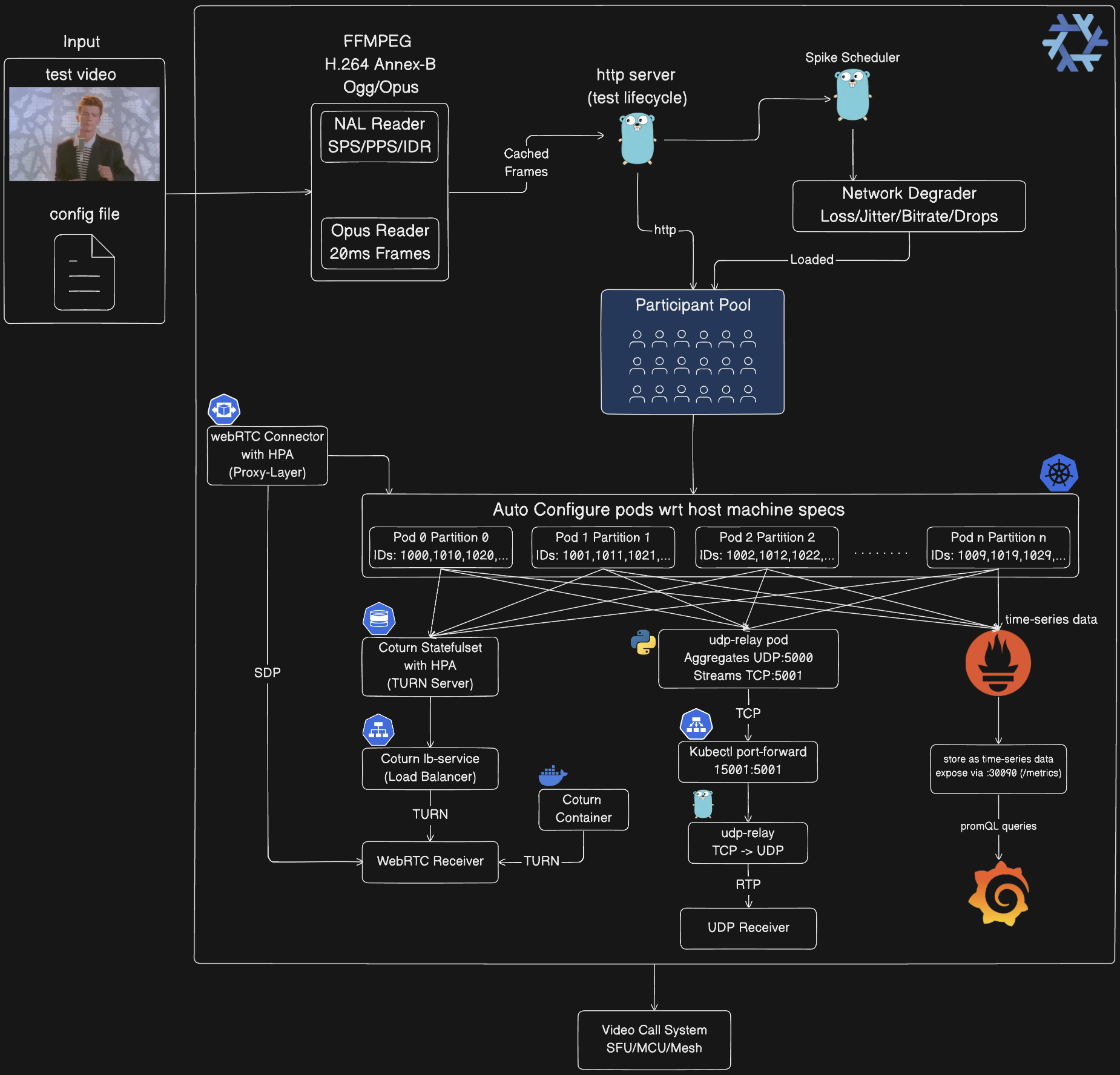
-
Pipeline de traitement média :
- FFmpeg convertit la vidéo d'entrée en H.264 Annex-B et Ogg/Opus au démarrage
- NAL Reader analyse le flux H.264 (SPS/PPS/IDR/Slices)
- Opus Reader extrait des trames audio de 20 ms du conteneur Ogg
- Les trames sont mises en cache en mémoire, partagées entre tous les participants (zero-copy)
- Réduit l'utilisation du processeur d'environ 90 % par rapport au codage par participant
-
Plan de contrôle :
- Serveur HTTP (:8080) gère le cycle de vie des tests via l'API REST
- Spike Scheduler distribue les événements de chaos (pair/aléatoire/avant/arrière/héritage)
- Network Degrader applique le chaos : perte de paquets (1-25 %), gigue (10-50 ms), réduction de débit (30-80 %), chute de trames (10-60 %)
- La configuration de chaos chargée est appliquée au pool de participants
-
Pool de participants :
- Partitionnement automatique entre les pods en utilisant :
participant_id % total_partitions = partition_id
- Chaque participant génère des flux RTP (PT=96 vidéo, PT=111 audio)
- L'identifiant du participant est intégré dans l'en-tête d'extension RTP (ID=1)
- Taille du pool : 1-100 (local), 100-500 (Docker), 500-1500 (Kubernetes)
-
Auto-configuration Kubernetes :
- Les pods détectent automatiquement l'ID de partition à partir du nom du pod :
orchestrator-3 → PARTITION_ID=3
- Allocation de ports :
base_port + (partition_id × 10000) + participant_index
- Exemple : Partition 0 utilise 5000-14999, Partition 1 utilise 15000-24999
- StatefulSet avec 10 réplicas, chacun gère environ 150 participants
- Ressources : 1-4 CPU, 2-4 Go de mémoire par pod
- Configuration automatique en fonction des spécifications de la machine hôte
-
Chaîne de relais UDP (Kubernetes uniquement) :
Pods Orchestrator (10×) → UDP :5000 → pod udp-relay (Python)
→ TCP avec préfixe de longueur :5001 → kubectl port-forward 15001:5001
→ tools/udp-relay (Go) → UDP :5002 → Votre récepteur
- Pourquoi : kubectl port-forward ne supporte que TCP, pas UDP
- Relais dans le cluster : script Python qui agrège l'UDP de tous les pods et le diffuse en TCP avec un préfixe de longueur de 2 octets
- Relais local : outil Go qui convertit le flux TCP en paquets UDP
- Agrège les flux de 1500 participants en une seule connexion
-
Infrastructure WebRTC :
- Coturn StatefulSet : 3 réplicas initiaux, HPA échelle de 1 à 10 en fonction de la charge (~500 participants/réplica)
- Service coturn-lb : Répartit la charge du trafic TURN entre les réplicas
- webrtc-connector : Couche proxy optionnelle (Deployment + HPA 2-10 réplicas), gère la signalisation SDP
- Mode Docker : Conteneur Coturn unique pour les tests locaux
- Ports : 3478 (TURN), 49152-65535 (plage de relais)
- Identifiants : webrtc/webrtc123
-
Intégration client :
- Récepteur UDP : Reçoit le flux RTP agrégé de tous les participants via la chaîne de relais
- Récepteur WebRTC : Établit des connexions WebRTC 1:1 via l'échange SDP par les serveurs TURN
- Les deux transmettent à votre système d'appel vidéo testé (SFU/MCU/Mesh)
-
Pile d'observabilité (optionnelle) :
- Prometheus : Interroge le point de terminaison
/metrics de tous les pods orchestrator toutes les 5 secondes
- Grafana : Visualise les métriques via un tableau de bord préconfiguré (admin/admin)
- Métriques exposées : nombre de participants, paquets envoyés, octets envoyés, pics actifs, % de perte de paquets, gigue en ms, score MOS
- Accès : Prometheus sur :30090, Grafana sur :30030 (NodePort)
- Les pods Orchestrator sont annotés pour l'auto-découverte :
prometheus.io/scrape: "true"
Concepts fondamentaux
Simulation de participant
Chaque participant virtuel génère des flux média réels :
- Vidéo : Unités NAL H.264 provenant de fichiers vidéo réels, packetisées selon la RFC 6184
- Audio : Trames Opus provenant de conteneurs Ogg, packetisées selon la RFC 7587
- RTP : En-têtes conformes aux normes avec extensions d'identifiant de participant
- Temporisation : Temporisation précise à la trame (30 ips vidéo, paquets audio de 20 ms)
Injection de chaos
Cinq types de pics simulent des conditions réseau réelles :
- Perte de paquets : Supprime les paquets RTP au niveau applicatif (1-100 %)
- Gigue réseau : Ajoute une variation de latence (latence de base + gigue gaussienne)
- Réduction de débit : Limite le codage vidéo (30-80 % de réduction)
- Chute de trames : Saute des trames vidéo (10-60 % de taux de chute)
- Limitation de bande passante : Plafonne le débit total
Stratégies de distribution
Les pics sont répartis sur la durée du test selon des stratégies configurables :
- Uniforme : Espacement uniforme avec gigue (charge prévisible)
- Aléatoire : Temporisation imprévisible (chaos réaliste)
- Anticipée : Pics denses au début (test de rétablissement)
- Retardée : Ligne de base puis chaos (test comparatif)
- Héritage : Tic à intervalle fixe (injection en cours d'exécution)
Partitionnement
Les déploiements Kubernetes utilisent le partitionnement des participants pour la mise à l'échelle horizontale :
- Chaque pod gère
participant_id % total_partitions == partition_id
- Allocation de ports :
base_port + (partition_id * 10000) + participant_index
- Répartition automatique de la charge sur 1 à 10 pods
- Évolue jusqu'à 1500+ participants (150 par pod)
Exécution du système
1. Développement local (Go natif)
Idéal pour : Développement, débogage, tests à petite échelle (1-100 participants)
# Démarrer l'orchestrateur
go run cmd/main.go

# Dans un autre terminal : Démarrer le récepteur UDP
go run examples/go/udp_receiver.go 5002

# Modifier config/config.json pour définir num_participants: 10
# Lancer le test de chaos
go run tools/chaos-test/main.go -config config/config.json
Ce qui se passe :
- Processus d'orchestrateur unique sur
:8080
- Les participants envoient UDP vers
127.0.0.1:5002
- Les pics de chaos sont injectés via l'API HTTP
- Métriques en temps réel affichées toutes les 2 secondes
Configuration (config/config.json) :
{
  "base_url": "http://localhost:8080",
  "media_path": "public/rick-roll.mp4",
  "num_participants": 10,
  "duration_seconds": 300,
  "spikes": {
    "count": 20,
    "interval_seconds": 5,
    "types": { "rtp_packet_loss": {...}, "network_jitter": {...} }
  },
  "spike_distribution": {
    "strategy": "random",
    "min_spacing_seconds": 5,
    "jitter_percent": 15
  }
}
2. Docker Compose (conteneurisé)
Idéal pour : Tests isolés, CI/CD, tests à moyenne échelle (100-500 participants)
Prérequis :
- Docker Desktop avec allocation mémoire de 8 à 16 Go
docker-compose installé
# Construire et démarrer le conteneur orchestrateur
./scripts/start_everything.sh build

# Dans un autre terminal : Démarrer le récepteur UDP
go run examples/go/udp_receiver.go 5002

# Modifier config/config.json pour définir num_participants: 100
# Lancer le test de chaos (cible le conteneur)
go run tools/chaos-test/main.go -config config/config.json
Limites de ressources (modifier docker-compose.yaml) :
services:
  orchestrator:
    deploy:
      resources:
        limits:
          cpus: "14.0"
          memory: 6G  # Augmenter pour plus de participants
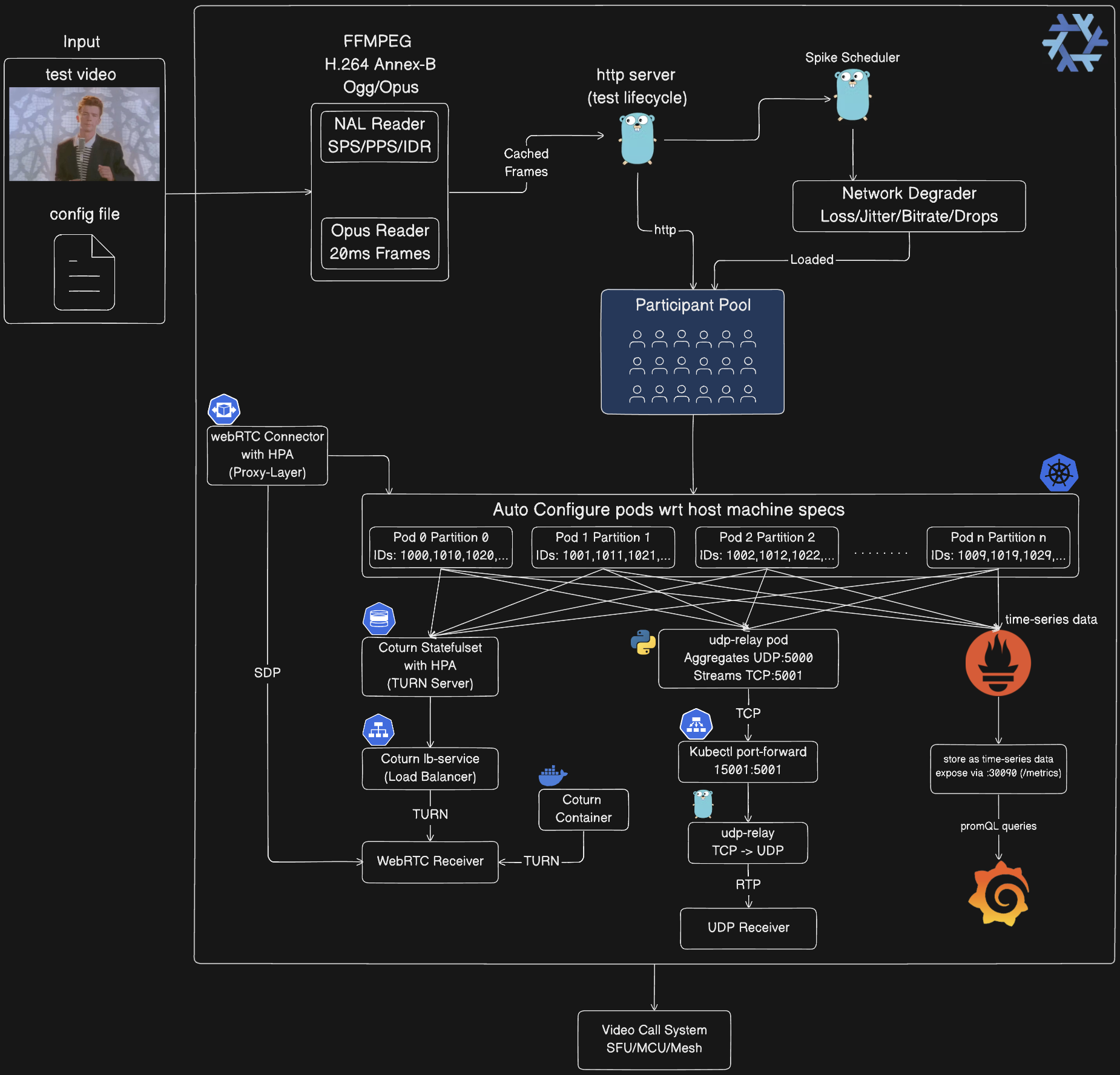
 mdsadiqmd/av-chaos-monkey
