

A list of cyber-chef recipes and curated links

CyberChef est le « couteau suisse cybernétique » (Cyber Swiss-Army Knife) autoproclamé créé par le GCHQ. C'est un outil fantastique pour la transformation, l'extraction et la manipulation de données dans votre navigateur web.
Tout le crédit revient à @GCHQ pour la création de cet outil. Voir : https://gchq.github.io/CyberChef/
Maîtriser les expressions régulières est essentiel pour tirer le meilleur parti de la manipulation de données dans CyberChef (ou pour tout travail de DFIR). Voici quelques regex auxquelles je reviens souvent.
Extraire du Base64 : [a-zA-Z0-9+/=]{30,}
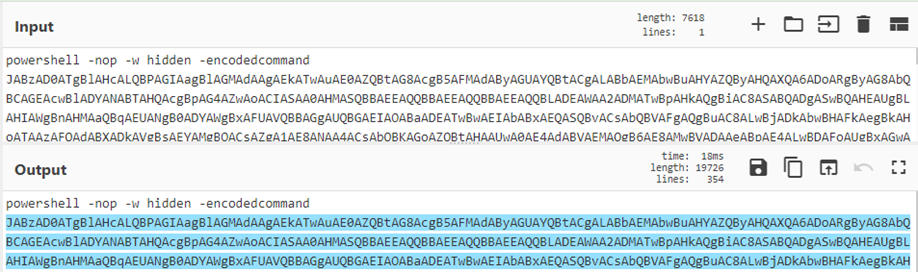
Extraire de l'hexadécimal : [a-fA-F0-9]{10,}
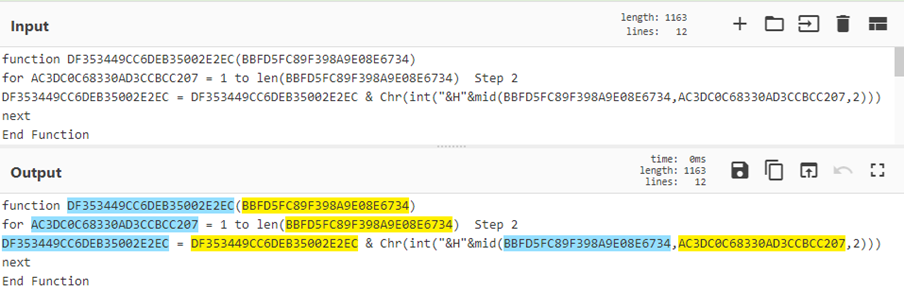
Extraire des codes de caractères : [\d]{2,3}(,|’)
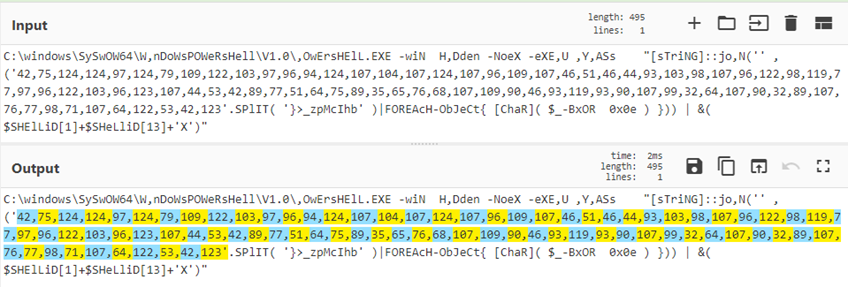
(?<=foo)(.*)
^.*(?=bar)
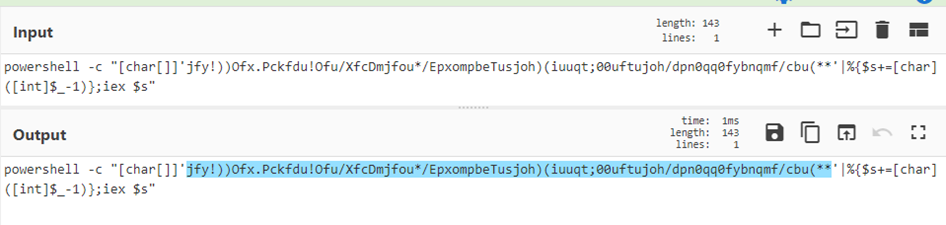
(?<=')(.*?)(?=')
CyberChef fournit une opération HTTP Request (voir Recette 22) qui permet d'envoyer des requêtes HTTP vers des ressources externes. En raison de la politique de même origine (Same Origin Policy, SOP) ou de l'absence de configuration de partage des ressources entre origines (CORS), beaucoup de ces requêtes ne fonctionnent pas. La SOP est une mesure de sécurité des navigateurs modernes qui empêche de lire les réponses cross-site provenant de serveurs qui ne l'autorisent pas explicitement via le CORS. Consultez la présentation de @GlassSec sur CyberChef qui inclut des astuces pour démarrer Chrome sans sécurité web afin de permettre des requêtes HTTP vers des API autrement restreintes (comme Virus Total)
Quelques exemples de recettes CyberChef :
Recette 1 : Extraire base64, raw inflate et embellir le code
Recette 2 : Invoke Obfuscation
Recette 4 : Déchiffrement des mots de passe des préférences de stratégie de groupe
Recette 5 : Utiliser les boucles et les étiquettes
Recette 6 : Horodatages ei de Google
Recette 7 : Scriptlet COM multi-étapes vers assembleur x86
Recette 8 : Extraire l'hexadécimal, convertir en hexdump pour fichier PE intégré
Recette 9 : Inverser les chaînes, substitution de caractères, depuis base64
Recette 10 : Extraire un objet du cache proxy Squid
Recette 11 : Extraire les coordonnées GPS vers des URLs Google Maps
Recette 12 : Traitement des grands nombres
Recette 13 : Analyser les enregistrements DNS PTR avec des registres
Recette 14 : Décodage des exécutables POSHC2
Recette 15 : Analyser les horodatages $MFT $SI
Recette 16 : Décodage de webshells PHP gzinflate et base64
Recette 17 : Extraction de shellcode d'un script PowerShell Meterpreter Reverse TCP
Recette 18 : Analyseur de corbeille avec sous-sections et fusions
Recette 19 : Identifier du Base64 obfusqué avec surlignage par expression régulière
Recette 20 : Utiliser des règles Yara avec des scripts malveillants désobfusqués
Recette 22 : Recherche API JA3 avec HTTP Request et registres
Recette 24 : Choisir une lettre aléatoire dans une chaîne de six octets
Recette 25 : Créer un code QR Wifi
Recette 26 : Extraction et décodage d'un webshell PHP multi-étapes
Recette 27 : Décodage d'un script PHP Auto Visitor
Recette 29 : Manipulation d'horodatages de fichiers journaux avec sous-sections et registres
Recette 30 : Loader PowerShell obfusqué par CharCode pour un Cobalt Strike Beacon
Recette 31 : Désobfusquer des chaînes encodées dans un binaire .NET
Recette 32 : Extraire une DLL Gootkit malveillante de données de registre obfusquées
Recette 33 : Identifier les URLs intégrées dans un script PowerShell Emotet
Recette 34 : Analyser des fichiers OOXML pour des URLs
Recette 35 : Déchiffrer un échantillon de ransomware PowerShell REvil
Recette 36 : Créer un générateur de mots de passe CyberChef
Recette 37 : D'un e-mail zippé en sandbox à une URL malveillante
Recette 38 : Avions, crânes et enveloppes - Live and Let PowerShell
Recette 39 : Déchiffrer les fichiers de configuration chiffrés GoldMax alias Sunshutte
Recette 40 : Folie de code Morse
Recette 41 : Encodage PHP mixte hexadécimal et octal
Recette 42 : Webshell PHP avec obfuscation en couches
Recette 43 : Désobfuscation d'un skimmer Magento
Recette 44 : Déchiffrement du ransomware JobCrypter
Recette 45 : Conversion d'horodatages de journaux proxy Sqiud
Recette 46 : Adapter votre regex à la situation
Recette 47 : Script Visual Basic Trickbot
Recette 48 : vjw0rm folie d'émojis
Recette 49 : Désassembler un fichier de test EICAR
Recette 50 : Analyser la sortie du langage de définition de descripteurs de sécurité
Recette 52 : Randomiser une liste d'éléments
Recette 53 : Sortie Olevba vers PowerShell
Recette 54 : Hachages Windows Event ID 1029
Recette 55 : Désobfuscation de BazarLoader alias TA551 maldoc
Recette 56 : Calculer et rechercher les valeurs de hachage JA3 ou JA3S à partir d'un PCAP
Recette 57 : Créer un mème avec CyberChef
Recette 58 : Extraire l'URL de deuxième étape d'IcedID d'un maldoc
Recette 59 : Analyser la configuration d'un Cobalt Strike Beacon
Recette 60 : Décoder les URLs protégées par Microsoft Safelinks
Recette 61 : Extraire les URLs de deuxième étape des maldocs Excel Qakbot
Recette 62 : De maldoc Emotet à PowerShell
Recette 63 : Extraire les URLs d'un VBS obfusqué Dridex
Recette 64 : Convertir des chaînes en requêtes Grep VirusTotal
Recette 65 : Désobfusquer une charge utile PowerShell reverse shell MSF Venom
Recette 66 : Exemple de sous-section imbriquée
Recette 67 : Convertir un MSI ProductCode en ProductID d'installateur de registre
Recette 68 : Convertir des tableaux d'octets signés Java
Recette 69 : Extraction d'une charge utile DLL d'un script PowerShell Bumblebee
Recette 70 : Extraction des points de terminaison de la configuration de sécurité réseau Android
Un scénario très courant : extraire le Base64, décompresser, embellir le code. Vous devrez peut-être ensuite effectuer un traitement supplémentaire ou une analyse dynamique selon l'étape suivante.
Nom du fichier : ahack.bat
Fichier compressé : cc9c6c38840af8573b8175f34e5c54078c1f3fb7c686a6dc49264a0812d56b54_183SnuOIVa.bin.gz
Échantillon : SHA256 cc9c6c38840af8573b8175f34e5c54078c1f3fb7c686a6dc49264a0812d56b54
[{"op":"Regular expression","args":["User defined","[a-zA-Z0-9+/=]{30,}",true,true,false,false,false,false,"List matches"]},{"op":"From Base64","args":["A-Za-z0-9+/=",true]},{"op":"Raw Inflate","args":[0,0,"Adaptive",false,false]},{"op":"Generic Code Beautify","args":[]}]
CyberChef won't be able to handle all types of Invoke-Obfuscation, but here is one that can be decoded.
Filename: Acknowledgement NUT-95-52619.eml
Zipped File: 1240695523bbfe3ed450b64b80ed018bd890bfa81259118ca2ac534c2895c835.bin.gz
Sample: SHA256 1240695523bbfe3ed450b64b80ed018bd890bfa81259118ca2ac534c2895c835
[{"op":"Find / Replace","args":[{"option":"Regex","string":"\\^|\\\\|-|_|\\/|\\s"},"",true,false,true,false]},{"op":"Reverse","args":["Character"]},{"op":"Generic Code Beautify","args":[]},{"op":"Find / Replace","args":[{"option":"Simple string","string":"http:"},"http://",true,false,true,false]},{"op":"Extract URLs","args":[false]},{"op":"Defang URL","args":[true,true,true,"Valid domains and full URLs"]}]

Les malwares et les scripts utilisent souvent Charcode pour représenter des caractères afin de contourner les solutions AV et EDR. CyberChef en a facilement raison.
Nom du fichier : 3431818-f71f60d10b1cbe034dc1be242c6efa5b9812f3c6.zip
Source : https://gist.github.com/jonmarkgo/3431818
[{"op":"Regular expression","args":["User defined","([0-9]{2,3}(,\\s|))+",true,true,false,false,false,false,"List matches"]},{"op":"From Charcode","args":["Comma",10]},{"op":"Regular expression","args":["User defined","([0-9]{2,3}(,\\s|))+",true,true,false,false,false,false,"List matches"]},{"op":"From Charcode","args":["Space",10]}]
When a new GPP is created, there’s an associated XML file created in SYSVOL with the relevant configuration data and if there is a password provided, it is AES-256 bit encrypted. Microsoft published the AES Key, which can be used to decrypt passwords store in: \\SYSVOL<DOMAIN>\Policies\
Credit: @cyb3rops
Source 1: https://twitter.com/cyb3rops/status/1036642978167758848
Source 2: https://adsecurity.org/?p=2288
[{"op":"From Base64","args":["A-Za-z0-9+/=",true]},{"op":"To Hex","args":["None"]},{"op":"AES Decrypt","args":[{"option":"Hex","string":"4e9906e8fcb66cc9faf49310620ffee8f496e806cc057990209b09a433b66c1b"},{"option":"Hex","string":""},"CBC","Hex","Raw",{"option":"Hex","string":""}]},{"op":"Decode text","args":["UTF16LE (1200)"]}]

CyberChef peut utiliser des étiquettes pour identifier des parties de la recette, puis revenir en arrière pour exécuter des opérations plusieurs fois. Dans cet exemple, il y a 29 tours d'encodage Base64 qui sont extraits et décodés.
Crédit : @pmelson
Fichier source : hmCPDnHs.txt
Source 1 : https://pastebin.com/hmCPDnHs
Source 2 : https://twitter.com/pmelson/status/1078776229996752896
Voir aussi d'autres exemples de boucles sur Base64 : https://twitter.com/QW5kcmV3/status/1079095274776289280 (Crédit : @QW5kcmV3)
[{"op":"Label","args":["top"]},{"op":"Regular expression","args":["User defined","[a-zA-Z0-9+/=]{30,}",true,true,false,false,false,false,"List matches"]},{"op":"From Base64","args":["A-Za-z0-9+/=",true]},{"op":"Raw Inflate","args":[0,0,"Adaptive",false,false]},{"op":"Jump","args":["top",28]},{"op":"Generic Code Beautify","args":[]}]
Google uses its own timestamp, I call ei time, which it embeds in the URL.
Source: https://bitofhex.com/2018/05/29/cyberchef/
[{"op":"From Base64","args":["A-Za-z0-9-_=",true]},{"op":"To Hex","args":["None"]},{"op":"Take bytes","args":[0,8,false]},{"op":"Swap endianness","args":["Hex",4,true]},{"op":"From Base","args":[16]},{"op":"From UNIX Timestamp","args":["Seconds (s)"]}]

Il s'agit d'un scriptlet COM décodé en onze étapes qui utilise les opérations Base64, Gunzip, RegEx et Disassemble x86.
Crédit: @JohnLaTwC
Nom de fichier: 41a6e22ec6e60af43269f4eb1eb758c91cf746e0772cecd4a69bb5f6faac3578.txt
Source 2: https://twitter.com/JohnLaTwC/status/1062419803304976385
[{"op":"Regular expression","args":["","[A-Za-z0-9=/]{40,}",true,true,false,false,false,false,"List matches"]},{"op":"From Base64","args":["A-Za-z0-9+/=",true]},{"op":"Remove null bytes","args":[]},{"op":"Regular expression","args":["User defined","[A-Za-z0-9+/=]{40,}",true,true,false,false,false,false,"List matches"]},{"op":"From Base64","args":["A-Za-z0-9+/=",true]},{"op":"Gunzip","args":[]},{"op":"Regular expression","args":["User defined","[A-Za-z0-9+/=]{40,}",true,true,false,false,false,false,"List matches"]},{"op":"From Base64","args":["A-Za-z0-9+/=",true]},{"op":"To Hex","args":["Space"]},{"op":"Remove whitespace","args":[true,true,true,true,true,false]},{"op":"Disassemble x86","args":["32","Full x86 architecture",16,0,true,true]}]
This file has an embedded PE file (SHA 256: 26fac1d4ea12cdceac0d64ab9694d0582104b3c84d7940a4796c1df797d0fdc2, R5Sez8PH.exe, VT: 54/70). Using CyberChef, we can regex hexadecimal and the convert to a more easily viewable hexdump.
Source 1: https://pastebin.com/R5Sez8PH (sorry: no longer available!)
Source 2: https://twitter.com/ScumBots/status/1081949877272276992
[{"op":"Regular expression","args":["User defined","[a-fA-F0-9]{200,}",true,true,false,false,false,false,"List matches"]},{"op":"From Hex","args":["Auto"]},{"op":"To Hexdump","args":[16,false,false]}]

Un blob de base64 avec quelques octets mineurs à substituer. Le décodage original a été réalisé par @pmelson en Python et converti en CyberChef.
Crédit : @pmelson
Source 1 : https://pastebin.com/RtjrweYF / RtjrweYF.txt
Source 2 : https://twitter.com/pmelson/status/1076893022758100998
[{"op":"Reverse","args":["Character"]},{"op":"Find / Replace","args":[{"option":"Regex","string":"%"},"A",true,false,true,false]},{"op":"Find / Replace","args":[{"option":"Regex","string":"×"},"T",true,false,false,false]},{"op":"Find / Replace","args":[{"option":"Simple string","string":"÷"},"V",true,false,false,false]},{"op":"From Base64","args":["A-Za-z0-9+/=",true]},{"op":"To Hexdump","args":[16,false,false]}]
Don't manually carve out your Squid cache objects. Simply upload the file to CyberChef. This recipe will search for the magic bytes 0x0D0A0D0A, extract everything after. It then gzip decompresses the object for download.
Source: 00000915 (output should be TrueCrypt_Setup_7.1a.exe with SHA256 e95eca399dfe95500c4de569efc4cc77b75e2b66a864d467df37733ec06a0ff2)
[{"op":"To Hex","args":["None"]},{"op":"Regular expression","args":["User defined","(?<=0D0A0D0A).*$",true,false,false,false,false,false,"List matches"]},{"op":"From Hex","args":["Auto"]},{"op":"Gunzip","args":[]}]

Si vous avez besoin de trier rapidement le lieu où une photo a été prise et que vous avez la chance d'avoir des latitudes et longitudes GPS intégrées, utilisez cette recette pour créer rapidement une URL Google Maps exploitable afin d'identifier l'emplacement.
[{"op":"Extract EXIF","args":[]},{"op":"Regular expression","args":["User defined","((?<=GPSLatitude:).*$)|((?<=GPSLongitude: ).*$)",true,true,false,false,false,false,"List matches"]},{"op":"Find / Replace","args":[{"option":"Extended (\\n, \\t, \\x...)","string":"\\n"},",",true,false,true,false]},{"op":"Find / Replace","args":[{"option":"Simple string","string":" "},"https://maps.google.com/?q=",true,false,true,false]}]
CyberChef can handle massive numbers. Here we can use a simple recipe to change a 38-digit X509SerialNumber to its hexadecimal equivalent X.509 certificate serial number. Then we can regex the hexadecimal and insert a colon to transform it to the correct format.
Credit: @QW5kcmV3
Source: https://twitter.com/QW5kcmV3/status/949437437473968128
[{"op":"To Base","args":[16]},{"op":"Regular expression","args":["User defined","[a-f0-9]{2,2}",true,true,false,false,false,false,"List matches"]},{"op":"Find / Replace","args":[{"option":"Extended (\\n, \\t, \\x...)","string":"\\n"},":",true,false,true,false]}]

Les adresses IP dans les enregistrements DNS PTR sont stockées avec l'octet le moins significatif en premier. Par exemple : 167.139.44.10.in-addr.arpa correspondrait à l'adresse IP 10.44.139.167. En utilisant les registres de CyberChef, nous pouvons allouer chaque octet à un registre mémoire (ou à une variable si cela est plus facile à concevoir ainsi). Ceux-ci peuvent ensuite être inversés pour réordonner l'adresse IP. Une recherche/remplacement nettoie le reste de l'enregistrement. Cette approche pourrait être inversée si vous souhaitiez convertir des adresses IP « classiques » pour effectuer des recherches dans les enregistrements DNS PTR.

[{"op":"Fork","args":["\\n","\\n",false]},{"op":"Register","args":["(\\d{1,3}).(\\d{1,3}).(\\d{1,3}).(\\d{1,3})",true,false,false]},{"op":"Find / Replace","args":[{"option":"Regex","string":"$R0.$R1.$R2.$R3"},"$R3.$R2.$R1.$R0",true,false,true,false]},{"op":"Find / Replace","args":[{"option":"Regex","string":".in-addr.arpa"},"",true,false,true,false]}]PoshC2 is a proxy aware C2 framework that utilises Powershell to aid penetration testers with red teaming, post-exploitation and lateral movement. The dropper is based on PowerShell and consists of a PowerShell script which is double Base64 encoded and compressed. Extracting the strings can be done with CyberChef as detailed below. Depending on the settings and customisation of the executable you may need to adjust your recipe.
Credit: @a_tweeter_user
Source: https://twitter.com/a_tweeter_user/status/1100751236687642624
Source: posh.zip

[{"op":"Strings","args":["All",4,"Alphanumeric + punctuation (A)",false]},{"op":"Remove null bytes","args":[]},{"op":"Regular expression","args":["User defined","[a-zA-Z0-9+=]{200,}",true,true,false,false,false,false,"List matches"]},{"op":"From Base64","args":["A-Za-z0-9+/=",true]},{"op":"Remove null bytes","args":[]},{"op":"Regular expression","args":["User defined","[a-z0-9/\\\\+=]{100,}",true,true,false,false,false,false,"List matches"]},{"op":"From Base64","args":["A-Za-z0-9+/=",true]},{"op":"Raw Inflate","args":[0,0,"Adaptive",false,false]}]
CyberChef peut faire à peu près n'importe quoi avec les données. Voici des octets hexadécimaux bruts provenant d'une entrée $MFT. En sélectionnant certains octets et en utilisant diverses fonctions de CyberChef, je peux analyser n'importe quelle partie des données selon les besoins. Cette recette extraira et analysera les horodatages $SI. Plus besoin d'Encase !

[{"op":"Take bytes","args":[160,64,false]},{"op":"Regular expression","args":["User defined",".{16}",true,true,true,false,false,false,"List matches with capture groups"]},{"op":"Fork","args":["\\n","\\n",false]},{"op":"Swap endianness","args":["Hex",10,true]},{"op":"Remove whitespace","args":[true,true,true,true,true,false]},{"op":"Windows Filetime to UNIX Timestamp","args":["Nanoseconds (ns)","Hex"]},{"op":"From UNIX Timestamp","args":["Nanoseconds (ns)"]},{"op":"Merge","args":[]},{"op":"Register","args":["(.*)\\n(.*)\\n(.*)\\n(.*)",true,false,false]},{"op":"Find / Replace","args":[{"option":"Regex","string":"$R0"},"$SI Creation Time: $R0",true,false,true,false]},{"op":"Find / Replace","args":[{"option":"Regex","string":"$R1"},"$SI Modified Time: $R1",true,false,true,false]},{"op":"Find / Replace","args":[{"option":"Regex","string":"$R2"},"$SI MFT Change Time: $R2",true,false,true,false]},{"op":"Find / Replace","args":[{"option":"Regex","string":"$R3"},"$SI Access Time: $R3",false,false,true,false]}]Webshells come in all shapes and sizes. For PHP webshells the combination of gzinflate and base64 can be used to obfuscate the eval data. In this example, there are 21 rounds of compression and base64 that we can quickly parse out using labels and loops.

[{"op":"Label","args":["start"]},{"op":"Regular expression","args":["User defined","[a-zA-Z0-9=/+]{10,}",true,true,false,false,false,false,"List matches"]},{"op":"From Base64","args":["A-Za-z0-9+/=",true]},{"op":"Raw Inflate","args":[0,0,"Block",false,false]},{"op":"Jump","args":["start",21]}]
Souvent vu dans le bot Pastbin de @pmelson, @scumbots, cet outil retire les multiples couches d'un script Powershell encodé pour afficher le shellcode. À partir de là, vous pourriez extraire les instructions PUSH pour tenter d'identifier l'adresse IP et le port, mais vous obtiendrez trop de faux positifs. Il vaut donc mieux utiliser un outil comme scdbg (voir : http://sandsprite.com/blogs/index.php?uid=7&pid=152)
Source: https://twitter.com/ScumBots/status/1121854255898472453
Source: https://pastebin.com/9DnD6t6W / 9DnD6t6W.txt

[{"op":"Regular expression","args":["User defined","[a-zA-Z0-9=/+]{30,}",true,true,false,false,false,false,"List matches"]},{"op":"From Base64","args":["A-Za-z0-9+/=",true]},{"op":"Remove null bytes","args":[]},{"op":"Regular expression","args":["User defined","[a-zA-Z0-9=/+]{30,}",true,true,false,false,false,false,"List matches"]},{"op":"From Base64","args":["A-Za-z0-9+/=",true]},{"op":"Gunzip","args":[]},{"op":"Regular expression","args":["User defined","[a-zA-Z0-9=/+]{30,}",true,true,false,false,false,false,"List matches"]},{"op":"From Base64","args":["A-Za-z0-9+/=",true]},{"op":"To Hex","args":["None"]},{"op":"Disassemble x86","args":["32","Full x86 architecture",16,0,true,true]}]Subsections and Merges are powerful tools in CyberChef that allow the application of ingredients to a selection of data rather than the whole input file. This section can then be merged together to continue on the whole input. In an awesome piece of work @GlassSec has created a Windows Recycle Bin parser using CyberChef indicating the possibilities of these functions is endless.
Source: https://gist.github.com/glassdfir/f30957b314ec39a8aa319420a29ffc76
Credit: https://twitter.com/GlassSec

[{"op":"Conditional Jump","args":["^(\\x01|\\x02)",true,"Error",10]},{"op":"Find / Replace","args":[{"option":"Regex","string":"^(\\x02.{23})(....)"},"$1",false,false,false,false]},{"op":"Subsection","args":["^.{24}(.*)",true,true,false]},{"op":"Decode text","args":["UTF16LE (1200)"]},{"op":"Find / Replace","args":[{"option":"Regex","string":"^(.*)."},"\\nDeleted File Path: $1",false,false,false,false]},{"op":"Merge","args":[]},{"op":"Subsection","args":["^.{16}(.{8})",false,true,false]},{"op":"Swap endianness","args":["Raw",8,true]},{"op":"To Hex","args":["None"]},{"op":"Windows Filetime to UNIX Timestamp","args":["Seconds (s)","Hex"]},{"op":"From UNIX Timestamp","args":["Seconds (s)"]},{"op":"Find / Replace","args":[{"option":"Regex","string":"^(.* UTC)"},"\\nFile Deletion Time: $1",true,false,true,false]},{"op":"Merge","args":[]},{"op":"Subsection","args":["^.{8}(.{8})",true,true,false]},{"op":"To Hex","args":["None"]},{"op":"Swap endianness","args":["Hex",8,true]},{"op":"From Base","args":[16]},{"op":"Find / Replace","args":[{"option":"Regex","string":"^(.*)"},"\\nDeleted File Size: $1 bytes",true,false,true,true]},{"op":"Merge","args":[]},{"op":"Find / Replace","args":[{"option":"Regex","string":"^.{8}"},"******** WINDOWS RECYCLE BIN METADATA ********",true,false,false,false]},{"op":"Jump","args":["Do Nothing",10]},{"op":"Label","args":["Error"]},{"op":"Find / Replace","args":[{"option":"Regex","string":"^.*$"},"This doesn't look like a Recycle Bin file to me ",true,false,true,false]},{"op":"Label","args":["Do Nothing"]}]
Il s'agit moins d'une recette que d'une technique. L'utilisation de la fonction « highlight » de l'ingrédient d'expression régulière peut clairement faire ressortir les endroits où les données base64 ont été fragmentées avec un jeu de caractères base64 non traditionnel. Ici, la séquence @<! est utilisée pour obscurcir et perturber la conversion d'encodage automatisée. Plus loin dans le script, la séquence est remplacée par A, qui peut ensuite être insérée à l'aide d'un Find/Replace avant l'extraction. Cela se poursuit sur plusieurs passages jusqu'à ce qu'un domaine d'intérêt soit révélé (accompagné d'un exécutable).
Source : https://pastebin.com/TmJsB0Nv & https://twitter.com/pmelson/status/1167065236907659264


[{"op":"Find / Replace","args":[{"option":"Simple string","string":"@<!"},"A",true,false,true,false]},{"op":"Regular expression","args":["User defined","[a-zA-Z0-9+/=]{20,}",true,true,false,false,false,false,"List matches"]},{"op":"From Base64","args":["A-Za-z0-9+/=",true]},{"op":"Regular expression","args":["User defined","[a-zA-Z0-9+/=]{50,}",true,true,false,false,false,false,"List matches"]},{"op":"From Base64","args":["A-Za-z0-9+/=",true]},{"op":"Find / Replace","args":[{"option":"Simple string","string":"@<!"},"A",true,false,true,false]},{"op":"Regular expression","args":["User defined","[a-zA-Z0-9+/=]{50,}",true,true,false,false,false,false,"List matches"]},{"op":"From Base64","args":["A-Za-z0-9+/=",true]}]Although not the most convenient way, CyberChef does provide the ability to run a yara rule over the output of a recipe. You could combine this by using the multiple inputs function to scan a larger number of files.
Source: https://twitter.com/ScumBots/status/1168528510681538560 & https://pastebin.com/r40SXe7V

[{"op":"Regular expression","args":["User defined","\\(.*\\);",true,false,false,false,false,false,"List matches"]},{"op":"Find / Replace","args":[{"option":"Regex","string":",|\\(|\\);"}," ",true,false,true,false]},{"op":"From Charcode","args":["Space",10]},{"op":"YARA Rules","args":["rule SuspiciousPowerShell {\n meta:\n description = \"Testing Yara on Cyberchef for Powershell\"\n strings:\n $a1 = \"[System.Reflection.Assembly]\" ascii\n $a2 = \"IEX\" ascii nocase\n $a3 = \"powershell.exe -w hidden -ep bypass -enc\" ascii\n condition:\n 2 of them\n}",true,true,true,true]}]
Cette recette extrait une charge utile VBE d'un fichier de raccourci Microsoft (LNK), puis décode les chaînes hexadécimales en ligne à l'aide de sous-sections.
Source: malicious.lnk.bin

[{"op":"Microsoft Script Decoder","args":[]},{"op":"Subsection","args":["(?<=\\(\\\")(.*?)(?=\\\"\\))",true,true,false]},{"op":"Fork","args":["\\n","\\n",false]},{"op":"From Hex","args":["Auto"]}]Using the HTTP Request function and Registers we can enrich out data with that from an API or external resource. Here we are searching against three JA3 hashes for any known bad.
Source: Input hashes: 1aa7bf8b97e540ca5edd75f7b8384bfa, 1be3ecebe5aa9d3654e6e703d81f6928, and b386946a5a44d1ddcc843bc75336dfce

[{"op":"Comment","args":["https://ja3er.com/search/hash"]},{"op":"Fork","args":["\\n","\\n",false]},{"op":"Register","args":["(.*)",true,false,false]},{"op":"HTTP request","args":["GET","https://ja3er.com/search/$R0","","Cross-Origin Resource Sharing",false]},{"op":"JSON Beautify","args":[" ",false]}]
Ce fichier DOC malveillant est téléchargé directement depuis Hybrid-Analysis. Nous le décompressons avec gunzip, sélectionnons la dosfuscation avec une expression régulière, puis sélectionnons la section critique utilisée avec la fonction 'set'. Cette section est désobfusquée avec une boucle for inversée avec un pas de trois. Une fois sélectionnée, nous inversons la chaîne et utilisons des groupes de capture d'expression régulière pour sélectionner chaque troisième caractère. C'est un excellent travail de Hack eXPlorer sur YouTube. Allez-y et regardez !
Source: Untitled-11232018-659370.doc.bin.gz
Crédit : Adapté de la vidéo de Hack eXPlorer Masquage de code malveillant avec Windows CMD - Dosfuscation

[{"op":"Gunzip","args":[]},{"op":"Regular expression","args":["User defined","c:\\\\.*\"",true,true,false,false,false,false,"List matches"]},{"op":"Find / Replace","args":[{"option":"Simple string","string":"^"},"",true,false,true,false]},{"op":"Regular expression","args":["User defined","(?<=9ojB\\=)(.*?)(?=\\) )",true,true,false,false,false,false,"List matches"]},{"op":"Reverse","args":["Character"]},{"op":"Regular expression","args":["User defined","(.)..",true,true,false,false,false,false,"List capture groups"]},{"op":"Find / Replace","args":[{"option":"Regex","string":"\\n"},"",true,false,true,false]},{"op":"Extract URLs","args":[false]},{"op":"Extract domains","args":[true]}]A request for assistance led to this recipe which uses Registers, HTTP request and some Regex to select a random character from a six-byte string.
Credit: Adapted from Steve Thompson

[{"op":"Register","args":["(.*)",true,false,false]},{"op":"HTTP request","args":["GET","https://www.random.org/integers/?num=1&min=1&max=6&col=1&base=10&format=plain&rnd=new","","Cross-Origin Resource Sharing",false]},{"op":"Register","args":["(.)",true,false,false]},{"op":"Find / Replace","args":[{"option":"Regex","string":"(.)"},"$R0",true,false,true,false]},{"op":"Regular expression","args":["User defined","(.){$R1}",true,true,false,false,false,false,"List capture groups"]},{"op":"Head","args":["Line feed",1]}]
Either for ease of letting your mates access your guest wifi, or for any Red Team that needs to add tempting convenience to a rogue access point! Using the create QR Code function to allow Android or iOS devices to logon to your Wifi.
Credit: https://twitter.com/mattnotmax/status/1242031548884369408
Background: https://github.com/zxing/zxing/wiki/Barcode-Contents#wi-fi-network-config-android-ios-11
Generate_QR_Code('PNG',5,2,'Medium')

Decoding a Webshell documented by SANS entirely within Cyberchef using regex, ROT13, HTTP Request, Registers and more!
Credit: https://twitter.com/thebluetoob
[{"op":"Regular expression","args":["User defined","(?<=')(.*?)(?=')",true,true,false,false,false,false,"List matches"]},{"op":"From Base64","args":["A-Za-z0-9+/=",true]},{"op":"ROT13","args":[true,true,13]},{"op":"Raw Inflate","args":[0,0,"Adaptive",false,false]},{"op":"ROT13","args":[true,true,13]},{"op":"Extract URLs","args":[false]},{"op":"Register","args":["(.*)",true,false,false]},{"op":"HTTP request","args":["GET","$R0","","Cross-Origin Resource Sharing",false]},{"op":"Strings","args":["Single byte",4,"Alphanumeric + punctuation (A)",false]},{"op":"Regular expression","args":["User defined","[a-zA-Z0-9+=/]{30,}",true,true,false,false,false,false,"List matches"]},{"op":"From Base64","args":["A-Za-z0-9+/=",true]},{"op":"Regular expression","args":["User defined","(?<=')(.*?)(?=')",true,true,false,false,false,false,"List matches"]},{"op":"From Base64","args":["A-Za-z0-9+/=",true]},{"op":"Raw Inflate","args":[0,0,"Adaptive",false,false]},{"op":"ROT13","args":[true,true,13]},{"op":"Regular expression","args":["User defined","[a-zA-Z0-9+=/]{30,}",true,true,false,false,false,false,"List matches"]},{"op":"From Base64","args":["A-Za-z0-9+/=",true]}]

Decoding an auto visitor script written in PHP within Cyberchef using regex, ROT13, multiple decompression algorithms, and subsections! The key point to consider is there are two variables using different rounds of obfuscation. You have a couple of options: work in multiple CyberChef windows to get the end result, or, as below, use subsections and greg for each variable to manipulate each independently and get both deobfuscated outputs in the one script. You can shorten the recipe further by using loops to jump the multiple rounds of Raw Inflate.
Credit: Original script provided by @NtSetDefault, original Cyberchef recipe(s) created by @thebluetoob, and refined by @mattnotmax in to one recipe.
[{"op":"Regular expression","args":["User defined","(?<=')(.*?)(?=')",true,true,false,false,false,false,"List matches"]},{"op":"From Base64","args":["A-Za-z0-9+/=",true]},{"op":"ROT13","args":[true,true,13]},{"op":"Raw Inflate","args":[0,0,"Adaptive",false,false]},{"op":"ROT13","args":[true,true,13]},{"op":"Subsection","args":["(?<=\\$Fadly.*?\")(.*?)(?=\\\")",true,true,false]},{"op":"From Base64","args":["A-Za-z0-9+/=",true]},{"op":"URL Decode","args":[]},{"op":"From HTML Entity","args":[]},{"op":"Merge","args":[]},{"op":"Subsection","args":["(?<=\\$Gans.*?\")(.*?)(?=\\\")",true,true,false]},{"op":"Reverse","args":["Character"]},{"op":"From Base64","args":["A-Za-z0-9+/=",true]},{"op":"Label","args":["jump"]},{"op":"Raw Inflate","args":[0,0,"Adaptive",false,false]},{"op":"Jump","args":["jump",2]},{"op":"Zlib Inflate","args":[0,0,"Adaptive",false,false]},{"op":"Zlib Inflate","args":[0,0,"Adaptive",false,false]}]

Choose your poison with this ingenious script from @0xtornado which determines which type of obfuscation your beacon script has via CyberChef conditional jumps to parse out the shellcode. First the code looks for a simple regex 'bxor' to then jump to the appropriate section of the recipe. Else it parses out the second type. Using CyberChef 'tabs' you can load up two different scripts and get out your data. Impress your colleagues and friendly red team or local APT crew!
Credit: https://twitter.com/0xtornado/status/1255866333545316352
[{"op":"Conditional Jump","args":["bxor",false,"Decode_Shellcode",10]},{"op":"Label","args":["Decode_beacon"]},{"op":"From Base64","args":["A-Za-z0-9+/=",true]},{"op":"Decode text","args":["UTF-16LE (1200)"]},{"op":"Regular expression","args":["User defined","[a-zA-Z0-9+/=]{30,}",true,true,false,false,false,false,"List matches"]},{"op":"From Base64","args":["A-Za-z0-9+/=",true]},{"op":"Gunzip","args":[]},{"op":"Label","args":["Decode_Shellcode"]},{"op":"Regular expression","args":["User defined","[a-zA-Z0-9+/=]{30,}",true,true,false,false,false,false,"List matches"]},{"op":"From Base64","args":["A-Za-z0-9+/=",true]},{"op":"XOR","args":[{"option":"Decimal","string":"35"},"Standard",false]}]


Not everyone thinks of CyberChef as a tool for log file analysis. But its handy if you have to transpose, reformat or maniulate a log file to suit your purpose. Here, we have an Apache log file with a timestamp that doesn't lead to useful temporal analysis with other log files: the date format is not sortable, its enclosed in square brackets and it's in UTC +1 not a standard UTC. Using Subsections, Registers and Transpose Date and Time we can change the formatting of the timestamp and move the column around to be able to combine it with other data. Awesome!
Credit: @gazambelli and @mattnotmax
[{"op":"Fork","args":["\\n","\\n",false]},{"op":"Subsection","args":["\\[.*\\+0100\\]",true,true,false]},{"op":"Find / Replace","args":[{"option":"Regex","string":"\\[|\\]"},"",true,false,true,false]},{"op":"Translate DateTime Format","args":["Standard date and time","DD/MMM/YYYY:HH:mm:ss ZZ","Etc/GMT-1","YYYY-MM-DDTHH:mm:ss ZZ","UTC"]},{"op":"Merge","args":[]},{"op":"Fork","args":["\\n","\\n",false]},{"op":"Register","args":["(.*)(\\d{4}-.*\\+0000)(.*)",true,false,false]},{"op":"Find / Replace","args":[{"option":"Simple string","string":"$R0$R1$R2"},"$R1 $R0 $R2",true,false,true,false]}]

A variant on the standard PowerShell loader for Cobalt Strike. Here the first layer of obfuscation is a GZipped blob split into two CharCode arrays. The end result is up to you: disassembly, strings, extract IP, or parse UserAgent. Choose your own adventure.
Source: @scumbots & https://pastebin.com/raw/mUFM4fcQ
[{"op":"Regular expression","args":["User defined","\\d{1,3}",true,true,false,false,false,false,"List matches"]},{"op":"From Charcode","args":["Line feed",10]},{"op":"Gunzip","args":[]},{"op":"Regular expression","args":["User defined","[a-zA-Z0-9+/=]{30,}",true,true,false,false,false,false,"List matches"]},{"op":"From Base64","args":["A-Za-z0-9+/=",true]},{"op":"XOR","args":[{"option":"Decimal","string":"35"},"Standard",false]},{"op":"Strings","args":["Single byte",5,"All printable chars (A)",false]}]

The SolarWinds malicious .dll contained obfuscated strings using compression and base64. Rather than lose the context in your analysis, we can do a quick de-obfuscation in-line by selecting the strings with a Subsection and then converting. The result is a function that becomes readable with context and avoids a potentially error-prone cut and paste.
Credit: @cybercdh & @Shadow0pz
Source: https://twitter.com/cybercdh/status/1338885244246765569 & https://twitter.com/Shadow0pz/status/1338911469480661000
[{"op":"Subsection","args":["(?<=\\(\\\")(.*)(?=\\\"\\))",true,true,false]},{"op":"From Base64","args":["A-Za-z0-9+/=",true]},{"op":"Raw Inflate","args":[0,0,"Adaptive",false,false]}]

Gootkit stores a DLL inside the registry as encoded PowerShell. CyberChef makes mince meat of this so-called 'fileless' malware. A handy recipe provided by @StefanKelm puts the 'file' back in 'fileless' (yes, I thought of that one myself, we are up to recipe 32 my friends...).
Source: https://github.com/StefanKelm/cyberchef-recipes
[{"op":"Decode text","args":["UTF-16LE (1200)"]},{"op":"Regular expression","args":["User defined","[a-zA-Z0-9+/=]{30,}",true,true,false,false,false,false,"List matches"]},{"op":"From Base64","args":["A-Za-z0-9+/=",true]},{"op":"Decode text","args":["UTF-16LE (1200)"]},{"op":"Regular expression","args":["User defined","[a-zA-Z0-9+/=]{30,}",true,true,false,false,false,false,"List matches"]},{"op":"From Base64","args":["A-Za-z0-9+/=",true]},{"op":"Raw Inflate","args":[0,0,"Adaptive",false,false]}]

Using the powerful operation of Registers, a handy recipe from @Cryptolaemus1 extracts obfuscated URLs from the PowerShell from an Emotet malicious document. Here capture groups are used to grab the find/replace string which de-obfuscates the URLs. Awesome stuff.
Credit: @Cryptolaemus and @NtRaiseException()
Source: https://twitter.com/Cryptolaemus1/status/1319357369902649344
[{"op":"Regular expression","args":["User defined","[a-zA-Z0-9+/=]{30,}",true,true,false,false,false,false,"List matches"]},{"op":"From Base64","args":["A-Za-z0-9+/=",true]},{"op":"Decode text","args":["UTF-16LE (1200)"]},{"op":"Find / Replace","args":[{"option":"Regex","string":"'\\)?\\+\\(?'"},"",true,false,true,false]},{"op":"Register","args":["\\(+'(=[\\w\\d]*)'\\)+,'/'\\)",true,false,false]},{"op":"Find / Replace","args":[{"option":"Simple string","string":"$R0"},"/",true,false,true,false]},{"op":"Register","args":["\\/(.)http",true,false,false]},{"op":"Find / Replace","args":[{"option":"Simple string","string":"$R1"},"\\n",true,false,true,false]},{"op":"Find / Replace","args":[{"option":"Regex","string":"'"},"\\n",true,false,true,false]},{"op":"Extract URLs","args":[false]}]

Didier Stevens demonstrates the amazing simplicity and usefulness of CyberChef by extracting URLs from OOXML documents (e.g. .docx files). By unzipping the file and filtering out the 'known good' the remaining URLs can be inspected. Don't forget to defang to avoid any unnecessary clicks or operational security mistakes. Combine with CyberChef 'tabs' functionality and you could analyse a batch of files.
Credit: @DidierStevens
Source: https://isc.sans.edu/diary/27020
[{"op":"Unzip","args":["",false]},{"op":"Extract URLs","args":[false]},{"op":"Filter","args":["Line feed","http://schemas\\.openxmlformats\\.org/",true]},{"op":"Filter","args":["Line feed","http://schemas\\.microsoft\\.com/",true]},{"op":"Filter","args":["Line feed","http://purl\\.org/",true]},{"op":"Filter","args":["Line feed","http://www\\.w3\\.org/",true]},{"op":"Defang URL","args":[true,true,true,"Valid domains and full URLs"]}]

An AES encrypted PowerShell ransomware script is no match for CyberChef. Here were can convert the Base64 to hex, extract the IV and Key into registers and use them to decrypt the blob. Once decrypted we can examine the data and identify a PE file 1925 bytes into the decrypted blob. Extracting this we can then use other tools to identify its behaviour including detonation or static analysis.
Source: @mattnotmax
Further Info: Powershell Dropping a REvil Ransomware
[{"op":"Subsection","args":["(?<=\\\")([a-zA-Z0-9+/=]{20,})(?=\\\")",true,true,false]},{"op":"From Base64","args":["A-Za-z0-9+/=",true]},{"op":"To Hex","args":["None",0]},{"op":"Merge","args":[]},{"op":"Register","args":["(?<=\\\")([a-fA-F0-9]{32})(?=\\\")",true,false,false]},{"op":"Register","args":["(?<=\\\")([a-fA-F0-9]{64})(?=\\\")",true,false,false]},{"op":"Regular expression","args":["User defined","[a-f0-9]{100,}",true,true,false,false,false,false,"List matches"]},{"op":"AES Decrypt","args":[{"option":"Hex","string":"$R1"},{"option":"Hex","string":"$R0"},"CBC","Hex","Raw",{"option":"Hex","string":""},""]},{"op":"Regular expression","args":["User defined","[a-f0-9]{30,}",true,true,false,false,false,false,"List matches"]},{"op":"From Hex","args":["Auto"]},{"op":"Drop bytes","args":[0,1925,false]},{"op":"SHA2","args":["256",64,160]}]

Ok, so I'm kinda cheating here, as the bulk of the work is being done by an API. But it's a good example to remind you the HTTP Requests operation can be a super powerful way of augmenting CyberChef. Here I made a little 'input form' in the CyberChef input pane, and use regular expressions to capture the key paramters for the API call into Registers. A little text massage, and you can have a quick and easy generator as you need it. Saved as a recipe for when you need to deliver a quick new password to a new user.
Source: @mattnotmax
[{"op":"Register","args":["(?<=number:\\s)(.*)",true,false,false]},{"op":"Register","args":["(?<=words:\\s)(.*)",true,false,false]},{"op":"Register","args":["(?<=length:\\s)(.*)",true,false,false]},{"op":"HTTP request","args":["GET","https://makemeapassword.ligos.net/api/v1/passphrase/plain?pc=$R0&wc=$R1&sp=y&maxCh=$R2","","Cross-Origin Resource Sharing",false]},{"op":"Find / Replace","args":[{"option":"Regex","string":" "},"-",true,false,true,false]}]

Most sandboxes deliver a zipped file with the generic password 'infected'. Why risk extracting out to your desktop when you can extract the contents in CyberChef? Here we have an email .eml file which includes an OLE2 file attachment. Strings identifies Base64 which is then extracted and decoded to pull out the second stage.
Source: Any.run
[{"op":"Unzip","args":["infected",false]},{"op":"Find / Replace","args":[{"option":"Regex","string":"\\n"},"",true,false,true,false]},{"op":"Regular expression","args":["User defined","[a-zA-Z0-9+/=]{400,}",true,true,false,false,false,false,"List matches"]},{"op":"From Base64","args":["A-Za-z0-9+/=",true]},{"op":"Strings","args":["16-bit littleendian",400,"Null-terminated strings (U)",false]},{"op":"Decode text","args":["UTF-16LE (1200)"]},{"op":"Regular expression","args":["User defined","[a-zA-Z0-9+/=]{2000,}",true,true,false,false,false,false,"List matches"]},{"op":"From Base64","args":["A-Za-z0-9+/=",true]},{"op":"Decode text","args":["UTF-16LE (1200)"]},{"op":"Extract URLs","args":[false]},{"op":"Defang URL","args":[true,true,true,"Valid domains and full URLs"]}]

A substitution is a substitution. It can be letter for letter, letter for number, or letter for...skull? Here the obfuscation may initially look more confusing but its actually no different to other types. Find/Replce, Subsection, From Base64...all a standard day out for CyberChef. I've reversed the first section to enable extraction of the url, then continue with the deobfuscation.
Source: any.run
Credit: https://twitter.com/neonprimetime/status/1365351048525791232
[{"op":"Find / Replace","args":[{"option":"Regex","string":"☠"},"B",true,false,true,false]},{"op":"Subsection","args":["[a-zA-Z0-9+/=]{300,}",true,true,false]},{"op":"From Base64","args":["A-Za-z0-9+/=",true]},{"op":"Decode text","args":["UTF-16LE (1200)"]},{"op":"Reverse","args":["Character"]},{"op":"Merge","args":[]},{"op":"Find / Replace","args":[{"option":"Simple string","string":"_✉✈_"},"A",true,false,true,false]},{"op":"Regular expression","args":["User defined","[a-zA-Z0-9+/=]{300,}",true,true,false,false,false,false,"List matches"]},{"op":"From Base64","args":["A-Za-z0-9+/=",true]}]

GoldMax aka Sunshuttle drops an encrypted configuration file when it executes. In the RE analysis by Microsoft and Fireeye the algorithm and keys were identified and published, making it a breeze to decrypt with CyberChef.
Source 1: https://www.microsoft.com/security/blog/2021/03/04/goldmax-goldfinder-sibot-analyzing-nobelium-malware/
Source 2: https://www.fireeye.com/blog/threat-research/2021/03/sunshuttle-second-stage-backdoor-targeting-us-based-entity.html
[{"op":"From Base64","args":["A-Za-z0-9-_",true]},{"op":"AES Decrypt","args":[{"option":"UTF8","string":"hz8l2fnpvp71ujfy8rht6b0smouvp9k8"},{"option":"Hex","string":"00000000000000000000000000000000"},"CFB","Raw","Raw",{"option":"Hex","string":""}]},{"op":"Subsection","args":["[a-zA-Z0-9+/=]{50,}",true,true,false]},{"op":"From Base64","args":["A-Za-z0-9+/=",true]},{"op":"Merge","args":[]},{"op":"Drop bytes","args":[0,16,false]},{"op":"Take bytes","args":[0,120,false]},{"op":"Register","args":["(^.*?)\\|(.*?)\\|(.*?)\\|(.*)\\|(.*)",true,false,false]},{"op":"Find / Replace","args":[{"option":"Regex","string":".*"},"MD5 of Execution Time:\\t\\t\\t$R0\\nLower/Upper Limit for Sleep Time:\\t$R1\\nUtilize “blend-in” traffic requests:\\t$R2\\nEnd execution timestamp:\\t\\t$R2\\nUser-agent for HTTPS requests:\\t\\t$R4",false,false,false,false]}]

Yes, there is a morse code operation in CyberChef. Yes, you may need to use it one day. Sadly this wasn't malware but still CyberChef does the job. Thanks to @pmelson and @cyber__sloth for this entry.
Source: https://pastebin.com/raw/PvLuparz
Recipe: https://twitter.com/cyber__sloth/status/1367904890157211654
[{"op":"From Binary","args":["Space",8]},{"op":"From Morse Code","args":["Space","Forward slash"]},{"op":"Reverse","args":["Character"]},{"op":"ROT13","args":[true,true,false,13]}]


What do we want? Mixed encoding with both hexadecimal and octal in the one set! When do we want it? Now!
Source: https://twitter.com/JCyberSec_/status/1368963598475739137
[{"op":"Fork","args":["\\n","\\n",false]},{"op":"Subsection","args":["\\\\x[a-fA-F0-9]{2}",true,true,false]},{"op":"From Hex","args":["\\x"]},{"op":"Merge","args":[]},{"op":"Subsection","args":["\\\\\\d{3}",true,true,false]},{"op":"Find / Replace","args":[{"option":"Regex","string":"\\\\"},"",true,false,true,false]},{"op":"From Octal","args":["Space"]}]

This multi-layered webshell is a good case for subsections and jumps. You can break it into parts or complete it (as below) in a single CyberChef recipe.
Source: https://twitter.com/mattnotmax/status/1377829935780274176
[{"op":"Regular expression","args":["User defined","[a-zA-Z0-9+/=]{30,}",true,true,false,false,false,false,"List matches"]},{"op":"From Base64","args":["A-Za-z0-9+/=",true]},{"op":"Subsection","args":["(?<=\\\\x)([a-fA-F0-9]{2})",true,true,false]},{"op":"From Hex","args":["\\x"]},{"op":"Merge","args":[]},{"op":"Find / Replace","args":[{"option":"Regex","string":"\\\\x"},"",true,false,true,false]},{"op":"Subsection","args":["[a-zA-Z0-9+/=]{30,}=",true,true,false]},{"op":"From Base64","args":["A-Za-z0-9+/=",true]},{"op":"Raw Inflate","args":[0,0,"Adaptive",false,false]},{"op":"From HTML Entity","args":[]},{"op":"Merge","args":[]},{"op":"Subsection","args":["[a-zA-Z0-9+/=]{30,}",true,true,false]},{"op":"Reverse","args":["Character"]},{"op":"From Base64","args":["A-Za-z0-9+/=",true]},{"op":"Label","args":["decompress"]},{"op":"Zlib Inflate","args":[0,0,"Adaptive",false,false]},{"op":"Raw Inflate","args":[0,0,"Adaptive",false,false]},{"op":"Jump","args":["decompress",3]},{"op":"ROT13","args":[true,true,false,13]}]

Let's face it, no-one likes to deobfuscate JavaScript. Looking at this mess of an obfuscation we probably don't need to do much to get the key info as the encoding is simple. With regex in a couple of Subsections we can deobfuscate 'in-line' quickly and get to the key data (i.e exfil domains) immediately. Then, we pass the full script for complete analysis to the new team member to finish while you get lunch...
Source: https://twitter.com/unmaskparasites/status/1370151988285992960
[{"op":"Subsection","args":["(?<=\\\")([\\w\\\\]+)(?=\\\")",true,true,false]},{"op":"From Hex","args":["\\x"]},{"op":"Merge","args":[]},{"op":"Subsection","args":["(?<=\\\")([a-f0-9\\$]+)(?=\\\")",true,true,false]},{"op":"Find / Replace","args":[{"option":"Simple string","string":"$"},",",true,false,true,false]},{"op":"From Hex","args":["Comma"]}]

JobCrypter is a .NET ransomware that uses SMTP as a C2 channel. This allows an asute professional the ability to decrypt files if they have captured email traffic as the communication is not encrypted. Full analysis of this ransomware is available at Yoroi, and @malwarelab_eu provides two related recipes to decrypt files. The first uses the captured email C2 traffic to derive the encryption key, and the second applies that key to encrypted data. I particularly like the use of 'comments' in the recipes which allow a clear understanding of the recipe! Kudos!
Source: https://twitter.com/malwarelab_eu/status/1383732397510828033
[{"op":"Comment","args":["JobCrypter Ransomware Decryptor\n\nExtracts encryption key (96 digits) from captured email traffic\n\nDerive 3DES key as K1+K2+K1 (Keyring Option 2, see https://en.wikipedia.org/wiki/Triple_DES#Keying_options)"]},{"op":"Regular expression","args":["User defined","[0-9]{96}",true,true,false,false,false,false,"List matches"]},{"op":"MD5","args":[]},{"op":"Register","args":["([a-f0-9]{16})([a-f0-9]{16})",true,false,false]},{"op":"Find / Replace","args":[{"option":"Regex","string":"$R0$R1"},"$R0$R1$R0",true,false,true,false]}]

[{"op":"Comment","args":["JobCrypter Ransomware Decryptor\n\nExtracts Base64-encoded 3DES-encrypted data from encrypted .txt files and decrypts the original data"]},{"op":"Regular expression","args":["User defined","[A-Za-z0-9+/=]{32,}",false,true,false,false,false,false,"List matches"]},{"op":"From Base64","args":["A-Za-z0-9+/=",true]},{"op":"Triple DES Decrypt","args":[{"option":"Hex","string":"ebd3ff58ec8ebf688e6c918a95622b9febd3ff58ec8ebf68"},{"option":"Hex","string":""},"ECB","Raw","Raw"]},{"op":"From Base64","args":["A-Za-z0-9+/=",true]},{"op":"Render Image","args":["Raw"],"disabled":true}]

The brother of Recipe 29, and cousin of Recipe 10, here we convert squid Unix millisecond timestamp format to ISO 8601 (or whatever our choosing). A fork and subsection to isolate the timestamp and translate date and time format for the conversion. Adding .SSS keeps the fractional millisecond precision. Don't forget to 'merge' it all back if you want to continue cooking up a storm later in this recipe.
Source: https://twitter.com/mattnotmax/status/1389547145183830016
Sample Data: https://www.linuxquestions.org/questions/linux-server-73/sample-squid-proxy-log-files-837345/
[{"op":"Fork","args":["\\n","\\n",false]},{"op":"Subsection","args":["^(.*?)(?=\\s)",true,true,false]},{"op":"Translate DateTime Format","args":["UNIX timestamp (seconds)","X.SSS","UTC","YYYY-MM-DDTHH:mm:ss.SSS","UTC"]}]

Here's a pretty standard script deobfuscation. You'll get some VBS script with comma separated URLs that are cycled through to download a second stage. If you want to extract the URLs, normally you'd use the 'Extract URLs' operation which give us 99% of what we want. Except the operation also picks up the trailing '.Split('');$name which looks ugly and not as easily cut and pasted or defanged.
Now the 'Extract URLs' function simply works via a regular expression, which takes into accout all the legitimate reserved characters of a URL as per the RFC. The trailing ' (where we want it to end) is included, so we get more than we wanted. But using the built in regular expression for URLs (screenshot two) and adding the ' into the negation in the syntax we can tailor the regex to our needs and get the perfect outcome!
Source: https://app.any.run/tasks/b6d9a548-722c-4066-9448-11a966be2a73/
[{"op":"Regular expression","args":["User defined","[a-zA-Z0-9+/=]{30,}",true,true,false,false,false,false,"List matches"]},{"op":"From Base64","args":["A-Za-z0-9+/=",true]},{"op":"Decode text","args":["UTF-16LE (1200)"]},{"op":"Regular expression","args":["User defined","\\d{2,3}",true,true,false,false,false,false,"List matches"]},{"op":"From Charcode","args":["Line feed",10]},{"op":"Extract URLs","args":[false],"disabled":true},{"op":"Regular expression","args":["URL","([A-Za-z]+://)([-\\w]+(?:\\.\\w[-\\w]*)+)(:\\d+)?(/[^.!,?\"<>\\[\\]{}\\s\\x7F-\\xFF]*(?:[.!,?]+[^.!,?'\"<>\\[\\]{}\\s\\x7F-\\xFF]+)*)?",true,true,false,false,false,false,"List matches"]},{"op":"Split","args":[",","\\n"]}]


The malware author here has attempted to fool automated analysis by slicing the recognisable Base64 encoded PE header into character codes. Using a filter to remove junk, subsection and standard regular expressions we can extract the base64 and the DLL the script is hiding.
Source: https://twitter.com/mattnotmax/status/1394986367604695042
[{"op":"Filter","args":["Line feed","^'",true]},{"op":"Subsection","args":["(?<=\\()(\\d{2,3})(?=\\))",true,true,false]},{"op":"From Charcode","args":["Space",10]},{"op":"Merge","args":[]},{"op":"Regular expression","args":["User defined","(?<=\\()([a-zA-Z0-9+/=]{1}?)(?=\\))|[a-zA-Z0-9+/=]{20,}",true,true,false,false,false,false,"List matches"]},{"op":"Find / Replace","args":[{"option":"Regex","string":"\\n"},"",true,false,true,false]},{"op":"From Base64","args":["A-Za-z0-9+/=",true]},{"op":"SHA2","args":["256",64,160]}]

"Emojis, so hot right now", says the meme (see recipe 38 for proof) but this interesting sample found by TomU through his ongoing research into DESKTOP-group has a few tricks up its sleeve. Apart from emoji obfuscation, it downloads a snippet of code from pastee.ee which has the final key to its de-obfuscation. But it's no match for his CyberChef recipe. I've slighted edited to use a subsection and done a find/replace directly with the emoji values as these can be pasted easily into CyberChef. For those playing at home, the extra snippet of code that helps with the deobfuscation is also available in the sample zip.
Source: https://twitter.com/c_APT_ure/status/1362146658117701632
[{"op":"Subsection","args":["\\\\x[a-fA-F0-9]{2}",true,true,false]},{"op":"From Hex","args":["Auto"]},{"op":"Merge","args":[]},{"op":"Find / Replace","args":[{"option":"Regex","string":"☽☂|☚☎"},"",true,false,true,false]},{"op":"Find / Replace","args":[{"option":"Simple string","string":"'"},"\"",true,false,true,false]}]

The EICAR test file has a standard known structure of a 16 bit DOS program. Using CyberChef we can take any valid EICAR test file and break it down to its assembly. Here we use subsections (are we getting the idea that subsections are awesome yet?) and use it to capture and manipulate sections that we require. CyberChef can produce disassembly in 16, 32 or 64 bit and voilà! We've got the correct output. With thanks to Nintechnet blog for breaking down the EICAR file and helping me to understand the structure.
Source: https://blog.nintechnet.com/anatomy-of-the-eicar-antivirus-test-file/
[{"op":"Subsection","args":["(.*)(\\$.*\\$)(.*)",true,false,false]},{"op":"To Hex","args":["None",0]},{"op":"Disassemble x86","args":["16","Full x86 architecture",16,0,true,false]},{"op":"Merge","args":[]},{"op":"Subsection","args":[".*(\\$.*\\$)",true,true,false]},{"op":"Find / Replace","args":[{"option":"Regex","string":"^"},"db\\t\\t\\t\\t",true,false,true,false]},{"op":"Merge","args":[]},{"op":"Subsection","args":[".*\\$(.*)",true,true,false]},{"op":"To Hex","args":["None",0]},{"op":"Disassemble x86","args":["16","Full x86 architecture",16,0,true,false]},{"op":"Find / Replace","args":[{"option":"Regex","string":"^"},"\\n",true,false,false,false]}]

If there is one thing that is definately 'All Greek to me' it's Security Descriptor Definition Language (SDDL). Thankfully, @cnotin has created a fantastic recipe to parse SDDL output to make it much easier to understand, read, and interpret. I also like the extensive use of Comments (something that I'm always advocating, but often not implementing!) Kudos!
Source: https://twitter.com/cnotin/status/1387002797175021569
[{"op":"Comment","args":["subsection for the content before the ACE strings"]},{"op":"Subsection","args":["(.*?)\\(.*",false,true,false]},{"op":"Comment","args":["Each \"G:\" and \"D:\" on its own line"]},{"op":"Find / Replace","args":[{"option":"Regex","string":"([GD]):"},"\\n$1:",true,false,true,false]},{"op":"Comment","args":["add separator"]},{"op":"Find / Replace","args":[{"option":"Regex","string":"$"},"\\n######\\n",true,false,false,false]},{"op":"Merge","args":[]},{"op":"Comment","args":["subsection for the ACE strings"]},{"op":"Subsection","args":["######\\n(.*)",false,true,false]},{"op":"Find / Replace","args":[{"option":"Simple string","string":")("},"\\n",true,false,true,false]},{"op":"Find / Replace","args":[{"option":"Regex","string":"\\)$"},"",true,false,true,false]},{"op":"Find / Replace","args":[{"option":"Regex","string":"^\\("},"",true,false,true,false]},{"op":"Comment","args":["Add space between each permission or flag bigram"]},{"op":"Find / Replace","args":[{"option":"Regex","string":"([A-Z]{2})"},"$1 ",true,false,true,false]},{"op":"Comment","args":["Insert table header"]},{"op":"Find / Replace","args":[{"option":"Regex","string":"^"},"Type;Flags;Permissions;ObjectType;Inherited ObjectType;Trustee\\n",false,false,true,false]},{"op":"To Table","args":[";","\\n",true,"ASCII"]},{"op":"Merge","args":[]}]

Base 45 is another type of encoding related to Base64 et al. Here Tomasz Zieliński has done amazing work in writing a CyberChef recipe for this encoding. Plus the recipe is heavily commented so you can see what is happening where! Awesome.
Credit: https://gist.github.com/tomekziel
Source: https://gist.github.com/tomekziel/eaaabd55f2d244adf5fcf7db4db0387f
[{"op":"Comment","args":["CYBERCHEF BASE-45 DECODER\n\nTomasz Zielinski ([email protected])\npublic domain\n"]},{"op":"Conditional Jump","args":["^(...)+$",false,"multiply3",10]},{"op":"Comment","args":["Flow for case with number of input characters that not divide by 3"]},{"op":"Comment","args":["\nSTEP 1\nReplace BASE-45 alphabet with numeric values\nhttps://datatracker.ietf.org/doc/html/draft-faltstrom-base45-04"]},{"op":"Substitute","args":["0123456789ABCDEFGHIJKLMNOPQRSTUVWXYZ $%*+\\-./:","\\x00\\x01\\x02\\x03\\x04\\x05\\x06\\x07\\x08\\x09\\x0a\\x0b\\x0c\\x0d\\x0e\\x0f\\x10\\x11\\x12\\x13\\x14\\x15\\x16\\x17\\x18\\x19\\x1a\\x1b\\x1c\\x1d\\x1e\\x1f\\x20\\x21\\x22\\x23\\x24\\x25\\x26\\x27\\x28\\x29\\x2a\\x2b\\x2c"]},{"op":"Comment","args":["STEP 2\nIf the length of vector is not divisible by 3, add 0 as last value"]},{"op":"To Decimal","args":["Space",false]},{"op":"Find / Replace","args":[{"option":"Regex","string":"((\\d+ \\d+ \\d+[ ]*)+)(\\d+ \\d+[ ]*)*"},"$1/$3_",false,false,false,false]},{"op":"Find / Replace","args":[{"option":"Regex","string":"((\\d)+[ ]*)_$"},"$1 0",true,false,true,false]},{"op":"Find / Replace","args":[{"option":"Regex","string":"[ _]*$|/"},"",true,false,true,false]},{"op":"Comment","args":["Take three-number sequences and prepare multiplication by 1, 45, and 2025"]},{"op":"Find / Replace","args":[{"option":"Regex","string":"(\\d+) (\\d+) (\\d+){0,1}"},"$1\\n$2 45\\n$3 2025\\n",true,false,true,false]},{"op":"Fork","args":["\\n","\\n",false]},{"op":"Multiply","args":["Space"]},{"op":"Merge","args":[]},{"op":"Find / Replace","args":[{"option":"Regex","string":"NaN"},"",true,false,true,false]},{"op":"Find / Replace","args":[{"option":"Regex","string":"\\n"}," ",true,false,true,false]},{"op":"Comment","args":["Sum sequences of three numbers"]},{"op":"Find / Replace","args":[{"option":"Regex","string":"(\\d+) (\\d+) (\\d+)"},"$1 $2 $3\\n",true,false,true,false]},{"op":"Fork","args":["\\n","\\n",false]},{"op":"Sum","args":["Space"]},{"op":"Merge","args":[]},{"op":"Find / Replace","args":[{"option":"Regex","string":"NaN"},"",true,false,true,false]},{"op":"Fork","args":["\\n","\\n",false]},{"op":"To Base","args":[16]},{"op":"Find / Replace","args":[{"option":"Regex","string":"NaN"},"",true,false,true,false]},{"op":"Find / Replace","args":[{"option":"Regex","string":"^(\\w\\w\\w)$"},"0$1",true,false,true,false]},{"op":"Find / Replace","args":[{"option":"Regex","string":"^(\\w\\w)$"},"00$1",true,false,false,false]},{"op":"Comment","args":["Split a number to two bytes (effectively DIV256 and MOD256)"]},{"op":"Find / Replace","args":[{"option":"Regex","string":"(\\w\\w)(\\w\\w)"},"$1\\n$2",true,false,true,false]},{"op":"Merge","args":[]},{"op":"Comment","args":["Change hex to chars"]},{"op":"Fork","args":["\\n","",false]},{"op":"Merge","args":[]},{"op":"Comment","args":["Special case, last byte is malformed as two bytes, remove unnecessary 0"]},{"op":"Find / Replace","args":[{"option":"Regex","string":"00(\\w\\w)$"},"$1",true,false,true,false]},{"op":"From Hex","args":["Line feed"]},{"op":"Jump","args":["end",10]},{"op":"Label","args":["multiply3"]},{"op":"Comment","args":["Flow for case with number of input characters that divide by 3"]},{"op":"Substitute","args":["0123456789ABCDEFGHIJKLMNOPQRSTUVWXYZ $%*+\\-./:","\\x00\\x01\\x02\\x03\\x04\\x05\\x06\\x07\\x08\\x09\\x0a\\x0b\\x0c\\x0d\\x0e\\x0f\\x10\\x11\\x12\\x13\\x14\\x15\\x16\\x17\\x18\\x19\\x1a\\x1b\\x1c\\x1d\\x1e\\x1f\\x20\\x21\\x22\\x23\\x24\\x25\\x26\\x27\\x28\\x29\\x2a\\x2b\\x2c"]},{"op":"To Decimal","args":["Space",false]},{"op":"Comment","args":["Take three-number sequences and prepare multiplication by 1, 45, and 2025"]},{"op":"Find / Replace","args":[{"option":"Regex","string":"(\\d+) (\\d+) (\\d+){0,1}"},"$1\\n$2 45\\n$3 2025\\n",true,false,true,false]},{"op":"Fork","args":["\\n","\\n",false]},{"op":"Multiply","args":["Space"]},{"op":"Merge","args":[]},{"op":"Find / Replace","args":[{"option":"Regex","string":"NaN"},"",true,false,true,false]},{"op":"Find / Replace","args":[{"option":"Regex","string":"\\n"}," ",true,false,true,false]},{"op":"Comment","args":["Sum sequences of three numbers"]},{"op":"Find / Replace","args":[{"option":"Regex","string":"(\\d+) (\\d+) (\\d+)"},"$1 $2 $3\\n",true,false,true,false]},{"op":"Fork","args":["\\n","\\n",false]},{"op":"Sum","args":["Space"]},{"op":"Merge","args":[]},{"op":"Find / Replace","args":[{"option":"Regex","string":"NaN"},"",true,false,true,false]},{"op":"Fork","args":["\\n","\\n",false]},{"op":"To Base","args":[16]},{"op":"Find / Replace","args":[{"option":"Regex","string":"NaN"},"",true,false,true,false]},{"op":"Find / Replace","args":[{"option":"Regex","string":"^(\\w\\w\\w)$"},"0$1",true,false,true,false]},{"op":"Find / Replace","args":[{"option":"Regex","string":"^(\\w\\w)$"},"00$1",true,false,false,false]},{"op":"Comment","args":["Split a number to two bytes (effectively DIV256 and MOD256)"]},{"op":"Find / Replace","args":[{"option":"Regex","string":"(\\w\\w)(\\w\\w)"},"$1\\n$2",true,false,true,false]},{"op":"Comment","args":["Change hex to chars"]},{"op":"From Hex","args":["Line feed"]},{"op":"Merge","args":[]},{"op":"Fork","args":["\\n","",false]},{"op":"Merge","args":[]},{"op":"Label","args":["end"]}]

Here we can use the operation Pseudo-Random Number Generator to create a random hexadecimal value. Prior to that we save are items in registers. Then we can join them together and sort by the randomised hex values. Sure, it's probably not cryptographically perfect and make NSA eggheads eyes bleed but ¯_(ツ)_/¯.
[{"op":"Find / Replace","args":[{"option":"Regex","string":","},"\\n",true,false,true,false]},{"op":"Sort","args":["Line feed",false,"Alphabetical (case insensitive)"]},{"op":"Fork","args":["\\n","\\n",false]},{"op":"Register","args":["([\\s\\S]*)",true,false,false]},{"op":"Pseudo-Random Number Generator","args":[32,"Hex"]},{"op":"Find / Replace","args":[{"option":"Regex","string":"(.*)"},"$1 $R0",false,false,true,false]},{"op":"Merge","args":[]},{"op":"Sort","args":["Line feed",false,"Numeric (hexadecimal)"]},{"op":"Regular expression","args":["User defined","(?<=\\s)\\w+$",true,true,false,false,false,false,"List matches"]}]

With thanks to @James_inthe_box for this RustyBuer maldoc and recipe. Taking the output from Olevba we can regex, convert, loop and decode until we reach out PowerShell with its IOC goodies.
Credit: https://twitter.com/James_inthe_box
[{"op":"Regular expression","args":["User defined","\\d\\d+\\)(,|\\n)",true,true,false,false,false,false,"List matches"]},{"op":"Find / Replace","args":[{"option":"Regex","string":"\\)|,"},"",true,false,true,false]},{"op":"From Charcode","args":["Line feed",10]},{"op":"Label","args":["base64loop"]},{"op":"From Base64","args":["A-Za-z0-9+/=",true]},{"op":"Decode text","args":["UTF-16LE (1200)"]},{"op":"Jump","args":["base64loop",1]}]

Windows event logs. Love them? Hate them? Do you see event IDs in your dreams? Well rest easier with this smart recipe from Mike Peterson at nullsec.us who researched at Windows Event ID 1029 in the Microsoft-Windows-TerminalServices-RDPClient/Operational.evtx log. Lovingly placed in the log is this curious entry similar to: Base64(SHA256(UserName)) is = s8v7wS1UMkc0myytGIXeX2MWh9ojpi4aKwRwbOwFS5U=- which is a hashed & encoded entry of the username used for the RDP connection on computer initiating the connection. Read more at the blog. As it is hashed it's not easily reverseable. But if you have a 'suspect' account(s) then you can use this recipe to test your hypothesis.
Credit: https://nullsec.us/windows-event-id-1029-hashes/
[{"op":"Decode text","args":["UTF-8 (65001)"]},{"op":"Encode text","args":["UTF-16LE (1200)"]},{"op":"SHA2","args":["256",64,160]},{"op":"From Hex","args":["Space"]},{"op":"To Base64","args":["A-Za-z0-9+/="]}]

A recipe worthy of two screenshots! Here the maldoc uses a simple find/replace to further obfuscate base64 encoded & reversed data. Here within lies the URI for the next stage of malware goodness (or badness, depending on your profession, and point of view). Once you've identified the 'out of place data' (screenshot one), you can then modify your recipe to suit your needs.
Credit: Kostas
[{"op":"Find / Replace","args":[{"option":"Simple string","string":"za67t"},"",true,false,true,false]},{"op":"Generic Code Beautify","args":[]},{"op":"Subsection","args":["[A-Za-z0-9+/=]{450,}",true,true,false]},{"op":"From Base64","args":["A-Za-z0-9+/=",true]},{"op":"Merge","args":[]},{"op":"Subsection","args":["(?<=\\)e\\()(.*?)(?=\\n)",true,true,false]},{"op":"Reverse","args":["Character"]},{"op":"Merge","args":[]},{"op":"Extract URLs","args":[false]},{"op":"Defang URL","args":[true,true,true,"Valid domains and full URLs"]}]


Available in v9.30+ a modern update to Recipe 22. Filter a PCAP for the Client/Server Hello and extract the bytes. From here, pass it through the JA3 operation, into a register and then lookup via an API request to ja3er.com. Try out some PCAPs from the amazing www.malware-traffic-analysis.net.
Source: https://twitter.com/mattnotmax/status/1426763382082850816
[{"op":"Regular expression","args":["User defined","16030[13].+",true,true,false,false,false,false,"List matches"]},{"op":"JA3 Fingerprint","args":["Hex","Hash digest"]},{"op":"Register","args":["(.*)",true,false,false]},{"op":"HTTP request","args":["GET","https://ja3er.com/search/$R0","","Cross-Origin Resource Sharing",false]},{"op":"JSON Beautify","args":[" ",false]}]


Yes, with Add Text to Image this can be done. Yes, with Add Test to Image this should be done. Go. Do it now.
Credit: Ignis
[{"op":"HTTP request","args":["GET","https://static.flag.farm/img/2ju3gf.jpg.b64","","Cross-Origin Resource Sharing",false]},{"op":"From Base64","args":["A-Za-z0-9+/=",true]},{"op":"Render Image","args":["Raw"]},{"op":"Add Text To Image","args":["Making memes normally","Right","None",0,150,32,"Roboto",0,0,0,255]},{"op":"Add Text To Image","args":["Making Memes with","Right","None",0,450,32,"Roboto",0,0,0,255]},{"op":"Add Text To Image","args":["Cyberchef","None","None",550,490,32,"Roboto",0,0,0,255]}]

IcedID, also known as Bokbot, is a prolific threat, known for sending out waves of malicious documents. Here @Max_Mal_ provides a quick way to extract the second stage URL from the maldoc without executing it. By unzipping the .docx and a little regex magic we can extract the URL in plain text.
Source: Max_Malyutin
[{"op":"Unzip","args":["",false]},{"op":"Regular expression","args":["User defined","(?<=Target\\=\\\")(.*)(?=\\\"\\sTargetMode\\=)",true,true,false,false,false,false,"List matches"]}]

In the category of 'Things you probably shouldn't do in CyberChef but should try anyway' is parsing a Cobalt Strike beacon configuration file. @notwhickey has done a mammoth task of parsing the structure in CyberChef, and his blog goes into excellent detail into how this can be achieved. Definately take the time to have a read as you can learn some cool tips and tricks that could apply to other problems. You may need to adjust various XOR parameters to account for different formats as in my sample. Amazing stuff!
Source: Cobalt Strike beacon configuration parsing with CyberChef
[{"op":"To Hex","args":["None",0]},{"op":"Register","args":["([\\s\\S]*)",true,false,false]},{"op":"Regular expression","args":["User defined","(^(?:.*?)ffffff)",true,true,false,false,false,false,"List matches"]},{"op":"Find / Replace","args":[{"option":"Regex","string":"(..)"},"$1\\n",true,false,true,false]},{"op":"Add line numbers","args":[]},{"op":"Tail","args":["Line feed",1]},{"op":"Find / Replace","args":[{"option":"Regex","string":"(\\d+)"},"$1 4",true,false,true,false]},{"op":"Divide","args":["Space"]},{"op":"Find / Replace","args":[{"option":"Regex","string":"([0–9\\.]+)"},"$1 2",true,false,true,false]},{"op":"Sum","args":["Space"]},{"op":"Find / Replace","args":[{"option":"Regex","string":"\\..*"},"",true,false,true,false]},{"op":"Register","args":["(\\d+)",true,false,false]},{"op":"Find / Replace","args":[{"option":"Regex","string":".*"},"CLEAR",true,false,true,true]},{"op":"Find / Replace","args":[{"option":"Simple string","string":"CLEARCLEAR"},"$R0",true,false,true,false]},{"op":"Register","args":["(?:[0–9a-f][0–9a-f]){$R1}(.*)",true,false,true]},{"op":"Find / Replace","args":[{"option":"Regex","string":".*"},"CLEAR",true,false,true,true]},{"op":"Find / Replace","args":[{"option":"Simple string","string":"CLEARCLEAR"},"$R2",true,false,true,false]},{"op":"From Hex","args":["Auto"]},{"op":"Drop bytes","args":[0,4,false]},{"op":"XOR","args":[{"option":"Hex","string":"$R2"},"Standard",false],"disabled":true},{"op":"XOR","args":[{"option":"Hex","string":"2e"},"Standard",false]},{"op":"To Hex","args":["Space",0]},{"op":"Find / Replace","args":[{"option":"Regex","string":"(.*)"},"$1 00 08 00 03 01 00 ZZ ZZ ZZ ZZ 00 09 00 03 00 80 ZZ ZZ ZZ ZZ 00 0a 00 03 00 40 ZZ ZZ ZZ ZZ 00 0c 00 03 01 00 ZZ ZZ ZZ ZZ 00 0d 00 03 01 00 ZZ ZZ ZZ ZZ 00 0e 00 03 00 40 ZZ ZZ ZZ ZZ 00 0f 00 03 00 80 ZZ ZZ ZZ ZZ 00 1a 00 03 00 10 ZZ ZZ ZZ ZZ 00 1b 00 03 00 10 ZZ ZZ ZZ ZZ 00 1d 00 03 00 40 ZZ ZZ ZZ ZZ 00 1e 00 03 00 40 ZZ ZZ ZZ ZZ 00 20 00 03 00 80 ZZ ZZ ZZ ZZ 00 21 00 03 00 40 ZZ ZZ ZZ ZZ 00 22 00 03 00 40 ZZ ZZ ZZ ZZ 00 23 00 01 00 02 ZZ ZZ ZZ ZZ 00 24 00 01 00 02 ZZ ZZ ZZ ZZ 00 02 00 01 00 02 ZZ ZZ ZZ ZZ 00 05 00 01 00 02 ZZ ZZ ZZ ZZ 00 06 00 01 00 02 ZZ ZZ ZZ ZZ 00 10 00 01 00 02 ZZ ZZ ZZ ZZ 00 11 00 01 00 02 ZZ ZZ ZZ ZZ 00 12 00 01 00 02 ZZ ZZ ZZ ZZ 00 14 00 02 00 04 ZZ ZZ ZZ ZZ 00 03 00 02 00 04 ZZ ZZ ZZ ZZ 00 13 00 02 00 04 ZZ ZZ ZZ ZZ",true,false,true,false]},{"op":"Register","args":["(?:00 08 00 03 01 00)((?:.*?)(?=00)|(?: ZZ ZZ ZZ ZZ))",true,false,true]},{"op":"Register","args":["(?:00 09 00 03 00 80)((?:.*?)(?=00)|(?: ZZ ZZ ZZ ZZ))",true,false,true]},{"op":"Register","args":["(?:00 0a 00 03 00 40)((?:.*?)(?=00)|(?: ZZ ZZ ZZ ZZ))",true,false,true]},{"op":"Register","args":["(?:00 0c 00 03 01 00)((?:.*?)(?=00)|(?: ZZ ZZ ZZ ZZ))",true,false,true]},{"op":"Register","args":["(?:00 0d 00 03 01 00)((?:.*?)(?=00)|(?: ZZ ZZ ZZ ZZ))",true,false,true]},{"op":"Register","args":["(?:00 0e 00 03 00 40)((?:.*?)(?=00)|(?: ZZ ZZ ZZ ZZ))",true,false,true]},{"op":"Register","args":["(?:00 0f 00 03 00 80)((?:.*?)(?=00)|(?: ZZ ZZ ZZ ZZ))",true,false,true]},{"op":"Register","args":["(?:00 1a 00 03 00 10)((?:.*?)(?=00)|(?: ZZ ZZ ZZ ZZ))",true,false,true]},{"op":"Register","args":["(?:00 1b 00 03 00 10)((?:.*?)(?=00)|(?: ZZ ZZ ZZ ZZ))",true,false,true]},{"op":"Register","args":["(?:00 1d 00 03 00 40)((?:.*?)(?=00)|(?: ZZ ZZ ZZ ZZ))",true,false,true]},{"op":"Register","args":["(?:00 1e 00 03 00 40)((?:.*?)(?=00)|(?: ZZ ZZ ZZ ZZ))",true,false,true]},{"op":"Register","args":["(?:00 20 00 03 00 80)((?:.*?)(?=00)|(?: ZZ ZZ ZZ ZZ))",true,false,true]},{"op":"Register","args":["(?:00 21 00 03 00 40)((?:.*?)(?=00)|(?: ZZ ZZ ZZ ZZ))",true,false,true]},{"op":"Register","args":["(?:00 22 00 03 00 40)((?:.*?)(?=00)|(?: ZZ ZZ ZZ ZZ))",true,false,true]},{"op":"Register","args":["(?:00 23 00 01 00 02)((?:.*?)(?=00)|(?: ZZ ZZ ZZ ZZ))",true,false,true]},{"op":"Register","args":["(?:00 24 00 01 00 02)((?:.*?)(?=00)|(?: ZZ ZZ ZZ ZZ))",true,false,true]},{"op":"Register","args":["(?:00 02 00 01 00 02 )((?:[0–9A-F]{2}\\s){2}|(?:ZZ ZZ ZZ ZZ))",true,false,false]},{"op":"Register","args":["(?:00 05 00 01 00 02 )((?:[0–9A-F]{2}\\s){2}|(?:ZZ ZZ ZZ ZZ))",true,false,false]},{"op":"Register","args":["(?:00 06 00 01 00 02 )((?:[0–9A-F]{2}\\s){2}|(?:ZZ ZZ ZZ ZZ))",true,false,false]},{"op":"Register","args":["(?:00 10 00 01 00 02 )((?:[0–9A-F]{2}\\s){2}|(?:ZZ ZZ ZZ ZZ))",true,false,false]},{"op":"Register","args":["(?:00 11 00 01 00 02 )((?:[0–9A-F]{2}\\s){2}|(?:ZZ ZZ ZZ ZZ))",true,false,false]},{"op":"Register","args":["(?:00 12 00 01 00 02 )((?:[0–9A-F]{2}\\s){2}|(?:ZZ ZZ ZZ ZZ))",true,false,false]},{"op":"Register","args":["(?:00 14 00 02 00 04 )((?:[0–9A-F]{2}\\s){2}|(?:ZZ ZZ ZZ ZZ))",true,false,false]},{"op":"Register","args":["(?:00 03 00 02 00 04 )((?:[0–9A-F]{2}\\s){2}|(?:ZZ ZZ ZZ ZZ))",true,false,false]},{"op":"Register","args":["(?:00 13 00 02 00 04 )((?:[0–9A-F]{2}\\s){4}|(?:ZZ ZZ ZZ ZZ))",true,false,false]},{"op":"Find / Replace","args":[{"option":"Regex","string":".*"},"CLEAR",true,false,true,true]},{"op":"Find / Replace","args":[{"option":"Simple string","string":"CLEARCLEAR"},"7b 0a 22 43 32 20 53 65 72 76 65 72 22 3a $R3 2c 0a 22 55 73 65 72 20 41 67 65 6e 74 22 3a $R4 2c 0a 22 48 54 54 50 20 4d 65 74 68 6f 64 20 50 61 74 68 20 32 22 3a $R5 2c 0a 22 48 65 61 64 65 72 20 31 22 3a $R6 2c 0a 22 48 65 61 64 65 72 20 32 22 3a $R7 2c 0a 22 49 6e 6a 65 63 74 69 6f 6e 20 50 72 6f 63 65 73 73 22 3a $R8 2c 0a 22 50 69 70 65 20 4e 61 6d 65 22 3a $R9 2c 0a 22 4d 65 74 68 6f 64 20 31 22 3a $R10 2c 0a 22 4d 65 74 68 6f 64 20 32 22 3a $R11 2c 0a 22 53 70 61 77 6e 20 54 6f 20 78 38 36 22 3a $R12 2c 0a 22 53 70 61 77 6e 20 54 6f 20 78 36 34 22 3a $R13 2c 0a 22 50 72 6f 78 79 20 48 6f 73 74 6e 61 6d 65 22 3a $R14 2c 0a 22 50 72 6f 78 79 20 55 73 65 72 6e 61 6d 65 22 3a $R15 2c 0a 22 50 72 6f 78 79 20 50 61 73 73 77 6f 72 64 22 3a $R16 2c 0a 22 50 72 6f 78 79 20 41 63 63 65 73 73 20 54 79 70 65 22 3a $R17 2c 0a 22 43 72 65 61 74 65 52 65 6d 6f 74 65 54 68 72 65 61 64 22 3a $R18 2c 0a 22 50 6f 72 74 22 3a $R19 2c 0a 22 4a 69 74 74 65 72 22 3a $R20 2c 0a 22 4d 61 78 20 44 4e 53 22 3a $R21 2c 0a 22 59 65 61 72 22 3a $R22 2c 0a 7d",true,false,true,false]},{"op":"Find / Replace","args":[{"option":"Simple string","string":"ZZ ZZ ZZ ZZ"},"4e 55 4c 4c",true,false,true,false]},{"op":"From Hex","args":["Auto"]}]

Safe Links is a feature in Defender for Office 365 that provides URL scanning and rewriting of inbound email messages in mail flow, and time-of-click verification of URLs and links in email messages, Teams and Office 365 apps.
Source 1: @WikiJM
Source 2: https://docs.microsoft.com/en-us/microsoft-365/security/office-365-security/safe-links?view=o365-worldwide
[{"op":"Split","args":["?","\\n"]},{"op":"Split","args":["&","\\n"]},{"op":"Split","args":["=","\\n"]},{"op":"Regular expression","args":["User defined","url\\s([^\\s]+)",true,true,false,false,false,false,"List capture groups"]},{"op":"URL Decode","args":[]}]

Qbot? Qakbot? Who cares? With this short and sweet recipe we can extract the malicious URLs from Qakbot Excel maldocs. Pivot from here to other log sources like proxy logs, sysmon, EDR, DNS...you've got all those right?
Credit: @cluster25_io
Source: https://twitter.com/cluster25_io/status/1468248610814971916
[{"op":"Unzip","args":["",false]},{"op":"Strings","args":["16-bit littleendian",10,"All printable chars (U)",false]},{"op":"Filter","args":["Line feed","^\\\"",false]},{"op":"Find / Replace","args":[{"option":"Extended (\\n, \\t, \\x...)","string":"\\x00"},"",true,false,true,false]},{"op":"Find / Replace","args":[{"option":"Regex","string":"[\"& ,]"},"",true,false,true,false]}]

Emotet is back! Gianni Amato has whipped up a great recipe using unzip, filter, regex and some other tricks to extract and deobfuscate the embedded PowerShell. A fantastic learning recipe. Great work.
Credit: @guelfoweb
Source: https://twitter.com/guelfoweb/status/1468959342514749451
[{"op":"Unzip","args":["",false]},{"op":"XML Beautify","args":["\\t"]},{"op":"Filter","args":["Line feed","<w:t>.*?<\\/w:t>",false]},{"op":"Find / Replace","args":[{"option":"Regex","string":"3-"},"",true,false,true,false]},{"op":"From HTML Entity","args":[]},{"op":"Regular expression","args":["User defined","(?:[A-Za-z0-9+/]{4})*(?:[A-Za-z0-9+/]{2}==|[A-Za-z0-9+/]{3}==)",true,true,false,false,false,false,"List matches"]},{"op":"From Base64","args":["A-Za-z0-9+/=",true]},{"op":"Reverse","args":["Character"]}]

Let's switch to Dridex, and smash their VBS obfuscation with this excellent submission from @Kostastsale. Using subsection the full recipe is kept for any further analysis, but a simple 'Extract URLs' lets us see the (unsurprising) Discord destination.
Credit: @Kostastsale
Source: https://twitter.com/Kostastsale/status/1475375446430609411
[{"op":"Find / Replace","args":[{"option":"Simple string","string":"+1-1"},"",true,false,true,false]},{"op":"Subsection","args":["chr\\((\\d+)\\)",false,true,false]},{"op":"Fork","args":["\\n","\\n",false]},{"op":"From Charcode","args":["Space",10]},{"op":"Merge","args":[]},{"op":"Find / Replace","args":[{"option":"Simple string","string":"chr("},"",true,true,true,false]},{"op":"Find / Replace","args":[{"option":"Regex","string":"(\\)\\s&\\s|\\\"\\s&\\s\\\"|\\\"\\s&\\s|\\\")"},"",true,false,true,false]},{"op":"Extract URLs","args":[false]},{"op":"Defang URL","args":[true,true,true,"Valid domains and full URLs"]}]

Straight forward recipe for converting Strings to the syntax used for VT Grep queries. VirusTotal Syntax Reference
Credit: @th3_protoCOL
Source: https://twitter.com/th3_protoCOL/status/1505288686560186369
[{"op":"To Hex","args":["Space",0]},{"op":"Find / Replace","args":[{"option":"Regex","string":"^"},"content:{",true,false,true,false]},{"op":"Find / Replace","args":[{"option":"Regex","string":"$"},"}",true,false,true,false]}]

Regular contributor @thebluetoob cooks a storm here with all the hallmarks of a seasoned CyberChef veteran: Registers, eye-bleeding regex, and a solid understanding of 'getting it done' in CyberChef. Kudos!
Credit: @thebluetoob
[{"op":"Regular expression","args":["User defined","[a-zA-Z0-9=/+]{30,}",true,true,false,false,false,false,"List matches"]},{"op":"From Base64","args":["A-Za-z0-9+/=",true]},{"op":"Decode text","args":["UTF-16LE (1200)"]},{"op":"Register","args":["\\'\\'\\)\\-f\\'\\'([a-zA-Z0-9+=\\/])\\'\\'[\\,\\'\\)]{3}([a-zA-Z0-9+=\\/])?[\\'\\)\\,]{1,5}([a-zA-Z0-9+=\\/])?.*?\\[",true,false,false]},{"op":"Find / Replace","args":[{"option":"Regex","string":"\\{[\\'\\+0]*?}"},"$R0",true,false,true,false]},{"op":"Find / Replace","args":[{"option":"Regex","string":"\\{[\\'\\+1]*?}"},"$R1",true,false,true,false]},{"op":"Find / Replace","args":[{"option":"Regex","string":"\\{[\\'\\+2]*?}"},"$R2",true,false,true,false]},{"op":"Find / Replace","args":[{"option":"Simple string","string":"''+''"},"",true,false,true,false]},{"op":"Regular expression","args":["User defined","[a-zA-Z0-9=/+]{30,}",true,true,false,false,false,false,"List matches"]},{"op":"From Base64","args":["A-Za-z0-9+/=",true]},{"op":"Gunzip","args":[]},{"op":"Regular expression","args":["User defined","[a-zA-Z0-9=/+]{30,}",true,true,false,false,false,false,"List matches"]},{"op":"From Base64","args":["A-Za-z0-9+/=",true]},{"op":"To Hex","args":["None",0]}]

Nested subsections is a feature available in versions >= 9.46.0. If you have a layered obfuscation and use two subsections you can merge the second layer only without losing your first subsection later. The below recipe is a contrived example and is explained in this Twitter thread.
Source: https://twitter.com/mattnotmax/status/1545990049094778880
[{"op":"Subsection","args":["[a-zA-Z0-9+/=]{100,}",true,true,false]},{"op":"From Base64","args":["A-Za-z0-9+/=",true,false]},{"op":"Subsection","args":["\\\".*\\\"",true,true,false]},{"op":"Find / Replace","args":[{"option":"Regex","string":"\\\""},"",true,false,true,false]},{"op":"From Base64","args":["A-Za-z0-9+/=",true,false]},{"op":"Merge","args":[false]},{"op":"From Hex","args":["Auto"]}]
[{"op":"Subsection","args":["[a-zA-Z0-9+/=]{100,}",true,true,false]},{"op":"From Base64","args":["A-Za-z0-9+/=",true,false]},{"op":"Subsection","args":["\\\".*\\\"",true,true,false]},{"op":"Find / Replace","args":[{"option":"Regex","string":"\\\""},"",true,false,true,false]},{"op":"From Base64","args":["A-Za-z0-9+/=",true,false]},{"op":"Merge","args":[]},{"op":"Subsection","args":["[a-fA-F0-9]{100,}",true,true,false]},{"op":"From Hex","args":["Auto"]}]

MSI files have a master ProductCode GUID for each installer file. This will be referenced in the registry at HKEY_LOCAL_MACHINE\SOFTWARE\Classes\Installer\Products\ with a ProductID. That original ProductCode GUID undergoes a simple transformation that we can do in CyberChef. If you have a malicious .msi file you could look up the corresponding ProductCode, calculate the ProductID and hunt in the registry for artifacts. Try it with the string: {6732E1E0-6629-4B92-A25F-40377D162D15}. Good luck!
Source: https://www.advancedinstaller.com/msi-registration-productid.html
[{"op":"Find / Replace","args":[{"option":"Regex","string":"\\}|\\{|-"},"",true,false,true,false]},{"op":"Subsection","args":["^(\\w{8})",true,true,false]},{"op":"Reverse","args":["Character"]},{"op":"Merge","args":[true]},{"op":"Subsection","args":["^\\w{8}(\\w{4})",true,true,false]},{"op":"Reverse","args":["Character"]},{"op":"Merge","args":[true]},{"op":"Subsection","args":["^\\w{8}\\w{4}(\\w{4})",true,true,false]},{"op":"Reverse","args":["Character"]},{"op":"Merge","args":[true]},{"op":"Subsection","args":["(\\w{16})$",true,true,false]},{"op":"Reverse","args":["Character"]},{"op":"Swap endianness","args":["Hex",8,false]},{"op":"Merge","args":[true]},{"op":"Remove whitespace","args":[true,true,true,true,true,false]},{"op":"To Upper case","args":["All"]},{"op":"Find / Replace","args":[{"option":"Regex","string":"^"},"HKEY_LOCAL_MACHINE\\SOFTWARE\\Classes\\Installer\\Products\\",true,false,true,false]}]

Java uses signed integers so character codes need to be converted to unsigned values before we can use the 'From Character Code' operation. Here we extract the byte array from a Java Neo-ReGeorg webshell and conver the data to its class file. From there we can save off the class file and decompile for further analysis.
Source: https://twitter.com/mattnotmax/status/1563106640819150848
Source: https://github.com/L-codes/Neo-reGeorg
[{"op":"Regular expression","args":["User defined","(?<=\\{)([\\-\\d,]+)(?=\\})",true,true,false,false,false,false,"List matches"]},{"op":"Find / Replace","args":[{"option":"Regex","string":"(-\\d+)"},"$1 256",true,false,true,false]},{"op":"Find / Replace","args":[{"option":"Regex","string":","},"\\n",true,false,true,false]},{"op":"Fork","args":["\\n","\\n",false]},{"op":"Sum","args":["Space"]},{"op":"Merge","args":[true]},{"op":"From Charcode","args":["Line feed",10]}]

Bumblebee, the apparent successor to Bazarloader, comes in swinging with a large PowerShell payload containing 113 Base64 blobs. Convert, decompress, substitute, regex-fu, substitute. All in a days work to extra the DLL payload with CyberChef.
Source: https://twitter.com/mattnotmax/status/1564915219507253248
Credit: https://twitter.com/_shtove and https://twitter.com/mattnotmax
[{"op":"Decode text","args":["UTF-16LE (1200)"]},{"op":"Regular expression","args":["User defined","[a-zA-Z0-9+/=]{30,}",true,true,false,false,false,false,"List matches"]},{"op":"Fork","args":["\\n","\\n",false]},{"op":"Find / Replace","args":[{"option":"Regex","string":"^."},"H",true,false,true,false]},{"op":"From Base64","args":["A-Za-z0-9+/=",true,false]},{"op":"Gunzip","args":[]},{"op":"Merge","args":[true]},{"op":"Regular expression","args":["User defined","(?<=0\\n*x)([a-f0-9]{2})(?=,|\\))",true,true,false,false,false,false,"List matches"]},{"op":"From Hex","args":["Auto"]},{"op":"Find / Replace","args":[{"option":"Regex","string":"^."},"M",true,false,false,false]}]

The Network Security Configuration feature lets you customize your app's network security settings in a safe, declarative configuration file without modifying app code. These settings can be configured for specific domains and for a specific app. This recipe can be used to extract some endpoints that can help in your recon:
Credit: https://www.linkedin.com/in/isdebuggerpresent
[{"op":"Regular expression","args":["User defined","includeSubdomains\\=\\\"\\w+\\\"\\>(?<lista>.*)\\<",true,true,false,false,false,false,"List capture groups"]},{"op":"Unique","args":["Line feed",false]}]

I've developed a course 'CyberChef for Security Analysts' which contains 10 hours of instuctional videos plus labs through Applied Network Defense. To find out more visit learncyberchef.com
Twitter #cyberchef
CyberChef & DFIR
CyberChef Docker Image (untested!)
Static Malware Analysis with OLE Tools and CyberChef
Analyzing obfuscated Powershell with shellcode
Solving Simple Crypto Challenges with CyberChef
CyberChef: BASE64/XOR Recipe
Deciphering Browser Hieroglyphics: LocalStorage (Part 2)
Cooking with the Cyber-Chef 2020
13cubed: Cooking with CyberChef
Decoding Metasploit framework and CobaltStrike shells
Hiding Malicious code using windows CMD - Dosfuscation
Splunk TA (Technology Add-on) Example
I haven't tested these, so caveat emptor.
FireFox
Chrome
Burp - SentToCyberChef
CyberSaucier
Official CyberChef Server
Splunk TA (Technology Add-on)
@GlassSec: Zero to Hero with CyberChef
Happy to add (and learn) more. Pull request or tweet to @mattnotmax!
Please include original source of text and recipe developer (if not yourself). For consistency in pasting into CyberChef I have found the best results are to export the function as compact JSON.