 m4ll0k/secretfinder
SecretFinder - Un script python pour trouver des données sensibles (apikeys, accesstoken, jwt, ..) et chercher n'importe quoi dans les fichiers javascript

SecretFinder est un script Python basé sur LinkFinder, conçu pour découvrir des données sensibles comme les clés API, jetons d'accès, autorisations, JWT, etc. dans les fichiers JavaScript. Il utilise jsbeautifier pour Python en combinaison avec une expression régulière assez grande. Les expressions régulières se composent de quatre petites expressions régulières. Celles-ci sont responsables de la recherche et de la détection de tout élément dans les fichiers JS.
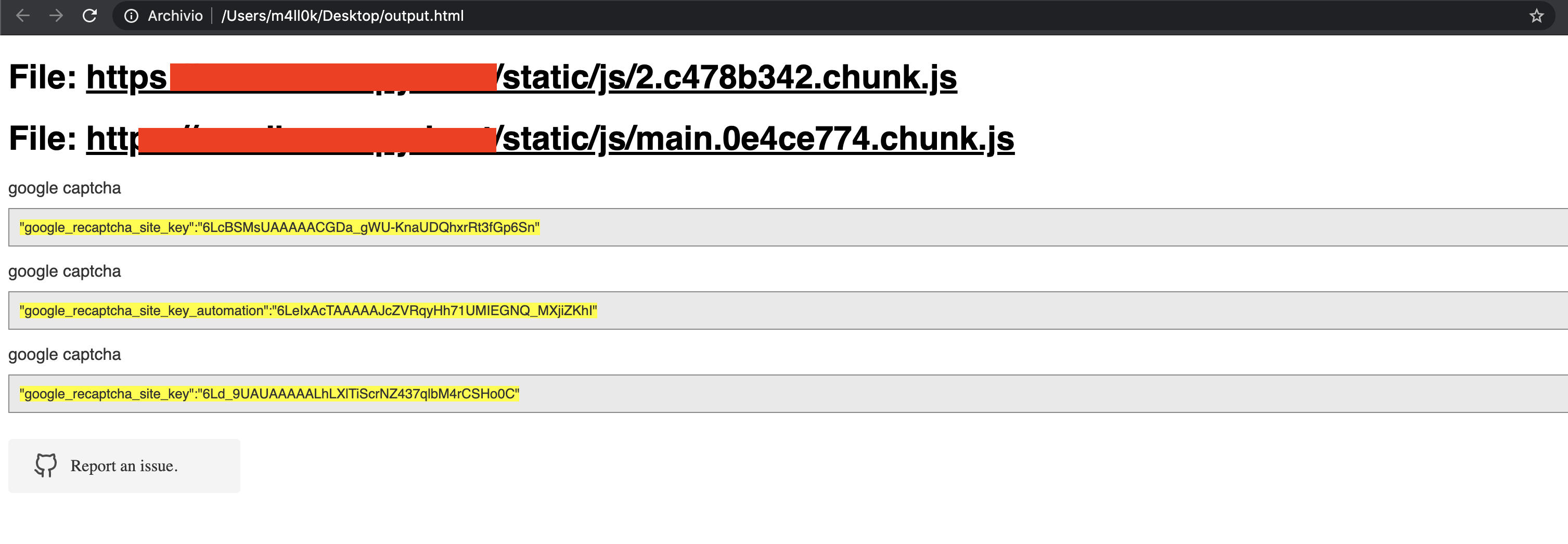
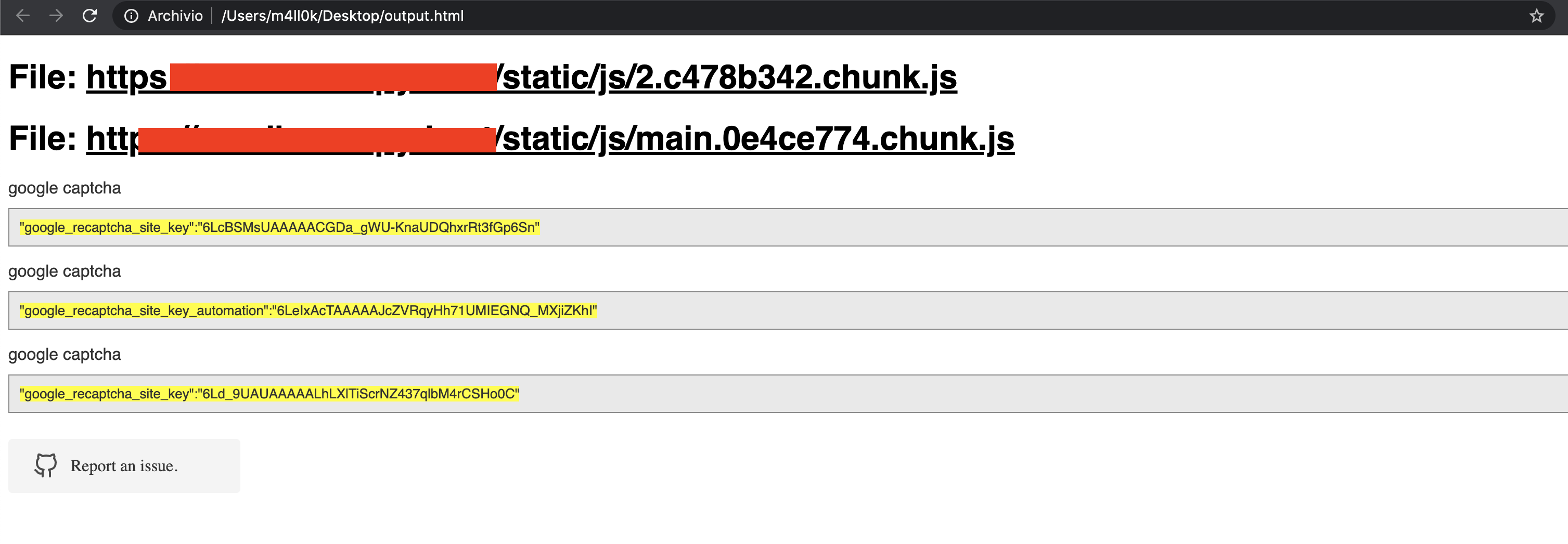
La sortie est donnée en HTML ou en texte brut.
usage: SecretFinder.py [-h] [-e] -i INPUT [-o OUTPUT] [-r REGEX] [-b]
                       [-c COOKIE] [-g IGNORE] [-n ONLY] [-H HEADERS]
                       [-p PROXY]

optional arguments:
  -h, --help            show this help message and exit
  -e, --extract         Extract all javascript links located in a page and
                        process it
  -i INPUT, --input INPUT
                        Input a: URL, file or folder
  -o OUTPUT, --output OUTPUT
                        Where to save the file, including file name. Default:
                        output.html
  -r REGEX, --regex REGEX
                        RegEx for filtering purposes against found endpoint
                        (e.g: ^/api/)
  -b, --burp            Support burp exported file
  -c COOKIE, --cookie COOKIE
                        Add cookies for authenticated JS files
  -g IGNORE, --ignore IGNORE
                        Ignore js url, if it contain the provided string
                        (string;string2..)
  -n ONLY, --only ONLY  Process js url, if it contain the provided string
                        (string;string2..)
  -H HEADERS, --headers HEADERS
                        Set headers ("Name:Value\nName:Value")
  -p PROXY, --proxy PROXY
                        Set proxy (host:port)
SecretFinder supporte Python 3.
$ git clone https://github.com/m4ll0k/SecretFinder.git secretfinder
$ cd secretfinder
$ python -m pip install -r requirements.txt ou pip install -r requirements.txt
$ python3 SecretFinder.py
python3 SecretFinder.py -i https://exemple.com/1.js -o results.html
python3 SecretFinder.py -i https://exemple.com/1.js -o cli
python3 SecretFinder.py -i https://exemple.com/ -e
-g --ignore :python3 SecretFinder.py -i https://exemple.com/ -e -g 'jquery;bootstrap;api.google.com'
-n --only :python3 SecretFinder.py -i https://exemple.com/ -e -n 'd3i4yxtzktqr9n.cloudfront.net;www.myexternaljs.com'
python3 SecretFinder.py -i https://exemple.com/1.js -o cli -r 'apikey=my.api.key[a-zA-Z]+'
python3 SecretFinder.py -i https://exemple.com/ -e -o cli -c 'mysessionid=111234' -H 'x-header:value1\nx-header2:value2' -p 127.0.0.1:8080 -r 'apikey=my.api.key[a-zA-Z]+'
L'entrée accepte tous ces éléments :
URL : p.ex. https://www.google.com/ [-e] est requis
URL JS : p.ex. https://www.google.com/1.js
Dossier : p.ex. myjsfiles/*
Fichier local : p.ex. /js/myjs/file.js
SecretFinder.py et ajoutez votre expression rationnelle :_regex = {
'google_api' : r'AIza[0-9A-Za-z-_]{35}',
'google_captcha' : r'6L[0-9A-Za-z-_]{38}|^6[0-9a-zA-Z_-]{39}$',
'google_oauth' : r'ya29\.[0-9A-Za-z\-_]+',
'amazon_aws_access_key_id' : r'A[SK]IA[0-9A-Z]{16}',
'amazon_mws_auth_toke' : r'amzn\\.mws\\.[0-9a-f]{8}-[0-9a-f]{4}-[0-9a-f]{4}-[0-9a-f]{4}-[0-9a-f]{12}',
'amazon_aws_url' : r's3\.amazonaws.com[/]+|[a-zA-Z0-9_-]*\.s3\.amazonaws.com',
'facebook_access_token' : r'EAACEdEose0cBA[0-9A-Za-z]+',
'authorization_basic' : r'basic\s*[a-zA-Z0-9=:_\+\/-]+',
'authorization_bearer' : r'bearer\s*[a-zA-Z0-9_\-\.=:_\+\/]+',
'authorization_api' : r'api[key|\s*]+[a-zA-Z0-9_\-]+',
'mailgun_api_key' : r'key-[0-9a-zA-Z]{32}',
'twilio_api_key' : r'SK[0-9a-fA-F]{32}',
'twilio_account_sid' : r'AC[a-zA-Z0-9_\-]{32}',
'twilio_app_sid' : r'AP[a-zA-Z0-9_\-]{32}',
'paypal_braintree_access_token' : r'access_token\$production\$[0-9a-z]{16}\$[0-9a-f]{32}',
'square_oauth_secret' : r'sq0csp-[ 0-9A-Za-z\-_]{43}|sq0[a-z]{3}-[0-9A-Za-z\-_]{22,43}',
'square_access_token' : r'sqOatp-[0-9A-Za-z\-_]{22}|EAAA[a-zA-Z0-9]{60}',
'stripe_standard_api' : r'sk_live_[0-9a-zA-Z]{24}',
'stripe_restricted_api' : r'rk_live_[0-9a-zA-Z]{24}',
'github_access_token' : r'[a-zA-Z0-9_-]*:[a-zA-Z0-9_\-]+@github\.com*',
'rsa_private_key' : r'-----BEGIN RSA PRIVATE KEY-----',
'ssh_dsa_private_key' : r'-----BEGIN DSA PRIVATE KEY-----',
'ssh_dc_private_key' : r'-----BEGIN EC PRIVATE KEY-----',
'pgp_private_block' : r'-----BEGIN PGP PRIVATE KEY BLOCK-----',
'json_web_token' : r'ey[A-Za-z0-9-_=]+\.[A-Za-z0-9-_=]+\.?[A-Za-z0-9-_.+/=]*$',
'nom_de_mon_regex' : r'my_regex',
# par exemple
'exemple_api_key' : r'^example\w+{10,50}'
}
