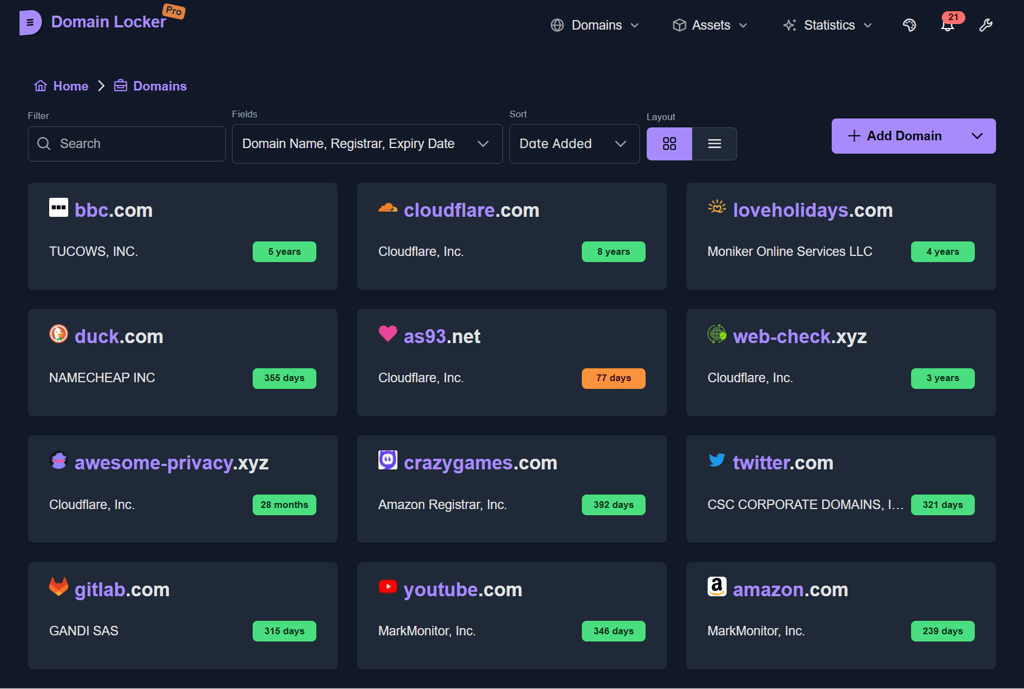
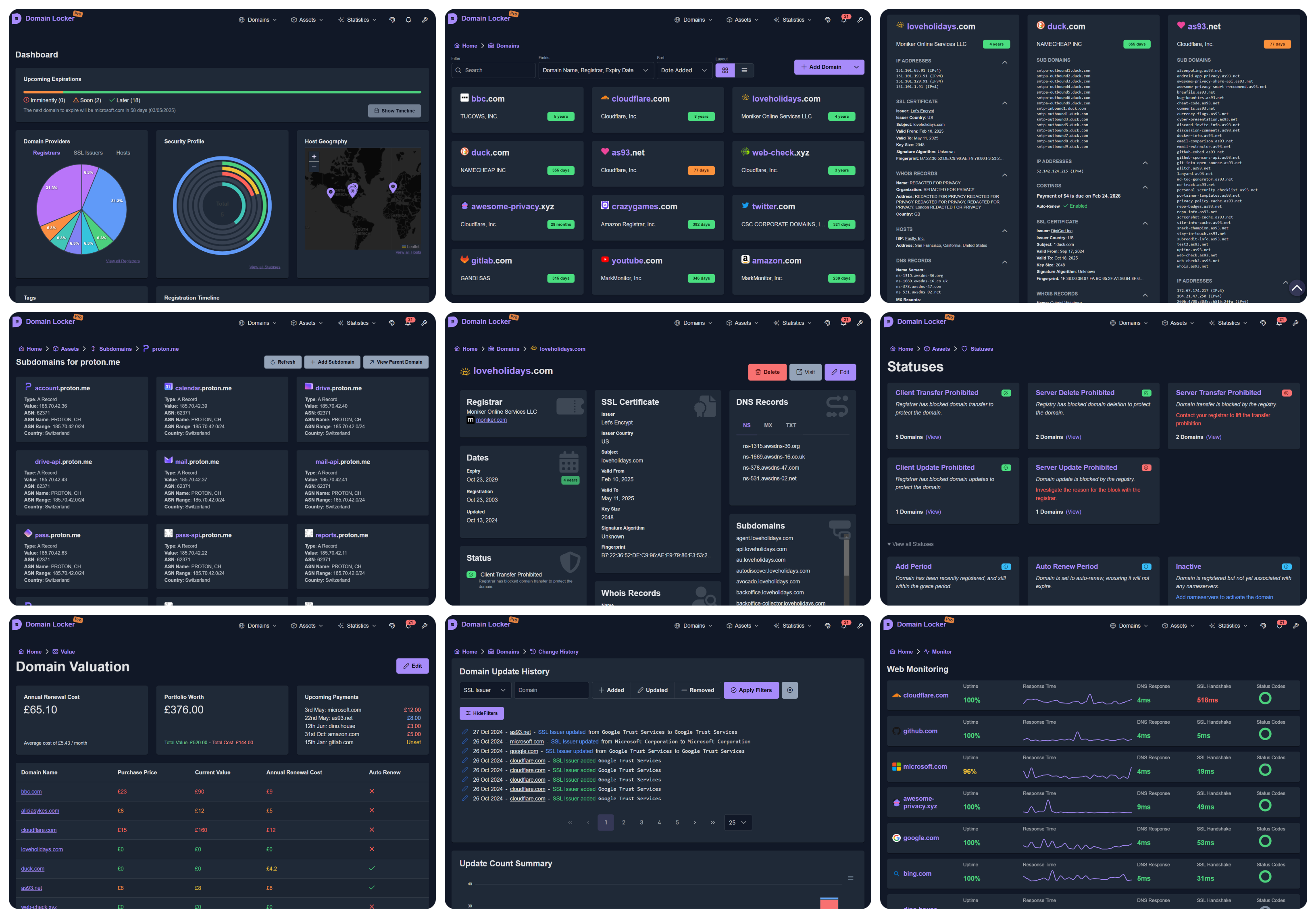
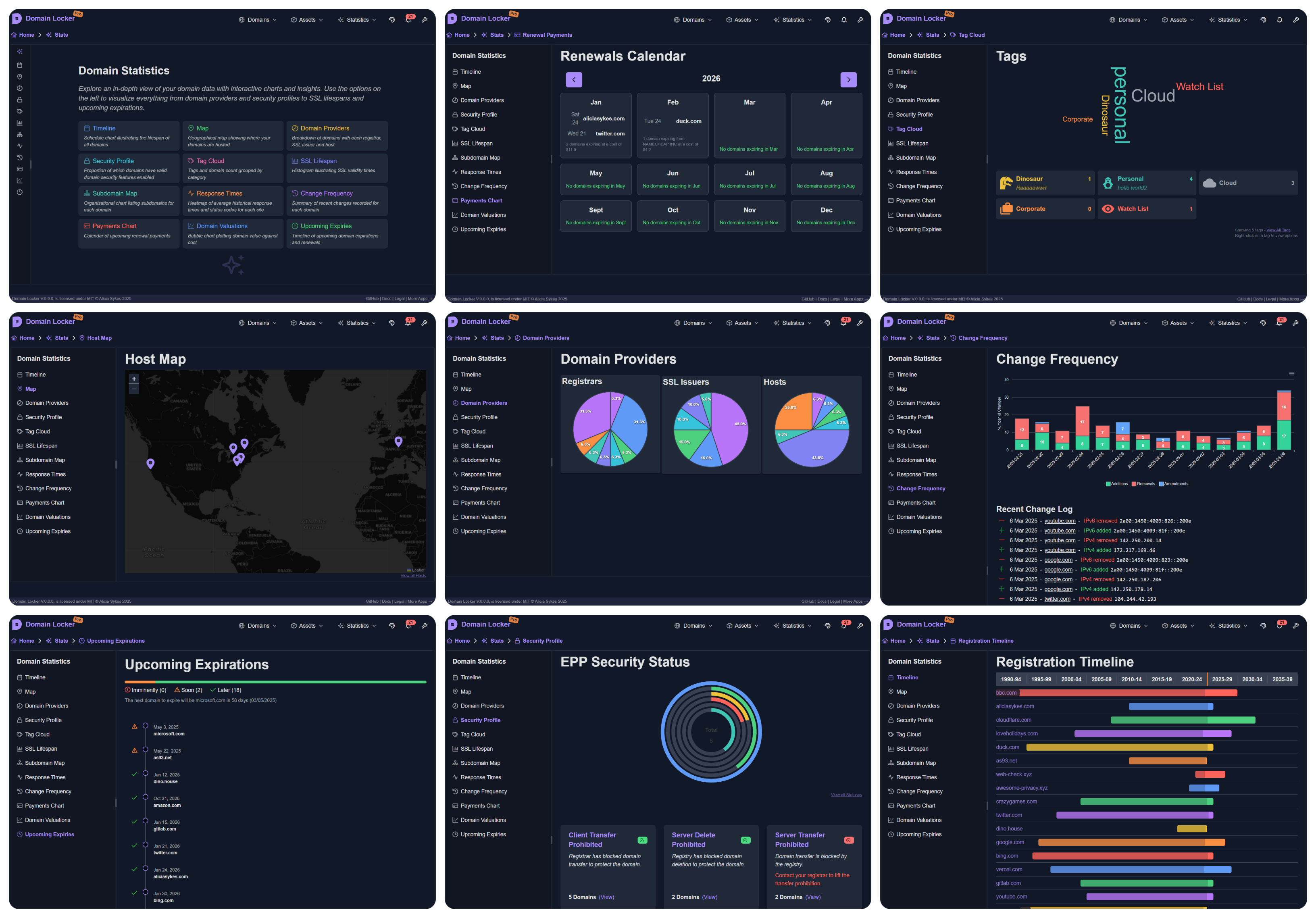
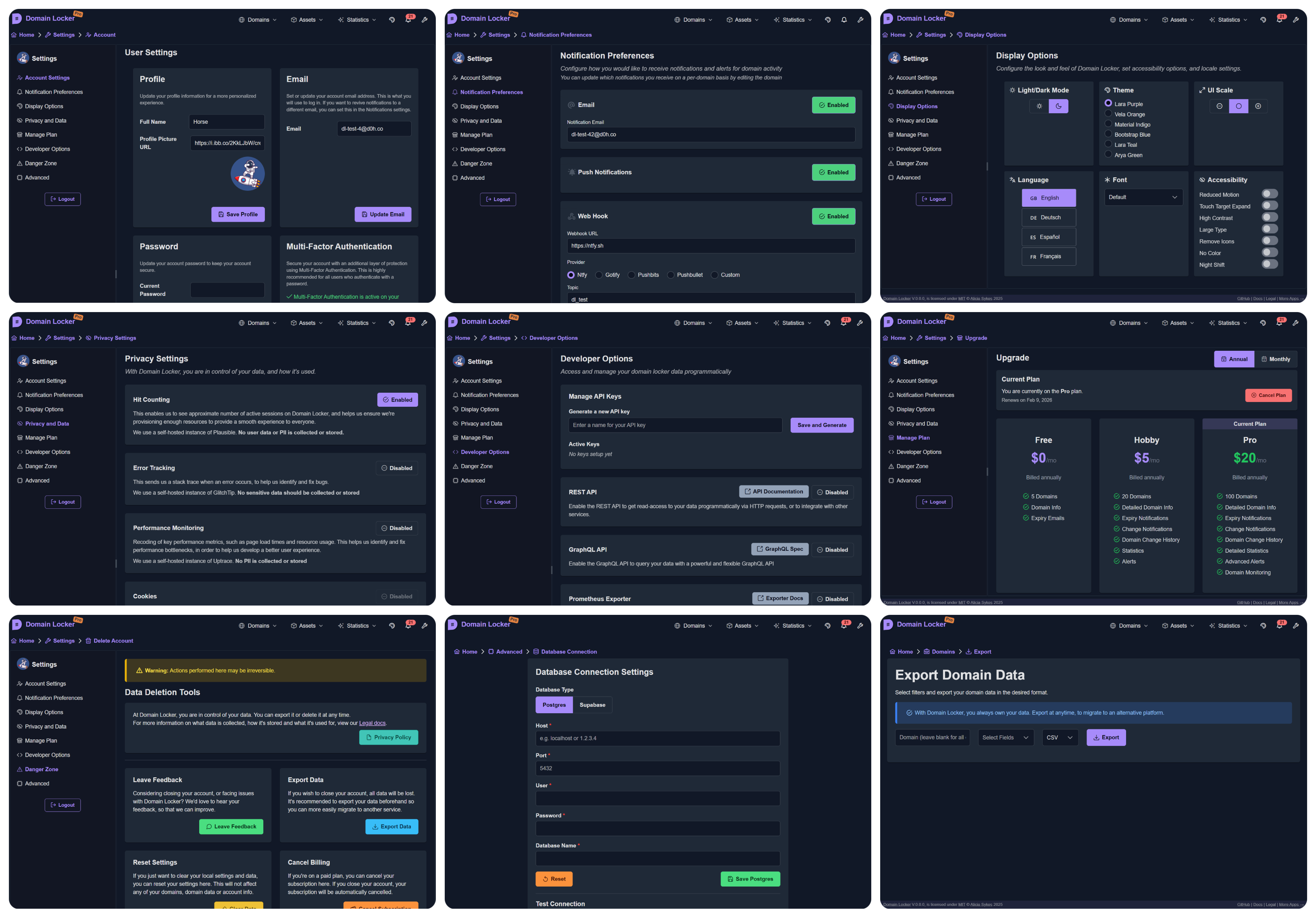
Gestionnaire centralisé de portefeuille de domaines avec données WHOIS, DNS, SSL récupérées automatiquement, alertes d'expiration, surveillance de disponibilité et analyses visuelles. Auto-hébergeable avec Docker.
Le centre névralgique de tous vos noms de domaine
🌐domain-locker.com

L'objectif de Domain Locker est de vous offrir une visibilité complète de votre portefeuille de noms de domaine, en un seul endroit central.
Pour chaque domaine que vous ajoutez, nous l'analysons et récupérons toutes les données associées. Nous surveillons ensuite en continu vos domaines, et vous notifions (selon vos préférences) lorsqu'un changement important survient ou que l'expiration est proche. Vous obtiendrez ainsi une analyse détaillée du domaine, des informations de sécurité, un historique des modifications, des performances récentes, des données d'évaluation et bien plus encore.
Avec Domain Locker, vous ne perdrez plus jamais la trace de vos domaines, ne manquerez plus une expiration et n'oublierez plus quel registrar et quels fournisseurs chaque domaine utilise.
(Désolé pour les 5 i/s, je souhaitais réduire la taille du fichier !)
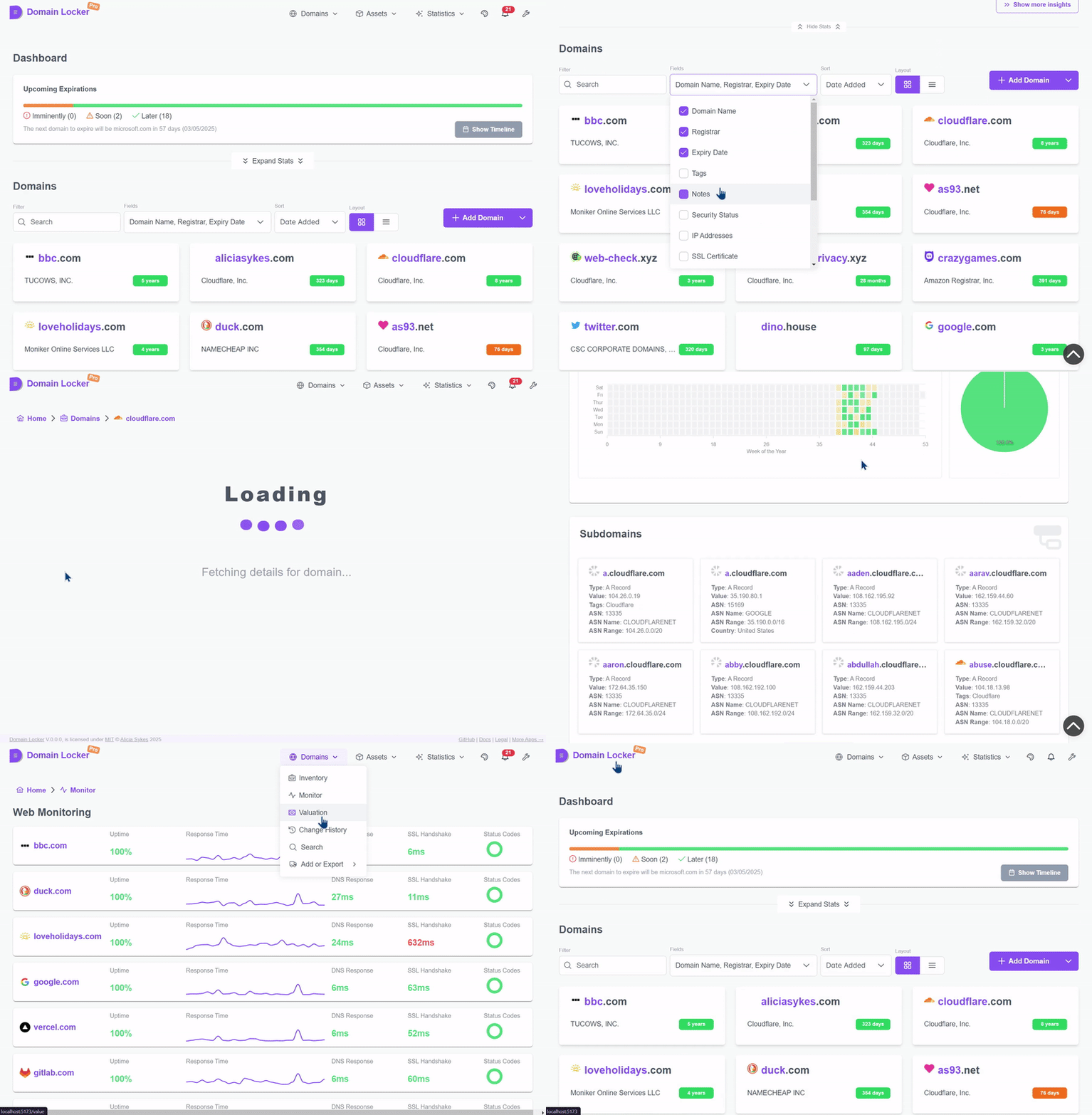
Essayez la démo en direct sur demo.domain-locker.com
(Identifiant : [email protected] Mot de passe : domainlocker)
Pour utiliser Domain Locker, vous avez deux options :
Rendez-vous sur notre site web et inscrivez-vous avec Google, GitHub ou votre email.
Le plan de démarrage est gratuit et aucune configuration n'est nécessaire. Connectez-vous, ajoutez vos domaines et commencez à les suivre.
curl -fsSL https://install.domain-locker.com | bash
Utilisez la ligne de commande ci-dessus, ou utilisez le fichier [`docker-compose.yml`](https://github.com/Lissy93/domain-locker/blob/main/docker-compose.yml)
<details>
<summary>Détails</summary>
- **Prérequis**:
- Domain Locker est conçu pour être exécuté dans un conteneur, vous aurez donc besoin de Docker [installé](https://docs.docker.com/engine/install/) sur votre système hôte.
- **Conteneurs**:
- Nous avons une image Docker publiée sous [`lissy93/domain-locker`](https://hub.docker.com/r/lissy93/domain-locker).
- Vous aurez également besoin d'une base de données Postgres, comme le conteneur [`postgres:15-alpine`](https://hub.docker.com/_/postgres?tab=tags&name=15-alpine).
- **Environnement**:
- Lors du démarrage du conteneur, liez le port `3000` du conteneur à votre `PORT` hôte (par défaut `3000`).
- Ensuite, spécifiez les variables Postgres : `DL_PG_HOST`, `DL_PG_PORT`, `DL_PG_USER`, `DL_PG_PASSWORD` et `DL_PG_NAME`.
- **Volumes**:
- Montez un volume vers `/var/lib/postgresql/data` pour persister vos données Postgres
- **Tâches Cron**
- `/api/domain-updater` - Exécutez cette tâche quotidiennement pour maintenir les données des domaines à jour et déclencher les notifications
- `/api/domain-monitor` - Exécutez cette tâche toutes les 15 minutes pour surveiller la disponibilité et les performances du site web
- `/api/cleanup-monitor-data` - Exécutez cette tâche chaque semaine pour agréger les anciennes données de surveillance
- **Exemple**:
- En assemblant le tout, vous pouvez utiliser notre fichier [`docker-compose.yml`](https://github.com/Lissy93/domain-locker/blob/main/docker-compose.yml).
- Pour plus de détails, consultez la [documentation d'auto-hébergement](https://domain-locker.com/about/self-hosting)
<details>
<summary>Diagramme Docker</summary>```mermaid
flowchart TB
subgraph Volume Mounts
direction TB
Vpostgresdata([📦 postgres_data]) x-. /var/lib/postgresql/data .-x postgres[(🐘 PostgreSQL DB)]
Vdbschemasql{{📄 ./db/schema.sql}} -. Mounted on Init .-> postgres
end
subgraph Network
direction TB
domainlockernetwork[/🌐 domain_locker_network/]
end
postgres -.- domainlockernetwork
subgraph app[⚙️ App Container]
SSR[HTTP Server]
CLIENT[Client App]
API[API Endpoints]
SSR --> CLIENT
SSR --> API
end
app -.- domainlockernetwork
git clone [email protected]:Lissy93/domain-locker.git # Get the code cd domain-locker # Navigate into directory npm install --legacy-peer-deps # Install dependencies cp .env.example .env # Set environmental variables npm run dev # Start the dev server
- **Prérequis**
- Vous aurez besoin de Git et Node installés sur votre système.
- **Configuration**
- Le fichier exemple `.env.sample` contient les identifiants publics pour notre instance de développement Supabase.
- Pour utiliser une autre base de données, voir la section [Base de données](#database) ci-dessous pour configurer avec Postgres.
- **Déploiement**
- Vous pouvez construire le code avec `npm run build`, puis l'exécuter avec `npm start`
- Ou, avec Docker, construire le conteneur avec `docker build -t domain-locker .`
- N'utilisez pas l'instance de développement Supabase en production, car elle est souvent réinitialisée.
---
## Architecture de l'application
#### Stack technique
Domain Locker est composé d'une application, d'une base de données et de quelques points de terminaison API.
- **L'application** est construite avec Angular, utilisant Analog+Nitro avec les composants PrimeNg, et Tailwind pour le style.
- **Le serveur** est une série de points de terminaison Deno avec des fonctions TypeScript.
- **La base de données** peut être soit Postgres, soit Supabase.
Bien que l'instance auto-hébergée soit destinée à être déployée de manière autonome, la version gérée dépend cependant de quelques services tiers supplémentaires, que vous pouvez voir ci-dessous, [dont la documentation se trouve ici](https://domain-locker.com/about/developing/third-party-docs).
<details>
<summary>Pourquoi</summary>
Pourquoi Angular ? Comme une sorte de blague morbide pour le futur moi, qui aura ensuite besoin de maintenir cela.
</details>
<p align="center">
<img width="800" src="https://assets.kitploit.com/production/public/readmes/264/1449d16cb6a07bd766d3b86a8de608aaa4075270a0a634cd6f6af1f1a1d70c49.png" />
<br>
<span>Vous pouvez consulter la documentation des technologies et services utilisés <a href="https://domain-locker.com/about/developing/third-party-docs">ici</a></span>
</p>
#### Architecture
L'architecture est assez simple.
Nous avons une application (constituée d'un frontend et de points de terminaison API), où l'utilisateur peut lire et écrire dans la base de données (via des adaptateurs). Ensuite, un service cron appellera périodiquement les points de terminaison API pour maintenir les données de domaine à jour, suivre les changements, surveiller la santé, et déclencher des notifications en cas de certains changements (selon les préférences de l'utilisateur) ou avant une expiration à venir.```mermaid
graph TD;
subgraph User Interactions
User[👤 User] -->|Enter domain| WebApp[🌐 Frontend];
WebApp -->|Send API request| API[⚙️ Nitro API];
API -->|Auth Check| Auth[🔐 Auth Service];
API -->|Store domain info| Database[🗄️ PostgreSQL / Supabase];
end
subgraph Automated Cron Jobs
CronService[⏳ Cron Service] -->|Trigger Updates| EdgeFunctions[⚡ Edge Functions];
EdgeFunctions -->|Fetch WHOIS, DNS, SSL| ExternalAPIs[🌎 Analysis Services];
EdgeFunctions -->|Store Data| Database;
CronService -->|Monitor Uptime| WebsiteMonitor[📡 Uptime Monitor];
WebsiteMonitor -->|Store Metrics| Database;
CronService -->|Check Expirations| ExpiryChecker[📆 Expiration Check];
ExpiryChecker -->|Update Status| Database;
CronService -->|Send Notifications| NotificationService[🔔 Notification System];
NotificationService -->|Email| Resend[📧 Resend];
NotificationService -->|SMS| Twilio[📱 Twilio];
end
Database -->|Serve Data| WebApp;
Une base de données est nécessaire pour stocker tous vos domaines et informations associées. Domain Locker prend en charge à la fois Supabase et Postgres standard pour stocker les données. La base de données utilisée dépendra des variables d'environnement définies.
Supabase : Suivez la documentation d'auto-hébergement Supabase, puis utilisez dl-sb-iac pour importer le schéma et configurer l'authentification, les edge functions, les emails, etc.
SUPABASE_URL et SUPABASE_ANON_KEYPostgres : Déployez une instance Postgres, puis appliquez le schema.sql
psql -h $DL_PG_HOST -U $DL_PG_USER -d $DL_PG_NAME -f ./db/schema.sqlsetup-postgres.sh (nécessite un accès superutilisateur)DL_PG_HOST, DL_PG_PORT, DL_PG_USER, DL_PG_PASSWORD, `DL_PG_NAME````mermaid
classDiagram
class users {
uuid id
text email
timestamp created_at
timestamp updated_at
}class domains { uuid id uuid user_id text domain_name date expiry_date text notes timestamp created_at timestamp updated_at uuid registrar_id timestamp registration_date timestamp updated_date }
class registrars { uuid id text name text url uuid user_id }
class tags { uuid id text name text color text description text icon uuid user_id }
class domain_tags { uuid domain_id uuid tag_id }
class notifications { uuid id uuid user_id uuid domain_id text change_type text message boolean sent boolean read timestamp created_at }
class billing { uuid id uuid user_id text current_plan timestamp next_payment_due text billing_method timestamp created_at timestamp updated_at jsonb meta }
class dns_records { uuid id uuid domain_id text record_type text record_value timestamp created_at timestamp updated_at }
class domain_costings { uuid id uuid domain_id numeric purchase_price numeric current_value numeric renewal_cost boolean auto_renew timestamp created_at timestamp updated_at }
class domain_hosts { uuid domain_id uuid host_id }
class domain_links { uuid id uuid domain_id text link_name text link_url timestamp created_at timestamp updated_at text link_description }
class domain_statuses { uuid id uuid domain_id text status_code timestamp created_at }
class domain_updates { uuid id uuid domain_id uuid user_id text change text change_type text old_value text new_value timestamp date }
class uptime { uuid id uuid domain_id timestamp checked_at boolean is_up integer response_code numeric response_time_ms numeric dns_lookup_time_ms numeric ssl_handshake_time_ms timestamp created_at }
class ssl_certificates { uuid id uuid domain_id text issuer text issuer_country text subject date valid_from date valid_to text fingerprint integer key_size text signature_algorithm timestamp created_at timestamp updated_at }
class whois_info { uuid id uuid domain_id text country text state text name text organization text street text city text postal_code }
class user_info { uuid id uuid user_id jsonb notification_channels timestamp created_at timestamp updated_at text current_plan }
class hosts { uuid id inet ip numeric lat numeric lon text isp text org text as_number text city text region text country uuid user_id }
class ip_addresses { uuid id uuid domain_id inet ip_address boolean is_ipv6 timestamp created_at timestamp updated_at }
class notification_preferences { uuid id uuid domain_id text notification_type boolean is_enabled timestamp created_at timestamp updated_at }
class sub_domains { uuid id uuid domain_id text name timestamp created_at timestamp updated_at jsonb sd_info }
users --> domains : user_id registrars --> domains : registrar_id users --> registrars : user_id users --> tags : user_id domains --> domain_tags : domain_id tags --> domain_tags : tag_id users --> notifications : user_id domains --> notifications : domain_id users --> billing : user_id domains --> dns_records : domain_id domains --> domain_costings : domain_id domains --> domain_hosts : domain_id hosts --> domain_hosts : host_id domains --> domain_links : domain_id domains --> domain_statuses : domain_id domains --> domain_updates : domain_id users --> domain_updates : user_id domains --> uptime : domain_id domains --> ssl_certificates : domain_id domains --> whois_info : domain_id users --> user_info : user_id users --> hosts : user_id domains --> ip_addresses : domain_id domains --> notification_preferences : domain_id domains --> sub_domains : domain_id
<p align="center"><sub>Vous pouvez télécharger le schéma depuis <a href="https://github.com/Lissy93/domain-locker/blob/main/db/schema.sql"<code>db/schema.sql</code></a></sub></p>
---
### Contribuer
Les contributions, de toutes sortes, sont toujours les bienvenues et grandement appréciées ! 💗
Si vous êtes novice avec Git, le flux général pour contribuer est le suivant :
- Forkez le dépôt en [cliquant ici](https://github.com/lissy93/domain-locker/fork)
- Clonez votre fork (avec `git clone [email protected]:[votre_utilisateur]/domain-locker.git`)
- Suivez les instructions [Configuration du projet](#project-setup) ci-dessus pour faire fonctionner le projet en mode développement
- Implémentez votre super nouvelle fonctionnalité ou corrigez ce fichu bug...
- Créez une branche avec `git checkout -b nom-de-la-branche`, puis `git add` vos modifications et `git commit` en utilisant les commits conventionnels, avant de faire `git push` vers votre branche
- Retournez sur GitHub, et vous pouvez alors ouvrir une PR vers notre branche `main`. N'oubliez pas d'inclure ce que vous avez changé, pourquoi, et de lier les éventuels tickets associés.
- Nous examinerons, ferons un retour, fusionnerons, et une fois publiée, vos modifications seront mises en production et disponibles dans la dernière image Docker.
<details>
<summary>Exemple de branche Git</summary>```mermaid
%%{init: {"theme": "default"}}%%
gitGraph
commit id: "Initial commit"
branch trunk
commit id: "Feature A"
commit id: "Feature B"
commit id: "v1.0.0 (Tag)"
branch demo
checkout main
commit id: "Feature C"
commit id: "v1.1.0 (Tag)"
checkout demo
merge main id: "Merge main into demo"
checkout main
commit id: "Feature D"
commit id: "v1.2.0 (Tag)"
checkout demo
merge main id: "Merge main into demo (v1.2.0)"
checkout main
branch feature-branch-1
commit id: "Contributor Feature 1"
checkout main
merge feature-branch-1 id: "Merge contributor feature 1"
commit id: "v1.3.0 (Tag)"
checkout demo
merge main id: "Merge main into demo (v1.3.0)"
checkout main
branch feature-branch-2
commit id: "Contributor Feature 2"
checkout main
merge feature-branch-2 id: "Merge contributor feature 2"
commit id: "v1.4.0 (Tag)"
checkout demo
merge main id: "Merge main into demo (v1.4.0)"
Lissy93/Domain-Locker est sous licence MIT © Alicia Sykes 2025.
Pour plus d'informations, voir TLDR Legal > MIT
Permission is hereby granted, free of charge, to any person obtaining a copy of this software and associated documentation files (the "Software"), to deal in the Software without restriction, including without limitation the rights to use, copy, modify, merge, publish, distribute, sub-license, and/or sell copies of the Software, and to permit persons to whom the Software is furnished to do so, subject to the following conditions:
The above copyright notice and this permission notice shall be included install copies or substantial portions of the Software.
THE SOFTWARE IS PROVIDED "AS IS", WITHOUT WARRANTY OF ANY KIND, EXPRESS OR IMPLIED, INCLUDING BUT NOT LIMITED TO THE WARRANTIES OF MERCHANT ABILITY, FITNESS FOR A PARTICULAR PURPOSE AND NON INFRINGEMENT. IN NO EVENT SHALL THE AUTHORS OR COPYRIGHT HOLDERS BE LIABLE FOR ANY CLAIM, DAMAGES OR OTHER LIABILITY, WHETHER IN AN ACTION OF CONTRACT, TORT OR OTHERWISE, ARISING FROM, OUT OF OR IN CONNECTION WITH THE SOFTWARE OR THE USE OR OTHER DEALINGS IN THE SOFTWARE.
</details>
<!-- Licence + Copyright -->
<p align="center">
<i>© <a href="https://aliciasykes.com">Alicia Sykes</a> 2025</i><br>
<i>Sous licence <a href="https://gist.github.com/Lissy93/143d2ee01ccc5c052a17">MIT</a></i><br>
<a href="https://github.com/lissy93"><img src="https://assets.kitploit.com/production/public/readmes/264/2dd6b50bb46f34f56ce0166642faf6ef16cd4102cd8a3805f1be707c9f7c0a3d.png" /></a><br>
<sup>Merci de votre visite :)</sup>
</p>
<!-- Les dinosaures sont géniaux -->
<!--
. - ~ ~ ~ ~ - .
.. _ .-~ ~-.
//| \ `..~ `.
|| | } } / \ \
(\ \\ \~^..' | } \
\`.-~ o / } | / \
(__ | / | / `.
`- - ~ ~ -._| /_ - ~ ~ ~ ^| /- _ `.
| / | / ~-. ~- _
|_____| |_____| ~ - . _ _~_-_
-->