 knqyf263/ndff
Un moniteur réseau basé sur les flux avec inspection approfondie des paquets.

ndff est un collecteur de flux utilisant la bibliothèque nDPI pour fluentd.
ndff a été implémenté sur la base de ndpiReader, un exemple fourni avec nDPI.
nDPI est une bibliothèque open source sous licence LGPLv3 pour l'inspection approfondie des paquets. ndpiReader est un exemple fourni avec nDPI qui possède les fonctionnalités suivantes.
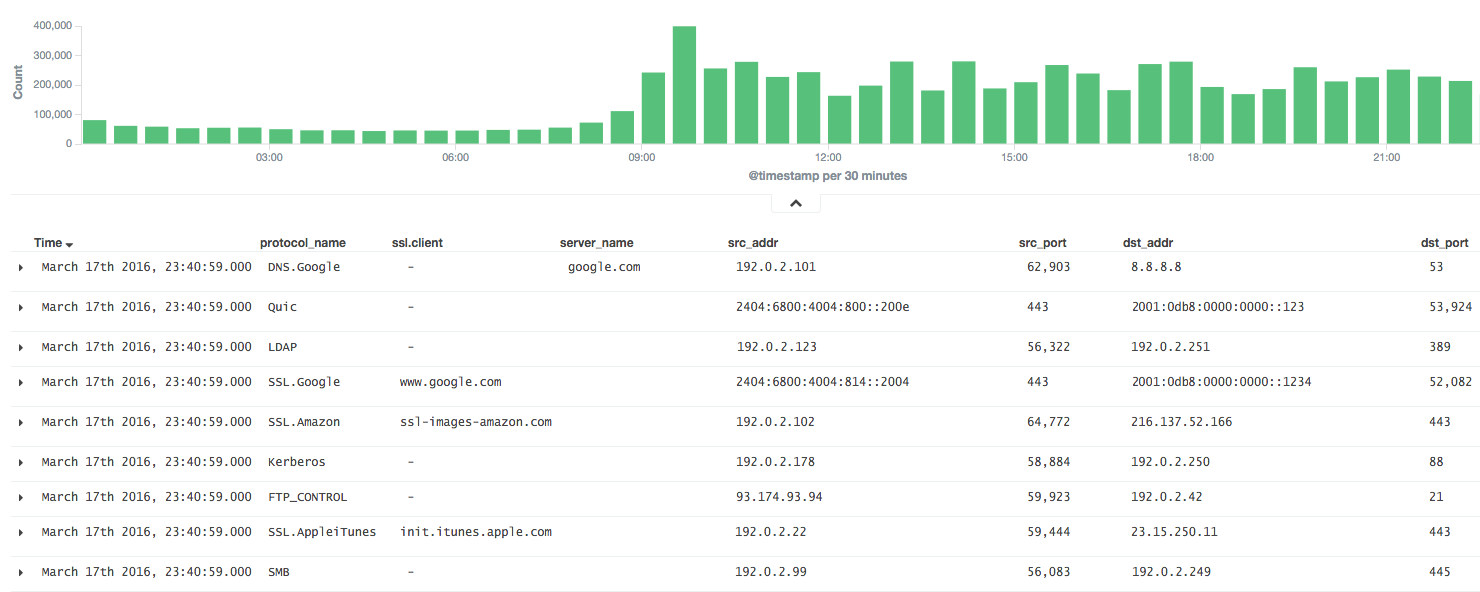
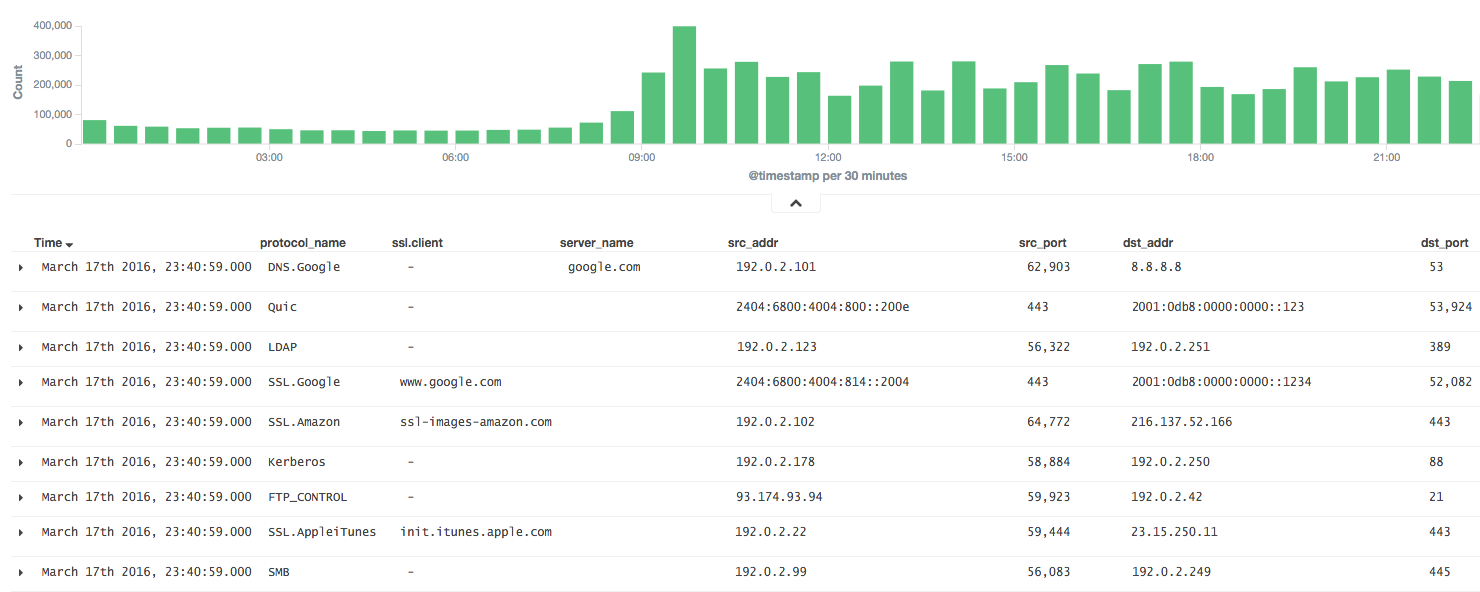
Il est très utile de pouvoir analyser les résultats de nDPI dans fluentd.
C'est pourquoi ndff regroupe les paquets en flux, comme NetFlow, et transmet les résultats au serveur fluentd sous forme de JSON ou MessagePack.
Installez ndff depuis le binaire (CentOS 6).
$ sudo yum -y install libpcap msgpack json-c
$ sudo rpm -ivh https://forensics.cert.org/centos/cert/6.5/x86_64/nDPI-1.7.1-1.el6.x86_64.rpm
$ sudo rpm -ivh https://github.com/knqyf263/ndff/releases/download/0.0.2/ndff-0.0.2-1.x86_64.rpm
Puis exécutez
$ sudo ndff -i eth0 -s 127.0.0.1 -p 24224 -m msgpack
Reportez-vous à INSTALL.md
Ensuite, installez json-c ou msgpack-c.
Dans le cas de json-c :
$ git clone https://github.com/json-c/json-c.git
$ cd json-c
$ sh autogen.sh
$ ./configure
$ make
$ make install
Enfin, installez ndff depuis le dépôt git.
$ git clone https://github.com/knqyf263/ndff.git
$ cd ndff
$ ./autogen.sh
$ make
$ sudo make install
$ ndff
ndff -i <file|device> [-s <server>] [-m <json|msgpack>] [-f <filter>]
          [-p <port>][-P <protos>][-t <tag>][-q][-d][-D][-h][-T][-v <level>]
          [-n <threads>] [-w <file>]

Usage:
  -i <file.pcap|device>     | Specify a pcap file/playlist to read packets from or a device for live capture (comma-separated list)
  -m <json|msgpack>         | Specify a protocol to send messages to the server (json or msgpack)
  -f <BPF filter>           | Specify a BPF filter for filtering selected traffic
  -s <server>               | Specify a server for fluentd (If not, ndff runs in the dry-run mode)
  -p <port>                 | Specify a port for fluentd (default: 24224)
  -P <file>.protos          | Specify a protocol file (eg. protos.txt)
  -n <num threads>          | Number of threads. Default: number of interfaces in -i. Ignored with pcap files.
  -g <id:id...>             | Thread affinity mask (one core id per thread)
  -d                        | Daemonize (run in background)
  -D                        | Disable protocol guess and use only DPI
  -q                        | Quiet mode
  -t                        | Specify a tag for fluentd (default: ndpi.flow)
  -T                        | Dissect GTP/TZSP tunnels
  -r                        | Print nDPI version and git revision
  -w <path>                 | Write test output on the specified file. This is useful for
                            | testing purposes in order to compare results across runs
  -h                        | This help
  -v <1|2>                  | Verbose 'unknown protocol' packet print. 1=verbose, 2=very verbose
Exécutez ndff au premier plan ou en arrière-plan
Exporte les résultats vers stdout.
$ sudo ndff -v 2 -i eth0
[WARN] No server is specified. This is dry-run mode.
[INFO] Capturing live traffic from device eth0...
[INFO] Running thread 0...

	1	ICMPV6 [2001:db8::253]:0 <-> [2001:db8::22]:0 [VLAN: 262][proto: 102/ICMPV6][1 pkts/90 bytes]
	2	UDP 192.0.2.10:1985 <-> 192.0.2.11:1985 [VLAN: 262][proto: 125/Skype][1 pkts/98 bytes]
	3	VRRP 192.0.2.10:0 <-> 192.0.2.11:0 [VLAN: 262][proto: 73/VRRP][1 pkts/60 bytes]
	4	UDP 192.0.2.12:1985 <-> 192.0.2.13:1985 [proto: 125/Skype][1 pkts/94 bytes]
	5	TCP 192.0.2.14:22 <-> 192.0.2.15:51462 [proto: 92/SSH][11 pkts/1510 bytes]
Exporte les résultats vers le fichier.
$ sudo ndff -v 2 -i tests/pcap/bittorrent.pcap -w bittorrent.txt
[WARN] No server is specified. This is dry-run mode.
[INFO] Reading packets from pcap file tests/pcap/bittorrent.pcap...
[INFO] Running thread 0...

$ head -n5 bittorrent.txt
        1       TCP 192.168.1.3:52888 <-> 82.58.216.115:38305 [proto: 37/BitTorrent][1 pkts/134 bytes][BT Hash: dcfcdccfb9e670ccc3dd40c78c161f2bea243126]
        2       TCP 192.168.1.3:52887 <-> 82.57.97.83:53137 [proto: 37/BitTorrent][1 pkts/134 bytes][BT Hash: dcfcdccfb9e670ccc3dd40c78c161f2bea243126]
        3       TCP 192.168.1.3:52895 <-> 83.216.184.241:51413 [proto: 37/BitTorrent][1 pkts/134 bytes][BT Hash: dcfcdccfb9e670ccc3dd40c78c161f2bea243126]
        4       TCP 79.53.228.2:14627 <-> 192.168.1.3:52896 [proto: 37/BitTorrent][1 pkts/134 bytes][BT Hash: dcfcdccfb9e670ccc3dd40c78c161f2bea243126]
        5       TCP 192.168.1.3:52894 <-> 120.62.33.241:39332 [proto: 37/BitTorrent][1 pkts/134 bytes][BT Hash: dcfcdccfb9e670ccc3dd40c78c161f2bea243126]
Envoi au serveur fluentd.
$ sudo ndff -q -i eth0 -s fluentd.example.com -p 22425 -t json.ndpi.flow -m json
Capturing live traffic from device eth0...
Running thread 0...
La sortie devient alors comme ci-dessous sur le serveur fluentd
2016-03-29 14:41:23 +0900 ndpi.flow: {"protocol":"ICMPV6","src_addr":"2001:DB8::1234","src_port":0,"dst_addr":"2001:DB8::5678","dst_port":0,"detected_protocol":102,"protocol_name":"ICMPV6","out_pkts":1,"out_bytes":86,"in_pkts":0,"in_bytes":0,"first_switched":1459230083,"last_switched":1459230083,"server_name":""}
2016-03-29 14:41:00 +0900 ndpi.flow: {"protocol":"UDP","src_addr":"192.0.2.2","src_port":1985,"dst_addr":"192.0.2.3","dst_port":1985,"detected_protocol":125,"protocol_name":"Skype","out_pkts":16,"out_bytes":1568,"in_pkts":0,"in_bytes":0,"first_switched":1459230060,"last_switched":1459230100,"server_name":""}
2016-03-29 14:41:35 +0900 ndpi.flow: {"protocol":"TCP","src_addr":"192.0.2.4","src_port":49751,"dst_addr":"192.0.2.5","dst_port":80,"detected_protocol":7,"protocol_name":"HTTP","out_pkts":6,"out_bytes":514,"in_pkts":4,"in_bytes":816,"first_switched":1459230095,"last_switched":1459230096,"server_name":"google.co.jp"}
2016-03-29 14:41:35 +0900 ndpi.flow: {"protocol":"UDP","src_addr":"192.0.2.4,"src_port":36605,"dst_addr":"192.0.2.6","dst_port":53,"master_protocol":5,"detected_protocol":126,"protocol_name":"DNS.Google","out_pkts":2,"out_bytes":152,"in_pkts":2,"in_bytes":488,"first_switched":1459230095,"last_switched":1459230095,"server_name":"www.google.co.jp"}
$ sudo ndff -q -i eth0 -s fluentd.example.com -p 22425 -t msgpack.ndpi.flow -m msgpack
Capturing live traffic from device eth0...
Running thread 0...
