 fadidevv/clawdguard
🦞 Correctif de durcissement de sécurité pour Clawdbot/Moltbot. Détecte et corrige automatiquement les passerelles exposées.




Renforcement de la sécurité pour les installations Clawdbot/Moltbot. Détecte et corrige les passerelles exposées.
Détecter et corriger les passerelles Clawdbot/Moltbot exposées
Problème • Fonctionnalités • Démarrage rapide • Docker • CLI • Ce qui est corrigé • Développement
900+ instances Clawdbot/Moltbot sont actuellement exposées sur internet (visibles sur Shodan, port 18789) sans aucune authentification. Cela permet à n'importe qui de :
| Risque | Impact |
|---|---|
| Accéder aux clés API | Voler les identifiants OpenAI, Anthropic, etc. |
| Exécuter des commandes | Exécuter des commandes shell arbitraires sur votre machine |
| Contrôler le navigateur | Prendre le contrôle de votre session de navigation |
| Lire les e-mails | Accéder à Gmail, calendrier, contacts |
| Lire les discussions | Voir tout l'historique de vos conversations |
| Détourner le bot | Envoyer des messages en votre nom |
Le problème n'est pas un bug — c'est une mauvaise configuration.
Les utilisateurs qui modifient gateway.bind en 0.0.0.0 ou utilisent Docker avec -p 18789:18789 sans authentification appropriée sont totalement exposés.
ClawdGuard corrige cela.
cargo install clawdguard

# Run
clawdguard
# Clone repository
git clone https://github.com/fadidevv/clawdguard.git
cd clawdguard

# Build (first time takes ~2 min)
cargo build --release

# Run
./target/release/clawdguard
# Clone repository
git clone https://github.com/fadidevv/clawdguard.git
cd clawdguard

# Build image (~3-5 min first time)
docker build --no-cache -t clawdguard .

# Run (mount your config directory)
docker run -v ~/.moltbot:/root/.moltbot clawdguard
# Or for legacy Clawdbot:
docker run -v ~/.clawdbot:/root/.clawdbot clawdguard
clawdguard
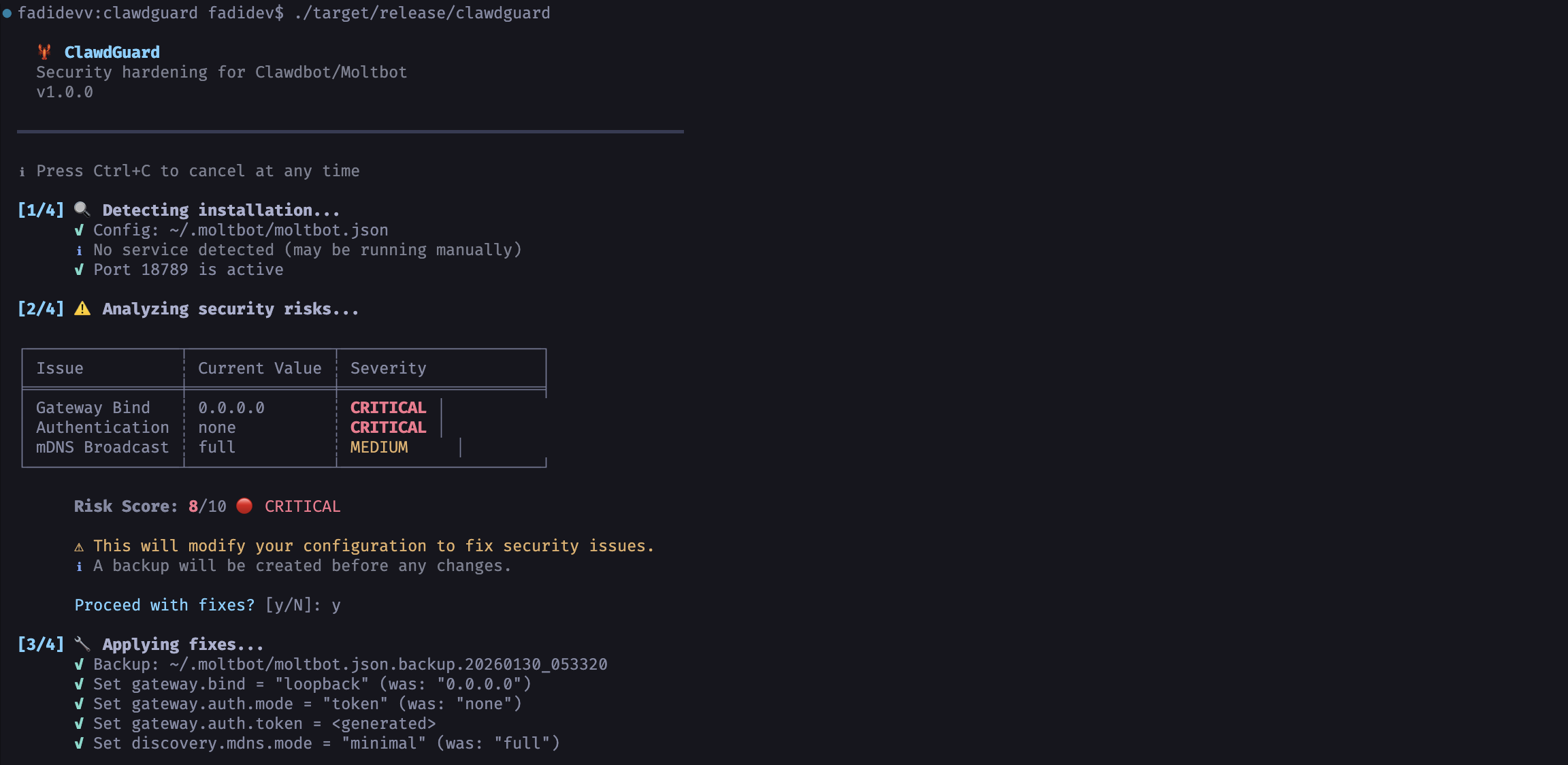
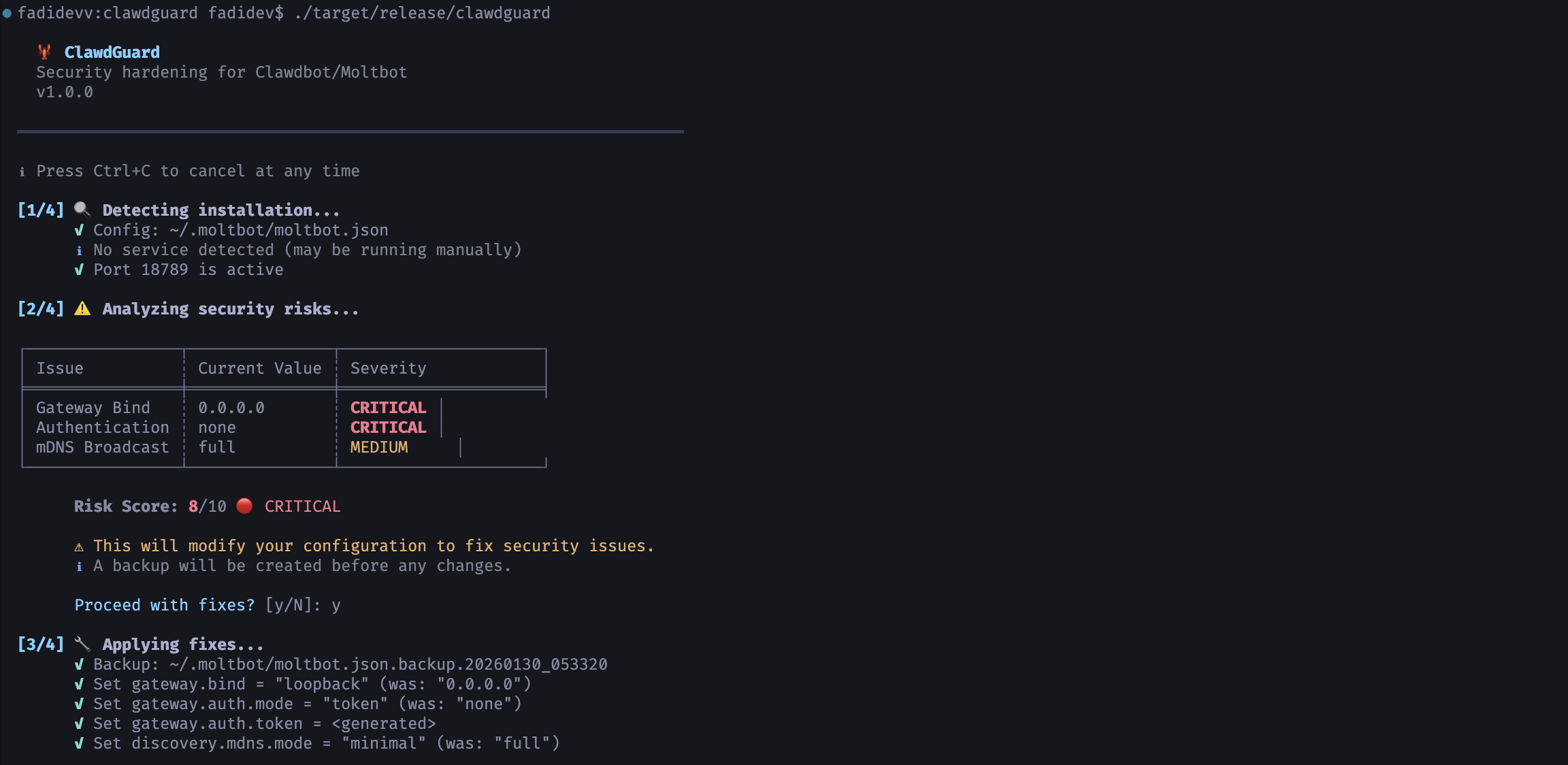
C'est tout ! ClawdGuard va :
ClawdGuard génère un jeton sécurisé. Sauvegardez-le !
╭────────────────────────────────────────────────────────────────────╮
│  ⚠️  IMPORTANT : Sauvegardez votre nouveau jeton de passerelle !   │
│                                                                    │
│    clwd_a8f2k9x3m1p7v4q2b6n8...                                    │
│                                                                    │
│  Vous en aurez besoin pour vous connecter depuis l'interface de   │
│  contrôle ou la CLI.                                               │
╰────────────────────────────────────────────────────────────────────╯
Documentation Docker complète pour ceux qui n'ont pas Rust installé.
# 1. Clone repository
git clone https://github.com/fadidevv/clawdguard.git
cd clawdguard

# 2. Build image (~3-5 min first time)
docker build --no-cache -t clawdguard .

# 3. Run scan (mount your config directory)
# For Moltbot (newer):
docker run -v ~/.moltbot:/root/.moltbot clawdguard

# For Clawdbot (legacy):
docker run -v ~/.clawdbot:/root/.clawdbot clawdguard

# With verbose mode
docker run -v ~/.moltbot:/root/.moltbot clawdguard --verbose

# Scan only (no fixes)
docker run -v ~/.moltbot:/root/.moltbot clawdguard --scan-only

# Auto mode (no prompts)
docker run -v ~/.moltbot:/root/.moltbot clawdguard --auto

# Show help
docker run clawdguard --help
Syntaxe plus simple avec docker-compose :
# Run with docker-compose
docker-compose run clawdguard

# With verbose
docker-compose run clawdguard --verbose

# Scan only
docker-compose run clawdguard --scan-only

# Auto mode
docker-compose run clawdguard --auto
| Commande | Description |
|---|---|
docker build --no-cache -t clawdguard . | Construire l'image |
docker run clawdguard --help | Afficher l'aide |
docker run -v ... clawdguard | Lancer l'analyse |
docker run -v ... clawdguard --scan-only | Analyser uniquement |
docker run -v ... clawdguard --auto | Correction automatique |
docker run -v ... clawdguard --verbose | Mode verbeux |
docker-compose run clawdguard | Exécuter avec compose |
| Montage | Objectif |
|---|---|
~/.moltbot:/root/.moltbot | Votre répertoire de configuration Moltbot (plus récent) |
~/.clawdbot:/root/.clawdbot | Votre répertoire de configuration Clawdbot (legacy) |
./results:/app/results | Sauvegarder les résultats localement |
# Créer un alias pour une utilisation plus simple (utilisez votre répertoire de config)
alias clawdguard='docker run -v ~/.moltbot:/root/.moltbot clawdguard'
# Or for legacy Clawdbot:
alias clawdguard='docker run -v ~/.clawdbot:/root/.clawdbot clawdguard'

# Ensuite, exécutez simplement :
clawdguard
clawdguard --scan-only
clawdguard --verbose
clawdguard [OPTIONS]
