 d4vinci/humax-cli
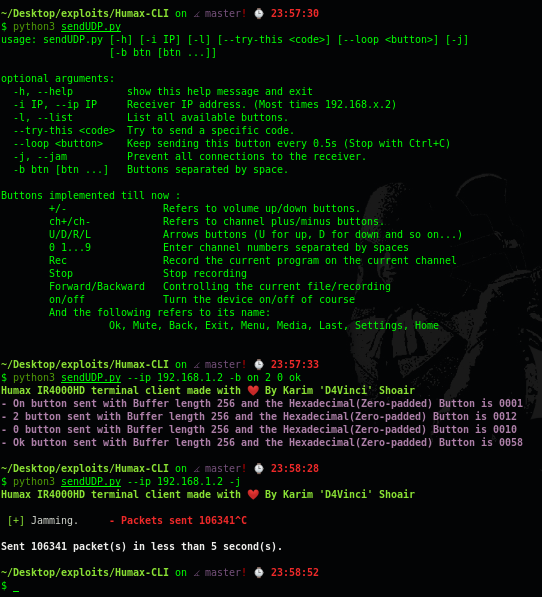
Un client terminal non officiel pour Humax IR4000HD avec des fonctionnalités améliorées.

Un client terminal non officiel pour le Humax IR4000HD avec des fonctionnalités améliorées.
Tout cela vient de la rétro-ingénierie de l'application Android et un article arrivera dès que possible 😄
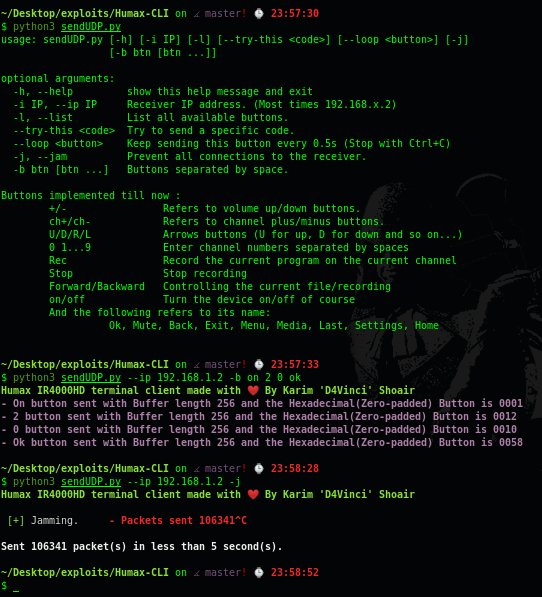
usage: sendUDP.py [-h] [-i IP] [-l] [--try-this <code>] [--loop <button>] [-j] [-b btn [btn ...]]

optional arguments:
  -h, --help         show this help message and exit
  -i IP, --ip IP     Receiver IP address. (Most times 192.168.x.2)
  -l, --list         List all available buttons.
  --try-this <code>  Try to send a specific code.
  --loop <button>    Keep sending this button every 0.5s (Stop with Ctrl+C)
  -j, --jam          Prevent all connections to the receiver.
  -b btn [btn ...]   Buttons separated by space.
-lButtons implemented till now :
+/- Refers to volume up/down buttons.
ch+/ch- Refers to channel plus/minus buttons.
U/D/R/L Arrows buttons (U for up, D for down and so on...)
0 1...9 Enter channel numbers separated by spaces
Rec Record the current program on the current channel
Stop Stop recording
Forward/Backward Controlling the current file/recording
on/off Turn the device on/off of course
And the following refers to its name:
Ok, Mute, Back, Exit, Menu, Media, Last, Settings, Home
--try-thisSTANDBY(1),
0(16),
1(17),
2(18),
3(19),
4(20),
5(21),
6(22),
7(23),
8(24),
9(25),
11(26),
12(27),
RED(32),
GREEN(33),
YELLOW(34),
BLUE(35),
INFO(48),
GUIDE(49),
MENU(50),
HUB(50),
QMENU(51),
FAVORITE(52),
CHLIST(53),
SETUP(54),
VFORMAT(55),
AUDIO(56),
SUBTITLE(57),
SLEEP(58),
OPT(59),
PLUS(59),
SCHEDULE(60),
MEDIA(61),
IP_BROWSER(62),
SELECT(63),
RESERVATION(64),
DLNA(65),
HDD(66),
VOD(67),
DISP_ON(68),
HOTKEY(69),
SMART_SEARCH(71),
AUDIO_LANGUAGE(72),
FAVORITES(73),
PROGRAM(74),
PLAYLIST(75),
PAGEUP(80),
PAGEDOWN(81),
ARROWLEFT(82),
ARROWRIGHT(83),
ARROWUP(84),
ARROWDOWN(85),
BACK(86),
EXIT(87),
OK(88),
ERASE(89),
CH_PLUS(96),
CH_MINUS(97),
LAST(98),
TVRADIO(99),
COMBO(100),
FREESAT(101),
CH_INPUT(102),
NETWORK_TER(103),
NETWORK_BS(104),
NETWORK_CATV(105),
DATA(106),
DIGITS(107),
VOLUMEUP(112),
VOLUMEDOWN(113),
MUTE(114),
EXT_AV(115),
EXT_AV_PLUS(116),
EXT_AV_MINUS(117),
AVMODE(118),
FREEZE(119),
WIDE(120),
3D(121),
SOURCE(122),
MHP(123),
MYEPG(124),
TIVUEPG(125),
OTTV(126),
TEXT(128),
TEXT_OPTION(129),
TTX_HOLD(130),
TTX_REVEAL(131),
TTX_DOUBLE(132),
TTX_CANCEL(133),
TTX_INDEX(134),
TTX_SUBPAGE(135),
TTX_UPDATE(136),
PLAY(144),
PAUSE(145),
STOP(146),
RECORD(147),
FORWARD(148),
BACKWARD(149),
PREV(150),
NEXT(151),
REPLAY(152),
SKIP(153),
ADD_BOOKMARK(154),
BOOKMARK_LIST(155),
SLOW(156),
TSR(157),
QVIEW(160),
ENERGY_GREEN(161),
PSM(162),
SSM(163),
AD(164),
ALERT(165),
RECALL(166),
SYSTEM(167),
SETTING(168),
OP_MODE(169),
WELCOM(170),
MAIL(171),
PIP_MOVE(178),
HOTELMENU(192),
SERVICEMODE(193),
DISC(208),
TRAY_OPEN(209),
DISC_MENU(210),
DUB(211),
MODE_PVR(224),
MODE_TV(225),
MODE_DVD(226),
MODE_AUDIO(227),
MODE_WARNING(228),
RECENT(240),
HOME(241),
BROWSER_PREV(242),
BROWSER_NEXT(243),
BROWSER_BOOKMARK(244),
BROWSER_URL(245),
FRONT_EXT_AV(2049),
FRONT_MENU(2050),
FRONT_CH_PLUS(2051),
FRONT_CH_MINUS(2052),
FRONT_VOLUME_UP(2053),
FRONT_VOLUME_DOWN(2054),
FRONT_OK(2055),
FRONT_ARROW_UP(2056),
FRONT_ARROW_DOWN(2057),
FRONT_ARROW_LEFT(2058),
FRONT_ARROW_RIGHT(2059),
FRONT_TVRADIO(2060),
FRONT_GUIDE(2061),
FRONT_BACK(2062),
FRONT_INFO(2063),
FRONT_STOP(2064),
FRONT_PLAY_PAUSE(2065),
FRONT_OPEN_CLOSE(2066),
FRONT_HDD_DISC(2067),
FRONT_TER_BS_CATV(2068),
FRONT_PLAY_LIST(2069),
FRONT_RECORD(2070),
FRONT_LOCK_OFF(2176),
FRONT_HIDDEN(2177),
SPECIAL_CLEAR(61710),
SPECIAL_MODE(61731),
SPECIAL_KEYBOARD(61732),
SPECIAL_PC(61733),
SPECIAL_SCREEN(61734),
UNI_SHIFT(61953),
UNI_CONTROL(61954),
UNI_ALT(61956),
UNI_ALTGR(61960),
UNI_META(61968),
UNI_SUPER(61984),
UNI_HYPER(62016),
CUSTOM_PRESET_CH(62742),
CUSTOM_ETC(62803),
CUSTOM_RECOMMAND(62804),
UNKNOWN(65535),
NULL(0);
python -m pip install -r windows-requirements.txt pour activer la colorationSi ce travail vous a été utile, n'hésitez pas à me remercier en m'offrant un café :)