Open Source security and compliance gate for GitLab CI and GitHub Actions: SBOM, dependency vulnerabilities, SAST, secrets, IaC and licenses, under one versioned policy and one verdict. No SaaS, no code sent to a third party.
100% Open Source code analysis suite (security & compliance) for GitLab CI and GitHub Actions — SCA, SAST, secrets, and licenses, driven by a single versioned policy. Polyglot repositories (Go, Rust, Java/JVM, Python, JS/TS, C/C++). No SaaS, no code sent to a third party.
oss-analyzer gates a repository on its security and compliance in CI: it runs the scanners, applies one versioned policy and gives one verdict, with an HTML dashboard and merge request reports.
flowchart LR
    repo["Your repository"]
    subgraph checks["Scanners: they collect, never block"]
        deps["Dependencies<br/>Syft SBOM<br/>Grype, OSV-Scanner"]
        licenses["Licenses<br/>license gate on the SBOM<br/>policy-licenses.yml"]
        code["Code<br/>Semgrep<br/>policy-semgrep.yml"]
        secrets["Secrets<br/>Gitleaks, whole git history<br/>policy-gitleaks.toml"]
        iac["Dockerfiles, IaC<br/>Trivy"]
        headers["SPDX headers<br/>REUSE"]
    end
    policy{{"Policy<br/>thresholds, modes, exceptions<br/>policy-global.yml"}}
    verdict(["One verdict: pass or block<br/>dashboard, merge request reports"])

    repo --> deps & licenses & code & secrets & iac & headers --> policy --> verdict
The policy-* files are your settings, in your security/ folder: each
one is optional and completes oss-analyzer's defaults (see
Customizing oss-analyzer).
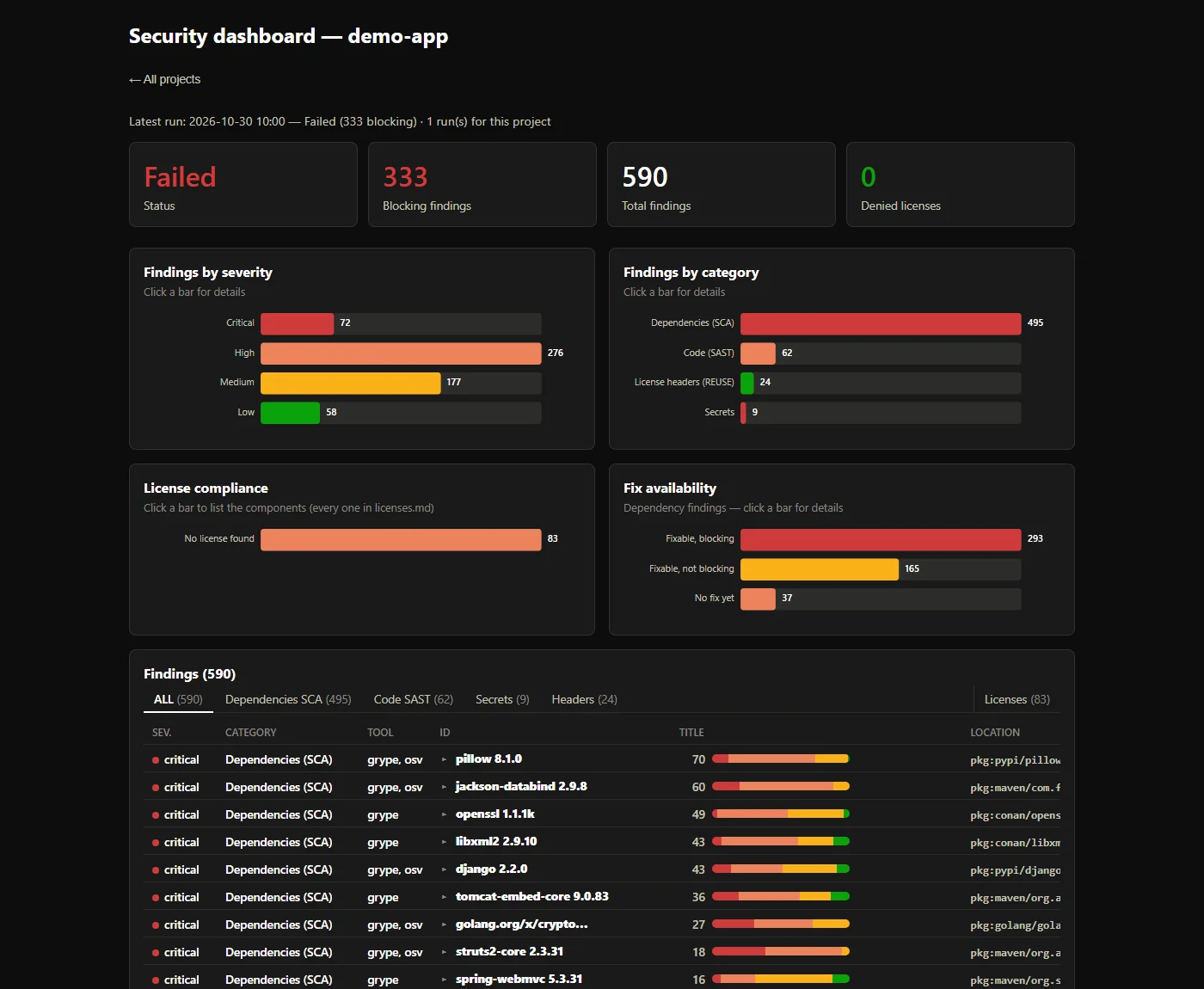
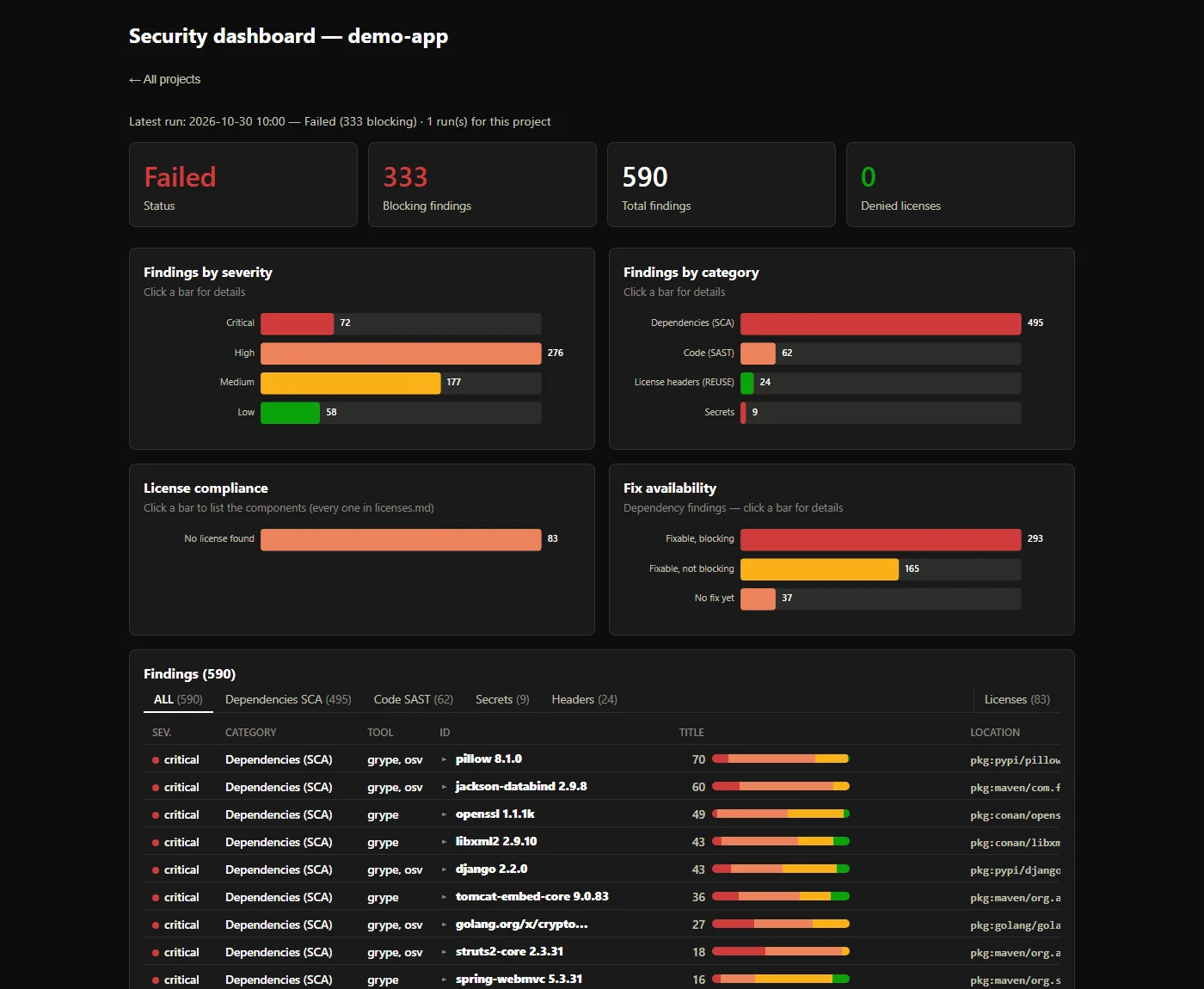
Every finding ends up in one dashboard, here on a deliberately vulnerable demo project (590 findings, 333 of them blocking):
Three ways to run it, with the same policy and the same report:
include:
  - component: gitlab.com/thalesgroup/oss-analyzer/[email protected]
That's all, on gitlab.com: the component is published in its CI/CD
Catalog from gitlab.com/thalesgroup/oss-analyzer,
a read-only copy of this repository. On a self-managed instance, which
can only include its own projects, mirror that project there and include
it by its path on your instance; its image stays on
registry.gitlab.com/thalesgroup/oss-analyzer (OSA_IMAGE_REPOSITORY),
tagged with the component's commit SHA. The analysis runs in the test stage on merge requests, the
default branch, schedules and tags; osa_report_aggregate is the only job
that can block. The dashboard is linked as OSS security dashboard in
the MR pipeline widget, and the MR's Reports tab shows the findings
(Security scan, Code Quality).
OSA_<TOOL>_IMAGE inputs — see
Container images.security/policy-global.yml,
policy-licenses.yml, policy-semgrep.yml, policy-gitleaks.toml,
holding only your differences — see
Customizing oss-analyzer. inputs:
OSA_DISTRIBUTION_MODEL: distributed # saas | distributed | oss_library
OSA_MODE: audit # onboarding: report everything, never block
OSA_JOB_NEEDS: ["build"] # wait for your build first
OSA_MODE: audit reports everything and
blocks nothing. OSA_GATE_SCOPE: new keeps blocking what's new: on a
merge request, only what isn't already in the target branch's latest
successful report blocks; elsewhere, findings are reported without
blocking (so it needs merge request pipelines). See
New findings only.OSA_ENABLE_MR_COMMENT: true posts the verdict,
the blocking findings and the dashboard link as one comment, updated by
every pipeline. It needs a project access token (scope api, role
Reporter) in a masked OSA_GITLAB_TOKEN CI/CD variable.OSA_MAVEN_MIRROR_URL (e.g. a
Maven Central remote of your artifact repository), with a masked OSA_MAVEN_MIRROR_AUTH
variable if it needs credentials, resolves through a mirror instead —
see Known pitfalls.@0.4 follows its patches). The 0.x
interface may still change until 1.0.0: a breaking change bumps the
minor version, see CHANGELOG.md.jobs:
security:
uses: ThalesGroup/oss-analyzer/.github/workflows/security.yml@<ref>
with:
oss-analyzer-repository: ThalesGroup/oss-analyzer
oss-analyzer-ref: <ref> # the same ref as in `uses:`
Inputs, permissions and secrets: see GitHub Actions.
Analyze a received project archive (.zip, .tar.gz) or folder without
setting up CI:
security/scripts/analyze-archive.sh my-project.zip
The report and an HTML dashboard land under
security-reports/<project-name>/ — see
Usage.
The full documentation is security/README.md: setup, every input and setting, the reports, known pitfalls. CHANGELOG.md lists the versions, breaking changes first.
Good Open Source scanners exist for each concern: Semgrep, Gitleaks, Syft, Grype, OSV-Scanner, Trivy, cdxgen, REUSE. What a team lacks is rarely one more scanner. It's the part between them: one decision instead of a pile of reports, rules that are written down instead of remembered, and licenses treated as seriously as CVEs. oss-analyzer is that part.
Each run looks at the three surfaces of what you ship, together: