
Skip to content
KitploitKITPLOIT
ToolsBlog
Submit
ToolsBlog
Submit

Hacking, PenTest, and Cybersecurity Tools for Your Security Arsenal!

Kitploit is a directory of hacking, cybersecurity, and pentesting tools. Discover the latest project updates to find vulnerabilities, analyze systems, automate testing, and strengthen your security.

··Feeds·Contact·Privacy·© 2026 Kitploit

Tool Directory

Categories

View all categories
Loading categories
Tools/GitLabGitLab/nihal799/zttp
Authentication & AuthorizationCloud Infrastructure SecurityDefensive ToolsNetwork SecurityDevSecOpsIdentity & Access Management (IAM)
GitLabnihal799/zttp

zttp

Zero-trust SSH bastion proxy with Vault-backed key management, RBAC policy enforcement, full session recording, and admin TUI for auditable access to production infrastructure.

View Repository
132 months agoNot yet reviewed

Most Popular

View all →

Discover the most used tools by our community.

Explore all tools

Browse our collection of tools

View all tools →
Share
Website

ZTTP — Zero-Trust Transparent Proxy

A hardened, self-hosted SSH bastion host with Vault-backed key management, RBAC policy enforcement, full session recording, and an interactive admin TUI — designed for teams who need auditable, zero-trust access to production infrastructure.


Table of Contents

  • Why ZTTP
  • Architecture Overview
  • Feature Highlights
  • Prerequisites
  • Quick Start — Server
  • Quick Start — Client
  • Configuration
  • Roles & RBAC Policy
  • Admin Console
  • Audit Logs & Session Recordings
  • Building from Source
  • Makefile Reference
  • Screenshots & Demo
  • Project Structure
  • Security Model
  • Contributing
  • License

Why ZTTP

Modern engineering teams need a way to give developers the minimum access required to do their jobs — no more, no less. Traditional SSH key distribution is error-prone: keys get shared, forgotten on laptops, and revoked days too late.

ZTTP solves this by acting as the single door into your infrastructure:


Architecture Overview

root@kitploit:~
Developer Laptop
      │
      │  zttp
      │  (Under the hood: SSH over port 2224)
      ▼
┌─────────────────────────────────────────────────────────┐
│                     ZTTP Proxy                          │
│                                                         │
│  ① Auth Gate     — bcrypt/Argon2id login TUI           │
│  ② RBAC Engine   — environment-aware policy check      │
│  ③ Vault Fetch   — ephemeral SSH key retrieval         │
│  ④ Bridge        — transparent TCP tunnel              │
│  ⑤ Audit Writer  — ttyrec frame recorder               │
└──────────┬──────────────────────────────────────────────┘
           │  ssh (private IP, ephemeral key)
           ▼
     Target Server

Infrastructure services (Docker Compose):


Feature Highlights

  • 🔐 Zero-trust authentication — Interactive SSH login TUI with bcrypt password hashing, rate limiting, and account lockout after 5 failed attempts
  • 🛡️ RBAC policy engine — Per-role, per-environment access control with a single optimized PostgreSQL JOIN (no round-trips)
  • 🗝️ Vault-backed SSH keys — Private keys never touch disk; fetched ephemerally per session from HashiCorp Vault
  • 📹 Full session recording — All sessions are recorded in .ttyrec format with timestamped frames
  • 🖥️ Interactive Admin TUI — Full terminal UI for user management, server registration, access grants, and log review
  • 🔍 Audit Log Viewer — Browse sessions by server, replay recordings, or read clean text logs directly from the admin console
  • ⚡ Kill Switch — gRPC endpoint to terminate any live session instantly
  • 📋 Admin Action Log — Every administrative action (user creation, access grants, log viewing) is logged to a persistent audit trail
  • 🌍 Multi-platform client — Single-binary CLI for Linux, macOS (amd64/arm64), and Windows

Prerequisites

Server (proxy host):

  • Docker ≥ 24 and Docker Compose ≥ 2.20
  • A public or LAN-accessible IP on port 2224
  • make (optional, but recommended)

Developer (client):

  • Any SSH client (ssh command)
  • Linux, macOS, or Windows machine

Quick Start — Server

1. Clone the repository

root@kitploit:~
git clone https://gitlab.com/Nihal799/zttp.git
cd zttp

2. Configure your environment

root@kitploit:~
cp .env.example .env

Edit .env and set at minimum:

root@kitploit:~
PROXY_NODE_IP=<your-server-public-ip>
POSTGRES_PASSWORD=<a-strong-password>
VAULT_TOKEN=<a-strong-vault-token>

⚠️ Never commit your .env file. It is listed in .gitignore.

3. Start all services

root@kitploit:~
make docker-up
# or directly:
docker compose -f deploy/docker-compose.yml up -d --build

4. Verify services are healthy

root@kitploit:~
make docker-ps
curl http://localhost:8080/healthz

5. Build and publish the CLI installers

root@kitploit:~
make release PROXY_ADDR=<your-server-ip>:2224

This cross-compiles clients for all platforms and auto-updates dist/install.sh and dist/install.ps1 with the correct server URL. The Nginx container serves these at http://<your-server-ip>:8555/.


Quick Start — Client

Linux / macOS

root@kitploit:~
curl -fsSL http://<proxy-ip>:8555/install.sh | bash

Windows (PowerShell, run as Administrator)

root@kitploit:~
irm http://<proxy-ip>:8555/install.ps1 | iex

Connect

Once installed, connect to the ZTTP gateway:

root@kitploit:~
zttp
# or directly:
ssh -p 2224 <your-username>@<proxy-ip>

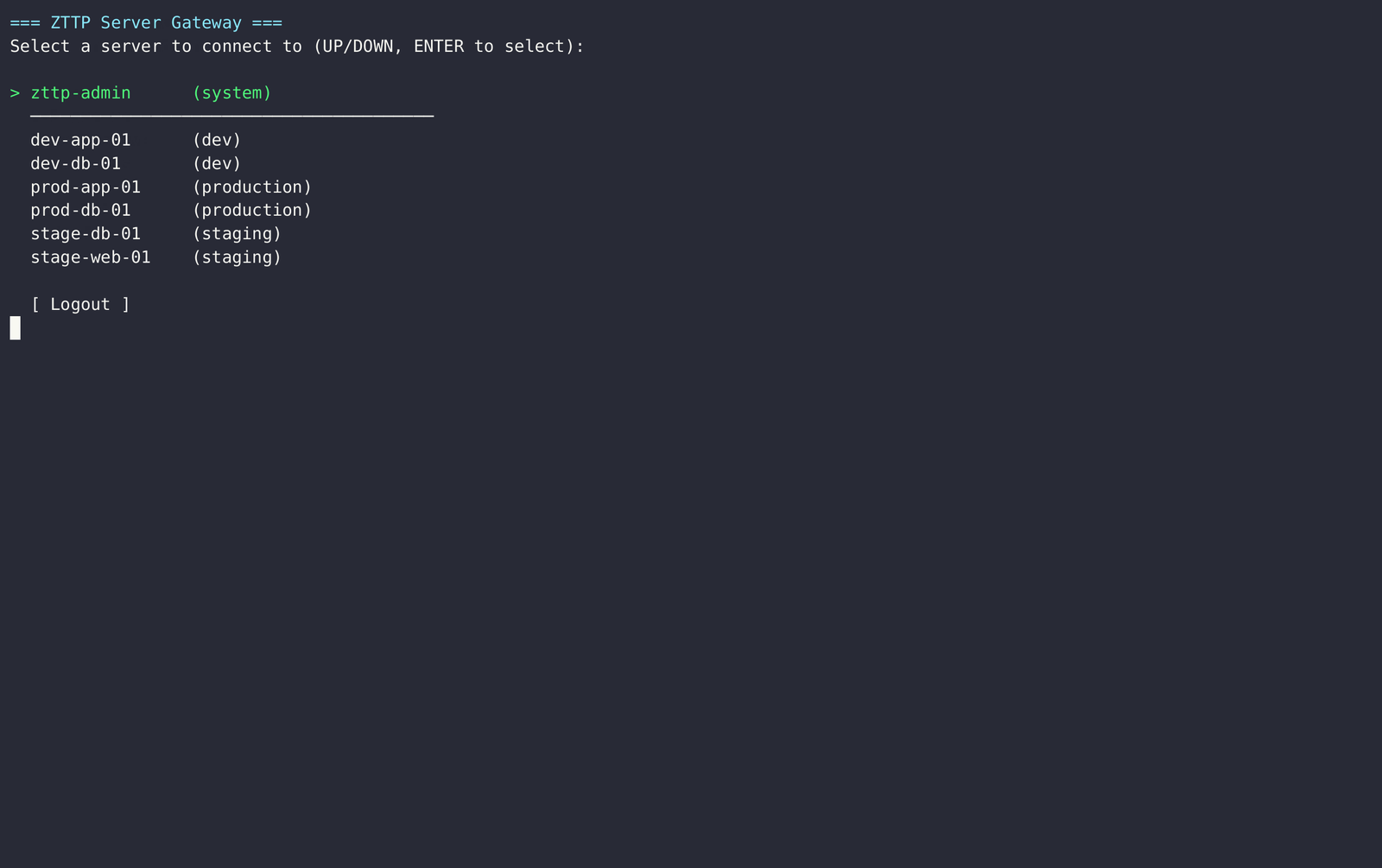
You will be presented with a terminal login screen. After authentication, you'll see a list of servers you are authorized to access.


Configuration

All configuration is via environment variables (or .env file). See .env.example for the full reference.


Roles & RBAC Policy

ZTTP uses a role-based model. Each user is assigned a role; each role has a policy that defines which server environments it can access.

Roles and server assignments are managed through the Admin Console (see below). The RBAC engine performs all checks in a single PostgreSQL query — it never exposes why access was denied to the client (enumeration protection).


Admin Console

Connect to the zttp-admin server from the gateway menu, or log in with an account that has the security-admin role.

The Admin Console provides:

All admin actions are logged to admin-actions.log inside the audit volume.


Audit Logs & Session Recordings

All sessions are stored in the zttp-audit-logs Docker volume (/var/log/zttp/audit/ inside the container).

Viewing from the Admin Console

  1. Log in as security-admin
  2. Select View Audit Logs
  3. Select a server from the list
  4. Select a session
  5. Choose View Text Log (ANSI-stripped, readable) or Play Recording (real-time playback)
  6. Press Ctrl+C to go back

Viewing from the host (raw)

root@kitploit:~
# List recordings
sudo ls /var/lib/docker/volumes/zttp-audit-logs/_data/

# Play a recording with ttyplay
sudo ttyplay /var/lib/docker/volumes/zttp-audit-logs/_data/<session-id>.ttyrec

# Read admin actions log
sudo cat /var/lib/docker/volumes/zttp-audit-logs/_data/admin-actions.log

Building from Source

Requirements: Go 1.25+, Docker (for cross-compilation)

root@kitploit:~
# Build proxy + CLI for current platform
make build

# Cross-compile CLI for all platforms (Linux, macOS, Windows)
make release PROXY_ADDR=<proxy-ip>:2224

# Run tests
make test

# Run proxy locally (requires Postgres + Vault already running)
make run-proxy

Makefile Reference


Screenshots & Demo

1. Installation

Installation Demo (Click to play demo)

2. Secure Login

Secure Login Demo (Click to play demo)

3. Add Server (Admin Console)

Add Server Demo (Click to play demo)

4. Connect to Server (Gateway)

Connect Server Demo (Click to play demo)

5. Kill Switch (Admin Eject)

Kill Switch Demo (Click to play demo)


Project Structure

root@kitploit:~
zttp/
├── cmd/
│   ├── proxy/          # Proxy server entrypoint
│   └── zttp/           # CLI client entrypoint
├── db/
│   └── migrations/     # PostgreSQL schema migrations
├── deploy/
│   ├── docker-compose.yml
│   ├── Dockerfile.proxy
│   └── vault-seed.sh   # Seeds test SSH keys into Vault
├── dist/
│   ├── install.sh      # Linux/macOS installer script
│   └── install.ps1     # Windows installer script
├── internal/
│   ├── audit/          # Admin action logging
│   ├── auth/           # User authentication (bcrypt, lockout)
│   ├── cli/            # CLI client TUI and connect logic
│   ├── config/         # Environment-based configuration
│   ├── killswitch/     # gRPC kill-switch service
│   ├── proxy/          # SSH proxy, gateway TUI, admin TUI, bridge
│   ├── rbac/           # Role-based access control engine
│   ├── ratelimit/      # Per-IP rate limiting
│   ├── session/        # Session tracking and DB store
│   └── vault/          # HashiCorp Vault SSH key client
├── proto/              # gRPC protocol definitions
├── tools/
│   └── hashpw/         # CLI tool: generate bcrypt password hash
├── .env.example        # Configuration template
├── go.mod
└── Makefile

Security Model


Contributing

  1. Fork the repository
  2. Create a feature branch: git checkout -b feat/your-feature
  3. Make your changes, ensuring each file gets its own commit
  4. Run tests: make test
  5. Open a merge request

Please do not commit:

  • .env or any file containing secrets
  • Real IP addresses or hostnames of production servers
  • Compiled binaries (the zttp binary in the root is .gitignored)

License

This project is proprietary. All rights reserved.


Built with Go, PostgreSQL, HashiCorp Vault, and Docker.

Download Tool
ProblemZTTP Solution
SSH keys shared on laptopsKeys live only in HashiCorp Vault — never on disk
No visibility into who did whatEvery keystroke is recorded in .ttyrec format
Blanket production accessRole-based policy engine enforces per-environment rules
No way to stop an active sessionKill-switch gRPC endpoint terminates any live session
Opaque access for auditorsAdmin TUI with session playback, text logs, and admin action logs
ServicePurpose
zttp-proxyThe SSH bastion (Go binary)
zttp-postgresControl-plane database (users, servers, RBAC policies)
zttp-vaultHashiCorp Vault — stores SSH private keys
zttp-nginxServes CLI installers at /release/
zttp-init-auditOne-shot container that fixes volume permissions
VariableDefaultDescription
PROXY_LISTEN_ADDR0.0.0.0:2222SSH proxy bind address
HTTP_LISTEN_ADDR0.0.0.0:8080Health check HTTP address
GRPC_LISTEN_ADDR0.0.0.0:9090Kill-switch gRPC address
PROXY_NODE_IP127.0.0.1External IP baked into CLI binaries
DATABASE_URLpostgres://zttp:...PostgreSQL connection string
VAULT_ADDRhttp://localhost:8201Vault server URL
VAULT_TOKENdev-root-token-zttpVault root token (dev only — use AppRole in prod)
MAX_FAILED_ATTEMPTS5Lockout threshold
LOCKOUT_DURATION15mDuration of account lockout
RATE_LIMIT_PER_MIN10Max login attempts per minute per IP
AUDIT_LOG_DIR/var/log/zttp/auditPath to session recording directory
SOC_WEBHOOK_URL(empty)Optional webhook for SOC alerting
RoleAccess
security-adminFull access to all environments + Admin Console
sre-tier1All environments including production
sre-tier2Staging and development only
devDevelopment environment only
readonlyDevelopment environment, restricted command set
Menu OptionDescription
Add UserCreate a new user with role assignment
Add ServerRegister a target server (hostname, IP, environment, SSH user)
Manage Server AccessGrant or revoke user access to specific servers
View UsersList all users and their roles
View ServersList all registered servers
View Audit LogsBrowse sessions, replay recordings, read text logs
[ Back ]Return to the server gateway
CommandDescription
make buildBuild proxy and CLI for current platform
make releaseCross-compile CLI binaries for all platforms
make release-dockerCross-compile inside a Docker container (avoids snap/WSL issues)
make docker-upStart all Docker Compose services
make docker-downStop all services and delete volumes
make docker-logsTail proxy logs
make docker-psShow container status
make testRun all Go tests
make migrateApply database migrations
make seedSeed development data
make hashpw PW=mypasswordGenerate a bcrypt hash for manual DB seeding
make cleanRemove compiled binaries and build cache
LayerMechanism
TransportAll client connections are SSH (encrypted in transit)
Authenticationbcrypt (cost 12) / Argon2id — plaintext is structurally prohibited in the schema
Brute-force protectionAccount lockout (5 attempts / 15 min) + per-IP rate limiter
AuthorizationSingle-JOIN RBAC query — denials are always generic ("Permission denied")
Secret managementSSH private keys stored exclusively in HashiCorp Vault, fetched ephemerally
Audit trailFull keystroke recording in .ttyrec format, immutable append-only admin log
Process isolationProxy runs as non-root (UID 65532) inside a distroless container
Kill switchAny live session can be terminated via gRPC without restarting the proxy