Skip to content
KitploitKITPLOIT
ToolsBlog
Submit
ToolsBlog
Submit

Hacking, PenTest, and Cybersecurity Tools for Your Security Arsenal!

Kitploit is a directory of hacking, cybersecurity, and pentesting tools. Discover the latest project updates to find vulnerabilities, analyze systems, automate testing, and strengthen your security.

··Feeds·Contact·Privacy·© 2026 Kitploit

Tool Directory

Categories

View all categories
Loading categories
NcStatusCheck — Monitoring centralisé pour instances Nextcloud multiples | Kitploit
Tools/GitLabGitLab/jp.louvel/ncstatuscheck
Vulnerability AnalysisConfiguration AuditingCloud Security
GitLabjp.louvel/ncstatuscheck

NcStatusCheck

Monitoring centralisé pour instances Nextcloud multiples

View Repository
2117 days agoNot yet reviewed

Most Popular

View all →

Discover the most used tools by our community.

Explore all tools

Browse our collection of tools

View all tools →
Share

NcStatusCheck

Centralized monitoring for multiple Nextcloud instances

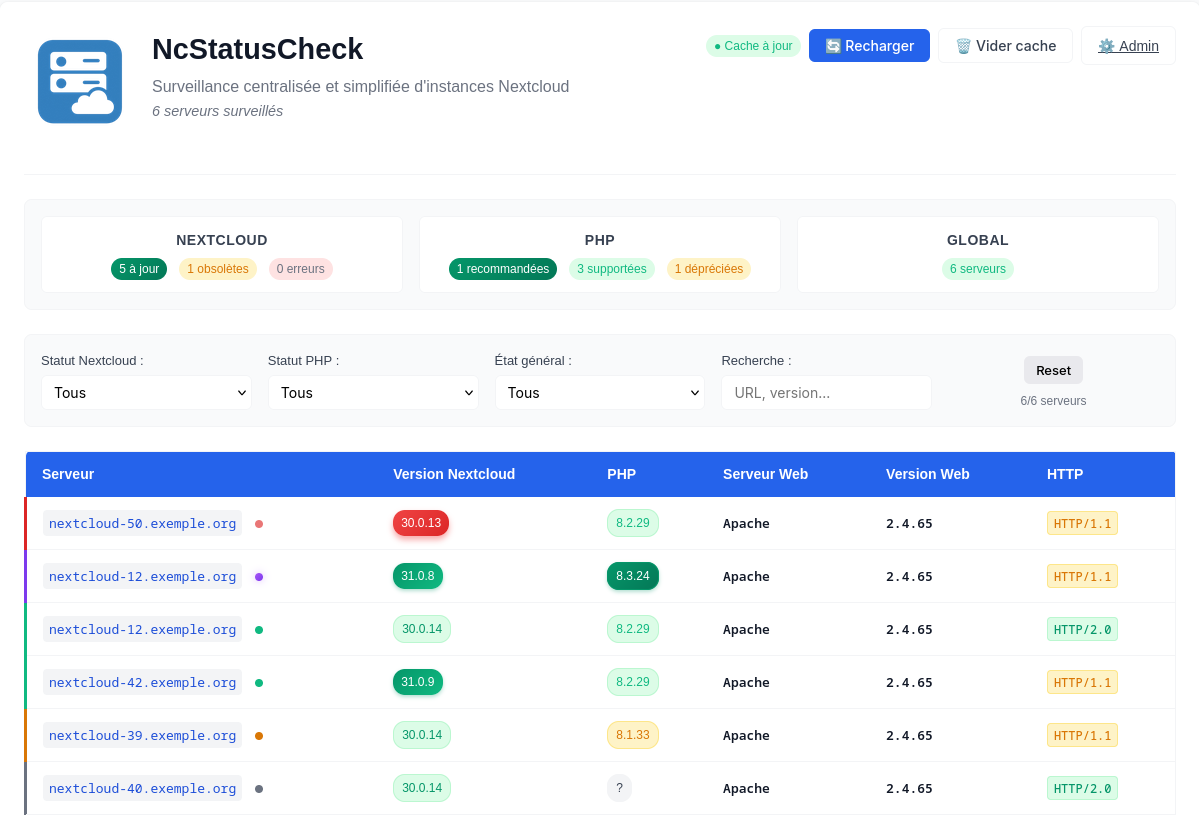
NcStatusCheck is a monitoring tool that lets you track the health of multiple Nextcloud servers from a single web interface. It analyzes Nextcloud and PHP versions and provides update recommendations.

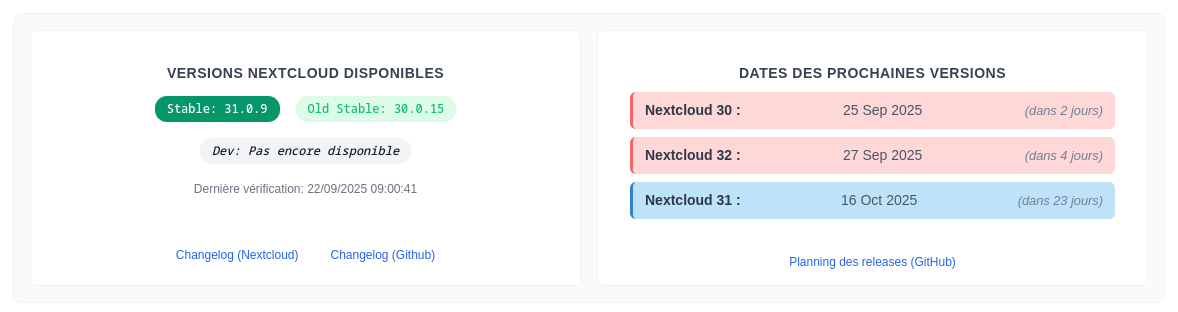
NcStatusCheck Interface NcStatusCheck Interface - 2

🎯 Features

Monitoring

  • Automated surveillance of multiple Nextcloud instances
  • Three data collection modes per server: Basic (NC version only), Extended (full data via serverinfo API), and Push (data sent by the remote instance)
  • Version analysis for Nextcloud and PHP
  • Web server detection (nginx, Apache) and HTTP protocols
  • Up/down tracking (mini uptime): current reachability + last state change, surfaced as a red "offline" badge only when down. A bounded transition journal also feeds a 30-day availability % and a recent-incident list on the detail page
  • SSL certificate expiry alert: read from the existing HTTPS probe (no extra request), badge when the certificate expires soon (< 15d / < 7d)
  • Installed apps audit: cross-checks occ app:list against the Nextcloud app store to flag apps to review — blocking (upgrade-blocking, incompatible, test apps in production) plus informational maturity/turbulence signals (recently published, pre-1.0, alpha/beta/rc build, burst of releases, freshly released version)
  • Fleet-wide watch blocks: an "Apps to watch" (📦) and a twin "Containers to watch" (🐳) block aggregate every flagged app / Docker image across all instances into one entry each, with per-group type filters and a popup listing the impacted instances and their versions
  • Proactive alerts (webhook and/or email): fires on a confirmed up/down state change (offline, maintenance, recovered) so you are notified without a dashboard open — Slack / Mattermost / Google Chat / Discord / raw JSON (ALERT_WEBHOOK_URL), and/or a digest email per batch (ALERT_EMAIL_TO) sent by direct SMTP submission to your mail server (vendored PHPMailer; falls back to the local MTA when no SMTP relay is configured). Also covers slow-moving signals (ALERT_CHECKS): SSL certificate expiry (tiered), vulnerable/deprecated Nextcloud version, stale Push probe, critical audit report, blocking app finding — one alert per new condition, no reminder spam
  • Update grace delay: an instance is only flagged outdated a few days after a patch is released (nc_update_grace_days), to avoid chasing a same-day-buggy release
  • Health column using the "silence = all good" principle: only shows badges (⚠️ warnings, 📦 apps, 🔄 Docker, 🔒 SSL, 🔴 offline, 🚧 maintenance) when there is something to report
  • Cache system for server data and official versions

Detail page

  • Full view of each Nextcloud server's configuration (PHP, OPcache, Redis, database…) for Extended/Push servers
  • Basic detail page for servers without a probe: shows version, web server, HTTP protocol, and an upgrade hint
  • 30-day availability % and recent-incident list (start, end, duration, reason), computed from the bounded up/down transition journal — honest "measured over N days" label while the journal is younger than the window
  • Configuration warning rules with ⚠️ indicators, each acknowledgeable (reason + optional expiry)
  • Server audit report section when the instance pushes its monthly nc-audit.sh report
  • Accessible by clicking on any server name or a health indicator

Interface

  • Centralized dashboard with status overview (summary cards surface offline / expiring-cert / apps-to-review counts only when non-zero)
  • Advanced filters by Nextcloud status, PHP status, overall status, running Docker image, and text search
  • Official versions automatically fetched from Nextcloud sources
  • Release schedule with upcoming version dates
  • FR / EN / DE interface (language switcher in the top-right corner)

Administration

  • Administration interface to configure version rules
  • Probe modes summary table at the top: explains the three collection methods (Basic, Extended, Push) at a glance
  • Server management via web UI with card layout: two distinct probe zones (serverinfo / push), masked tokens with reveal, inline delete
  • "Configure probes" button per server to toggle token zones, state saved in localStorage
  • Real-time server search with accent-insensitive matching
  • Push script generator: generates a ready-to-use bash cron script (chmod 700) for the remote Nextcloud instance, auto-updated as options change
  • "Trigger Push" button on the dashboard: sends a push request to all configured push servers (visible only when at least one push server exists, 5-minute cooldown)
  • Flexible configuration of security thresholds per Nextcloud branch

🏗️ Architecture

root@kitploit:~
ncstatuscheck/
├── Frontend
│   ├── index.php              # Main entry point
│   ├── template.html          # HTML template (dashboard)
│   ├── admin.html             # Administration interface
│   ├── detail.php             # Server detail page
│   ├── audit.php              # Server-audit script distribution page (nc-audit.sh)
│   ├── troubleshooting.php    # Probe troubleshooting guide
│   ├── app.js / admin.js / detail.js / audit.js / troubleshooting.js
│   └── style*.css             # One stylesheet per page family
├── APIs (HTTP)
│   ├── api.php                # Main monitoring API
│   ├── detail-api.php         # Detail page API (serverinfo + warnings + acks + availability)
│   ├── push-api.php           # Push reception + trigger + audit-report reception
│   ├── ack-api.php            # Warning acknowledge / unmute
│   ├── admin-api.php          # Version configuration routing
│   ├── servers-admin-api.php  # Server list management
│   ├── nextcloud-versions-api.php # Official version scraping
│   ├── nextcloud-apps-api.php # App store catalog (slim cache) for the apps audit
│   ├── php-versions-api.php   # PHP branch support data
│   └── apps-warnings-api.php  # Manual app warnings (known-bug list) CRUD
├── Shared modules (lib/)
│   ├── auth.php               # Auth + CSRF + URL redaction (defense in depth)
│   ├── csrf-client.js         # Auto-inject X-CSRF-Token in fetch()
│   ├── nextcloud-client.php   # Centralized HTTP client → remote Nextclouds
│   ├── servers-store.php      # Single source of truth for servers.json
│   ├── uptime-state.php       # Up/down state machine + transition journal + availability
│   ├── alerts.php             # Proactive alert dispatch: webhook + email digest
│   ├── alerts-checks.php      # Slow-signal alerts (SSL/version/push/audit/apps) + dedup state
│   ├── smtp-mailer.php        # SMTP transport adapter over vendored PHPMailer
│   ├── phpmailer/             # Vendored PHPMailer (3 files + LICENSE, pinned in VERSION)
│   ├── apps-warnings-manager.php # Manual app warnings storage
│   ├── ui-common.js           # NcUI: notify / confirm / prompt + shared app-audit messages
│   ├── url-guard.php          # Anti-SSRF (loopback, RFC1918, link-local…)
│   ├── json-cache.php         # Locked JSON read/write helpers
│   └── version-config-manager.php # Version rules CRUD
├── Business logic
│   ├── version-rules.php      # NC / PHP status analysis engine
│   ├── warnings-rules.php     # Configuration warning engine
│   ├── apps-rules.php         # Installed-apps audit engine (store catalog cross-check)
│   ├── cron-update.php        # Full collection script, CLI only (twice a day)
│   └── cron-ping.php          # Lightweight up/down probe, CLI only (every 5 min)
├── Tools (never web-served — blocked by nginx/.htaccess)
│   ├── tools/nc-audit.sh      # Standalone server audit script (root, read-only)
│   └── tools/ncstatuscheck-push-core.sh # Generic Push probe core (fleet-shared)
├── Tests
│   └── tests/run.php          # Plain-PHP test suite (no framework): php tests/run.php
├── Configuration
│   ├── config.php             # Central configuration (git-ignored)
│   └── servers.json           # Server list with tokens (git-ignored)
└── Cache
    ├── servers_data.json      # All server data
    ├── serverinfo_<md5>.json  # Raw per-server cache (Extended)
    ├── push_<md5>.json        # Last push payload per server
    ├── ack_<md5>.json         # Acknowledged warnings per server
    ├── audit_<md5>.json       # Last nc-audit.sh report per server
    ├── version-config.json    # Version configuration
    ├── uptime_state.json      # Up/down state per server (mini uptime)
    ├── uptime_history.json    # Bounded up/down transition journal (availability % + incidents)
    ├── alerts_state.json      # "Already alerted" memory of the check alerts
    ├── nextcloud_versions.json # Official NC versions
    ├── nextcloud_apps.json    # App store slim catalog (apps audit)
    ├── apps-warnings.json     # Manual app warnings (admin-curated)
    ├── .csrf_secret           # CSRF HMAC secret (binary, 0600)
    └── *.log                  # Activity logs

deploy/ansible/                # Fleet deployment of the Push core (Ansible / scp)
deploy/docker/                 # Container packaging of the monitor itself

🔌 Collection modes

Modes are not mutually exclusive — a server can be Extended and Push simultaneously.

The serverinfo NC-Token is available in Nextcloud Settings → Administration → System.

The push token is generated from the administration interface; the admin provides a ready-to-use bash cron script (chmod 700) to deploy on the monitored instance.

Extended mode data is provided by the nextcloud/serverinfo app, which must be installed and enabled on the monitored instance.

Fallback behavior: if the Extended API is unreachable (connection error, invalid token, app not installed), NcStatusCheck automatically falls back to /status.php to retrieve at least the Nextcloud version.

Push staleness threshold: a push server is considered stale if no data has been received within auto_push_interval + 30 minutes. The default push interval is 12 hours.

Dashboard table columns

The main dashboard shows 5 columns: Server | NC Version | PHP | Probes | Health

The Probes column displays the active collection modes for each server:

  • ⚡ Extended badge (purple, turns orange on connection error or stale data)
  • 📡 Push badge (blue, turns orange when no data received within the threshold)
  • Both badges can appear simultaneously if both modes are active
  • No badge = Basic mode only

Health column

The Health column only shows something when there is something to act on:

Up/down & SSL expiry

NcStatusCheck keeps a minimal up/down state per server (current state + last change date only — no time series, no history page). "Up" means the outbound HTTPS probe reached the instance; a red Offline badge appears only when down. During that same HTTPS probe, the SSL certificate expiry is read for free (CURLOPT_CERTINFO) and surfaced when it gets close. Both are visible in full on the detail page. Note: these outbound checks don't apply to Push-only instances that the monitor never contacts.

Apps audit (📦)

When a Push server reports its installed apps (occ app:list, push script v3+), NcStatusCheck cross-checks them against the Nextcloud app store catalogue and flags apps worth reviewing. Signalling only — the tool never disables anything; it surfaces candidates (it cannot know whether an app is actually used). Only factual, binary signals are used. The 📦 N badge counts blocking findings (no compatible release for the current NC version, no release for NC N+1 → blocks the upgrade, or a test/dev app left enabled in production). Informational findings (app outdated on the instance, abandoned upstream, PHP incompatible) are shown on the detail page only. Findings can be muted via the same acknowledge mechanism as warnings.

servers.json format

root@kitploit:~
[
  {"url": "https://cloud.example.com"},
  {"url": "https://cloud2.example.com", "serverinfo_token": "abc123def456"},
  {"url": "https://cloud3.example.com", "serverinfo_token": "...", "push_token": "xyz789"}
]

🚀 Installation

Prerequisites

  • PHP 8.1+ with cURL and JSON extensions — that's the syntax floor CI tests against, not a deployment recommendation: 8.1 and 8.2 are both already past their security-support end date, use a currently-supported version (8.3+ as of this writing) for anything internet-facing
  • Web server nginx or Apache with HTTPS
  • Network access to the Nextcloud servers to monitor

Web server configuration (nginx)

root@kitploit:~
server {
    server_name monitoring.your-domain.com;
    root /var/www/ncstatuscheck;
    index index.php;

    # HTTP Basic Authentication
    auth_basic "Monitoring Access";
    auth_basic_user_file /etc/nginx/.htpasswd;

    # Protect sensitive files/dirs (tests/run.php has no CLI-only guard — it must
    # never be reachable over HTTP; same blocklist as deploy/docker/nginx.conf)
    location ~ ^/(cache/|\.git|deploy/|tools/|tests/) {
        deny all;
        return 404;
    }

    # .txt covers servers.txt (legacy server list — real monitored URLs)
    location ~* \.(log|json|txt)$ {
        deny all;
        return 404;
    }

    # Security headers for static HTML pages (admin.html, template.html).
    # PHP pages (index.php, detail.php) send the same headers themselves
    # via send_security_headers() in lib/auth.php.
    location ~* \.html$ {
        add_header X-Content-Type-Options nosniff always;
        add_header X-Frame-Options DENY always;
        add_header Referrer-Policy no-referrer always;
        add_header Content-Security-Policy "default-src 'self'; script-src 'self' 'unsafe-inline'; style-src 'self' 'unsafe-inline'; img-src 'self' data:; connect-src 'self'; frame-ancestors 'none'; base-uri 'self'" always;
        try_files $uri =404;
    }

    # Standard PHP configuration (adjust the socket to your PHP version —
    # use a security-supported one: 8.2 has been EOL since December 2025)
    location ~ \.php$ {
        fastcgi_pass unix:/run/php/php8.4-fpm.sock;
        fastcgi_index index.php;
        include fastcgi_params;
        fastcgi_param SCRIPT_FILENAME $document_root$fastcgi_script_name;
    }

    location / {
        try_files $uri $uri/ =404;
    }
}

Apache: the repository ships .htaccess files mirroring the deny rules above (root: blocks *.log/*.json/*.txt and .git; cache/, tools/, deploy/, tests/: Require all denied). They only work if the vhost sets AllowOverride FileInfo AuthConfig (or All) — Debian's default for /var/www is AllowOverride None, in which case replicate the rules in the vhost directly. HTTP Basic auth still has to be configured in the vhost either way.

Deployment

  1. Clone the repository
root@kitploit:~
git clone https://gitlab.com/jp.louvel/ncstatuscheck.git
cd ncstatuscheck
  1. Configuration Create your configuration file from the template:
root@kitploit:~
cp config-example.php config.php

Edit config.php and adjust paths and URL to your environment:

root@kitploit:~
define('MONITOR_PATH', '/var/www/ncstatuscheck');
define('MONITOR_URL', 'https://monitoring.your-domain.com'); // your public URL
define('CACHE_DIR', MONITOR_PATH . '/cache');
  1. Add servers

Servers are managed directly from the administration interface (⚙️ Admin button). You can also create servers.json manually:

root@kitploit:~
[
  {"url": "https://cloud.example.com"},
  {"url": "https://nextcloud.mycompany.org", "serverinfo_token": "your_token_here"}
]

Migration from servers.txt: if a servers.txt file exists, it is automatically converted to servers.json on first access. You can then delete servers.txt.

  1. Set permissions

nginx/PHP-FPM run as their own user (www-data on Debian/Ubuntu, nginx/apache on RHEL-family — adjust below) — if you cloned as your own login user, that user almost certainly won't be www-data or in its group, so chmod alone leaves the web server with no access at all, not even read (every request 403/404s):

root@kitploit:~
chown -R www-data:www-data /var/www/ncstatuscheck   # adjust the user:group to your distro

chmod 750 /var/www/ncstatuscheck
chmod 750 cache img

chmod 640 *.php *.html *.js *.css *.md
chmod 600 config.php servers.json servers.txt   # secrets / serverinfo & push tokens
chmod 660 cache/*.json cache/*.log

If servers.json doesn't exist yet (you're letting the admin UI create it instead of the manual step above), the chmod 600 above simply has nothing to act on — that's fine: ServersStore::save() chmods the file to 0600 itself on every write, so a servers.json (re)created through the admin UI never stays group/world-readable with serverinfo/push tokens inside.

  1. HTTP authentication
root@kitploit:~
htpasswd -c /etc/nginx/.htpasswd admin
  1. Scheduled tasks (optional)

Two complementary crons — install both in the same crontab - call: crontab - installs a whole new crontab from stdin, it doesn't append, so running it twice (once per line) leaves only the second job — the first silently vanishes, no error. This also preserves anything already in your crontab (crontab -l piped in first) instead of wiping it:

root@kitploit:~
(crontab -l 2>/dev/null; cat <<'EOF'
# Full collection (NC/PHP versions, serverinfo, app-store catalog) — twice a day
0 6,18 * * * cd /var/www/ncstatuscheck && php cron-update.php
# Lightweight reachability probe (status.php only -> up/down state) — every 5 min
*/5 * * * * cd /var/www/ncstatuscheck && php cron-ping.php
EOF
) | crontab -

Re-running this appends duplicates if these lines are already present — check with crontab -l first if unsure.

cron-ping.php is intentionally minimal: it only checks each instance's status.php and updates the up/down state (cache/uptime_state.json), so it can run frequently without load. An instance is only flagged down after UPTIME_FAIL_THRESHOLD consecutive failed probes (default 2 → ~10 min with a 5-min cadence); recovery to up is immediate. The full cron-update.php remains unchanged for everything else.

Docker (alternative to bare-metal)

Instead of steps 1–6 above, NcStatusCheck can also run as a small docker compose stack (PHP-FPM + nginx + a cron container) — the repo is bind-mounted as-is, no build step or Composer, so it mirrors the bare-metal layout exactly, just containerised. Serves plain HTTP only (port 8080 by default) — put your own TLS-terminating reverse proxy in front of it.

Full setup — configuration, the permissions gotchas (uid 82, servers.json pre-creation), HTTP Basic Auth, cron, updates and backups — lives entirely in deploy/docker/README.md. Start there; this section is intentionally just a pointer, to avoid keeping two copies of the same steps in sync.

📋 Usage

Main interface

  • Go to https://monitoring.your-domain.com
  • View the dashboard with the status of all your servers
  • Use filters to narrow down by status or search
  • Check official versions and the release schedule

Administration

  • Open the administration interface via the "⚙️ Admin" button
  • A probe modes summary table at the top of the page explains the differences between Basic, Extended, and Push collection methods
  • Server management: each server is displayed as a card with two collapsible probe zones:
    • Serverinfo zone: configure the read token (NC → NcStatusCheck pull)
    • Push zone: generate a push token and download the ready-to-use cron script for the remote instance
  • Nextcloud configuration: set minimum secure versions per branch (hover effects on rows)
  • PHP configuration: set recommended/supported statuses per version

Detail page

Accessible by clicking on any server name or its Health indicator.

For Basic servers (no Extended or Push probe), a simplified page shows the available data (NC version, web server, HTTP protocol) with a notice and a suggestion to enable a probe.

For Extended / Push servers, the full detail page displays separate sections:

API

NcStatusCheck exposes several REST endpoints:

Main API (api.php)

  • GET ?action=get_data — Fetch data (cache or refresh)
  • POST ?action=refresh_data — Force update of all servers

Push API (push-api.php)

  • POST with push_token header — Receive push data from a remote NC instance
  • POST ?action=request_push_all — Request an immediate push from all configured push servers (sets a trigger flag consumed by the remote cron script)

The cron script generated by the admin UI is split in two: a generic core /usr/local/bin/ncstatuscheck-push.sh — identical on every server (all the logic) — driven by a small per-instance config /etc/ncstatuscheck/<slug>.conf (SERVER_URL, SLUG, OCC_CMD, DOCKER_ENABLED, SKOPEO_ENABLED). It is invoked as ncstatuscheck-push.sh /etc/ncstatuscheck/<slug>.conf [--test]. The core refuses to source a group/world-writable config (anti code-injection).

It is multi-target (fan-out): data is collected once and pushed to every monitor listed in /etc/ncstatuscheck/targets-<slug>.conf (one url|push_token[|http_user|http_pass] line per monitor). Each monitor's admin emits an idempotent command to register itself.

Multiple Nextcloud instances on one host: per-instance paths are suffixed by a <slug> derived from the monitored URL (e.g. → ): , , , , state . Only the core is shared, so co-located instances never collide.

Detail API (detail-api.php)

  • GET ?server=<url> — Full serverinfo data + computed warnings for an Extended/Push server

Administration APIs

  • admin-api.php — Version configuration
  • servers-admin-api.php — Server management (get_servers, add_server, remove_server, update_server_token, generate_push_token, remove_push_token)
  • nextcloud-versions-api.php — Official versions

🩺 Server audit (nc-audit.sh)

A separate subsystem from monitoring: a standalone, read-only bash script (tools/nc-audit.sh) run as root on a Nextcloud server for a one-off / monthly audit of the web + PHP + database tuning, cross-checked against the machine's physical capacity (RAM, CPU, disk type). Aimed at a managed-supervision offer: the client installs it, the monitor only receives reports — no machine/network access required. The script only reads the configuration (no changes), prints a coloured report and writes a copy to /tmp.

What it checks: server capacity (RAM/CPU/SSD-HDD, swappiness, shared-server detection) · Nextcloud (versions, cron, cache, Redis runtime, DB type, logs) · PHP/PHP-FPM (real serving SAPI, OPcache runtime, multi-pool memory) · Apache (MPM-aware worker memory) · Nginx · PostgreSQL · MariaDB · security hygiene (fail2ban or CrowdSec + bouncer + community blocklist; pending updates / reboot / services on stale libraries) · RAM budget reconciliation (InnoDB + FPM + Apache vs real RAM) · deep analysis with optional tools if already present (mysqltuner, pt-variable-advisor, apache2buddy, sar/iostat).

root@kitploit:~
# Download (the page distributes it; the repo raw URL is public)
curl -fsSL https://gitlab.com/jp.louvel/ncstatuscheck/-/raw/master/tools/nc-audit.sh -o /usr/local/bin/nc-audit.sh
chmod 700 /usr/local/bin/nc-audit.sh

sudo nc-audit.sh                                   # auto-detect, dedicated server
sudo nc-audit.sh /var/www/nextcloud                # explicit path (or NC_PATH=…)
sudo NC_RAM_BUDGET_PCT=50 nc-audit.sh              # shared host: size to 50% of RAM

Multi-instance hosts (several Nextclouds + a shared database). NC_RAM_BUDGET_PCT is then the total stack budget; NC_PHP_SHARE_PCT% of it (default 60, the rest covers DB + web + OS — lower it on DB-heavy servers) is the PHP share, split across FPM pools by weight (a relative importance — not a percentage, not MB) to give a target pm.max_children per pool:

root@kitploit:~
target = PHP_share × (weight / Σ weights) / ~50 MB per process

The target is a ceiling the budget allows, not a value you must set (only raise a pool that actually saturates). Weights are your call — the tool never guesses them.

root@kitploit:~
# Weights you provide (a human judgment — the tool never guesses them):
sudo NC_RAM_BUDGET_PCT=70 NC_INSTANCES="poolA:4,poolB:2,poolC:1" nc-audit.sh

# Interactive helper (terminal only): lists the pools, asks a weight for each,
# prints the targets + a reusable NC_INSTANCES line:
sudo NC_RAM_BUDGET_PCT=70 nc-audit.sh --tune-fpm

Report push-back (optional, reuses the Push infrastructure): nc-audit.sh --push /etc/ncstatuscheck/<slug>.conf runs the audit and POSTs the report to the monitor(s), which store it and show it on the server's detail page ("🩺 Server audit" section). Typically a monthly cron. The web page (admin, beta) at audit.php distributes the script (download + inline + GitLab one-liner) and shows its version.

Deep-analysis tools are never installed by the script — they only run if already present (no curl | bash, no auto-install), each bounded by timeout.

🔧 Advanced configuration

Version rule customization

Evaluation rules are configurable via the administration interface:

Nextcloud statuses:

  • dev — Development version
  • stable — Current stable version
  • oldstable — Previous supported stable version
  • deprecated — Deprecated version

PHP statuses:

  • recommended — Recommended version
  • supported — Supported version
  • deprecated — Deprecated version

Configuration variables

Edit config.php to adapt the configuration:

root@kitploit:~
// Environment: 'dev' or 'prod'
define('ENV', 'prod');

// Paths and URLs
define('MONITOR_PATH', '/var/www/ncstatuscheck');
define('MONITOR_URL', 'https://monitoring.your-domain.com');

// Main server cache duration
define('CACHE_MAX_AGE', 86400); // 24 hours

// Official Nextcloud versions cache duration
define('VERSIONS_CACHE_AGE', 86400);

// Consecutive failed probes before a server is marked "down" (min 1)
define('UPTIME_FAIL_THRESHOLD', 2);

// Proactive alerts — webhook on a confirmed up/down state change.
// Empty URL = disabled. Format: 'slack' (default, also Mattermost/Google Chat),
// 'discord', or 'raw' (structured JSON). The URL usually carries a secret, so it
// is never logged in full — see config-example.php for details.
define('ALERT_WEBHOOK_URL', '');
define('ALERT_WEBHOOK_FORMAT', 'slack');

// Check alerts on top of up/down (cron-update cadence, 2×/day): SSL expiry
// tiers, vulnerable (below min_secure) or deprecated Nextcloud version, stale
// Push data, critical audit report, blocking apps-audit finding. Edge-triggered with a persisted state
// (cache/alerts_state.json): one alert per NEW condition, no reminders, re-arms
// when resolved (renewed cert, fixed/acked app…). First run arms silently.
define('ALERT_CHECKS', 'ssl,version,push_stale,audit,apps'); // '' = up/down only
define('ALERT_SSL_DAYS', '30,14,7');                          // days-left tiers

// Email channel, independent of the webhook (either one arms the alerting).
// One digest mail per batch. Recommended transport: direct SMTP submission to
// your mail server (vendored PHPMailer, lib/phpmailer/ — nothing to set up on
// the host). Without ALERT_SMTP_HOST it falls back to PHP mail() (local MTA).
define('ALERT_EMAIL_TO', '');    // comma list of recipients, '' = off
define('ALERT_EMAIL_FROM', '');  // default: ncstatuscheck@<hostname>
define('ALERT_SMTP_HOST', '');   // e.g. 'mail.example.org', '' = mail() fallback
define('ALERT_SMTP_PORT', 587);
define('ALERT_SMTP_SECURITY', 'starttls'); // 'starttls' | 'tls' | 'none'
define('ALERT_SMTP_USER', '');
define('ALERT_SMTP_PASS', '');

See config-example.php for the full, commented list of options (including DEMO_MODE and PUSH_SCRIPT_VERSION).

🛡️ Security

Implemented measures

  • Mandatory HTTP Basic Authentication, doubled by an application-level auth check on every admin endpoint (defense in depth)
  • CSRF protection: HMAC token automatically injected on every mutating request (lib/csrf-client.js + csrf_require())
  • Anti-SSRF guard on every operator-supplied URL (loopback, RFC1918, link-local rejected; HTTPS-only redirects; post-connect IP check)
  • HTTPS required with Let's Encrypt certificates
  • Protection of data files and logs: nginx rules (see above) mirrored by shipped .htaccess files for Apache; servers.json chmod'ed 0600 automatically (tokens inside)
  • Security headers (CSP, X-Frame-Options, nosniff, Referrer-Policy) on every PHP-served page
  • Strict URL validation on all inputs
  • Root-run client scripts: the instance config is sourced as root and the targets file decides where collected data is sent — both are refused unless they are neither group/world-writable nor owned by a third party
  • Isolation between monitored instances: a push is only accepted when the URL in the body matches an entry AND hash_equals() passes on entry's token, so a compromised monitored server can neither read nor overwrite another one's data. / sit behind admin auth + CSRF. Verified end to end against a compromised-client scenario

Recommendations

  • Use strong passwords for HTTP authentication
  • Restrict access to known addresses — the admin IP filtering tab generates the rules for you (see below)
  • Monitor logs for intrusion attempts
  • Keep PHP and system dependencies up to date

config.php health banner (admin)

config.php is gitignored and hand-edited per server, so it drifts — silently, since nearly every constant has a fallback in the code. A banner at the top of the admin page reports what is actually wrong, and only when something is: a PUSH_SCRIPT_VERSION left behind by a bump, no alert transport configured at all, a trailing closing tag emitting a byte before any header(), an unwritable cache directory, constants absent and silently falling back to defaults.

Read-only by design and with no save action, for the same reason as the Notifications tab: config.php is root-owned and holds secrets. The file content never travels — only facts about it — and no secret is read.

IP filtering (admin tab)

Everything above is application-level: anyone on the internet can still reach the monitor and probe it, and only the password stops them. The IP filtering tab generates the rules that put an allowlist in front of the app, so unknown hosts cannot talk to it at all. It is defense in depth, not a replacement for Basic auth or the push tokens — and it only ever produces text to review and paste, it never writes a web server or firewall config.

Two classes of source, deliberately unequal, so a compromised monitored server cannot reach the admin:

ClassWhoMay reach
pushmonitored instances in Push mode only/push-api.php, nothing else
adminbastion / VPN / fixed office IPeverything

Instances polled in Basic/Extended mode open no inbound connection and get no allowlist entry at all.

Addresses come from two sources, and the difference matters: a monitored domain's DNS record is its ingress address, while its push leaves from its egress. Where they differ, only the second one works. push-api.php therefore records the real source address of every push (source_ip in the push cache), and the tab allowlists that, reporting the mismatch. Until a server has pushed once, it falls back to DNS A+AAAA and says so.

Three outputs:

  • nginx (recommended) — a self-contained conf.d file (geo + map) plus a single if ($ncsc_forbidden) { return 403; } line in the vhost. No need to duplicate the fastcgi block, static files are covered too (admin.html is one), and /.well-known/acme-challenge/ stays open so certificate renewal cannot silently break.
  • Apache 2.4 — <LocationMatch> with a negative lookahead plus a <Location> for the push endpoint, so the two sections cannot overlap and nothing depends on Apache's merge order. All addresses of a rule go on one Require ip line: several lines inside <RequireAll> are ANDed, which nobody can satisfy.
  • ufw — coarse by nature (a packet filter sees ports, not URLs), so it cannot express the push/admin split. Use it as an outer layer only.

The generator refuses to emit anything when no administration address is given, warns when the operator's own address is not covered, and warns when the request came through a proxy (both geo and Require ip read the transport peer, so behind a proxy every client looks alike). The generated ufw snippet puts the SSH rule first, keeps port 80 open for the HTTP-01 challenge, and spells out the IPv6 trap: unlike nginx, which refuses an unlisted v6 address, ufw does not filter v6 at all unless IPV6=yes is set — a dual-stack host would otherwise be wide open over IPv6.

Known limit, surfaced in the page itself: once the rules are applied, this tab discovers nothing new. A refused push is rejected by the web server before it reaches PHP, so the recorded address stays the last one that got through — and still looks verified. Two consequences: adding a Push server means regenerating and reapplying the rules, or its first push is refused; and if an instance's address changes, the new one is only readable in the web server access log (grep 'push-api.php' access.log | grep ' 403 '). The tab therefore shows the last-seen date of every observed address and flags it once it is older than a full missed push cycle — the same threshold as the push_stale alert, which covers the same blind spot from the other side.

Telling a filtering problem from any other one: a bare GET on the push endpoint separates the layers cleanly, with no side effect and no token needed — run it from the machine concerned, since what is judged is that machine's outgoing address:

root@kitploit:~
curl -sS -o /dev/null -w '%{http_code}\n' https://your-monitor/push-api.php
AnswerMeaning
403blocked by the IP filtering
401filtering passed, Basic auth is answering — the problem is elsewhere

Re-run with -u user:password to settle a doubt on a 403: if the code does not move, it really is the filtering. Verified on both nginx and Apache (including with Require valid-user enabled), the filter answers before authentication — and a 403 coming from the application itself always carries JSON in the body.

The snippet logic lives in lib/hardening-rules.php, which is pure and covered by tests/run.php: the snippets are the product here, and a wrong one either locks the operator out or leaves a hole. Both the nginx and the Apache output have been verified behaviourally (real servers, real source addresses, including path-traversal attempts from the push class).

Automated analysis (CI security stage)

Dependency scanning (npm/pnpm audit, Snyk Open Source, Dependabot) is a no-op here: there is no package.json and no composer.json — nothing to scan. The risk lives in the custom code (~15k lines of PHP, ~6k of JS) and in the shell scripts that run as root on monitored instances (tools/*.sh). The pipeline is aimed there:

All blocking jobs have a zero-finding baseline, so any new alert is a real signal. Two deliberate calls, documented inline in .gitlab-ci.yml:

  • php.lang.security.injection.echoed-request is excluded from semgrep: it flags every echo json_encode() as XSS, which is what every API endpoint here legitimately does (JSON responses, not HTML). It accounted for 10 out of 10 findings on the first run, all false. Keeping it would train everyone to ignore the job.
  • The two allow_failure jobs report upstream facts (a CVE in nginx:alpine or one whose fix has not reached the Alpine branch yet, a new PHPMailer release) that a merge request cannot fix. Red-but-tolerated is the accurate signal — "time to rebuild / refresh the vendoring" — not a reason to block unrelated work. phpmailer_freshness reports an unreachable or rate-limited GitHub API as a skip, never as "outdated".
  • container_cve scans the image it builds, not the FROM tag. The Dockerfile hardens the base with apk --no-cache upgrade (the official PHP image lags behind the Alpine repos — it shipped c-ares 1.34.6-r0 while 1.34.8-r0, fixing CVE-2026-33630, was already published). Scanning the base tag would therefore report CVEs the shipped image no longer has: a permanently orange job nobody reads.

Allowlists are intentionally narrow: .gitleaks.toml excuses literal placeholder strings, never whole documentation files (allowlisting README.md would blind the scan the day a real secret is pasted into it) — so a new example token in the docs must be added there. .trivyignore holds a single entry, DS-0002, argued in the file: the php-fpm master must start as root to drop its workers to www-data (uid 82).

Post-deployment verification (nc-selfcheck.sh)

CI can lock the shipped config (the deploy_selfcheck job above stands the nginx ruleset up in a container and probes it), but it cannot verify the server you actually deployed to — different host, Basic-auth credentials, filesystem permissions. tools/nc-selfcheck.sh closes that gap. It is a standalone, read-only bash script (same model as nc-audit.sh) you run after each deploy:

root@kitploit:~
# Black-box, no credentials: confirms Basic auth is enforced (401) and that
# sensitive files are blocked (cache/, servers.*, .git, config.php source).
bash tools/nc-selfcheck.sh https://monitoring.example.com

# + security headers behind Basic auth:
bash tools/nc-selfcheck.sh -u user:pass https://monitoring.example.com

# + filesystem checks (run ON the host): servers.json / config.php / CSRF-secret
# permissions, and a stray closing "?>" in config.php.
bash tools/nc-selfcheck.sh --webroot /var/www/ncstatuscheck https://monitoring.example.com

It exits non-zero on any critical finding (source leak, unblocked secret file, world-readable token store, missing Basic auth), so it can gate a rollout — wire it into your sync/deploy script as a post-step. WARN/INFO never fail the run.

🧪 Testing and development

Development mode

root@kitploit:~
// In config.php
define('ENV', 'dev');

In development mode, additional information is displayed (PHP version, web server).

Server testing

Use the administration interface to add a server by URL. The server will be polled on the next data refresh.

Debug logs

Check the log files in cache/:

  • monitor.log — General application logs
  • cron.log — Full collection script logs (cron-update.php)
  • ping.log — Lightweight up/down probe logs (cron-ping.php)
  • alerts.log — Proactive alert dispatch (webhook/email), never logs webhook secrets or SMTP credentials

Test suite

root@kitploit:~
php tests/run.php   # plain-PHP assertions, no framework — exit 0 = all green

Covers the pure business logic (version/apps rules, warnings, uptime state machine and availability, alert dedup/re-arm state machine, email builders).

🤝 Contributing

Reporting a bug

Open a new issue with:

  • A detailed description of the problem
  • Steps to reproduce
  • Error logs if available
  • Your environment configuration

Proposing an improvement

  1. Open an issue to discuss your idea
  2. Fork the project
  3. Create a branch for your feature
  4. Implement with documentation
  5. Submit a merge request

📝 License

This project is licensed under GNU AGPL v3.

👥 Credits

NcStatusCheck is developed by ézéo, a digital cooperative specializing in open source solutions.

Contributors

  • ézéo team — Initial development and maintenance

Need help? Check the issues or contact the ézéo team.

Download Tool
ModeBadgeSourceCollected data
Basic(none)/status.php + HTTP headersNextcloud version (PHP/webserver if exposed)
Extended⚡ Extended (purple → orange on error/stale)/ocs/v2.php/apps/serverinfo/api/v1/info with NC-TokenNC version, PHP, web server, OPcache, Redis, DB, active users…
Push📡 Push (blue → orange on error/stale)POST to push-api.phpData pushed by the remote NC instance via cron script
IndicatorBadgeMeaning
Offline🔴 OfflineInstance unreachable (HTTP probe failed), with "offline for X"
Active warnings⚠️ NN configuration issues
Apps audit📦 NN installed apps to review (upgrade-blocking/incompatible)
SSL expiry🔒 N dCertificate expires soon — orange < 15d, red < 7d or expired
Docker updates🔄 MM container updates available
All OK(empty)Nothing to report
No data?Basic mode with no push data
SectionFields
Nextcloud systemVersion, debug mode, local/distributed memcache, file locking, disk space
PHPVersion, memory_limit, upload_max_filesize, max_execution_time, FPM, OPcache
Web serverName + version, HTTP protocol
DatabaseType, version, size
CacheRedis, APCu hit rate
Active usersLast 5 min, 1 h, 24 h, 7 days
latest.ezeo.coop
latest_ezeo_coop
<slug>.conf
/etc/cron.d/ncstatuscheck-<slug>
targets-<slug>.conf
ncstatuscheck-push-<slug>.log
…-<slug>.<md5>.last

Nextcloud running in Docker (official image, compose, AIO): fully supported — the script is installed on the host (root cron + Docker daemon access), never inside the container, and occ goes through docker exec: OCC_CMD=docker exec -u www-data <container> php occ (AIO container: nextcloud-aio-nextcloud). The admin script generator has an install type preset that prefills this. Never add -t (no TTY under cron); keep -u www-data (the official image refuses occ as root).

Fleet deployment / updates: because the core is a single identical file, updating the logic across many servers = replacing that one file (the ↑ marker flags servers running an older version). See deploy/ansible/ for a ready-to-use playbook (or a plain scp loop). The monitor stays passive — it never sends code to the fleet; the trust anchor is your own SSH access, not the monitor.

Migrating from a pre-v4 install (monolithic per-instance script): remove the old /usr/local/bin/ncstatuscheck-push-<slug>.sh and /etc/cron.d/ncstatuscheck-<slug> before installing the core + config (the targets-<slug>.conf is reused as-is), otherwise you double-push.

that
request_push
request_push_all
  • Push target reporting: each instance declares which monitors it pushes to (URLs only, never tokens); the detail page shows them and an alert fires when the set changes — an extra line in targets.conf silently copies every push to a third party otherwise
  • Push payload sanitization: app ids are character-allowlisted; free-form Docker fields (name, image, version, status) are stripped of <>"'& at ingestion, on top of escaping at render time
  • SSL/TLS verification for outgoing connections — never disabled, including the SMTP alert transport
  • Bounded remote responses (2 MB): a monitored server fully controls what it answers and nothing authenticates that direction. Unbounded, a server that just streams data exhausts PHP's memory — a fatal error no try/catch can catch, which would kill the collection run mid-loop and, with it, every alert for the whole fleet
  • Demo-mode anonymisation covers more than the URL: container names, private registry hosts in image references and the hostname quoted inside cURL error messages are all scrubbed, on both the dashboard and the detail page
  • 405the request reached the application (GET is not an accepted method there)
    nothing / timeoutnot the filtering: a filter answers, it does not go silent
    JobToolBlockingScope
    secrets_scangitleaksyescommitted secrets (working tree)
    sast_semgrepsemgrep (p/php, p/javascript, p/owasp-top-ten)yesSSRF, missing authz/CSRF, XSS
    shellcheckshellcheck (--severity=warning)yestools/*.sh — root on client hosts
    dockerfile_misconfigtrivy misconfigyesdeploy/docker/
    container_cvetrivy imageno (allow_failure)the image deploy/docker builds, plus nginx:alpine
    ui_testsnode (no deps)yesescaping invariants of lib/ui-common.js (both past XSS regressions)
    phpmailer_freshnessGitHub APIno (allow_failure)vendored pin vs upstream release
    deploy_selfchecknc-selfcheck.shyesthe shipped nginx ruleset (deny rules + security headers) stood up in a throwaway container