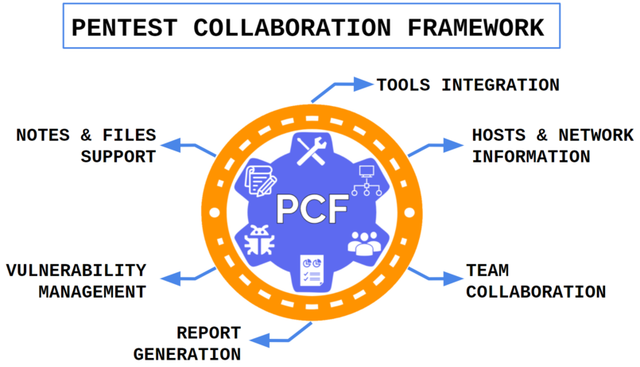
Opensource, cross-platform and portable toolkit for automating routine processes when carrying out various works for testing!
Pentest Collaboration Framework - an opensource, cross-platform and portable toolkit for automating routine processes
when carrying out various works for testing!

Explore the docs »
| Links |
|---|
| 📖Installation Guide | ![]() |
| 🌐Wiki | |
| 🚀Releases | |
| 💬Telegram | |

![]()
| |
| 🕹️Demo |
| Structure | |
|---|---|
| ![]() |
| Name | PCF | Lair | Dradis | Faraday | AttackForge | PenTest.WS | Hive | Cervantes |
|---|---|---|---|---|---|---|---|---|
| Portable | ✅ | ❌ | ❌ | ❌ | ❌ | ✅💲 | ❌ | ❌ |
| Cross-platform | ✅ | ✅ | ✅ | ✅ | ❌ | ❌ | ❌ | ❌ |
| Free | ✅ | ✅ | ❌✅ | ❌✅ | ❌✅ | ❌✅ | ❌✅ | ✅ |
| NOT deprecated! | ✅ | ❌ | ✅ | ✅ | ✅ | ✅ | ❌ | ✅ |
| Data export | ✅ | ❌✅ | ✅ | ✅ | ✅ | ❌✅ | ✅ | ❌✅ |
| Chat | ✅ | ❌ | ❌ | ❌ | ✅ | ❌ | ✅ | ❌ |
| Made for sec specialists, not managers | ✅ | ✅ | ✅ | ✅ | ❌ | ✅ | ❌✅ | ❌✅ |
| Report generation | ✅ | ❌ | ✅ | ✅ | ✅ | ✅ | ✅ | ✅ |
| API | ✅ | ❌✅ | ✅ | ✅ | ✅ | ✅ | ✅ | ✅ |
| Issue templates | ✅ | ❌ | ✅ | ✅ | ✅ | ❌ | ✅ | ✅ |
| Tool name | Integration type | Description |
|---|---|---|
| Nmap | Import | Import XML results (ip, port, service type, service version, hostnames, os). Supported plugins: vulners |
| Nessus | Import | Import .nessus results (ip, port, service type, security issues, os) |
| Qualys | Import | Import .xml results (ip, port, service type, security issues) |
| Masscan | Import | Import XML results (ip, port) |
| Nikto | Import | Import XML, CSV, JSON results (issue, ip, port) |
| Acunetix | Import | Import XML results (ip, port, issue) |
| Burp Suite Enterprise | Import | Import HTML results (ip, port, hostname, issue, poc) |
| kube-hunter | Import | Import JSON result (ip, port, service, issue) |
| Checkmarx SAST | Import | Import XML/CSV results (code info, issue) |
| Dependency-check | Import | Import XML results (code issues) |
| OpenVAS/GVM | Import | Import XML results (ip, port, hostname, issue) |
| NetSparker | Import | Import XML results (ip, port, hostname, issue) |
| BurpSuite | Import/Extention | Extention for fast issue send from burpsuite. |
| ipwhois | Scan | Scan hosts(s)/network(s) and save whois data |
| shodan | Scan | Scan hosts ang save info (ip, port, service). |
| HTTP-Sniffer | Additional | Create multiple http-sniffers for any project. |
| WPScan | Import | Import JSON results (ip, port, hostname, issue) |
| DNSrecon | Import | Import JSON/CSV/XML results (ip, port, hostname) |
| theHarvester | Import | Import XML results (ip, hostname) |
| Metasploit | Import | Import XML project (ip, port, hostname, issue) |
| Nuclei | Import | Import JSON results (ip, hostname, port, issue) |
| PingCastle | Import |
You need only Python3.
⚠️Better to have Python3 <= 3.9, or be ready that PIP will compile python dependency packages.
During this compilation it may require to install other system dependencies.
Download project:
git clone https://gitlab.com/invuls/pentest-projects/pcf.git
Go to folder:
cd pcf
Install deps (for unix-based systems):
pip3 install -r requirements_unix.txt
or windows:
pip.exe install -r requirements_windows.txt
Run initiation script:
(this script recreates database, but )
# !!! read the text and input "DELETE_ALL" string
python3 new_initiation.py
or windows
# !!! read the text and input "DELETE_ALL" string
python.exe new_initiation.py
Edit configuration:
nano configuration/settings.ini
Run:
old version: python3 app.py
new version: python3 run.py
or windows
old version: python.exe app.py
new version: python.exe run.py
⚠️ From november 2022 Heroku free tier does not include PostgreSQL. So, you will be able to use it only at paid account⚠️
Deploy from our github repository:
Careful: Check github repo last push version!
You can check 😓Harder and 💀Impossible ways at 🌐wiki page!
You can just follow the link and install PCF from AWS marketplace:
Will be added later!
Clone repository
git clone https://gitlab.com/invuls/pentest-projects/pcf.git
Go to folder:
cd pcf
Run docker-compose:
# if it clean installation run this:
# rm ./configuration/database.sqlite3
docker-compose up
and go to URL
http://127.0.0.1:5000/
Default port (check config): 5000 Default ip (if run at localhost): 127.0.0.1
Register at http(s)://<ip>:<port>/register
Login at http(s)://<ip>:<port>/login
Create team (if need) at http(s)://<ip>:<port>/create_team
Create project at http(s)://<ip>:<port>/new_project
Enjoy your hacking process!
![]() | ![]() |
| Team information | Projects list |
![]() | ![]() |
| Project: issues | Project: host page |
![]() | ![]() |
| Project: hosts | Project:services |
![]() | ![]() |
| Project: issue info | Project: issue info (PoC) |
![]() | ![]() |
This program, by default, uses 5000 port and allows everyone to register and use it, so you need to set correct firewall & network rules.
Careful with new_initiation script! It makes some important changes with filesystem:
If you have any feature suggestions or bugs, leave a GitLab issue. We welcome any and all support :D
We communicate over Telegram. Click here to join our Telegram community!
There will be companies list which use Pentest Collaboration Framework.
If you want to add your company, then read next topic :)
If you want to help to project or encourage PCF developers, you can do any of the following:
There was some frequent question:
How to donate money to the project?
No way. I do not guarantee that I will not abandon this project after a while, so the best "donation" will be a contribution to the development and distribution of the utility.
How to make a merge requests to this repository?
Again, no way. To develop PCF faster, I need to know all of its code, so just create an issue at gitlab with bug/feature request and some code example, which I may use to fix it.
| Import XML results (ip, issue) |
| MaxPatrol | Import | Import XML results (ip, port, issue) |
| Scanvus | Import | Import JSON report (issue) |
| Tenable.sc | Import | Import .nessus results (ip, port, service type, security issues, os) |
| aiodnsbrute | Import | Import JSON/CSV results (ip, hostname) |
| Advanced Port Scanner | Import | Import XML results (ip, hostname, port) |
| RedCheck | Import | Import CSV results (ip, port, security issues) |
| MaxPatrol VM | Import | Import XML results (ip, port, hostname, os, security issues) |
| Project: networks | Project: files |
![]() | ![]() |
| Project: tools (may be changed) | Project: found credentials |
![]() | ![]() |
| Project: testing notes | Project: chats |
![]() | ![]() |
| Project: settings | Project: reports |