Skip to content
KitploitKITPLOIT
ToolsBlog
Submit
ToolsBlog
Submit

Hacking, PenTest, and Cybersecurity Tools for Your Security Arsenal!

Kitploit is a directory of hacking, cybersecurity, and pentesting tools. Discover the latest project updates to find vulnerabilities, analyze systems, automate testing, and strengthen your security.

··Feeds·Contact·Privacy·© 2026 Kitploit

Tool Directory

Categories

View all categories
Loading categories
Pentest-Collaboration-Framework — Opensource, cross-platform and portable toolkit for automating routine processes when carrying out various works for testing! | Kitploit
Tools/GitLabGitLab/invuls/pentest-projects/pcf
Penetration Testing FrameworksVulnerability ScannersContainer SecurityAPI Security TestingInformation GatheringWeb SecurityCloud Security
GitLabinvuls/pentest-projects/pcf

Most Popular

View all →

Discover the most used tools by our community.

Explore all tools

Browse our collection of tools

View all tools →
Share

Pentest-Collaboration-Framework

Opensource, cross-platform and portable toolkit for automating routine processes when carrying out various works for testing!


View Repository
112373 months agoReviewed by Kitploit

Pentest Collaboration Framework

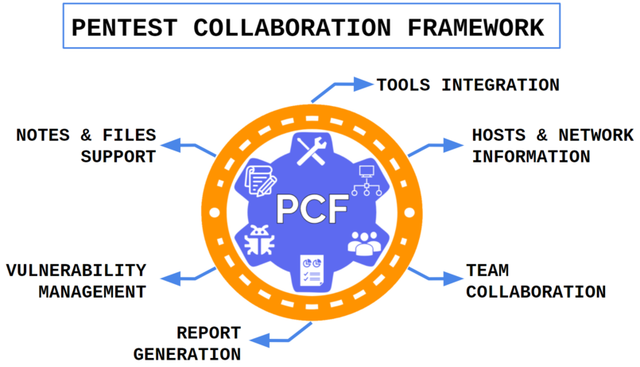
Pentest Collaboration Framework - an opensource, cross-platform and portable toolkit for automating routine processes when carrying out various works for testing!

Explore the docs »

‼️ Important Links

Links
📖Installation Guide
🌐Wiki
🚀Releases
💬Telegram

🕹️Demo

✨ Features

  • 🔬 You can create private or team projects!
  • 💼 Team moderation.
  • 🛠 Multiple tools integration support! Such as Nmap/Masscan, Nikto, Nessus and Acunetix!
  • 🖥️ Cross-platform, opensource & free!
  • ☁ Cloud deployment support.

📊 PCF vs analogues

🛠 Supported tools

🙋 Table of Contents

  • 📖 Fast Installation Guide
    • 💻 Standalone
    • ☁️ Heroku
    • ☁️ AWS
    • 🐋 Docker Usage
  • 🦜 Telegram
  • 🤸 Usage
  • 🖼️ Gallery
  • ⚠️ WARNING
  • 🎪 Community
  • 📝 TODO
  • 🎁 Presentations
  • 🏢 Companies
  • ❤️ Contribute

📖 Fast Installation Guide

You need only Python3.

⚠️Better to have Python3 <= 3.9, or be ready that PIP will compile python dependency packages.

During this compilation it may require to install other system dependencies.

🖥️ Windows / Linux / MacOS

Download project:

root@kitploit:~
git clone https://gitlab.com/invuls/pentest-projects/pcf.git

Go to folder:

root@kitploit:~
cd pcf

Install deps (for unix-based systems):

root@kitploit:~
pip3 install -r requirements_unix.txt

or windows:

root@kitploit:~
pip.exe install -r requirements_windows.txt

Run initiation script:

(this script recreates database, but )

root@kitploit:~
# !!! read the text and input "DELETE_ALL" string
python3 new_initiation.py

or windows

root@kitploit:~
# !!! read the text and input "DELETE_ALL" string
python.exe new_initiation.py

Edit configuration:

root@kitploit:~
nano configuration/settings.ini

Run:

root@kitploit:~
old version: python3 app.py
new version: python3 run.py

or windows

root@kitploit:~
old version: python.exe app.py
new version: python.exe run.py

☁️ Heroku

⚠️ From november 2022 Heroku free tier does not include PostgreSQL. So, you will be able to use it only at paid account⚠️

👍 Easy way

Deploy from our github repository:

Deploy

Careful: Check github repo last push version!

You can check 😓Harder and 💀Impossible ways at 🌐wiki page!

☁️ AWS

You can just follow the link and install PCF from AWS marketplace:

Marketplace

🐳 Docker

One line install

Will be added later!

Build by yourself

Clone repository

root@kitploit:~
git clone https://gitlab.com/invuls/pentest-projects/pcf.git

Go to folder:

root@kitploit:~
cd pcf

Run docker-compose:

root@kitploit:~
# if it clean installation run this:
# rm ./configuration/database.sqlite3
docker-compose up

and go to URL

root@kitploit:~
http://127.0.0.1:5000/

🤸 Usage

Default port (check config): 5000 Default ip (if run at localhost): 127.0.0.1

  1. Register at http(s)://<ip>:<port>/register

  2. Login at http(s)://<ip>:<port>/login

  3. Create team (if need) at http(s)://<ip>:<port>/create_team

  4. Create project at http(s)://<ip>:<port>/new_project

  5. Enjoy your hacking process!

API information: https://gitlab.com/invuls/pentest-projects/pcf/-/wikis/API%20documentation

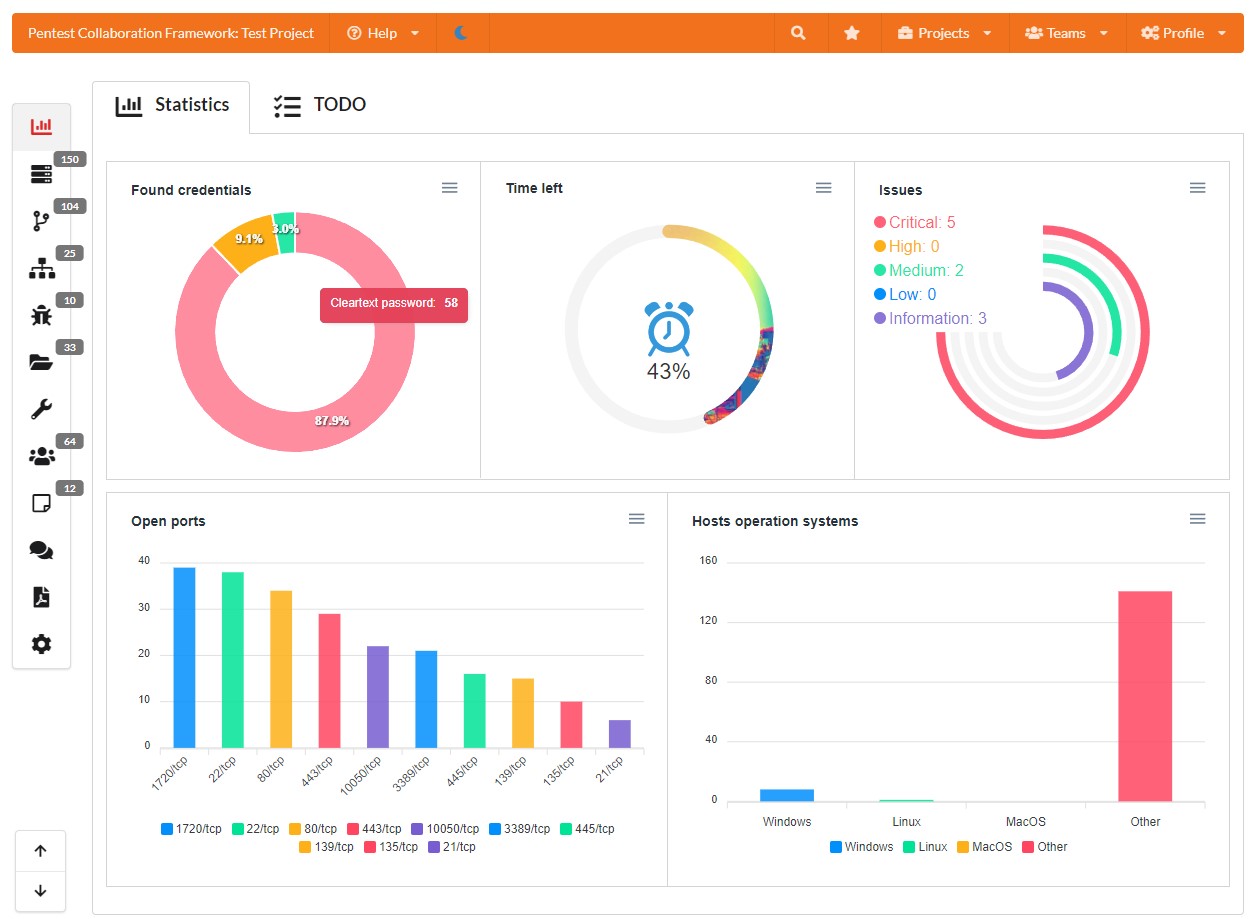
🖼️ Gallery

⚠️ WARNING

🚨 Default settings

This program, by default, uses 5000 port and allows everyone to register and use it, so you need to set correct firewall & network rules.

🔌 Initiation logic

Careful with new_initiation script! It makes some important changes with filesystem:

  1. Renames database /configuration/database.sqlite3
  2. Regenerates SSL certificates
  3. Regenerates session key.
  4. Creates new empty /configuration/database.sqlite3 database
  5. Creates /tmp_storage/ folder

🎪 Community

If you have any feature suggestions or bugs, leave a GitLab issue. We welcome any and all support :D

We communicate over Telegram. Click here to join our Telegram community!

📝 TODO

General

  • Team config storage
  • Team report templates storage
  • Automatic database backup
  • Share Issues with non-registered users
  • Report generation
  • Fast popular password bruteforce check (top-10k)
  • REST-API
  • Network graph
  • Hash fast export/import
  • Add another databases
  • Add .doc report generation support
  • Issue templates
  • Backup/Restore from backup projects/teams

Tools

  • HTTP-sniffer
  • NetNTLM smb sniffer
  • Custom tool txt report upload support (added notes to hosts)
  • Hash fast check top-10k passwords
  • Export projects from Faraday/Dradis
  • Metasploit/Cobalt Strike integration

Version 2.0

  • Vue.js
  • Websockets
  • Push messages (updates)
  • Database rebuild (objects)
  • hosts -> interfaces -> ports
  • hosts -> hostnames
  • Project file manager
  • Port -> Protocol:Software:Version
  • User-defined host marks (mark all hosts with open port)
  • TODO marks button every page
  • Dublicate hosts (join them?)
  • host MAC/AD domain/Forest

🎁 Presentations

  • Black Hat:

    • Asia : 2021

    Europe 2021

  • MIPHI : 2021

  • Defcon-NN : 2021

  • DC7495 : 2021

  • H@cktivityCon🌐: 2021

  • Standoff : 2021

  • PHDays 2022

🏢 Companies

There will be companies list which use Pentest Collaboration Framework.

If you want to add your company, then read next topic :)

❤️ Contribute

If you want to help to project or encourage PCF developers, you can do any of the following:

  • Mention PCF at your presentations/research articles/forum topics/other information resources.
  • Advise it to you friends/collegues.
  • "Star" this repository
  • Don't forget about PCF telegram chat https://t.me/PentestCollaborationFramework
  • Create more feature/bug requests at gitlab issues page https://gitlab.com/invuls/pentest-projects/pcf/-/issues
  • If you use it at work, you can ask @drakylar (Telegram) to add your work icon + link at "Companies" topic at README.md
  • You can create more template examples for PCF and send them to me (@drakylar Telegram), so I will add them to template examples folder at main repository
  • We have not too much Youtube tutorials, so, you can create one :)
  • Also you can create more nmap scripts plugins and also send them to @drakylar. More info here: https://gitlab.com/invuls/pentest-projects/pcf/-/issues/34 https://gitlab.com/invuls/pentest-projects/pcf/-/blob/master/routes/ui/tools_addons/nmap_scripts/nmap_example.py

There was some frequent question:

How to donate money to the project?

No way. I do not guarantee that I will not abandon this project after a while, so the best "donation" will be a contribution to the development and distribution of the utility.

How to make a merge requests to this repository?

Again, no way. To develop PCF faster, I need to know all of its code, so just create an issue at gitlab with bug/feature request and some code example, which I may use to fix it.

Download Tool
Structure
  • :family_mmb: Teams
    • Work team
    • Personal team
  • ⛑ Pentest projects
    • 🖥️ Hosts
      • ip-address
      • hostnames
      • operation system
      • open ports
      • tester notes
    • 🐞 Issues
      • 🌐 Networks
      • 🔑 Found credentials
      • 📝 Notes
      • 💬 Chats
      • 📊 Report generation
        • 📁 Files
        • 🛠 Tools
      image
      NamePCFLairDradisFaradayAttackForgePenTest.WSHiveCervantes
      Portable✅❌❌❌❌✅💲❌❌
      Cross-platform✅✅✅✅❌❌❌❌
      Free✅✅❌✅❌✅❌✅❌✅❌✅✅
      NOT deprecated!✅❌✅✅✅✅❌✅
      Data export✅❌✅✅✅✅❌✅✅❌✅
      Chat✅❌❌❌✅❌✅❌
      Made for sec specialists, not managers✅✅✅✅❌✅❌✅❌✅
      Report generation✅❌✅✅✅✅✅✅
      API✅❌✅✅✅✅✅✅✅
      Issue templates✅❌✅✅✅❌✅✅
      Tool nameIntegration typeDescription
      NmapImportImport XML results (ip, port, service type, service version, hostnames, os). Supported plugins: vulners
      NessusImportImport .nessus results (ip, port, service type, security issues, os)
      QualysImportImport .xml results (ip, port, service type, security issues)
      MasscanImportImport XML results (ip, port)
      NiktoImportImport XML, CSV, JSON results (issue, ip, port)
      AcunetixImportImport XML results (ip, port, issue)
      Burp Suite EnterpriseImportImport HTML results (ip, port, hostname, issue, poc)
      kube-hunterImportImport JSON result (ip, port, service, issue)
      Checkmarx SASTImportImport XML/CSV results (code info, issue)
      Dependency-checkImportImport XML results (code issues)
      OpenVAS/GVMImportImport XML results (ip, port, hostname, issue)
      NetSparkerImportImport XML results (ip, port, hostname, issue)
      BurpSuiteImport/ExtentionExtention for fast issue send from burpsuite.
      ipwhoisScanScan hosts(s)/network(s) and save whois data
      shodanScanScan hosts ang save info (ip, port, service).
      HTTP-SnifferAdditionalCreate multiple http-sniffers for any project.
      WPScanImportImport JSON results (ip, port, hostname, issue)
      DNSreconImportImport JSON/CSV/XML results (ip, port, hostname)
      theHarvesterImportImport XML results (ip, hostname)
      MetasploitImportImport XML project (ip, port, hostname, issue)
      NucleiImportImport JSON results (ip, hostname, port, issue)
      PingCastleImportImport XML results (ip, issue)
      MaxPatrolImportImport XML results (ip, port, issue)
      ScanvusImportImport JSON report (issue)
      Tenable.scImportImport .nessus results (ip, port, service type, security issues, os)
      aiodnsbruteImportImport JSON/CSV results (ip, hostname)
      Advanced Port ScannerImportImport XML results (ip, hostname, port)
      RedCheckImportImport CSV results (ip, port, security issues)
      MaxPatrol VMImportImport XML results (ip, port, hostname, os, security issues)
      imageimage
      Team informationProjects list
      imageimage
      Project: issuesProject: host page
      imageimage
      Project: hostsProject:services
      imageimage
      Project: issue infoProject: issue info (PoC)
      imageimage
      Project: networksProject: files
      imageimage
      Project: tools (may be changed)Project: found credentials
      imageimage
      Project: testing notesProject: chats
      imageimage
      Project: settingsProject: reports