 gitlab-security-oss/cis/gitlabcis
Audits GitLab projects against the CIS GitLab Benchmark via read-only API checks, generating JSON reports on compliance and hardening recommendations.

On April 17th 2024, GitLab™ published a blog post introducing its Center for Internet Security® (CIS) GitLab Benchmark. With the goal to improve the security of the product and offer hardening recommendations to GitLab's customers. You can download a copy of the benchmarks which are published on the Center for Internet Security® website.
"The CIS GitLab Benchmark stemmed from a collaboration between CIS and GitLab's Field Security and Product Management teams. After numerous conversations with customers, we understood the need for a specific benchmark that would guide their hardening efforts. We conducted an in-depth review of GitLab’s product and documentation to understand how our offering mapped to CIS's Software Supply Chain Security Benchmark. After the initial draft was ready, it entered into the CIS consensus process, where the broader CIS Benchmark Community was able to review it and suggest edits prior to publication."
gitlabcis is a Python® package which audits a GitLab project against the Center for Internet Security® (CIS) GitLab Benchmark. It includes recommendations-as-code formatted in YAML™.
There is a larger effort to add the CIS Benchmark as a compliance standard to the Compliance Adherence Report.
Through the course of developing this tool, the authors contributed 2 features to the GitLab product (#39):
[[TOC]]
| Disclaimer | Comment |
|---|---|
| This tool assumes that one is using GitLab for everything |
|
| This tool cannot audit every recommendation |
|
| This tool does not execute any write operations on your GitLab instance, group or project. No write actions are performed. |
|
| This is not an official GitLab product |
|
gitlabcis requires one of the following tokens:
You can either pass the token as an option or store it as an environment variable:
GITLAB_TOKEN - (optional) Environment Variable--token / -t - (optional) gitlabcis token optionYou can either pass the token as an option or store it as an environment variable:
GITLAB_OAUTH_TOKEN - (optional) Environment Variable--oauth-token / -ot - (optional) gitlabcis token optionread_api scope.There's a number of ways to download the scanner. Please see them below:
Install gitlabcis from pypi.org:
pip install gitlabcis
Install gitlabcis from the package registry:
pip install gitlabcis --index-url https://gitlab.com/api/v4/projects/57279821/packages/pypi/simple
If you haven't already done so, you will need to add the below to your .pypirc file.
[gitlab]
repository = https://gitlab.com/api/v4/projects/57279821/packages/pypi
username = __token__
password = <your personal access token>
Install gitlabcis from source via clone, or our releases page
# make a clone (or create a local fork) of the repo
git clone [email protected]:gitlab-security-oss/cis/gitlabcis.git
cd gitlabcis
make install
The following syntax is expected:
gitlabcis URL OPTIONS
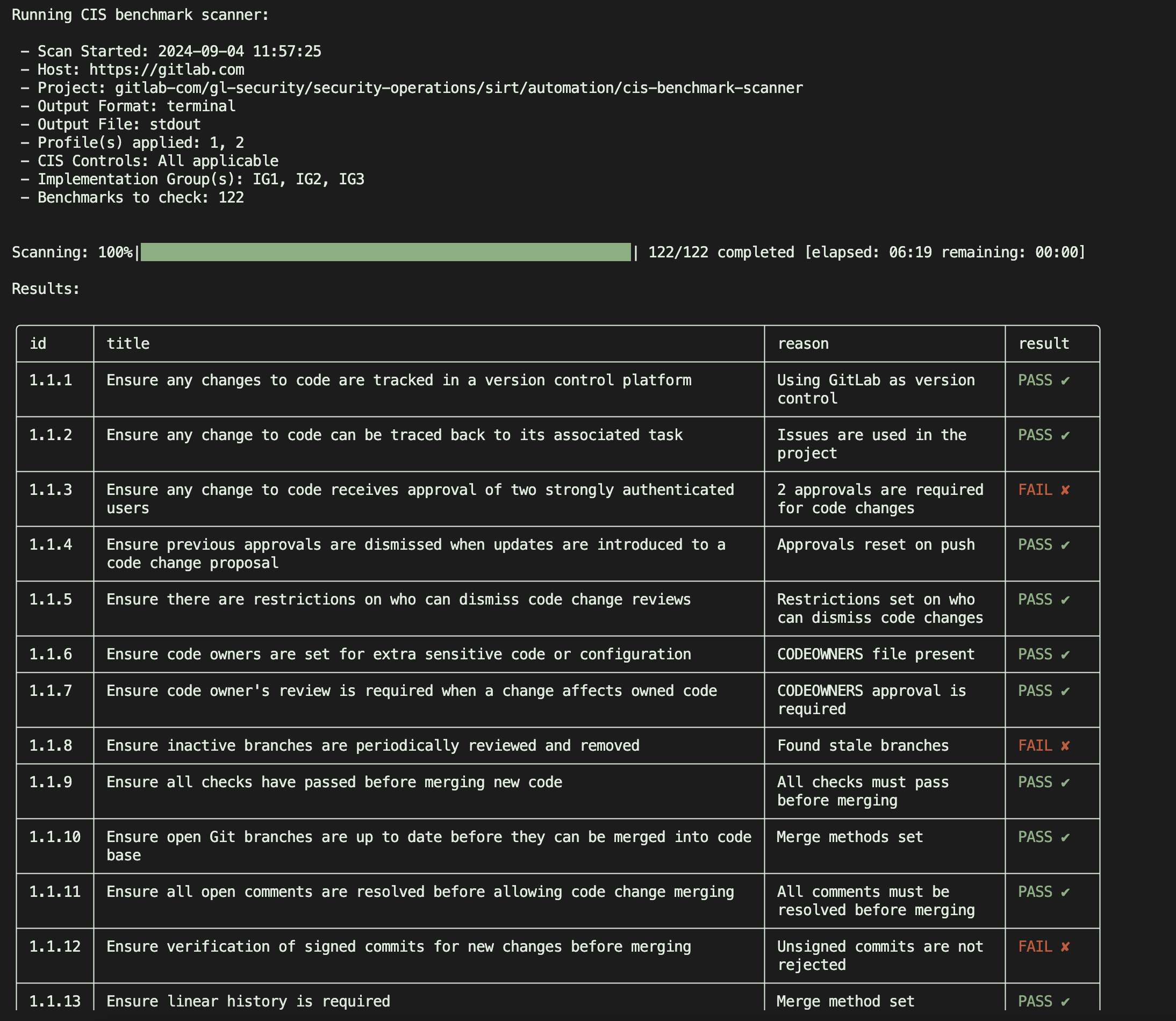
To generate a report from the shell:
gitlabcis https://gitlab.example.com/path/to/project --token $TOKEN
Generate a json report: (Using the $GITLAB_TOKEN variable, you do not need to specify --token option)
gitlabcis \
    https://gitlab.example.com/path/to/project \
    -o results.json \
    -f json
To execute a single control:
gitlabcis \
    https://gitlab.example.com/path/to/project \
    -ids 1.2.3 # or multiple: 2.3.4 3.4.5 etc
Scan all sub-groups and projects under an instance or group (1 level deep by default):
gitlabcis https://gitlab.example.com/path-to-group --nest
Scan all sub-groups and projects up to 2 levels deep, writing per-entity JSON files to ./results/:
gitlabcis \
    https://gitlab.example.com/path-to-group \
    --nest \
    --depth 2 \
    --output-dir results \
    -f json
Scan with unlimited depth and a filename prefix:
gitlabcis \
    https://gitlab.example.com/path-to-group \
    --nest \
    --depth 0 \
    --prefix "audit_" \
    --output-dir results \
    -f json
