 andrew_vanderbilt/bridgeblock
macOS menu bar app that detects and prevents wireless bridging attacks by automatically disabling the AirPort module when Ethernet connectivity is present. Includes a CLI version for system administrators.


BridgeBlock is a menu bar app that prevents wireless bridging attacks by detecting bridging conditions and taking action.
It also has a commandline version for system administrators.
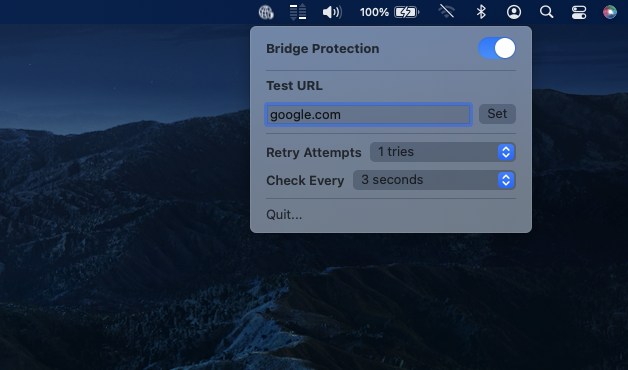

Zips of the both the GUI and CLI versions are provided in the releases page. You can unzip them and run them from anywhere, but you'll probably want to install the GUI version in /Applications and the CLI version in /usr/local/bin.
Homebrew packages will be made availible in the 2.0 release, pending feedback from the community.
macOS, 13.0 (Ventura) or later.
BridgeBlock works by powering off the AirPort module, so any functionality that relies on it will be temporarily unavailable as well. AirDrop, AirPlay, Apple Watch Unlocking, etc. The kind of environments that need BridgeBlock probably have these disabled anyways.
You cannot use the CLI and GUI versions of BridgeBlock simultainiously. They will conflict with each other and cause erratic behaviour of the AirPort module.
BridgeBlock gets a list of network interfaces on the system, then tests each of the Ethernet interfaces for connectivity by the pinging URL you provided through each interface. If connectivity is present, the AirPort module is powered down. Without WiFi communication, the ability of an attacker to interact with the Mac over WiFi is prevented.
We are grateful for all community contributions. If you see an issue, feel free to file a bug report and submit a patch if you can. Contributors are expected to treat other with respect and dignity. We don't care about your personal life/opinions, but it shouldn't be something that draws negative attention to the project.

