
Zscan a scan blasting tool set
📄中文文档

Zscan is an open source collection of Intranet port scanners, blasting tools, and other utilities. Based on host discovery and port scanning, you can blow up mysql, MSSQL, Redis, Mongo, Postgres, FTP, SSH and other services. Other scanning functions include NetBIOS, SMB, OXID, SOCKS Server (scanning proxy servers on the Intranet), SNMP, and MS17010. Each module has its own unique functions such as SSH, which also supports user name, password and public key login,traverse the host based on the private key, and can execute commands after all services are blown up successfully. In addition to basic scanning and service blasting,Webtitle capture and fingerprint recognition are also supported, ZScan integrates nc module (connect and listen), HTTPServer module (support for downloading files, uploading files, and authentication), SOcks5 module (start a proxy server). There is also the ALL module, which calls all the other scanning and blasting modules during the scan. Built-in proxy functionality.
The tool is bulky, and a condensed version will be published later
The format is
zscan module args
______ ______ ______ ______ __ __
/\___ \ /\ ___\ /\ ___\ /\ __ \ /\ "-.\ \
\/_/ /__ \ \___ \ \ \ \____ \ \ __ \ \ \ \-. \
/\_____\ \/\_____\ \ \_____\ \ \_\ \_\ \ \_\\"\_\
\/_____/ \/_____/ \/_____/ \/_/\/_/ \/_/ \/_/
Usage:
zscan [module]
all module:
all Use all scan mode
completion generate the autocompletion script for the specified shell
ftp burp ftp username and password
help Help about any command
httpserver Start an authentication HTTP server
mongo burp mongodb username and password
ms17010 MS17_010 scan
mssql burp mssql username and password
mysql burp mysql username and password
nc A easy nc
ping ping scan to find computer
postgres burp postgres username and password
proxyfind Scan proxy
ps Port Scan
redis burp redis password
snmp snmp scan
socks5 Create a socks5 server
ssh ssh client support username password burp
version Show version of zscan
winscan netbios、smb、oxid scan
Flags:
-h, --help help for zscan
--log Record the scan results in chronological order,Save path./log.txt
-O, --output Whether to enter the results into a file(default ./result.txt),can use --path set
--path string the path of result file (default "result.txt")
--proxy string Connect with a proxy(user:[email protected]:1080 or 172.16.95.1:1080)
-T, --thread thread Set thread eg:2000 (default 100)
-t, --timeout time Set timeout(s) eg:5s (default 3s)
-v, --verbose Show verbose information
The Flags in the module represent the parameters of the current command, and the Global Flags represent Global parameters (all commands can be used). Flags is a global parameter that can be used by all modules
Existing modules:
Usage:
zscan ping [flags]
Flags:
-d, --discover string Live network segment found
-h, --help help for ping
-H, --host hosts Set hosts(The format is similar to Nmap)
--hostfile string Set host file
-i, --icmp Icmp packets are sent to check whether the host is alive(need root)
Global Flags:
-h, --help help for zscan
--log Record the scan results in chronological order,Save path./log.txt
-O, --output Whether to enter the results into a file(default ./result.txt),can use --path set
--path string the path of result file (default "result.txt")
--proxy string Connect with a proxy(user:[email protected]:1080 or 172.16.95.1:1080)
-T, --thread thread Set thread eg:2000 (default 100)
-t, --timeout time Set timeout(s) eg:5s (default 3s)
-v, --verbose Show verbose information
You must specify one of the two parameters, host and hostfile. When you have root permission, you can use -i to send ICMP packets instead of calling the local ping command (if the thread is extremely high, calling the local ping command will cause high CPU usage).
add --discover find network
Usage:
zscan ps [flags]
Flags:
-b, --banner Return banner information
-h, --help help for ps
-H, --host hosts Set hosts(The format is similar to Nmap) eg:192.168.1.1/24,172.16.95.1-100,127.0.0.1
--hostfile string Set host file
-i, --icmp Icmp packets are sent to check whether the host is alive(need root)
--ping Ping host discovery before port scanning
-p, --port port Set port eg:1-1000,3306,3389
Global Flags:
--log Record the scan results in chronological order,Save path./log.txt
-O, --output Whether to enter the results into a file(default ./result.txt),can use --path set
--path string the path of result file (default "result.txt")
-T, --thread thread Set thread eg:2000 (default 100)
-t, --timeout time Set timeout(s) eg:5s (default 3s)
-v, --verbose Show verbose information
--host and --hostfile specify the target
-p Specify the port. If not, use the default port
--ping Ping host discovery before port scanning
--icmp Icmp packets are used for host discovery when ping is used
Usage:
zscan all [flags]
Flags:
-h, --help help for all
-H, --host hosts Set hosts(The format is similar to Nmap) eg:192.168.1.1/24,172.16.95.1-100,127.0.0.1
--hostfile string Set host file
-i, --icmp Icmp packets are sent to check whether the host is alive(need root)
--passdict string Set postgres passworddict path
-P, --password string Set postgres password
--ping Ping host discovery before port scanning
-p, --port port Set port eg:1-1000,3306,3389
Global Flags:
--log Record the scan results in chronological order,Save path./log.txt
-O, --output Whether to enter the results into a file(default ./result.txt),can use --path set
--path string the path of result file (default "result.txt")
--proxy string Connect with a proxy(user:[email protected]:1080 or 172.16.95.1:1080)
-T, --thread thread Set thread eg:2000 (default 100)
-t, --timeout time Set timeout(s) eg:5s (default 3s)
-v, --verbose Show verbose information
In essence, the ALL module is basically the same as the PS module, except that when the ALL module scans the corresponding port, it will conduct fingerprint identification or user name and password blasting in the current thread
The parameters of the ALL module are the same as those of the PS module. There is a password dictionary, which is used to set the dictionary when the port needs to be blown up. Other things are the same
Usage:
zscan ssh [flags]
Flags:
-b, --burp Use burp mode default login mode
-h, --help help for ssh
-H, --host string Set ssh server host
--hostfile string Set host file
-d, --keypath string Set public key path
-k, --login_key Use public key login
--passdict string Set ssh passworddict path
-P, --password string Set ssh password
-p, --port int Set ssh server port (default 22)
--userdict string Set ssh userdict path
-U, --username string Set ssh username
Global Flags:
--log Record the scan results in chronological order,Save path./log.txt
-O, --output Whether to enter the results into a file(default ./result.txt),can use --path set
--path string the path of result file (default "result.txt")
-T, --thread thread Set thread eg:2000 (default 100)
-t, --timeout time Set timeout(s) eg:5s (default 3s)
-v, --verbose Show verbose information
Login module (default)
username password login:./zscan ssh -H 172.16.95.24 -U root -P 123456
A public key to login:./zscan ssh -H 172.16.95.24 -U root -k
You can use -d/--keypath to specify the path of the private key,default, public key login uses ./ssh under the current user directory to obtain the private key.
Blasting module (-b/--burp parameters)
username:can use -U/--username specify user name、--userdict specify the user name dictionary and do not specify the use of internal user names(admin,root)
password:can use -P/--password specify passworld、--passdict specifies a password file and does not specify the use of an internal password dictionary
eg:./zscan_linux ssh -H 172.16.95.1-30 -U root -b --passdict 1.txt
Take mysql for example, the operation of the database is basically the same
Usage:
zscan mysql [flags]
Flags:
--burpthread int Set burp password thread(recommend not to change) (default 100)
-c, --command string Set the command you want to sql_execute
-h, --help help for mysql
-H, --host string Set mysql server host
--hostfile string Set host file
--passdict string Set mysql passworddict path
-P, --password string Set mysql password
-p, --port int Set mysql server port (default 3306)
--userdict string Set mysql userdict path
-U, --username string Set mysql username
Global Flags:
--log Record the scan results in chronological order,Save path./log.txt
-O, --output Whether to enter the results into a file(default ./result.txt),can use --path set
--path string the path of result file (default "result.txt")
-T, --thread thread Set thread eg:2000 (default 100)
-t, --timeout time Set timeout(s) eg:5s (default 3s)
-v, --verbose Show verbose information
There is a new thread parameter called burptheard. This thread is different from the -t thread, which represents the number of targets that we scan concurrently (this target is a combination of IP and port, and each concurrency is equivalent to sending a packet to the target). Burptheard stands for when we find our target port in the single thread of the above concurrent scanning, such as mysql, it will start a multi-thread blasting in the current scanning thread (here the target is changed to a specific PORT of a specific IP address, so speed limiting is required here, too fast speed may cause the target service to be unavailable).
You can use -c to specify the command to execute
Usage:
zscan proxyfind [flags]
Flags:
-h, --help help for proxyfind
-H, --host hosts Set hosts(The format is similar to Nmap) eg:192.168.1.1/24,172.16.95.1-100,127.0.0.1
--hostfile string Set host file
-p, --ports port Set port eg:1-1000,3306,3389 (default "1080,1089,8080,7890,10808")
--type string Set the scan proxy type(socks4/socks5/http) (default "socks5")
Global Flags:
--log Record the scan results in chronological order,Save path./log.txt
-O, --output Whether to enter the results into a file(default ./result.txt),can use --path set
--path string the path of result file (default "result.txt")
-T, --thread thread Set thread eg:2000 (default 100)
-t, --timeout time Set timeout(s) eg:5s (default 3s)
-v, --verbose Show verbose information
Scan the proxy server on the Intranet
-H specifies the target, -p specifies the port, --type specifies the proxy protocol type for scanning (currently supports SOckS4/5, other protocols are in progress)
Usage:
zscan ms17010 [flags]
Flags:
-h, --help help for ms17010
-H, --host string Set target
--hostfile string Set host file
Global Flags:
--log Record the scan results in chronological order,Save path./log.txt
-O, --output Whether to enter the results into a file(default ./result.txt),can use --path set
--path string the path of result file (default "result.txt")
-T, --thread thread Set thread eg:2000 (default 100)
-t, --timeout time Set timeout(s) eg:5s (default 3s)
-v, --verbose Show verbose information
Just specify the target
--listoid This section lists common query information
0: 系统基本信息 SysDesc GET 1.3.6.1.2.1.1.1.0 1: 监控时间 sysUptime GET 1.3.6.1.2.1.1.3.0 2: 系统联系人 sysContact GET 1.3.6.1.2.1.1.4.0 3: 获取机器名 SysName GET 1.3.6.1.2.1.1.5.0 4: 机器所在位置 SysLocation GET 1.3.6.1.2.1.1.6.0 5: 机器提供的服务 SysService GET 1.3.6.1.2.1.1.7.0 6: 系统运行的进程列表 hrSWRunName WALK 1.3.6.1.2.1.25.4.2.1.2 7: 系统安装的软件列表 hrSWInstalledName WALK 1.3.6.1.2.1.25.6.3.1.2 8: 网络接口列表 ipAdEntAddr WALK 1.3.6.1.2.1.4.20.1.1
Queries can be made by using --walk and --get
If the password is not specified, public is used by "default"
Usage:
zscan winscan [flags]
Flags:
-h, --help help for winscan
-H, --host string Set target
--hostfile string Set host file
--netbios netbios scan
--oxid oxid scan
--smb smb scan
Global Flags:
--log Record the scan results in chronological order,Save path./log.txt
-O, --output Whether to enter the results into a file(default ./result.txt),can use --path set
--path string the path of result file (default "result.txt")
-T, --thread thread Set thread eg:2000 (default 100)
-t, --timeout time Set timeout(s) eg:5s (default 3s)
-v, --verbose Show verbose information
Netbios, OXID, SMB are scanned simultaneously if given directly to the target. You can use -- to specify that only one is used
zscan nc
Usage:
zscan nc [flags]
Flags:
-a, --addr string listen/connect host address eg(listen):-a 0.0.0.0:4444 eg(connect):-a 172.16.95.1:4444
-h, --help help for nc
-l, --listen listen mode(default connect)
Global Flags:
--log Record the scan results in chronological order,Save path./log.txt
-O, --output Whether to enter the results into a file(default ./result.txt),can use --path set
--path string the path of result file (default "result.txt")
-T, --thread thread Set thread eg:2000 (default 100)
-t, --timeout time Set timeout(s) eg:5s (default 3s)
-v, --verbose Show verbose information
-a specifies the address. If -l is not used, it indicates the connection target. If -l is used, it indicates the listening port
Usage:
zscan socks5 [flags]
Flags:
-a, --addr string Specify the IP address and port of the Socks5 service (default "0.0.0.0:1080")
-h, --help help for socks5
-P, --password string Set the socks5 service authentication password
-U, --username string Set the socks5 service authentication user name
Global Flags:
--log Record the scan results in chronological order,Save path./log.txt
-O, --output Whether to enter the results into a file(default ./result.txt),can use --path set
--path string the path of result file (default "result.txt")
-T, --thread thread Set thread eg:2000 (default 100)
-t, --timeout time Set timeout(s) eg:5s (default 3s)
-v, --verbose Show verbose information
You can use -a to specify the IP address and port that the Socks5 service listens to
-p and -u specify the user name and password of the proxy
Usage:
zscan httpserver [flags]
Flags:
-a, --addr string set http server addr (default "0.0.0.0:7001")
-d, --dir string set HTTP server root directory (default ".")
-h, --help help for httpserver
-P, --pass string Set the authentication password
-U, --user string Set the authentication user
Global Flags:
--log Record the scan results in chronological order,Save path./log.txt
-O, --output Whether to enter the results into a file(default ./result.txt),can use --path set
--path string the path of result file (default "result.txt")
-T, --thread thread Set thread eg:2000 (default 100)
-t, --timeout time Set timeout(s) eg:5s (default 3s)
-v, --verbose Show verbose information
Currently, open a simple HTTP server that can only browse and download files and authenticate, but not upload files
-a specifies the linsten IP address and address
-d specifies whether the HTTPServer is enabled
-P and -U Set the user name and password for authentication
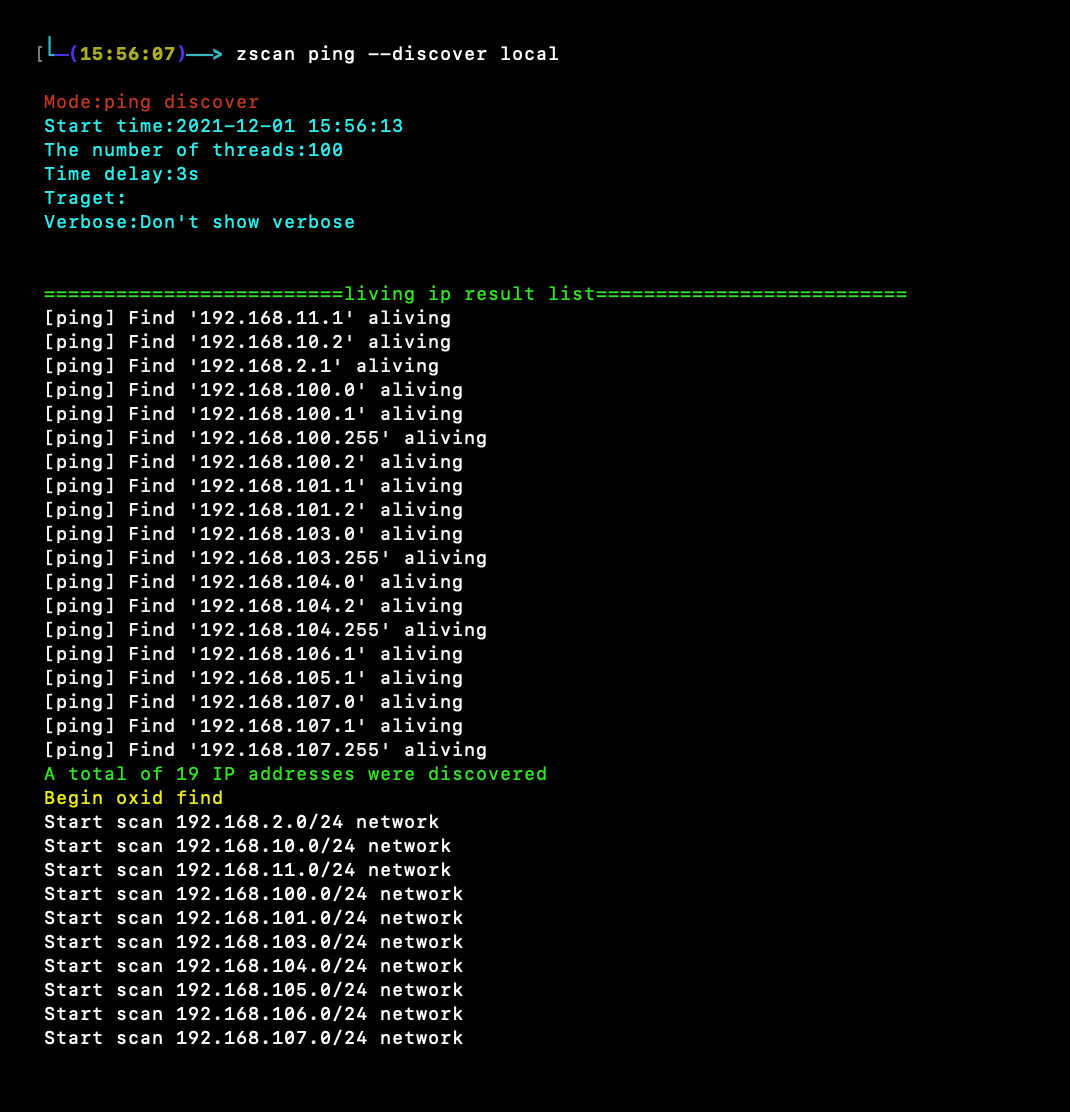
zscan ping --discover local
or use zscan ping --discover 192.168.0.0
zscan ps -H 172.16.95.1-30
burp zscan ssh -H 172.16.95.24 -b
login zscan ssh -H 172.16.95.24 -U root -P 123123
burp zscan redis -H 172.16.95.1-30
login zscan redis -H 172.16.95.16 -c cmd
zscan winscan -H 172.16.95.1-33
zscan all -H 172.16.95.1-30
go get github.com/zyylhn/zscan
go bulid
This tool is only for legally authorized enterprise security construction activities. If you need to test the availability of this tool, please build your own target environment.
When using this tool for testing, ensure that you comply with local laws and regulations and that you have obtained sufficient authorization. Do not scan unauthorized targets.
If you have any illegal behavior during the use of the tool, you shall bear the corresponding consequences by yourself, and we will not assume any legal and joint liability.
Before installing and using this tool, you must carefully read and fully understand the contents of each clause. Restrictions, disclaimers or other clauses that involve your significant rights and interests may be highlighted in bold or underlined. Do not install and use this tool unless you have fully read, fully understand and accept all terms of this agreement. Your use of this Agreement or your acceptance of this Agreement in any other way, express or implied, shall be deemed that you have read and agreed to be bound by this Agreement.
https://github.com/shadow1ng/fscan
https://github.com/k8gege/LadonGo
ping:Ping Host Discovery
ps Port scanning module
nc
The SSH private key must be specified at the same time-U,-b,-k,-d
eg:./zscan ssh -H 172.16.95.1-24 -U root -k -b -d ~/.ssh/id_rsa
socks
proxyfind
httpserver Enable the HTTP server module
ssh
ftp
mysql
mssql
mongo
redis
postgres
winscan@https://github.com/shenzhibuqins
17010 scan
wmi
ldap
version
The current version and the latest version are output
Update to the latest version
..........
