 zolderio/token-proxy
A transparent PII redaction proxy for LLM API traffic. Sits between an application and an LLM provider (currently Anthropic), pseudonymizing sensitive data outbound and restoring it inbound. Built with FastAPI + httpx.

A transparent PII redaction proxy for LLM API traffic. Sits between your application and the LLM provider, pseudonymizing sensitive data on the way out and restoring it on the way back.
Your LLM never sees real names, emails, IPs, or domains — it works entirely with structured pseudonyms like [email protected]. Your application gets back the original values, transparently.
When using LLMs for security operations, incident response, or any task involving real customer data, you risk sending PII to third-party APIs. This proxy solves that by:
# 1. Create your config
cp config.json.example config.json
# Edit config.json with your internal domains, known entities, etc.

# 2. Run with Docker
docker build -t llm-token-proxy .
docker run -p 8090:8080 -v ./config.json:/app/config.json llm-token-proxy

# 3. Point your application at the proxy
export ANTHROPIC_BASE_URL=http://localhost:8090/session/my-session/
That's it. Your Anthropic API calls now go through the proxy with PII redacted.
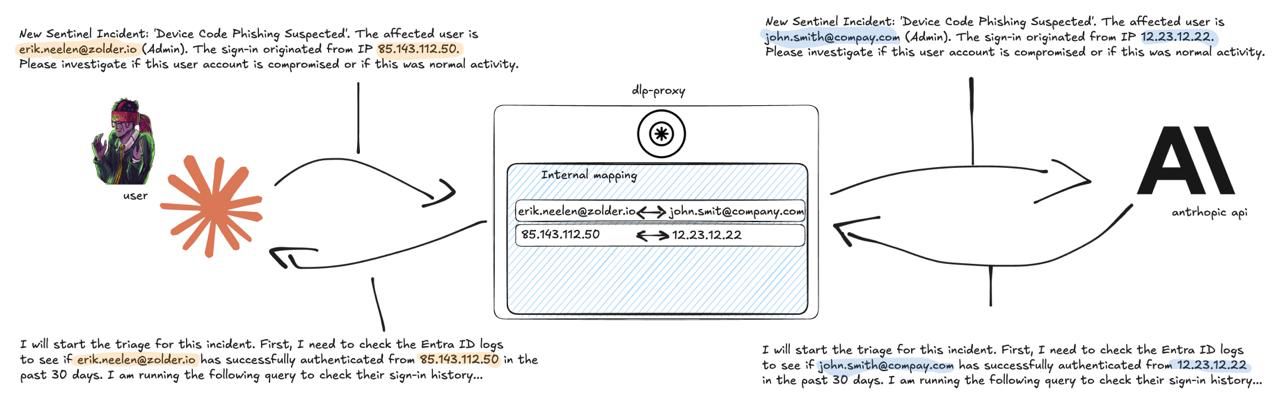
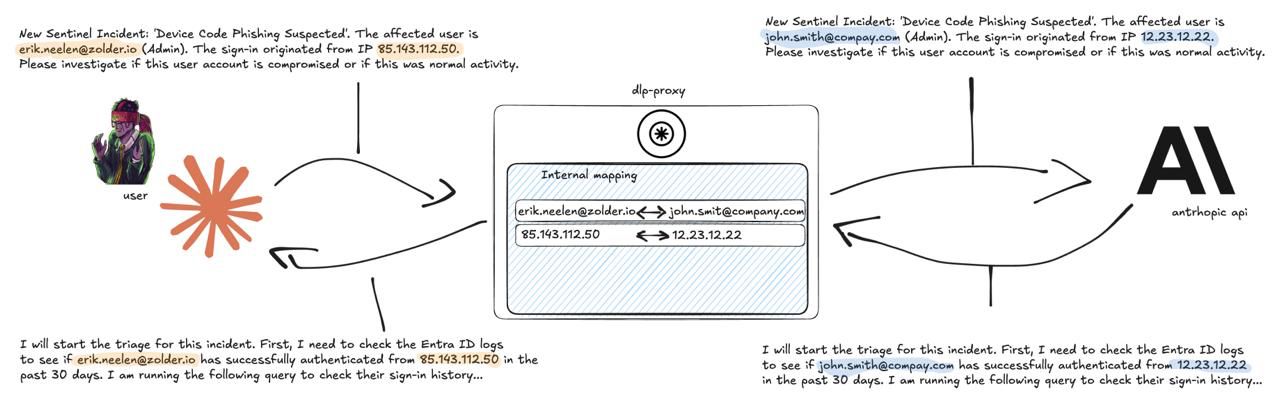
Typical flow: Application → Token Proxy (PII redaction) → LLM API (pseudonyms only) → Token Proxy (restore originals) → Application
admin from [email protected])| Entity Type | Internal Example | External Example |
|---|---|---|
[email protected] | [email protected] | |
| Domain | domain-internal-001.com | domain-external-001.net |
| IP | 10.99.99.1 (RFC1918) | ASN-aware donor IP (see below) |
| Person | person_internal_001 | person_external_001 |
| Org | org_internal_001 | org_external_001 |
| Hostname | host_001 | host_001 |
Pseudonyms are deterministic within a session — the same real value always maps to the same pseudonym.
When an LLM is analyzing security logs, the hosting provider and geolocation of an IP address matters — a login from a Hetzner IP in Germany tells a different story than one from a residential ISP in the US. Naive replacement with documentation-range IPs (e.g., 198.51.100.x) destroys this context.
With the optional MaxMind GeoLite2-ASN database, the proxy replaces real IPs with a different IP from the same ASN and subnet. The LLM sees a real-looking IP that resolves to the same hosting provider and approximate geography — but it's not the actual address.
10.99.99.x (no ASN context to preserve)198.51.100.x (documentation range)The donor IP is chosen deterministically via HMAC with a per-session salt, so the same real IP always maps to the same donor within a session, but different sessions produce different mappings.
The proxy ships with an empty config.json — no built-in word lists or domain-specific assumptions. The included config.json.example is tuned for security operations with Microsoft Sentinel and Entra ID (8,000+ KQL table/column names, Graph API permission terms, security reference domains). If that matches your use case, copy what you need from it. If you're using the proxy for a different domain (healthcare, legal, finance, etc.), start from the empty config and build your own lists.
config.json{
"internal_domains": ["yourcompany.com"],
"partner_domains": ["partnercorp.com"],
"internal_ip_ranges": ["10.0.0.0/8", "172.16.0.0/12", "192.168.0.0/16"],
"known_persons": ["John Smith"],
"known_orgs": ["YourCompany"],
"known_hostnames": ["DC01", "FS01"],
"ner_enabled": true,
"ner_skiplist": [],
"redaction_enabled": true
}
_internal_ pseudonyms)spacy + en_core_web_sm)false, proxy becomes pure pass-throughfalse, domains pass through unmodified (emails, IPs, names are still redacted). Useful when domain names carry important context for the LLM (e.g., distinguishing outlook.com from protonmail.com) and are not considered sensitive.| Variable | Default | Purpose |
|---|---|---|
ANTHROPIC_API_BASE | https://api.anthropic.com | Upstream Anthropic API URL |
TOKEN_PROXY_CONFIG_PATH | /app/config.json | Path to config file |
LOG_LEVEL | info | Logging level |
GEOIP_ASN_DB_PATH | /app/data/GeoLite2-ASN.mmdb | MaxMind GeoLite2-ASN database (optional) |
Manage whitelists and toggle redaction without restarting:
# View all whitelists
curl http://localhost:8090/token-proxy/config/whitelist

# Add terms to NER skiplist (reduces false positives)
curl -X POST http://localhost:8090/token-proxy/config/whitelist \
  -H "Content-Type: application/json" \
  -d '{"category": "ner_skiplist", "values": ["EvoSTS", "Hetzner"]}'

# Add domains to allowlist (never pseudonymize these)
curl -X POST http://localhost:8090/token-proxy/config/whitelist \
  -H "Content-Type: application/json" \
  -d '{"category": "domain_allowlist", "values": ["github.com"]}'

# Disable redaction (pass-through mode)
curl -X POST http://localhost:8090/token-proxy/config/status \
  -H "Content-Type: application/json" \
  -d '{"redaction_enabled": false}'
Whitelist categories: ner_skiplist, domain_allowlist, known_persons, known_orgs, known_hostnames
Inspect what the proxy is doing in real-time:
# List active sessions
curl http://localhost:8090/token-proxy/sessions

# View pseudonym mappings for a session
curl http://localhost:8090/token-proxy/sessions/{session_id}/mappings

# View redaction activity log
curl http://localhost:8090/token-proxy/sessions/{session_id}/log

# Search mappings
curl http://localhost:8090/token-proxy/sessions/{session_id}/search?q=admin

# View captured payloads (what the LLM actually saw)
curl http://localhost:8090/token-proxy/sessions/{session_id}/payloads

# Token usage for a session (input/output tokens across all requests)
curl http://localhost:8090/token-proxy/sessions/{session_id}/usage

# Global statistics (includes total_tokens across all sessions)
curl http://localhost:8090/token-proxy/stats
