 yilongmd/zafrida-ui
A Frida UI tool window inside PyCharm / JetBrains IDEs.

[中文](https://github.com/yilongmd/zafrida-ui/blob/main/README.md) | English

ZAFrida UI - PyCharm Frida Plugin
===============
Current Version: 0.3.6
[](LICENSE)
[](https://github.com/yilongmd/zafrida-ui)
[](https://plugins.jetbrains.com/)
[](https://github.com/yilongmd/zafrida-ui)
Project Introduction
-----------------------------------
<h3 align="center">Frida GUI Tool for PyCharm/IntelliJ</h3>
ZAFrida UI is a Frida graphical interface plugin integrated into PyCharm and JetBrains IDEs. It aims to solve the complexity of Frida command-line operations and script management by providing a complete **UI interaction interface** to manage devices, processes, scripts, and logs.
The core highlight is its **"Checkbox-style" Template Management System**: users can dynamically insert code snippets into the main script or comment them out simply by checking/unchecking boxes, enabling a "block-building" style of Hook script assembly. Additionally, the plugin features built-in **Project Management** (`zafrida-project.xml`), supporting quick switching between multiple devices and environment configurations.
ZAFrida does not replace Frida but serves as a powerful UI wrapper for `frida-tools`, seamlessly connecting with your existing Python and Frida environment.
**Simplified Wiki**: [ZAFrida UI Simplified Wiki (BBS)](https://github.com/yilongmd/zafrida-ui/blob/main/zafrida_ui_wiki_bbs_en.md) (This is a simpler wiki)
**Full Wiki**: [ZAFrida UI Wiki (EN)](https://github.com/yilongmd/zafrida-ui/blob/main/ZAFridaUI_Wiki_en.md)
## Home
Quick Start
-----------------------------------
1. **Install Plugin**: Search for "ZAFrida" in the IDE Plugin Marketplace or install via disk.
2. **Configure Environment**: Go to `Settings` -> `Tools` -> `ZAFrida` and configure `frida` executable paths (if not auto-detected).
3. **Create Project**: Right-click in Project View -> `New Frida Project`.
4. **Write/Select Script**: Select your `agent.js` in the Run Panel.
5. **Hook & Debug**:
* Connect device (USB or Remote).
* Select target process or package name.
* Click **Run**.
6. **Use Templates**: Switch to the `Templates` tab, check the Hook functions you need (e.g., "SSL Pinning Bypass"), and the code will be automatically injected into your script.
7. **Skills Automation (Optional)**: Disabled by default. Go to `Settings/Preferences -> ZAFrida -> Skills HTTP API`, check `Enable Skills` to auto-start the local API (or use manual `Start/Stop`). CLI and template locations:
* `skills-cli/zafrida_skill_cli.py`
* `skills-template/zafrida-http-control/`
Features
-----------------------------------
* **Device & Process Management**
Integrated with `frida-ls-devices` and `frida-ps`, supporting one-click device refresh and viewing running processes, apps, or installed packages.
* **Multiple Connection Modes**
Full support for **USB**, **Remote**, and **Gadget** modes, with customizable remote host and port—no need to manually construct complex CLI arguments.
* **Interactive Script Execution (Run / Attach)**
* Supports **Run (default Spawn)** and **Attach** as explicit execution actions rather than a simple mode switch.
* Supports **Force Stop** to terminate target applications.
* Built-in console output with automatic log persistence to the `zafrida-logs/` directory.
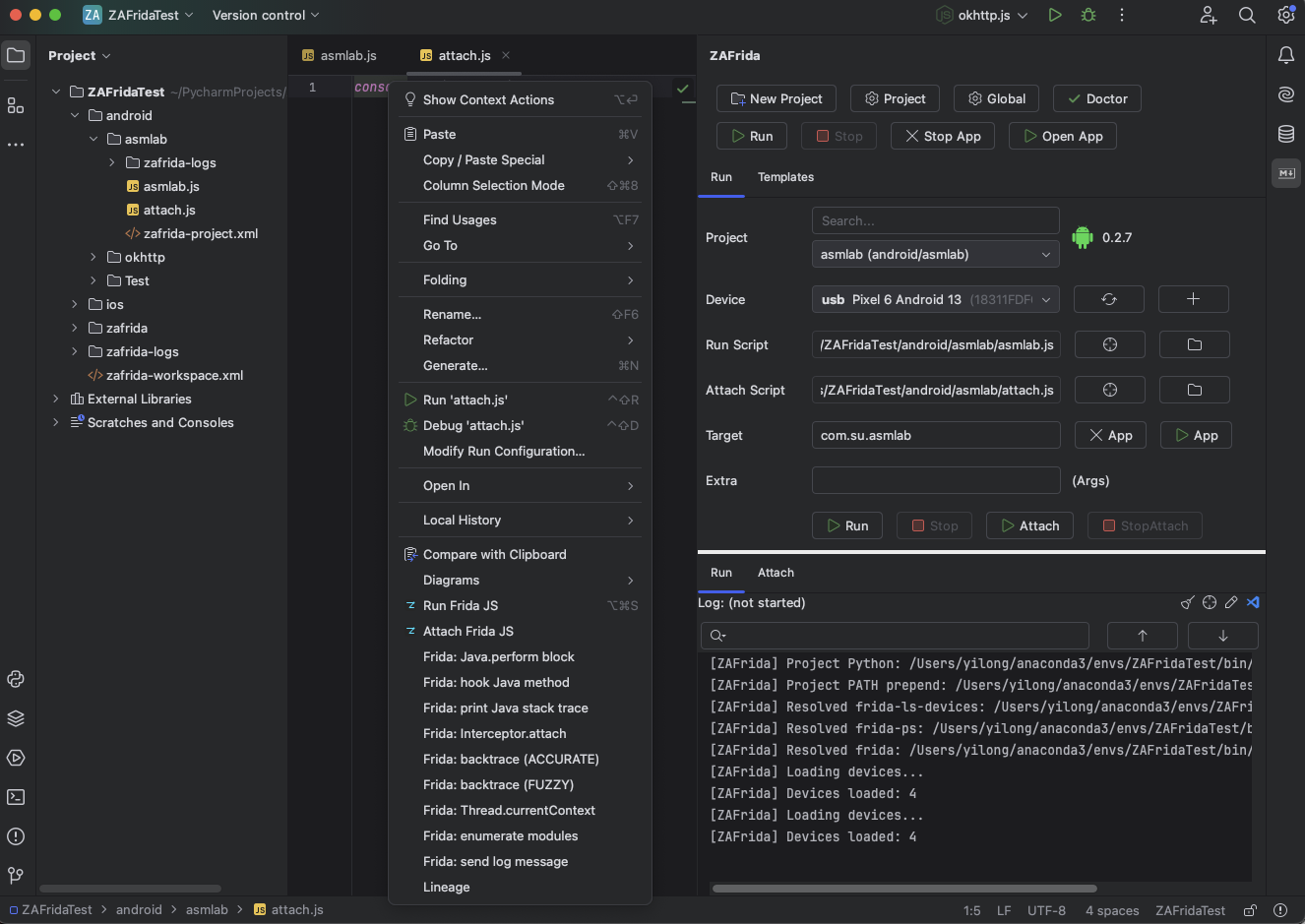
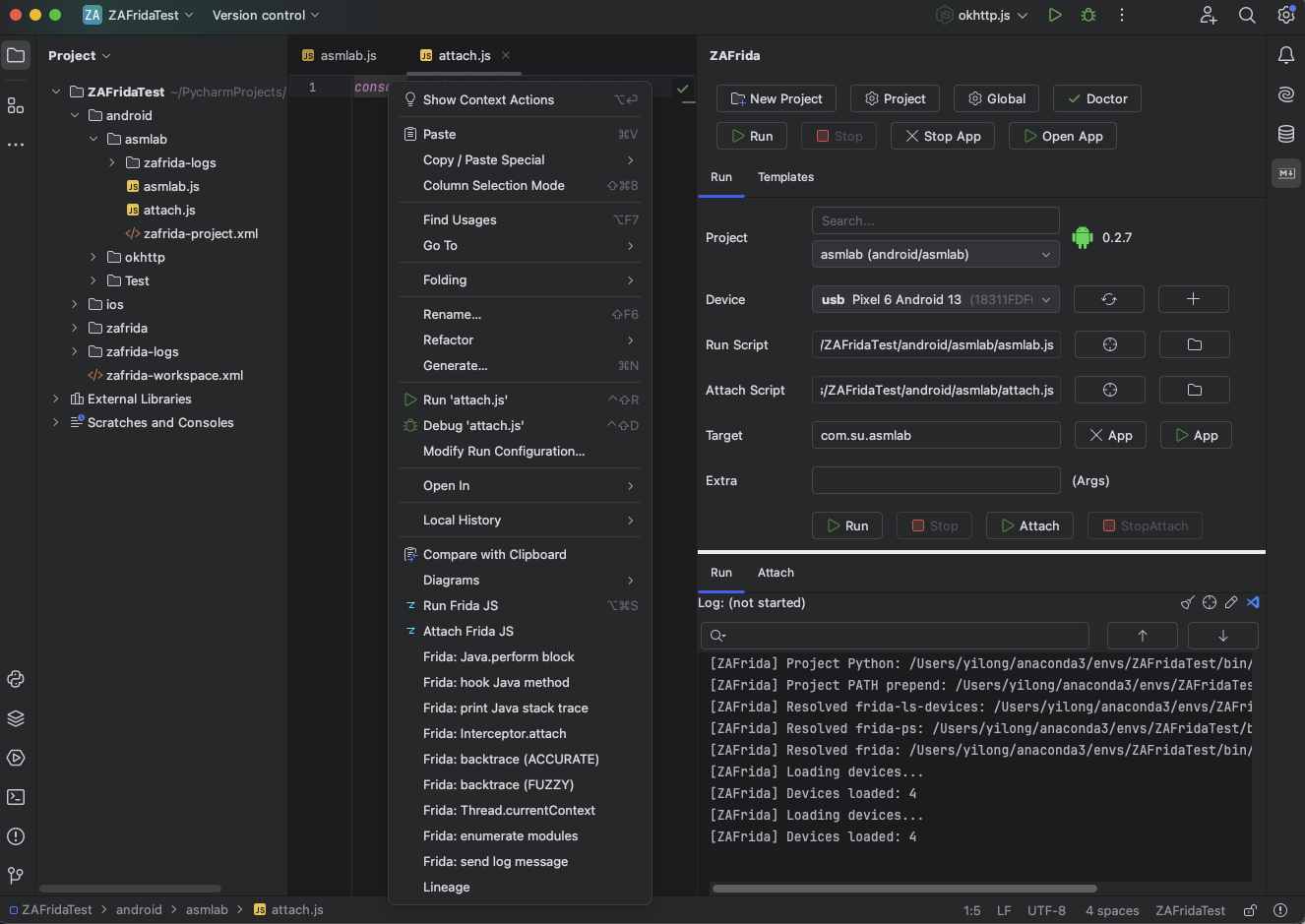
* **JS Editor Context Menu (Important)**
* Right-click inside a Frida JS editor to directly choose:
* **Run Frida JS** – run the currently opened JS file as the main script (default Spawn).
* **Attach Frida JS** – attach the currently opened JS file to an already running target process.
* The file is automatically saved before execution, and the corresponding ZAFrida Project is auto-selected.
* Ideal for quick PoC validation, demos, Gadget mode, or attaching to live processes.
* **Shortcut**:
* Windows / Linux: `Ctrl + Alt + S`
* macOS: `⌘ + ⌥ + S`
* **Editor Snippets Insertion**
* Provides **ZAFrida Frida Snippets** in the JS editor context menu.
* One-click insertion of common Frida code patterns, including:
* `Java.perform` wrappers
* Java method hook templates
* Native hooks via `Interceptor.attach`
* Module / export enumeration
* `send()` log helpers
* Insertions are performed via WriteCommandAction, fully undo/redo safe.
* **Dynamic Template System (Core Innovation)**
* Built-in Android / iOS hook templates (e.g., SSL Pinning Bypass, Method Hook, Native Hook).
* **Checkbox-driven control**: check to insert code, uncheck to automatically comment it out—no manual deletion required.
* Supports custom templates with real-time preview inside the IDE.
* **Run Script + Attach Script Separation**
* Supports a primary **Run Script** and an independent **Attach Script**.
* Enables clean separation between startup hooks and runtime injection logic for advanced debugging workflows.
* **Project-Based Configuration (ZAFrida Project)**
* Introduces the ZAFrida Project concept to persist devices, targets, scripts, attach scripts, and connection parameters as a complete working context.
* In the Project View, supports:
* `New Frida Project`
* `Select Frida Project`
* `Load Frida Project`
* UI state and configuration are automatically restored when switching projects.
* **Smart Python / Frida Environment Resolution**
* Automatically detects the current PyCharm project’s Python SDK (venv / conda).
* Dynamically injects PATH to ensure the correct `frida` / `frida-tools` are used.
* Handles Remote and Gadget scenarios to avoid incorrect local environment injection.
* **Developer Aids**
* One-click installation of `frida-gum.d.ts` for type hints and intelligent code completion in Frida JS.
* **Skills Local Automation API**
* Adds a local Skills HTTP API (disabled by default) for scripted control: project switching, device/connection mode setup, Run/Attach actions, and run/attach log path/content reading.
* How to enable: `Settings/Preferences -> ZAFrida -> Skills HTTP API`, then check `Enable Skills`.
* Bundled CLI and template:
* `skills-cli/zafrida_skill_cli.py`
* `skills-template/zafrida-http-control/`
Use Cases
-----------------------------------
ZAFrida UI is suitable for all scenarios involving reverse engineering with Frida, especially:
* Android / iOS App penetration testing and reverse analysis.
* Debugging processes requiring frequent switching of different Hook scripts.
* Engineers accustomed to using IDEs (PyCharm/IDEA) for mixed Python and JS development.
Technical Documentation
-----------------------------------
- **Requirements**:
- IntelliJ IDEA or PyCharm (Recommended 2024.3+)
- Python3 and `frida-tools` installed locally (`pip install frida-tools`)
- Ensure `frida`, `frida-ps`, and `frida-ls-devices` are in the system PATH or configured in plugin settings.
- **Issues**: [Github Issues](https://github.com/yilongmd/zafrida-ui/issues)
Start the Project
-----------------------------------
1. Clone source: `git clone https://github.com/yilongmd/zafrida-ui.git`
2. Open the project in IntelliJ IDEA.
3. Run the Gradle task `runIde` to start the debug environment.
System Effect
-----------------------------------
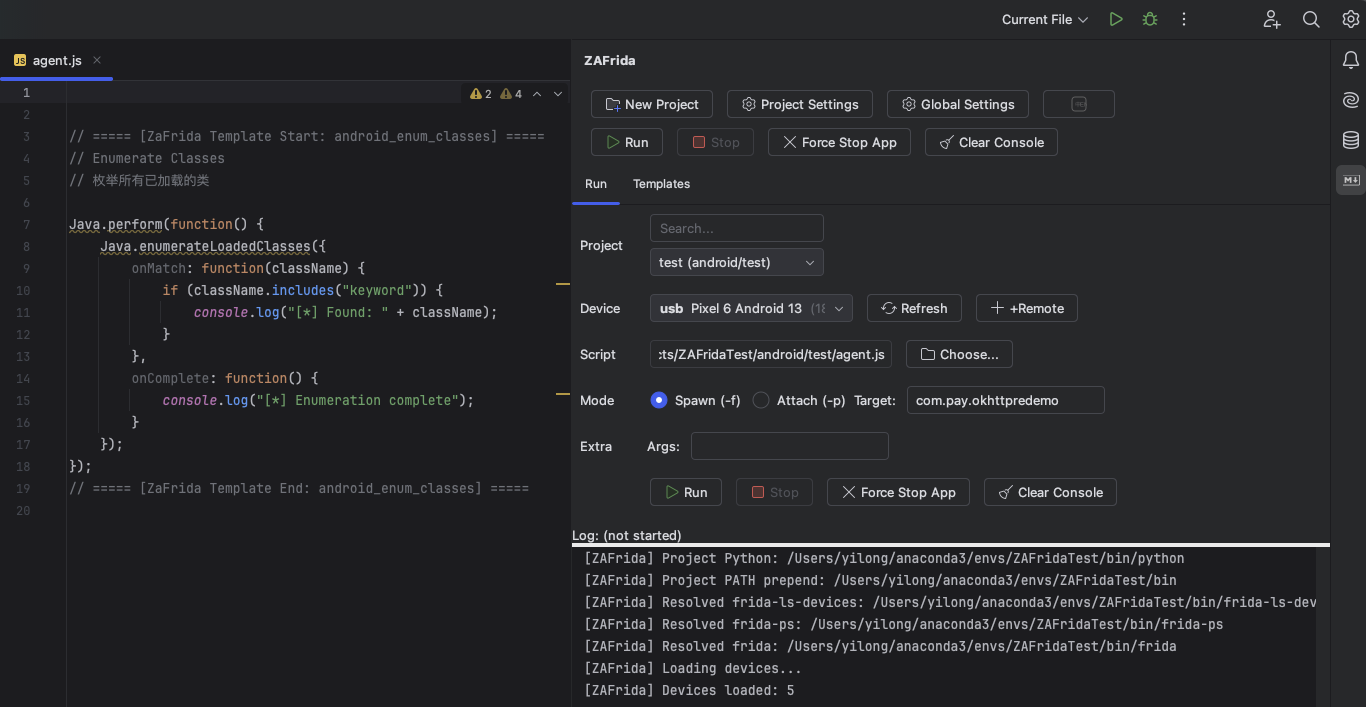
##### Main Interface & Run Panel
> Provides device selection, script selection, run mode configuration, and console output.
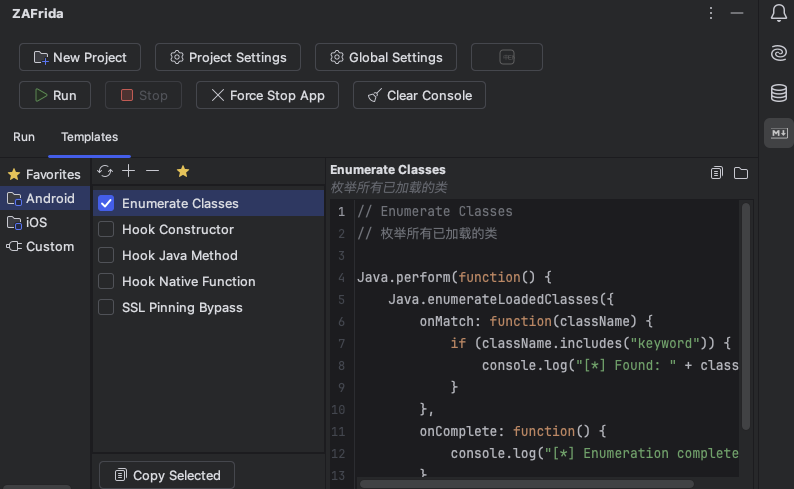
##### Template Management Panel
> Select categories on the left, check templates in the middle, and preview code on the right. Checkboxes directly control the effectiveness of script content.
##### Settings
> Supports customizing Frida tool paths, remote connection addresses, and log configurations.
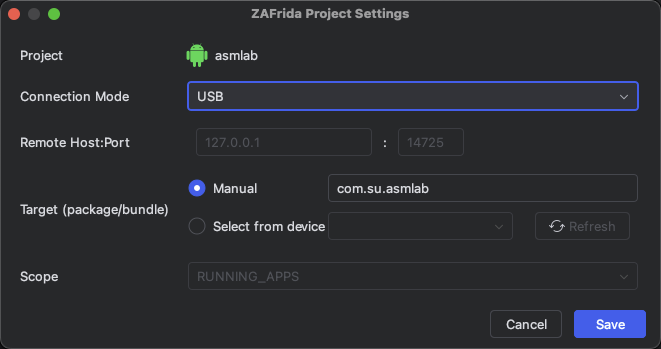
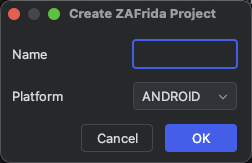
##### Project Wizard
> Quickly create standardized Frida project structures.
Technical Architecture
-----------------------------------
#### Development Environment
- Language: Language: Java 21 (production source). Build scripts use Gradle Kotlin DSL.
- Framework: IntelliJ Platform SDK
- Build Tool: Gradle
- Dependency: `frida` `frida-tools` (Python environment)
Acknowledgements
-----------------------------------
Special thanks to the following contributors for providing core Frida JS script templates:
* **小佳**
* **Lane**
* **迷人**
For more contributors and acknowledgements, see: [CONTRIBUTORS.md](https://github.com/yilongmd/zafrida-ui/blob/main/CONTRIBUTORS.md)
