
 xaitax/sploitscan
Aggregates CVE details, exploit databases, and EPSS scores with AI risk assessment and vulnerability scanner import for prioritized patching.



SploitScan is a powerful and user-friendly tool designed to streamline the process of identifying exploits for known vulnerabilities and their respective exploitation probability. Empowering cybersecurity professionals with the capability to swiftly identify and apply known and test exploits. It's particularly valuable for professionals seeking to enhance their security measures or develop robust detection strategies against emerging threats.
CVE Information Retrieval
Retrieve detailed information about vulnerabilities.
EPSS Integration
Check the likelihood of exploitation with data from the Exploit Prediction Scoring System.
Public Exploits Aggregation
Collect publicly available exploit data to help you understand the context of each vulnerability.
CISA KEV Integration
Quickly see if a vulnerability is listed in CISA’s Known Exploited Vulnerabilities catalog.
AI-Powered Risk Assessment
Get risk assessments using multiple AI providers (OpenAI ChatGPT, Google Gemini, Grok AI, or DeepSeek) that explain potential risks and offer mitigation ideas.
HackerOne Reports
Find out if a vulnerability has been involved in HackerOne bug bounty reports, including basic ranking and severity details.
Patching Priority System
Receive a simple priority rating for patching based on CVSS, EPSS, and available exploit information.
Multi-CVE Support and Export Options
Work with multiple CVEs at once and export the results to HTML, JSON, or CSV formats.
Vulnerability Scanner Import
Import scan results from popular vulnerability scanners (Nessus, Nexpose, OpenVAS, Docker) to directly search for known exploits. Now supports directory-based import with --input-dir for batch processing multiple reports.
Granular Method Selection
Choose which specific data retrieval methods to run (such as CISA, EPSS, HackerOne, AI, etc.) so you only get the information you need.
Local CVE Database Update & Cloning
Maintain a local copy of the CVE List V5 repository. This lets you update the full CVE data on your machine for offline use and search.
Keyword-Based CVE Search Across Sources
Search for CVEs by keywords (for example, “Apple”) across both your local database and remote sources like CISA and Nuclei Templates.
Fast Mode for Streamlined Output
Use fast mode to display only the basic CVE information, skipping extra lookups for quicker results.
User-Friendly Interface
Enjoy a clear and straightforward interface that presents all the information in an easy-to-read format.
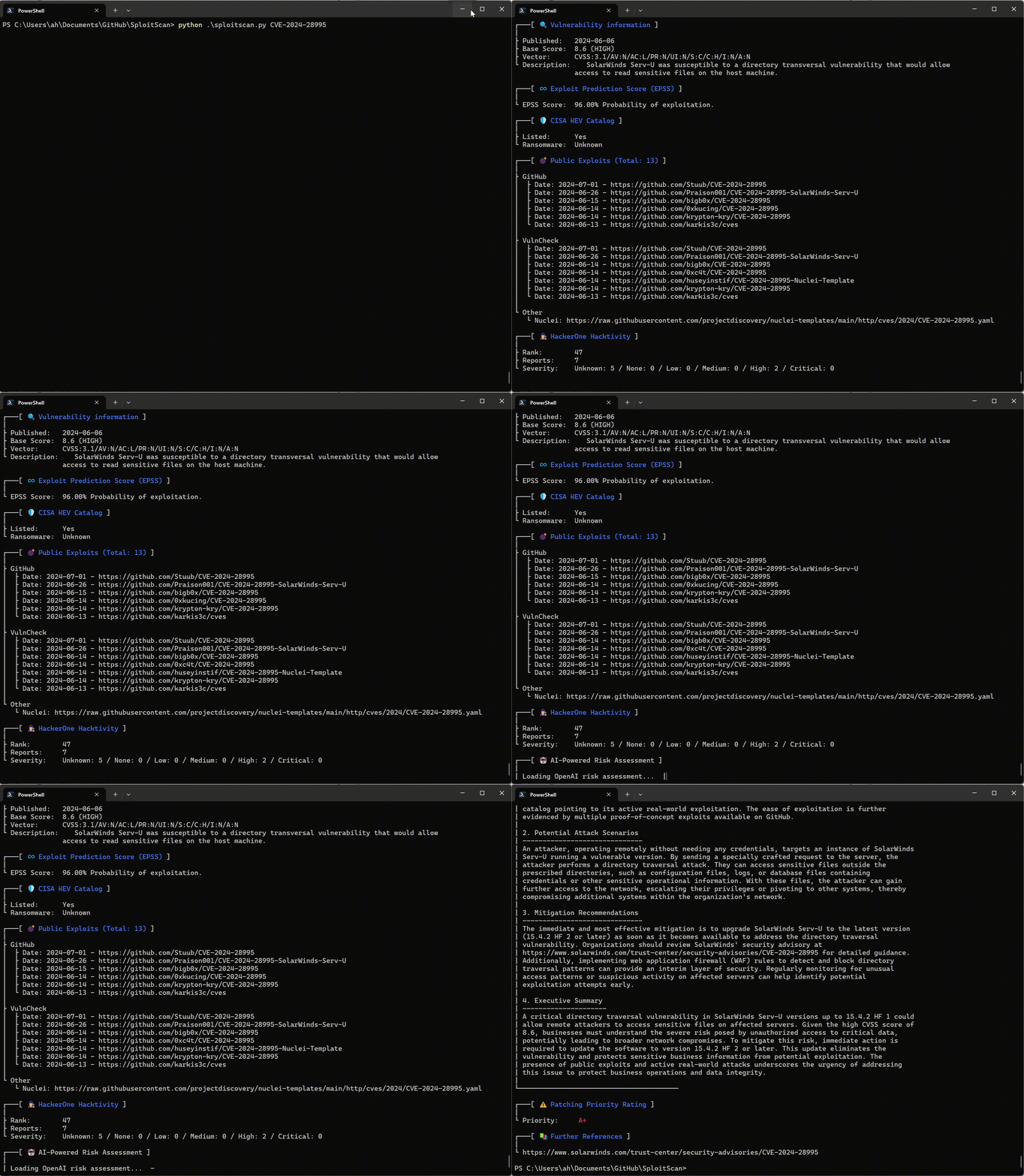
git clone https://github.com/xaitax/SploitScan.git
cd sploitscan
pip install -r requirements.txt
pip install --user sploitscan
apt install sploitscan
SploitScan searches for a config.json in multiple locations by default. It will load the first valid file it finds, in this order:
--config or -cSPLOITSCAN_CONFIG_PATH~/.sploitscan/config.json~/.config/sploitscan/config.json~/Library/Application Support/sploitscan/config.json (macOS)%APPDATA%/sploitscan/config.json (Windows)/etc/sploitscan/config.jsonNote: Only one file is loaded — the first one found in the above sequence. You can place your
config.jsonin any of these paths.
A typical config.json might look like this:
{
    "vulncheck_api_key": "",
    "openai_api_key": "",
    "google_ai_api_key": "",
    "grok_api_key": "",
    "deepseek_api_key": ""
}
$ python .\sploitscan.py -h

███████╗██████╗ ██╗      ██████╗ ██╗████████╗███████╗ ██████╗ █████╗ ███╗   ██╗
██╔════╝██╔══██╗██║     ██╔═══██╗██║╚══██╔══╝██╔════╝██╔════╝██╔══██╗████╗  ██║
███████╗██████╔╝██║     ██║   ██║██║   ██║   ███████╗██║     ███████║██╔██╗ ██║
╚════██║██╔═══╝ ██║     ██║   ██║██║   ██║   ╚════██║██║     ██╔══██║██║╚██╗██║
███████║██║     ███████╗╚██████╔╝██║   ██║   ███████║╚██████╗██║  ██║██║ ╚████║
╚══════╝╚═╝     ╚══════╝ ╚═════╝ ╚═╝   ╚═╝   ╚══════╝ ╚═════╝╚═╝  ╚═╝╚═╝  ╚═══╝
v0.14.0 / Alexander Hagenah / @xaitax / [email protected]

usage: sploitscan.py [-h] [-e {json,csv,html}] [-t {nessus,nexpose,openvas,docker}] [--ai {openai,google,grok,deepseek}] [-k KEYWORDS [KEYWORDS ...]] [-local] [-f] [-m METHODS] [-i IMPORT_FILE] [-c CONFIG] [-d] [cve_ids ...]

SploitScan: Retrieve and display vulnerability and exploit data for specified CVE ID(s).

positional arguments:
  cve_ids               Enter one or more CVE IDs (e.g., CVE-YYYY-NNNNN). This is optional if an import file is provided via -i.

