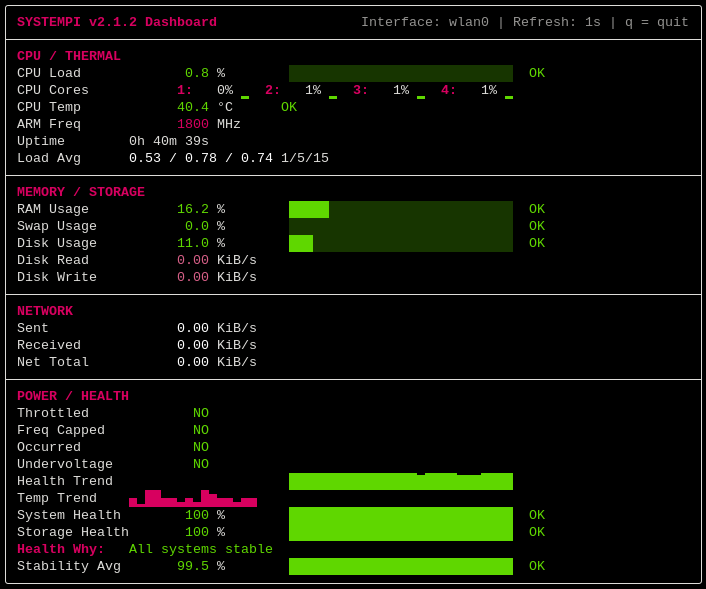
 wastelandsys/systempi
Modern real-time Raspberry Pi system monitoring dashboard with live telemetry, hardware health diagnostics, and low-flicker terminal rendering.

Real-time Raspberry Pi system monitoring dashboard for Linux terminals with live telemetry, hardware health analysis, and low-flicker rendering.
vcgencmdq for instant dashboard exit| Mode | Purpose |
|---|---|
| Balanced | Full monitoring dashboard |
| Compact | Smaller terminal optimized |
| Minimal | Essential-only clean mode |
| Doctor | Diagnostic, alert, and update-monitoring mode |
Each variation is designed for a different monitoring workflow — from lightweight minimal monitoring to deep diagnostic analysis.
systempi --variation balanced --theme wasteland
--variant and --var may also be used as aliases for --variation.
systempi --variation doctor --repo-check --theme vaulttec
systempi --variation compact --theme crt
systempi --variation minimal --theme ice
systempi --variation balanced --theme raspberrypi
systempi --variation doctor --theme biohazard
systempi --variation balanced --theme ocean
systempi --variation doctor --theme synthwave
git clone https://github.com/WastelandSYS/systempi.git
cd systempi
chmod +x install.sh uninstall.sh
sudo ./install.sh
Launch with:
systempi
cd systempi
sudo ./uninstall.sh
Optional dependency cleanup:
sudo ./uninstall.sh --remove-deps
The uninstaller removes the global systempi shortcut from /usr/local/bin. It does not delete your cloned repository folder.
Default launch:
systempi
Press q at any time to exit the live dashboard.
One-shot snapshot mode (render once and exit):
systempi --once
Compact mode:
systempi --variation compact
Minimal mode:
systempi --variation minimal
Balanced mode:
systempi --variation balanced
Doctor mode (diagnostic-focused):
systempi --variation doctor
Doctor mode with optional repository freshness checking:
systempi --variation doctor --repo-check
Doctor mode refreshes its normal Updates count when local package state changes. The count still comes from apt list --upgradable; SystemPi only uses package-state changes as a trigger to ask APT again. This requires no sudo/root access and does not install, remove, or upgrade packages.
--repo-check is opt-in and only valid with Doctor mode. It contacts the APT repositories already configured on the machine, stores isolated user-owned metadata under ~/.cache/systempi/apt/, and refreshes asynchronously every three hours without modifying the system APT cache.
Updates means updates currently known to the machine's normal APT metadata. Repo means the result from SystemPi's optional private repository freshness check. For example, Updates 8 available and Repo 9 available means the system currently knows about 8 available updates, while the isolated repository check sees 9 total available packages.
Once + export snapshot:
systempi --once --export text --output report.txt
systempi --once --export json --output report.json
Live alert event logging with watch/history support:
systempi --watch
systempi --history
--watch records newly active alert events, and --history prints recent events from:
~/.local/state/systempi/events.log
Theme selection examples:
systempi --theme ocean
systempi --theme matrix
systempi --theme wasteland
Refresh interval examples:
systempi --refresh 0.5
systempi --refresh 2
Pin network metrics to a specific interface:
systempi --interface eth0
systempi --interface wlan0
Disable ANSI colors:
systempi --no-color
Combine options:
systempi --variation compact --theme mono --refresh 2 --interface wlan0 --no-color
Help menu:
systempi -h
Version information:
systempi --version
Terminal glyph selection:
systempi --glyphs auto
systempi --glyphs unicode
systempi --glyphs ascii
auto automatically selects the most compatible glyph set for the active terminal. unicode forces full Unicode rendering, while ascii uses a plain ASCII fallback for maximum compatibility.
