 wanjunzh/ssct
A wrapper tool for shadowsocks to consistently bypass firewalls.



A wrapper tool for shadowsocks to consistently bypass firewalls.
The easiest way to run this tool is just type ssct in terminal, and ssct will acquire available shadowsocks servers from ishadowsocks and connect to it automatically.
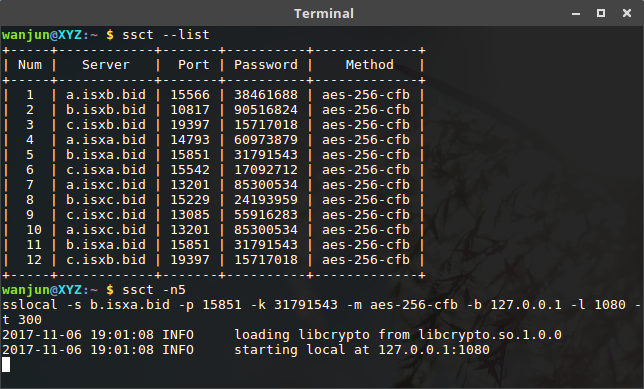
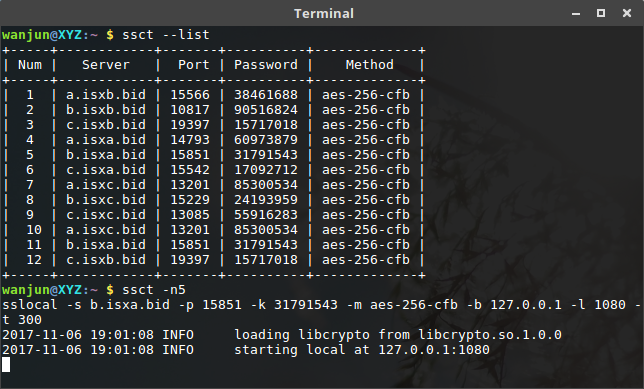
First, show all ss servers by --list option.
ssct --list
Then, connect to a specific server by -n option.
ssct -n 5
Alternatively, you can connect a custom server.
ssct -s <server_addr> -p <server_port> -l <local_port> -k <password> -m <method>
1 Install shadowsocks and requests (Required)
pip3 install shadowsocks
pip3 install requests
2 Install prettytable (Optional)
pip3 install prettytable
Note: The module prettytable is optional, but would be better if installed.
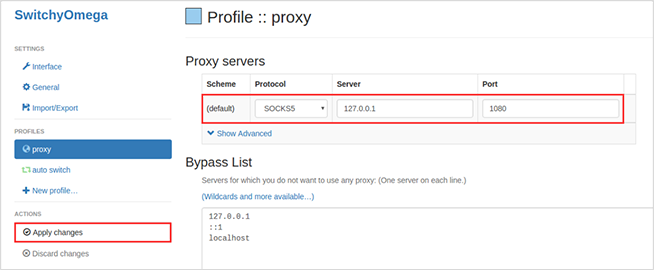
ssct to connect automatically.

optional arguments:
  -h, --help         show this help message and exit

ssct options:
  -n <num>           connect server number
  --list             list all ss servers
  --version          show program's version number and exit

shadowsocks options:
  -c <config>        path to config file
  -s <addr>          server address, auto crawl online
  -p <port>          server port, auto crawl online
  -b <addr>          local binding address [default: 127.0.0.1]
  -l <port>          local port [default: 1080]
  -k <password>      password, auto crawl online
  -m <method>        encryption method, auto crawl online
  -t <timeout>       timeout in seconds [default: 300]
  --fast-open        use TCP_FASTOPEN, requires Linux 3.7+
  -d <daemon>        daemon mode, one of start, stop and restart
  --pid-file <file>  pid file for daemon mode
  --log-file <file>  log file for daemon mode
  --user <user>      username to run as
  -v, -vv            verbose mode
  -q, -qq            quiet mode, only show warnings/errors
Connect to the available server automatically without any argument.
Permission is hereby granted, free of charge, to any person, without any restriction.
