 wangyu-/udp2raw
A Tunnel which Turns UDP Traffic into Encrypted UDP/FakeTCP/ICMP Traffic by using Raw Socket,helps you Bypass UDP FireWalls(or Unstable UDP Environment)

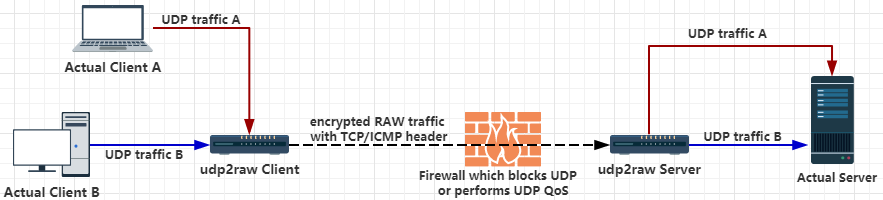
A Tunnel which turns UDP Traffic into Encrypted FakeTCP/UDP/ICMP Traffic by using Raw Socket, helps you Bypass UDP FireWalls(or Unstable UDP Environment).
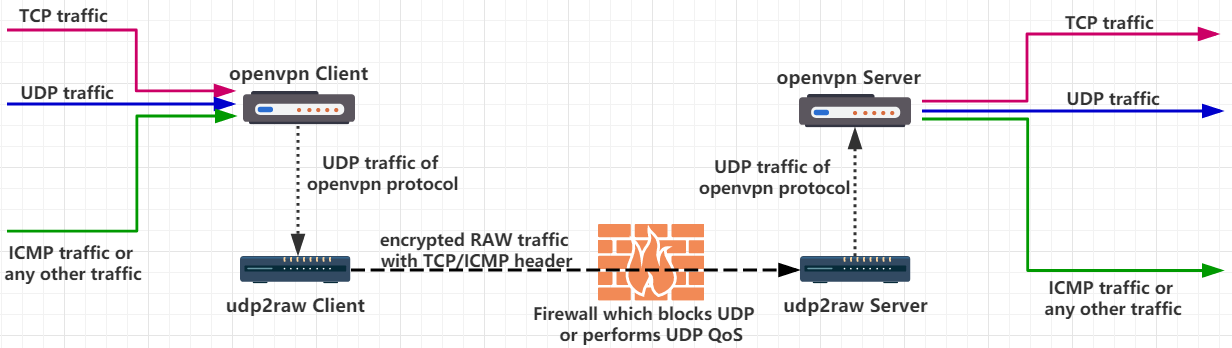
When used alone,udp2raw tunnels only UDP traffic. Nevertheless,if you used udp2raw + any UDP-based VPN together,you can tunnel any traffic(include TCP/UDP/ICMP),currently OpenVPN/L2TP/ShadowVPN and tinyfecVPN are confirmed to be supported.
or
Linux host (including desktop Linux,Android phone/tablet,OpenWRT router,or Raspberry PI) with root account or cap_net_raw capability.
For Windows and MacOS users, use the udp2raw in this repo.
ICMP/FakeTCP headers help you bypass UDP blocking, UDP QOS or improper UDP NAT behavior on some ISPs. In ICMP header mode,udp2raw works like an ICMP tunnel.
UDP headers are also supported. In UDP header mode, it behaves just like a normal UDP tunnel, and you can just make use of the other features (such as encryption, anti-replay, or connection stabilization).
In FakeTCP header mode,udp2raw simulates 3-way handshake while establishing a connection,simulates seq and ack_seq while data transferring. It also simulates a few TCP options such as: MSS, sackOk, TS, TS_ack, wscale. Firewalls will regard FakeTCP as a TCP connection, but its essentially UDP: it supports real-time/out-of-order delivery(just as normal UDP does), no congestion control or re-transmission. So there wont be any TCP over TCP problem when using OpenVPN.
Conection failures are detected by heartbeats. If timed-out, client will automatically change port number and reconnect. If reconnection is successful, the previous connection will be recovered, and all existing UDP conversations will stay vaild.
For example, if you use udp2raw + OpenVPN, OpenVPN won't lose connection after any reconnect, even if network cable is re-plugged or WiFi access point is changed.
Multiplexing One client can handle multiple UDP connections, all of which share the same raw connection.
Multiple Clients One server can have multiple clients.
NAT Support All of the 3 modes work in NAT environments.
OpenVZ Support Tested on BandwagonHost VPS.
Easy to Build No dependencies.To cross-compile udp2raw,all you need to do is just to download a toolchain,modify makefile to point at the toolchain,run make cross then everything is done.(Note:Pre-compiled binaries for Desktop,RaspberryPi,Android,some Openwrt Routers are already included in Releases)
Bypass UDP QoS Bypass UDP Blocking Bypass OpenVPN TCP over TCP problem OpenVPN over ICMP UDP to ICMP tunnel UDP to TCP tunnel UDP over ICMP UDP over TCP
Download binary release from https://github.com/wangyu-/udp2raw-tunnel/releases
Assume your UDP is blocked or being QOS-ed or just poorly supported. Assume your server ip is 44.55.66.77, you have a service listening on udp port 7777.
# Run at server side:
./udp2raw_amd64 -s -l0.0.0.0:4096 -r 127.0.0.1:7777    -k "passwd" --raw-mode faketcp -a

# Run at client side
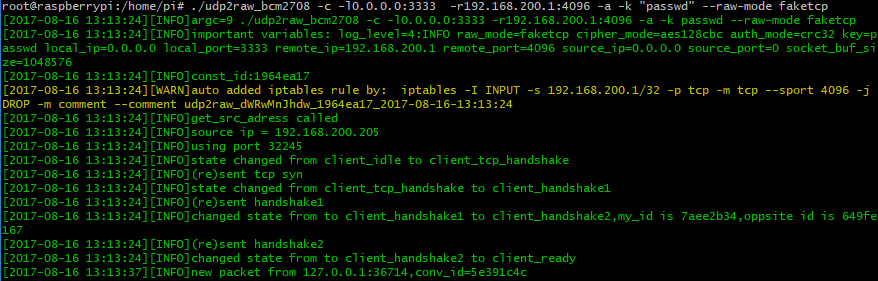
./udp2raw_amd64 -c -l0.0.0.0:3333  -r44.55.66.77:4096  -k "passwd" --raw-mode faketcp -a
(The above commands need to be run as root. For better security, with some extra steps, you can run udp2raw as non-root. Check this link for more info )
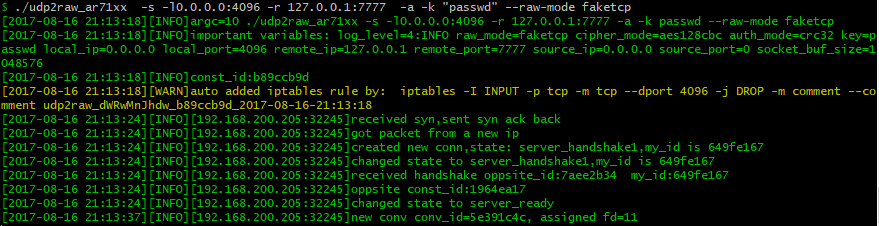
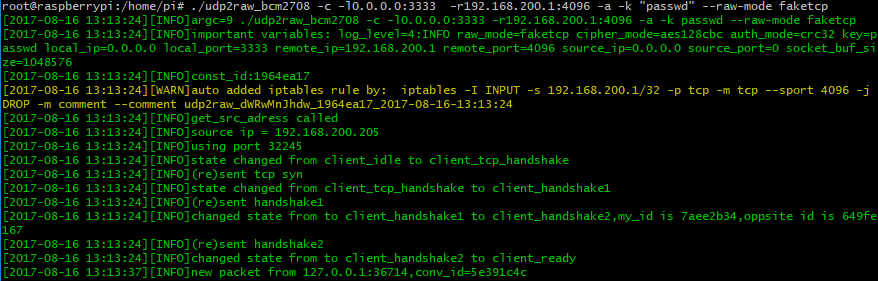
Now,an encrypted raw tunnel has been established between client and server through TCP port 4096. Connecting to UDP port 3333 at the client side is equivalent to connecting to port 7777 at the server side. No UDP traffic will be exposed.
To run on Android, check Android_Guide
-a option automatically adds an iptables rule (or a few iptables rules) for you, udp2raw relies on this iptables rule to work stably. Be aware you dont forget -a (its a common mistake). If you dont want udp2raw to add iptables rule automatically, you can add it manually(take a look at -g option) and omit -a.
udp2raw-tunnel
git version:4623f878e0    build date:Nov  3 2024 23:15:46
repository: https://github.com/wangyu-/udp2raw-tunnel

usage:
    run as client : ./this_program -c -l local_listen_ip:local_port -r server_address:server_port  [options]
    run as server : ./this_program -s -l server_listen_ip:server_port -r remote_address:remote_port  [options]
