wallarm/gotestwaf
An open-source project in Golang to asess different API Security tools and WAF for detection logic and bypasses

GoTestWAF is a tool for API and OWASP attack simulation that supports a wide range of API protocols including REST, GraphQL, gRPC, SOAP, XMLRPC, and others.
It was designed to evaluate web application security solutions, such as API security proxies, Web Application Firewalls, IPS, API gateways, and others.
GoTestWAF generates malicious requests using encoded payloads placed in different parts of HTTP requests: its body, headers, URL parameters, etc. Generated requests are sent to the application security solution URL specified during GoTestWAF launch. The results of the security solution evaluation are recorded in the report file created on your machine.
Default conditions for request generation are defined in the testcases folder in the YAML files of the following format:
payload:
  - '"union select -7431.1, name, @aaa from u_base--w-'
  - "'or 123.22=123.22"
  - "' waitfor delay '00:00:10'--"
  - "')) or pg_sleep(5)--"
encoder:
  - Base64Flat
  - URL
  - JSUnicode
placeholder:
  - URLPath
  - URLParam
  - Header
type: SQL Injection
payload is a malicious attack sample (e.g XSS payload like <script>alert(111)</script> or something more sophisticated).
Since the format of the YAML string is required for payloads, they must be encoded as binary data.
encoder is an encoder to be applied to the payload before placing it to the HTTP request. Possible encoders are:
placeholder is a place inside HTTP request where encoded payload should be. Possible placeholders are:
The RawRequest placeholder will allow you to do an arbitrary HTTP request. The payload is substituted by replacing the string {{payload}} in the URL path, Headers or body. Fields of RawRequest placeholder:
methodpathheadersbodyRequired fields for RawRequest placeholder:
method fieldExample:
payload:
  - test
encoder:
  - Plain
placeholder:
  - RawRequest:
      method: "POST"
      path: "/"
      headers:
        Content-Type: "multipart/form-data; boundary=boundary"
      body: |
        --boundary
        Content-disposition: form-data; name="field1"

        Test
        --boundary
        Content-disposition: form-data; name="field2"
        Content-Type: text/plain; charset=utf-7

        Knock knock.
        {{payload}}
        --boundary--
type: RawRequest test
type is a name of entire group of the payloads in file. It can be arbitrary, but should reflect the type of attacks in the file.
Request generation is a three-step process involving the multiplication of payload amount by encoder and placeholder amounts. Let's say you defined 2 payloads, 3 encoders (Base64, JSUnicode, and URL) and 1 placeholder (URLParameter - HTTP GET parameter). In this case, GoTestWAF will send 2x3x1 = 6 requests in a test case.
During GoTestWAF launch, you can also choose test cases between two embedded: OWASP Top-10, OWASP-API,
or your own (by using the configuration option testCasePath).
The steps below walk through downloading and starting GoTestWAF with minimal configuration on Docker.
Pull the GoTestWAF image from Docker Hub:
docker pull wallarm/gotestwaf
Start the GoTestWAF image:
docker run --rm --network="host" -it -v ${PWD}/reports:/app/reports \
    wallarm/gotestwaf --url=<EVALUATED_SECURITY_SOLUTION_URL>
If required, you can replace ${PWD}/reports with the path to another folder used to place the evaluation report.
If you don't want to optionally email the report, just press Enter after the email request message appears, or you can use --noEmailReport to skip the message:
docker run --rm --network="host" -v ${PWD}/reports:/app/reports \
    wallarm/gotestwaf --url=<EVALUATED_SECURITY_SOLUTION_URL> --noEmailReport
If the evaluated security tool is available externally, you can skip the option --network="host". This option enables interaction of Docker containers running on 127.0.0.1.
To perform the gRPC tests you must have a working endpoint and use the --grpcPort cli option.
docker run --rm --network="host" -it -v ${PWD}/reports:/app/reports \
    wallarm/gotestwaf --grpcPort 9000 --url=http://my.grpc.endpoint
Check your email for the report.
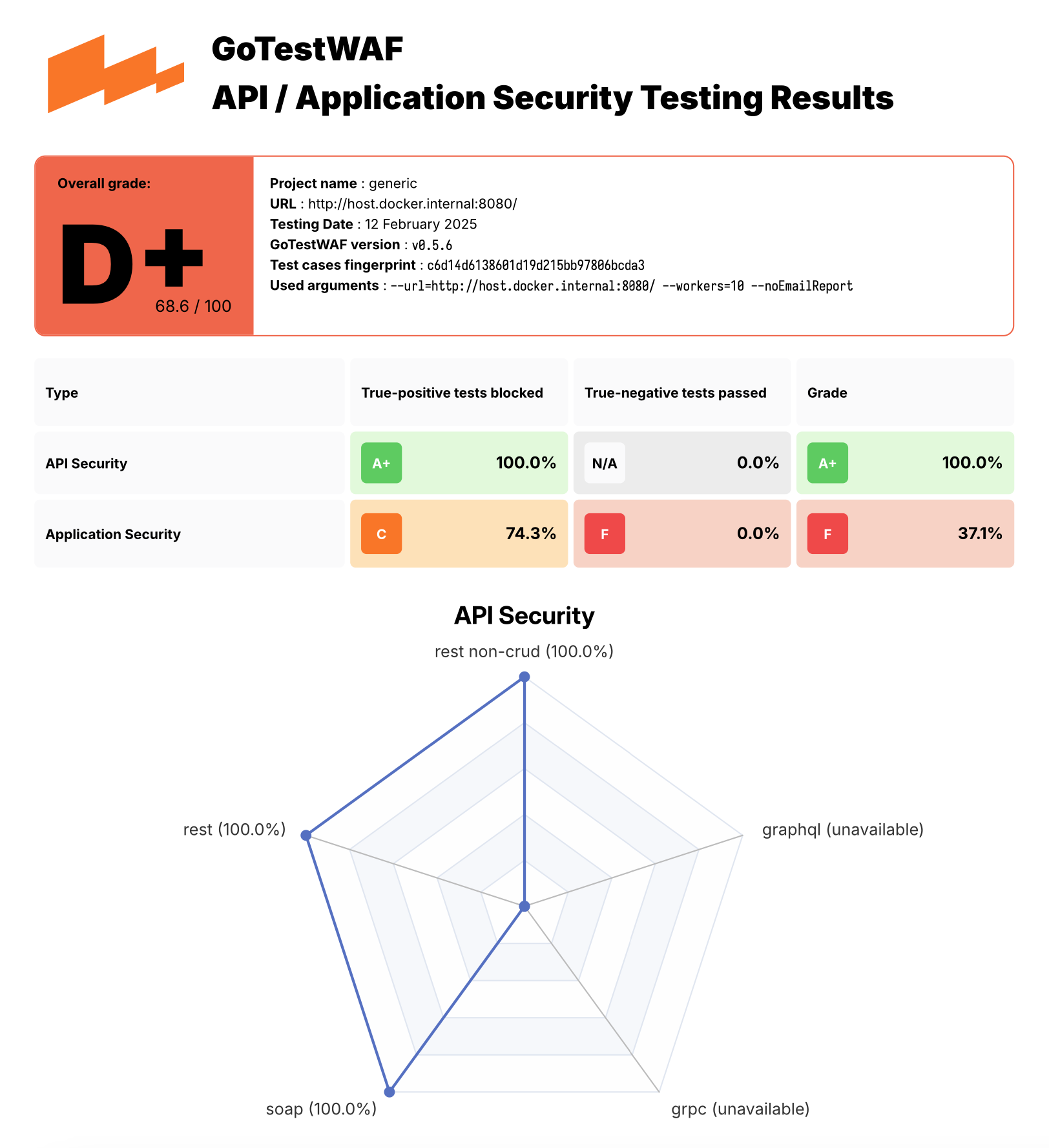
You have successfully evaluated your application security solution by using GoTestWAF with minimal configuration. To learn advanced configuration options, please use this link.
Check the evaluation results logged using the STDOUT and STDERR services. For example: