
Skip to content
KitploitKITPLOIT
ToolsExploitsBlog
Log in
Submit
ToolsExploitsBlog
Submit

Hacking, PenTest, and Cybersecurity Tools for Your Security Arsenal!

Kitploit is a directory of hacking, cybersecurity, and pentesting tools. Discover the latest project updates to find vulnerabilities, analyze systems, automate testing, and strengthen your security.

FeedsContactPrivacyΒ© 2026 Kitploit

Tool Directory

Categories

View all categories
Loading categories
SyncShield β€” SyncShield - Browser Extension to Detect Unsafe Rsync Commands (CVE-2018-5764) | Kitploit
Tools/GitHubGitHub/waleedadam360-web/syncshield
Static Code Analysis (SAST)Vulnerability AnalysisScripting & AutomationWeb SecurityMisconfigurationLearning & Education
GitHubwaleedadam360-web/syncshield

SyncShield

SyncShield - Browser Extension to Detect Unsafe Rsync Commands (CVE-2018-5764)
View Repository
1610 months agoNot yet reviewed

Most Popular

View all β†’

Discover the most used tools by our community.

Explore all tools

Browse our collection of tools

View all tools β†’
Share

SyncShield Logo

πŸ” SyncShield β€” Browser Extension for CVE-2018-5764 Detection

Detect unsafe Rsync commands before they become exploits

A lightweight, privacy-focused browser extension developed as part of Final Year Project NWS/129/23B to detect missing --protect-args flag in Rsync commands β€” preventing remote command execution via CVE-2018-5764.

βœ… Works entirely offline
βœ… No server connections or data collection
βœ… Real-time scanning & alerts
βœ… Educational & mitigation-focused
βœ… Built for students, sysadmins, and security enthusiasts


πŸ‘₯ Team Members

No.NameStudent IDRole & Responsibilities
1Muhammad Nur Faiz Bin Ahmad FauziNWS23070251Project Manager & Testing Lead
2Wan Muhammad Afifuddin Bin Wan AhmadNWS23070157Backend & Functionality Developer
3Waleed Adam Bin Riza FaroukNWS23070265Frontend & UI/UX Developer
4Roshazne Elia Binti Mohd RoshidiNWS23070105Security Analyst & Resource Coordinator

Supervisor: Sir Amir Hakeem
Intake: July 2023 | Trade: CID (Computer Information & Data)
Project Code: NWS/129/23B
Submission: January 2025


🎯 Project Overview

Rsync is a powerful utility for file synchronization β€” but if misconfigured (especially without --protect-args), it can lead to remote command execution via specially crafted filenames or arguments (CVE-2018-5764).

SyncShield helps users:

  • βœ… Paste or upload Rsync commands/scripts
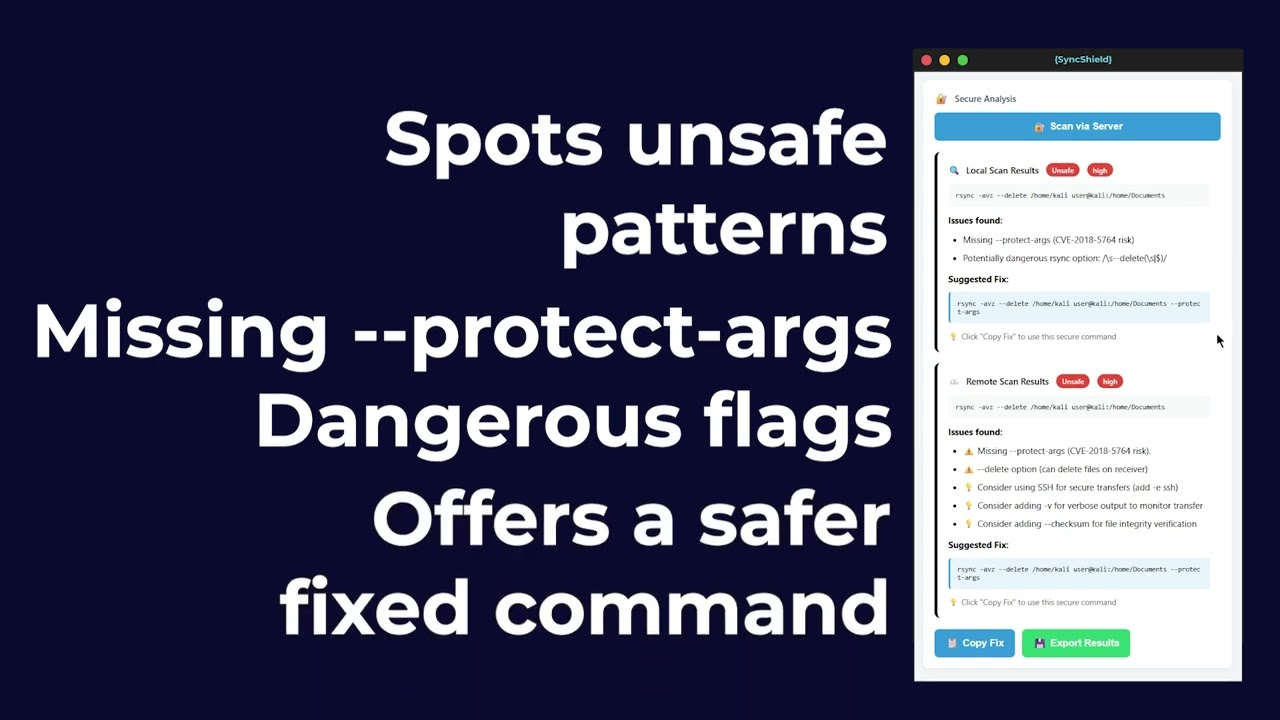
  • βœ… Instantly detect unsafe patterns (missing --protect-args, unquoted inputs, etc.)
  • βœ… Get clear, non-technical alerts and mitigation steps
  • βœ… Learn secure Rsync practices β€” no CLI expertise required

⚠️ Scope: Focused only on CVE-2018-5764 β€” simple, targeted, and achievable within academic timeline.


πŸŽ₯ Project Demo

Watch SyncShield in action:

Watch the SyncShield Demo

🧩 Project Structure

SyncShield/
β”œβ”€β”€ docs/       # Extension and Website source code
β”‚   β”œβ”€β”€ css   
β”‚   β”œβ”€β”€ images
β”‚   β”œβ”€β”€ js
β”‚   β”œβ”€β”€ extension   # Extension folder
β”‚   └── index.html   # Website source code
β”œβ”€β”€ LICENSE          # MIT License file
└── README.md        # You are here

🌐 Official SyncShield Website

https://syncshield.my


πŸ› οΈ Key Features

1. Rsync Argument Analyzer

Scans user-inputted Rsync commands to detect absence of --protect-args β€” the critical flag that prevents shell injection.

2. Detection of Unsafe Input Patterns

Flags unquoted variables, shell metacharacters, and unsanitized user inputs that could trigger CVE-2018-5764.

3. Real-Time Alerts & Risk Warnings

Provides immediate visual feedback with:

  • Risk level (Low/Medium/High)
  • Plain-language explanation
  • Impact summary

4. Mitigation Guidance

Offers actionable fixes:

# ❌ Unsafe
rsync -av /src user@host:/dest

# βœ… Safe
rsync -av --protect-args /src user@host:/dest

πŸ“– Usage

Once installed, you can start using SyncShield:

  1. Open the Extension
  2. Click the Extensions icon in your browser
  3. Select SyncShield
  4. Paste your Rsync command:
rsync -av /src user@host:/dest
  1. Run a Scan
    • Local Scan β†’ checks immediately in your browser
    • (Optional) Remote Scan β†’ test against a server (requires URL + token)

πŸ“¦ Installation Guide

Follow these steps to install SyncShield in your browser:

  1. Download the Extension
    Get SyncShield from our website
  • (Only download on our website otherwise it'll download outdated extension file)
  1. Extract the Files

    • Unzip the downloaded .zip file to a folder on your computer.
  2. Open Browser Extensions Page

    • Chrome / Edge / Brave β†’ Go to chrome://extensions/
    • Firefox β†’ Go to about:debugging#/runtime/this-firefox
  3. Enable Developer Mode

    • Chrome/Edge/Brave: Toggle the switch at the top-right.
    • Firefox: No toggle required.
  4. Load the Extension

    • Chrome/Edge/Brave: Click Load unpacked β†’ Select the unzipped SyncShield folder.
    • Firefox: Click Load Temporary Add-on β†’ Select the manifest.json file inside the SyncShield folder.
  5. Installation Complete πŸŽ‰

    • SyncShield will now appear in your extensions list and browser toolbar.

πŸ“¦ Why Rsync Matters & Why SyncShield is Important

What is Rsync?

Rsync is a powerful tool used to copy and synchronize files between computers. It’s popular because it’s fast, efficient, and saves bandwidth by only transferring changes instead of the whole file.

The Problem

If Rsync is not used carefully, it can cause serious problems:

  • A wrong command could delete important files.
  • Attackers could abuse misconfigured Rsync servers to steal data.
  • Past security issues (like CVE-2018-5764) showed that Rsync can be exploited if not properly secured.

Why SyncShield?

SyncShield helps by:

  • βœ… Checking Rsync commands before running them
  • βœ… Warning users about dangerous options (like --delete or overwriting files)
  • βœ… Giving safety tips to prevent data loss or attacks

🧭 User Guide

1. Launch SyncShield

  • Launch SyncShield from your browser’s extensions menu.
  • You’ll see three tabs: Command Scan, History, and Info.
  • Default tab: Command Scan

2. Enter Your Rsync Command

  • Paste or type an rsync command into the Rsync Command box.
  • If the command is invalid or incomplete, SyncShield will warn you:
    ⚠️ β€œThis does not look like an rsync command.”
  • Actions:
    • Click πŸ” Local Scan to analyze it for unsafe patterns.
    • Click ✨ Generate Safe to automatically rewrite the command with --protect-args and other secure practices.

3. Build a Command (Optional)

  • Not sure about syntax? Use the Command Builder:
    • Source: Path to source files (e.g. /path/to/source)
    • Destination: Target location (e.g. user@host:/path/to/dest)
    • Options available:
      • -a Archive
      • -v Verbose
      • -z Compress
      • --progress Show progress
      • --checksum Verify integrity
  • Click ⚑ Build Secure Command to auto-generate a safe version.

4. Scan with Remote Server (Optional)

  • Validate with a remote host (optional).
  • (This feature requires a URL + token β€” only use with trusted servers.)

5. Review the Results

  • After scanning, you can review:
    • Whether the command is Safe or Unsafe
    • Warnings, explanations, and impact summary
    • Suggested fixes
    • A Suggested Safe Command
  • Actions available:
    • Copy Fix β†’ copies the safe version
    • Export Results β†’ saves a JSON report

6. Real-Time Command Visualization

SyncShield includes a live visual diagram that updates as you type.
It shows:

  • Source β†’ Destination
  • Transfer direction
  • Color-coded safety level
  • Automatic updates on every keystroke

This helps prevent reversed paths, accidental overwrites, or unsafe behavior by making the command’s behavior visually clear.


7. Dashboard Summary

The Dashboard tab gives you a quick overview of your last scan, including:

Download Tool