 voidsec/driverbuddyreloaded
Driver Buddy Reloaded is an IDA Pro Python plugin that helps automate some tedious Windows Kernel Drivers reverse engineering tasks


The install method depends on your IDA version, because the built-in plugin manager (and therefore the hcli
tool and the ida-plugin.json manifest) only exists in IDA 9.0 and above. IDA 7.6 and 8.x have no plugin
manager and only scan the top level of the plugins folder.
hcli)The repository ships an ida-plugin.json manifest, so IDA 9.0+ loads the plugin from its own subdirectory. Install it with:
hcli plugin install DriverBuddyReloaded
This drops the plugin into a subdirectory of your user plugins folder (e.g.
%APPDATA%\Hex-Rays\IDA Pro\plugins\DriverBuddyReloaded\ or ~/.idapro/plugins/DriverBuddyReloaded/), keeping the
DriverBuddyReloaded.py entry point inside that subdirectory. This is the intended layout: IDA reads the manifest,
loads the declared entry point from the subdirectory, and puts the subdirectory on sys.path so the entry point can
import the sibling DriverBuddyReloaded package. You do not need to move DriverBuddyReloaded.py to the top level.
Verify the install with hcli plugin status, then launch IDA and confirm the plugin appears under
Edit -> Plugins (check the Output window for any Python errors at startup).
To install from a local checkout for testing (e.g. after your own changes), run hcli plugin install . from the
repository root; hcli plugin lint . validates the manifest/layout first.
These versions have no plugin manager, so an hcli-installed subdirectory plugin will not be picked up. Copy
the DriverBuddyReloaded folder and the DriverBuddyReloaded.py script file directly into the top level of the
IDA plugins folder, for example:
%APPDATA%\Hex-Rays\IDA Pro\plugins\C:\Program Files\IDA Pro 8.4\plugins\~/.idapro/plugins/The resulting layout is plugins\DriverBuddyReloaded.py alongside plugins\DriverBuddyReloaded\ (the package folder).
If your IDA is configured for Python 2, run the idapyswitch binary (located in IDA's folder) to switch it to Python 3.
NOTE: Driver Buddy Reloaded runs on IDA 7.6+, 8.x (including 8.4) and 9.0+ with Python 3. All version-specific
IDA API differences (the removal of get_inf_structure, the ida_struct module and the idc.*struc* helpers in
IDA 9.0, etc.) are handled internally by the DriverBuddyReloaded/ida_compat.py compatibility layer.
To use the auto-analysis feature:
Edit -> Plugins -> Driver Buddy Reloaded or press CTRL+ALT+A to start the auto-analysis.<DRIVER_NAME>-YYYY-MM-DD-TIMESTAMP-):
findings.json - machine-readable findings (IOCTLs, flagged functions, device names, pooltags, call chains, heuristics, device ACL audit, symbolic links, exports audit, privileged opcodes)report.html - a standalone, severity-grouped HTML reportpooltags.txt - dumped Pooltags in pooltags.txt format for WinDbgautoanalysis.txt - the full text analysis log (mirrors the Output window)To decode an IOCTL:
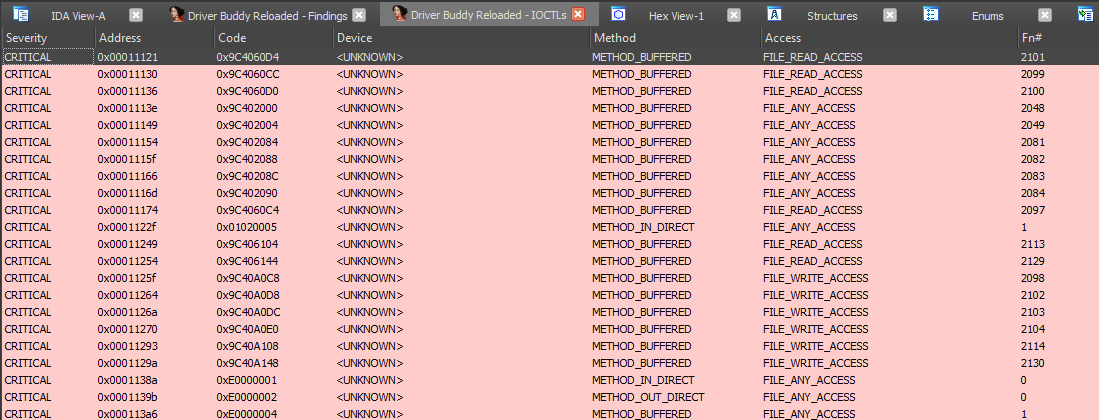
Driver Buddy Reloaded -> Decode IOCTL; alternatively, press the CTRL+ALT+D shortcut.To reopen the IOCTLs window or findings window at any time (without re-running analysis):
CTRL+ALT+I to open the IOCTLs window.CTRL+ALT+F to open the findings window.The vulnerable_function_lists directory contains a lists of potentially
dangerous/problematic functions, Windows APIs and opcodes; a brief description on why a specific function/API has been listed is
provided. You can edit the custom list including driver's specific functions.
Note: winapi_function_prefixes will partial match to start of function name (e.g. Zw will match ZwClose, ZwCommitComplete and so on) while winapi_functions will perform exact matches only.
In find_opcodes.py, the find_opcode_data option (default False)
suppresses opcode matches that fall in data sections
(issue #11). Switching it to True also surfaces
raw byte matches in data; if a real opcode was missed this way, going to the reported address and re-defining
the bytes as code usually recovers it. Matches are reported like every other stage (results window,
findings.json, report.html).
Watch out: switching it to True generates more false positives!
Driver Buddy Reloaded is an IDA Pro Python plugin that helps automate some tedious Windows Kernel Drivers reverse engineering tasks. It has a number of handy features, such as:
