
noapi-google-search-mcp
[email protected]
If you want to support noapi-google-mcp or gpt-oss-20B/120B-Vision and other open source models in the pipeline please add to my GPU compute fund: around $3000 are needed.
If you find this useful, consider supporting continued development and new features.
BTC: 16DT4AHemLyn7C6P116YepjY518gu9wUUH
ETH: 0x7287D1F9c77832cFF246937af0443622bFdACD04
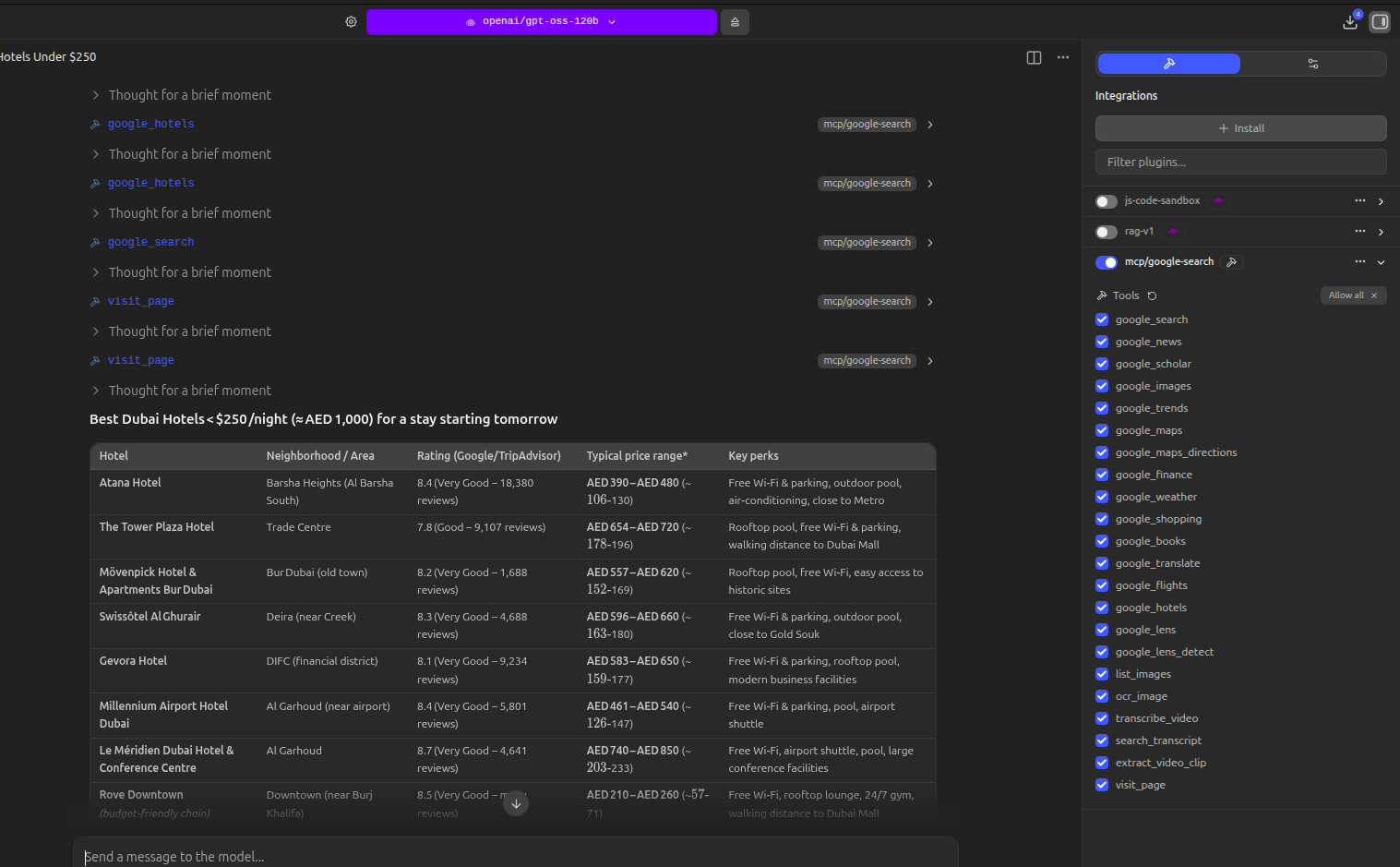
38 tools. Zero API keys. Give any local LLM real Google search, live feeds, vision, OCR, and full video understanding.
An MCP server that turns your local LLM into a fully connected assistant. Real Google results, live news and social feeds, reverse image search, offline OCR, YouTube transcription and clip extraction — all running locally through headless Chromium and open-source ML models. No API keys, no usage limits, no cloud dependency.
Works with LM Studio, Claude Desktop, OpenClaw, Ollama, and any MCP-compatible client.
What's New in v0.3.1 — Anti-Bot Detection & Neural Net CAPTCHA Solver
Google started catching headless Chromium browsers and serving CAPTCHAs instead of search results (#2). Fixed it properly and then added a neural net CAPTCHA solver just for the hell of it.
Stealth patches:
- JavaScript injection before every page load patches
navigator.webdriver, fake browser plugins, chrome.runtime, and removes Playwright fingerprints
- Fixed User-Agent mismatch (was
aarch64, now matches the actual Chromium binary)
- Cookie persistence between sessions so Google sees a returning browser, not a fresh bot
- Human-like random delays between page interactions
- Clear error messages when rate-limited instead of cryptic timeouts
Neural net CAPTCHA solver (MobileNetV2 + OpenCV):
- When Google serves a reCAPTCHA image challenge ("Select all images with traffic lights"), the server now attempts to solve it automatically
- Uses MobileNetV2 (ImageNet classifier, ~13MB ONNX model, auto-downloads on first encounter)
- OpenCV splits the CAPTCHA grid into cells, each cell is classified by the neural net and matched against the prompt
- Covers 22 common CAPTCHA categories: traffic lights, buses, bicycles, motorcycles, cars, bridges, boats, trains, trucks, fire hydrants, parking meters, tractors, and more
- Human-like mouse movement for clicking cells and the verify button
- Falls back gracefully if the challenge type isn't supported
Will it solve every CAPTCHA? No. But it'll get through some of them, and honestly we mostly built it because we could.
YouTube RAG — Subscribe, Transcribe, Search, Clip
A full local retrieval-augmented pipeline for YouTube. Subscribe to any channel, and when you check feeds the server automatically downloads the audio, transcribes it with Whisper, and stores the full transcript in SQLite with FTS5 full-text search. Every word from every video becomes searchable — ask your LLM a question and it pulls the answer from the right video.
Found something interesting? Ask the LLM to extract that segment as a clip. It reads the transcript, finds the exact timestamps, and cuts the video for you. This is the beginning of AI/LLM-powered video editing — your LLM understands the content and cuts clips based on what's being said, not just timestamps.
How it works:
subscribe to a YouTube channel — by handle (@3Blue1Brown), URL, or channel ID
check_feeds — new videos are fetched and auto-transcribed locally with faster-whisper. Transcripts are written into the database for instant search. Up to 5 videos per check, cached so nothing gets re-downloaded.
search_feeds — full-text search across all transcripts. Supports AND, OR, NOT, and quoted phrases. Your LLM finds the exact video and passage that answers your question.
extract_video_clip — tell the LLM what you're interested in and it cuts the clip from the video. The LLM uses the transcript to find the right segment and extracts it automatically.
"Subscribe to @AndrejKarpathy on YouTube"
"Check my feeds"
"Search my feeds for backpropagation explained"
"What did Karpathy say about tokenization?"
"Extract the part where he explains gradient descent"
"Cut a clip of the hardware comparison section"
No embeddings, no vector database, no API — just Whisper + SQLite FTS5 running on your machine.
Roadmap: The clip extraction is the first step toward full AI-driven video editing. Future releases will add music/audio overlay, video remixing, multi-clip compilation, vertical reformat for TikTok/Reels/Shorts, and automated highlight reels — all driven by your LLM understanding the content.
Live Feed Subscriptions
Subscribe to news, Reddit, Hacker News, YouTube channels, Twitter/X profiles, GitHub repos, arXiv papers, and podcasts. Content is fetched, stored locally in SQLite with full-text search, and available to your LLM instantly.
Pre-configured news sources — subscribe with one word: bbc, cnn, nyt, guardian, npr, aljazeera, techcrunch, ars, verge, wired, reuters
arXiv shortcuts — ai, ml, cv, nlp, robotics, crypto, systems, hci
"Subscribe to BBC News, r/LocalLLaMA, and Hacker News"
"Follow @elonmusk on Twitter"
"Subscribe to the YouTube channel @3Blue1Brown"
"Watch anthropics/claude-code on GitHub for new releases"
"Subscribe to the machine learning arXiv category"
"Check my feeds"
"Search my feeds for transformer architecture"
"What's new in my Reddit feeds?"
Local File Processing
Transcribe meetings, convert formats, read documents — all local, no cloud.
| New Tool | What It Does |
|---|
transcribe_local | Transcribe any local audio or video file with Whisper (mp3, wav, mp4, mkv, etc.) |
convert_media | FFmpeg format conversion — video to audio, format to format, video to GIF |
read_document | Extract text from PDF, DOCX, HTML, CSV, JSON, and 30+ text formats |
Email, Web Utilities & Cloud
Pull emails, generate QR codes, shorten URLs, archive pages, look up Wikipedia, upload to S3.
"Transcribe this recording: ~/meeting.mp3"
"Convert video.mp4 to mp3"
"Read this PDF: ~/report.pdf"
"Check my email: [email protected] password: xxxx"
"Shorten this URL: https://very-long-url..."
"Generate a QR code for https://mysite.com"
"Archive this article: https://news.example.com/story"
"Wikipedia: quantum computing"
"Upload report.pdf to my MinIO bucket"
Zero extra dependencies for feeds. Built entirely on Python stdlib — SQLite for storage, FTS5 for search, urllib for fetching, xml.etree for parsing. YouTube and Twitter use the existing Playwright browser. FFmpeg required for convert_media (commonly pre-installed).
Live Feed Subscriptions
Google Search & Web
Travel & Commerce
Finance & Info
| Tool | Description |
|---|
google_finance | Stock prices, market data, company info |
google_weather | Current conditions and multi-day forecast |
google_books | Book search with author, ISBN, snippets |
Vision & OCR
| Tool | Description |
|---|
google_lens | Reverse image search — identify objects, products, landmarks, text |
Video & Audio Intelligence — AI-Powered Video Editing
Documents & Data
| Tool | Description |
|---|
read_document | Extract text from PDF, DOCX, HTML, CSV, JSON, and 30+ formats |
Email
| Tool | Description |
|---|
fetch_emails | Pull emails via IMAP — Gmail, Outlook, Yahoo, iCloud, any IMAP server |
Web Utilities
Cloud Storage
| Tool | Description |
|---|
upload_to_s3 | Upload files to MinIO, AWS S3, DigitalOcean Spaces, Cloudflare R2, Backblaze B2 |
Documents (read_document)
| Category | Formats |
|---|
| Audio | MP3, WAV, M4A, FLAC, OGG, AAC, WMA, OPUS |
| Video | MP4, MKV, WEBM, AVI, MOV |
| Special | GIF (video-to-GIF output) |
| Input | Any format FFmpeg can decode (hundreds of formats) |
Images (google_lens, google_lens_detect, ocr_image, list_images)
| Category | Formats |
|---|
| Standard | JPG, JPEG, PNG, GIF, BMP, WEBP |
| Professional | TIFF, TIF, SVG |
| Input methods | Local file path, public URL, base64 (drag-and-drop into chat) |
Why This Instead of API-Based Alternatives?
subscribe — Add a Content Source
Identifier formats by type:
- news: preset name (
bbc, cnn, nyt, guardian, npr, aljazeera, techcrunch, ars, verge, wired, reuters) or any RSS URL
- reddit: subreddit name (e.g.
LocalLLaMA, programming)
- hackernews:
top, new, or
check_feeds — Fetch New Content
| Parameter | Description | Example |
|---|
source_type | Limit to one type (optional) | "news", "reddit" |
search_feeds — Full-Text Search
get_feed_items — Browse Recent Items
google_search — Web Search
| Parameter | Description | Example |
|---|
query | Product search query (required) | "Sony WH-1000XM5" |
num_results | Number of results (1-10, default 5) | 5 |
google_flights — Flight Search

google_hotels — Hotel Search
| Parameter | Description | Example |
|---|
query | Hotel search with location (required) | "Paris", "Tokyo near Shibuya" |
num_results | Number of results (1-10, default 5) |

google_translate — Translation
google_maps — Places Search with Map Screenshot
| Parameter | Description | Example |
|---|
query | Place search query (required) | "pizza near Central Park" |
num_results | Number of results (1-10, default 5) | 5 |

google_maps_directions — Route Directions with Map

google_weather — Weather
| Parameter | Description | Example |
|---|
location | City or location (required) | "Dubai", "Tokyo" |
google_finance — Stock & Market Data
| Parameter | Description | Example |
|---|
query | Stock ticker or company name (required) | "AAPL:NASDAQ", "TSLA:NASDAQ" |

google_news — News Search
| Parameter | Description | Example |
|---|
query | News search query (required) | "AI regulation" |
num_results | Number of results (1-10, default 5) | 5 |

google_scholar — Academic Search
| Parameter | Description | Example |
|---|
query | Academic search query (required) | "transformer attention mechanism" |
num_results | Number of results (1-10, default 5) | 5 |
google_books — Book Search
| Parameter | Description | Example |
|---|
query | Book search query (required) | "machine learning" |
num_results | Number of results (1-10, default 5) | 5 |
google_images — Image Search (inline in chat)
| Parameter | Description | Example |
|---|
query | Image search query (required) | "sunset over ocean" |
num_results | Number of results (1-10, default 5) | 5 |


google_trends — Trends
| Parameter | Description | Example |
|---|
query | Topic (required) | "artificial intelligence" |
google_lens — Reverse Image Search
Identify objects, products, brands, landmarks, and text. Supports URLs, local files, and base64 drag-and-drop.
| Parameter | Description | Example |
|---|
image_source | Image URL, file path, or base64 (required) | "https://example.com/photo.jpg" or "/home/user/image.jpg" |

google_lens_detect — Object Detection + Identification
Detect all objects (OpenCV), crop each one, identify individually via Lens.
| Parameter | Description | Example |
|---|
image_source | Local file path or base64 (required) | "/home/user/photo.jpg" |
ocr_image — Local OCR (offline)
Extract text from images using RapidOCR. No internet needed.
| Parameter | Description | Example |
|---|
image_source | Local file path or base64 (required) | "/home/user/screenshot.png" |

list_images — Image Discovery
| Parameter | Description | Example |
|---|
directory | Folder to scan (default ~/lens/) | "/home/user/photos" |
transcribe_video — Video Transcription
Download and transcribe any YouTube video (or video URL) with timestamps using faster-whisper.
search_transcript — Transcript Search
Ask "extract the part about X" and the LLM finds timestamps from the transcript and cuts the clip.
Sample Prompts
Feed Subscriptions
Web Search
Maps & Directions
| What you type | Tool called |
|---|
| "Find Italian restaurants near Times Square" | google_maps |
| "Get directions from Berlin to Munich" | google_maps_directions |
| "Walking directions from the Eiffel Tower to the Louvre" |
Finance, Weather & Info
Images & Vision
Tip: To enable drag-and-drop images with text-only models in LM Studio, add a model.yaml file in the model directory with metadataOverrides: { vision: true }. The image will be sent as base64 and the MCP tools handle it automatically.
Documents & Email
Web Utilities & Cloud
Installation
Quick Install (pipx - recommended)
pipx install noapi-google-search-mcp
playwright install chromium
Install in a Virtual Environment
python3 -m venv ~/.local/share/noapi-google-search-mcp
~/.local/share/noapi-google-search-mcp/bin/pip install noapi-google-search-mcp
~/.local/share/noapi-google-search-mcp/bin/playwright install chromium
Python 3.13 / OCR
The core package installs on every supported Python, including 3.13. OCR is
opt-in because rapidocr-onnxruntime does not yet ship a Python 3.13 wheel
upstream (RapidAI/RapidOCR#579).
Everything except the OCR tools (ocr_image and the scanned-PDF fallback in
read_document) works without it.
To enable OCR, add the [ocr] extra on a compatible Python (3.10–3.12):
pipx install "noapi-google-search-mcp[ocr]"
If you install the core package and later call an OCR tool without the extra,
the tool returns a short message telling you to install
"noapi-google-search-mcp[ocr]" instead of crashing.
Configuration
LM Studio
Add to ~/.lmstudio/mcp.json:
{
"mcpServers": {
"google-search": {
"command": "noapi-google-search-mcp",
"env": {
"PYTHONUNBUFFERED": "1"
}
}
}
}
If installed in a venv, use the full path: ~/.local/share/noapi-google-search-mcp/bin/noapi-google-search-mcp
Claude Desktop
Add to your Claude Desktop config (claude_desktop_config.json):
{
"mcpServers": {
"google-search": {
"command": "noapi-google-search-mcp"
}
}
}
OpenClaw
Add to your agent configuration:
mcp_servers:
google-search:
command: "noapi-google-search-mcp"
env:
PYTHONUNBUFFERED: "1"
This gives your OpenClaw agent access to all 38 tools — real Google search, live feeds, vision, OCR, and video intelligence — with zero API keys.
As a CLI
Or:
python -m google_search_mcp
Development
git clone https://github.com/VincentKaufmann/noapi-google-search-mcp.git
cd google-search-mcp
pip install -e .
playwright install chromium
License
MIT