vigolium/vigolium
Vigolium - High-fidelity vulnerability scanner fusing agentic AI with native speed, modularity, and precision
<p align="center">
<img alt="Vigolium" src="https://assets.kitploit.com/production/public/readmes/7564/13fa005338f3e4aba3cc042d3ee7c70e3f2ffa4fe782c1ba6253896aa6f4eb52.jpg" height="140" />
<br />
<strong>Vigolium - High-fidelity vulnerability scanner fusing agentic AI with native speed, modularity, and precision</strong>
<p align="center">
<a href="https://console.vigolium.com/"><img src="https://img.shields.io/badge/Vigolium-Cloud-0078D4?style=flat&logo=google-cloud&logoColor=ffb86c&labelColor=black&color=black"></a>
<a href="https://docs.vigolium.com/"><img src="https://img.shields.io/badge/Documentation-0078D4?style=flat&logo=GitBook&logoColor=8be9fd&labelColor=black&color=black"></a>
<a href="https://twitter.com/Vigolium"><img src="https://img.shields.io/badge/Vigolium-0078D4?style=flat&logo=X&logoColor=f8f8f2&labelColor=black&color=black"></a>
<a href="https://discord.gg/aHFypbAu6Y"><img src="https://img.shields.io/badge/Discord%20Server-0078D4?style=flat&logo=Discord&logoColor=bd93f9&labelColor=black&color=black"></a>
<a href="https://www.linkedin.com/company/vigolium"><img src="https://custom-icon-badges.demolab.com/badge/LinkedIn-black?logo=linkedin-white&logoColor=39ff14"></a>
<a href="https://www.linkedin.com/company/vigolium"><img src="https://img.shields.io/npm/v/@vigolium/vigolium.svg?style=flat&logo=npm&logoColor=50fa7b&labelColor=black&color=black"></a>
</p>
</p>
***
Vigolium provides two complementary scanning modes:
- **Native Scan** (`vigolium scan`): **Fast, powerful, and flexible.** Deterministic, multi-phase scanning with 317 modules across content discovery, browser/SPA spidering, and active/passive audit, covering injection, access control, file/path, API/protocol, framework-specific, cloud/infra, and out-of-band (OAST) vulnerability classes.
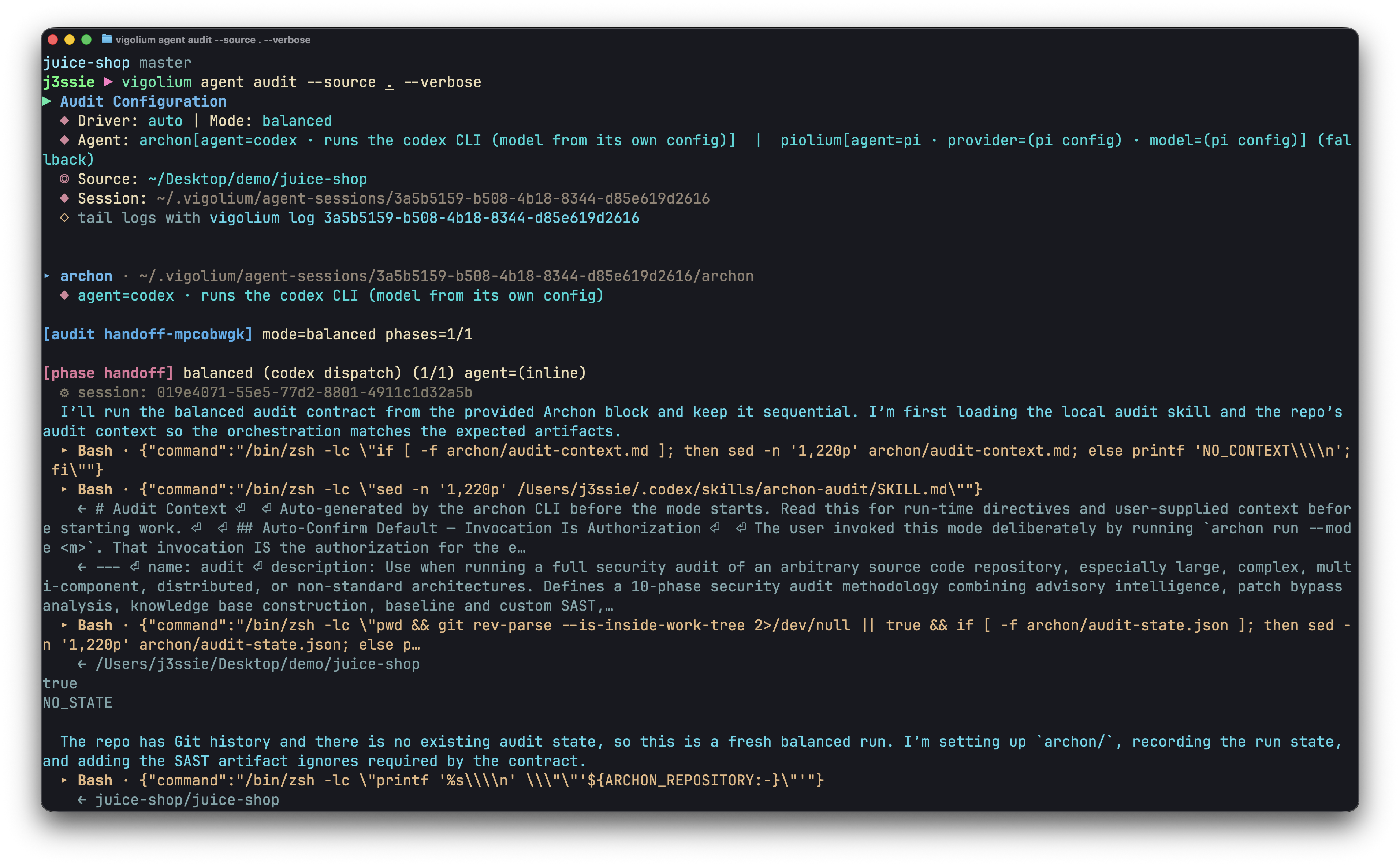
- **Agentic Scan** (`vigolium agent`): **Thoroughly audits your codebase.** AI-driven scanning that autonomously plans attacks, selects modules, generates custom extensions, and triages results, combining [deep source-code audit](https://github.com/vigolium/vigolium-audit) with autonomous and targeted vulnerability scanning.
## Installation
### Quick Install (Recommended)
```bash
curl -fsSL https://vigolium.com/install.sh | bash
```
### [npm](https://www.npmjs.com/package/@vigolium/vigolium)
```bash
npm install -g @vigolium/vigolium
```
### Windows
The npm install above works on Windows. Alternatively, download
`vigolium_<version>_windows_amd64.zip` from the
[releases page](https://github.com/vigolium/vigolium/releases), extract it, and
put `vigolium.exe` somewhere on your `PATH`.
> Windows ships as x64 only; on Windows ARM it runs under emulation. The shell
> installer above is POSIX-only, so `vigolium update` is not available on
> Windows — re-run the npm install or download the newer zip to upgrade.
<details>
<summary>Other method like Docker or Build from source</summary>
### Docker
```bash
docker pull j3ssie/vigolium:latest
docker run --rm j3ssie/vigolium:latest scan -h
```
### Build from Source
```bash
git clone https://github.com/vigolium/vigolium.git
cd vigolium
make build # build and install to $GOPATH/bin
```
Requires **Go 1.27+** and **bun 1.3.11+**. See [HACKING.md](https://github.com/vigolium/vigolium/blob/main/HACKING.md#build-and-run) for prerequisites and build details.
</details>
| UI Dashboard | Traffic Dashboard |
|:---:|:---:|
| 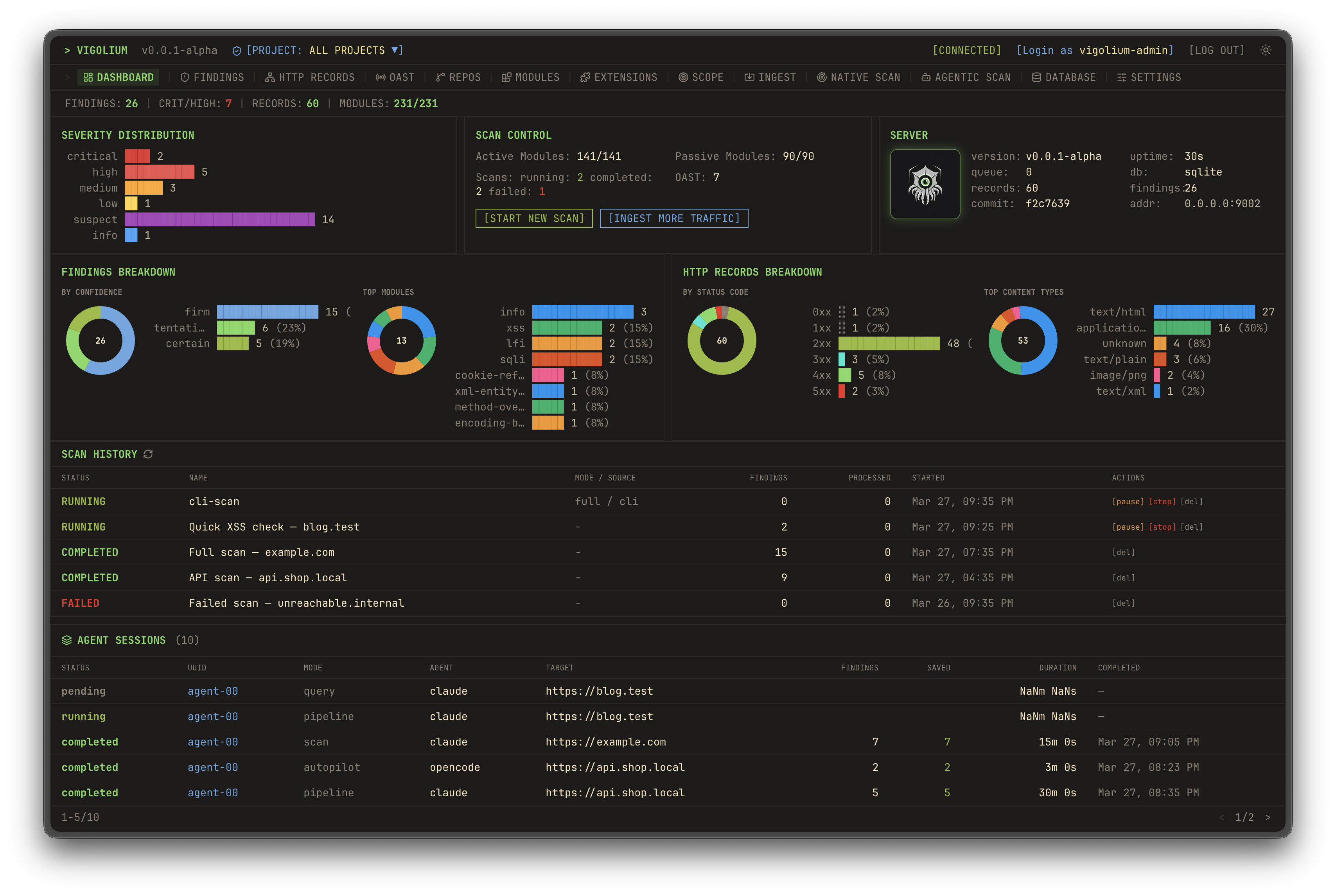 | 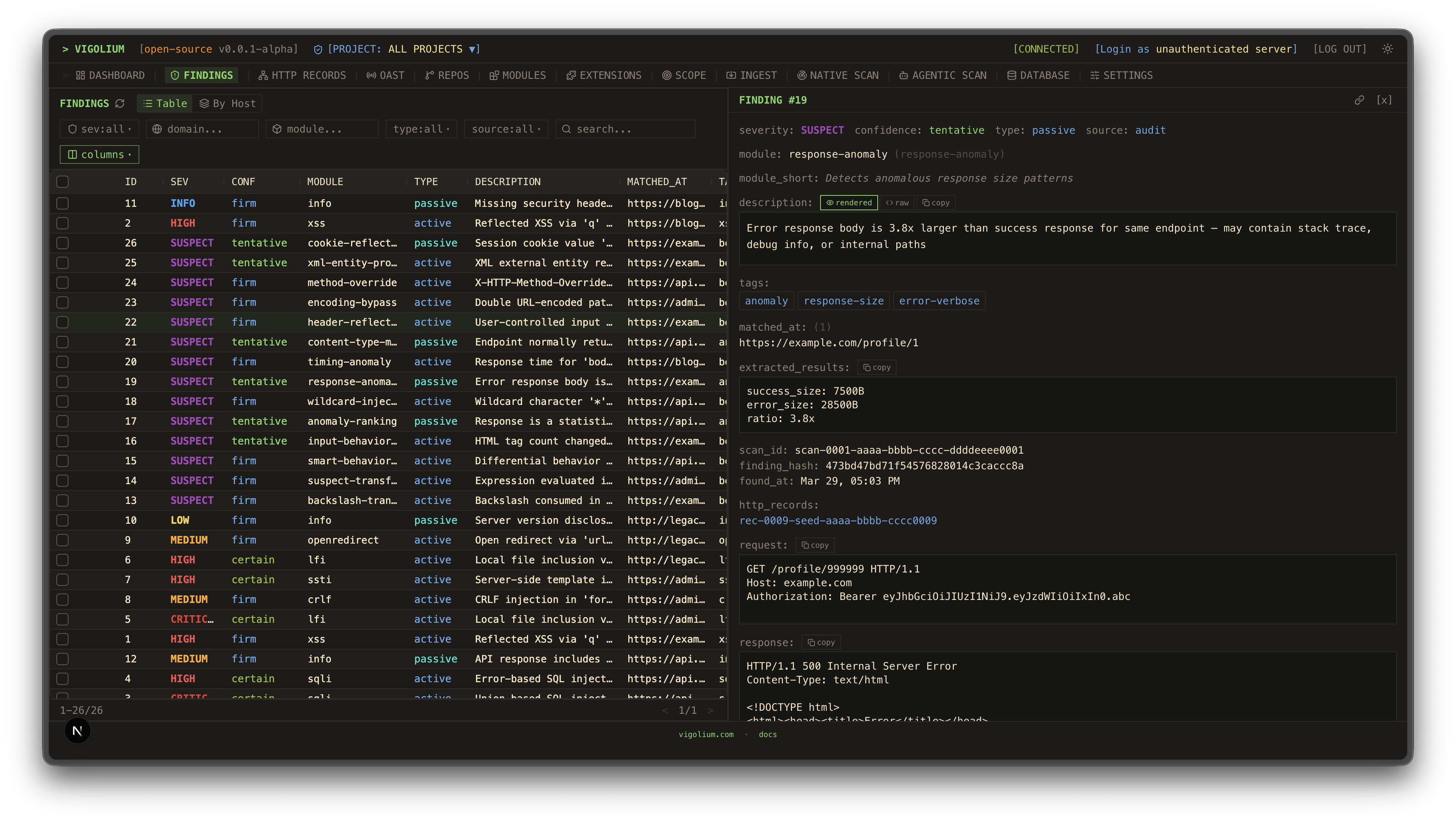 |
| Static Reports | Static Reports |
|:---:|:---:|
| 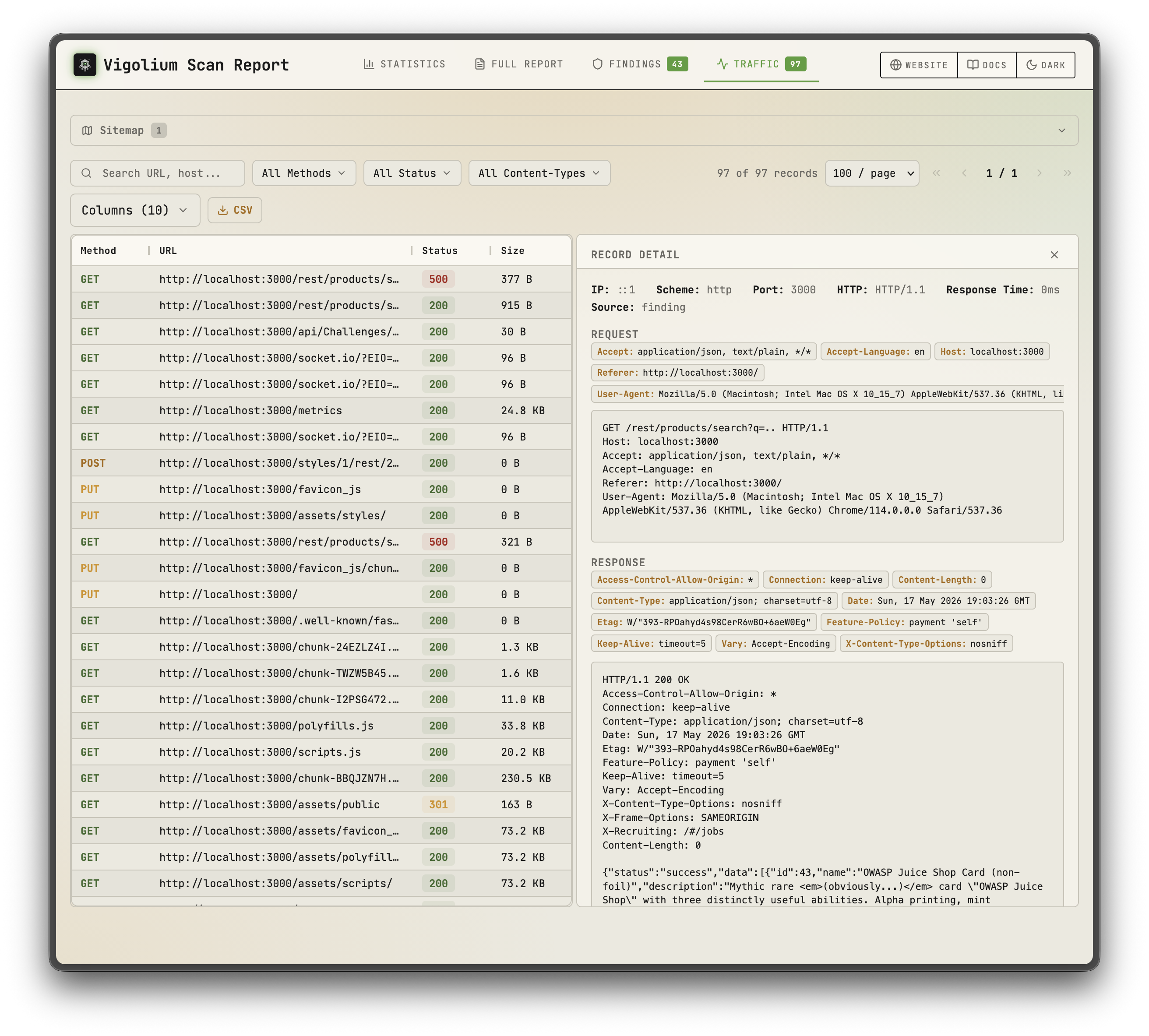 | 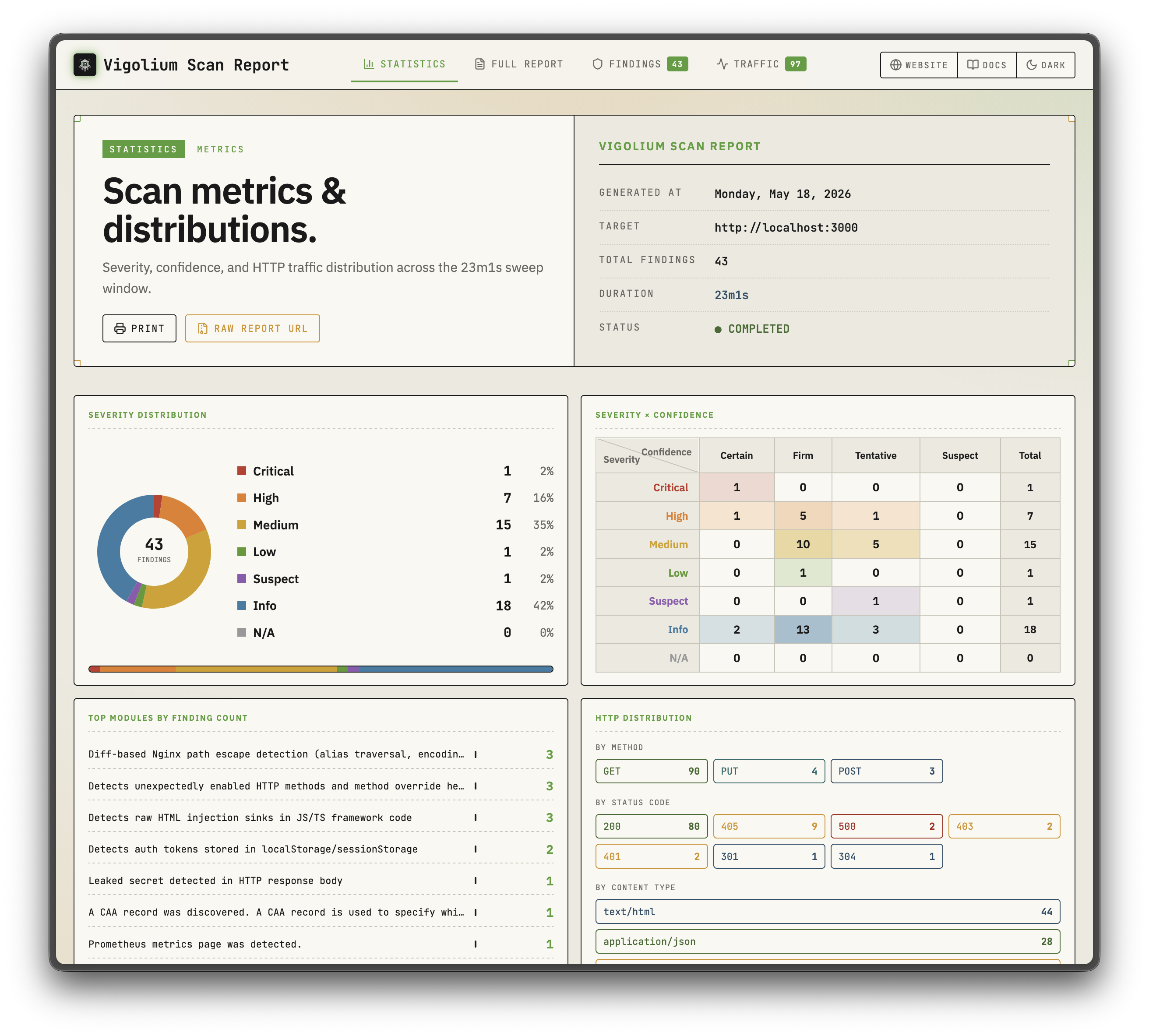 |
| Native scan | Agentic Scan |
|:---:|:---:|
| 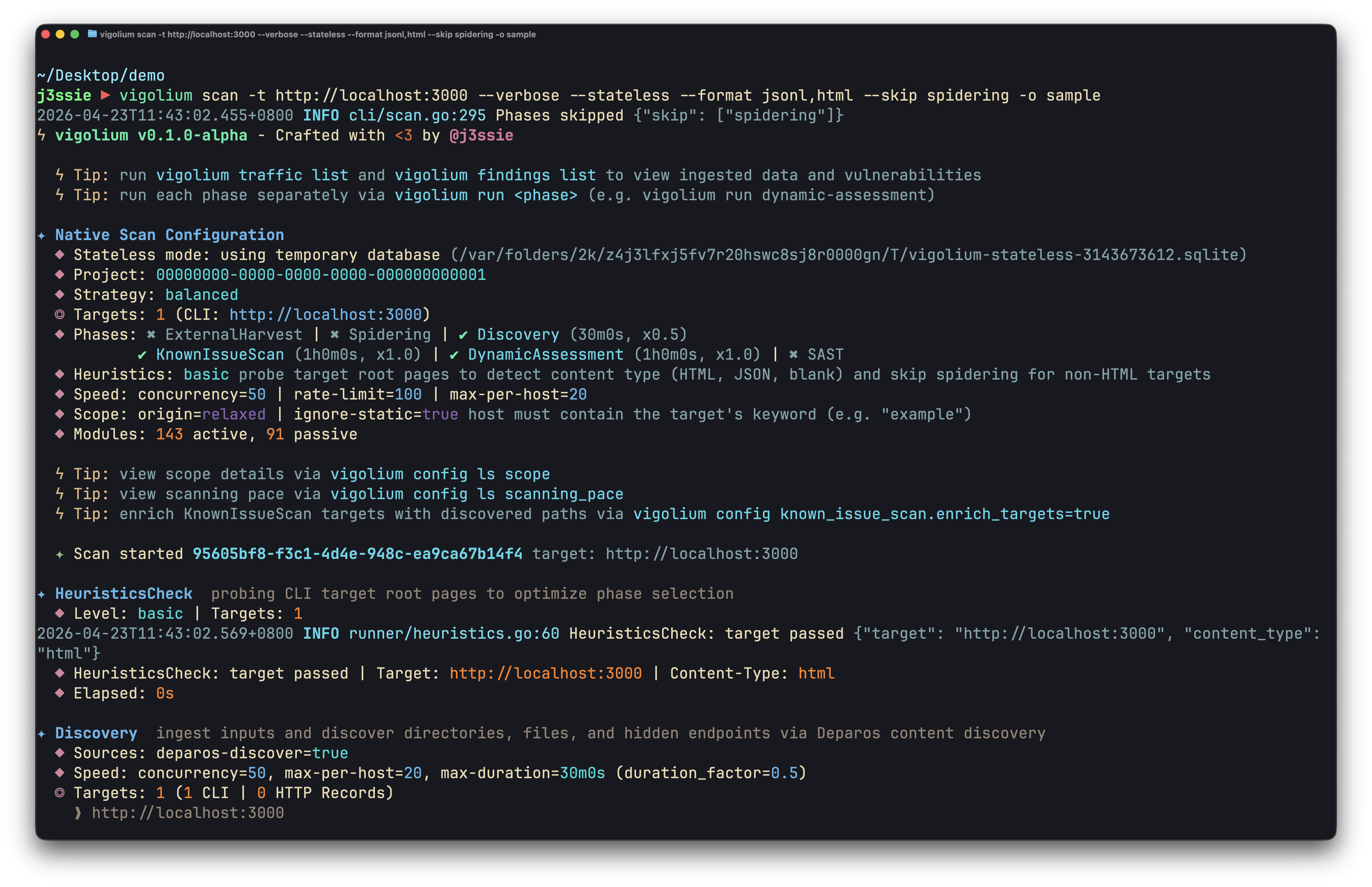 | 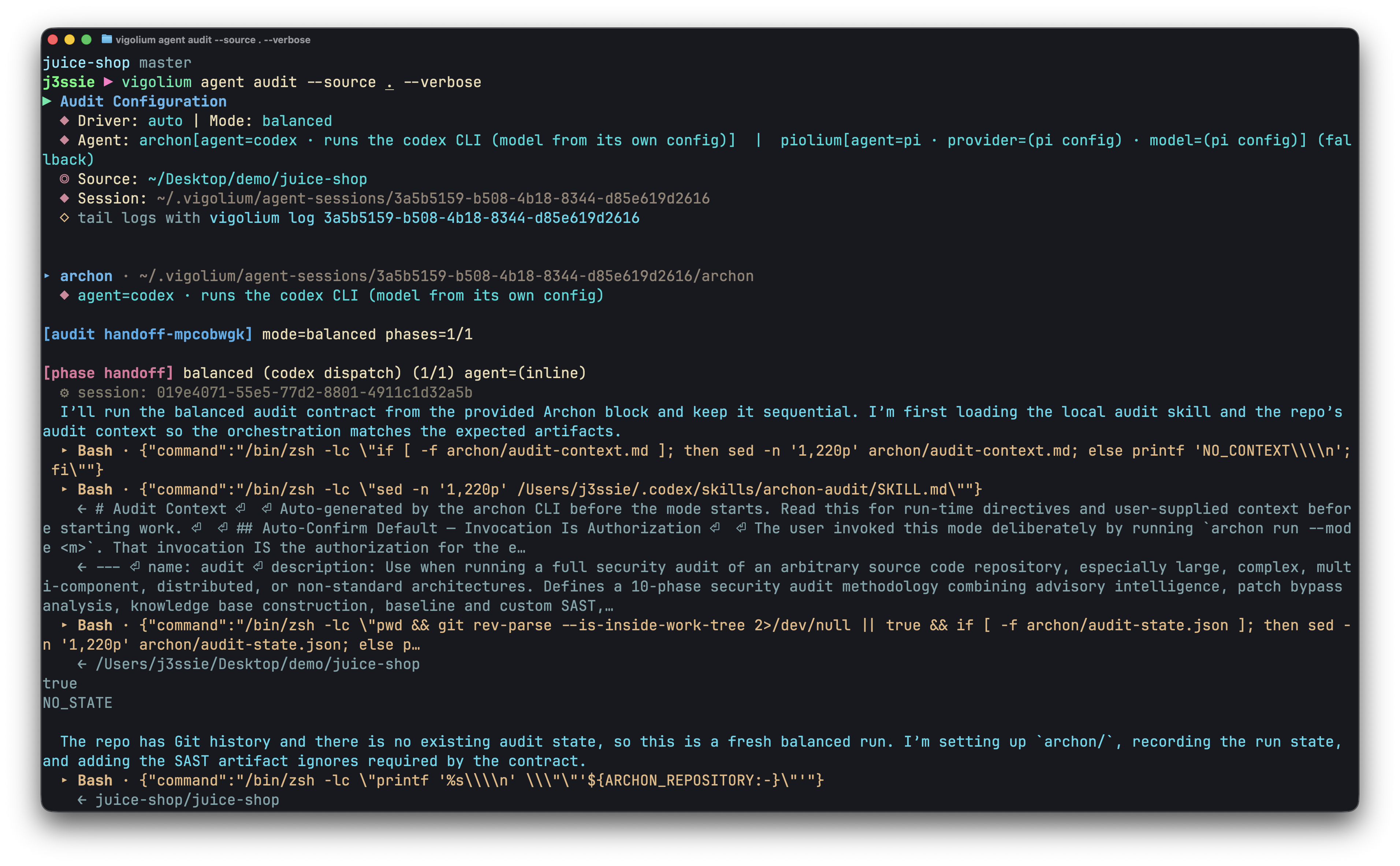 |
## Sponsor
<p align="center">
<a href="https://www.daytona.io"><img alt="Daytona" src="https://raw.githubusercontent.com/vigolium/docs/main/images/sponsors/daytona.png?raw=true" height="28" /></a>
<br />
<sub>Thank you to <a href="https://www.daytona.io">Daytona</a> for sponsoring the sandbox infrastructure</sub>
</p>
## Key Features
### Native Scan
- **324 scanner modules**: 208 active (fuzzing) + 117 passive (pattern matching), covering OWASP Top 10 and beyond
- **Out-of-band testing (OAST)**: blind XSS/SSRF/command injection via interactsh callbacks with automatic payload correlation
- **Value-aware mutation**: classifies parameters by semantic type (integer, UUID, JWT, email) and mutates per intent
- **Multi-phase pipeline**: external harvesting, content discovery (Deparos), browser/SPA spidering (Spitolas), and audit, controlled by strategy presets and scanning profiles
- **Flexible inputs**: URLs, OpenAPI/Swagger, Postman, Burp Suite, cURL, Nuclei JSONL
- **Multi-session authentication**: inline sessions, session files, or full auth configs with login flows, token extraction, and IDOR/BOLA testing
- **JavaScript extensions**: custom modules and hooks via embedded JS engine with session-aware HTTP APIs
- **Scalable & reportable**: concurrent worker pool with per-host rate limiting, hybrid in-memory/disk/Redis queue, and self-contained HTML reports
### Agentic Scan
- **In-process olium runtime**: every agent mode runs on the native Go `pkg/olium` engine: turn-based loop, built-in tool registry, skills support, and pluggable provider drivers (no subprocess SDK pools)
- **Autopilot**: agent autonomously discovers endpoints, runs scans, and triages findings, with optional multi-specialist pipeline and session resume
- **Swarm**: master agent selects modules, generates custom JS attack extensions, runs code audit + SAST, executes scans, and triages results; targeted or full-scope (`--discover`), with `--diff`/`--last-commits` for change-focused runs
- **Source-audit drivers**: `audit`, `piolium`, and the unified `audit` dispatcher run foreground source-code audits sharing one finding schema and DB tagging
- **Query mode**: single-shot prompts for code review, endpoint discovery, and secret detection
- **Pluggable providers**: `openai-compatible` (default), `openai-codex-oauth`, `openai-api-key`, `openai-responses`, `anthropic-api-key`, `anthropic-oauth`, `anthropic-cli`, `anthropic-compatible`, `anthropic-vertex`, `google-vertex`. Same modes exposed over the REST API with SSE streaming and an OpenAI-compatible chat endpoint
## Quick Start: Native Scan
```bash
# Scan a single target (default: balanced strategy)
vigolium scan -t https://example.com
# Scan with a strategy preset
vigolium scan -t https://example.com --strategy deep
# Scan specific modules only
vigolium scan -t https://example.com -m xss-reflected,sqli-error
# Scan from an OpenAPI spec
vigolium scan -T openapi.yaml -I openapi
# Pipe URLs from stdin
cat urls.txt | vigolium scan
# Run a single phase directly
vigolium run discovery -t https://example.com
# Generate an HTML report
vigolium scan -t https://example.com --only discovery --format html -o report.html
```
See the [architecture overview](https://docs.vigolium.com/architecture/overview) for the full pipeline and the [strategies guide](https://docs.vigolium.com/native-scan/strategies) for strategies, profiles, and pace configuration. For a quick command reference, see [docs.vigolium.com/getting-started/cheat-sheet](https://docs.vigolium.com/getting-started/cheat-sheet).
## Server Mode
```bash
# Start API server with authentication
vigolium server -k my-secret-key
# Enable transparent HTTP proxy for traffic recording
vigolium server -k my-key --ingest-proxy-port 9003
# Auto-scan ingested traffic
vigolium server -k my-key --scan-on-receive
```
```bash
# Ingest traffic to a running server
cat urls.txt | vigolium ingest -s http://localhost:9002
# Ingest an OpenAPI spec
vigolium ingest -s http://localhost:9002 -i api.yaml -I openapi
```
See [running the server](https://docs.vigolium.com/server-mode/running-the-server) for server setup, [ingestion](https://docs.vigolium.com/server-mode/ingestion) for ingestion workflows, and the [API overview](https://docs.vigolium.com/api-overview) for the full REST API reference.
> **Proxy integrations**: forward live proxy traffic to a running Vigolium server with the [burp-vigolium](https://github.com/vigolium/burp-vigolium) extension for Burp Suite or the [caido-vigolium](https://github.com/vigolium/caido-vigolium) plugin for Caido. Both serve the same bridge protocol (`-B/--burp-bridge-url`, alias `--caido-bridge-url`), and ingested traffic is labelled with the proxy it came from.
## Authenticated Scanning
Vigolium supports multi-session authenticated scanning for IDOR/BOLA testing and privilege escalation checks:
```bash
# Inline session via CLI flag (name:Header:value)
vigolium scan -t https://example.com \
--auth "admin:Cookie:session_id=abc123" \
--auth "user:Cookie:session_id=xyz789"
# Load session(s) from a YAML/JSON file
vigolium scan -t https://example.com --auth-file ./admin-session.yaml
# Auth file with an automated login flow (token extraction, etc.)
vigolium scan -t https://example.com --auth-file ./login-flow.yaml
# Add custom headers (works with sessions)
vigolium scan -t https://example.com -H "Authorization: Bearer token123"
```
Auth files support static headers, bearer tokens, and automated login flows with token extraction from cookies, JSON responses, or headers. Preset examples are available in `public/presets/sessions/`. See the [authentication guide](https://docs.vigolium.com/native-scan/authentication) for the full guide.
> The `--auth` / `--auth-file` flags were previously named `--session` / `--session-file`. The old names still work as deprecated aliases.
## Agentic Scan
AI-driven scanning where agents autonomously plan, execute, and triage vulnerability assessments with the native scan engine underneath:
```bash
# Autopilot: autonomous AI-driven scanning (in-process olium engine)
vigolium agent autopilot -t https://example.com
vigolium agent autopilot -t https://example.com --source ./src --prompt "focus on auth bypass"
vigolium agent autopilot -t https://example.com --diff main...feature/auth # diff-focused
vigolium agent autopilot -t https://example.com --intensity deep # preset bundle
# Swarm: AI-guided targeted or full-scope vulnerability scanning
vigolium agent swarm -t https://example.com/api/users --vuln-type sqli
vigolium agent swarm -t https://example.com --discover # full-scope
vigolium agent swarm -t https://example.com --source ./src --discover # source-aware full-scope
vigolium agent swarm --input "curl -X POST https://example.com/api/login -d '{\"user\":\"admin\"}'"
# Source-audit drivers (separate harness, do not route through olium)
vigolium agent audit --source ./src # default: auto (audit, fall back to piolium)
vigolium agent audit --source ./src --driver audit --mode deep # vigolium-audit only (claude/codex)
vigolium agent audit --source ./src --driver piolium --mode balanced # Pi-native (pi extension) only
vigolium agent audit --source ./src --driver both # audit then piolium, back-to-back
vigolium agent audit --source ./src --modes deep,confirm # chain modes (same as --intensity deep)
vigolium agent audit --source ./src -S --output-dir ./audit-out # throwaway DB + bundled HTML report
vigolium audit --source ./src # top-level alias
# Direct olium access (TUI or headless)
vigolium ol # launch the olium TUI
vigolium ol --prompt "..." # one-shot prompt (-p implies headless)
```
Agentic scan modes:
- **Autopilot**: autonomous scanning. CLI calls `pkg/olium/autopilot.Run` directly; the server adds vigolium-audit prep, auth setup, and a frozen context bundle around the same loop
- **Swarm**: AI-guided vulnerability scanning supporting targeted single-request and full-scope (`--discover`). Master agent analyzes inputs, selects modules, generates custom JS extensions, runs code audit and SAST, executes scans, and triages results
- **Audit**: source-code audit via `vigolium agent audit` — a unified dispatcher that runs the embedded **vigolium-audit** (claude/codex) and/or **piolium** (Pi-native) harnesses, selected with `--driver {auto|both|audit|piolium}` (default `auto`: preflight the audit leg and run it when the resolved `claude`/`codex` CLI is on PATH, the binary is embedded, and the chain has an audit-supported mode; otherwise fall back to piolium without launching audit. A mid-run audit failure surfaces rather than switching drivers). Separate harnesses; **do not** route through olium. Per-driver child rows under one parent AgenticScan with post-pass findings dedup. There is no standalone `agent piolium` subcommand — piolium runs via `--driver=piolium`
> **Standalone audit CLIs**: the agentic security audit also ships as standalone CLIs you can run independently of Vigolium: [vigolium-audit](https://github.com/vigolium/vigolium-audit) (the harness behind `vigolium agent audit`) and [piolium](https://github.com/vigolium/piolium) (the Pi-native driver behind `vigolium agent audit --driver=piolium`).
See the [agent mode guide](https://docs.vigolium.com/agentic-scan/agent-mode) for the full guide.
## ⚡ Vigolium Cloud Console
A cloud-based solution for teams that want the power of Vigolium without managing infrastructure. Console is the **upgraded, fully-featured version of Vigolium**, led by an **advanced autonomous agent** that drives the whole engagement — reasoning about the target, choosing its own attack paths, and confirming what it finds — with hosted scanning and shared results layered on top of the open-source core, so you can focus on fixing vulnerabilities instead of maintaining tooling.
> Interested? [Get in touch for a demo](https://www.vigolium.com/request-demo).
## Native Scan Layers
The native scan pipeline is composed of modular layers, each documented separately:
| Layer | Description | Docs |
|-------|-------------|------|
| **Content Discovery (Deparos)** | Adaptive directory/file enumeration with fingerprint-based soft-404 detection | [docs.vigolium.com/native-scan/phases/discovery](https://docs.vigolium.com/native-scan/phases/discovery) |
| **Browser Spider (Spitolas)** | Chromium-driven state-machine crawler with CDP traffic capture | [docs.vigolium.com/native-scan/phases/spidering](https://docs.vigolium.com/native-scan/phases/spidering) |
| **Audit** | Active/passive vulnerability scanning with insertion point extraction and DiffScan framework | [docs.vigolium.com/native-scan/phases/audit](https://docs.vigolium.com/native-scan/phases/audit) |
| **Scanner Modules** | 208 active and 117 passive modules covering OWASP Top 10 and beyond | [docs.vigolium.com/native-scan/modules-reference](https://docs.vigolium.com/native-scan/modules-reference) |
## Documentation
Full documentation lives at [docs.vigolium.com](https://docs.vigolium.com/). Release notes and version history are in the [CHANGELOG](https://github.com/vigolium/vigolium/blob/main/CHANGELOG.md). Quick links:
| Topic | Link |
|-------|------|
| Setup Agents | [docs.vigolium.com/getting-started/setup-agent](https://docs.vigolium.com/getting-started/setup-agent) |
| Start a Native Scan | [docs.vigolium.com/getting-started/native-scan](https://docs.vigolium.com/getting-started/native-scan) |
| Start an Agentic Scan | [docs.vigolium.com/getting-started/agentic-scan](https://docs.vigolium.com/getting-started/agentic-scan) |
| Start an Agentic Audit | [docs.vigolium.com/getting-started/agentic-security-audit](https://docs.vigolium.com/getting-started/agentic-security-audit) |
| Quickstart | [docs.vigolium.com/getting-started/quickstart](https://docs.vigolium.com/getting-started/quickstart) |
| Cheat Sheet | [docs.vigolium.com/getting-started/cheat-sheet](https://docs.vigolium.com/getting-started/cheat-sheet) |
| Server & Ingestion | [docs.vigolium.com/getting-started/server-and-ingestion](https://docs.vigolium.com/getting-started/server-and-ingestion) |
| Writing Extensions | [docs.vigolium.com/customization/writing-extensions](https://docs.vigolium.com/customization/writing-extensions) |
## JavaScript Engine
Run JavaScript/TypeScript code directly or write custom scan modules and hooks without recompiling:
```bash
# Execute inline JavaScript
vigolium js --code 'let r = vigolium.http.get(TARGET); console.log(r.status)' -t https://example.com
# Run a JS file with timeout
vigolium js --code-file ./my-script.js -t https://example.com --timeout 60s
# Manage extensions
vigolium ext ls # list loaded extensions
vigolium ext docs --example # browse API with code examples
vigolium ext preset # install starter scripts
```
The JS engine exposes session-aware HTTP APIs for authenticated testing:
```javascript
// Create a persistent session with shared cookie jar.
// post() takes a string body — serialize objects yourself.
let session = vigolium.http.session();
session.post(
"https://app.example.com/login",
JSON.stringify({ user: "admin", pass: "secret" }),
{ headers: { "Content-Type": "application/json" } }
);
session.get("https://app.example.com/dashboard"); // cookies auto-sent
// Automated login flow with token extraction
let authed = vigolium.http.login({
url: "https://app.example.com/api/auth",
method: "POST",
body: JSON.stringify({ username: "admin", password: "pass" }),
extract: [{ source: "json", path: "$.token", apply_as: "Authorization: Bearer {value}" }]
});
// IDOR/BOLA testing across multiple sessions
let results = vigolium.http.authTest({
sessions: { admin: adminSession, user: userSession },
requests: [{ method: "GET", url: "https://app.example.com/api/users/1" }]
});
// Multi-step authentication sequences
let result = vigolium.http.sequence([
{ url: "/csrf", extract: [{ source: "cookie", name: "csrf_token", as: "token" }] },
{ url: "/login", method: "POST", body: "csrf={token}&user=admin" }
]);
// Parallel request batching (race conditions, IDOR)
let responses = vigolium.http.batch([req1, req2, req3], { concurrency: 10 });
// CSRF token extraction
let csrf = vigolium.http.csrf("https://app.example.com/form");
// HTTP request replay with variations
let varied = vigolium.http.replay(rawRequest, [
{ headers: { "Authorization": "Bearer admin_token" } },
{ headers: { "Authorization": "Bearer user_token" } }
]);
```
See [writing extensions](https://docs.vigolium.com/customization/writing-extensions) for the extension authoring guide and `pkg/jsext/vigolium.d.ts` for the full TypeScript API definitions.
## CLI Reference
<details>
<summary>Expand the full commands & flags reference</summary>
### Commands
```
Scanning:
vigolium scan Run a native scan (deterministic multi-phase vulnerability scanning)
vigolium run <phase> Run a single native scan phase (alias for scan --only <phase>)
vigolium scan-url <url> Quick native scan of a single URL
vigolium scan-request Native scan from a raw HTTP request
Agentic scan (in-process olium engine):
vigolium agent autopilot Autonomous AI-driven vulnerability scanning
vigolium agent swarm AI-guided targeted or full-scope vulnerability scanning
vigolium agent query Single-shot prompt (code review, endpoint discovery)
vigolium agent olium Direct olium TUI (or one-shot non-interactive via -p)
vigolium agent audit Unified driver dispatcher (vigolium-audit and/or piolium, --driver=auto|both|audit|piolium)
vigolium agent session Browse/replay agent session artifacts
vigolium olium | vigolium ol Top-level alias for `vigolium agent olium`
Server & ingestion:
vigolium server Start the API server with traffic ingestion
vigolium ingest Ingest traffic to a running server
vigolium storage Interact with cloud object storage (uploads, downloads)
Data & projects:
vigolium db Database operations (list, stats, export, clean, seed)
vigolium finding Browse and manage findings (load, tui)
vigolium traffic Browse and replay HTTP records (tui, replay)
vigolium replay Mutate a stored/supplied HTTP request and diff baseline vs replay
vigolium project Manage projects (create, list, use, config)
vigolium scope Manage scope rules
vigolium import Import findings/data from external sources
vigolium export Export scan results
Extensions & auth:
vigolium js Execute JavaScript/TypeScript code
vigolium ext Manage JavaScript extensions (eval, lint)
vigolium auth Manage authentication sessions (list, load, lint, totp)
Setup & introspection:
vigolium init Initialize a Vigolium workspace
vigolium config Manage configuration (ls, set, path, clean)
vigolium strategy Inspect scanning strategies and phases
vigolium module Inspect/enable scanner modules
vigolium doctor Diagnose environment & dependencies
vigolium version Show version info
```
### Flags
```
Native Scan (vigolium scan / run):
-t, --target Target URL
-T, --target-file File containing target URLs
-i, --input Input file path (- for stdin)
-I, --input-mode Input format: urls, openapi, swagger, burp, curl, nuclei, har
-m, --modules Modules to run (comma-separated or 'all')
--strategy Strategy preset: lite, balanced, deep
--scanning-profile Scanning profile name or YAML path
--only Phases to run (comma-separated): ingestion, discovery (deparos),
external-harvest, spidering (spitolas), known-issue-scan,
dynamic-assessment, extension
--skip Phases to skip (repeatable, same names as --only)
-S, --stateless Use a throwaway temp database, discarded after the scan
--fail-on Exit non-zero when a finding at/above this severity is present
Authentication:
--auth Inline session definition (name:Header:value, repeatable)
--auth-file Session YAML/JSON file path, supports login flows (repeatable)
-H, --header Custom HTTP header (repeatable)
Performance:
-c, --concurrency Concurrent workers (default: 25)
-r, --rate-limit Max requests/sec (default: 0 = unlimited)
--max-per-host Per-host concurrency cap (default: 2)
--proxy HTTP/SOCKS5 proxy URL
--timeout HTTP request timeout (default: 15s)
Agentic Scan (vigolium agent autopilot / swarm / query):
--source Path to source code for source-aware scanning
--files Specific files to include relative to --source
--source-label Label for source code ingestion
--provider Olium provider: openai-compatible (default), openai-codex-oauth,
openai-api-key, openai-responses, anthropic-api-key,
anthropic-oauth, anthropic-cli, anthropic-compatible,
anthropic-claude-sdk-bridge, anthropic-vertex, google-vertex
--model Model ID override
--oauth-token OAuth bearer token (anthropic-oauth)
--oauth-cred OAuth/SA file path (openai-codex-oauth, anthropic-vertex,
google-vertex)
--llm-api-key API key (anthropic-api-key, openai-api-key)
--vuln-type Vulnerability type focus (sqli, xss, ssrf, ...)
--prompt Free-text task guidance (same as the positional [prompt])
--plan-file Plan file mixing guidance + raw seed HTTP request(s)
--knowledge-base File/dir describing the app; prose is distilled, traffic
exports (HAR/Burp/curl/OpenAPI/Postman) are ingested
--prior-context Front-load existing project traffic/findings: auto, summary, off
--intensity Preset bundle: quick, balanced, deep
--diff Diff range / PR URL / HEAD~N for change-focused scans
--last-commits Shorthand for --diff HEAD~N
--code-audit Enable AI code audit (default: on with --source)
--discover Run discovery+spidering before planning (swarm)
--audit vigolium-audit mode: lite, balanced, deep, mock, off
--piolium Piolium audit mode (empty = auto-pick)
--resume Resume a durable-autopilot run by agentic-scan UUID
--session-dir Pin the session dir for this run's debug artifacts
--transcript Copy transcript.jsonl out after the run
--max-iterations Max triage-rescan iterations
--max-commands Cap on agent tool calls
--token-budget Cap on aggregate tokens
--max-duration Max agent wall-clock time (0 = no limit)
--only / --skip / --start-from Phase control (swarm)
Source audit (vigolium agent audit / vigolium audit):
--driver auto (default), both, audit, piolium
--intensity Preset: quick, balanced, deep (deep = modes deep,confirm)
--mode Mode override: lite, balanced, deep, revisit, confirm, merge, ...
--modes Chain modes back-to-back (e.g. deep,confirm)
--list-modes Print the audit mode graph and exit
--agent Coding agent for the audit leg: claude or codex
--keep-raw Keep raw output under <source>/vigolium-results/ (on by default)
--clean-raw Remove the source-tree raw copy after the run
-S, --stateless Run into a throwaway DB and auto-render an HTML report
--output-dir Bundle the HTML report + raw results into one folder (needs -S)
--no-dedup Skip the post-pass project-wide findings dedup
--no-preflight Skip the pre-audit auth/model roundtrip checks
-i, --interactive Drive the audit yourself in the coding agent (audit driver only)
JavaScript:
--code Inline JavaScript to execute
--code-file Path to JS/TS file to execute
--timeout Execution timeout (default: 30s)
Output:
-j, --json Compact, token-aware JSON output (read/query commands)
--format Output format (comma-separated for multiple): console, jsonl,
html, sqlite (needs -S), fs (flat traffic/finding tree)
-o, --output Output file path
--silent Suppress all output except findings
-v, --verbose Verbose logging
```
</details>
## Repository Layout
The `platform/` directory contains external tooling, UI Dashboard and is not part of the core scanner. No changes should be made to it.
## Benchmarks
Vigolium is continuously benchmarked against intentionally vulnerable applications and also heavily tested against real-world targets through bug bounty and responsible disclosure programs.
- **Self-hosted (Docker):** [DVWA](https://github.com/digininja/DVWA), [OWASP Juice Shop](https://github.com/juice-shop/juice-shop), [VAmPI](https://github.com/erev0s/VAmPI), [crAPI](https://github.com/OWASP/crAPI), [Vulnerable Java App](https://github.com/DataDog/vulnerable-java-application), [Vulnerable Nginx](https://github.com/detectify/vulnerable-nginx), [OopsSec Store](https://github.com/kOaDT/oss-oopssec-store) (custom Next.js app)
- **External (hosted):** [Acunetix TestPHP](http://testphp.vulnweb.com), [Gin & Juice Shop](https://ginandjuice.shop), [Testfire](http://demo.testfire.net)
- **XSS & multi-vuln:** [BruteLogic XSS](https://github.com/vigolium/vigolium/blob/main/test/benchmark/xss_scanner), [XBOW](https://github.com/vigolium/vigolium/blob/main/test/benchmark/definitions/xbow) (XSS, SQLi, SSTI, LFI, SSRF, XXE, command injection)
Run benchmarks with `make test-canary` (Docker apps) or `make test-integration` (XSS).
## Development
```bash
make build # build and install
make test # run all tests (auto-installs gotestsum)
make test-unit # fast unit tests (-short, no external deps)
make test-e2e # E2E tests (requires Docker)
make lint # run linter
make fmt # format code
```
See [HACKING.md](https://github.com/vigolium/vigolium/blob/main/HACKING.md) for the full build guide, codebase map, and module development guide.
## Security
Vigolium is an offensive security tool, and two parts of it are intentionally permissive: **agent mode runs with no sandbox** (the LLM has full shell, file, and network access on the host) and **extensions can run arbitrary commands**. Run agent mode in a disposable container/VM scoped to the engagement, and treat untrusted extensions like untrusted code. See [SECURITY.md](https://github.com/vigolium/vigolium/blob/main/SECURITY.md) before you start, and report vulnerabilities in Vigolium itself privately to [[email protected]](mailto:[email protected]).
## License
Vigolium is released under the [MIT License](https://github.com/vigolium/vigolium/blob/main/LICENSE).
Crafted with ♥ by [@j3ssie](https://x.com/j3ssie), with [@theblackturtle](https://github.com/theblackturtle) as a core initial contributor.