Skip to content
KitploitKITPLOIT
ToolsBlog
Submit
ToolsBlog
Submit

Hacking, PenTest, and Cybersecurity Tools for Your Security Arsenal!

Kitploit is a directory of hacking, cybersecurity, and pentesting tools. Discover the latest project updates to find vulnerabilities, analyze systems, automate testing, and strengthen your security.

··Feeds·Contact·Privacy·© 2026 Kitploit

Tool Directory

Categories

View all categories
Loading categories
vigolium — Vigolium - High-fidelity vulnerability scanner fusing agentic AI with native speed, modularity, and precision | Kitploit
Tools/GitHubGitHub/vigolium/vigolium
Vulnerability ScannersWeb Vulnerability ScannersDynamic Analysis (Sandboxing)Code AnalysisAPI Security TestingWeb SecurityFuzzingPenetration TestingSecret DetectionAuthenticationCrawlerAI Security
971142245 days agoReviewed by Kitploit
GitHubvigolium/vigolium

vigolium

Vigolium - High-fidelity vulnerability scanner fusing agentic AI with native speed, modularity, and precision

View RepositoryWebsite

Most Popular

View all →

Discover the most used tools by our community.

Explore all tools

Browse our collection of tools

View all tools →
Share

Vigolium
Vigolium - High-fidelity vulnerability scanner fusing agentic AI with native speed, modularity, and precision


Vigolium provides two complementary scanning modes:

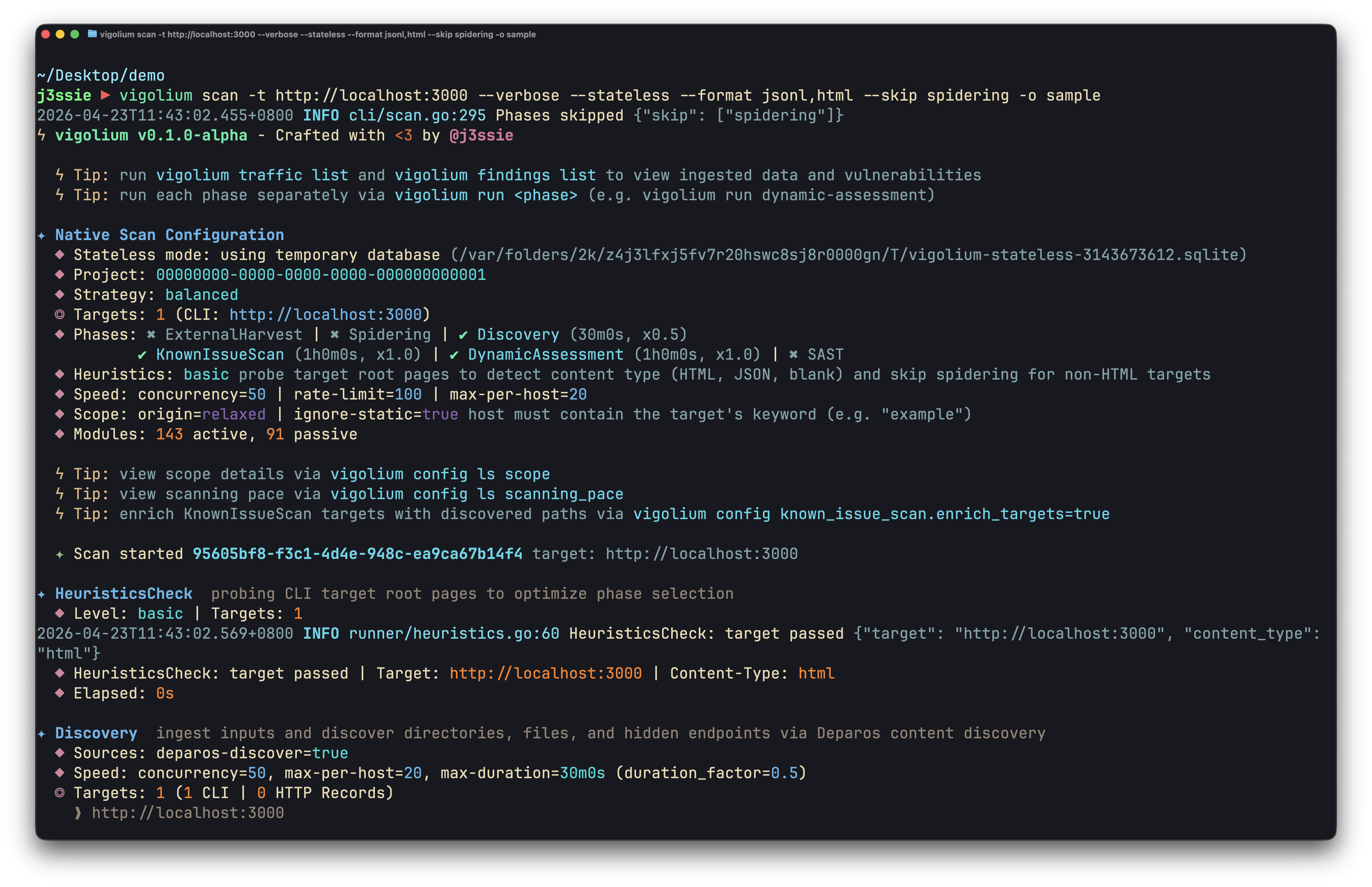
  • Native Scan (vigolium scan): Deterministic, multi-phase scanning with 317 modules across content discovery, browser/SPA spidering, and active/passive audit, covering injection, access control, file/path, API/protocol, framework-specific, cloud/infra, and out-of-band (OAST) vulnerability classes.

Fast, powerful, and flexible.
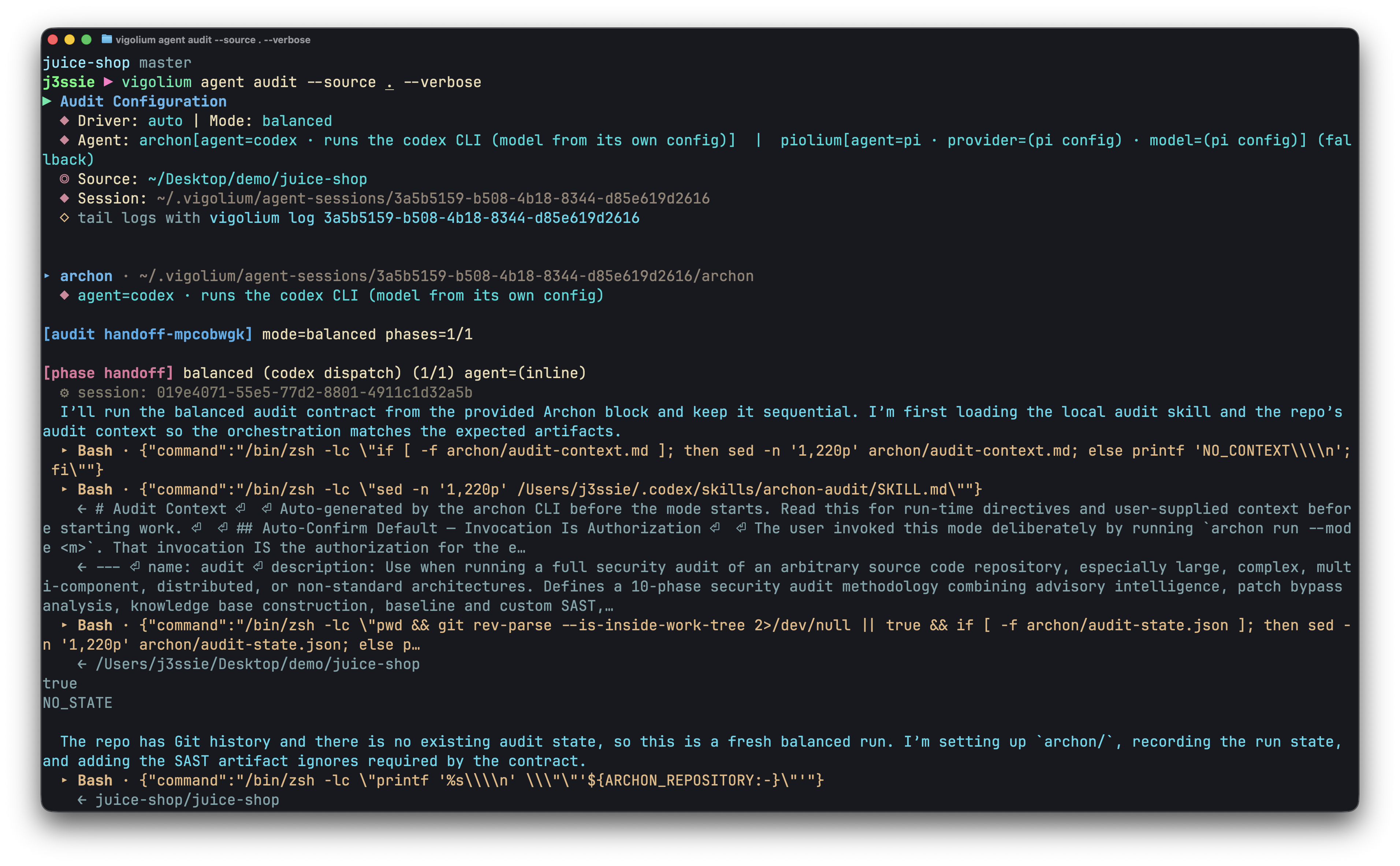
  • Agentic Scan (vigolium agent): Thoroughly audits your codebase. AI-driven scanning that autonomously plans attacks, selects modules, generates custom extensions, and triages results, combining deep source-code audit with autonomous and targeted vulnerability scanning.

  • Installation

    Quick Install (Recommended)

    root@kitploit:~
    curl -fsSL https://vigolium.com/install.sh | bash
    

    npm

    root@kitploit:~
    npm install -g @vigolium/vigolium
    

    Windows

    The npm install above works on Windows. Alternatively, download vigolium_<version>_windows_amd64.zip from the releases page, extract it, and put vigolium.exe somewhere on your PATH.

    Windows ships as x64 only; on Windows ARM it runs under emulation. The shell installer above is POSIX-only, so vigolium update is not available on Windows — re-run the npm install or download the newer zip to upgrade.

    Other method like Docker or Build from source

    Docker

    root@kitploit:~
    docker pull j3ssie/vigolium:latest
    docker run --rm j3ssie/vigolium:latest scan -h
    

    Build from Source

    root@kitploit:~
    git clone https://github.com/vigolium/vigolium.git
    cd vigolium
    make build         # build and install to $GOPATH/bin
    

    Requires Go 1.27+ and bun 1.3.11+. See HACKING.md for prerequisites and build details.

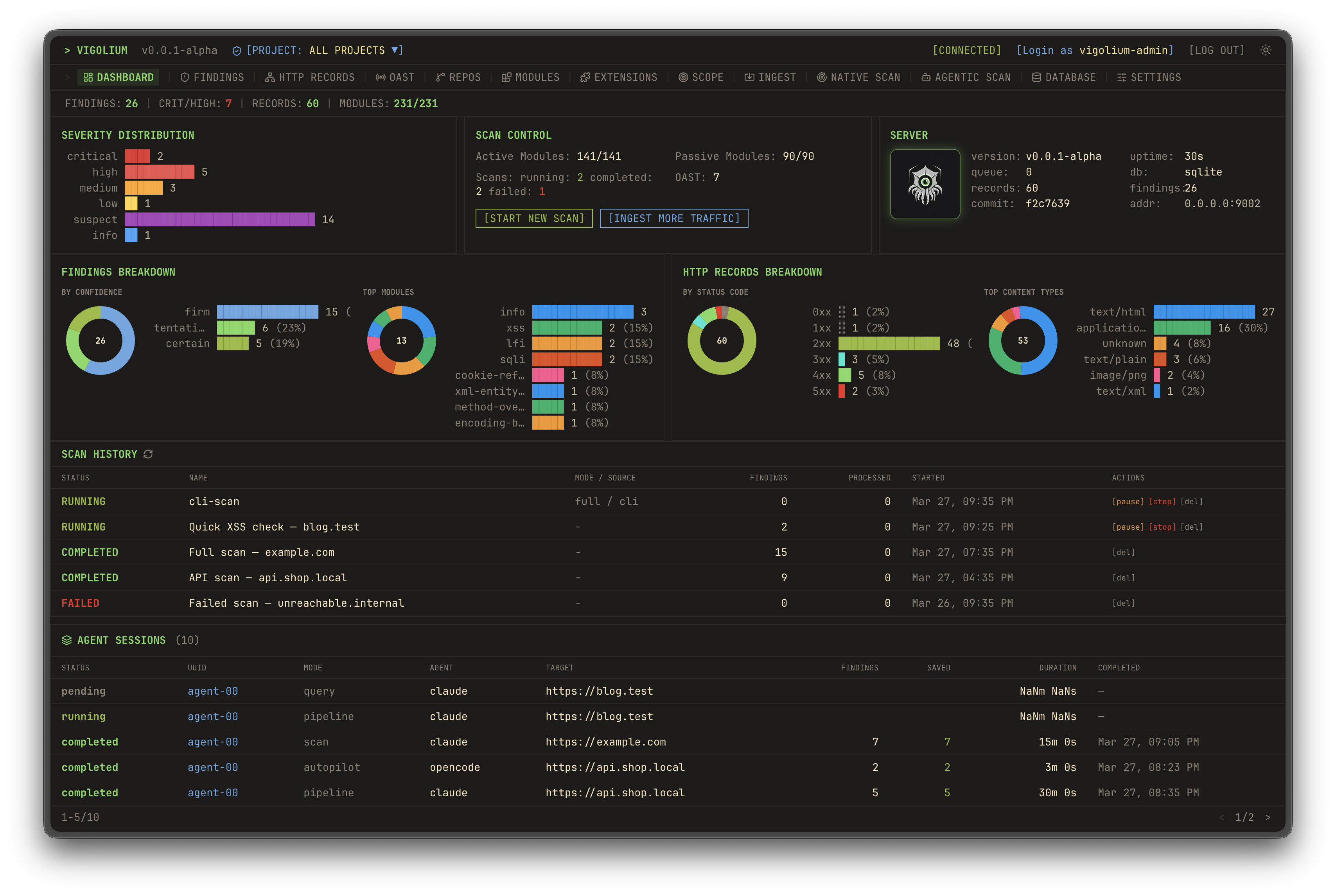
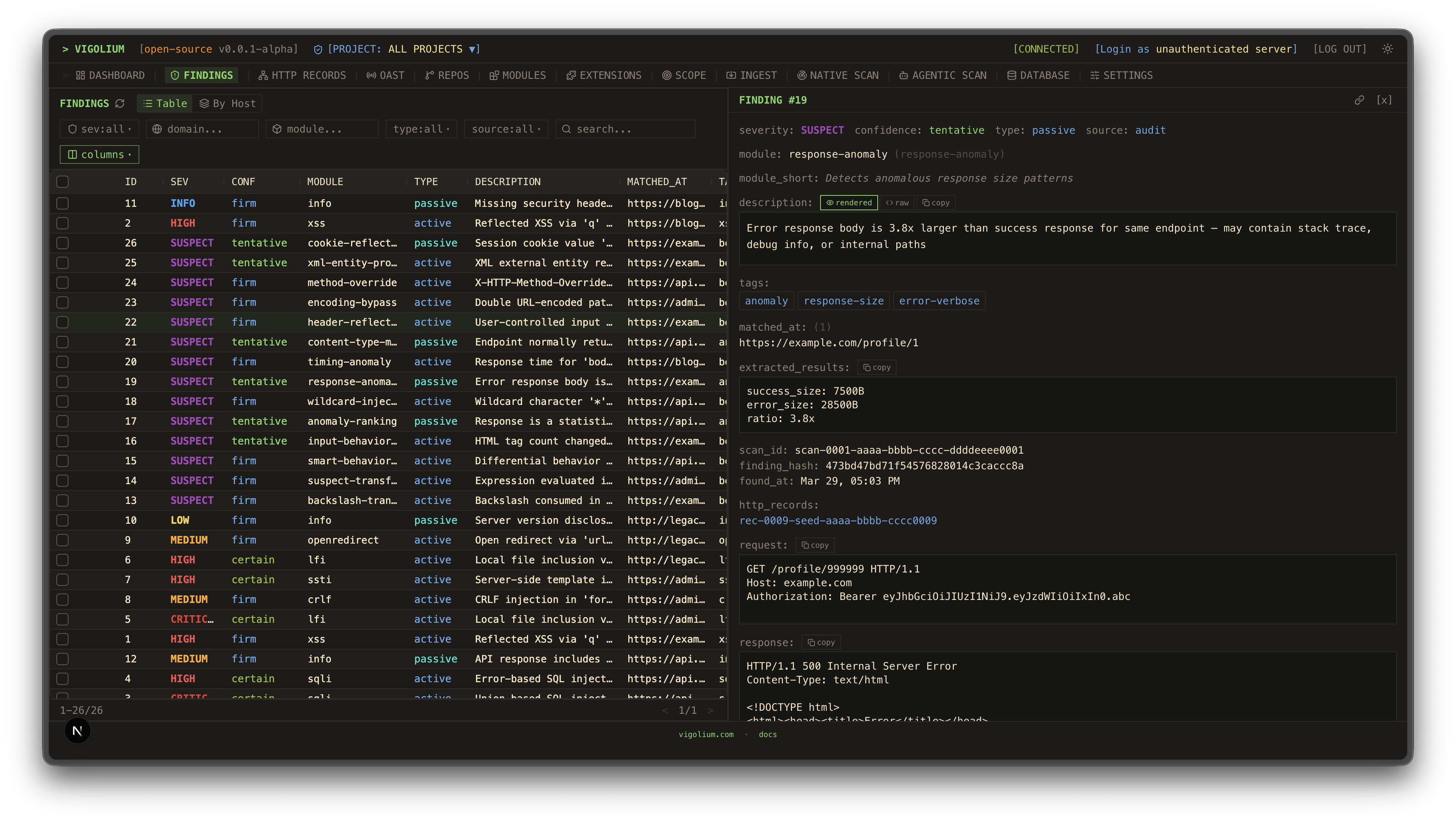
    UI DashboardTraffic Dashboard
    Dashboard 1Dashboard 2
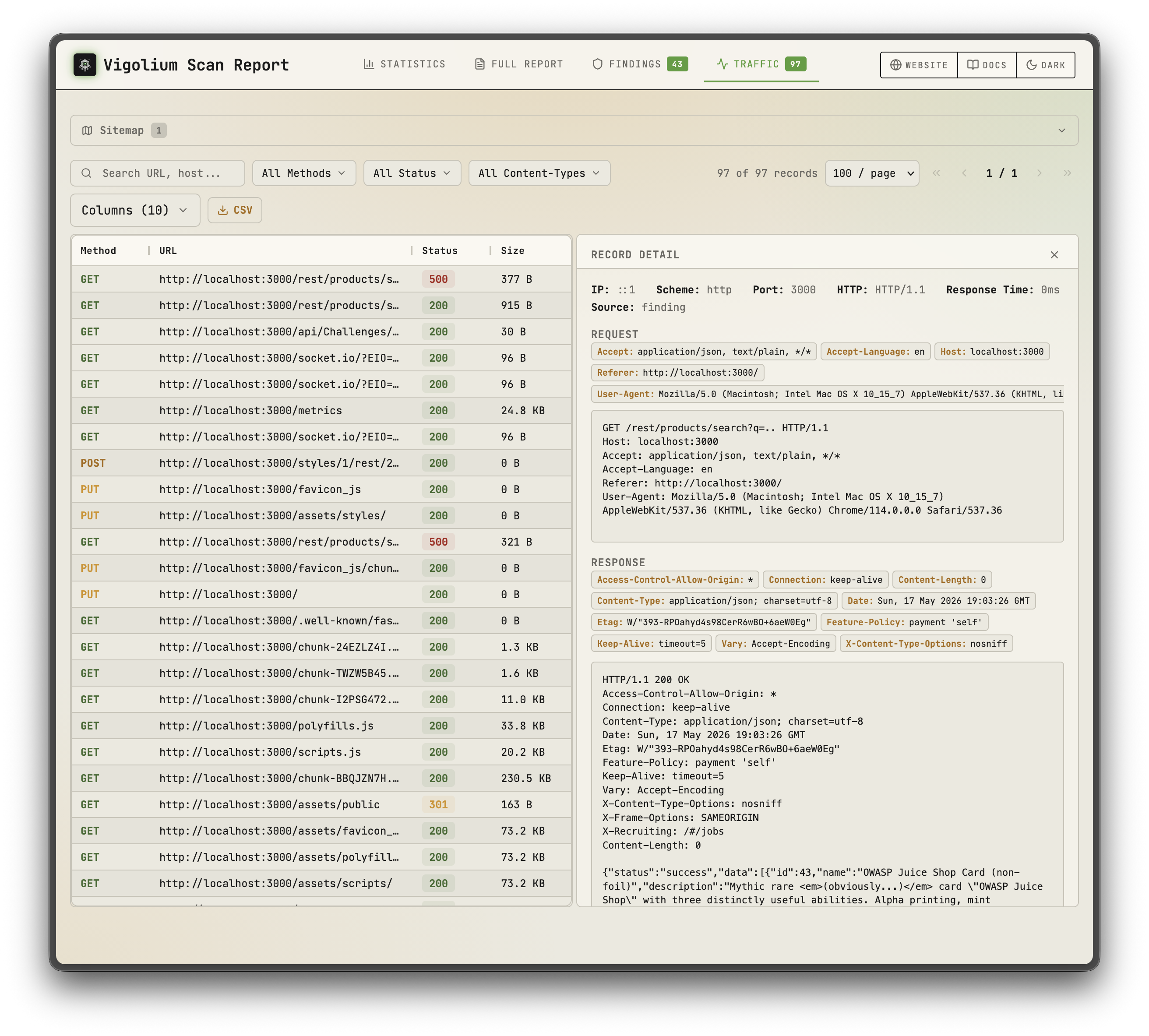
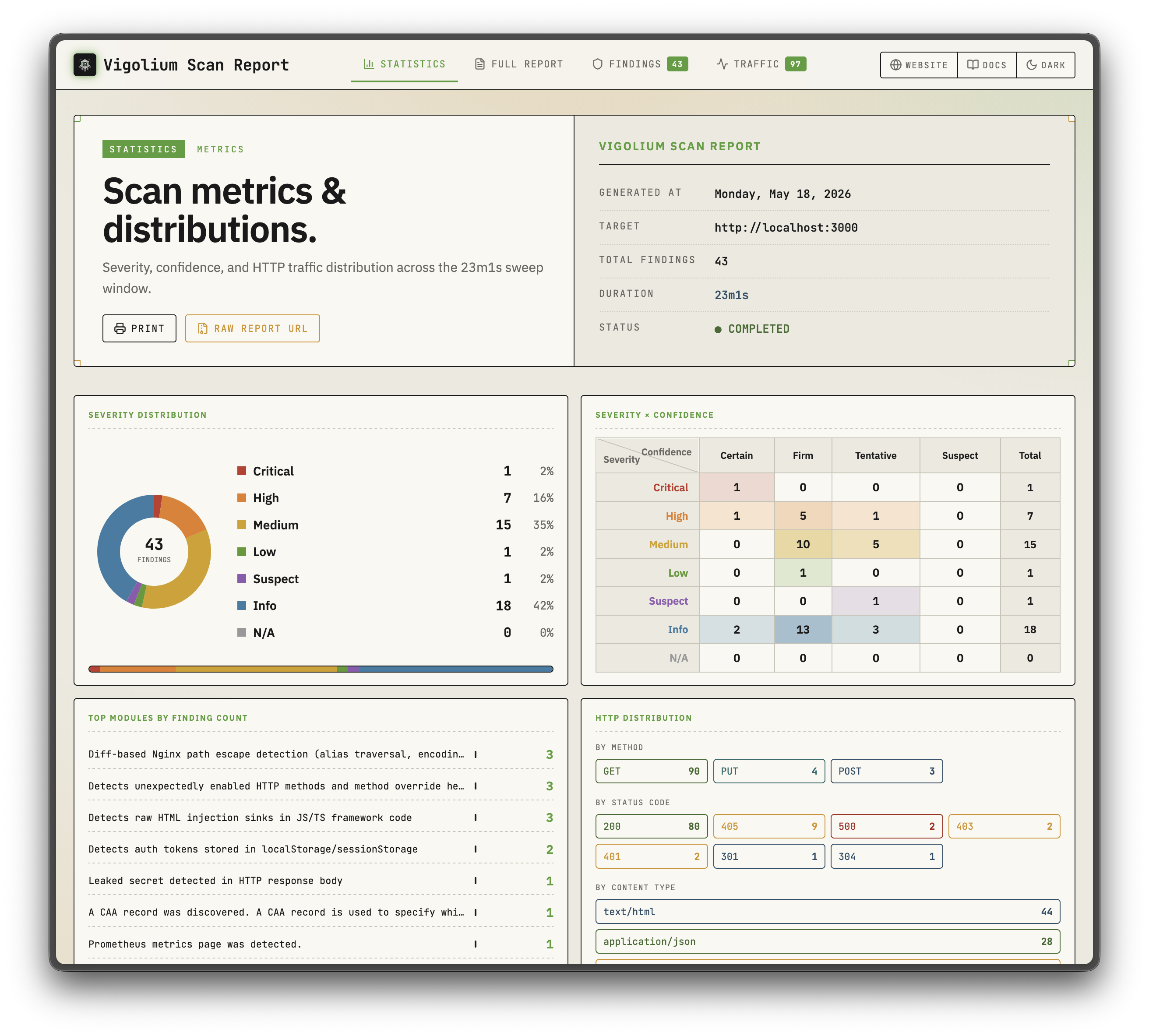
    Static ReportsStatic Reports
    Static Report 1Static Report 2
    Native scanAgentic Scan
    Native scanAgentic Scan

    Sponsor

    Daytona
    Thank you to Daytona for sponsoring the sandbox infrastructure

    Key Features

    Native Scan

    • 323 scanner modules: 207 active (fuzzing) + 116 passive (pattern matching), covering OWASP Top 10 and beyond
    • Out-of-band testing (OAST): blind XSS/SSRF/command injection via interactsh callbacks with automatic payload correlation
    • Value-aware mutation: classifies parameters by semantic type (integer, UUID, JWT, email) and mutates per intent
    • Multi-phase pipeline: external harvesting, content discovery (Deparos), browser/SPA spidering (Spitolas), and audit, controlled by strategy presets and scanning profiles
    • Flexible inputs: URLs, OpenAPI/Swagger, Postman, Burp Suite, cURL, Nuclei JSONL
    • Multi-session authentication: inline sessions, session files, or full auth configs with login flows, token extraction, and IDOR/BOLA testing
    • JavaScript extensions: custom modules and hooks via embedded JS engine with session-aware HTTP APIs
    • Scalable & reportable: concurrent worker pool with per-host rate limiting, hybrid in-memory/disk/Redis queue, and self-contained HTML reports

    Agentic Scan

    • In-process olium runtime: every agent mode runs on the native Go pkg/olium engine: turn-based loop, built-in tool registry, skills support, and pluggable provider drivers (no subprocess SDK pools)
    • Autopilot: agent autonomously discovers endpoints, runs scans, and triages findings, with optional multi-specialist pipeline and session resume
    • Swarm: master agent selects modules, generates custom JS attack extensions, runs code audit + SAST, executes scans, and triages results; targeted or full-scope (--discover), with --diff/--last-commits for change-focused runs
    • Source-audit drivers: audit, piolium, and the unified audit dispatcher run foreground source-code audits sharing one finding schema and DB tagging
    • Query mode: single-shot prompts for code review, endpoint discovery, and secret detection
    • Pluggable providers: openai-compatible (default), openai-codex-oauth, openai-api-key, openai-responses, anthropic-api-key, anthropic-oauth, anthropic-cli, anthropic-compatible, anthropic-vertex, google-vertex. Same modes exposed over the REST API with SSE streaming and an OpenAI-compatible chat endpoint

    Quick Start: Native Scan

    root@kitploit:~
    # Scan a single target (default: balanced strategy)
    vigolium scan -t https://example.com
    
    # Scan with a strategy preset
    vigolium scan -t https://example.com --strategy deep
    
    # Scan specific modules only
    vigolium scan -t https://example.com -m xss-reflected,sqli-error
    
    # Scan from an OpenAPI spec
    vigolium scan -T openapi.yaml -I openapi
    
    # Pipe URLs from stdin
    cat urls.txt | vigolium scan
    
    # Run a single phase directly
    vigolium run discovery -t https://example.com
    
    # Generate an HTML report
    vigolium scan -t https://example.com --only discovery --format html -o report.html
    

    See the architecture overview for the full pipeline and the strategies guide for strategies, profiles, and pace configuration. For a quick command reference, see docs.vigolium.com/getting-started/cheat-sheet.

    Server Mode

    root@kitploit:~
    # Start API server with authentication
    vigolium server -k my-secret-key
    
    # Enable transparent HTTP proxy for traffic recording
    vigolium server -k my-key --ingest-proxy-port 9003
    
    # Auto-scan ingested traffic
    vigolium server -k my-key --scan-on-receive
    
    root@kitploit:~
    # Ingest traffic to a running server
    cat urls.txt | vigolium ingest -s http://localhost:9002
    
    # Ingest an OpenAPI spec
    vigolium ingest -s http://localhost:9002 -i api.yaml -I openapi
    

    See running the server for server setup, ingestion for ingestion workflows, and the API overview for the full REST API reference.

    Proxy integrations: forward live proxy traffic to a running Vigolium server with the burp-vigolium extension for Burp Suite or the caido-vigolium plugin for Caido. Both serve the same bridge protocol (-B/--burp-bridge-url, alias --caido-bridge-url), and ingested traffic is labelled with the proxy it came from.

    Authenticated Scanning

    Vigolium supports multi-session authenticated scanning for IDOR/BOLA testing and privilege escalation checks:

    root@kitploit:~
    # Inline session via CLI flag (name:Header:value)
    vigolium scan -t https://example.com \
      --auth "admin:Cookie:session_id=abc123" \
      --auth "user:Cookie:session_id=xyz789"
    
    # Load session(s) from a YAML/JSON file
    vigolium scan -t https://example.com --auth-file ./admin-session.yaml
    
    # Auth file with an automated login flow (token extraction, etc.)
    vigolium scan -t https://example.com --auth-file ./login-flow.yaml
    
    # Add custom headers (works with sessions)
    vigolium scan -t https://example.com -H "Authorization: Bearer token123"
    

    Auth files support static headers, bearer tokens, and automated login flows with token extraction from cookies, JSON responses, or headers. Preset examples are available in public/presets/sessions/. See the authentication guide for the full guide.

    The --auth / --auth-file flags were previously named --session / --session-file. The old names still work as deprecated aliases.

    Agentic Scan

    AI-driven scanning where agents autonomously plan, execute, and triage vulnerability assessments with the native scan engine underneath:

    root@kitploit:~
    # Autopilot: autonomous AI-driven scanning (in-process olium engine)
    vigolium agent autopilot -t https://example.com
    vigolium agent autopilot -t https://example.com --source ./src --prompt "focus on auth bypass"
    vigolium agent autopilot -t https://example.com --diff main...feature/auth   # diff-focused
    vigolium agent autopilot -t https://example.com --intensity deep             # preset bundle
    
    # Swarm: AI-guided targeted or full-scope vulnerability scanning
    vigolium agent swarm -t https://example.com/api/users --vuln-type sqli
    vigolium agent swarm -t https://example.com --discover                       # full-scope
    vigolium agent swarm -t https://example.com --source ./src --discover        # source-aware full-scope
    vigolium agent swarm --input "curl -X POST https://example.com/api/login -d '{\"user\":\"admin\"}'"
    
    # Source-audit drivers (separate harness, do not route through olium)
    vigolium agent audit --source ./src                                  # default: auto (audit, fall back to piolium)
    vigolium agent audit --source ./src --driver audit --mode deep       # vigolium-audit only (claude/codex)
    vigolium agent audit --source ./src --driver piolium --mode balanced # Pi-native (pi extension) only
    vigolium agent audit --source ./src --driver both                    # audit then piolium, back-to-back
    vigolium agent audit --source ./src --modes deep,confirm             # chain modes (same as --intensity deep)
    vigolium agent audit --source ./src -S --output-dir ./audit-out      # throwaway DB + bundled HTML report
    vigolium audit --source ./src                                        # top-level alias
    
    # Direct olium access (TUI or headless)
    vigolium ol                             # launch the olium TUI
    vigolium ol --prompt "..."              # one-shot prompt (-p implies headless)
    

    Agentic scan modes:

    • Autopilot: autonomous scanning. CLI calls pkg/olium/autopilot.Run directly; the server adds vigolium-audit prep, auth setup, and a frozen context bundle around the same loop
    • Swarm: AI-guided vulnerability scanning supporting targeted single-request and full-scope (--discover). Master agent analyzes inputs, selects modules, generates custom JS extensions, runs code audit and SAST, executes scans, and triages results
    • Audit: source-code audit via vigolium agent audit — a unified dispatcher that runs the embedded vigolium-audit (claude/codex) and/or piolium (Pi-native) harnesses, selected with --driver {auto|both|audit|piolium} (default auto: preflight the audit leg and run it when the resolved claude/codex CLI is on PATH, the binary is embedded, and the chain has an audit-supported mode; otherwise fall back to piolium without launching audit. A mid-run audit failure surfaces rather than switching drivers). Separate harnesses; do not route through olium. Per-driver child rows under one parent AgenticScan with post-pass findings dedup. There is no standalone agent piolium subcommand — piolium runs via --driver=piolium

    Standalone audit CLIs: the agentic security audit also ships as standalone CLIs you can run independently of Vigolium: vigolium-audit (the harness behind vigolium agent audit) and piolium (the Pi-native driver behind vigolium agent audit --driver=piolium).

    See the agent mode guide for the full guide.

    ⚡ Vigolium Cloud Console

    A cloud-based solution for teams that want the power of Vigolium without managing infrastructure. Console is the upgraded, fully-featured version of Vigolium, led by an advanced autonomous agent that drives the whole engagement — reasoning about the target, choosing its own attack paths, and confirming what it finds — with hosted scanning and shared results layered on top of the open-source core, so you can focus on fixing vulnerabilities instead of maintaining tooling.

    Interested? Get in touch for a demo.

    Native Scan Layers

    The native scan pipeline is composed of modular layers, each documented separately:

    LayerDescriptionDocs
    Content Discovery (Deparos)Adaptive directory/file enumeration with fingerprint-based soft-404 detectiondocs.vigolium.com/native-scan/phases/discovery
    Browser Spider (Spitolas)Chromium-driven state-machine crawler with CDP traffic capturedocs.vigolium.com/native-scan/phases/spidering
    AuditActive/passive vulnerability scanning with insertion point extraction and DiffScan frameworkdocs.vigolium.com/native-scan/phases/audit
    Scanner Modules207 active and 116 passive modules covering OWASP Top 10 and beyonddocs.vigolium.com/native-scan/modules-reference

    Documentation

    Full documentation lives at docs.vigolium.com. Release notes and version history are in the CHANGELOG. Quick links:

    TopicLink
    Setup Agentsdocs.vigolium.com/getting-started/setup-agent
    Start a Native Scandocs.vigolium.com/getting-started/native-scan
    Start an Agentic Scandocs.vigolium.com/getting-started/agentic-scan
    Start an Agentic Auditdocs.vigolium.com/getting-started/agentic-security-audit
    Quickstartdocs.vigolium.com/getting-started/quickstart
    Cheat Sheetdocs.vigolium.com/getting-started/cheat-sheet
    Server & Ingestiondocs.vigolium.com/getting-started/server-and-ingestion
    Writing Extensionsdocs.vigolium.com/customization/writing-extensions

    JavaScript Engine

    Run JavaScript/TypeScript code directly or write custom scan modules and hooks without recompiling:

    root@kitploit:~
    # Execute inline JavaScript
    vigolium js --code 'let r = vigolium.http.get(TARGET); console.log(r.status)' -t https://example.com
    
    # Run a JS file with timeout
    vigolium js --code-file ./my-script.js -t https://example.com --timeout 60s
    
    # Manage extensions
    vigolium ext ls                # list loaded extensions
    vigolium ext docs --example    # browse API with code examples
    vigolium ext preset            # install starter scripts
    

    The JS engine exposes session-aware HTTP APIs for authenticated testing:

    root@kitploit:~
    // Create a persistent session with shared cookie jar.
    // post() takes a string body — serialize objects yourself.
    let session = vigolium.http.session();
    session.post(
      "https://app.example.com/login",
      JSON.stringify({ user: "admin", pass: "secret" }),
      { headers: { "Content-Type": "application/json" } }
    );
    session.get("https://app.example.com/dashboard"); // cookies auto-sent
    
    // Automated login flow with token extraction
    let authed = vigolium.http.login({
      url: "https://app.example.com/api/auth",
      method: "POST",
      body: JSON.stringify({ username: "admin", password: "pass" }),
      extract: [{ source: "json", path: "$.token", apply_as: "Authorization: Bearer {value}" }]
    });
    
    // IDOR/BOLA testing across multiple sessions
    let results = vigolium.http.authTest({
      sessions: { admin: adminSession, user: userSession },
      requests: [{ method: "GET", url: "https://app.example.com/api/users/1" }]
    });
    
    // Multi-step authentication sequences
    let result = vigolium.http.sequence([
      { url: "/csrf", extract: [{ source: "cookie", name: "csrf_token", as: "token" }] },
      { url: "/login", method: "POST", body: "csrf={token}&user=admin" }
    ]);
    
    // Parallel request batching (race conditions, IDOR)
    let responses = vigolium.http.batch([req1, req2, req3], { concurrency: 10 });
    
    // CSRF token extraction
    let csrf = vigolium.http.csrf("https://app.example.com/form");
    
    // HTTP request replay with variations
    let varied = vigolium.http.replay(rawRequest, [
      { headers: { "Authorization": "Bearer admin_token" } },
      { headers: { "Authorization": "Bearer user_token" } }
    ]);
    

    See writing extensions for the extension authoring guide and pkg/jsext/vigolium.d.ts for the full TypeScript API definitions.

    CLI Reference

    Expand the full commands & flags reference

    Commands

    root@kitploit:~
    Scanning:
      vigolium scan                Run a native scan (deterministic multi-phase vulnerability scanning)
      vigolium run <phase>         Run a single native scan phase (alias for scan --only <phase>)
      vigolium scan-url <url>      Quick native scan of a single URL
      vigolium scan-request        Native scan from a raw HTTP request
    
    Agentic scan (in-process olium engine):
      vigolium agent autopilot     Autonomous AI-driven vulnerability scanning
      vigolium agent swarm         AI-guided targeted or full-scope vulnerability scanning
      vigolium agent query         Single-shot prompt (code review, endpoint discovery)
      vigolium agent olium         Direct olium TUI (or one-shot non-interactive via -p)
      vigolium agent audit         Unified driver dispatcher (vigolium-audit and/or piolium, --driver=auto|both|audit|piolium)
      vigolium agent session       Browse/replay agent session artifacts
      vigolium olium | vigolium ol Top-level alias for `vigolium agent olium`
    
    Server & ingestion:
      vigolium server              Start the API server with traffic ingestion
      vigolium ingest              Ingest traffic to a running server
      vigolium storage             Interact with cloud object storage (uploads, downloads)
    
    Data & projects:
      vigolium db                  Database operations (list, stats, export, clean, seed)
      vigolium finding             Browse and manage findings (load, tui)
      vigolium traffic             Browse and replay HTTP records (tui, replay)
      vigolium replay              Mutate a stored/supplied HTTP request and diff baseline vs replay
      vigolium project             Manage projects (create, list, use, config)
      vigolium scope               Manage scope rules
      vigolium import              Import findings/data from external sources
      vigolium export              Export scan results
    
    Extensions & auth:
      vigolium js                  Execute JavaScript/TypeScript code
      vigolium ext                 Manage JavaScript extensions (eval, lint)
      vigolium auth                Manage authentication sessions (list, load, lint, totp)
    
    Setup & introspection:
      vigolium init                Initialize a Vigolium workspace
      vigolium config              Manage configuration (ls, set, path, clean)
      vigolium strategy            Inspect scanning strategies and phases
      vigolium module              Inspect/enable scanner modules
      vigolium doctor              Diagnose environment & dependencies
      vigolium version             Show version info
    

    Flags

    root@kitploit:~
    Native Scan (vigolium scan / run):
      -t, --target           Target URL
      -T, --target-file      File containing target URLs
      -i, --input            Input file path (- for stdin)
      -I, --input-mode       Input format: urls, openapi, swagger, burp, curl, nuclei, har
      -m, --modules          Modules to run (comma-separated or 'all')
          --strategy         Strategy preset: lite, balanced, deep
          --scanning-profile Scanning profile name or YAML path
          --only             Phases to run (comma-separated): ingestion, discovery (deparos),
                             external-harvest, spidering (spitolas), known-issue-scan,
                             dynamic-assessment, extension
          --skip             Phases to skip (repeatable, same names as --only)
      -S, --stateless        Use a throwaway temp database, discarded after the scan
          --fail-on          Exit non-zero when a finding at/above this severity is present
    
    Authentication:
          --auth              Inline session definition (name:Header:value, repeatable)
          --auth-file         Session YAML/JSON file path, supports login flows (repeatable)
      -H, --header           Custom HTTP header (repeatable)
    
    Performance:
      -c, --concurrency      Concurrent workers (default: 50)
      -r, --rate-limit       Max requests/sec (default: 0 = unlimited)
          --max-per-host     Per-host concurrency cap (default: 2)
          --proxy            HTTP/SOCKS5 proxy URL
          --timeout          HTTP request timeout (default: 15s)
    
    Agentic Scan (vigolium agent autopilot / swarm / query):
          --source             Path to source code for source-aware scanning
          --files              Specific files to include relative to --source
          --source-label       Label for source code ingestion
          --provider           Olium provider: openai-compatible (default), openai-codex-oauth,
                               openai-api-key, openai-responses, anthropic-api-key,
                               anthropic-oauth, anthropic-cli, anthropic-compatible,
                               anthropic-claude-sdk-bridge, anthropic-vertex, google-vertex
          --model              Model ID override
          --oauth-token        OAuth bearer token (anthropic-oauth)
          --oauth-cred         OAuth/SA file path (openai-codex-oauth, anthropic-vertex,
                               google-vertex)
          --llm-api-key        API key (anthropic-api-key, openai-api-key)
          --vuln-type          Vulnerability type focus (sqli, xss, ssrf, ...)
          --prompt             Free-text task guidance (same as the positional [prompt])
          --plan-file          Plan file mixing guidance + raw seed HTTP request(s)
          --knowledge-base     File/dir describing the app; prose is distilled, traffic
                               exports (HAR/Burp/curl/OpenAPI/Postman) are ingested
          --prior-context      Front-load existing project traffic/findings: auto, summary, off
          --intensity          Preset bundle: quick, balanced, deep
          --diff               Diff range / PR URL / HEAD~N for change-focused scans
          --last-commits       Shorthand for --diff HEAD~N
          --code-audit         Enable AI code audit (default: on with --source)
          --discover           Run discovery+spidering before planning (swarm)
          --audit              vigolium-audit mode: lite, balanced, deep, mock, off
          --piolium            Piolium audit mode (empty = auto-pick)
          --resume             Resume a durable-autopilot run by agentic-scan UUID
          --session-dir        Pin the session dir for this run's debug artifacts
          --transcript         Copy transcript.jsonl out after the run
          --max-iterations     Max triage-rescan iterations
          --max-commands       Cap on agent tool calls
          --token-budget       Cap on aggregate tokens
          --max-duration       Max agent wall-clock time (0 = no limit)
          --only / --skip / --start-from   Phase control (swarm)
    
    Source audit (vigolium agent audit / vigolium audit):
          --driver             auto (default), both, audit, piolium
          --intensity          Preset: quick, balanced, deep (deep = modes deep,confirm)
          --mode               Mode override: lite, balanced, deep, revisit, confirm, merge, ...
          --modes              Chain modes back-to-back (e.g. deep,confirm)
          --list-modes         Print the audit mode graph and exit
          --agent              Coding agent for the audit leg: claude or codex
          --keep-raw           Keep raw output under <source>/vigolium-results/ (on by default)
          --clean-raw          Remove the source-tree raw copy after the run
      -S, --stateless          Run into a throwaway DB and auto-render an HTML report
          --output-dir         Bundle the HTML report + raw results into one folder (needs -S)
          --no-dedup           Skip the post-pass project-wide findings dedup
          --no-preflight       Skip the pre-audit auth/model roundtrip checks
      -i, --interactive        Drive the audit yourself in the coding agent (audit driver only)
    
    JavaScript:
          --code             Inline JavaScript to execute
          --code-file        Path to JS/TS file to execute
          --timeout          Execution timeout (default: 30s)
    
    Output:
      -j, --json             Compact, token-aware JSON output (read/query commands)
          --format           Output format (comma-separated for multiple): console, jsonl,
                             html, sqlite (needs -S), fs (flat traffic/finding tree)
      -o, --output           Output file path
          --silent           Suppress all output except findings
      -v, --verbose          Verbose logging
    

    Repository Layout

    The platform/ directory contains external tooling, UI Dashboard and is not part of the core scanner. No changes should be made to it.

    Benchmarks

    Vigolium is continuously benchmarked against intentionally vulnerable applications and also heavily tested against real-world targets through bug bounty and responsible disclosure programs.

    • Self-hosted (Docker): DVWA, OWASP Juice Shop, VAmPI, crAPI, Vulnerable Java App, Vulnerable Nginx, OopsSec Store (custom Next.js app)
    • External (hosted): Acunetix TestPHP, Gin & Juice Shop, Testfire
    • XSS & multi-vuln: BruteLogic XSS, XBOW (XSS, SQLi, SSTI, LFI, SSRF, XXE, command injection)

    Run benchmarks with make test-canary (Docker apps) or make test-integration (XSS).

    Development

    root@kitploit:~
    make build          # build and install
    make test           # run all tests (auto-installs gotestsum)
    make test-unit      # fast unit tests (-short, no external deps)
    make test-e2e       # E2E tests (requires Docker)
    make lint           # run linter
    make fmt            # format code
    

    See HACKING.md for the full build guide, codebase map, and module development guide.

    Security

    Vigolium is an offensive security tool, and two parts of it are intentionally permissive: agent mode runs with no sandbox (the LLM has full shell, file, and network access on the host) and extensions can run arbitrary commands. Run agent mode in a disposable container/VM scoped to the engagement, and treat untrusted extensions like untrusted code. See SECURITY.md before you start, and report vulnerabilities in Vigolium itself privately to [email protected].

    License

    Vigolium is released under the GNU Affero General Public License v3.0. Derivative works must remain open under the same terms.

    Crafted with ♥ by @j3ssie, with @theblackturtle as a core initial contributor.

    Download Tool