A collector and derivation engine. It maps your environment, evaluates effective permissions and trust, and writes a complete attack graph as a single .rage.ndjson file. The input to everything else.

You don't have 4,000 findings. You have six paths to your crown jewels.
A CSPM hands you a flat, deduplicated, severity-sorted list of misconfigurations and leaves you to guess which ones matter. Thunderstorm reasons about reachability: it collects your cloud read-only, models it as a graph of security capabilities, and tells you that a GitHub Actions OIDC trust leads, in four hops, to your production data lake.
None of the hops above is a finding on its own. A public bucket, a key in a state file, an assumable role, one over-broad IAM action. The path is the finding, and the path is what almost nothing else computes.
Deep on the platform you point it at. Run it against an AWS account, an Azure subscription, or a GCP project, and it maps that one environment in the provider's own terms: STS assume-role and IAM privilege escalation in AWS, RBAC and managed-identity chains in Azure, service-account impersonation in GCP. One environment, one graph, modeled the way that cloud actually works.
Plenty of tools enumerate more. The claim here is that Thunderstorm reasons over what it enumerates with real depth: 219 resource types, 80 edge types, 2,400+ derivation rules, and 1,049 mapped credential-leak sites, all sourced from RAGE.
RAGE is the format, Thunderstorm produces it, Blaze explores it.
They are what Thunderstorm produces from a single scan.
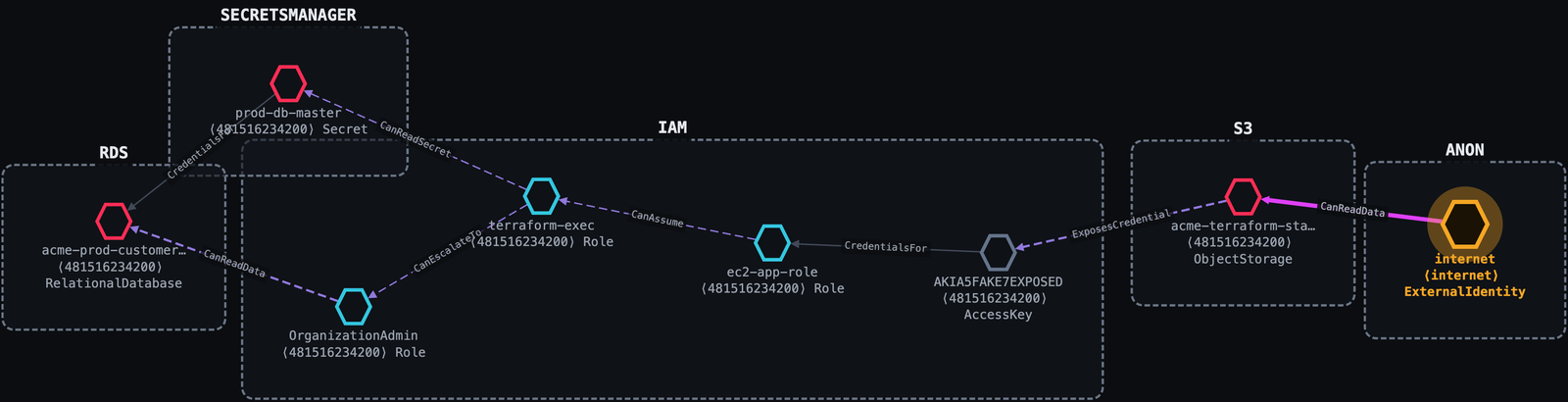
One misconfigured S3 bucket. Thunderstorm traces it six hops to the production customer database, and a second route straight to the database master secret.
Internet ──public s3:GetObject──▶ acme-terraform-state (public bucket)
         ──ExposesCredential────▶ AKIA…            (access key leaked in tfstate)
         ──CredentialsFor───────▶ ec2-app-role
         ──CanAssume────────────▶ terraform-exec    (sts:AssumeRole)
         ──CanEscalateTo────────▶ OrganizationAdmin (iam:AttachRolePolicy)
         ──CanReadData──────────▶ acme-prod-customers (PII)
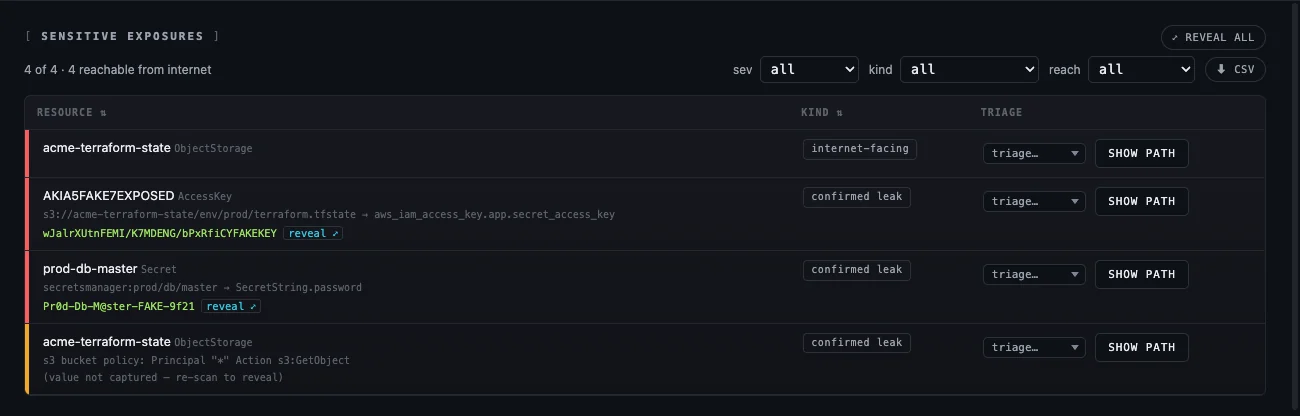
Every hop carries the permission that grants it, the evidence that proves it, and a plain-English narrative. The leaked values come out with it:
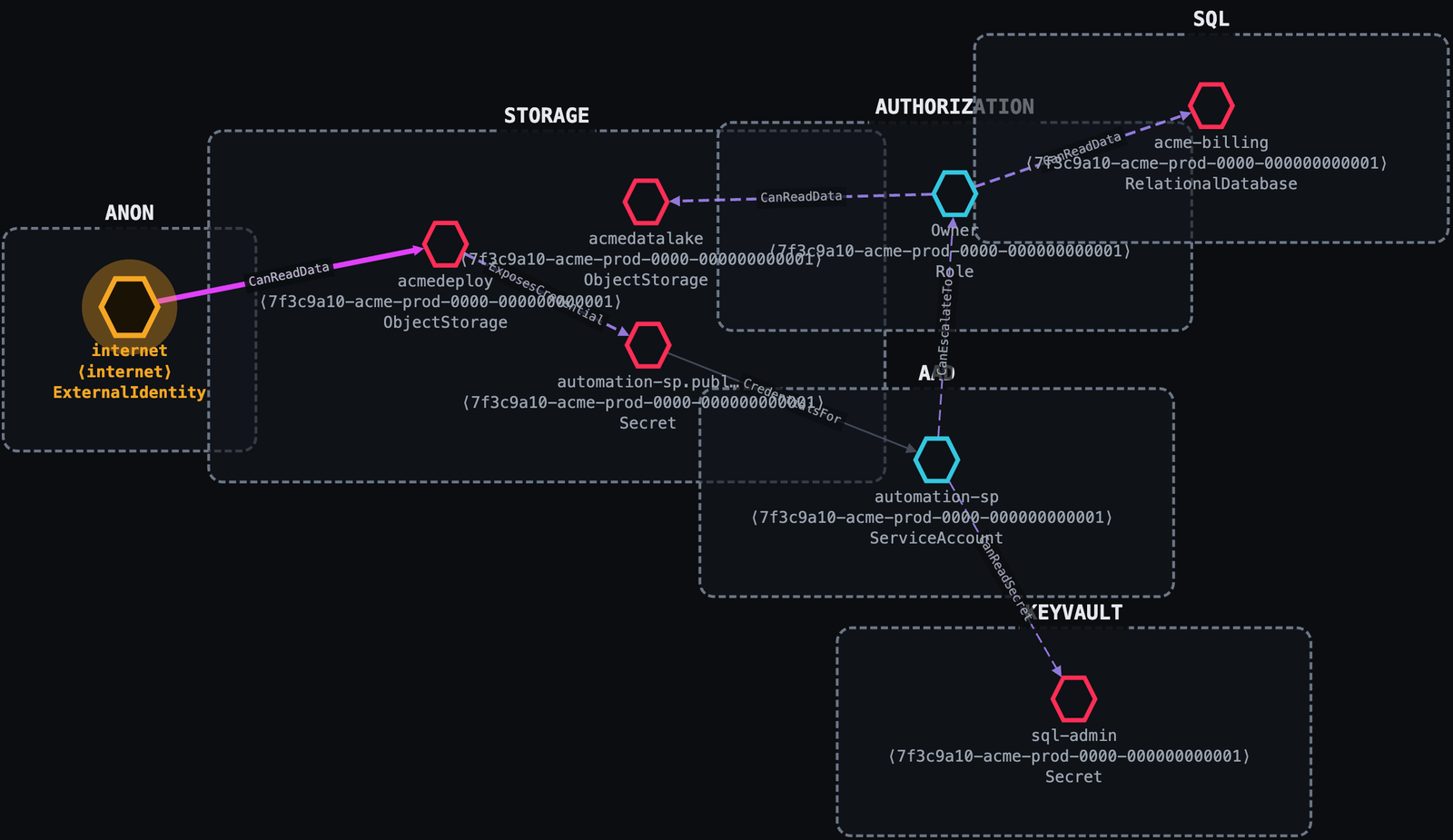
A publicly readable blob leaks a service-principal secret. A Contributor with one extra permission promotes itself to subscription Owner. No app exploit; just cloud misconfiguration and IAM.
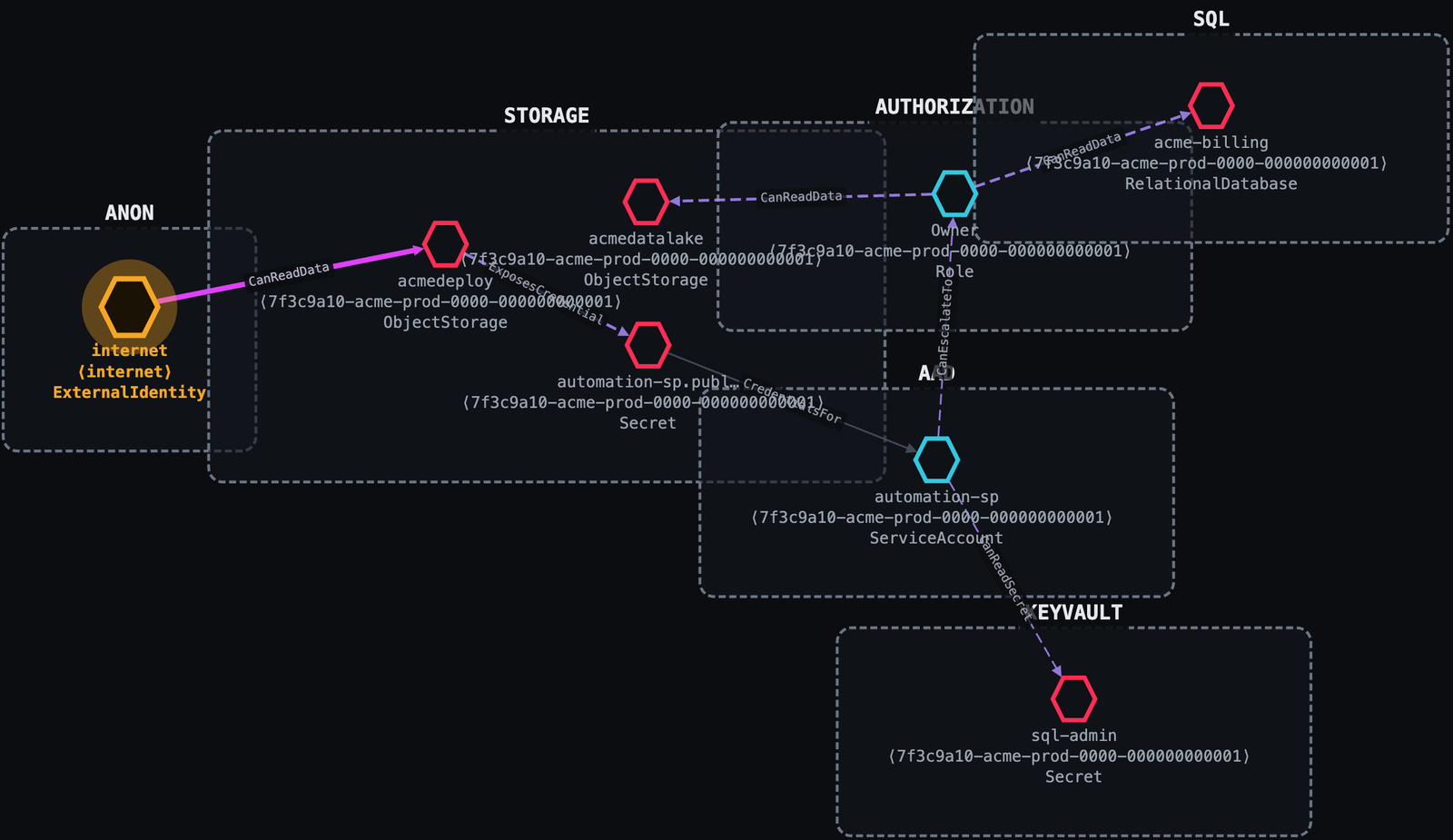
Internet ──anonymous blob read──▶ acmedeploy (public Storage account)
         ──ExposesCredential────▶ automation-sp secret (in a deploy config blob)
         ──CredentialsFor───────▶ automation-sp (Contributor)
         ──CanEscalateTo────────▶ Owner  (Microsoft.Authorization/roleAssignments/write)
         ──CanReadData──────────▶ acmedatalake
Service-account impersonation is invisible to most tooling. Thunderstorm treats
iam.serviceAccounts.getAccessToken as the lateral-movement edge it is.
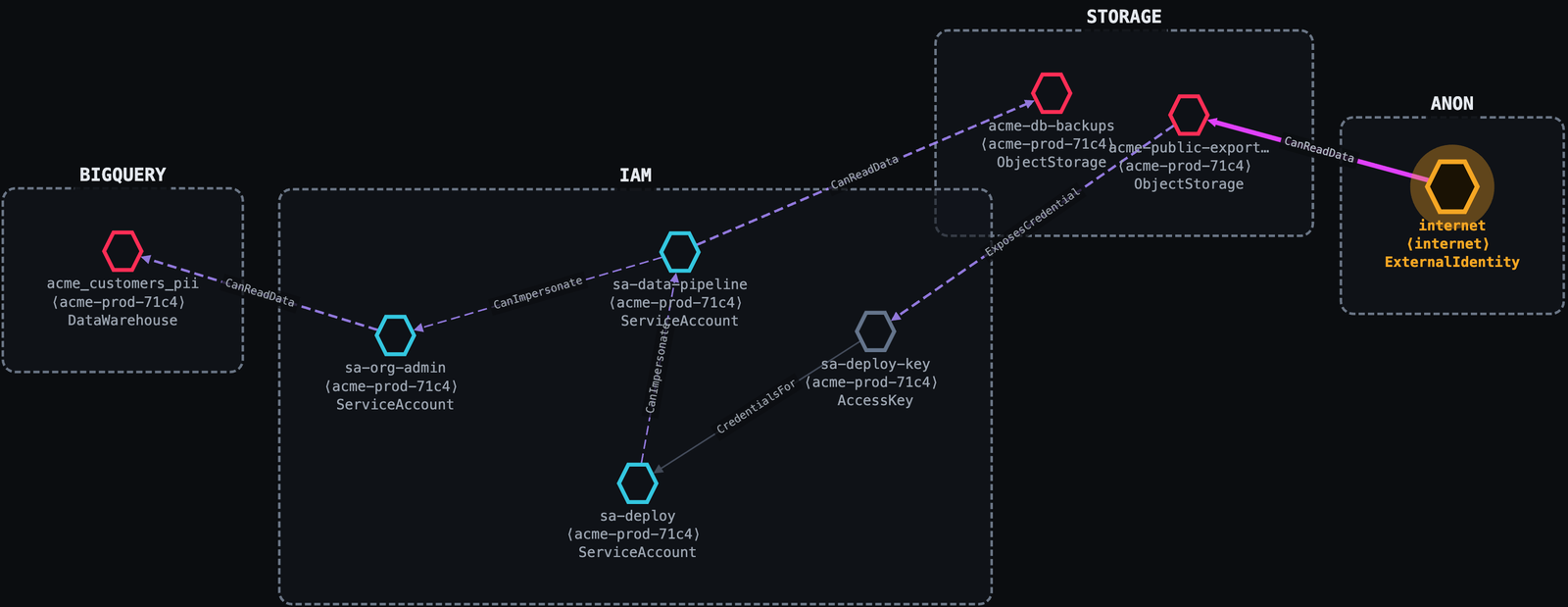
Internet ──public allUsers───▶ acme-public-exports (GCS)
         ──ExposesCredential─▶ sa-deploy-key
         ──CredentialsFor────▶ sa-deploy
         ──CanImpersonate────▶ sa-data-pipeline
         ──CanImpersonate────▶ sa-org-admin
         ──CanReadData───────▶ acme_customers_pii (BigQuery)
view opens it in your browser; nothing is uploaded.collectors/, engine/).Thunderstorm carries no taxonomy, mappings, or rules of its own. It consumes the RAGE standard end-to-end:
| Concern | Lives in RAGE |
|---|---|
| Node / edge taxonomy, conditions | vocab/{node-types,edge-types,conditions}.json |
| Native→generic mappings + collection recipes | providers/{aws,gcp,azure}.json |
| Derivation rule corpus | rules/ |
| Credential-exposure catalog | exposure-db/{aws,gcp,azure}.json + vocabulary.json |
Version tie: RAGE's spec_version is the single number that pins Thunderstorm to a
RAGE release. The collector reads it live from the RAGE it was built against
(thunderstorm version prints RAGE <v>) and stamps it into every graph it emits; Blaze
Lite reads that stamp and warns when a graph was built against a version it doesn't support.
How RAGE is resolved (first match wins):
$RAGE_ROOT: a live RAGE checkout, if you set it (dev override; edits apply without rebuild).collectors/rage/, embedded in the binary.Refresh the snapshot with make RAGE_ROOT=/path/to/rage (or go generate ./... in
collectors/). RAGE lives at github.com/trustedsec/rage.
Thunderstorm scans read-only using your existing cloud credentials; it never manages
secrets and never writes to the target. Log in with the provider's normal tooling, then
point scan at the account / project / subscription.
AWS uses the standard AWS SDK credential chain (a named profile, env vars, SSO, or an instance role):
aws configure --profile myprofile        # or: aws sso login --profile myprofile
./bin/thunderstorm scan --profile myprofile [--region us-east-1]
GCP uses Application Default Credentials (ADC). Log in, then pass the project:
gcloud auth application-default login
./bin/thunderstorm scan --provider gcp --project my-project-id
A service-account key also works via GOOGLE_APPLICATION_CREDENTIALS=/path/key.json.