 urbanadventurer/android-pin-bruteforce
Unlock an Android phone (or device) by bruteforcing the lockscreen PIN. Turn your Kali Nethunter phone into a bruteforce PIN cracker for Android devices! (no root, no adb)

Unlock an Android phone (or device) by bruteforcing the lockscreen PIN.
Turn your Kali Nethunter phone into a bruteforce PIN cracker for Android devices!
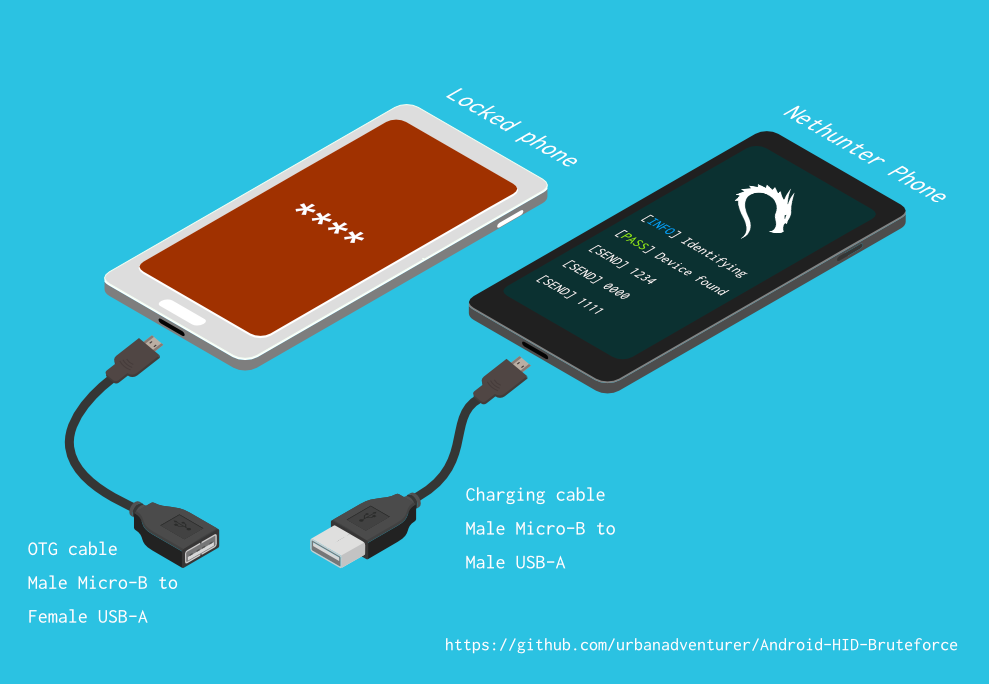
It uses a USB OTG cable to connect the locked phone to the Nethunter device. It emulates a keyboard, automatically tries PINs, and waits after trying too many wrong guesses.
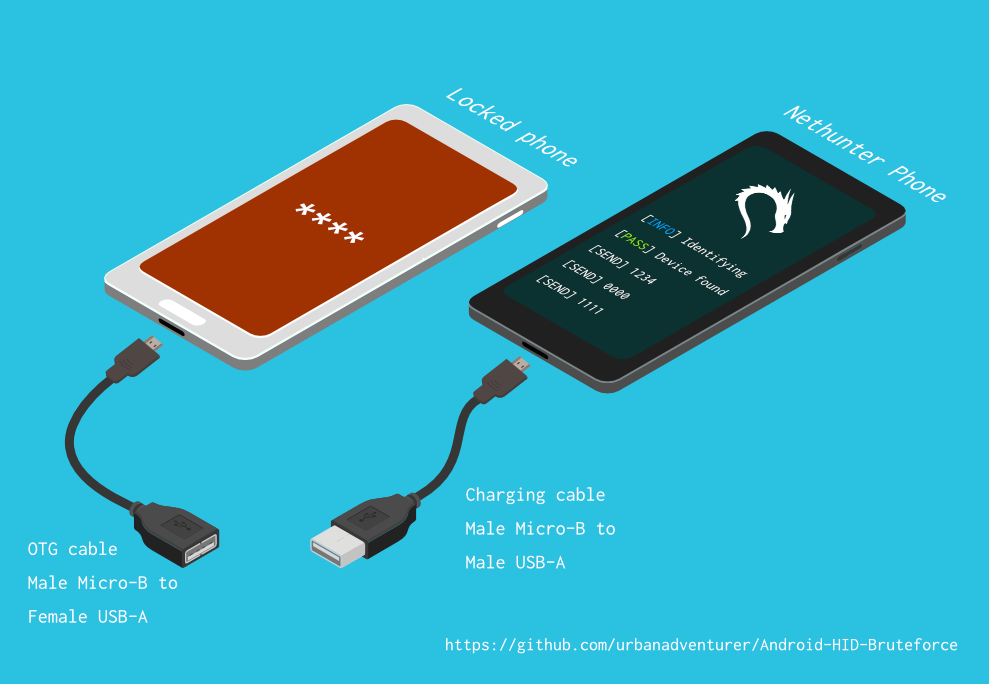
[Nethunter phone] <--> [USB cable] <--> [USB OTG adaptor] <--> [Locked Android phone]
The USB HID Gadget driver provides emulation of USB Human Interface Devices (HID). This enables an Android Nethunter device to emulate keyboard input to the locked phone. It's just like plugging a keyboard into the locked phone and pressing keys.
⏱ This takes just over 16.6 hours with a Samsung S5 to try all possible 4 digit PINs, but with the optimised PIN list it should take you much less time.
TBC
If you installed the script to /sdcard/, you can execute it with the following command.
bash ./android-pin-bruteforce
Note that Android mounts /sdcard with the noexec flag. You can verify this with mount.
Android-PIN-Bruteforce (0.2) is used to unlock an Android phone (or device) by bruteforcing the lockscreen PIN.
  Find more information at: https://github.com/urbanadventurer/Android-PIN-Bruteforce

Commands:
  crack                Begin cracking PINs
  resume               Resume from a chosen PIN
  rewind               Crack PINs in reverse from a chosen PIN
  diag                 Display diagnostic information
  version              Display version information and exit

Options:
  -f, --from PIN       Resume from this PIN
  -a, --attempts       Starting from NUM incorrect attempts
  -m, --mask REGEX     Use a mask for known digits in the PIN
  -t, --type TYPE      Select PIN or PATTERN cracking
  -l, --length NUM     Crack PINs of NUM length
  -c, --config FILE    Specify configuration file to load
  -p, --pinlist FILE   Specify a custom PIN list
  -d, --dry-run        Dry run for testing. Doesn't send any keys.
  -v, --verbose        Output verbose logs

Usage:
  android-pin-bruteforce <command> [options]
This has been successfully tested with various phones including the Samsung S5, S7, Motorola G4 Plus and G5 Plus.
It can unlock Android versions 6.0.1 through to 10.0. The ability to perform a bruteforce attack doesn't depend on the Android version in use. It depends on how the device vendor developed their own lockscreen.
Check the Phone Database for more details https://github.com/urbanadventurer/Android-PIN-Bruteforce/wiki/Phone-Database
Optimised PIN lists are used by default unless the user selects a custom PIN list.
Use the --length commandline option.
Use this command to crack a 3 digit PIN,
./android-pin-bruteforce crack --length 3
Use this command to crack a 6 digit PIN
./android-pin-bruteforce crack --length 6
The optimised PIN lists were generated by extracting numeric passwords from database leaks then sorting by frequency. All PINs that did not appear in the password leaks were appended to the list.
The optimised PIN lists were generated from Ga$$Pacc DB Leak (21GB decompressed, 688M Accounts, 243 Databases, 138920 numeric passwords).
The reason that the 4 digit PIN list is used from a different source is because it gives better results than the generated list from Ga$$Pacc DB Leak.
optimised-pin-length-4.txt is an optimised list of all possible 4 digit PINs, sorted by order of likelihood.
It can be found with the filename pinlist.txt at https://github.com/mandatoryprogrammer/droidbrute
This list is used with permission from Justin Engler & Paul Vines from Senior Security Engineer, iSEC Partners, and was used in their Defcon talk, Electromechanical PIN Cracking with Robotic Reconfigurable Button Basher (and C3BO)
Masks use regular expressions with the standard grep extended format.
./android-pin-bruteforce crack --mask "...[45]" --dry-run
19..1..1...[45]Device manufacturers create their own lock screens that are different to the default or stock Android. To find out what keys your phone needs, plug a keyboard into the phone and try out different combinations.
Load a different configuration file, with the --config FILE commandline parameter.
Example:
./android-pin-bruteforce --config ./config.samsung.s5 crack
You can also edit the config file by customising the timing and keys sent.
The following configuration variables can be used to support a different phone's lockscreen.
# Timing
## DELAY_BETWEEN_KEYS is the period of time in seconds to wait after each key is sent
DELAY_BETWEEN_KEYS=0.25

## The PROGRESSIVE_COOLDOWN_ARRAY variables act as multi-dimensional array to customise the progressive cooldown
## PROGRESSIVE_ARRAY_ATTEMPT_COUNT__________ is the attempt number
## PROGRESSIVE_ARRAY_ATTEMPTS_UNTIL_COOLDOWN is how many attempts to try before cooling down
## PROGRESSIVE_ARRAY_COOLDOWN_IN_SECONDS____ is the cooldown in seconds

PROGRESSIVE_ARRAY_ATTEMPT_COUNT__________=(1  11 41)
PROGRESSIVE_ARRAY_ATTEMPTS_UNTIL_COOLDOWN=(5   1  1)
PROGRESSIVE_ARRAY_COOLDOWN_IN_SECONDS____=(30 30 60)

## SEND_KEYS_DISMISS_POPUPS_N_SECONDS_BEFORE_COOLDOWN_END defines how many seconds before the end of the cooldown period, keys will be sent
# set to 0 to disable
SEND_KEYS_DISMISS_POPUPS_N_SECONDS_BEFORE_COOLDOWN_END=5
## SEND_KEYS_DISMISS_POPUPS_AT_COOLDOWN_END configures the keys that are sent to dismiss messages and popups before the end of the cooldown period
SEND_KEYS_DISMISS_POPUPS_AT_COOLDOWN_END="enter enter enter"

## KEYS_BEFORE_EACH_PIN configures the keys that are sent to prompt the lock screen to appear. This is sent before each PIN.
## By default it sends "escape enter", but some phones will respond to other keys.

# Examples:
# KEYS_BEFORE_EACH_PIN="ctrl_escape enter"
# KEYS_BEFORE_EACH_PIN="escape space"
KEYS_BEFORE_EACH_PIN="escape enter"

## KEYS_STAY_AWAKE_DURING_COOLDOWN the keys that are sent during the cooldown period to keep the phone awake
KEYS_STAY_AWAKE_DURING_COOLDOWN="enter"

## SEND_KEYS_STAY_AWAKE_DURING_COOLDOWN_EVERY_N_SECONDS how often the keys are sent, in seconds
SEND_KEYS_STAY_AWAKE_DURING_COOLDOWN_EVERY_N_SECONDS=5
