CVE-2025-55182
https://github.com/user-attachments/assets/0da9a623-fe2a-4a96-8192-7a07a76635d7
React2Shell Scanner - Burp Suite Extension


Description
React RCE Scanner is a Burp Suite extension designed to detect and exploit the React vulnerability CVE-2025-55182 (Remote Code Execution in React applications). It automatically captures URLs during browsing, removes duplicates, applies regex filters for exclusion, and scans for the vulnerability. No paid Burp subscription is required it works with the Community Edition.
This tool is for educational and security research purposes only. Use responsibly and with permission.
Features
- Automatic URL Capture: Collects unique base URLs (protocol + host + port) from HTTP traffic in the Proxy tool.
- Duplicate Removal: Ensures no repeated URLs in the list.
- Regex Exclusion Filter: Exclude specific domains or patterns (e.g.,
\.gov$ or internal\.company\.com) to focus your scan.
- Vulnerability Scanning: Scans for React RCE (CVE-2025-55182) by sending crafted payloads and checking for indicators like "digest" in responses.
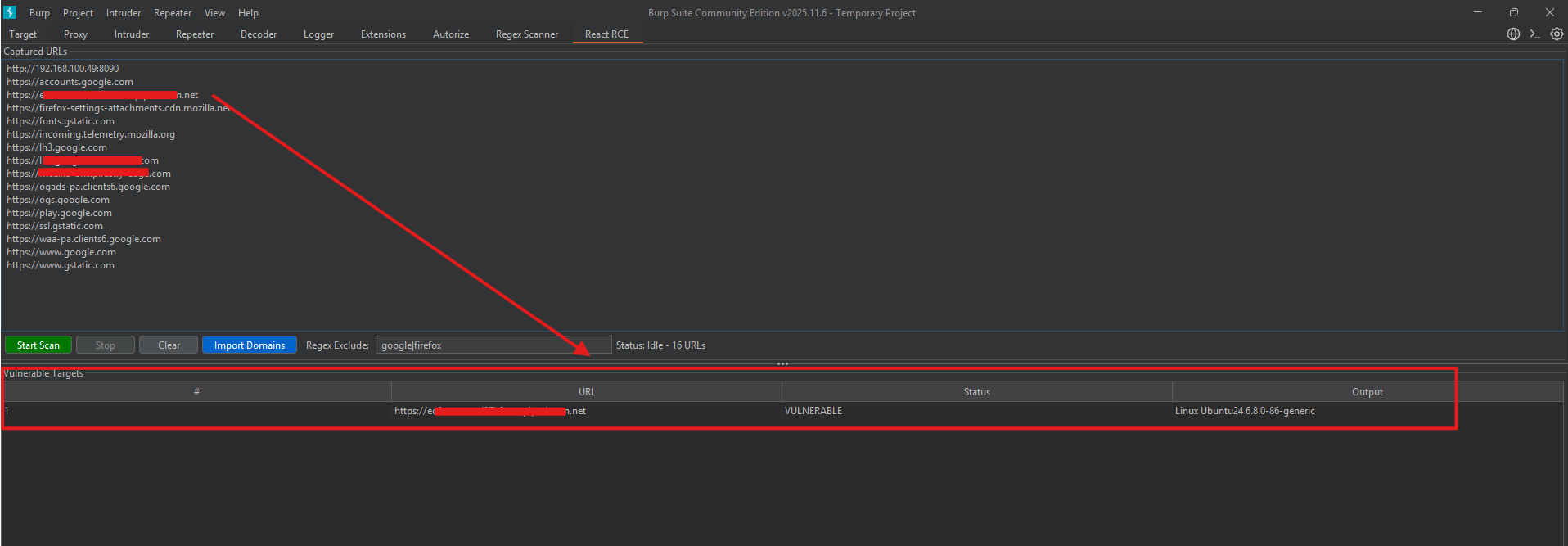
- Vulnerable Targets Table: Displays results with URL, status, and output (e.g., extracted digest).
- Import Domains: Load a list of domains from a text file (one per line).
- Start/Stop Controls: Easy scan management with real-time status.
- No Paid Burp Required: Works with Burp Suite Community Edition.
Installation
-
Download the Python File:
- download this file:
https://github.com/Updatelap/CVE-2025-55182/blob/main/burp_react_scanner.py
-
Load in Burp Suite:
- Open Burp Suite.
- Go to Extender > Extensions > Add.
- Select Extension type: Python.
- Choose the
.py file.
- Click Next. The extension will load, and you'll see the "React RCE" tab.
Usage
-
Capture URLs:
- Browse websites through Burp's Proxy.
- URLs will automatically appear in the "Captured URLs" area.
-
Import Domains (Optional):
- Click "Import Domains".
- Select a text file with one domain per line (e.g.,
https://example.com).
- Duplicates are automatically removed.
-
Apply Filter (Optional):
- Enter a regex in "Regex Exclude" (e.g.,
\.gov$ to exclude .gov domains).
-
Start Scan:
- Click "Start Scan".
- The tool will test each URL for CVE-2025-55182.
- Vulnerable targets appear in the bottom table with details.
-
Stop/Clear:
- Click "Stop" to halt scanning.
- Click "Clear" to reset the URL list.
Screenshots
Limitations
- Works best with HTTP/HTTPS traffic captured in Proxy.
- Scanning may take time for large lists—be patient.
- False positives possible; verify manually.
Disclaimer
This tool is for ethical hacking and research only. Do not use on unauthorized targets. The author is not responsible for misuse.
Contributions
Pull requests welcome! For major changes, open an issue first.
If you find bugs or have suggestions, create an issue on GitHub.
[email protected]
 updatelap/cve-2025-55182
