 twistlock/whoc
A container image that exfiltrates the underlying container runtime to a remote server

A container image that extracts the underlying container runtime and sends it to a remote server. Poke at the underlying container runtime of your favorite CSP container platform!
As shown by runc CVE-2019-5736, traditional Linux container runtimes expose themselves to the containers they're running through /proc/self/exe. whoc uses this link to read the container runtime executing it.
This is whoc default mode that works against dynamically linked container runtimes.
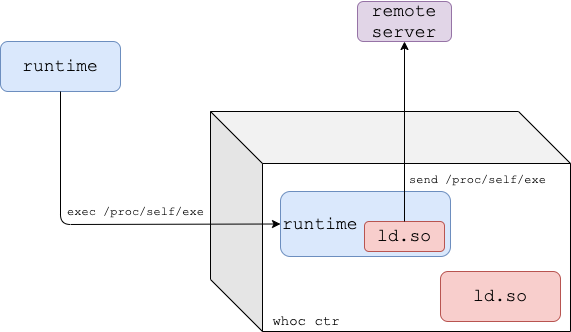
whoc image entrypoint is set to /proc/self/exe, and the image's dynamic linker (ld.so) is replaced with upload_runtime.upload_runtime) to the runtime process and passes execution to it.upload_runtime reads the runtime binary through /proc/self/exe and sends it to the configured remote server.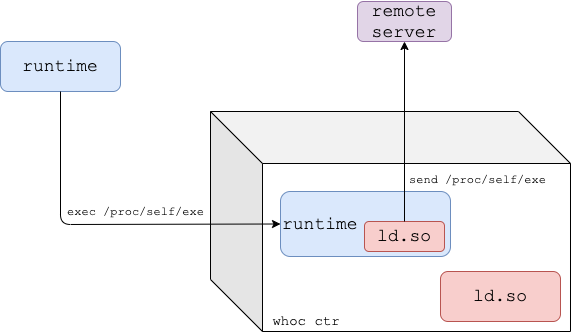
For statically linked container runtimes, whoc comes in another flavor: whoc:waitforexec.
upload_runtime is the image entrypoint, and runs as the whoc container PID 1.whoc container and invoke a file pointing to /proc/self/exe (e.g. docker exec whoc_ctr /proc/self/exe).upload_runtime reads the runtime binary through /proc/$runtime-pid/exe and sends it to the configured remote server.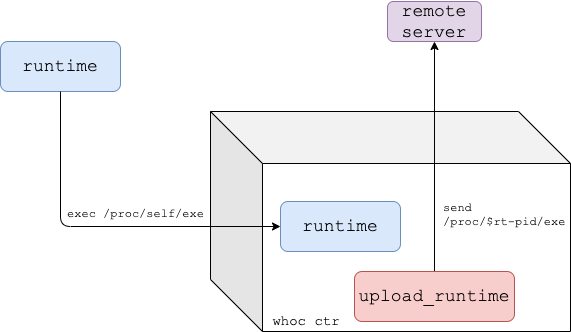
You'll need docker and python3 installed. Clone the repository:
git clone [email protected]:twistlock/whoc.git && cd whoc
Set up a file server to receive the extracted container runtime:
mkdir -p stash && cd stash
ln -s ../util/fileserver.py fileserver
./fileserver
From another shell, run the whoc image in your container environment of choice, for example Docker:
cd whoc
docker build -f Dockerfile_dynamic -t whoc:latest src  # or ./util/build.sh
docker run --rm -it --net=host whoc:latest 127.0.0.1  # or ./util/run_local.sh
See that the file server received the container runtime. If you run whoc under vanilla Docker, the received container runtime should be runc.
--net=host is only used in local tests so that the whoc container could easily reach the fileserver on the host via 127.0.0.1.
By default whoc is built for linux/amd64, but it also supports other CPU architectures. Wait-for-exec mode can be built as usual. To build whoc in dynamic mode for other CPU architectures, you must populate the PLATFORM_LD_PATH_ARG build argument with the path of the dynamic linker on the target architecture.
An example build script for arm64 is available at util/build_arm64.sh.
Help for whoc's main binary, upload_runtime:
Usage: upload_runtime [options] <server_ip>

Options:
 -p, --port                 Port of remote server, defaults to 8080
 -e, --exec                 Wait-for-exec mode for static container runtimes, waits until an exec to the container occurred
 -b, --exec-bin             In exec mode, overrides the default binary created for the exec, default is /bin/enter
 -a, --exec-extra-argument  In exec mode, pass an additional argument to the runtime so it won't exit quickly
 -r, --exec-readdir-proc    In exec mode, instead of guessing the runtime pid (which gives whoc one shot of catching the runtime),
                            find the runtime by searching for new processes under '/proc'
