
Card calculator and Proxmark3 Plugin for writing and/or simulating every card type that Doppelgänger Community, Pro, Stealth, and MFAS support.

A professional GUI application for calculating card data and automating Proxmark3 operations for every card type that Doppelgänger Core and Stealth support. This tool streamlines the card-writing process for physical penetration testing by providing an intuitive interface with dual output displays, visual separators, and one-click clipboard copying, eliminating the need to memorize complex Proxmark3 syntax or dig through notes.
The automated installers will install Doppelganger Assistant, required dependencies, and the latest Iceman fork of Proxmark3. During installation, you'll be prompted to select your Proxmark3 device type for optimal configuration.
/bin/bash -c "$(curl -fsSL https://raw.githubusercontent.com/tweathers-sec/doppelganger_assistant/main/installers/doppelganger_install_macos.sh)"
curl -sSL https://raw.githubusercontent.com/tweathers-sec/doppelganger_assistant/main/installers/doppelganger_install_linux.sh | sudo bash
Open PowerShell as Administrator and run:
irm https://raw.githubusercontent.com/tweathers-sec/doppelganger_assistant/main/installers/doppelganger_install_windows.ps1 | iex
Note: The installer will prompt you to select between Ubuntu 24.04 LTS (Noble) (recommended) or Kali Linux. It will automatically detect existing installations and prompt you to update. If a reboot is required to enable WSL features, you'll be prompted. Simply run the same command again after rebooting.
⚠️ IMPORTANT: WSL2 does not support running inside nested virtual machines. The installer automatically detects and prevents installation in such environments. To proceed, install on physical hardware.
The Doppelgänger Assistant provides a complete card analysis and cloning workflow, from initial detection through successful write operations. The application automatically identifies card technologies, extracts credential data, recovers encryption keys, and writes cloned cards with verification.
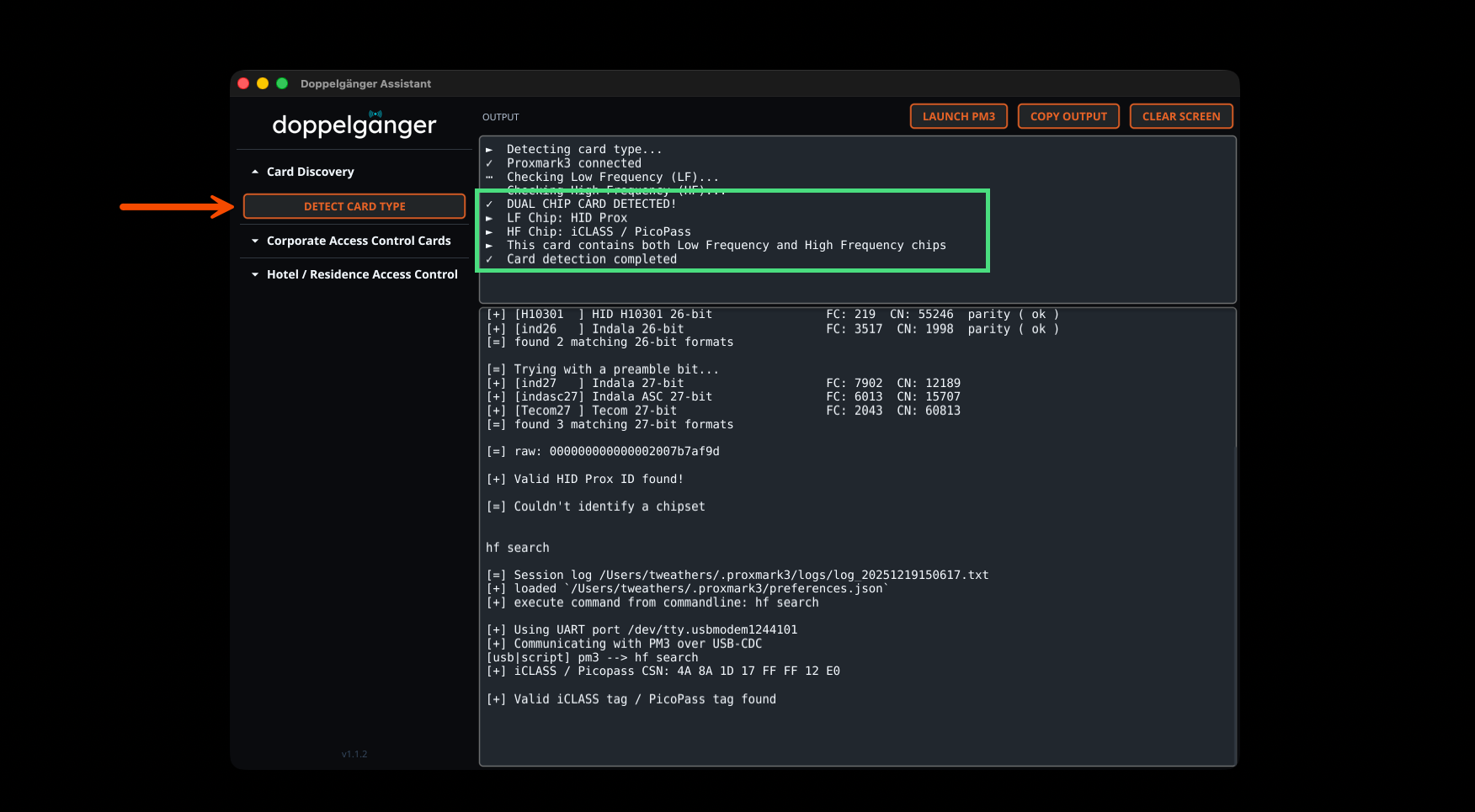
The Card Discovery feature automatically scans for both Low Frequency and High Frequency chips, identifying dual-chip cards and determining specific card technologies including HID Prox, iCLASS, PicoPass, MIFARE, and more. Results include decoded Wiegand data with facility codes and card numbers when available.
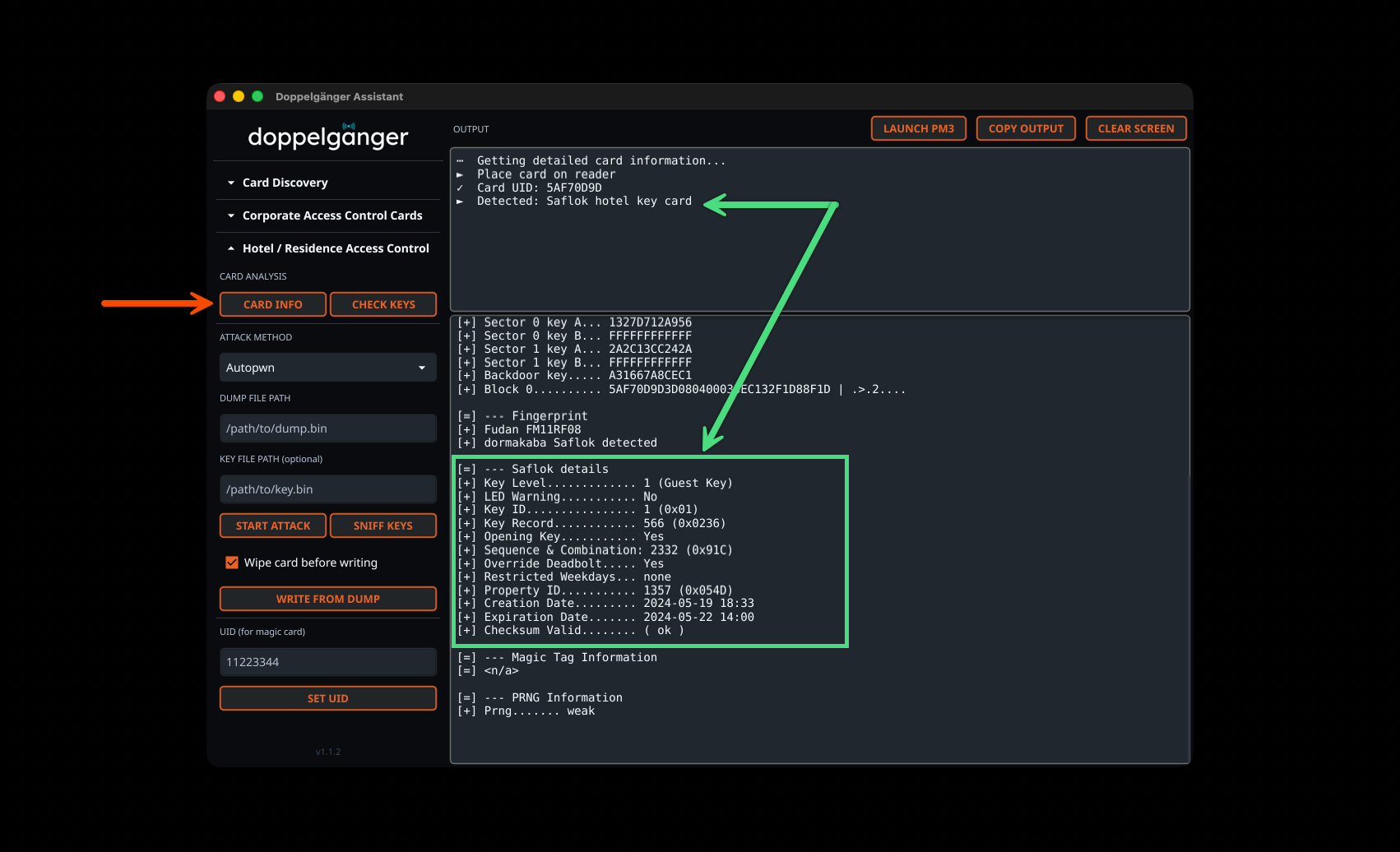
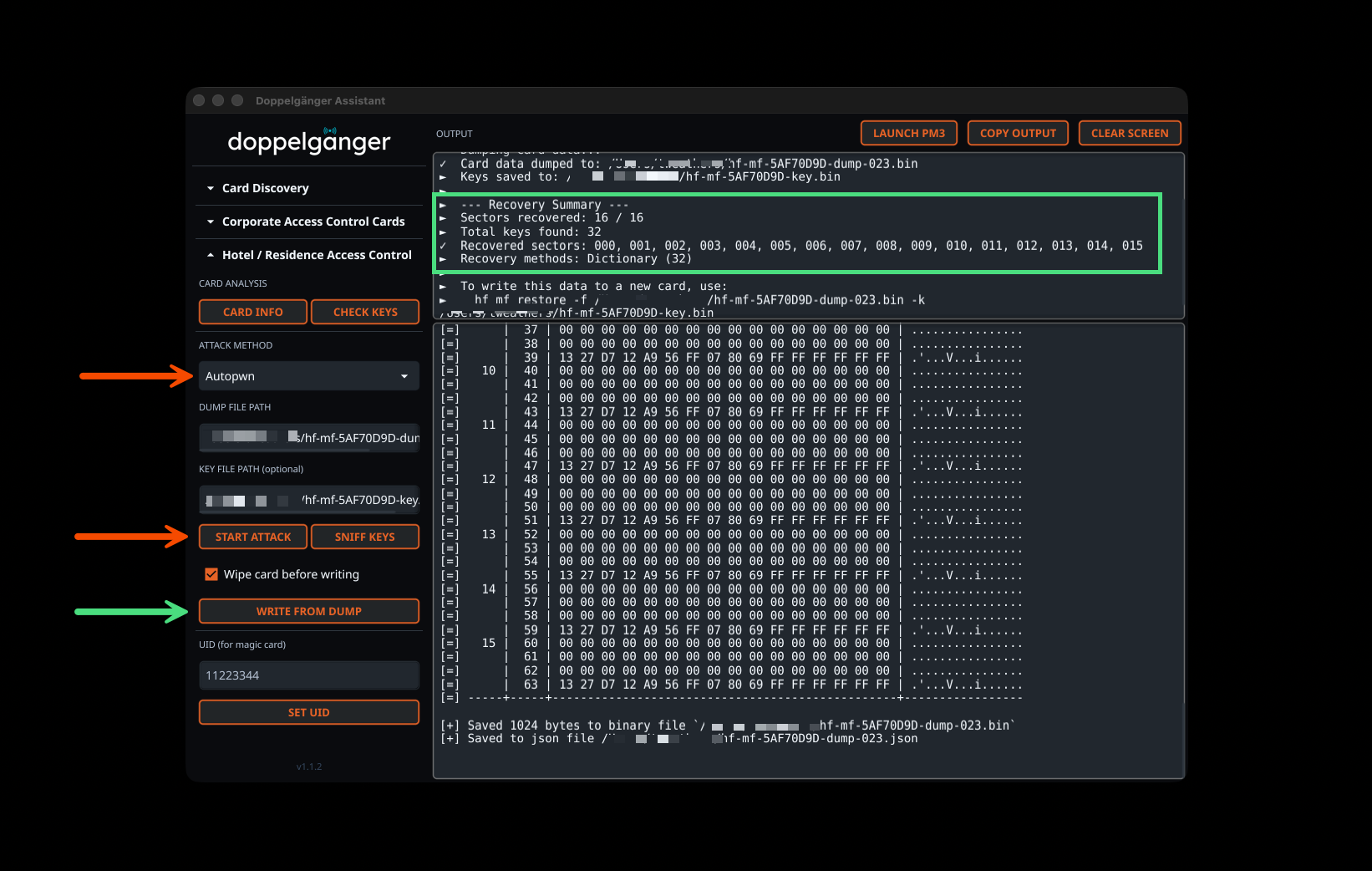
The Hotel Access Control section provides specialized tools for MIFARE-based hotel key systems. Card Info retrieval automatically identifies Saflok hotel key cards and displays detailed card information including UID, card type, magic capabilities, and PRNG detection. The raw Proxmark3 output includes comprehensive Saflok metadata when available.
The MIFARE attack tools include multiple recovery methods: Autopwn (automatic multi-method), Darkside, Nested, Hardnested, Static Nested, Bruteforce, and NACK vulnerability testing. Autopwn automatically selects the best attack method based on card characteristics. Results display comprehensive recovery summaries showing sectors recovered, total keys found, recovery methods used, and automatic dump file generation for immediate card cloning.
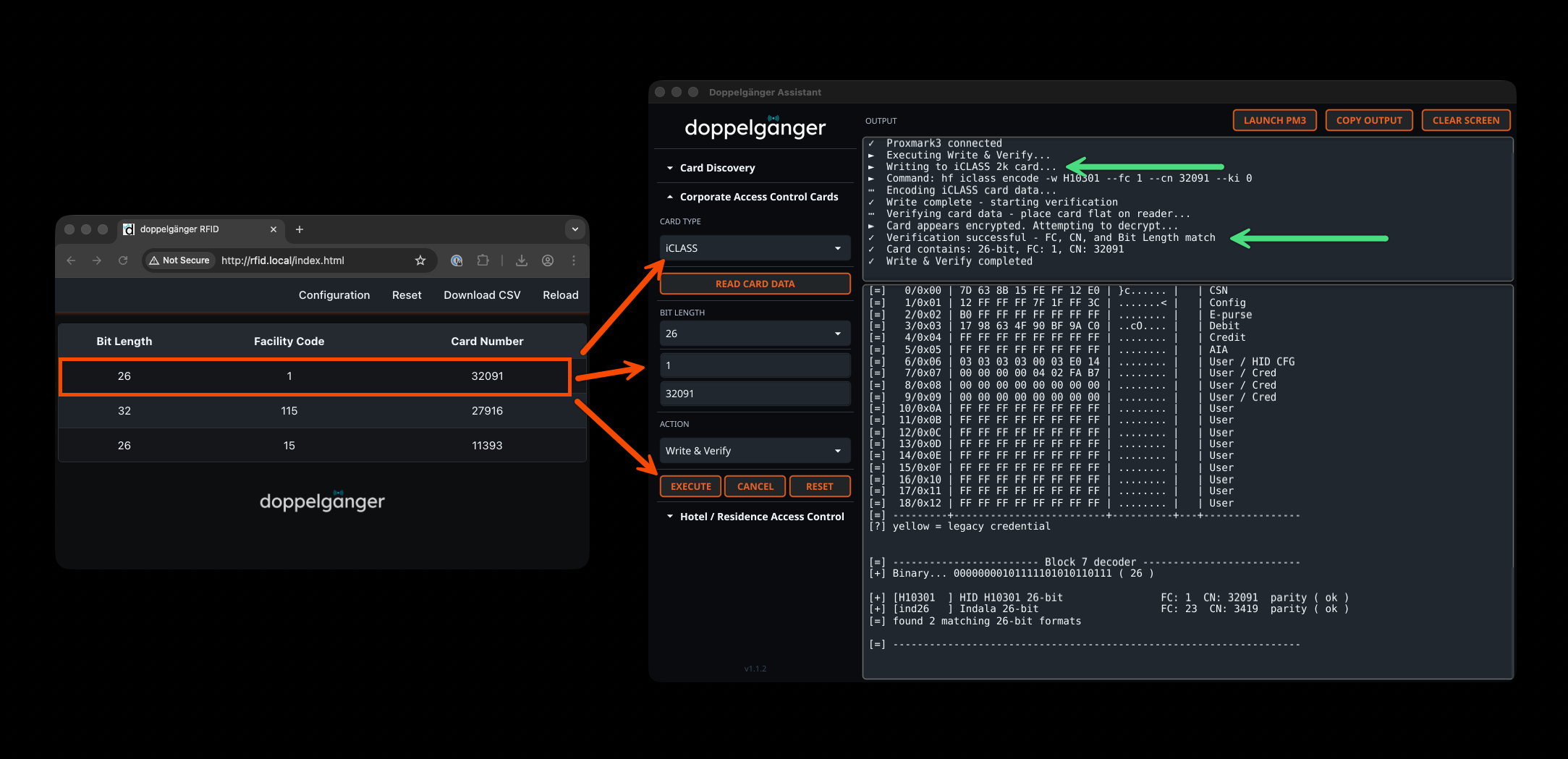
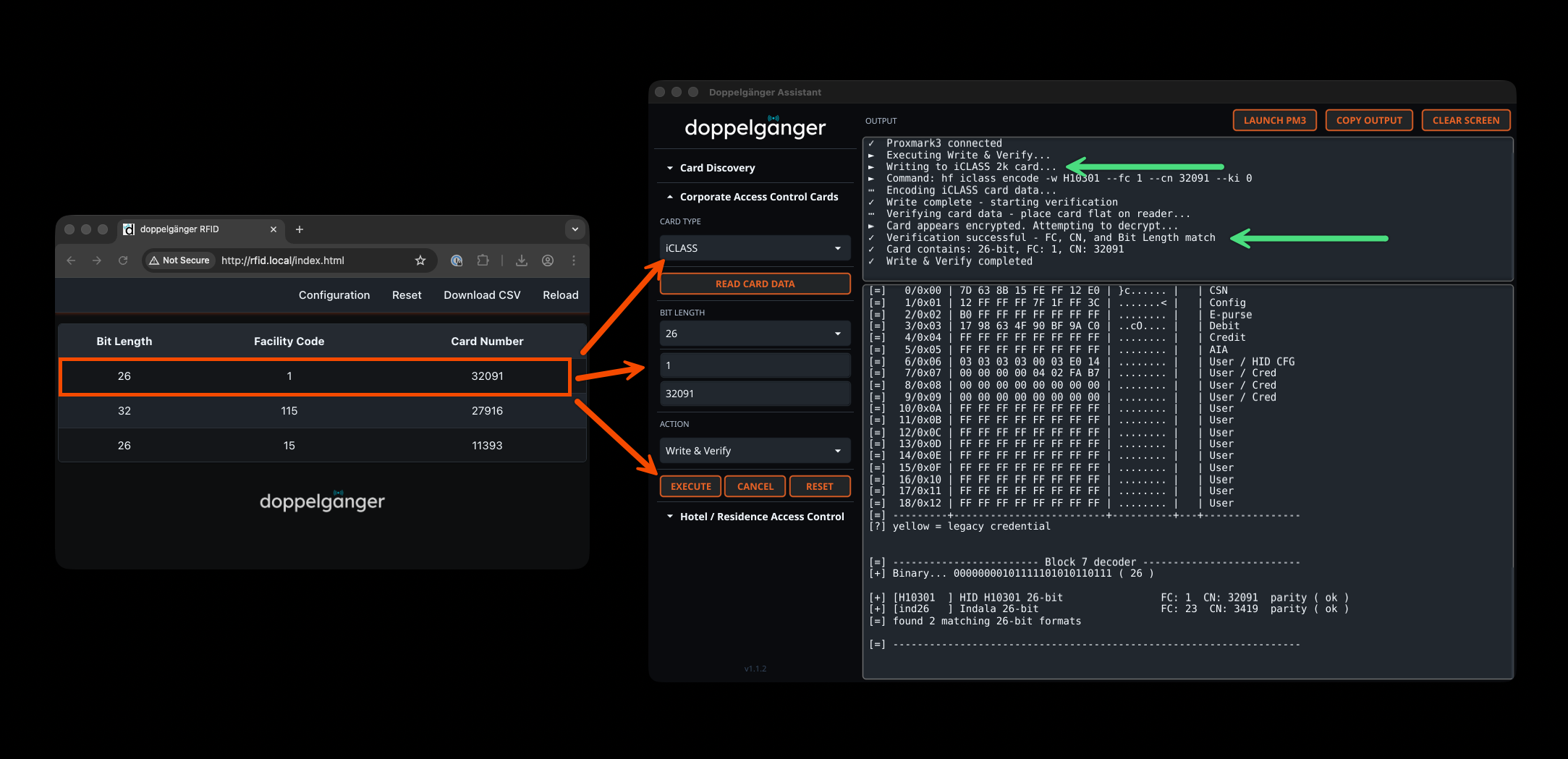
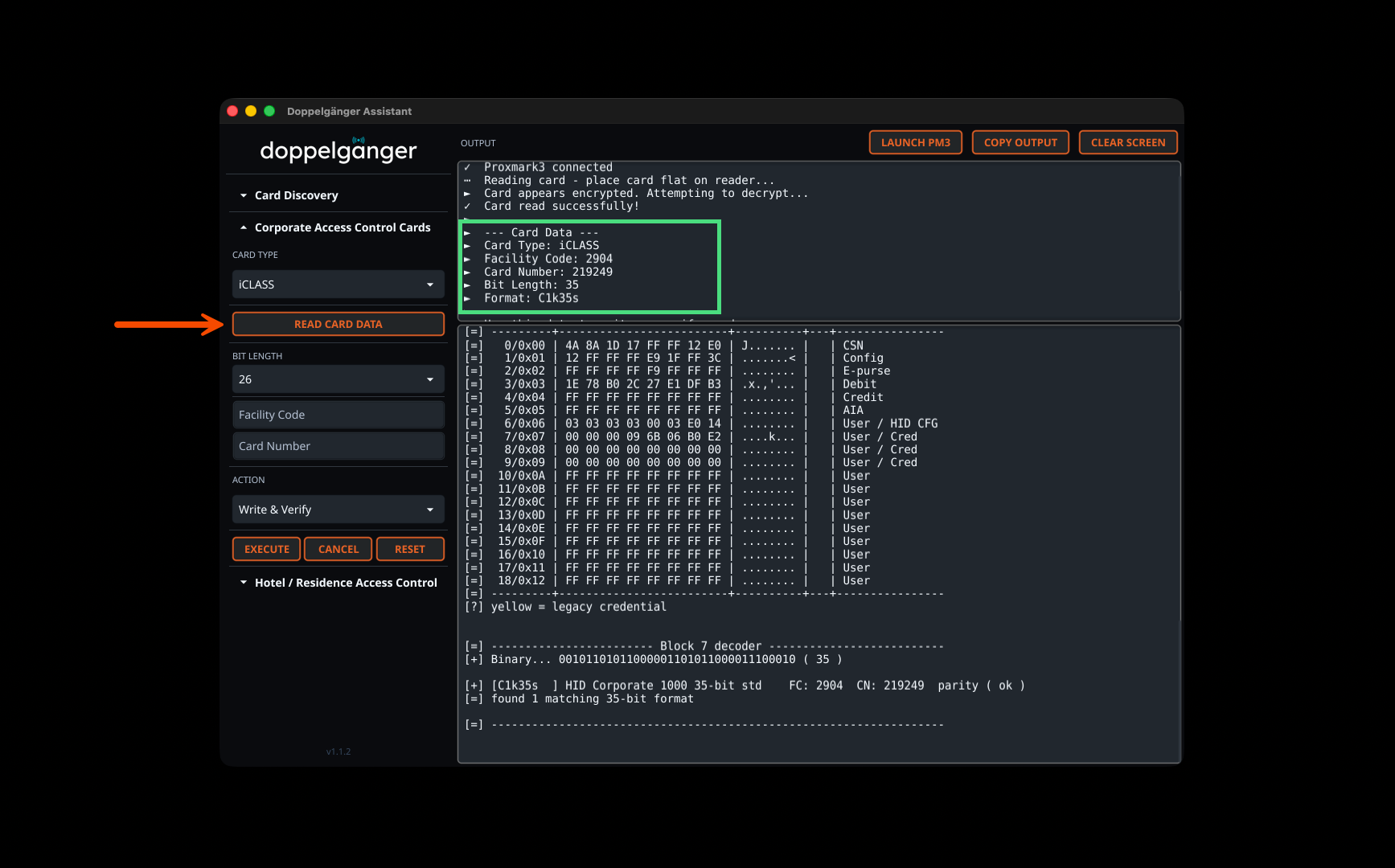
The Corporate Access Control section supports reading and writing iCLASS, PicoPass, AWID, HID Prox, Indala, Avigilon, and other corporate card technologies. Card data is automatically parsed from Proxmark3 output to extract facility codes, card numbers, bit lengths, format types (H10301, C1k35s, etc.), CSN values, and raw hex data. The integrated workflow allows immediate writing to blank cards with optional verification.
Doppelgänger Assistant integrates seamlessly with Doppelgänger RFID hardware and Proxmark3 devices. Credentials captured with Doppelgänger readers can be directly imported into the GUI for analysis and writing. The application supports reading cards from multiple manufacturers, parsing the data from the web interface, and executing write operations with real-time status updates and verification.
New Features:
Improvements:
You can purchase a Stealth reader, Doppelgänger Dev Board, or fully assembled long-range readers from the Physical Exploitation Store. For the open-source firmware, check out Doppelgänger Core.
Doppelgänger Assistant works with the Iceman fork of Proxmark3 and supports the following device types:
The automated installers will prompt you to select your device type during installation for optimal configuration.
Below are the officially supported corporate PACS card types based on Doppelgänger firmware. Hotel/Mifare key card support was added in version 1.1.2 with key recovery and cloning capabilities. Note, hotel key card / detailed Mifare anaylsis s not in alignment with captured data using Doppelgänger products. This is just an added feature to support physical penetration testing efforts and is considered a work in progress.
Supported technologies include:
Download the appropriate DMG file for your architecture from the release page:
doppelganger_assistant_darwin_arm64.dmgdoppelganger_assistant_darwin_amd64.dmgOpen the DMG file and drag doppelganger_assistant.app to your /Applications folder
Remove quarantine attributes:
xattr -cr /Applications/doppelganger_assistant.app
Create a command-line alias by adding to your shell profile (~/.zshrc or ~/.zprofile):
alias doppelganger_assistant='/Applications/doppelganger_assistant.app/Contents/MacOS/doppelganger_assistant'
Reload your shell:
source ~/.zshrc
Option 1: Using .deb package (Debian/Ubuntu/Kali - Recommended)
Install dependencies:
sudo apt update && sudo apt upgrade -y
sudo apt install libgl1 xterm wget -y
Download and install the .deb package for your architecture:
# For x86_64/amd64 systems:
wget https://github.com/tweathers-sec/doppelganger_assistant/releases/latest/download/doppelganger_assistant_linux_amd64.deb
sudo dpkg -i doppelganger_assistant_linux_amd64.deb

# For ARM64 systems:
wget https://github.com/tweathers-sec/doppelganger_assistant/releases/latest/download/doppelganger_assistant_linux_arm64.deb
sudo dpkg -i doppelganger_assistant_linux_arm64.deb
Fix any missing dependencies (if needed):
sudo apt-get install -f -y
Option 2: Using tar.xz archive (Other distributions)
Install dependencies:
sudo apt update && sudo apt upgrade -y
sudo apt install libgl1 xterm make git wget -y
Download and install for your architecture:
# For x86_64/amd64 systems:
wget https://github.com/tweathers-sec/doppelganger_assistant/releases/latest/download/doppelganger_assistant_linux_amd64.tar.xz

# For ARM64 systems:
wget https://github.com/tweathers-sec/doppelganger_assistant/releases/latest/download/doppelganger_assistant_linux_arm64.tar.xz

# Extract and install:
tar xvf doppelganger_assistant_linux_*.tar.xz
cd doppelganger_assistant
sudo make install
cd ..
rm -rf doppelganger_assistant
To launch the Doppelganger Assistant GUI:
doppelganger_assistant
Enable WSL and install a Linux distribution. Open PowerShell as Administrator:
# For Ubuntu 24.04 LTS (recommended):
wsl --install -d Ubuntu-24.04

# OR for Kali Linux:
wsl --install -d kali-linux
Reboot Windows. After reboot, WSL will finish setup. When prompted, create a username and password for your Linux environment.
Install Doppelganger Assistant (inside WSL):
sudo apt update && sudo apt upgrade -y
sudo apt install libgl1 xterm wget -y

# For x86_64/amd64 systems:
wget https://github.com/tweathers-sec/doppelganger_assistant/releases/latest/download/doppelganger_assistant_linux_amd64.deb
sudo dpkg -i doppelganger_assistant_linux_amd64.deb

# For ARM64 systems:
wget https://github.com/tweathers-sec/doppelganger_assistant/releases/latest/download/doppelganger_assistant_linux_arm64.deb
sudo dpkg -i doppelganger_assistant_linux_arm64.deb
Install Proxmark3 dependencies:
sudo apt install --no-install-recommends -y git ca-certificates build-essential pkg-config \
libreadline-dev gcc-arm-none-eabi libnewlib-dev qtbase5-dev \
libbz2-dev liblz4-dev libbluetooth-dev libpython3-dev libssl-dev libgd-dev
Clone and build Proxmark3:
mkdir -p ~/src && cd ~/src
git clone https://github.com/RfidResearchGroup/proxmark3.git
cd proxmark3

# Configure for your Proxmark3 device type:
cp Makefile.platform.sample Makefile.platform

# Edit Makefile.platform for your device:
# - For RDV4 with Blueshark: Uncomment PLATFORM=PM3RDV4 and PLATFORM_EXTRAS=BTADDON
# - For RDV4 without Blueshark: Uncomment PLATFORM=PM3RDV4 only
# - For Proxmark3 Easy (512KB): Uncomment PLATFORM=PM3GENERIC and PLATFORM_SIZE=512
nano Makefile.platform

# Build and install
make clean && make -j$(nproc)
sudo make install PREFIX=/usr/local
To launch Doppelganger Assistant:
doppelganger_assistant
Run the update script from the installation directory:
powershell -ExecutionPolicy Bypass -File C:\doppelganger_assistant\wsl_update.ps1
Or download and run directly from GitHub:
powershell -ExecutionPolicy Bypass -Command "irm https://raw.githubusercontent.com/tweathers-sec/doppelganger_assistant/main/scripts/wsl_update.ps1 | iex"
The update script will:
Re-run the installer script. It will detect the existing installation and prompt you to update:
macOS:
bash <(curl -fsSL https://raw.githubusercontent.com/tweathers-sec/doppelganger_assistant/main/installers/doppelganger_install_macos.sh)
Linux:
bash <(curl -fsSL https://raw.githubusercontent.com/tweathers-sec/doppelganger_assistant/main/installers/doppelganger_install_linux.sh)
Download and run the uninstaller directly from GitHub:
powershell -ExecutionPolicy Bypass -Command "irm https://raw.githubusercontent.com/tweathers-sec/doppelganger_assistant/main/scripts/uninstall.ps1 | iex"
If you have Doppelganger Assistant installed, run the uninstall script:
powershell -ExecutionPolicy Bypass -File C:\doppelganger_assistant\uninstall.ps1
The uninstaller will:
C:\doppelganger_assistantNote: The script automatically relocates itself to a temporary directory to ensure clean removal of the installation directory.
To uninstall from macOS:
sudo rm -rf /Applications/doppelganger_assistant.app
sudo rm /usr/local/bin/doppelganger_assistant
If installed via .deb package:
sudo apt remove doppelganger-assistant
If installed via tar.xz archive:
sudo rm /usr/local/bin/doppelganger_assistant
rm -f ~/.local/share/applications/doppelganger_assistant.desktop
rm -f ~/Desktop/doppelganger_assistant.desktop
sudo rm /usr/share/pixmaps/doppelganger_assistant.png
To build Doppelganger Assistant from source:
# Clone the repository
git clone https://github.com/tweathers-sec/doppelganger_assistant.git
cd doppelganger_assistant

# Build for current platform
./build.sh

# Build for all platforms (requires Docker)
./build_all.sh
src/ - Contains all Go source code and module filesinstallers/ - Platform-specific installation scriptsscripts/ - Utility scripts for WSL and Windows setupbuild.sh - Single-platform build scriptbuild_all.sh - Multi-platform build script using fyne-crosssrc/ directory./build.shThe Doppelgänger Assistant GUI launches by default when you run the application:
doppelganger_assistant
Or explicitly launch in GUI mode:
doppelganger_assistant -g
The dual output panels provide clear separation between status updates and command results, with visual spacers (e.g., |----------- WRITE #1 -----------|) making it easy to distinguish between multiple write attempts or verification steps.
Below is a quick video demo of the usage:

This command will generate the command needed to encode iCLASS (Legacy/SE/Seos) card data to an iCLASS 2k card:
doppelganger_assistant -t iclass -bl 26 -fc 123 -cn 4567

[>>] Writing to iCLASS 2k card...
[>>] Command: hf iclass encode -w H10301 --fc 123 --cn 4567 --ki 0
By adding the -w (write) and -v (verify) flags, the application will use your Proxmark3 to write and verify the card data:
doppelganger_assistant -t iclass -bl 26 -fc 123 -cn 4567 -w -v

|----------- WRITE -----------|
[..] Encoding iCLASS card data...
[>>] Command: hf iclass encode -w H10301 --fc 123 --cn 4567 --ki 0

[=] Session log /Users/user/.proxmark3/logs/log_20250105120000.txt
[+] loaded `/Users/user/.proxmark3/preferences.json`
[+] execute command from commandline: hf iclass encode -w H10301 --fc 123 --cn 4567 --ki 0
[+] Using UART port /dev/tty.usbmodem101
[+] Communicating with PM3 over USB-CDC
[+] Encoding successful

[OK] Write complete - starting verification

|----------- VERIFICATION -----------|
[..] Verifying card data - place card flat on reader...

[=] Session log /Users/user/.proxmark3/logs/log_20250105120005.txt
[+] execute command from commandline: hf iclass rdbl --blk 7 --ki 0
[+] Using key[0] AE A6 84 A6 DA B2 32 78
[+] block   7/0x07 : 00 00 00 00 06 F6 23 AE

[OK] Verification successful - Block 7: 00 00 00 00 06 F6 23 AE
[OK] Card contains: 26-bit, FC: 123, CN: 4567
Using the UID provided by Doppelgänger (Core and Stealth), you can simulate the exact wiegand signal with a Proxmark3.
doppelganger_assistant -uid 5AF70D9D -s -t piv

Handling PIV card...

Simulating the PIV card on your Proxmark3:

Executing command: hf 14a sim -t 3 --uid 5AF70D9D

[=] Session log /Users/tweathers/.proxmark3/logs/log_20240614152754.txt
[+] loaded `/Users/tweathers/.proxmark3/preferences.json`
[+] execute command from commandline: hf 14a sim -t 3 --uid 5AF70D9D

[+] Using UART port /dev/tty.usbmodem2134301
LF cards (Prox, AWID, Indala, Avigilon, EM) automatically perform 5 write attempts with visual separators:
doppelganger_assistant -t prox -bl 46 -fc 123 -cn 4567 -w

[..] Writing Prox card (5 attempts)...

|----------- WRITE #1 -----------|
[+] Using UART port /dev/tty.usbmodem101
[+] Communicating with PM3 over USB-CDC
[+] Wrote block successfully
[..] Move card slowly... Write attempt #1 complete

|----------- WRITE #2 -----------|
[+] Using UART port /dev/tty.usbmodem101
[+] Communicating with PM3 over USB-CDC
[+] Wrote block successfully
[..] Move card slowly... Write attempt #2 complete

|----------- WRITE #3 -----------|
... (continues for all 5 attempts)

[OK] All 5 write attempts complete
Avigilon cards are written with 5 attempts like other LF cards:
doppelganger_assistant -t avigilon -bl 56 -fc 118 -cn 1603 -w

[..] Writing Avigilon card (5 attempts)...

|----------- WRITE #1 -----------|
[+] Using UART port /dev/tty.usbmodem101
[+] Communicating with PM3 over USB-CDC
lf hid clone -w Avig56 --fc 118 --cn 1603
[..] Move card slowly... Write attempt #1 complete

... (continues for all 5 attempts)
Using the Avigilon card data, you can simulate the exact signal with a Proxmark3:
doppelganger_assistant -t avigilon -bl 56 -fc 118 -cn 1603 -s

Simulating the Avigilon card on your Proxmark3:

Executing command: lf hid sim -w Avig56 --fc 118 --cn 1603

Simulation is in progress... If your Proxmark3 has a battery, you can remove the device and the simulation will continue.

To end the simulation, press the `pm3 button`.
This application is intended for professional penetration testing and authorized security assessments only. Unauthorized or illegal use/possession of this software is the sole responsibility of the user. Mayweather Group LLC, Practical Physical Exploitation, and the creator are not liable for illegal application of this software.

This work is licensed under a Creative Commons Attribution-NonCommercial-NoDerivatives 4.0 International License.
You are free to:
Under the following terms:
See the LICENSE file for the full license text.
For professional support and documentation, visit:
Developed by Travis Weathers (@tweathers-sec)
Copyright © 2025 Mayweather Group, LLC
This software works in conjunction with Doppelgänger Core and Doppelgänger hardware devices.
| Card Types | Core | Stealth | FC Range | CN Range |
|---|
| Keypad PIN Codes | X | N/A | N/A | |
| HID H10301 26-bit | X | X | 0–255 | 0–65,535 |
| Indala 26-bit | X | X | 0–255 | 0–65,535 |
| Indala 27-bit | X | X | 0–4,095 | 0–8,191 |
| 2804 WIEGAND 28-bit | X | X | 0–255 | 0–16,383 |
| Indala 29-bit | X | X | 0–4,095 | 0–32,767 |
| ATS Wiegand 30-bit | X | X | 0–2,047 | 0–32,767 |
| HID ADT 31-Bit | X | X | 0–15 | 0–8,388,607 |
| EM4102 / Wiegand 32-bit | X | X | 0–32,767 | 0–65,535 |
| HID D10202 33-bit | X | X | 0–127 | 0–16,777,215 |
| HID H10306 34-bit | X | X | 0–65,535 | 0–65,535 |
| HID Corporate 1000 35-bit | X | X | 0–4,095 | 0–1,048,575 |
| HID Simplex 36-bit (S12906) | X | X | 0–255 | 0–65,535 |
| HID H10304 37-bit | X | X | 0–65,535 | 0–524,287 |
| HID H800002 46-bit | X | X | 0–16,383 | 0–1,073,741,823 |
| HID Corporate 1000 48-bit | X | X | 0–4,194,303 | 0–8,388,607 |
| AWID 50-bit | X | X | 0–65,535 | 0–8,388,607 |
| Avigilon 56-bit | X | X | 0–1,048,575 | 0–4,194,303 |
| C910 PIVKey | X | X | N/A | N/A |
| MIFARE (Various Types) | X | X | N/A | N/A |
Install USBipd (from Windows PowerShell as Administrator):
winget install --interactive --exact dorssel.usbipd-win
Connect Proxmark3 to WSL (from Windows cmd.exe or PowerShell as Administrator):
usbipd list                         # List USB devices - find your Proxmark3 (VID: 9ac4)
usbipd bind --busid 9-1             # Replace 9-1 with your Proxmark3's busid
usbipd attach --wsl --busid 9-1     # Attach to WSL
