
Skip to content
KitploitKITPLOIT
ToolsBlog
Submit
ToolsBlog
Submit

Hacking, PenTest, and Cybersecurity Tools for Your Security Arsenal!

Kitploit is a directory of hacking, cybersecurity, and pentesting tools. Discover the latest project updates to find vulnerabilities, analyze systems, automate testing, and strengthen your security.

··Feeds·Contact·Privacy·© 2026 Kitploit

Tool Directory

Categories

View all categories
Loading categories
CVE_Prioritizer — Streamline vulnerability patching with CVSS, EPSS, and CISA's Known Exploited Vulnerabilities. Prioritize actions based on real-time threat information, gain a competitive advantage, and stay informed about the latest trends. | Kitploit
Tools/GitHubGitHub/turroks/cve_prioritizer
Vulnerability ScannersVulnerability AnalysisConfiguration AuditingThreat Intelligence
GitHubturroks/cve_prioritizer

CVE_Prioritizer

Streamline vulnerability patching with CVSS, EPSS, and CISA's Known Exploited Vulnerabilities. Prioritize actions based on real-time threat information, gain a competitive advantage, and stay informed about the latest trends.

View Repository
70696317 days agoReviewed by Kitploit

Most Popular

View all →

Discover the most used tools by our community.

Explore all tools

Browse our collection of tools

View all tools →
Share

CVE Prioritizer

CVE Prioritizer is a powerful tool that helps you prioritize vulnerability patching by combining CVSS, EPSS, CISA's Known Exploited Vulnerabilities and VulnCheck's community resources ( NVD++, KEV). It provides valuable insights into the likelihood of exploitation and the potential impact of vulnerabilities on your information system.
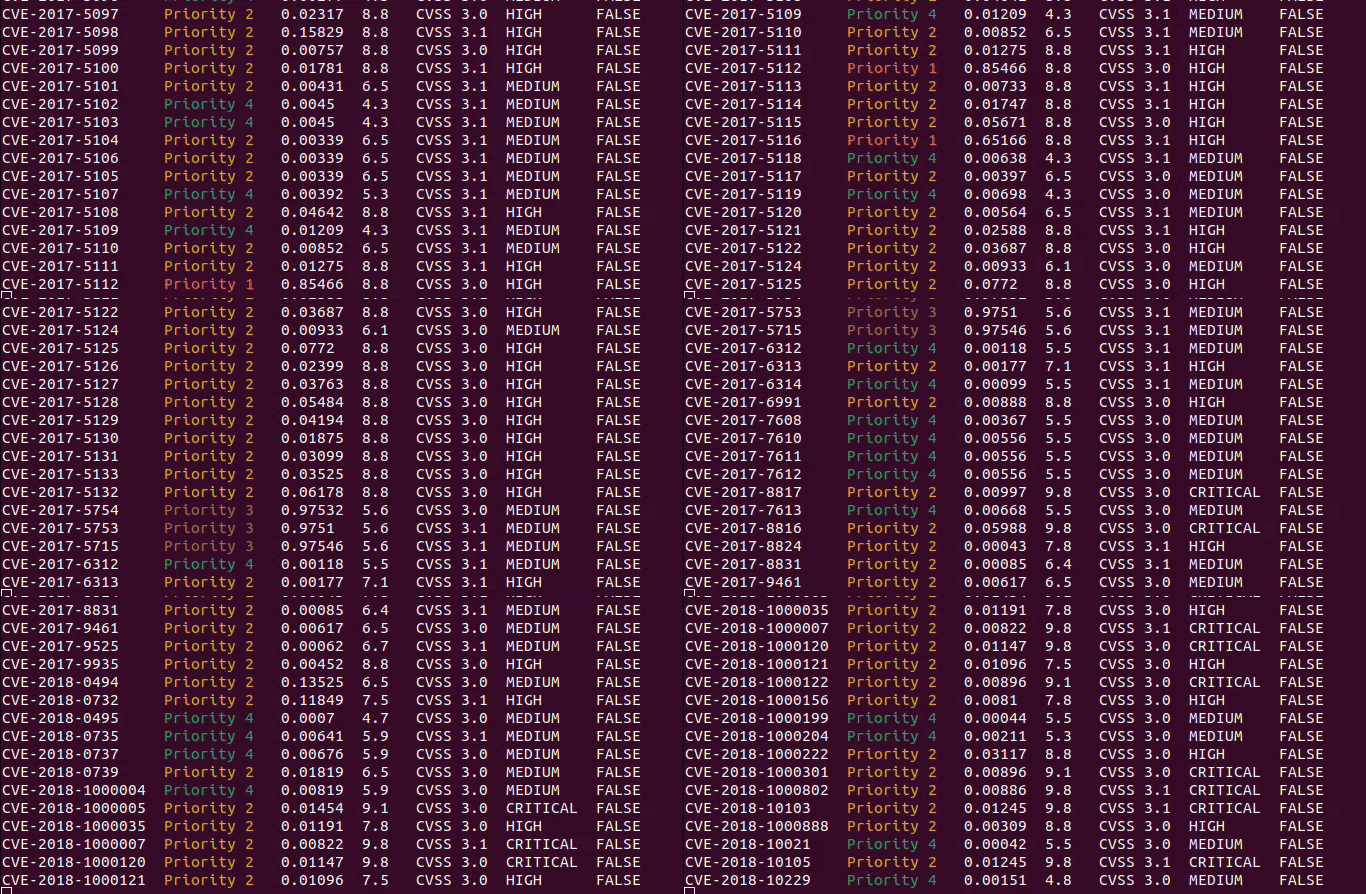
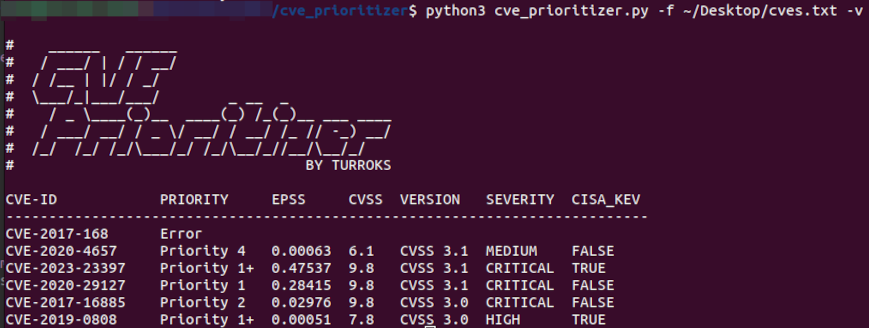
output.gif

Why Combine CVSS, EPSS, and CISA KEV?

CVE_Prioritizer leverages the correlation between CVSS and EPSS scores to enhance vulnerability remediation efforts. While CVSS captures the fundamental properties of a vulnerability, EPSS offers data-driven threat information, enabling you to better prioritize patching.

Table of Contents

  1. Why Combine CVSS, EPSS and KEV?
  2. Combining CVSS, EPSS and KEV
  3. Our Approach
  4. Installation
  5. Usage
    • Request API Keys
    • Select Your CVE Data Source
  • Choose Input Method
  • Tailor the Output
  • Examples
  • Contributing
  • License
  • Contact
  • Combining CVSS, EPSS and KEV

    The team at FIRST did an amazing job explaining why one would want to combine CVSS and EPSS in their EPSS User Guide. The following material has been extracted from that document.

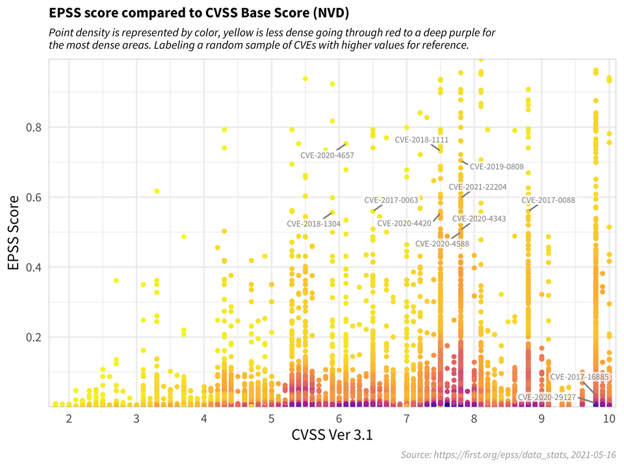
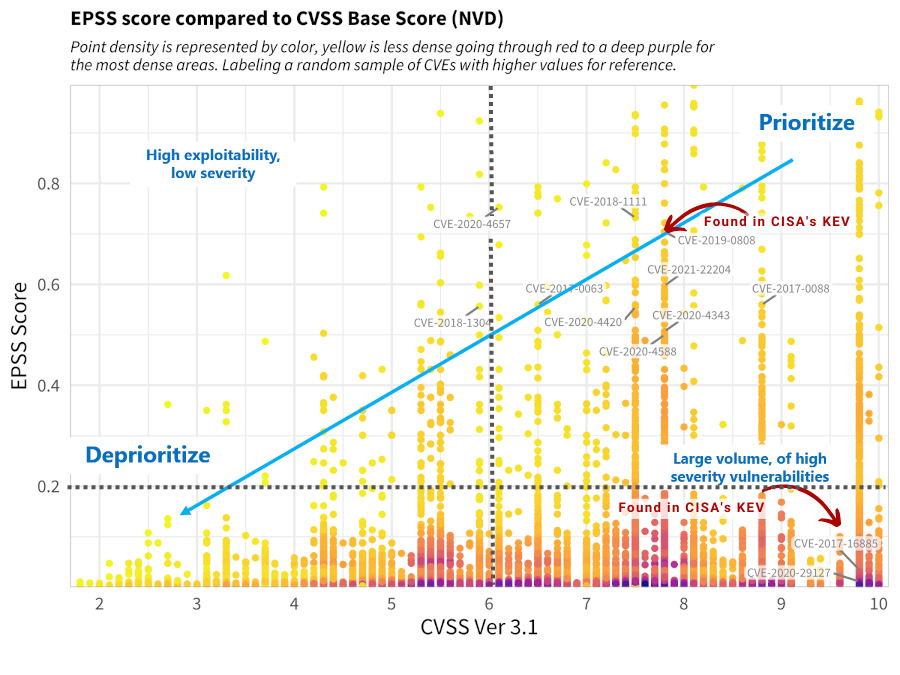
    The figure below shows the correlation between EPSS and CVSS scores based on data from 05-16-2021. Recall that EPSS produces prediction scores between 0 and 1 (0 and 100%) where higher scores suggest higher probability of exploit. Each dot represents one or more vulnerabilities (CVEs). Some vulnerabilities are labeled for illustrative purposes.
    cvss_comparison_scatter_density-1.png

    First, observe how most vulnerabilities are concentrated near the bottom of the plot, and only a small percent of vulnerabilities have EPSS scores above 50% (0.5). While there is some correlation between EPSS and CVSS scores, overall, this plot provides suggestive evidence that attackers are not only targeting vulnerabilities that produce the greatest impact, or are necessarily easier to exploit (such as for example, an unauthenticated remote code execution).

    This is an important finding because it refutes a common assumption that attackers are only looking for (and using) the most severe vulnerabilities. And so, how then can a network defender choose among these vulnerabilities when deciding what to patch first?

    CVSS is a useful tool for capturing the fundamental properties of a vulnerability, but it needs to be used in combination with data-driven threat information, like EPSS, in order to better prioritize vulnerability remediation efforts.

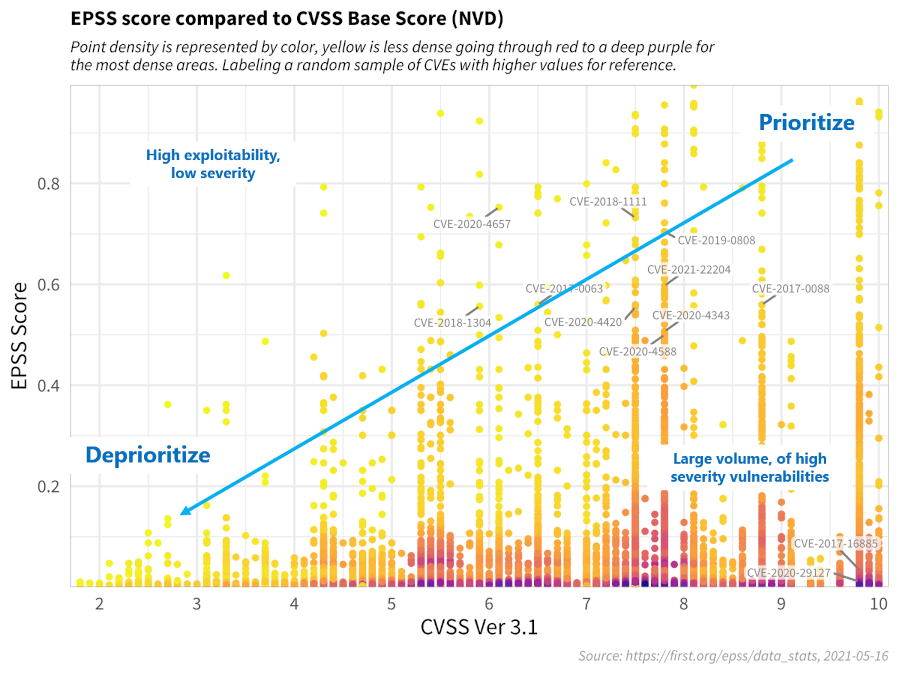
    For the sake of discussion, consider the diagram below, which has been annotated to generally illustrate vulnerability prioritization.
    epss-v-cvss-5-16-thresh_sized.png

    • Vulnerabilities in the bottom left represent those that have both a lower probability of being exploited, and would incur a lower severity impact to the information system, and can therefore be de-prioritized.
    • Vulnerabilities in the upper left quadrant may be more likely to be exploited, but, on their own, would not critically impact the information system. (Further research, however, should be conducted in order to better understand how these sorts of vulnerabilities may be used in a chained attack.)
    • Vulnerabilities in the bottom right represent those that, while may severely impact the information system, are much less likely to be exploited, relative to others, but should still be watched in the event that the threat landscape changes.
    • Vulnerabilities in the upper right quadrant, on the other hand, are the most critical kinds of vulnerabilities which are both more likely to be exploited, and could fully compromise the information system, and should therefore be patched first.

    This decision strategy as described above emphasizes the tremendous capability of EPSS. A network defender who has typically had to address thousands or tens of thousands of exposed vulnerabilities, is now able to spend fewer resources, to patch more vulnerabilities that are much more likely to be exploited. This capability to differentiate among vulnerabilities has never before been possible.

    Our Approach

    We have refined the prioritization thresholds based on FIRST's recommendations and our own experience. Here's an overview:

    1. We include CISA's Known Exploited Vulnerabilities, giving priority to CVEs found in KEV.
    2. The CVSS Threshold is set to 6.0, representing the weighted average CVSS Score from CVE Details.
    3. The EPSS Threshold is set to 0.2, focusing on vulnerabilities with higher relevance above this threshold.

    This approach categorizes vulnerabilities into five priority levels, allowing you to allocate resources more effectively.

    PriorityDescription
    Priority 1+CVEs found in CISA's KEV
    Priority 1CVEs in the Upper Right Quadrant
    Priority 2CVEs in the Lower Right Quadrant
    Priority 3CVEs in the Upper Left Quadrant
    Priority 4CVEs in the Lower Left Quadrant

    Below is a modified version of FIRST's recommendation after applying our own approach.
    our_approach.png

    Note: You can define your own thresholds when running the tool to tailor the results to your organization's risk appetite.

    Installation

    Github

    root@kitploit:~
    git clone https://github.com/TURROKS/CVE_Prioritizer.git
    cd CVE_Prioritizer
    pip install -r requirements.txt
    

    pip

    root@kitploit:~
    pip install --user cve_prioritizer
    

    Usage

    To use CVE_Prioritizer effectively, follow these steps:

    1. Request your API keys to avoid public rate limits:
      • NIST NVD: Request here
      • VULNCHECK (Fast): Register here.
      • Save APIs: Use the -sa or --set-api option to save your API Keys in your .env file.
    2. Select your CVE Data source:
      • NIST NVD: Default.
      • NVD++: Use -vc or --vulncheck.
      • VulnCheck KEV: Use -vck or vulnchek_kev (ONLY WORKS WITH NVD++).
    3. Choose Input Method:
      • Single CVE: Use the -c followed by the CVE ID.
      • List of CVEs: Use -l followed by a comma-separated list of CVEs.
      • File with CVEs: Use -f to import a file containing CVE IDs (one per line).
        • Import Vulnerability Reports: Use the -f flag along with --nessus or --openvas to automatically ingest CVEs from Nessus or OpenVAS scan reports.
    4. Tailor the output according to your needs:
      • Use the -v or --verbose for detailed information.
      • Define custom thresholds with --cvss and/or --epss to align the results with your organization's risk appetite.
      • Define the number of concurrent threads with -t or --threads (default: 100).

    Examples

    Single CVE

    root@kitploit:~
    python3 cve_prioritizer.py -c CVE-2020-29127
    

    single s.png

    List of CVEs

    root@kitploit:~
    python3 cve_prioritizer.py -l CVE-2020-29127,CVE-2017-16885
    

    list.png

    File with CVEs

    You can also provide a text file with a list of CVEs (one per line)

    root@kitploit:~
    python3 cve_prioritizer.py -f ~\Desktop\CheckTheseCVEs.txt
    

    file.png

    Outputs

    CVE_Prioritizer provides flexible output options to suit your preferences. By default, it provides a summary of results, including the CVE-ID and its priority. However, you can enable verbose mode to obtain additional information.

    Here are the available output options:

    Summary Results (default): Provides a concise summary, including the CVE-ID and its priority.

    single_s.png

    Verbose Mode: Enables detailed output with the following information for each CVE:

    • CVE ID
    • Priority
    • EPSS Score
    • CVSS Base Score
    • CVSS Version
    • CVSS Severity
    • KEV Status (TRUE or FALSE)
    • Vendor
    • Product
    • CVSS Vector

    single v.png

    CSV File

    You can save the results to a CSV file by using the -o or --output flags

    root@kitploit:~
    python3 cve_prioritizer.py -f cve_list.txt -o ~/Desktop/prioritized.csv
    

    output_file.png

    This outputs the verbose results independently of the terminal output that you use.

    Contributing

    Please refer to CONTRIBUTING.md for guidelines

    License

    This project is licensed under the BSD 3-Clause license - see the LICENSE file for details.

    Contact

    For questions or issues, please contact me at [email protected]

    Happy Patching!

    ko-fi

    NVD API Notice:

    Please note that while this tool uses the NVD API, it is not endorsed or certified by the NVD.

    Download Tool