
Skip to content
KitploitKITPLOIT
ToolsBlog
Submit
ToolsBlog
Submit

Hacking, PenTest, and Cybersecurity Tools for Your Security Arsenal!

Kitploit is a directory of hacking, cybersecurity, and pentesting tools. Discover the latest project updates to find vulnerabilities, analyze systems, automate testing, and strengthen your security.

··Feeds·Contact·Privacy·© 2026 Kitploit

Tool Directory

Categories

View all categories
Loading categories
iptables-essentials — Iptables Essentials: Common Firewall Rules and Commands. | Kitploit
Tools/GitHubGitHub/trimstray/iptables-essentials
Configuration AuditingNetwork SecurityLearning & EducationCurated Resources
GitHubtrimstray/iptables-essentials

iptables-essentials

Iptables Essentials: Common Firewall Rules and Commands.

View Repository
1.6k2891 year agoReviewed by Kitploit

Most Popular

View all →

Discover the most used tools by our community.

Explore all tools

Browse our collection of tools

View all tools →
Share

Iptables Essentials: Common Firewall Rules and Commands


Pull Requests MIT License


☑️ TODO

  • Add useful Iptables configuration examples
  • Add useful Kernel Settings (sysctl) configuration
  • Add links to useful external resources
  • Add advanced configuration examples, commands, rules

Table of Contents

  • Tools to help you configure Iptables
  • Manuals/Howtos/Tutorials
  • Useful Kernel Settings (sysctl) configuration
    • rp_filter
    • log_martians
    • send_redirects
    • accept_source_route
    • accept_redirects
    • tcp_syncookies
    • icmp_echo_ignore_broadcasts
    • ip_forward
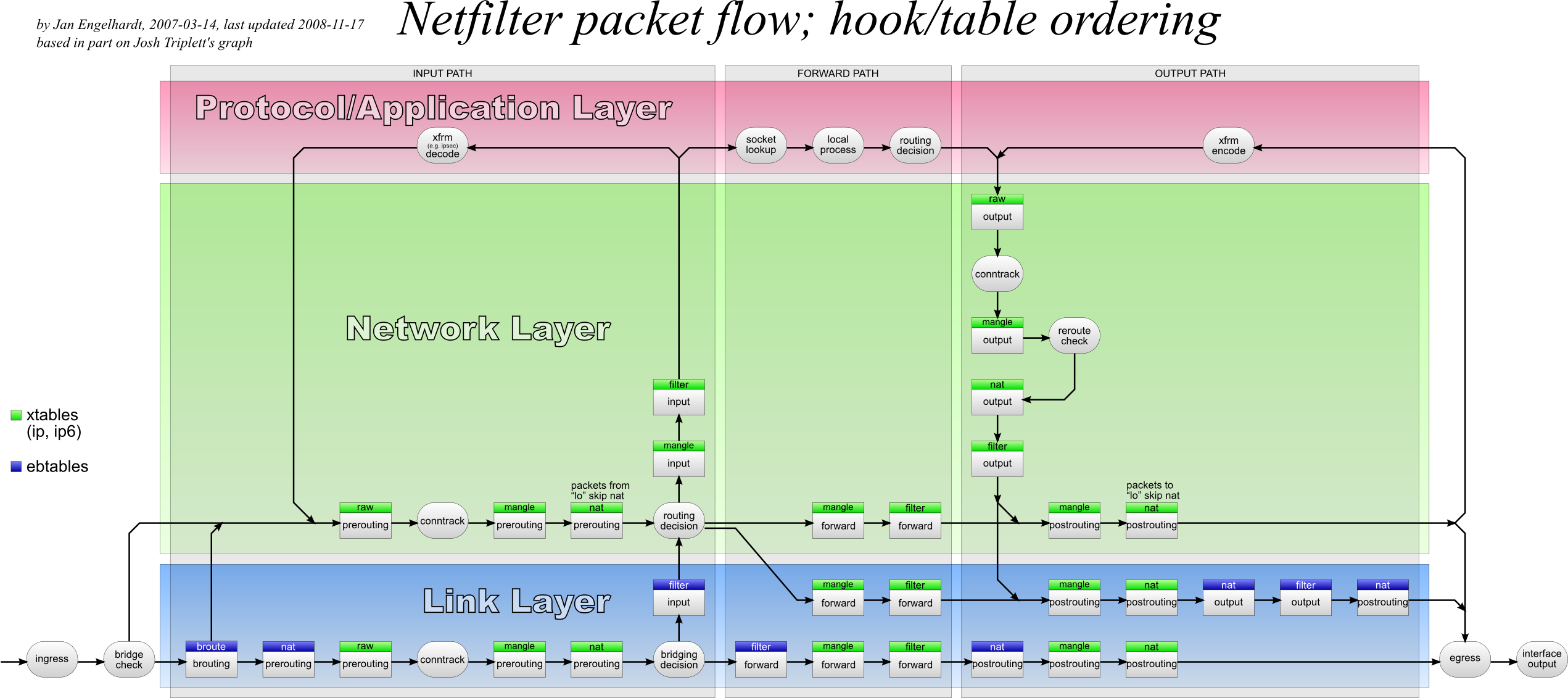
  • How it works?
  • Iptables Rules
    • Saving Rules
      • Debian Based
      • RedHat Based
    • List out all of the active iptables rules with verbose
    • List out all of the active iptables rules with numeric lines and verbose
    • Print out all of the active iptables rules
    • List Rules as Tables for INPUT chain
    • Print all of the rule specifications in the INPUT chain
    • Show Packet Counts and Aggregate Size
    • To display INPUT or OUTPUT chain rules with numeric lines and verbose
    • Delete Rule by Chain and Number
    • Delete Rule by Specification
    • Flush All Rules, Delete All Chains, and Accept All
    • Flush All Chains
    • Flush a Single Chain
    • Insert Firewall Rules
    • Allow Loopback Connections
    • Allow Established and Related Incoming Connections
    • Allow Established Outgoing Connections
    • Internal to External
    • Drop Invalid Packets
    • Block an IP Address
    • Block and IP Address and Reject
    • Block Connections to a Network Interface
    • Allow All Incoming SSH
    • Allow Incoming SSH from Specific IP address or subnet
    • Allow Outgoing SSH
    • Allow Incoming Rsync from Specific IP Address or Subnet
  • Advanced configuration examples
    • Packet handling in Python using NFQUEUE target
      • ACCEPT all packets from specific source on (filter:INPUT) and DROP everything else
      • Write your own port knocking script to secure ssh access

Tools to help you configure Iptables

  :small_orange_diamond: Shorewall - advanced gateway/firewall configuration tool for GNU/Linux.
  :small_orange_diamond: Firewalld - provides a dynamically managed firewall.
  :small_orange_diamond: UFW - default firewall configuration tool for Ubuntu.
  :small_orange_diamond: FireHOL - offer simple and powerful configuration for all Linux firewall and traffic shaping requirements.

Manuals/Howtos/Tutorials

  :small_orange_diamond: Best practices: iptables - by Major Hayden
  :small_orange_diamond: An In-Depth Guide to Iptables, the Linux Firewall
  :small_orange_diamond: Advanced Features of netfilter/iptables
  :small_orange_diamond: Linux Firewalls Using iptables
  :small_orange_diamond: Debugging iptables and common firewall pitfalls?
  :small_orange_diamond: Netfilter Hacking HOWTO
  :small_orange_diamond: Per-IP rate limiting with iptables

Useful Kernel Settings (sysctl) Configuration

rp_filter

Disable routing triangulation. Respond to queries out the same interface, not another. Also protects against IP spoofing.

root@kitploit:~
cat << EOF >> /etc/sysctl.d/40-custom.conf
net/ipv4/conf/all/rp_filter = 1
EOF
  • rp_filter and LPIC-3 Linux Security
  • Linux kernel rp_filter settings (Reverse path filtering)
  • Reverse Path Filtering
log_martians

Enable logging of packets with malformed IP addresses.

root@kitploit:~
cat << EOF >> /etc/sysctl.d/40-custom.conf
net/ipv4/conf/all/log_martians = 1
EOF
  • What is the usefulness of logging of martians packet?
send_redirects

Disables sending of all IPv4 ICMP redirected packets on all interfaces.

root@kitploit:~
cat << EOF >> /etc/sysctl.d/40-custom.conf
net/ipv4/conf/all/send_redirects = 0
EOF
  • Disable source routing
  • What are ICMP redirects and should they be blocked?
accept_source_route

Disable source routed packets (packets with the Strict Source Route (SSR) or Loose Source Routing (LSR) option set).

root@kitploit:~
cat << EOF >> /etc/sysctl.d/40-custom.conf
net/ipv4/conf/all/accept_source_route = 0
EOF
  • Disable source routing
  • The system must not accept IPv4 source-routed packets by default.
accept_redirects

Disable acceptance of ICMP redirects.

root@kitploit:~
cat << EOF >> /etc/sysctl.d/40-custom.conf
net/ipv4/conf/all/accept_redirects = 0
EOF
  • What are ICMP redirects and should they be blocked?
  • The Red Hat Enterprise Linux operating system must ignore Internet Protocol version 4 (IPv4) Internet Control Message Protocol (ICMP) redirect messages.
tcp_syncookies

Turn on SYN-flood protections (protection from Denial of Service (DOS) attacks).

root@kitploit:~
cat << EOF >> /etc/sysctl.d/40-custom.conf
net/ipv4/tcp_syncookies = 1
EOF
  • Hardening your TCP/IP Stack Against SYN Floods
  • Linux: Turn On TCP SYN Cookie Protection
  • Better alternative for tcp_syncookies in Linux
icmp_echo_ignore_broadcasts

Disable responding to ping broadcasts.

root@kitploit:~
cat << EOF >> /etc/sysctl.d/40-custom.conf
net/ipv4/icmp_echo_ignore_broadcasts = 1
EOF
  • What is ICMP broadcast good for?
  • The system must not respond to ICMPv4 sent to a broadcast address.
ip_forward

Enable IP routing. Required if your firewall is protecting a network, NAT included.

root@kitploit:~
cat << EOF >> /etc/sysctl.d/40-custom.conf
net/ipv4/ip_forward = 1
EOF
  • Introduction to routers
  • How to Enable IP Forwarding in Linux
  • What is kernel ip forwarding?

How it works?

Master

Iptables Rules

Saving Rules

Debian Based
root@kitploit:~
netfilter-persistent save
RedHat Based
root@kitploit:~
service iptables save

List out all of the active iptables rules with verbose

root@kitploit:~
iptables -n -L -v

List out all of the active iptables rules with numeric lines and verbose

root@kitploit:~
iptables -n -L -v --line-numbers

Print out all of the active iptables rules

root@kitploit:~
iptables -S

List Rules as Tables for INPUT chain

root@kitploit:~
iptables -L INPUT

Print all of the rule specifications in the INPUT chain

root@kitploit:~
iptables -S INPUT

Show Packet Counts and Aggregate Size

root@kitploit:~
iptables -L INPUT -v

To display INPUT or OUTPUT chain rules with numeric lines and verbose

root@kitploit:~
iptables -L INPUT -n -v
iptables -L OUTPUT -n -v --line-numbers

Delete Rule by Chain and Number

root@kitploit:~
iptables -D INPUT 10

Delete Rule by Specification

root@kitploit:~
iptables -D INPUT -m conntrack --ctstate INVALID -j DROP

Flush All Rules, Delete All Chains, and Accept All

root@kitploit:~
iptables -P INPUT ACCEPT
iptables -P FORWARD ACCEPT
iptables -P OUTPUT ACCEPT

iptables -t nat -F
iptables -t mangle -F
iptables -F
iptables -X

Flush All Chains

root@kitploit:~
iptables -F

Flush a Single Chain

root@kitploit:~
iptables -F INPUT

Insert Firewall Rules

root@kitploit:~
iptables -I INPUT 2 -s 202.54.1.2 -j DROP

Allow Loopback Connections

root@kitploit:~
iptables -A INPUT -i lo -j ACCEPT
iptables -A OUTPUT -o lo -j ACCEPT

Allow Established and Related Incoming Connections

root@kitploit:~
iptables -A INPUT -m conntrack --ctstate ESTABLISHED,RELATED -j ACCEPT

Allow Established Outgoing Connections

root@kitploit:~
iptables -A OUTPUT -m conntrack --ctstate ESTABLISHED -j ACCEPT

Internal to External

root@kitploit:~
iptables -A FORWARD -i eth1 -o eth0 -j ACCEPT

Drop Invalid Packets

root@kitploit:~
iptables -A INPUT -m conntrack --ctstate INVALID -j DROP

Block an IP Address

root@kitploit:~
iptables -A INPUT -s 192.168.252.10 -j DROP

Block and IP Address and Reject

root@kitploit:~
iptables -A INPUT -s 192.168.252.10 -j REJECT

Block Connections to a Network Interface

root@kitploit:~
iptables -A INPUT -i eth0 -s 192.168.252.10 -j DROP

Allow All Incoming SSH

root@kitploit:~
iptables -A INPUT -p tcp --dport 22 -m conntrack --ctstate NEW,ESTABLISHED -j ACCEPT
iptables -A OUTPUT -p tcp --sport 22 -m conntrack --ctstate ESTABLISHED -j ACCEPT

Allow Incoming SSH from Specific IP address or subnet

root@kitploit:~
iptables -A INPUT -p tcp -s 192.168.240.0/24 --dport 22 -m conntrack --ctstate NEW,ESTABLISHED -j ACCEPT
iptables -A OUTPUT -p tcp --sport 22 -m conntrack --ctstate ESTABLISHED -j ACCEPT

Allow Outgoing SSH

root@kitploit:~
iptables -A OUTPUT -p tcp --dport 22 -m conntrack --ctstate NEW,ESTABLISHED -j ACCEPT
iptables -A INPUT -p tcp --sport 22 -m conntrack --ctstate ESTABLISHED -j ACCEPT

Allow Incoming Rsync from Specific IP Address or Subnet

root@kitploit:~
iptables -A INPUT -p tcp -s 192.168.240.0/24 --dport 873 -m conntrack --ctstate NEW,ESTABLISHED -j ACCEPT
iptables -A OUTPUT -p tcp --sport 873 -m conntrack --ctstate ESTABLISHED -j ACCEPT

Allow All Incoming HTTP

root@kitploit:~
iptables -A INPUT -p tcp --dport 80 -m conntrack --ctstate NEW,ESTABLISHED -j ACCEPT
iptables -A OUTPUT -p tcp --sport 80 -m conntrack --ctstate ESTABLISHED -j ACCEPT

Allow All Incoming HTTPS

root@kitploit:~
iptables -A INPUT -p tcp --dport 443 -m conntrack --ctstate NEW,ESTABLISHED -j ACCEPT
iptables -A OUTPUT -p tcp --sport 443 -m conntrack --ctstate ESTABLISHED -j ACCEPT

Allow All Incoming HTTP and HTTPS

root@kitploit:~
iptables -A INPUT -p tcp -m multiport --dports 80,443 -m conntrack --ctstate NEW,ESTABLISHED -j ACCEPT
iptables -A OUTPUT -p tcp -m multiport --dports 80,443 -m conntrack --ctstate ESTABLISHED -j ACCEPT

Allow MySQL from Specific IP Address or Subnet

root@kitploit:~
iptables -A INPUT -p tcp -s 192.168.240.0/24 --dport 3306 -m conntrack --ctstate NEW,ESTABLISHED -j ACCEPT
iptables -A OUTPUT -p tcp --sport 3306 -m conntrack --ctstate ESTABLISHED -j ACCEPT

Allow MySQL to Specific Network Interface

root@kitploit:~
iptables -A INPUT -i eth1 -p tcp --dport 3306 -m conntrack --ctstate NEW,ESTABLISHED -j ACCEPT
iptables -A OUTPUT -o eth1 -p tcp --sport 3306 -m conntrack --ctstate ESTABLISHED -j ACCEPT

PostgreSQL from Specific IP Address or Subnet

root@kitploit:~
iptables -A INPUT -p tcp -s 192.168.240.0/24 --dport 5432 -m conntrack --ctstate NEW,ESTABLISHED -j ACCEPT
iptables -A OUTPUT -p tcp --sport 5432 -m conntrack --ctstate ESTABLISHED -j ACCEPT

Allow PostgreSQL to Specific Network Interface

root@kitploit:~
iptables -A INPUT -i eth1 -p tcp --dport 5432 -m conntrack --ctstate NEW,ESTABLISHED -j ACCEPT
iptables -A OUTPUT -o eth1 -p tcp --sport 5432 -m conntrack --ctstate ESTABLISHED -j ACCEPT

Block Outgoing SMTP Mail

root@kitploit:~
iptables -A OUTPUT -p tcp --dport 25 -j REJECT

Allow All Incoming SMTP

root@kitploit:~
iptables -A INPUT -p tcp --dport 25 -m conntrack --ctstate NEW,ESTABLISHED -j ACCEPT
iptables -A OUTPUT -p tcp --sport 25 -m conntrack --ctstate ESTABLISHED -j ACCEPT

Allow All Incoming IMAP

root@kitploit:~
iptables -A INPUT -p tcp --dport 143 -m conntrack --ctstate NEW,ESTABLISHED -j ACCEPT
iptables -A OUTPUT -p tcp --sport 143 -m conntrack --ctstate ESTABLISHED -j ACCEPT

Allow All Incoming IMAPS

root@kitploit:~
iptables -A INPUT -p tcp --dport 993 -m conntrack --ctstate NEW,ESTABLISHED -j ACCEPT
iptables -A OUTPUT -p tcp --sport 993 -m conntrack --ctstate ESTABLISHED -j ACCEPT

Allow All Incoming POP3

root@kitploit:~
iptables -A INPUT -p tcp --dport 110 -m conntrack --ctstate NEW,ESTABLISHED -j ACCEPT
iptables -A OUTPUT -p tcp --sport 110 -m conntrack --ctstate ESTABLISHED -j ACCEPT

Allow All Incoming POP3S

root@kitploit:~
iptables -A INPUT -p tcp --dport 995 -m conntrack --ctstate NEW,ESTABLISHED -j ACCEPT
iptables -A OUTPUT -p tcp --sport 995 -m conntrack --ctstate ESTABLISHED -j ACCEPT

Drop Private Network Address On Public Interface

root@kitploit:~
iptables -A INPUT -i eth1 -s 192.168.0.0/24 -j DROP
iptables -A INPUT -i eth1 -s 10.0.0.0/8 -j DROP

Drop All Outgoing to Facebook Networks

Get Facebook AS:

root@kitploit:~
whois -h v4.whois.cymru.com " -v $(host facebook.com | grep "has address" | cut -d " " -f4)" | tail -n1 | awk '{print $1}'

Drop:

root@kitploit:~
for i in $(whois -h whois.radb.net -- '-i origin AS32934' | grep "^route:" | cut -d ":" -f2 | sed -e 's/^[ \t]*//' | sort -n -t . -k 1,1 -k 2,2 -k 3,3 -k 4,4 | cut -d ":" -f2 | sed 's/$/;/') ; do

  iptables -A OUTPUT -s "$i" -j REJECT

done

Log and Drop Packets

root@kitploit:~
iptables -A INPUT -i eth1 -s 10.0.0.0/8 -j LOG --log-prefix "IP_SPOOF A: "
iptables -A INPUT -i eth1 -s 10.0.0.0/8 -j DROP

By default everything is logged to /var/log/messages file:

root@kitploit:~
tail -f /var/log/messages
grep --color 'IP SPOOF' /var/log/messages

Log and Drop Packets with Limited Number of Log Entries

root@kitploit:~
iptables -A INPUT -i eth1 -s 10.0.0.0/8 -m limit --limit 5/m --limit-burst 7 -j LOG --log-prefix "IP_SPOOF A: "
iptables -A INPUT -i eth1 -s 10.0.0.0/8 -j DROP

Drop or Accept Traffic From Mac Address

root@kitploit:~
iptables -A INPUT -m mac --mac-source 00:0F:EA:91:04:08 -j DROP
iptables -A INPUT -p tcp --destination-port 22 -m mac --mac-source 00:0F:EA:91:04:07 -j ACCEPT

Block or Allow ICMP Ping Request

root@kitploit:~
iptables -A INPUT -p icmp --icmp-type echo-request -j DROP
iptables -A INPUT -i eth1 -p icmp --icmp-type echo-request -j DROP

Specifying Multiple Ports with multiport

root@kitploit:~
iptables -A INPUT -i eth0 -p tcp -m state --state NEW -m multiport --dports ssh,smtp,http,https -j ACCEPT

Load Balancing with random* or nth*

root@kitploit:~
_ips=("172.31.250.10" "172.31.250.11" "172.31.250.12" "172.31.250.13")

for ip in "${_ips[@]}" ; do
  iptables -A PREROUTING -i eth0 -p tcp --dport 80 -m state --state NEW -m nth --counter 0 --every 4 --packet 0 \
    -j DNAT --to-destination ${ip}:80
done

or

root@kitploit:~
_ips=("172.31.250.10" "172.31.250.11" "172.31.250.12" "172.31.250.13")

for ip in "${_ips[@]}" ; do
  iptables -A PREROUTING -i eth0 -p tcp --dport 80 -m state --state NEW -m random --average 25 \
    -j DNAT --to-destination ${ip}:80
done

Restricting the Number of Connections with limit and iplimit*

root@kitploit:~
iptables -A FORWARD -m state --state NEW -p tcp -m multiport --dport http,https -o eth0 -i eth1 \
    -m limit --limit 20/hour --limit-burst 5 -j ACCEPT

or

root@kitploit:~
iptables -A INPUT -p tcp -m state --state NEW --dport http -m iplimit --iplimit-above 5 -j DROP

Maintaining a List of recent Connections to Match Against

root@kitploit:~
iptables -A FORWARD -m recent --name portscan --rcheck --seconds 100 -j DROP
iptables -A FORWARD -p tcp -i eth0 --dport 443 -m recent --name portscan --set -j DROP

Matching Against a string* in a Packet's Data Payload

root@kitploit:~
iptables -A FORWARD -m string --string '.com' -j DROP
iptables -A FORWARD -m string --string '.exe' -j DROP

Time-based Rules with time*

root@kitploit:~
iptables -A FORWARD -p tcp -m multiport --dport http,https -o eth0 -i eth1 \
    -m time --timestart 21:30 --timestop 22:30 --days Mon,Tue,Wed,Thu,Fri -j ACCEPT

Packet Matching Based on TTL Values

root@kitploit:~
iptables -A INPUT -s 1.2.3.4 -m ttl --ttl-lt 40 -j REJECT

Protection against port scanning

root@kitploit:~
iptables -N port-scanning
iptables -A port-scanning -p tcp --tcp-flags SYN,ACK,FIN,RST RST -m limit --limit 1/s --limit-burst 2 -j RETURN
iptables -A port-scanning -j DROP

SSH brute-force protection

root@kitploit:~
iptables -A INPUT -p tcp --dport ssh -m conntrack --ctstate NEW -m recent --set
iptables -A INPUT -p tcp --dport ssh -m conntrack --ctstate NEW -m recent --update --seconds 60 --hitcount 10 -j DROP

Syn-flood protection

root@kitploit:~
iptables -N syn_flood

iptables -A INPUT -p tcp --syn -j syn_flood
iptables -A syn_flood -m limit --limit 1/s --limit-burst 3 -j RETURN
iptables -A syn_flood -j DROP

iptables -A INPUT -p icmp -m limit --limit  1/s --limit-burst 1 -j ACCEPT

iptables -A INPUT -p icmp -m limit --limit 1/s --limit-burst 1 -j LOG --log-prefix PING-DROP:
iptables -A INPUT -p icmp -j DROP

iptables -A OUTPUT -p icmp -j ACCEPT
Mitigating SYN Floods With SYNPROXY
root@kitploit:~
iptables -t raw -A PREROUTING -p tcp -m tcp --syn -j CT --notrack
iptables -A INPUT -p tcp -m tcp -m conntrack --ctstate INVALID,UNTRACKED -j SYNPROXY --sack-perm --timestamp --wscale 7 --mss 1460
iptables -A INPUT -m conntrack --ctstate INVALID -j DROP

Block New Packets That Are Not SYN

root@kitploit:~
iptables -A INPUT -p tcp ! --syn -m state --state NEW -j DROP

or

root@kitploit:~
iptables -t mangle -A PREROUTING -p tcp ! --syn -m conntrack --ctstate NEW -j DROP

Force Fragments packets check

root@kitploit:~
iptables -A INPUT -f -j DROP

XMAS packets

root@kitploit:~
iptables -A INPUT -p tcp --tcp-flags ALL ALL -j DROP

Drop all NULL packets

root@kitploit:~
iptables -A INPUT -p tcp --tcp-flags ALL NONE -j DROP

Block Uncommon MSS Values

root@kitploit:~
iptables -t mangle -A PREROUTING -p tcp -m conntrack --ctstate NEW -m tcpmss ! --mss 536:65535 -j DROP

Block Packets With Bogus TCP Flags

root@kitploit:~
iptables -t mangle -A PREROUTING -p tcp --tcp-flags FIN,SYN,RST,PSH,ACK,URG NONE -j DROP
iptables -t mangle -A PREROUTING -p tcp --tcp-flags FIN,SYN FIN,SYN -j DROP
iptables -t mangle -A PREROUTING -p tcp --tcp-flags SYN,RST SYN,RST -j DROP
iptables -t mangle -A PREROUTING -p tcp --tcp-flags FIN,RST FIN,RST -j DROP
iptables -t mangle -A PREROUTING -p tcp --tcp-flags FIN,ACK FIN -j DROP
iptables -t mangle -A PREROUTING -p tcp --tcp-flags ACK,URG URG -j DROP
iptables -t mangle -A PREROUTING -p tcp --tcp-flags ACK,FIN FIN -j DROP
iptables -t mangle -A PREROUTING -p tcp --tcp-flags ACK,PSH PSH -j DROP
iptables -t mangle -A PREROUTING -p tcp --tcp-flags ALL ALL -j DROP
iptables -t mangle -A PREROUTING -p tcp --tcp-flags ALL NONE -j DROP
iptables -t mangle -A PREROUTING -p tcp --tcp-flags ALL FIN,PSH,URG -j DROP
iptables -t mangle -A PREROUTING -p tcp --tcp-flags ALL SYN,FIN,PSH,URG -j DROP
iptables -t mangle -A PREROUTING -p tcp --tcp-flags ALL SYN,RST,ACK,FIN,URG -j DROP

Block Packets From Private Subnets (Spoofing)

root@kitploit:~
_subnets=("224.0.0.0/3" "169.254.0.0/16" "172.16.0.0/12" "192.0.2.0/24" "192.168.0.0/16" "10.0.0.0/8" "0.0.0.0/8" "240.0.0.0/5")

for _sub in "${_subnets[@]}" ; do
  iptables -t mangle -A PREROUTING -s "$_sub" -j DROP
done
iptables -t mangle -A PREROUTING -s 127.0.0.0/8 ! -i lo -j DROP

Advanced configuration examples

Packet handling in Python using NFQUEUE target

This target passes the packet to userspace using the nfnetlink_queue handler. The packet is put into the queue identified by its 16-bit queue number. Userspace can inspect and modify the packet if desired. Userspace must then drop or reinject the packet into the kernel.

ACCEPT all packets from specific source on (filter:INPUT) and DROP everything else

This rule forwards all filter:INPUT packets to queue 1 with NFQUEUE target.

root@kitploit:~
iptables -A INPUT -j NFQUEUE --queue-num 1

Script to bind to netfilter queue 1 and handle packets.

root@kitploit:~
#!/usr/bin/python3

from netfilterqueue import NetfilterQueue
from scapy.all import *

def packetanalyzer(pkt):
    ip=IP(pkt.get_payload())
    if(ip.src=="192.168.122.1"):
        print(f"New packet from {ip.src}")
        pkt.accept()
    else:
	pkt.drop()

nfqueue=NetfilterQueue()
nfqueue.bind(1, packetanalyzer)
nfqueue.run()

Write your own port knocking script to secure ssh access

DROP all ssh requests and send secret port requests to user-space with NFQUEUE target.

root@kitploit:~
iptables -t filter -I INPUT -p tcp --dport 22 -j DROP
iptables -t raw -I PREROUTING -p tcp --sport 65534 --dport 65535 -j NFQUEUE --queue-num 1

_This script capture packet from netfilter queue 1 and check SOURCEPORT and SECRETPORT for port knocking and allow source to connect to ssh for EXPIRETIME, default is 30 minutes.

root@kitploit:~
#!/usr/bin/python3

from os	import system
from netfilterqueue import NetfilterQueue
from scapy.layers.inet import IP
from time import time

SOURCEPORT=65534
SECRETPORT=65535
EXPIRETIME=30
ALLOWED={}

def portknocking(pkt):
    packet=IP(pkt.get_payload())
    currtime=time()
    for item in list(ALLOWED):
        if(currtime-ALLOWED[item] >= EXPIRETIME*60):
            del ALLOWED[item]
    if(packet.sport==SOURCEPORT and packet.dport==SECRETPORT and packet.src not in ALLOWED):
        print(f"Port {packet.dport} knocked by {packet.src}:{packet.sport}")
        system(f"iptables -I INPUT -p tcp --dport 22 -s {packet.src} -j ACCEPT")
        system(f"echo 'iptables -D INPUT -p tcp --dport 22 -s {packet.src} -j ACCEPT' | at now + {EXPIRETIME} minutes")
        ALLOWED[packet.src]=time()
        pkt.drop()

nfqueue=NetfilterQueue()
nfqueue.bind(1, portknocking)

try:
    nfqueue.run()
except KeyboardInterrupt:
    print("\nExit with Keyboard Interrupt")

To knocking port and allow ssh connections from your computer just execute this command:

root@kitploit:~
nc -p 65534 SERVER 65535
Download Tool
  • Allow All Incoming HTTP
  • Allow All Incoming HTTPS
  • Allow All Incoming HTTP and HTTPS
  • Allow MySQL from Specific IP Address or Subnet
  • Allow MySQL to Specific Network Interface
  • PostgreSQL from Specific IP Address or Subnet
  • Allow PostgreSQL to Specific Network Interface
  • Block Outgoing SMTP Mail
  • Allow All Incoming SMTP
  • Allow All Incoming IMAP
  • Allow All Incoming IMAPS
  • Allow All Incoming POP3
  • Allow All Incoming POP3S
  • Drop Private Network Address On Public Interface
  • Drop All Outgoing to Facebook Networks
  • Log and Drop Packets
  • Log and Drop Packets with Limited Number of Log Entries
  • Drop or Accept Traffic From Mac Address
  • Block or Allow ICMP Ping Request
  • Specifying Multiple Ports with multiport
  • Load Balancing with random* or nth*
  • Restricting the Number of Connections with limit and iplimit*
  • Maintaining a List of recent Connections to Match Against
  • Matching Against a string* in a Packet's Data Payload
  • Time-based Rules with time*
  • Packet Matching Based on TTL Values
  • Protection against port scanning
  • SSH brute-force protection
  • Syn-flood protection
    • Mitigating SYN Floods With SYNPROXY
  • Block New Packets That Are Not SYN
  • Force Fragments packets check
  • XMAS packets
  • Drop all NULL packets
  • Block Uncommon MSS Values
  • Block Packets With Bogus TCP Flags
  • Block Packets From Private Subnets (Spoofing)