 trickest/cloud
Monitoring the Cloud Landscape


Our mission with this project is to provide an always up-to-date and freely accessible map of the cloud landscape for every major cloud service provider.
We've decided to kick things off with collecting SSL certificate data of AWS EC2 and GCP machines, considering the value of this data to security researchers. However, we plan to expand the project to include more data and providers in the near future. Your input and suggestions are incredibly valuable to us, so please don't hesitate to reach out on Twitter or Discord and let us know what areas you think we should prioritize next!
The SSL data is organized into CSV files, with the following properties collected for every found certificate:
| IP Address | Common Name | Organization | Country | Locality | Province | Subject Alternative DNS Name | Subject Alternative IP address | Self-signed |
|---|---|---|---|---|---|---|---|---|
| 1.2.3.4 | example.com | Example, Inc. | US | San Francisco | California | example.com | 1.2.3.4 | false |
| 5.6.7.8 | acme.net | Acme, Inc. | US | Seattle | Washington | *.acme.net | 5.6.7.8 | false |
So what can you do with this data?
Search for your target's domain names (e.g. example.com) and find hits in the Common Name and Subject Alternative Name fields of the collected certificates. All IP ranges are scanned daily and the dataset gets updated accordingly so you are very likley to find ephemeral hosts before they are taken down.
Search for your target's company name (e.g. Example, Inc.), find hits in the Organization field, and explore the associated Common Name and Subject Alternative Name fields. The results will probably include subdomains of the domains you're familiar with and if you're in luck you might find new root domains expanding the scope.
If the certificate is issued for a wildcard (e.g. *.foo.example.com), chances are there are other subdomains you can find by brute-forcing there. And you know how effective of this technique can be. Here are some wordlists to help you with that!
💡 Note: Remeber to monitor the dataset for daily updates to get notified whenever a new asset comes up!
Search for an IP address (e.g. 3.122.37.147) to find host names associated with it, and explore the Common Name, Subject Alternative Name, and Organization fields to gain find more information about that address.
When a website is hidden behind security proxy services like Cloudflare, Akamai, Incapsula, and others, it is possible to search for the host name (e.g., example.com) in the dataset. This search may uncover the origin IP address, allowing you to bypass the proxy. We've discussed a similar technique on our blog which you can find here!
Each IP address in the dataset corresponds to an HTTPS server running on port 443. You can use this data for large-scale research without needing to spend time collecting it yourself.
If you use this data for a cool project or research, we would love to hear about it!
Additionally, below you will find a detailed explanation of our data collection process and how you can implement the same technique to gather information from your own IP ranges.
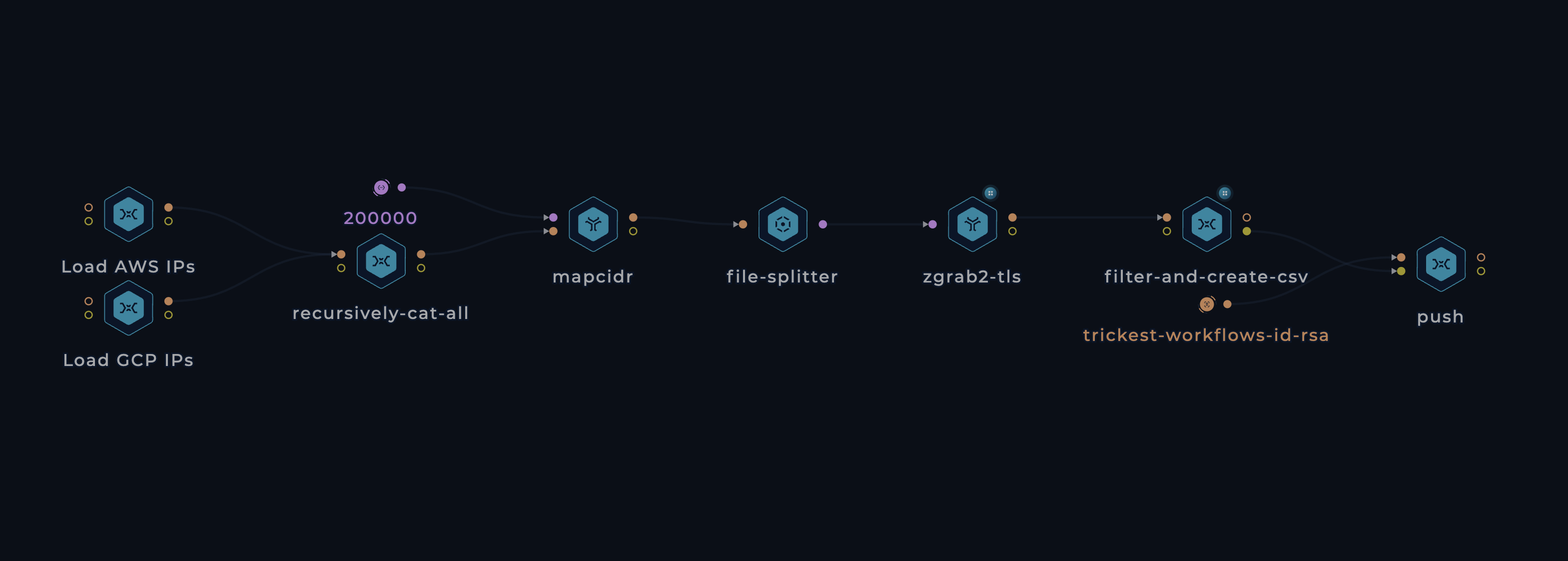
.prefixes[] | select(.service=="EC2") | .ip_prefix. Other services are excluded from this workflow since they don't support custom SSL certificates, making their data irrelevant for our dataset..prefixes[].ipv4Prefix.file-splitter node comes into play. This node iterates through the input from mapcidr and triggers individual jobs for each range. When executing this workflow across multiple machines (let's say 30), they concurrently process these jobs in parallel, significantly reducing the overall runtime. This efficiency enables us to run the workflow on a daily basis, keeping the data constantly updated.zgrab2's tls module emerged as the fastest and most reliable option. Shout out to The ZMap Project team!All contributions/ideas/suggestions are welcome! Feel free to create a new ticket via GitHub issues, tweet at us @trick3st, or join the conversation on Discord.
We believe in the value of tinkering; cookie-cutter solutions rarely cut it. Sign up for a Trickest demo to customize this workflow to your use case, get access to many more workflows, or build your own workflows from scratch!