Unified security scanner for MCP servers with config, pentest, and repo-scan modes. Generates SARIF reports for CI/CD integration, detects secrets, vulnerabilities, and misconfigurations via token and LLM analyzers.
[!NOTE] Looking to secure AI agent skills? Check out Skill X-Ray, an open-source static security scanner that analyzes skill packages for malicious or risky behavior before installation, without executing them.
MCP X-Ray is a unified open-source security scanning and penetration testing solution for Model Context Protocol (MCP) servers. It generates production-ready SARIF reports for seamless integration with security tooling and CI/CD pipelines. Scan results can be optionally uploaded to Traceforce Atlas for centralized security management and tracking. Atlas has over 600 MCPs in its registry, providing a comprehensive security assessment database for the MCP ecosystem.
# Clone the repository
git clone https://github.com/traceforce/mcp-xray
cd mcp-xray

# Install required dependencies (buf, etc.)
make install-dependencies

# Build everything (generates protobuf code and builds the binary)
# The binary will be created as `mcpxray` in the current directory
make all
Scan MCP configs for security issues; run before pentest to baseline your setup.
# Scan a specific MCP config file (uses token analyzer by default)
./mcpxray config-scan /path/to/mcp/config.json

# Scan all known MCP config paths automatically for Cursor, Claude and Windsurf.
# Known config locations (relative to home directory):
#   ~/.cursor/mcp.json (Cursor)
#   ~/Library/Application Support/Claude/claude_desktop_config.json (Claude Desktop)
#   ~/.codeium/windsurf/mcp_config.json (Windsurf)
./mcpxray config-scan --scan-known-configs

# Use LLM analyzer for more extensive and deepr analysis
./mcpxray config-scan /path/to/mcp/config.json --analyzer-type llm --llm-model claude-3-5-sonnet-20241022

# Specify custom output file
./mcpxray config-scan /path/to/mcp/config.json --output custom-report.sarif.json
Detection Capabilities:
Execute security test plans by making actual tool calls against MCP servers. LLMs are required to run the pentest. Run this before actual deployment in production.
# Run pentest with auto-generated test plan (requires LLM model)
./mcpxray pentest /path/to/mcp/config.json --llm-model claude-sonnet-4-5

# Use a custom test plan YAML file
./mcpxray pentest /path/to/mcp/config.json --test-plan /path/to/test-plan.yaml --llm-model claude-sonnet-4-5
Detection Capabilities: Code execution, SSRF, path traversal, authorization bypass, input injection, information disclosure, and DoS vulnerabilities
Scan the codebase for vulnerabilities; use when you own or can change the code.
# Scan current directory
./mcpxray repo-scan

# Scan a specific repository
./mcpxray repo-scan /path/to/repository

# Specify custom output file
./mcpxray repo-scan --output custom-report.sarif.json
Detection Capabilities:
The taint SAST uses the OpenGrep engine. Install
the pinned, SHA-verified binary with make install-opengrep (Linux x86_64/arm64, macOS
arm64/x86_64). On other platforms, install opengrep yourself and set
MCPXRAY_OPENGREP_BIN. Taint analysis activates by installation: repo-scan runs it
whenever the pinned engine is resolvable, and when the engine is absent it skips taint
and still runs SCA, secrets, and the unsafe-command rules.
For cross-file, interprocedural taint on Go and TypeScript (and Python), install the CodeQL engine. It activates by installation too, and its findings are merged with OpenGrep's:
make install-codeql                        # pinned CodeQL bundle (Linux x86_64, macOS, Windows)
./mcpxray repo-scan <repo>                 # every installed engine runs; results merged
CodeQL builds a database per language, so a scan takes noticeably longer once the bundle is
installed; that cost is the price of cross-file analysis. To drop back to the fast intra-file
pass, uninstall the engine the way you installed it: remove the bundle from make install-codeql
(it lives next to the binary), or unset MCPXRAY_CODEQL_BIN if you pointed it at one. Python and
TypeScript extract build-free (the target is never executed). Go has no build-free mode, so CodeQL
compiles the target; that step runs only with --codeql-allow-build and is otherwise skipped with
a warning; the scan never blocks on a prompt.
Each language gets a time budget covering database create plus analyze — 600s by default.
A target that exceeds it contributes nothing, so raise it for large repositories with
--codeql-timeout <seconds> (or MCPXRAY_CODEQL_TIMEOUT); the flag wins when both are set.
Exceeding the budget is reported as timed out after Ns, never as a clean zero.
MCP X-Ray generates reports in SARIF (Static Analysis Results Interchange Format) format, which is widely supported by security tools and CI/CD platforms.
Upload scan results to Traceforce Atlas for centralized security management, reporting, and tracking over time. Add the --upload flag to any scan command. Use --clean-up to remove generated files after successful upload.
Environment variables required:
TRACEFORCE_CLIENT_IDTRACEFORCE_CLIENT_SECRETThese credentials can be downloaded from the settings page on the Atlas UI.
# Upload config scan results
./mcpxray config-scan /path/to/mcp/config.json --upload

# Upload with cleanup
./mcpxray config-scan /path/xia-add-registry-imageto/mcp/config.json --upload --clean-up

# Upload pentest results
./mcpxray pentest /path/to/mcp/config.json --llm-model claude-sonnet-4-5 --upload
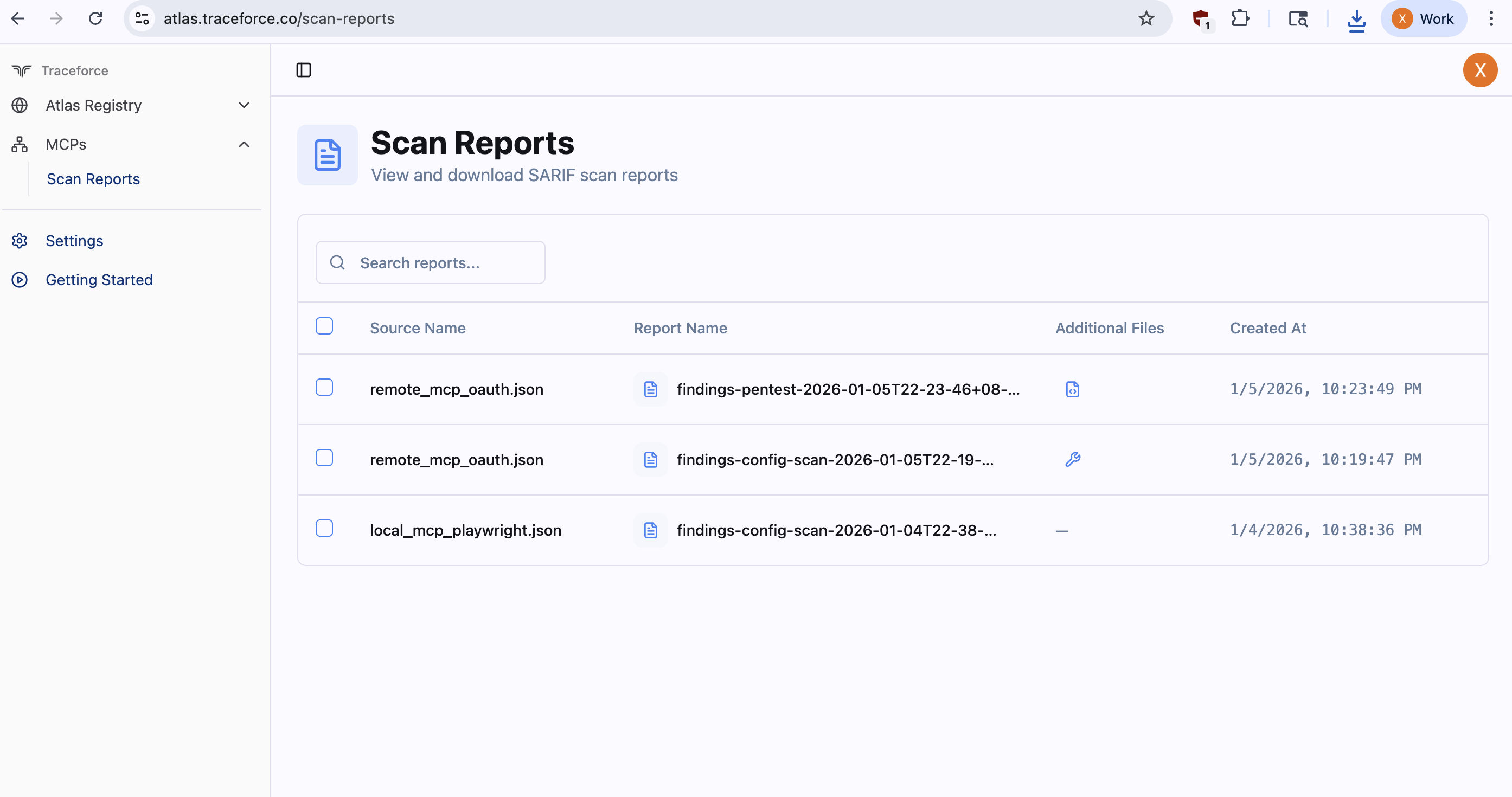
Example scan outputs are available in examples/findings/.
Example MCP configuration files are available in the examples/mcp_configs/ directory.
An example MCP Server is available in the examples/mcp_server/ directory:
mcp_server.py: FastMCP server using streamable-http transportmcp.json: Configuration file for connecting to the serverREADME.md: Instructions for setting up and scanning the serverMCP X-Ray provides two methods for analyzing tool security: