
Skip to content
KitploitKITPLOIT
ToolsBlog
Submit
ToolsBlog
Submit

Hacking, PenTest, and Cybersecurity Tools for Your Security Arsenal!

Kitploit is a directory of hacking, cybersecurity, and pentesting tools. Discover the latest project updates to find vulnerabilities, analyze systems, automate testing, and strengthen your security.

··Feeds·Contact·Privacy·© 2026 Kitploit

Tool Directory

Categories

View all categories
Loading categories
nuclei-wordfence-cve — 80k+ WordPress Nuclei templates, updated daily from Wordfence intel—filter by severity/tags/CVE and scan in one line. 🚀🔒 | Kitploit
Tools/GitHubGitHub/topscoder/nuclei-wordfence-cve
Vulnerability ScannersVulnerability AnalysisExploitationInformation GatheringWeb SecurityCrawler
GitHubtopscoder/nuclei-wordfence-cve

nuclei-wordfence-cve

80k+ WordPress Nuclei templates, updated daily from Wordfence intel—filter by severity/tags/CVE and scan in one line. 🚀🔒

View Repository
1.3k154140 days agoReviewed by Kitploit

Most Popular

View all →

Discover the most used tools by our community.

Explore all tools

Browse our collection of tools

View all tools →
Share

Nuclei + Wordfence = ♥

77,636 Nuclei Templates for WordPress Security Scanning 🥳

GitHub Workflow Status pre-commit Templates added
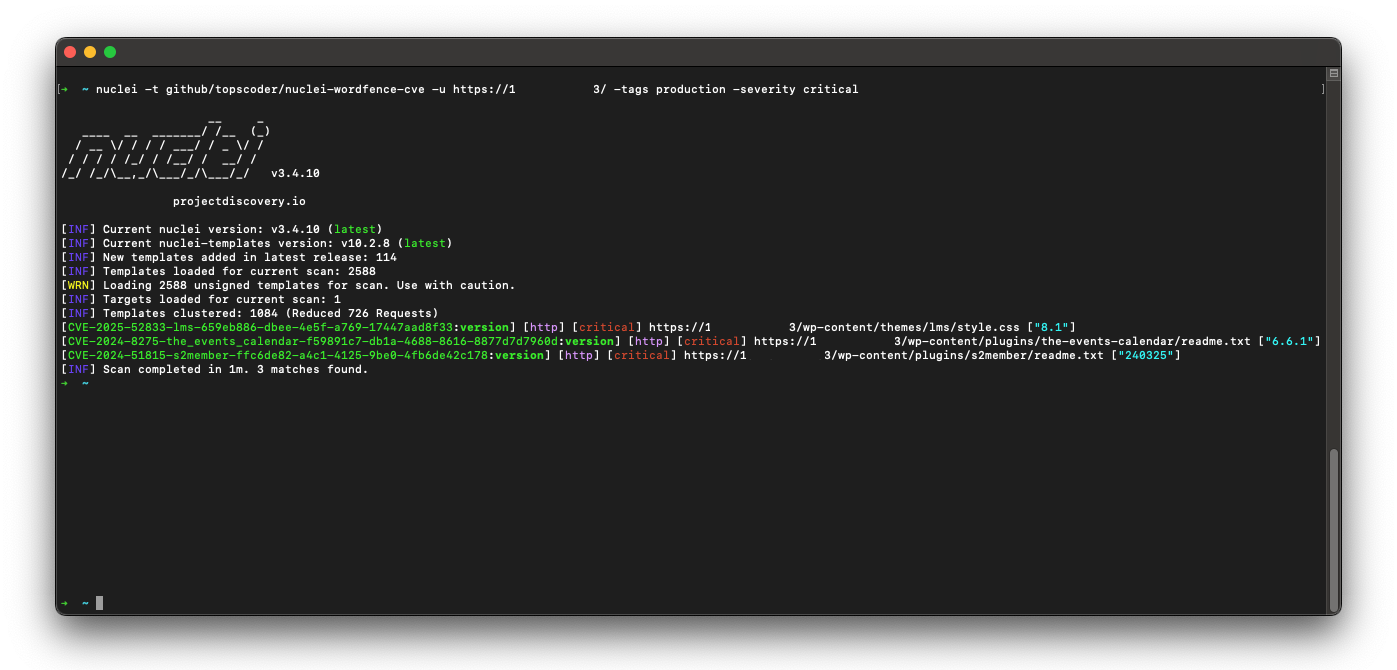
Project Demo

Level up your WordPress security game! This project's got a treasure trove of fresh Nuclei templates for WordPress. Scan for weaknesses in Core, plugins, and themes – all based on the latest intel from Wordfence.com.

Here's why this is your new best friend:

  • : No more hunting for individual templates, you've got a whole arsenal at your fingertips.
Massive collection
  • Always on point: These templates stay updated with the freshest threats, so you're never behind the curve.
  • Open source magic: Need to tweak a template for a specific situation? No problem, you've got full control.
  • If you're guarding a WordPress site, this project is your secret weapon to identify vulnerabilities before the bad guys do. Stop wasting time and secure your sites like a pro!


    [!TIP] If you found this project helpful, please consider buying me a coffee.

    Buy Me A Coffee

    ✨ What's in it?!

    categorytotal
    wp-plugins71,166
    wp-themes5,745
    wp-core731
    other0
    severitytotal
    critical7,299
    high12,455
    medium22,341
    low35,541
    info0

    🚀 Quick Start

    To install this nuclei-wordfence-cve repository for use with Nuclei, you can use the following commands:

    root@kitploit:~
    export GITHUB_TEMPLATE_REPO=topscoder/nuclei-wordfence-cve
    nuclei -update-templates
    

    Once you have installed this template repo using the commands above, you can run the following command to scan for vulnerabilities using Nuclei:

    root@kitploit:~
    nuclei -t github/topscoder/nuclei-wordfence-cve -u https://target.com
    

    Wordfence provides two separate feeds for vulnerabilities. The first feed includes only production vulnerabilities, each with an assigned CVE. The second feed contains candidate vulnerabilities, which do not yet have a CVE assigned and may or may not be promoted to the production feed. To differentiate templates generated from these feeds, a tag is assigned to each template—either production or candidate—allowing you to target them using a tag filter.

    Include only production templates:

    root@kitploit:~
    nuclei -t github/topscoder/nuclei-wordfence-cve -tags production -u https://target.com
    

    Include only candidate templates:

    root@kitploit:~
    nuclei -t github/topscoder/nuclei-wordfence-cve -tags candidate -u https://target.com
    

    💻 Examples

    Here are some examples how to use the templates:

    • To scan for all known vulnerabilities in WordPress, you can run the following command:
    root@kitploit:~
    nuclei -t github/topscoder/nuclei-wordfence-cve -u https://target.com
    
    • To scan for a CVE specific vulnerability, you can run the following command:
    root@kitploit:~
    nuclei -t github/topscoder/nuclei-wordfence-cve -template-id cve-2023-32961 -u https://target.com
    
    • To scan only for critical vulnerabilities, you can run the following command:
    root@kitploit:~
    nuclei -t github/topscoder/nuclei-wordfence-cve -severity critical -u https://target.com
    
    • To scan only for WordPress core vulnerabilities, you can run the following command:
    root@kitploit:~
    nuclei -t github/topscoder/nuclei-wordfence-cve -tags wp-core -u https://target.com
    
    • To scan only for WordPress plugin vulnerabilities, you can run the following command:
    root@kitploit:~
    nuclei -t github/topscoder/nuclei-wordfence-cve -tags wp-plugin -u https://target.com
    
    • To scan only for WordPress theme vulnerabilities, you can run the following command:
    root@kitploit:~
    nuclei -t github/topscoder/nuclei-wordfence-cve -tags wp-theme -u https://target.com
    
    • To go wild, you can combine and combine and combine:
    root@kitploit:~
    nuclei -t github/topscoder/nuclei-wordfence-cve -tags wp-plugin,wp-theme -severity critical,high
    
    • To go even wilder, you can use the template condition flag (-tc) that allows complex expressions like the following ones:
    root@kitploit:~
    nuclei -t github/topscoder/nuclei-wordfence-cve -template-condition "contains(to_lower(name),'cross-site scripting') || contains(to_upper(name),'XSS')" -u https://target.com
    
    nuclei -t github/topscoder/nuclei-wordfence-cve -template-condition "contains(to_lower(name),'sql injection') || contains(to_lower(description),'sql injection')" -u https://target.com
    
    nuclei -t github/topscoder/nuclei-wordfence-cve -template-condition "contains(to_lower(name),'file inclusion') || contains(to_lower(description),'file inclusion')" -u https://target.com
    
    nuclei -t github/topscoder/nuclei-wordfence-cve -template-condition "contains(to_upper(name),'CSRF') || contains(to_upper(description),'CSRF')" -u https://target.com
    

    🤖 Severity recalculation

    Template severity is adjusted by the parser to better reflect real-world impact. The determine_severity function in src/lib/wordfence_api_parser.py inspects the vulnerability title and description and will downscale issues that are limited to authenticated users (e.g., require login or elevated roles).

    Example (simplified):

    • If the title or description contains the word authenticated (and not unauthenticated), the function treats the issue as lower risk and returns Low instead of a higher CVSS label.

    This helps avoid assigning Medium/High severities to vulnerabilities that only affect logged-in users, which reduces noise when scanning publicly accessible sites.

    👥 Contributing

    If you would like to contribute to this project, please feel free to fork the repository and submit a pull request.

    📚 License

    This project is licensed under the MIT License.

    [!NOTE] ~~ Please use it responsibly!

    Download Tool