 thiojoe/yt-spammer-purge
Allows you easily scan for and delete scam comments using several methods.




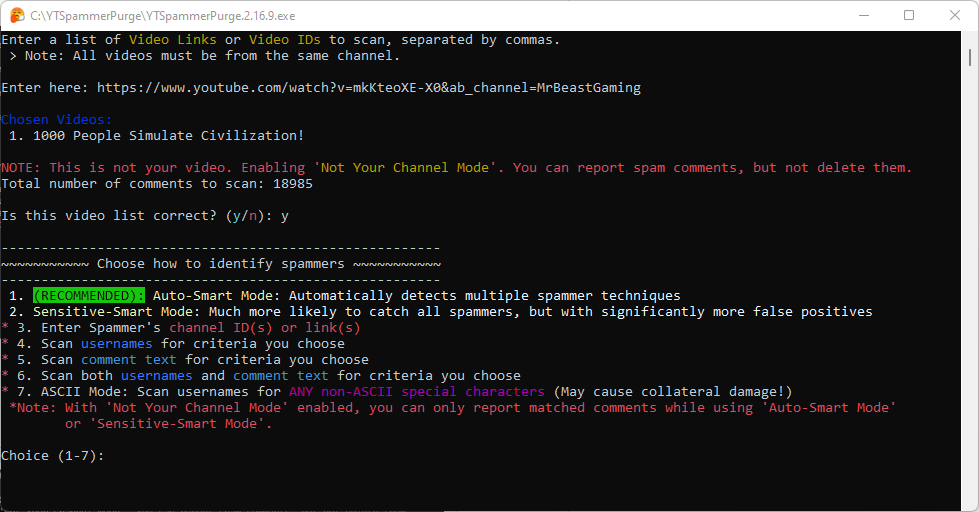
What Is This? - Allows you to filter and search for spammer comments on your channel and other's channel(s) in many different ways AND delete/report them all at once (see features below).
How to Download: Click the "[Releases]" link on the right, then on the latest release, under 'Assets' click to download "YTSpammerPurge.exe". (You might have to click "Assets" to view the files for the release)
- Linux Setup Instructions
- MacOS Setup Instructions
- (Windows installation not necessary if using exe file. But see how to set up required API key on this page)
Recently, there has been a massive infestation of spam on YouTube where fake impersonator accounts leave spam/scam replies to hundreds of users on a creator's videos. YouTube has fortunately now made it so the "Hide User From Channel" button instantly removes all of that user's comments, but there are sometimes many different spammers, and it can be difficult to find them all.
Therefore I created this script to allow you to easily scan for and purge these spammer comments. IT DOES NOT PREVENT SPAMMERS - It only makes it easier to delete them when they show up! YouTube still must implement better native tools for dealing with spammers.
If you feel sketched out about giving the app the required high level permissions to your channel (very understandable), you could instead use the app in 'moderator mode' (set in the config file). First, some context: When you grant access to another channel to be a moderator for your channel, they are able to mark comments for 'held for review', and this permission works through the API as well.
Therefore, what you could do is create an blank dummy-google-account with nothing on it except a empty new channel. Then you can grant that channel permission to be a moderator, and use the app through the dummy moderator account. This way, you know that the app will never have the ability to do more than mark comments as held for review (which the app supports) on your main channel, and have no other access to your account's data. You just won't be able to ban the spammers through this app directly, but you can still remove/hide their comments instead of deleting them. Just make sure to create the google cloud API project on the dummy account instead.
Read some additional details about 'moderator mode' on the [wiki page here][Moderator Mode].
An Additional Note: No matter the settings, the program runs completely locally on your own machine using the API key and Google Cloud project you created yourself, so even as the program's creator I will never have access to your channel.
To use this script, you will need to obtain your own API credentials file by making a project via the Google Developers Console (aka 'Google Cloud Platform'). The credential file should be re-named client_secret.json and be placed in the same directory as this script. [See Instructions Here][API Key].
IF IT FREEZES while scanning, it is probably because you clicked within the command prompt window and entered "selection mode" which pauses everything. To unfreeze it, simply right click within the window, or press the Escape key.
I'm a total amateur, so if something doesn't work I'll try to fix it but might not even know how, so don't expect too much. Therefore I OFFER NO WARRANTY OR GUARANTEE FOR THIS SCRIPT. USE AT YOUR OWN RISK. I tested it on my own and implemented some failsafes as best as I could, but there could always be some kind of unexpected bug. You should inspect the code yourself.
Latest Demonstration Video: https://www.youtube.com/watch?v=2tRppXW_aKo
[![Demo Updated Thumbnail]][Demo Updated]
Original Demo for Context: https://www.youtube.com/watch?v=-vOakOgYLUI
[![Demo 1 Thumbnail]][Demo 1]
(Takes you to YouTube, not embedded. See timestamps in video description.)
