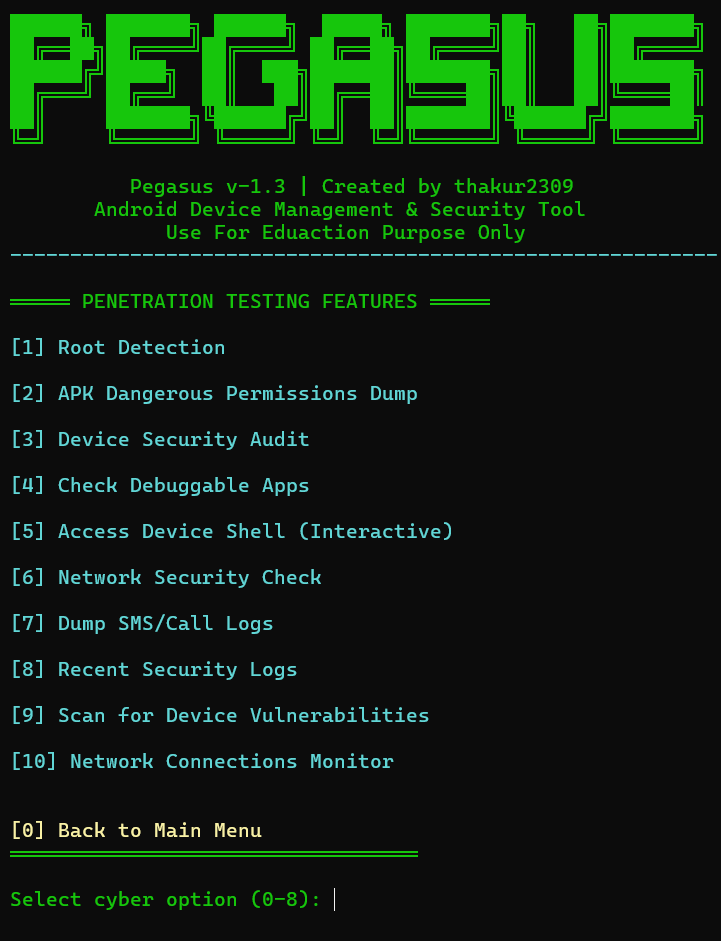


Python ADB-based Android device management and security audit toolkit with an interactive menu for root detection, permission dumps, debuggable app scanning, log and contact extraction.
██████╗ ███████╗ ██████╗  █████╗ ███████╗██╗   ██╗███████╗
██╔══██╗██╔════╝██╔════╝ ██╔══██╗██╔════╝██║   ██║██╔════╝
██████╔╝█████╗  ██║  ███╗███████║███████╗██║   ██║███████╗
██╔═══╝ ██╔══╝  ██║   ██║██╔══██║╚════██║██║   ██║╚════██║
██║     ███████╗╚██████╔╝██║  ██║███████║╚██████╔╝███████╗
╚═╝     ╚══════╝ ╚═════╝ ╚═╝  ╚═╝╚══════╝ ╚═════╝ ╚══════╝
Android Device Management & Security Audit Tool





🛡️ For Educational & Personal Use Only
Use only on devices you own or have explicit written permission to access.
Features • Screenshots • Installation • Usage • Device Setup • Changelog • License
🔐 Licence key - FIREWALLBREAKER
📌 Instagram Username sudo_xploit
Pegasus is a powerful Python-based Android Device Management and Security Audit tool built on top of ADB (Android Debug Bridge). It provides an interactive, color-coded terminal menu to remotely manage, monitor, analyze, and audit Android devices — entirely from your PC, with no third-party app required on the phone.
| Audience | Use Case |
|---|---|
| 🧑💻 Android Developers | Quick device control and log monitoring during development |
| 🔐 Security Researchers | Audit and assess your own device's security posture |
| 🎓 Students | Learn Android internals, ADB commands, and mobile security |
| 🖥️ Power Users | Manage and control phones wirelessly over Wi-Fi |
| Option | Feature | Description |
|---|---|---|
| 11 | Pull File | Copy any file from device storage to PC |
| 12 | Push File | Copy any file from PC to device storage |
Unlocks a dedicated penetration testing and security audit submenu.
Step 1 — Update system packages
sudo apt update && sudo apt upgrade -y
Step 2 — Install Python 3
sudo apt install python3 python3-pip -y
Step 3 — Install ADB
sudo apt install adb -y
Step 4 — Install scrcpy (optional — for Screen Mirror)
sudo apt install scrcpy -y
Step 5 — Install nmap (optional — for Network Security Scan)
sudo apt install nmap -y
Step 6 — Clone the repository
git clone https://github.com/thakur2309/PAGASUS-PRO.git
cd PAGASUS-PRO
Step 7 — Run Pegasus v1.3
python3 pegasus_v_1.3.py
Want to run an older version?
python3 pegasusV-1.2.py   # Run v1.2
python3 pegasus_v1.1.py   # Run v1.1
Step 1 — Update system
sudo pacman -Syu
Step 2 — Install Python and ADB
sudo pacman -S python android-tools
Step 3 — Install scrcpy (optional)
sudo pacman -S scrcpy
Step 4 — Install nmap (optional)
sudo pacman -S nmap
Step 5 — Clone the repository
git clone https://github.com/thakur2309/PAGASUS-PRO.git
cd PAGASUS-PRO
Step 6 — Run Pegasus v1.3
python3 pegasus_v_1.3.py
Want to run an older version?
python3 pegasusV-1.2.py   # Run v1.2
python3 pegasus_v1.1.py   # Run v1.1
Step 1 — Install Python 3
Verify in Command Prompt or PowerShell:
python --version
💡 PowerShell (winget) — One command install:
winget install Python.Python.3.11
Step 2 — Install ADB (Android Platform Tools)
Option A — Manual install:
.zip to a folder (e.g., C:\platform-tools\)Win + S → Search "Environment Variables"Path → EditC:\platform-toolsOption B — PowerShell (winget) — Recommended:
winget install Google.PlatformTools
ADB is automatically added to PATH — no manual setup needed.
Verify:
adb version
Step 3 — Install scrcpy (optional — for Screen Mirror feature)
Option A — Manual install:
C:\scrcpy\)C:\scrcpy\ to PATH using same method as Step 2Option B — PowerShell (winget) — Recommended:
winget install Genymobile.scrcpy
Verify:
scrcpy --version
Step 4 — Install Git (if not installed)
Option A — Manual install:
Download from: https://git-scm.com/download/win → Install with default options
Option B — PowerShell (winget):
winget install Git.Git
Verify:
git --version
Step 5 — Install all tools at once (PowerShell — Fastest Method)
Open PowerShell as Administrator and run this single command to install everything:
winget install Python.Python.3 Google.PlatformTools Genymobile.scrcpy Git.Git
✅ This installs Python, ADB, scrcpy, and Git in one shot. Restart PowerShell after this.
Step 6 — Clone the repository
Open Command Prompt or PowerShell:
git clone https://github.com/thakur2309/PAGASUS-PRO.git
cd PAGASUS-PRO
Step 7 — Install Python dependencies
pip install -r requirements.txt
Step 8 — Run Pegasus v1.3
python pegasus_v_1.3.py
Want to run an older version?
python pegasusV-1.2.py   # Run v1.2
python pegasus_v1.1.py   # Run v1.1
💡 Tip: Use Windows Terminal (free from Microsoft Store) for best color rendering.
Step 1 — Install Homebrew (if not installed)
/bin/bash -c "$(curl -fsSL https://raw.githubusercontent.com/Homebrew/install/HEAD/install.sh)"
Step 2 — Install Python 3
brew install python
Verify:
python3 --version
Step 3 — Install ADB
brew install android-platform-tools
Verify:
adb version
Step 4 — Install scrcpy (optional)
brew install scrcpy
Step 5 — Install nmap (optional)
brew install nmap
Step 6 — Clone the repository
git clone https://github.com/thakur2309/PAGASUS-PRO.git
cd PAGASUS-PRO
Step 7 — Run Pegasus v1.3
python3 pegasus_v_1.3.py
Want to run an older version?
python3 pegasusV-1.2.py   # Run v1.2
python3 pegasus_v1.1.py   # Run v1.1
What is Termux? Termux is an Android terminal emulator that provides a full Linux environment on your phone — no root required. You can run Pegasus directly from your Android device using Termux.
⚠️ Note:
scrcpy(Screen Mirror — Option 5) does not work in Termux because it requires a display server which is not available on Android. All other features work normally.
Install Termux from F-Droid (Recommended)
👉 https://f-droid.org/packages/com.termux/
⚠️ The Google Play Store version of Termux is outdated — always use the F-Droid version.
Open Termux and follow the steps below:
Step 1 — Update packages
pkg update && pkg upgrade -y
Step 2 — Install Python
pkg install python -y
Step 3 — Install Git
pkg install git -y
Step 4 — Install ADB
pkg install android-tools -y
Verify installation:
adb version
Step 5 — Install nmap (optional — required for Network Security Scan)
pkg install nmap -y
Step 6 — Clone the repository
git clone https://github.com/thakur2309/PAGASUS-PRO.git
cd PAGASUS-PRO
Step 7 — Install Python dependencies
pip install -r requirements.txt
Step 8 — Run Pegasus v1.3
python pegasus_v_1.3.py
Want to run an older version?
python pegasusV-1.2.py   # Run v1.2
python pegasus_v1.1.py   # Run v1.1
You can control another Android device from Termux using Wi-Fi (Wireless ADB).
Method 1 — Connect another device over Wi-Fi
adb tcpip 5555
[2] Connect a DeviceMethod 2 — Manage the same device (localhost)
If you want to manage your own phone directly:
adb connect localhost:5555
⚠️ This requires either a rooted phone or Wireless Debugging enabled (Android 11+ → Developer Options → Wireless Debugging).
| Feature | Status | Reason |
|---|---|---|
| Screen Mirror (Option 5) | ❌ Not supported | scrcpy requires a display server |
| All other features | ✅ Fully supported | Runs entirely over ADB |
termux-setup-storage
USB Debugging must be enabled on your Android device before Pegasus can connect.
Settings → About Phone
→ Tap "Build Number" 7 times rapidly
→ "You are now a developer!" message appears
→ Go back → Settings → Developer Options
→ Toggle ON "USB Debugging"
→ Connect phone to PC via USB
→ On phone popup: tap "Allow"
One-time USB setup required. After that, go fully wireless.
[2] Connect a Devicey when asked to enable TCP/IP mode# Linux / macOS — Latest Version
python3 pegasus_v_1.3.py
# Windows — Latest Version
python pegasus_v_1.3.py
# Run older versions
python3 pegasusV-1.2.py # v1.2
python3 pegasus_v1.1.py # v1.1
Main Menu Preview:
══════════════════════════════════════════════════════════════

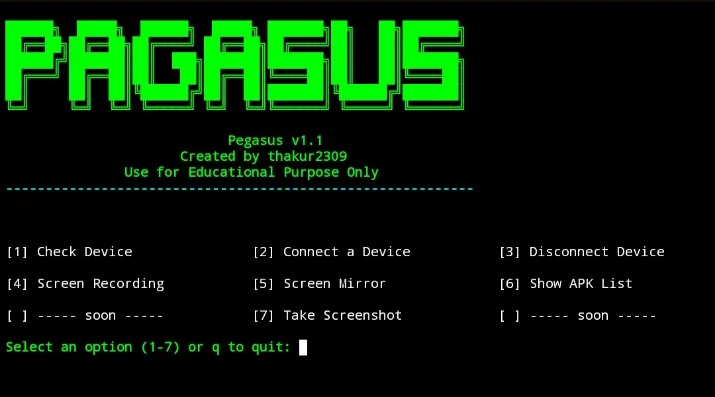
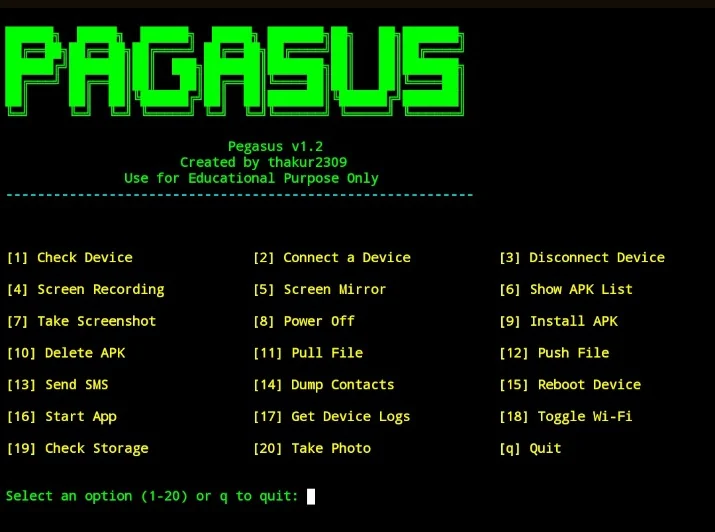
[1] Check Device           [2] Connect a Device      [3] Disconnect Device

[4] Screen Recording       [5] Screen Mirror          [6] Show APK List

[7] Take Screenshot        [8] Power Off              [9] Install APK

[10] Delete APK            [11] Pull File             [12] Push File

[13] Send SMS              [14] Dump Contacts         [15] Reboot Device

[16] Start App             [17] Get Device Logs       [18] Toggle Wi-Fi

[19] Check Storage         [20] Take Photo            [q] Quit

[21] Troubleshoot Connection

[22] Unlock Advanced Security Tools

[23] View Device Connection History

══════════════════════════════════════════════════════════════
All generated files are saved in the same directory where you run the script.
💡 Shortcut:
pip install -r requirements.txtse sab Python dependencies ek baar mein install ho jaati hain.
Name: Number format parsingdf -h for easy readingpegasusV-1.2.pyre module added for contact parsingpegasus_v1.1.pyThis project is licensed under the MIT License.
MIT License

Copyright (c) 2024 thakur2309

Permission is hereby granted, free of charge, to any person obtaining a copy
of this software and associated documentation files (the "Software"), to deal
in the Software without restriction, including without limitation the rights
to use, copy, modify, merge, publish, distribute, sublicense, and/or sell
copies of the Software, and to permit persons to whom the Software is
furnished to do so, subject to the following conditions:

The above copyright notice and this permission notice shall be included in all
copies or substantial portions of the Software.

THE SOFTWARE IS PROVIDED "AS IS", WITHOUT WARRANTY OF ANY KIND, EXPRESS OR
IMPLIED, INCLUDING BUT NOT LIMITED TO THE WARRANTIES OF MERCHANTABILITY,
FITNESS FOR A PARTICULAR PURPOSE AND NONINFRINGEMENT. IN NO EVENT SHALL THE
AUTHORS OR COPYRIGHT HOLDERS BE LIABLE FOR ANY CLAIM, DAMAGES OR OTHER
LIABILITY, WHETHER IN AN ACTION OF CONTRACT, TORT OR OTHERWISE, ARISING FROM,
OUT OF OR IN CONNECTION WITH THE SOFTWARE OR THE USE OR OTHER DEALINGS IN THE
SOFTWARE.
Pegasus is developed strictly for educational and personal use.
- ✅ Only use this tool on Android devices you own or have explicit written permission to access.
- ❌ Unauthorized access to someone else's device is illegal under cybercrime and privacy laws worldwide — including the IT Act (India), CFAA (USA), Computer Misuse Act (UK), and equivalent laws in other countries.
- The developer (thakur2309) holds zero liability for any illegal, unethical, or unauthorized use of this software.
- All data extraction features (contacts, SMS, call logs) are intended exclusively for personal data backup and security research on your own device.
Contributions, bug reports, and feature suggestions are welcome!
git checkout -b feature/your-feature-namegit commit -m "feat: add your feature"git push origin feature/your-feature-nameIf Pegasus helped you, please consider giving it a ⭐ star on GitHub.
It helps others find the project and motivates continued development.
👨💻 Author



| Option | Feature | Description |
|---|
| 1 | Check Device | View model name, Android version, and battery level |
| 2 | Connect Device | Connect via USB or wirelessly over Wi-Fi (TCP/IP) |
| 3 | Disconnect Device | Cleanly disconnect wireless ADB sessions |
| 4 | Screen Recording | Record device screen and auto-pull to your PC |
| 5 | Screen Mirror | Live real-time screen mirroring via scrcpy |
| 6 | Show APK List | List all installed packages, export clean list to file |
| 7 | Take Screenshot | Capture and pull screenshot instantly |
| 8 | Power Off | Remotely power off the device |
| 15 | Reboot Device | Remotely reboot the device |
| 18 | Toggle Wi-Fi | Enable or disable device Wi-Fi remotely |
| 19 | Check Storage | View storage usage in human-readable format |
| 20 | Take Photo | Trigger camera, capture photo, and auto-pull to PC |
| 21 | Troubleshoot | Kill and restart ADB server for connection issues |
| 23 | Connection History | View session connect/disconnect timestamps |
| Option |
|---|
| Feature |
|---|
| Description |
|---|
| 9 | Install APK | Sideload and install any .apk from your PC |
| 10 | Delete APK | Uninstall any package by its package name |
| 16 | Start App | Launch any installed application remotely |
| Option | Feature | Description |
|---|
| 13 | Send SMS | Open SMS intent with pre-filled number and message |
| 14 | Dump Contacts | Extract contacts (Name + Number), save to .txt |
| 17 | Get Device Logs | Pull full logcat dump and save locally |
| Sub-Option | Feature | Description |
|---|
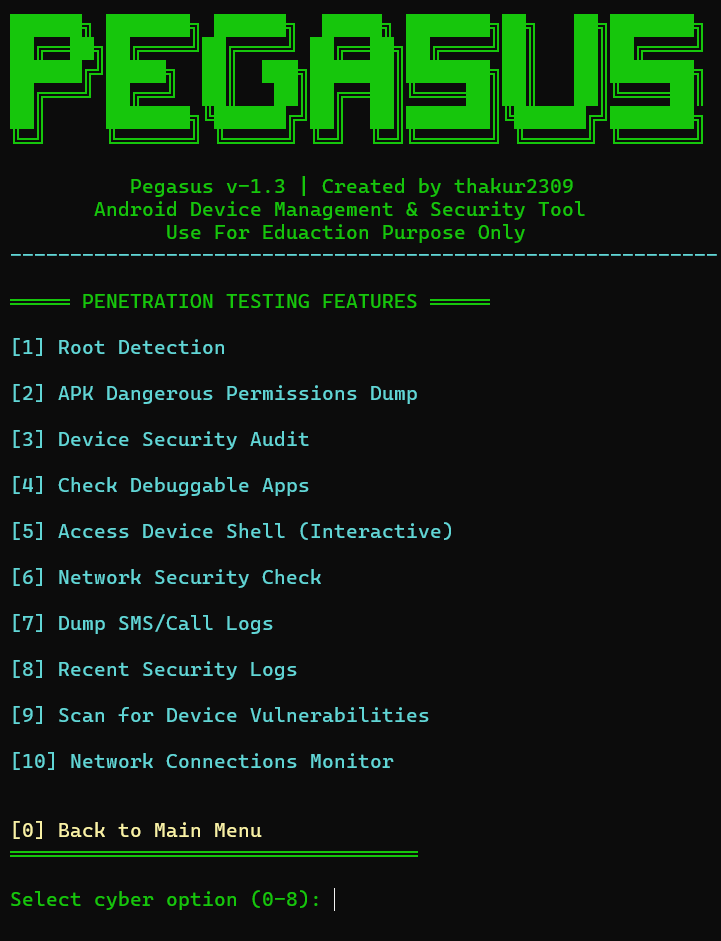
| 1 | Root Detection | Detect if device has been rooted via multiple methods |
| 2 | APK Permissions Dump | List all dangerous permissions granted per installed app |
| 3 | Device Security Audit | Check patch level, encryption state, and build tags |
| 4 | Debuggable Apps Scanner | Identify debug-enabled apps (common security risk) |
| 5 | Interactive ADB Shell | Open a live terminal shell session on the device |
| 6 | Network Security Check | Inspect Wi-Fi security type + optional nmap scan |
| 7 | Dump SMS / Call Logs | Export messages and call records to .txt files |
| 8 | Security Log Filter | Filter logcat for permission denials and security events |
| 9 | Vulnerability Scanner | Compare patch date against known risk threshold |
| 10 | Network Connections Monitor | View active network connections via netstat |
| Platform | Command |
|---|
| Ubuntu / Debian / Kali | sudo apt install -y python3 adb scrcpy git && git clone https://github.com/thakur2309/PAGASUS-PRO.git && cd PAGASUS-PRO && pip3 install -r requirements.txt && python3 pegasus_v_1.3.py |
| Arch / Manjaro / BlackArch | sudo pacman -S python android-tools scrcpy git && git clone https://github.com/thakur2309/PAGASUS-PRO.git && cd PAGASUS-PRO && pip install -r requirements.txt && python3 pegasus_v_1.3.py |
| macOS | brew install python android-platform-tools scrcpy git && git clone https://github.com/thakur2309/PAGASUS-PRO.git && cd PAGASUS-PRO && pip3 install -r requirements.txt && python3 pegasus_v_1.3.py |
| Windows | Install Python + ADB manually (see guide below), then: git clone https://github.com/thakur2309/PAGASUS-PRO.git && cd PAGASUS-PRO && pip install -r requirements.txt && python pegasus_v_1.3.py |
| 📱 Termux (Android) | pkg update && pkg install python git android-tools && git clone https://github.com/thakur2309/PAGASUS-PRO.git && cd PAGASUS-PRO && pip install -r requirements.txt && python pegasus_v_1.3.py |
| Filename | Generated By |
|---|
screen.png | Take Screenshot |
record.mp4 | Screen Recording |
apk_list.txt | Show APK List |
contacts.txt | Dump Contacts |
device_log.txt | Get Device Logs |
storage_info.txt | Check Storage |
sms_logs.txt | Dump SMS (Security Tools) |
call_logs.txt | Dump Call Logs (Security Tools) |
connection_log.txt | Auto-generated connection session log |
| Dependency | Required | Purpose | Install (Linux/macOS) | Install (Termux) |
|---|
| Python 3.7+ | ✅ Yes | Run the tool | sudo apt install python3 | pkg install python |
| colorama | ✅ Yes | Color terminal output | pip3 install colorama | pip install colorama |
| ADB | ✅ Yes | Device communication | sudo apt install adb | pkg install android-tools |
| scrcpy | ⚪ Optional | Screen Mirror feature | sudo apt install scrcpy | ❌ Termux mein kaam nahi |
| nmap | ⚪ Optional | Network scan in Security Tools | sudo apt install nmap | pkg install nmap |
| Git | ⚪ Recommended | Clone the repository | sudo apt install git | pkg install git |
| File | Version | Run Command |
|---|
pegasus_v_1.3.py | v1.3 (Latest) | python3 pegasus_v_1.3.py |
pegasusV-1.2.py | v1.2 | python3 pegasusV-1.2.py |
pegasus_v1.1.py | v1.1 | python3 pegasus_v1.1.py |
requirements.txt | — | pip install -r requirements.txt |