CVE-2020-1472 (ZeroLogon) Detection and Mitigation Demo
This project demonstrates the detection and mitigation of the critical Windows vulnerability CVE-2020-1472, also known as ZeroLogon. The vulnerability allows attackers to gain unauthenticated administrative access. This was developed as part of a school cybersecurity project. The PoC code credit goes to Tom Tervoort (Secura) and the Suricata ruleset credits goes to Proofpoint Emerging Threats.
Key components:
- Testing a domain controller’s vulnerability using a PoC script
- Monitoring for indicators via Windows Event Logs
- Implementing Suricata IDS with custom rules
- Applying Windows Updates
Demonstrated Detection Techniques
1. Vulnerability Testing Script
- Python script by Tom Tervoort (Secura)
- Leverages the
impacket library to test a domain controller’s vulnerability via Netlogon authentication bypass
2. Windows Event Log Analysis
Look for these key events:
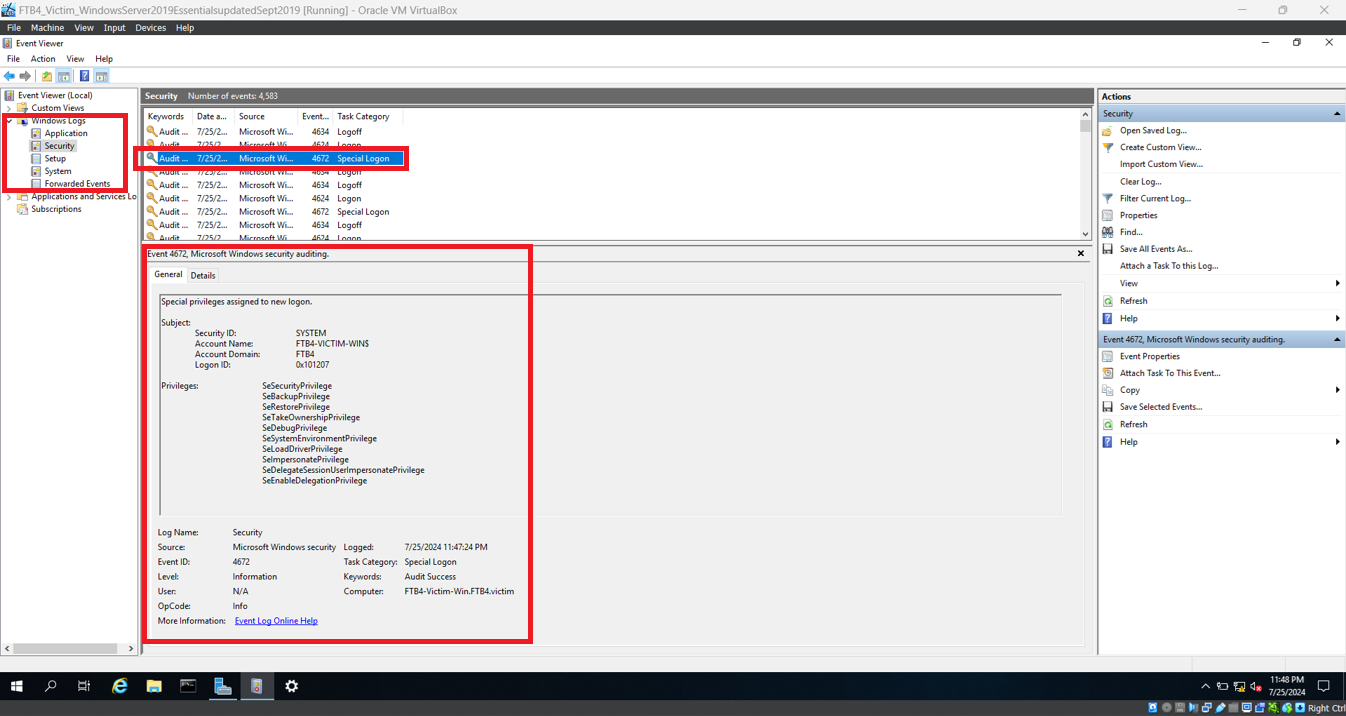
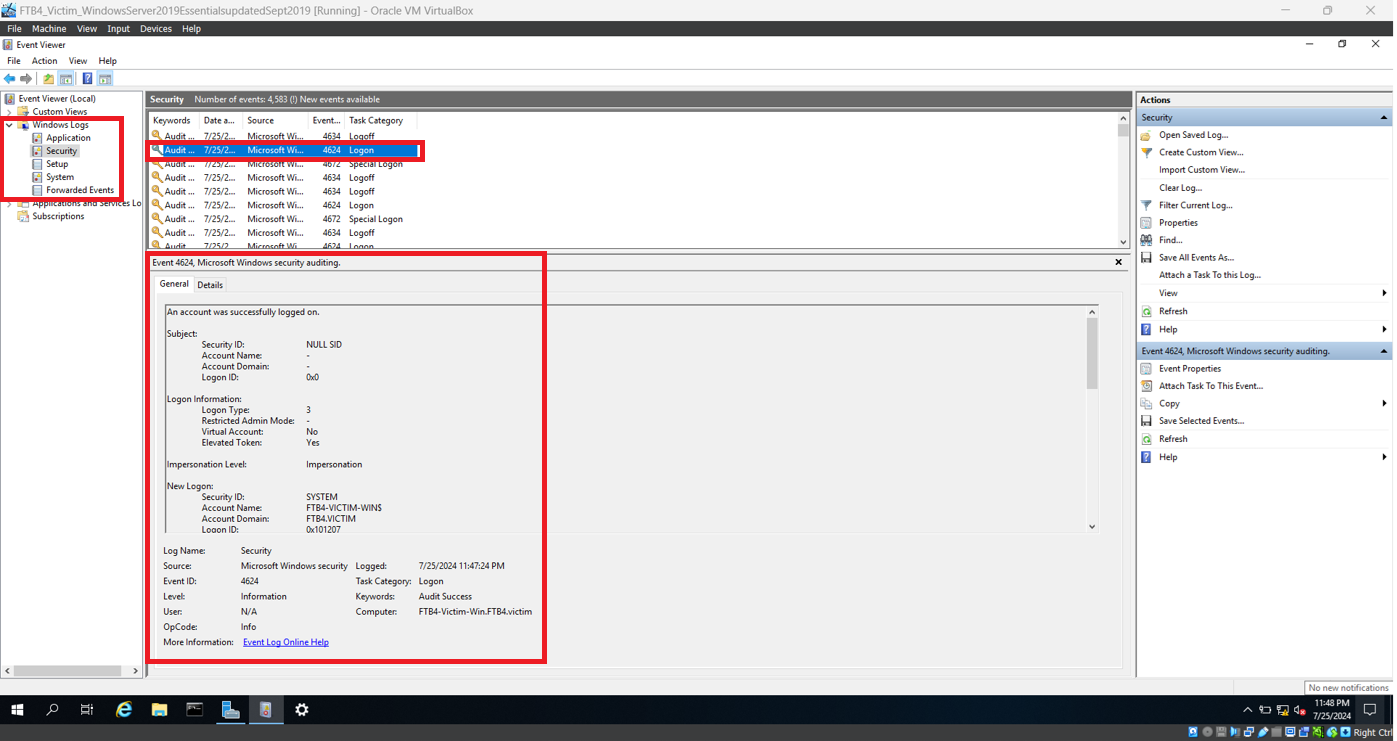
4624: Successful logon using DC credentials4672: Special privileges assigned to attacker (e.g., admin)5805: Netlogon error events (indicator of exploitation)
3. Intrusion Detection Using Suricata
- Uses Suricata to analyse network traffic on the domain controller
- Implements custom rules from the Proofpoint Emerging Threats ruleset
- Detects sequences of zero bytes commonly used in the ZeroLogon exploit
Requirements
To replicate this demonstration, the following setup is required:
Attacker Machine
Target Machine
- VirtualBox (same NATNetwork configuration with Promiscuous mode enabled)
- Windows Server 2019 Essentials (updated Sept 2019)
- A new domain and DC created (using Target Machine server as DC)
- Suricata
- Microsoft C++ Redistributable
- Npcap
- Notepad++
- Rules file from Proofpoint Emerging Threats Rules repository
emerging-all.rules by Proofpoint
Configuration Note:
The Suricata configuration was modified using Notepad++:
HOME_NET was set to the IP address of the Target machine- The
rule-files section was updated to use the emerging-all.rules file
Demonstration of Detection Approaches
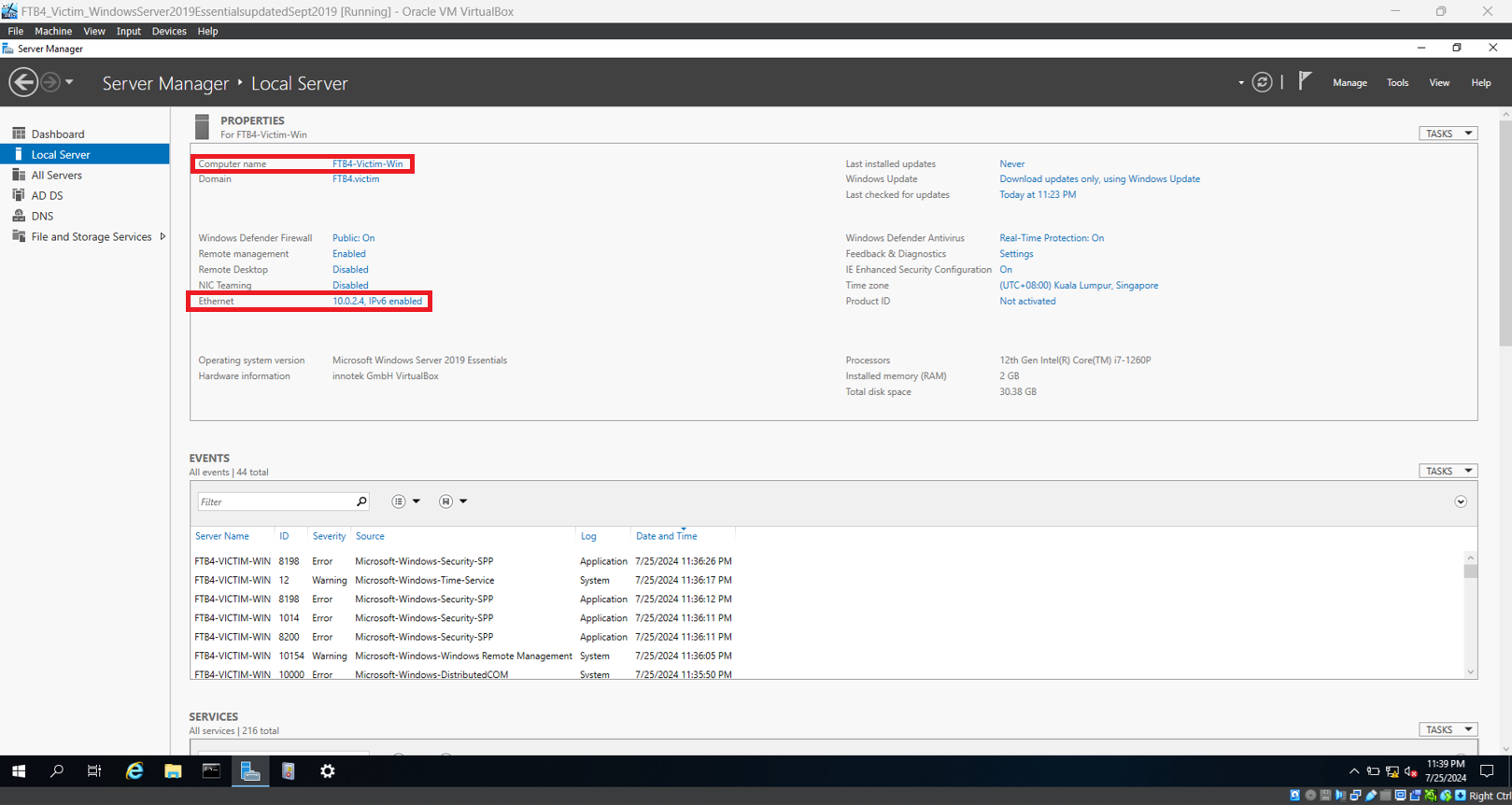
Step 1: Find out Target Machine Computer Name and IP address
- Open Server Manager.
- Navigate to Local Server. Take note of the Computer Name and IP address found under Ethernet. In this demonstration, the computer name is FTB4-Victim-Win, and the IP address is 10.0.2.4
Step 2: Launch Vulnerability Testing Script
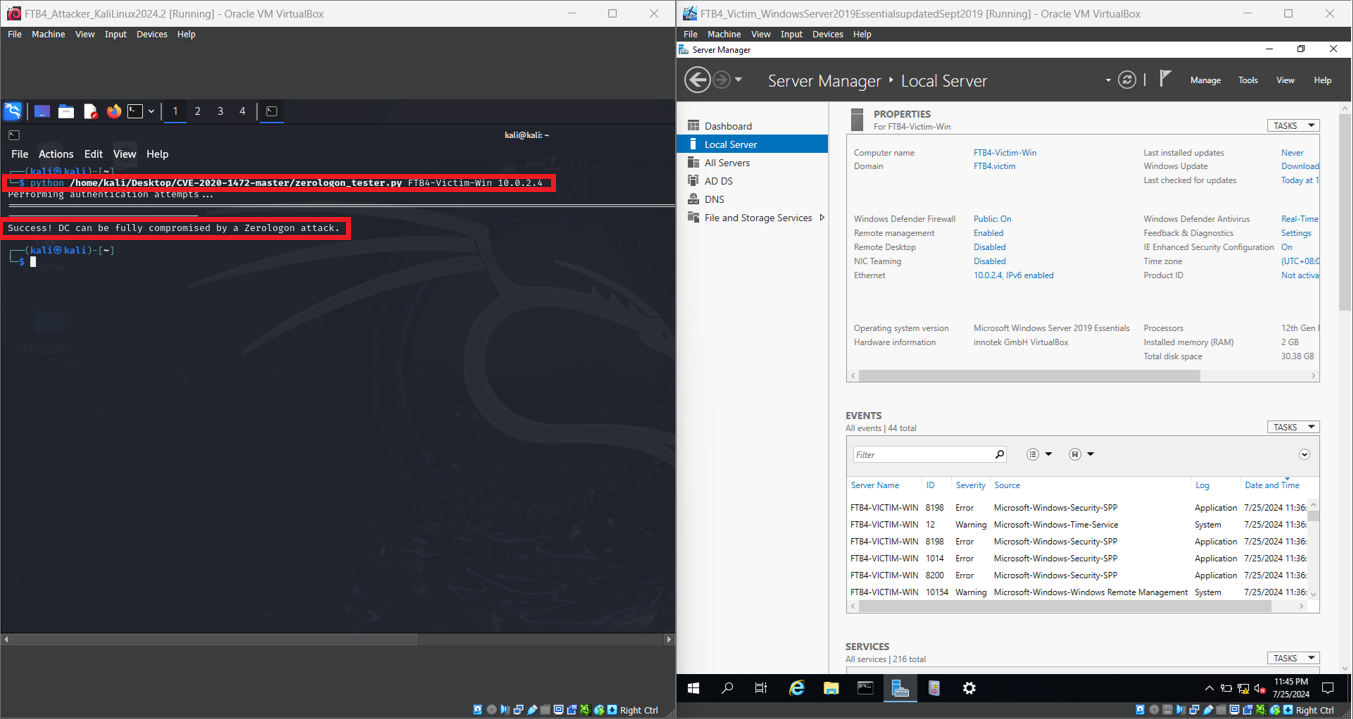
- In the Attacker Machine, open Terminal
- Execute the Python testing script with the target machine computer name and IP:
python /home/kali/Desktop/CVE-2020-1472-master/zerologon_tester.py <target computer name> <target IP>
- The script will conclude with the message indicating that the domain controller can be fully compromised by a ZeroLogon attack.
Step 3: Analysing Windows Event Log
- Now in the Target machine, launch Event Viewer. The icon is on the taskbar.
- Navigate to Windows Logs, then Security.
- As shown below, there are two Security events relating to the ZeroLogon bypass: Event 4672 and Event 4624.
- Go to System, also under Windows Logs. Scroll down until you see the event with Level as Error and Source as NETLOGON. Select it. This is another event relating to the ZeroLogon bypass.
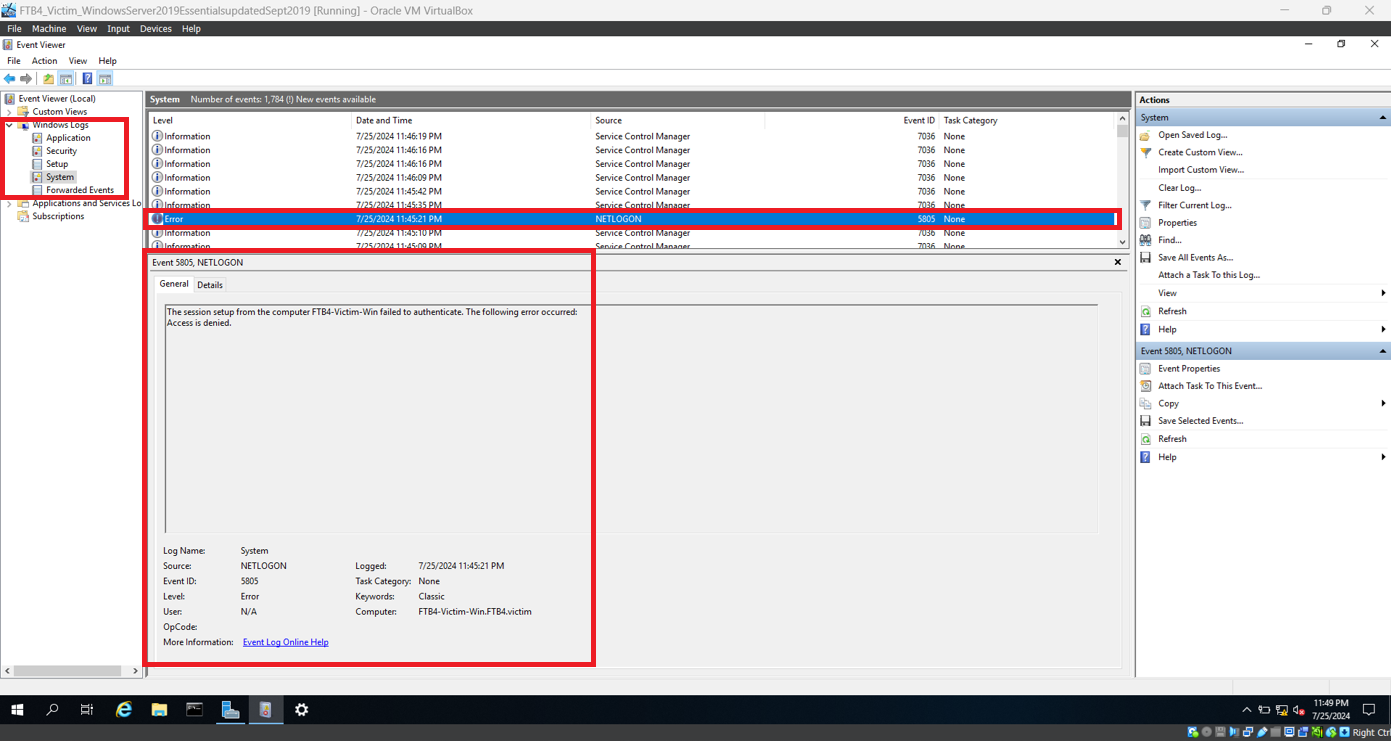
- You may close Windows Event Viewer.
Step 4: Intrusion Detection Using Suricata
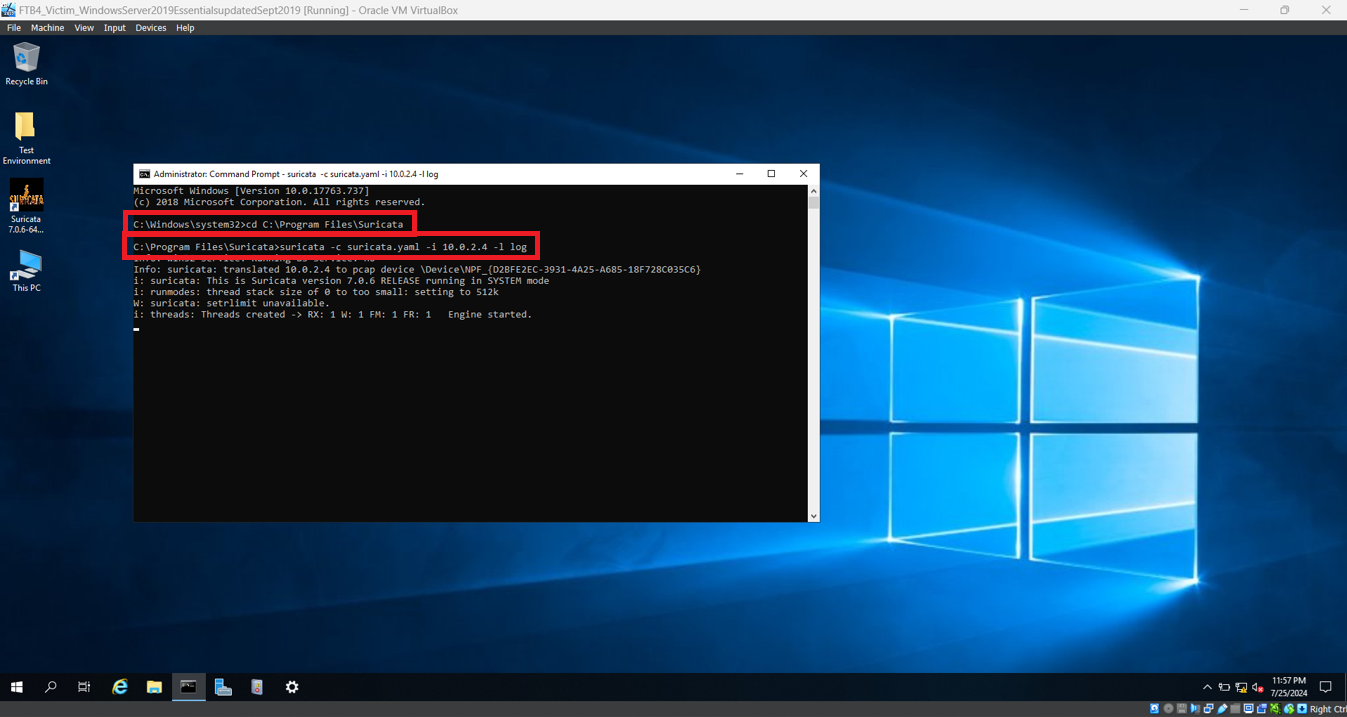
- In the Target machine, open Command Prompt as Administrator.
- Execute the following command to launch Suricata:
cd C:\Program Files\Suricata\
- Execute the following command with the approrpriate IP address
suricata -c suricata.yaml -i <target IP> -l log
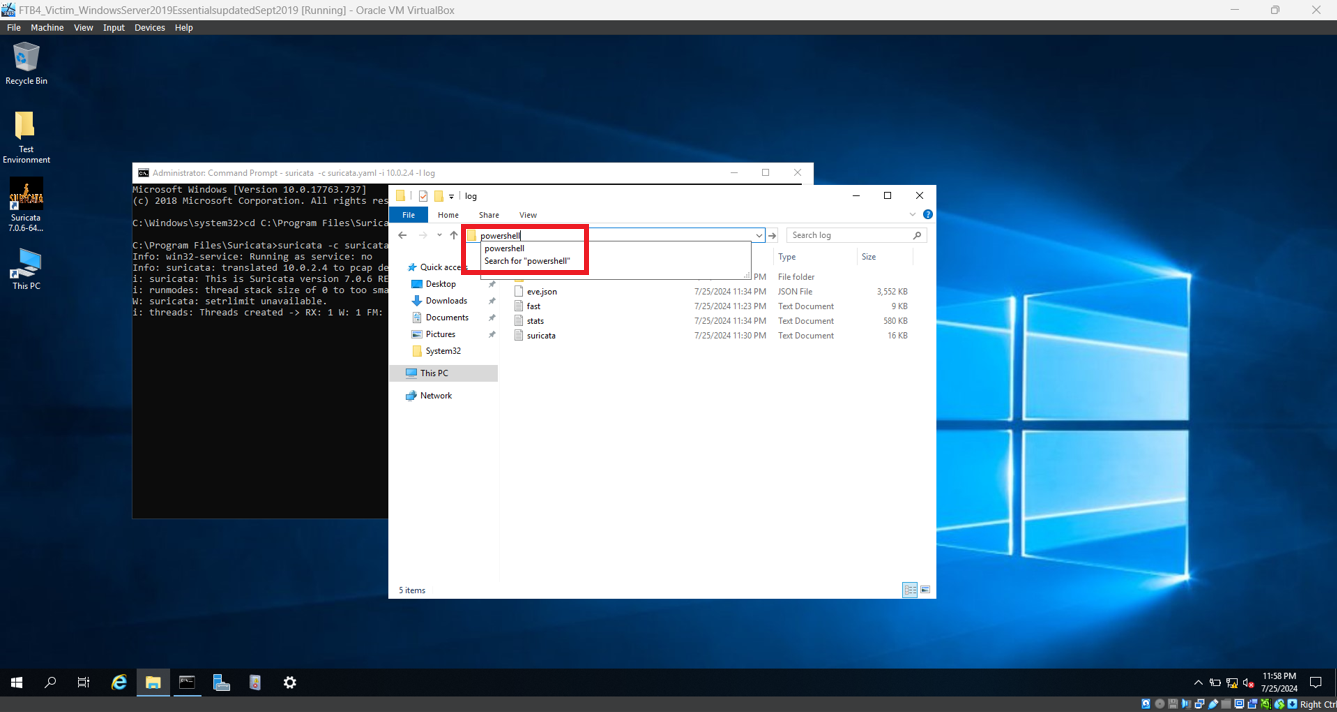
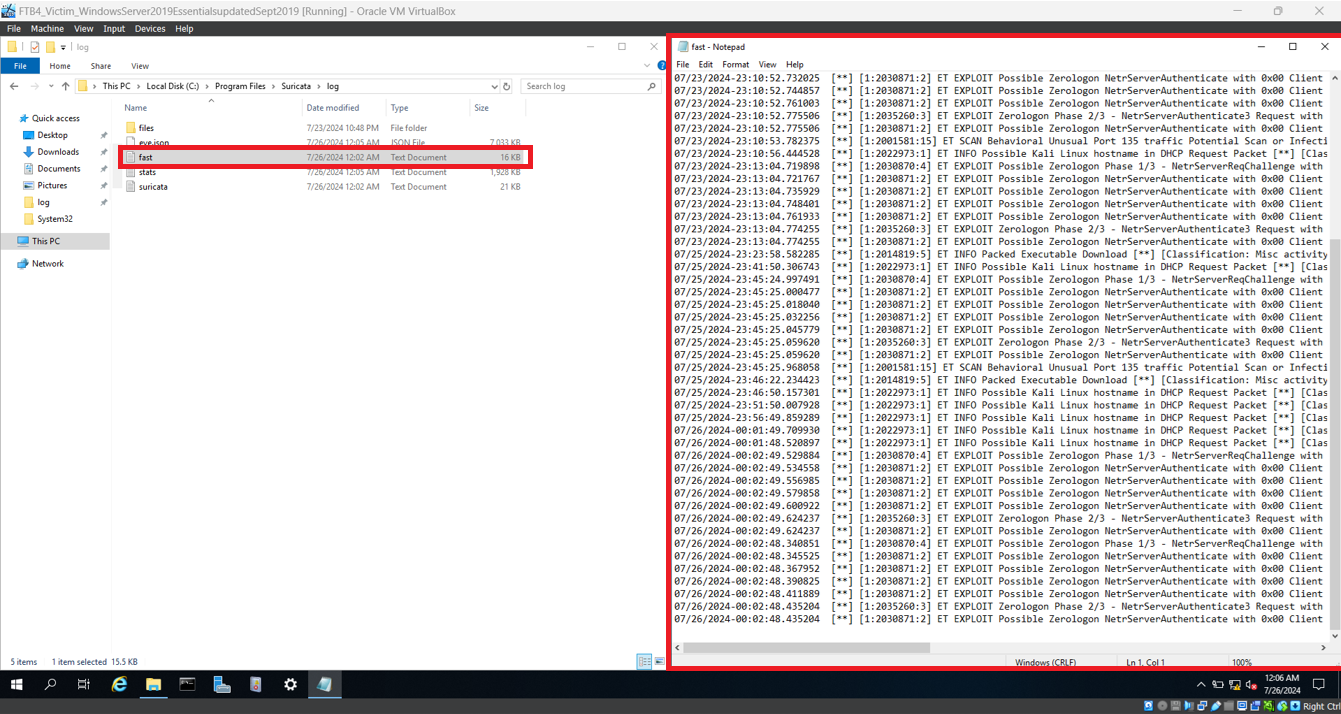
- Open File Explorer from the icon in the taskbar. Navigate to
C:\Program Files\Suricata\log
- Type
powershell on the navigation bar and press Enter. Windows PowerShell will launch.
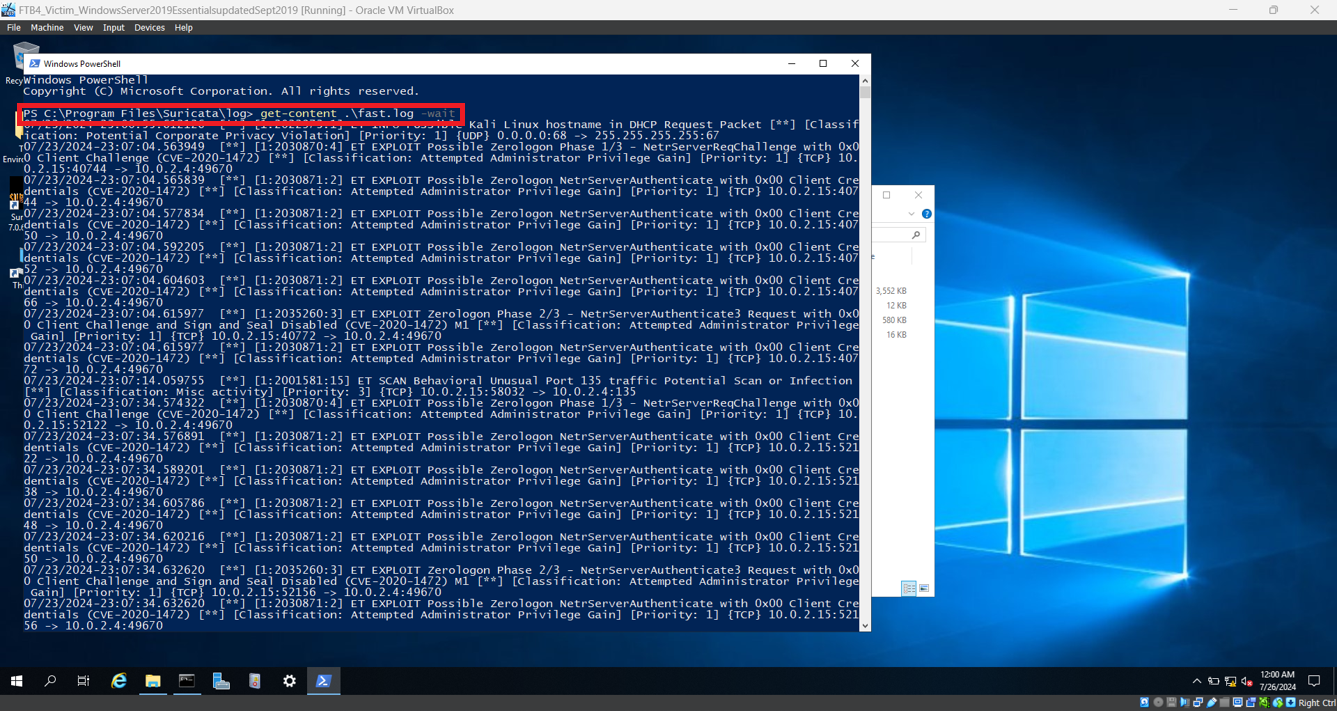
- In Windows PowerShell, type
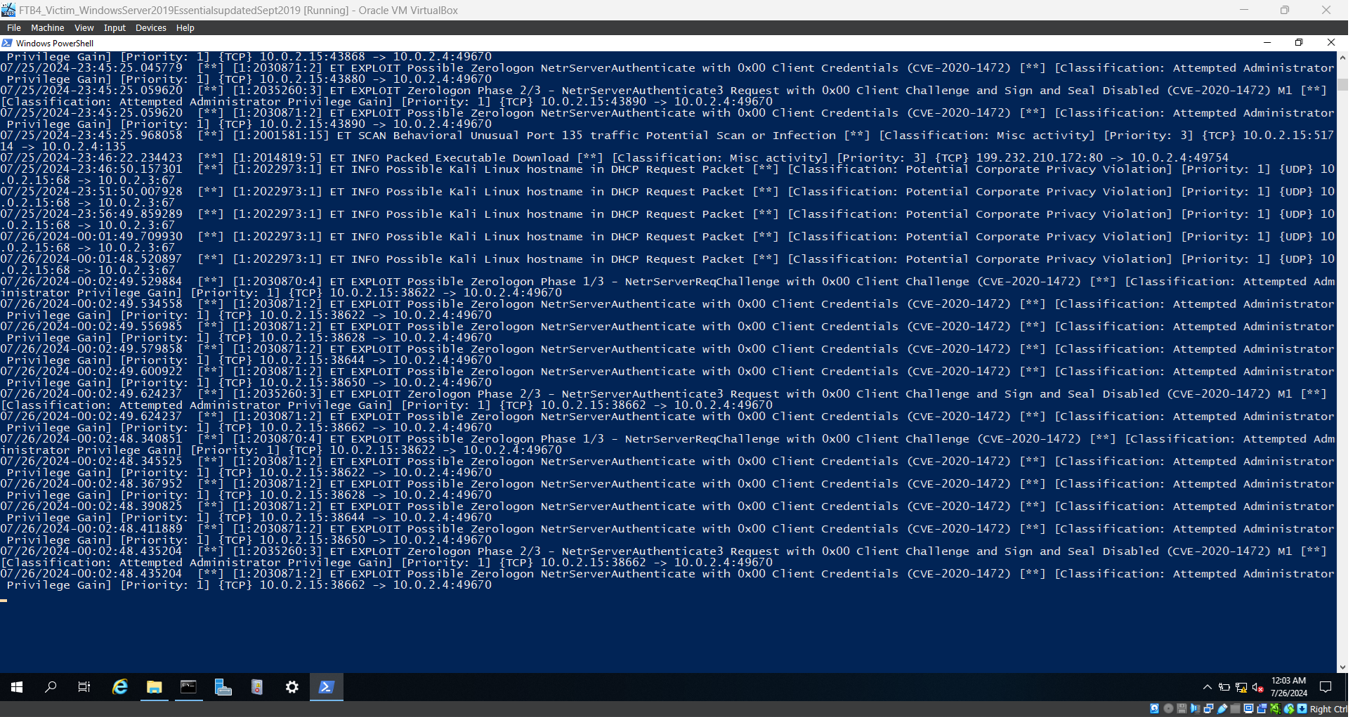
get-content .\fast.log -wait and press Enter. Ignore all the previous logs as they were from previous testing and scroll down to the empty space.
- In the Attacker machine and launch the Python testing script again.
- Now go back to the Target machine and take note of the new alerts generated. These alerts indicate an attempt or exploitation of ZeroLogon.
- You may close the Windows PowerShell and Command Prompt windows.
- Open
fast.txt. The logs are saved in this file.
Demonstration of Mitigation Approach
The most effective mitigation for CVE-2020-1472 (ZeroLogon) is to install the latest Windows security updates.
Steps:
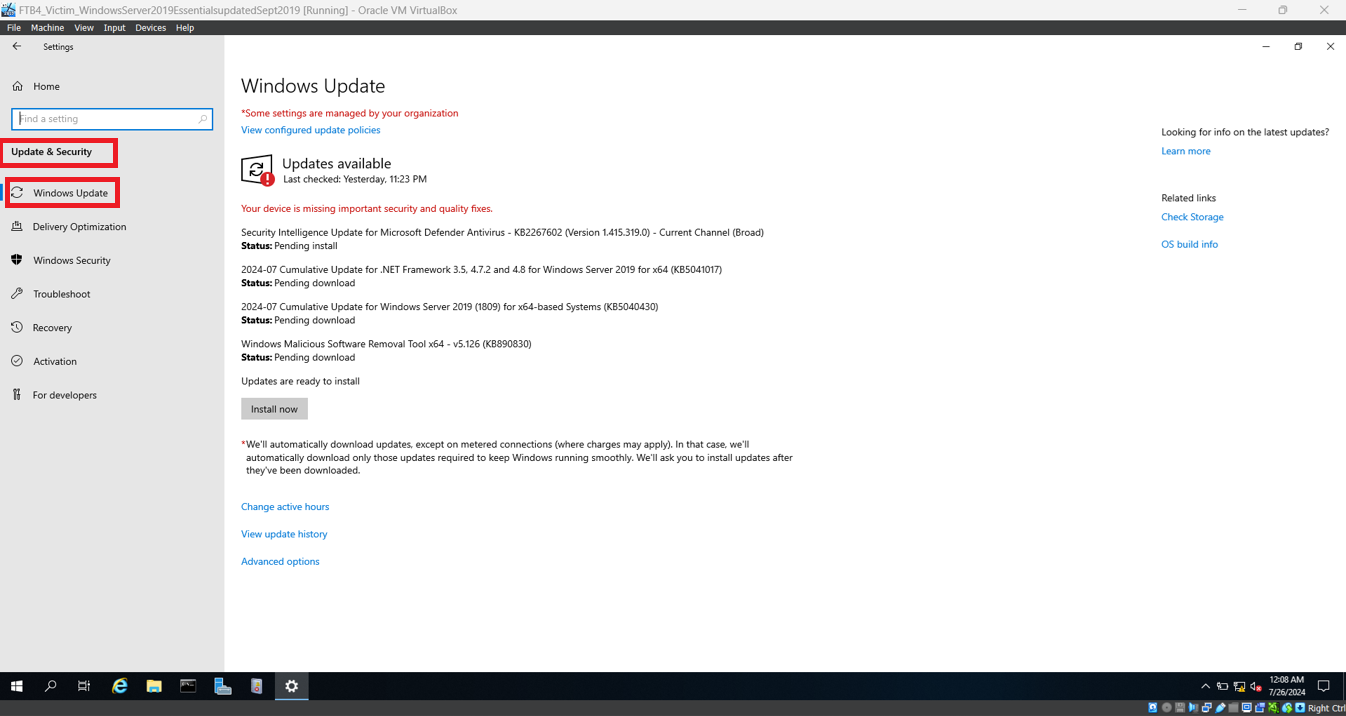
- On the Target Machine, open the Settings app.
- Navigate to Update and Security → Windows Update
- Click "Check for updates" and allow the system to download and install the latest updates.
- Reboot the machine if required.
These updates apply Microsoft's fix for the ZeroLogon vulnerability by enforcing secure remote protocol usage and enable enforcement mode by default in domain controllers.
Note on Limitations
The detection and mitigation approaches demonstrated in this project are designed for educational purposes within a controlled lab environment. While effective in illustrating the concepts behind CVE-2020-1472 (ZeroLogon), they have limitations and are not fully practical for deployment in real-world enterprise environments. As this is a school project, the focus is on learning and understanding cybersecurity techniques rather than implementing production-grade solutions.
Acknowledgements
Special thanks to
 tdevworks/cve-2020-1472-zerologon-demo-detection-mitigation
