 taviso/ctftool
Interactive CTF Exploration Tool

Just want to test the SYSTEM exploit? Click here.
This is ctftool, an interactive command line tool to experiment with CTF, a
little-known protocol used on Windows to implement Text Services. This might
be useful for studying Windows internals, debugging complex issues with Text
Input Processors and analyzing Windows security.
It is possible to write simple scripts with ctftool for automating interaction
with CTF clients or servers, or perform simple fuzzing.
There is a blog post that accompanies the release of this tool available here.
https://googleprojectzero.blogspot.com/2019/08/down-rabbit-hole.html
ctftool has been tested on Windows 7, Windows 8 and Windows 10. Both 32-bit
and x64 versions are supported, but x64 has been tested more extensively.
There is online help for most commands, simply type help to see a list of
commands, and help <command> to see detailed help for a particular command.
$ ./ctftool.exe
An interactive ctf exploration tool by @taviso.
Type "help" for available commands.
Most commands require a connection, see "help connect".
ctf> help
Type `help <command>` for help with a specific command.
Any line beginning with # is considered a comment.

help            - List available commands.
exit            - Exit the shell.
connect         - Connect to CTF ALPC Port.
info            - Query server informaiton.
scan            - Enumerate connected clients.
callstub        - Ask a client to invoke a function.
createstub      - Ask a client to instantiate CLSID.
hijack          - Attempt to hijack an ALPC server path.
sendinput       - Send keystrokes to thread.
setarg          - Marshal a parameter.
getarg          - Unmarshal a parameter.
wait            - Wait for a process and set it as the default thread.
thread          - Set the default thread.
sleep           - Sleep for specified milliseconds.
forget          - Forget all known stubs.
stack           - Print the last leaked stack ptr.
marshal         - Send command with marshalled parameters.
proxy           - Send command with proxy parameters.
call            - Send command without appended data.
window          - Create and register a message window.
patch           - Patch a marshalled parameter.
module          - Print the base address of a module.
module64        - Print the base address of a 64bit module.
editarg         - Change the type of a marshalled parameter.
symbol          - Lookup a symbol offset from ImageBase.
set             - Change or dump various ctftool parameters.
show            - Show the value of special variables you can use.
lock            - Lock the workstation, switch to Winlogon desktop.
repeat          - Repeat a command multiple times.
run             - Run a command.
script          - Source a script file.
print           - Print a string.
consent         - Invoke the UAC consent dialog.
reg             - Lookup a DWORD in the registry.
gadget          - Find the offset of a pattern in a file.
section         - Lookup property of PE section.
Most commands require a connection, see "help connect".
ctf>
The first thing you will want to do is connect to a session, and see which clients are connected.
ctf> connect
The ctf server port is located at \BaseNamedObjects\msctf.serverDefault1
NtAlpcConnectPort("\BaseNamedObjects\msctf.serverDefault1") => 0
Connected to CTF server@\BaseNamedObjects\msctf.serverDefault1, Handle 00000264
ctf> scan
Client 0, Tid 3400 (Flags 0x08, Hwnd 00000D48, Pid 8696, explorer.exe)
Client 1, Tid 7692 (Flags 0x08, Hwnd 00001E0C, Pid 8696, explorer.exe)
Client 2, Tid 9424 (Flags 0x0c, Hwnd 000024D0, Pid 9344, SearchUI.exe)
Client 3, Tid 12068 (Flags 0x08, Hwnd 00002F24, Pid 12156, PROCEXP64.exe)
Client 4, Tid 9740 (Flags 0000, Hwnd 0000260C, Pid 3840, ctfmon.exe)
You can then experiment by sending and receiving commands to the server, or any of the connected clients.
If you don't want to build it yourself, check out the releases tab
I used GNU make and Visual
Studio 2019 to develop ctftool. Only 32-bit builds are supported, as this
allows the tool to run on x86 and x64 Windows.
If all the dependencies are installed, just typing make in a developer command
prompt should be enough.
I use the "Build Tools" variant of Visual Studio, and the only components I have selected are MSVC, MSBuild, CMake and the SDK.
This project uses submodules for some of the dependencies, be sure that you're using a command like this to fetch all the required code.
git submodule update --init --recursive
The examples only work on Windows 10 x64. All platforms and versions since Windows XP are affected, but no PoC is currently implemented.
This tool was used to discover many critical security problem with the CTF protocol that have existed for decades.
If you just want to test an exploit on Windows 10 x64 1903, run or double-click
ctftool.exe and enter this command:
An interactive ctf exploration tool by @taviso.
Type "help" for available commands.
Most commands require a connection, see "help connect".
ctf> script .\scripts\ctf-consent-system.ctf
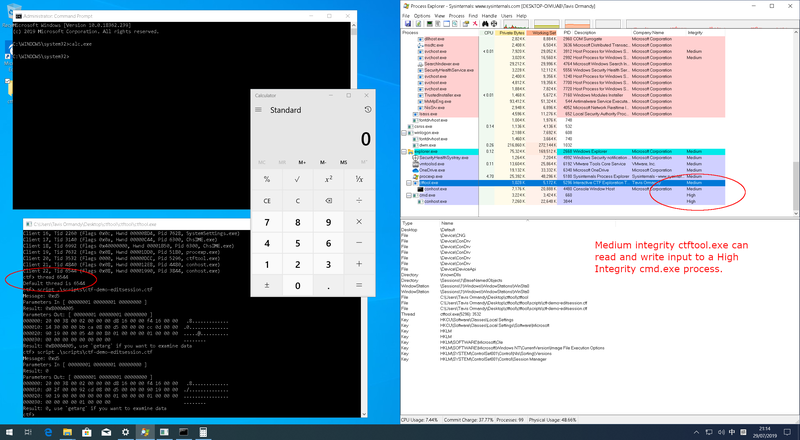
This will wait for the UAC dialog to appear, compromise it and start a shell.
In fact, the exploit code is split into two stages that you can use
independently. For example, you might want to compromise a process belonging to
a user on a different session using the optional parameters to connect.
Most CTF clients can be compromised, as the kernel forces applications that draw windows to load the vulnerable library.
Simply connect to a session, select a client to compromise (use the scan and
thread commands, or just wait), then:
ctf> script .\scripts\ctf-exploit-common-win10.ctf
Building a CFG jump chain that worked on the majority of CTF clients was quite
challenging. There are two primary components to the final exploit, an arbitrary
write primitive and then setting up our registers to call LoadLibrary().
You can use
dumpbin /headers /loadconfigto dump the whitelisted branch targets.
I need an arbitrary write gadget to create objects in a predictable location.
The best usable gadget I was able to find was an arbitrary dword decrement in
msvcrt!_init_time.
This means rather than just setting the values we want, We have to keep
decrementing until the LSB reaches the value we want. This is a lot of work,
but we never have to do more than (2^8 - 1) * len decrements.

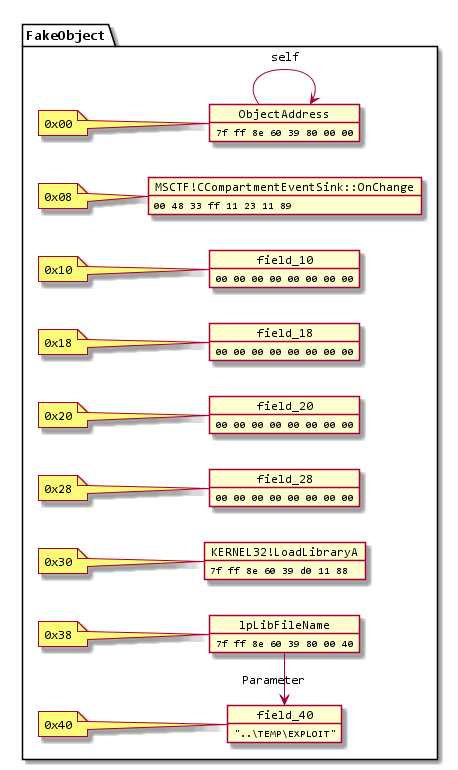
Using this primitive, I build an object like this in some unused slack space
in kernel32 .data section. It needs to be part of an image so that I can
predict where it will be mapped, as image randomization is per-boot on Windows.
There were (of course) lots of arbitrary write gadgets, the problem was regaining control of execution after the write. This proved quite challenging, and that's the reason I was stuck with a dword decrement instead of something simpler.
MSCTF catches all exceptions, so the challenge was finding an arbitrary write
